

Settling into a desk session with tinny laptop audio gets old fast, especially when you’re on back-to-back calls or trying to lose yourself in a game after work. Aux speakers for your monitor fix that without dragging in a bulky stereo setup or rewiring your whole desk. The picks below cover everything from tight USB-powered minis to richer powered monitors with real bass response, so you can match the speaker to the way you actually use your computer.
The Lineup, Simplified

FUNLOGY 14W Stereo PC Speakers (White)

Divoom MiniToo Retro PC-Style Speaker

BESTISAN PC Speakers with Bluetooth

Nylavee Hi-Res Desktop Speakers with LDAC

FUNLOGY 14W Stereo PC Speakers (Black)

Creative Pebble 2.0 USB Speakers

Nylavee Desktop Speakers with RGB Lighting

FUNLOGY Speaker Plus with Dual Amps

Nylavee PC Sound Bar with Bluetooth
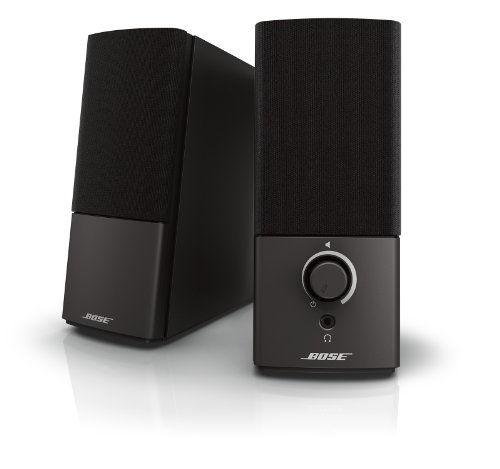
Bose Companion 2 Series III Speakers
A Closer Look At Each Pick
The white FUNLOGY speaker leans hard into “small footprint, decent output.” Each enclosure houses a 48mm full-range driver paired with a passive radiator, so the 14W stereo total carries more bass weight than the dimensions suggest.
The 30-degree upward tilt is the small touch that changes the experience. Sound lands closer to your ears instead of disappearing into the desk, which matters during long Zoom calls. A front-mounted volume dial keeps adjustments within reach, no menu diving required.
Notable Upsides
- USB-powered design means one cable for power and audio, freeing up outlet space
- 30-degree angled drivers reduce the need to prop the speakers up on books
- Compact body slips beside a 24-inch monitor without crowding the keyboard tray
- Front-facing volume dial is easier to reach than rear or side controls
- Passive radiator adds bass presence you’d expect from larger bookshelf designs
Things To Weigh
- No Bluetooth, so phone streaming requires a wired 3.5mm connection
- White finish can show dust along the grille, requiring more frequent wipe-downs
- Output is tuned for near-field listening, so large rooms feel underpowered
Right Fit For
You work from a small desk, prefer clean white aesthetics, and want a no-fuss upgrade over laptop speakers.
Consider Something Else When
The Nylavee Hi-Res Desktop Speakers with LDAC suit you better if Bluetooth streaming and Hi-Res detail matter more than footprint.
The MiniToo doesn’t try to hide what it is: a tiny 90s-inspired mini PC replica that doubles as a near-field speaker. The 1.77-inch pixel display on the front sets it apart from every plain box on this list.
Behind the retro shell sits a 5W driver aimed at close-range listening. You’ll get clear vocals for podcasts and light music, with bass that stays polite rather than thumpy. For desk setups where personality matters as much as sound, the MiniToo earns its keep.
Where It Excels
- Pixel display lets you cycle animations, faces, and scrolling text from the companion app
- Tiny footprint fits beside a single monitor or on a nightstand without taking over
- Near-field tuning makes vocals and dialogue crisp at arm’s-length distance
- Retro PC styling doubles as desk decor for gaming or creator setups
Honest Caveats
- 5W output lacks the headroom of the FUNLOGY or Nylavee picks
- Pixel features depend on app pairing, which adds setup steps compared to plain speakers
- Bass stays restrained, so action movies feel flat at low volumes
Key Specs
Whose Shelf It Belongs On
You want a speaker that doubles as desk art, and you’re content with casual-volume audio for music, calls, and chill playlists.
A Better Fit Elsewhere
The Creative Pebble 2.0 USB Speakers suit you better if you want a cleaner look with stronger everyday output and zero app dependency.
The BESTISAN set adds connection flexibility without much bulk. Alongside Bluetooth pairing, you get RCA and optical inputs, so the same pair of speakers can hop between your PC, a console, and a legacy source.
Where the FUNLOGY white speaker stayed compact, this pair leans into fuller cabinet size, which pays off in tonal balance. Dialogue from YouTube clips and game cutscenes comes through with fewer midrange gaps than you’d expect at this scale.
What Earns Its Place
- Multiple inputs mean one speaker pair covers PC, console, and older gear
- Bluetooth mode cuts the cable clutter when streaming from a phone
- Larger cabinets produce a fuller low end for casual movie nights
- Optical input supports cleaner digital audio from compatible desktops
Worth Noting
- Bluetooth adds codec-related latency that may bother fast-paced competitive gaming
- Larger footprint demands more desk real estate than the FUNLOGY mini
Made For
Your desk hosts a PC and a console, and you’d rather share one speaker pair between both instead of swapping cables.
Reach For A Different Pick When
The Bose Companion 2 Series III Speakers suit you better if you prefer a proven brand with simpler wired-only operation.
The Nylavee Hi-Res pair targets listeners who care about codec labels and driver materials. Each enclosure pairs a 1.5-inch silk dome tweeter with a 3-inch glass fiber mid-bass driver, which is more elaborate than the single-driver approach you see on most desktop speakers.
Bluetooth 6.0 with LDAC handling up to 96kHz/32-bit (on compatible Android gear) gives music listeners a wireless path that doesn’t strip away detail. USB Audio at 96kHz/24-bit covers the wired route. For someone who treats the desk like a listening station, the spec sheet reads like a wishlist.
Real-World Strengths
- Two-way driver layout separates highs and mids, so vocals sit clearly over busy tracks
- LDAC support preserves detail for Android users with Hi-Res source files
- Front bass and treble knobs let you tune the sound without diving into software EQ
- Headphone jack on the front means you can switch from speakers to cans without crawling behind the desk
Some Limits To Know
- Hi-Res benefits depend heavily on source files, so casual streaming won’t unlock the full spec
- RCA and AUX inputs add bulk on the rear panel, which complicates tight monitor stands
- Larger enclosures than the FUNLOGY or Creative Pebble, so plan space accordingly
Feature Snapshot
Best Suited To
You’re a music-first listener with Hi-Res files or LDAC-capable Android devices, and you want real tuning control.
Skip It When
The FUNLOGY 14W Stereo PC Speakers suit you better if Bluetooth codecs and tone knobs feel like overkill for casual desk audio.
This is the same FUNLOGY hardware as the white version, dressed in a darker shell. The 14W stereo output, 30-degree tilt, and 48mm drivers behave identically, so choosing between the two comes down to desk aesthetics.
The black finish hides dust and scuffs better, which matters in a high-traffic workspace. If your monitor stand, keyboard, and accessories all lean dark, the black pair blends in without becoming a focal point.
Useful Highlights
- Black enclosure hides daily dust better than the white version
- USB power keeps cable runs tidy on minimalist desks
- Same 30-degree tilt directs sound upward without extra stands
- Front volume dial stays accessible in dark rooms
Trade Offs
- No Bluetooth means phone or tablet pairing requires a wired adapter
- Compact body underdelivers for larger rooms or open floor plans
Who It Suits Best
You want the FUNLOGY sound profile but prefer a darker, more understated look that fades into the background.
Not Your Match When
The Divoom MiniToo Retro PC-Style Speaker suits you better if personality and a customizable pixel display outweigh subtle styling.
Creative’s Pebble 2.0 has been a quiet workhorse in this category for years, and the recipe stays simple: one USB cable for power and audio, a sphere-shaped driver housing, and 45-degree elevated drivers that aim at your ears.
Rear-facing passive radiators do the heavy lifting for bass, so the small footprint doesn’t completely sacrifice low-end weight. For students rotating between dorm rooms or hot desks in a shared office, the single-cable setup removes the usual tangle.
What Helps Most
- One USB cable handles power and audio, so no extra wall outlet is needed
- 45-degree elevated drivers target the listener’s ears for clearer near-field sound
- Passive radiators push more bass than the sphere size would suggest
- Minimalist round design fits almost any desk aesthetic
Potential Drawbacks
- No Bluetooth limits phone use to a wired 3.5mm connection
- No hardware tone controls, so adjustments mean tweaking system EQ
- Sphere shape can wobble on uneven desk surfaces, depending on your space
Right Fit For
You hop between study spots, need a true plug-and-play setup, and want clean sound without managing extra cables or apps.
Look Elsewhere When
The Nylavee Hi-Res Desktop Speakers with LDAC suit you better if Bluetooth streaming, Hi-Res support, and physical tone knobs matter to you.
The RGB-equipped Nylavee speakers add mood lighting without crossing into the “gaming peripheral” aesthetic. Six lighting modes cover everything from solid color to gentle pulses, so the speakers can match a battlestation or sit quietly when the lights are off.
Dual full-range drivers paired with two bass-boost ports push a warmer sound than you’d expect from a USB-powered pair. For late-night gaming sessions where the room lighting does as much work as the audio, these fit naturally.
Why It Works Well
- Six lighting modes give flexibility between bold and subtle desk ambience
- USB-powered for a single-cable setup that fits crowded gaming desks
- Two bass-boost ports add low-end warmth for explosions and music
- Dual speaker units keep stereo imaging intact at close range
Where It May Fall Short
- RGB lighting draws additional attention and may clash with minimalist setups
- No Bluetooth, so phone use requires a wired 3.5mm AUX cable
Feature Card
Who Should Grab It
Your gaming setup leans into RGB, and you want speakers that complement the visual theme without overcomplicating the audio side.
Another Choice May Suit
The BESTISAN PC Speakers with Bluetooth suit you better if you want Bluetooth flexibility and don’t care about RGB lighting.
The Speaker Plus refines the original FUNLOGY formula with dual amplifiers and DSP tuning. The 14W rating stays the same, but the power delivery and signal processing get smarter, which translates to cleaner output at higher volumes.
USB-C power replaces the older USB-A approach, so modern laptops connect with the cable you already carry. A 3.5mm AUX input covers older devices, and the same 30-degree tilt carries forward.
The Good Stuff
- DSP tuning manages distortion more gracefully at high volume
- USB-C input matches modern laptops without needing extra adapters
- Passive radiator helps bass punch above the compact body size
- Dual amplifiers split left and right channels for cleaner separation
Points To Note
- USB-C reliance means older desktops may need an extra cable
- No Bluetooth, so wireless streaming from phones still requires a wired path
Perfect Match For
Your laptop is USB-C native, you listen at higher volumes, and you want the cleanest version of the FUNLOGY house sound.
Swap It Out When
The Creative Pebble 2.0 USB Speakers suit you better if you want a simpler single-cable USB-A experience and don’t need DSP tuning.
The sound bar form factor sidesteps the typical “two boxes plus cables” setup. A single unit sits under your monitor and handles stereo through four drivers plus two independent bass diaphragms.
Bluetooth and AUX inputs give you both wireless phone streaming and a wired desktop connection. The built-in mic is a quiet bonus for calls, and the headphone jack on the front lets you switch to private listening without reaching behind your PC.
Key Advantages
- Single-unit design cuts cable clutter and frees desk space
- Four drivers plus two bass diaphragms deliver wider stereo than typical bars
- Bluetooth pairing covers phones, tablets, and laptops alike
- Built-in mic supports quick calls without swapping to a headset
- Headphone jack on the front panel simplifies late listening
Smaller Compromises
- Stereo separation is narrower than two separated speakers like the FUNLOGY pair
- Sound bar width may not match smaller 21-inch monitors, depending on your space
Quick Technical Notes
Who Will Love This
You have a single-monitor desk and want audio without dedicating space to two separate speaker enclosures.
A Different Pick May Help
The Nylavee Hi-Res Desktop Speakers with LDAC suit you better if stereo separation and Hi-Res tuning matter more than saving desk space.
The Bose Companion 2 Series III takes a straightforward approach: a 3.5mm AUX input plus a dedicated PC input, classic stereo separation, and the brand’s tuning pedigree. There’s no app, no Bluetooth juggling, no RGB.
The trade-off is a heavier reliance on the internal signal path, which Bose has refined across generations. If you want a set-and-forget speaker pair that just plays what’s on your screen without drama, this is the dependable choice.
What Pays Off
- Auxiliary input lets you plug in a phone or tablet alongside the PC
- Brand-tuned drivers deliver consistent clarity at low and moderate volumes
- Wired-only operation means zero latency for video calls or games
- Simple two-knob design keeps controls obvious
Trade-Offs To Consider
- No Bluetooth, so wireless phone streaming requires an adapter
- Older design lacks the modern DSP tuning found in newer picks
- Larger cabinets take up more desk space than the FUNLOGY or Pebble options
Feature Overview
Built With In Mind
You want a long-term wired speaker pair with a familiar brand and simple controls, and you don’t need Bluetooth or RGB.
Where A Sibling Pick Shines
The Nylavee PC Sound Bar with Bluetooth suits you better if you prefer a single-enclosure sound bar with wireless streaming and a headphone jack.
Picking The Right Pair For Your Desk
Connection type matters more than most shoppers expect. USB-powered pairs like the Creative Pebble 2.0 cut cable clutter on small desks, while USB-C models like the FUNLOGY Speaker Plus match newer laptops without adapters. If you switch between PC, console, and a phone regularly, Bluetooth plus AUX or RCA inputs cover the most ground.
Driver layout shapes the sound profile. Single full-range drivers, the kind in the FUNLOGY and Pebble picks, stay compact but flatten the stereo image. Two-way designs like the Nylavee Hi-Res pair with a separate tweeter and mid-bass driver bring out detail in vocals and strings, which helps during long music sessions. Passive radiators or bass ports add low-end weight without inflating the cabinet size.
Form Factor And Placement
Stereo pairs spread the soundstage wider, which suits music and games where direction matters. Sound bar designs like the Nylavee PC Sound Bar save desk space and tidy cable runs, though the stereo image stays narrower. A 30-degree or 45-degree upward tilt, common on the FUNLOGY and Pebble models, matters most when your monitor sits at eye level and the speakers live low on the desk.
Volume, Room Size, And Use Case
Near-field speakers tuned for arm’s-length listening, like the Divoom MiniToo and Creative Pebble, sound intimate but run out of steam in large rooms. For open-plan offices or bedrooms bigger than a closet, larger enclosures or powered monitors with more wattage carry better. Movies and gaming lean toward fuller bass, while podcast-heavy listeners can prioritize clear mids instead.
Extras That Actually Help
Front-facing volume dials, headphone jacks, and built-in mics change daily convenience more than headline specs suggest. RGB modes are a personal choice: they add flair to a gaming desk but feel out of place in a quiet home office. If you wear headphones often, a front-panel headphone jack removes the need to crawl behind your PC.
Smart Choices Before You Commit
Common Slip Ups At Checkout
The most common mistake is choosing a speaker based on wattage alone. Higher numbers don’t always mean better sound, especially when the cabinet and driver quality can’t support the output. Another trap is ignoring connection type. A Bluetooth-only speaker feels limiting when your desktop only has USB outputs. Match the inputs to your actual devices before anything else.
When Spending More Makes Sense
Premium picks earn their keep through driver quality, better signal processing, and physical tone controls. If your daily use leans on music, calls, and movies in equal doses, the upgrade from a basic USB pair to a tuned two-way system shows up in every session. For casual background audio, the simpler picks do the job without overpaying for features you won’t use.
Frequently Asked Questions
Do I Need Bluetooth On Desktop Speakers?
Not always. Bluetooth helps when you stream from a phone or tablet regularly, but a wired 3.5mm or USB connection gives you zero-latency audio for calls and games. Pick Bluetooth if you switch sources often, and stick with wired if your phone stays in your pocket.
Can Aux Speakers Power a Monitor With No Audio Jack?
Yes, through USB audio. Many modern monitors route audio over USB or HDMI to the connected PC, which then outputs through the speakers. If your monitor lacks an audio output entirely, USB-powered speakers solve the problem without extra adapters.
Are Sound Bars Better Than Stereo Pairs For Desks?
Sound bars save space and reduce cable clutter, which suits minimalist setups. Stereo pairs deliver wider channel separation, which matters for music and gaming where left/right placement adds immersion. The honest answer depends on how much desk real estate you’re willing to give up.
How Important Are Passive Radiators?
Passive radiators use the air motion inside the cabinet to boost bass without a port, which helps small enclosures sound fuller. For compact speakers, a passive radiator makes a noticeable difference in low-end weight. In larger cabinets, the benefit shrinks because the driver alone has more room to breathe.
What Is LDAC And Should I Care?
LDAC is a Bluetooth codec that transmits at higher bitrates than standard SBC or AAC, which preserves more detail from Hi-Res audio files. If you stream from a compatible Android device with Hi-Res files, LDAC delivers a meaningful upgrade. On iPhones or with compressed streaming services, the difference shrinks considerably.
The Takeaway
The right aux speakers for your monitor come down to your space, your devices, and how much time you spend listening each day. Compact USB pairs handle background music and calls, while tuned two-way systems reward longer listening sessions. Match the connections to your gear, and don’t overspend on features you won’t touch. Your desk, your ears, your call.


