

Multicolor printing used to feel like a leap too far for newcomers. Now several machines promise plug-and-print color without weeks of tuning or splicing. If you’re standing at the edge of the hobby, watching single-nozzle prints and wondering how people get clean color transitions, this shortlist maps the realistic starting points. Each model here is a beginner-friendly multicolor 3D printer, and the trade-offs below reflect what’s genuinely involved in owning one, not glossy marketing.
A Side-By-Side Look

Anycubic Kobra X Multicolor 3D Printer, Native 4-Color

FLASHFORGE AD5X Multi-Material 3D Printer 4-Color

FLASHFORGE AD5M Pro 3D Printer 600mm/s CoreXY Bundle

Official Creality K2 Combo 3D Printer with CFS

Entina Tina2C Mini 3D Printer Bundle with 4-Color PLA
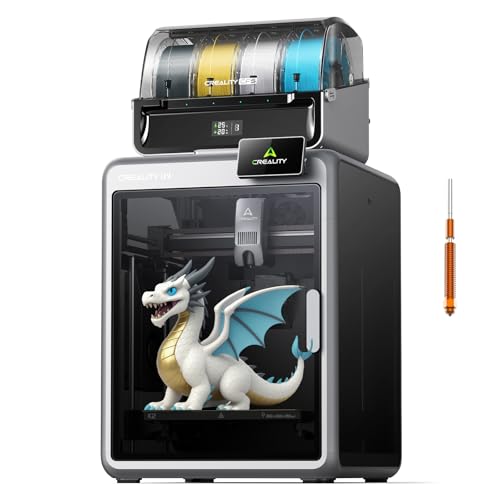
Creality K2 Combo 3D Printer Multicolor with CFS
The Picks, Examined More Closely
The Kobra X shows up out of the box already tuned for four-color work, which removes the most common sticking point for newcomers. Instead of buying separate filament modules or wiring upgrades, you get a setup where four spools sit ready from the first print. That matters most in a bedroom or kitchen workshop where you want color without clutter.
The trade-off shows up in long-term scaling. Four built-in colors cover most hobbyist projects, but anyone planning large artistic prints may feel boxed in. The machine is built for someone who wants color today and is willing to upgrade later if the hobby sticks.
What Pays Off
- Native 4-color support out of the box, no aftermarket assembly required
- Streamlined setup shortens the gap between unboxing and first multicolor print
- Compact footprint suits a desk, workshop bench, or small maker corner
- Beginner-oriented workflow reduces tuning frustration early on
Worth Noting
- Four-color ceiling means creative growth may push you toward a different system sooner
- Filament management still needs occasional attention to avoid tangles on a busy shelf
- Bed leveling and purge habits benefit from a short learning period even on a friendly machine
Whose Shelf It Belongs On
A first-time multicolor user who wants prints working the same afternoon the box opens, without splicing parts or chasing firmware tweaks.
Skip It When
You want more than four colors on a regular basis. The Creality K2 Combo 3D Printer Multicolor with CFS opens a wider palette for committed color work.
The AD5X leans hard into speed. Its 600mm/s headline capability means a four-color print that would crawl on a typical starter machine gets finished in a fraction of the time. For hobbyists juggling weekend projects, that speed is the difference between printing one gift and finishing several.
Where it differs from the Kobra X is ambition. This is a 3D printer for beginners, but it isn’t shy about feature depth. The DIY IFS (Internal Filament System) creation path invites tinkering once you’ve outgrown the basics. If your goal is to grow into a feature-rich machine rather than replace one, the AD5X is a strong middle ground.
Positive Points
- 600mm/s motion speed shortens long multicolor jobs dramatically
- Four-color material support opens up multi-material experimentation early
- DIY IFS creation feature rewards users who want to tinker beyond defaults
- Filament backup adds resilience during long overnight jobs
Trade Offs
- Speed-focused design rewards tuning patience; first prints may need dialing
- Larger footprint than a desk-only mini machine
Feature Snapshot
Made For
Hobbyists who want speed and four-color flexibility without stepping into a full-format prosumer machine just yet.
Look Elsewhere When
You mainly print in a shared bedroom or office and need a quieter footprint. The FLASHFORGE AD5M Pro 3D Printer 600mm/s CoreXY Bundle is tuned for low-noise environments.
The AD5M Pro answers a question many starters don’t think to ask: how loud is this thing going to be? With a fully enclosed CoreXY design and a standard-mode noise target around 50 dB, it suits a shared room, a home office, or a late-evening print run that won’t wake the household. The CoreXY structure is a motion system where the print head moves on two synchronized rails, which typically means faster and steadier travel than older Cartesian layouts.
Bundled with two nozzle sizes (0.4mm and 0.6mm), it gives newcomers room to experiment. The 0.4mm handles fine detail, while the 0.6mm pushes larger color prints faster. For a beginner multicolor 3D printer, that flexibility is rare at this noise level.
Everyday Perks
- 50 dB standard mode keeps shared spaces livable
- 0.4mm and 0.6mm nozzles cover detail and throughput without swapping parts manually
- Enclosed design helps with temperature-sensitive filaments like PETG and ABS blends
- Full-auto calibration smooths the first-week learning curve
Things To Consider
- Enclosed chassis runs warm, so placement needs a little airflow planning
- Speed still tops out at 600mm/s, so very large prints require patience even with the noise bonus
Right Fit For
Beginners printing in bedrooms, apartments, or shared home offices where noise and enclosure matter as much as color.
Consider Something Else When
You want more than two or three color channels from the start. The FLASHFORGE AD5X Multi-Material 3D Printer 4-Color delivers a wider multicolor range at the cost of some quiet.
The K2 Combo pairs a K2 base printer with a CFS (Creality Filament System) unit. The CFS is an external dry-box-plus-feeder that holds multiple spools and feeds filament into the printer on demand. That single addition unlocks multicolor capability without forcing you into a brand-new machine. It’s a smart way to enter multicolor if you already trust Creality’s printer lineup.
For newcomers, the system scales nicely. You can start with the included CFS and add more as your projects demand. Compared with the Anycubic Kobra X’s four-color ceiling, this path lets you grow color count over time, which suits a hobbyist who wants room to expand.
The Helpful Details
- CFS unit adds true multicolor support without rebuilding the printer
- Intelligent filament management reduces spool-swapping friction
- Modular path lets you upgrade at your own pace
- Combines well with dry filament storage for hygroscopic materials
Potential Drawbacks
- Multi-piece setup means more desk space than a single-frame machine
- Color count grows with each CFS unit, which adds cabling complexity over time
Core Details
Best Suited To
Beginners who plan to scale into larger color projects over months, not weeks, and value modular upgrades.
A Better Fit Elsewhere
You want a single enclosed footprint for a tight desk. The FLASHFORGE AD5M Pro 3D Printer 600mm/s CoreXY Bundle keeps everything in one quieter chassis.
The Tina2C ships fully assembled, which sets the tone for the whole experience. There’s no frame to square, no belts to tension, no firmware to flash. You plug it in, load the included PLA, and start with the companion app. For a family or a classroom, that low barrier is the whole point.
The bundle includes four PLA spools and a model library (a curated catalog of pre-made files you can print without designing anything yourself), plus over 20 DIY modules. This 3D printer for beginners treats creativity as the goal, not configuration. The trade-off is build volume: it’s a mini machine, so large prints aren’t on the menu.
The Value In It
- Fully assembled out of the box, skipping the build phase entirely
- Included 4-color PLA and 3000+ models give instant project variety
- 20+ DIY modules support kid-friendly experimentation
- Auto leveling and WiFi/app control remove common beginner friction
Small Caveats
- Mini build volume limits larger project ambitions
- Light-duty design isn’t suited to engineering-grade filaments
Who Should Grab It
Parents, teachers, and casual creators who value simplicity over output scale.
Reach For A Different Pick When
You want to print larger functional parts or scale color projects. The Anycubic Kobra X Multicolor 3D Printer, Native 4-Color offers a larger format with the same beginner-first philosophy.
The K2 Combo from Creality is the deeper dive of the multicolor range. With one CFS unit included and expansion room for up to four, it covers up to 16 colors. The smart filament system handles dry, auto, and reliable feeds in one package. Compared with the K2 Combo’s official channel sibling earlier in this list, this version leans harder into full-featured color work.
For a beginner multicolor 3D printer, this is closer to a mid-hobbyist investment. Newcomers who want headroom for future growth will appreciate it; newcomers who only need a few colors may find the feature ceiling more than they need.
The Upside
- Up to 16 colors with multi-CFS expansion, opening serious artistic range
- Smart filament system covers dry, auto, and reliable feeding
- Automatic wire switching delivers smooth color transitions
- Suitable for prototypes, art prints, and mixed-material projects
Honest Caveats
- Larger physical footprint than single-frame machines
- Full feature set rewards time spent learning filament care and dry storage
Quick Facts
Who Will Love This
Committed beginners planning long-term multicolor projects, prototypes, or artistic prints who want room to scale.
Where A Sibling Pick Shines
You only need a handful of colors and a tighter footprint. The FLASHFORGE AD5X Multi-Material 3D Printer 4-Color covers the basics in a single unit.
Picking a Multicolor Machine That Fits Your Routine
Choosing a beginner multicolor 3D printer is less about chasing specs and more about matching the machine to where you’ll actually print. A quiet bedroom has different demands than a busy maker corner, and color count matters less if you only print figurines for friends.
Color Count vs. Day-To-Day Use
Four colors covers most hobby prints: character figures, gifts, simple prototypes. A system expandable to eight or sixteen colors makes sense when you regularly print signage, artistic pieces, or multi-material functional parts. Overbuying color channels adds complexity you may not use yet, while underbuying can feel limiting by month two.
Enclosure, Noise, and Placement
An enclosed CoreXY chassis, like the AD5M Pro’s setup, prints quieter and handles temperature-sensitive filaments better. Open-frame machines tend to be louder but easier to service. A dry, dust-light spot with steady airflow extends the life of any 3D printer for beginners.
Filament Care and Long-Term Costs
A multicolor setup only stays multicolor if spools stay dry. PLA absorbs ambient moisture over weeks, which can ruin color consistency. Look for filament systems with built-in dry storage or budget for sealed dry boxes. Spools in PLA for everyday prints keep costs manageable, while PETG and ABS blends raise both price and care requirements.
Calibration and Beginner Workflows
Full-auto calibration removes one of the steepest early-learning hurdles. Machines with guided app setup, like the Entina Tina2C, reduce frustration during week one. Manual calibration is a useful skill to learn eventually, but it shouldn’t gate your first successful print.
Key Considerations Across These Picks
Common Shopping Slip Ups
A frequent mistake is buying the cheapest multicolor machine and assuming color will “just work” on day one. Multicolor printing, in plain terms, is the process of using more than one filament color in a single print, and it adds purge, switching, and calibration overhead. Skimping on filament care leads to clogged nozzles and inconsistent color output, which sends newcomers back to the box. Choosing a machine that matches your space and your tolerance for tuning saves weeks of frustration.
What The Higher Tier Buys
Stepping up from a four-color starter to a multi-CFS system means more than just extra spools. You’re paying for automatic filament handling, dry storage, and smarter switching that protects print quality on complex jobs. For hobbyists printing one-off gifts, that upgrade feels excessive. For users running regular color projects, the time saved on manual swaps and reprints often justifies the spend within a few months.
Frequently Asked Questions
What Is A Multicolor 3D Printer?
A multicolor 3D printer is a machine that can produce prints using more than one filament color in a single job, either through multiple feeders, a filament-switching module, or an external system like a CFS unit.
Do I Need Experience To Start With Multicolor Printing?
You don’t need prior 3D printing experience, but choosing a machine with full-auto calibration and guided setup shortens the learning curve considerably.
How Many Colors Do I Really Need?
Most hobby projects use two to four colors. Scaling to eight or sixteen colors only matters for artistic prints, signage, or multi-material prototypes.
Are These Printers Noisy?
Open-frame machines tend to run louder. Enclosed CoreXY designs, like the AD5M Pro, target around 50 dB and work well in shared rooms.
What Filament Should Beginners Start With?
PLA is the easiest starting point: low printing temperature, minimal warping, and forgiving on most beds. Save PETG and ABS blends for once you’re comfortable with tuning basics.
Bottom Line
Your first multicolor machine should match the space it lives in, the volume you actually print, and the color range you’ll genuinely use. Start with what fits today, and let the hobby tell you whether scaling up makes sense six months from now. The right pick is the one that gets you printing this weekend, not the one with the longest spec sheet.


