

Stepping into resin printing can feel like learning a new language. LCD printers cure liquid photopolymer (a light-sensitive liquid plastic) with UV light, layer by layer, to produce fine detail that filament machines struggle to match. The learning curve is real, but the right starter gear turns that curve into a gentle slope. These ten picks cover entry-level machines and the consumables you’ll burn through, so your first prints look clean and your wallet stays comfortable.
An Overview Of The Picks

ANYCUBIC 3D Printer Resin (Grey, 1kg)

ANYCUBIC 3D Printer Resin (Light Beige, 1kg)
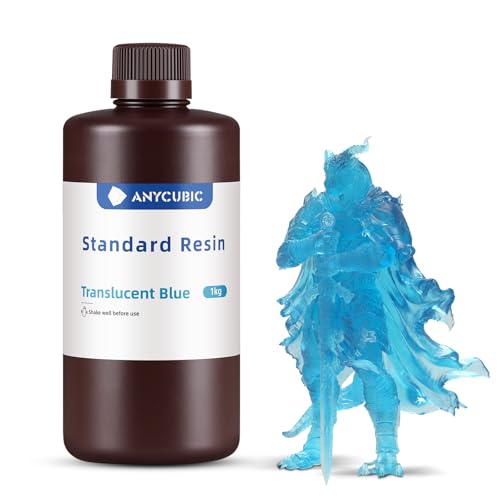
ANYCUBIC 3D Printer Resin (Clear Blue, 1kg)

ANYCUBIC Upgraded 8K 3D Printer Resin (HD Grey, 1kg)

ANYCUBIC 3D Printer Resin (Clear, 1kg)

ANYCUBIC 3D Printer Resin (Black, 1kg)

ANYCUBIC 3D Printer Resin (Clear Green, 1kg)

ANYCUBIC 3D Printer Resin (Clear Red, 1kg)

ANYCUBIC Photon Mono 4 Ultra 10K Printer

ANYCUBIC Photon Mono 4 + Wash & Cure 3.0 Bundle
Meet The Standout Selections
Grey is the safest starting color for any resin printer hobby. It hides faint layer lines that show up on your third or fourth print, so your early results look more polished than they actually are. The 405nm wavelength (the specific UV frequency this resin reacts to) matches standard LCD printers across the category, meaning the bottle you grab works whether you own an older 2K screen or a brand-new Mono 4. For anyone printing tabletop minis on a kitchen table, that’s exactly the kind of plug-and-play convenience that keeps the hobby fun.
Newcomers juggling sliced files (the digital instructions a slicer program sends to the printer) and exposure tests (small trial prints used to dial in cure time) will appreciate having forgiving material on hand. Grey is also friendly to painting, which is often the next step once prints come off the build plate.
Key Advantages
- Neutral grey tones down minor surface flaws, giving early prints a finished look
- 405nm UV-reactive formula pairs with most entry-level LCD machines
- One-kilogram bottle covers dozens of small minis before a refill
- Forgiving surface takes acrylic paint well after a light cure
Things To Consider
- Liquid resin needs nitrile gloves and a wash station during post-processing
- Standard grey lacks the wow factor of translucent or pigmented bottles
- Bottle should be stored away from sunlight to prevent premature curing
Who It Suits Best
First-time printers learning exposure settings who prefer a forgiving color that hides minor imperfections.
Where Another Pick Suits Better
Choose the ANYCUBIC Photon Mono 4 and Wash & Cure 3.0 Bundle when you also need the printer hardware itself plus a curing station to clean and harden your prints.
Light beige brings a warm, fleshy tone to figures and busts straight out of the vat. For character sculpts and tabletop RPG heroes, that natural base color means less priming and painting before a print looks alive. Compared to the standard grey above, this formula leans artistic, trading pure neutrality for a built-in skin palette.
You’ll still want a wash and cure cycle (rinsing uncured resin off the print, then hardening it under UV) before handling the finished piece, but the warm undertone survives that step cleanly. Hobbyists focused on display figures rather than mechanical parts gravitate toward this bottle.
Reasons It Performs
- Built-in skin tone cuts priming time for figure painters
- Compatible with most 405nm LCD printers used by beginners
- Warm hue photographs well for online shop listings
- Same low-shrinkage behavior expected from standard ANYCUBIC resin
Worth Noting
- Less versatile than grey if you branch into props or gadgets
- Color shifts slightly under different cure lamp strengths
- Still requires standard nitrile glove and IPA rinse workflow
Made For
Hobbyists printing character busts, action figures, and other skin-toned display pieces.
Skip It When
Pick the ANYCUBIC 3D Printer Resin in Clear Blue instead when your project calls for translucent or glowing aesthetics rather than warm, opaque color.
Clear blue resin turns a flat print into a piece that catches and bends light. Thin walls glow under a desk lamp, which is why light-pipe test prints, gem designs, and aquatic-themed minis look so satisfying in this color. For newcomers who want prints that look more like display glass than solid plastic, the translucent formula is the easiest path without diving into clear resin experiments.
You’ll notice the same 405nm compatibility that runs through this resin line, so swapping between grey and clear blue on the same machine requires no hardware changes. The trade-off is that translucent prints show layer lines more easily than opaque tones, so dialing in your exposure settings pays off here.
What Works In Its Favor
- Translucent tint gives an immediate wow factor on finished prints
- Same 405nm reactivity as the opaque bottles in this line
- Great for gem props, light-pipe demos, and aquatic minis
- Pairs nicely with LED backlighting for photography setups
Points To Note
- Translucent bodies reveal layer seams more than opaque colors
- Thicker sections may yellow slightly over months of UV exposure
- Bottle storage still demands cool, dark conditions to prevent pre-cure
Right Fit For
Creators designing light-catching display pieces, fantasy gems, or decorative lampshades on a beginner LCD printer.
Consider Something Else When
Reach for the ANYCUBIC 3D Printer Resin in Black if your prints prioritize hiding layer lines over showcasing translucency.
HD Grey takes the forgiving grey tone from earlier in this list and pushes it toward modern 8K and 12K screens. Where older monochrome LCDs (high-contrast black-and-white screens that cure resin faster than older color screens) hide fine pixel boundaries, these newer screens expose every detail, for better or worse. This resin is formulated to keep edges crisp rather than mushy on those tiny pixels.
For printers like the Photon Mono 4 reviewed further down, this HD formula lets the hardware actually flex. On a 4K machine, you may not notice a huge difference compared to standard grey, but on a 12K panel the surface quality is visibly cleaner.
A Favorable Mix
- Tuned chemistry for high-pixel-count LCDs running 4K through 12K
- HD Grey tone still hides minor layer transitions on flat surfaces
- Compatible with standard 405nm UV light sources
- Higher definition on small text, faces, and fine textures
Honest Caveats
- You may not see a meaningful upgrade on older 2K or 4K machines
- Exposure settings sometimes need slight tweaking from standard grey resin
- Same post-cure rinsing and UV hardening workflow as other resins
Who Will Love This
Makers with newer high-resolution LCD printers who want their resin to match their screen capability.
Look Elsewhere When
Stick with the standard ANYCUBIC Grey Resin when your printer tops out at 4K, since the HD upgrade is hardest to see on lower-resolution panels.
Clear resin is the wildcard of the starter set. Out of the printer, prints look frosted and slightly cloudy, almost like sandblasted glass. After a thorough post-cure, that haze clears up enough to pass light through thinner sections. The catch is that beginners often misjudge the cure time and end up with prints that stay stubbornly foggy.
For jewelry mockups, optical demonstrations, and embedding small objects inside the print, clear is the only starting point. You can always tint it later by mixing in alcohol ink or pigment, which makes this bottle a versatile base for experiments.
The Good Stuff
- Pure transparent base lets you tint or dye prints as desired
- Best choice for jewelry molds and small optical pieces
- Compatible with standard 405nm LCD machines
- Accepts pigments cleanly for custom color batches
Points To Keep In Mind
- Longer post-cure required to reach full transparency
- Thick sections stay slightly yellowed even after curing
- Shows every fingerprint until sealed or coated
Best Suited To
Printers experimenting with casting patterns, embedding projects, or selling custom-tinted jewelry online.
A Better Fit Elsewhere
Try the ANYCUBIC Photon Mono 4 Ultra 10K Resin 3D Printer when you need the actual hardware to print fine detail, since clear resin only shines on sharp machines.
Black resin is the practical choice for functional parts, brackets, and prop builds. The dark pigment soaks up stray UV light, which actually helps cure consistency in solid sections. Visually, the deep matte black hides layer lines better than any color in this line, so prints that don’t need to look pretty come out looking clean.
One real-world quirk worth mentioning: black resin is harder to see dust and debris floating in the vat before a print, since the surface absorbs light. Newcomers sometimes miss a speck of cured residue that then prints as a defect on the next piece. Strain the vat through a fine mesh filter between prints and the issue mostly disappears.
Useful Touches
- Deep black surface disguises layer lines on functional prints
- Pigment absorbs stray UV for more consistent cure depth
- Works with most 405nm LCD printers without hardware changes
- Strong visual contrast for photographing test prints
Things To Consider
- Harder to spot cured debris floating in the vat between prints
- Pigment settles over time, so shake bottles thoroughly before pouring
- Less ideal for projects that need paint to read clearly
Perfect Match For
Makers printing brackets, enclosures, cosplay props, and other functional pieces where clean edges matter more than color variety.
Another Choice May Suit
Pick the ANYCUBIC 3D Printer Resin in Clear Green when you want translucent color with similar light-absorbing depth for vases and terrain pieces.
Clear green resin sits in a sweet spot between the bold solid colors and the pure transparent bottle. Terrain pieces, fantasy foliage, and aquarium-themed decor come out of the printer with an organic tint that doesn’t require any paint. For hobbyists building D&D scatter terrain, that natural green body saves hours of dry-brushing.
Compared to the clear blue earlier in this list, green reads as warmer and more natural under daylight. It’s also slightly more forgiving on prints with thicker sections, since the tint masks the slight yellowing that pure clear resin sometimes shows after a long post-cure.
Positive Points
- Natural green body suits terrain, foliage, and aquatic models
- Tint hides minor yellowing in thicker cured sections
- Translucent enough to highlight internal textures under backlighting
- Compatible with 405nm LCD machines across entry-level lineups
Where It May Fall Short
- Limited use for projects that need skin tones or neutral grays
- Tint may look muddy if mixed with pigments of similar hue
- Still needs standard post-processing safety gear
Whose Shelf It Belongs On
Hobbyists printing fantasy terrain, aquarium props, or nature-themed dioramas on a beginner LCD machine.
Swap It Out When
Pick the ANYCUBIC 3D Printer Resin in Light Beige instead when your project centers on human figures rather than landscapes.
Clear red resin brings warmth and energy to display pieces. Translucent lampshades, holiday ornaments, and signage mockups glow with a soft ruby tone under ambient light. The formula behaves similarly to the other clear-tinted bottles in this list, so switching colors between prints is mostly a matter of rinsing the vat.
For newcomers, red is also a great learning color because any uncured residue on a finished print shows up clearly during the IPA rinse step, making it easier to spot spots you missed curing.
A Few Highlights
- Warm translucent tone works for seasonal decor and signage
- Uncured resin spots are easy to see against the red base color
- Same 405nm LCD compatibility as other ANYCUBIC clear resins
- Visually striking even before painting or sealing
Trade Offs
- Red pigment can stain silicone vat seals if spilled repeatedly
- Less versatile than neutral tones for everyday prototype work
- Same careful storage rules as the rest of the resin line
Who Should Grab It
Hobbyists making holiday ornaments, themed lampshades, and bold display pieces where warm color sells the design.
Reach For A Different Pick When
Choose the ANYCUBIC Upgraded 8K 3D Printer Resin (HD Grey) for everyday prototyping where neutrality is more important than color impact.
The Photon Mono 4 Ultra jumps to a 10K LCD screen with a 9024 x 5120 resolution and tiny 17 x 17 micron pixels. For newcomers who want print quality that approaches injection-molded plastic, this is the machine that finally makes that realistic. Face plates, fine text, and miniature details come through without the mushy transitions you see on 4K screens.
An 8mm T-type screw rod (the threaded metal rod that lifts the build plate smoothly during printing) and precision guide rails keep the Z-axis movement steady, so layers stack evenly over tall prints. You still get the standard 405nm UV compatibility, so the resin bottles reviewed above all work without modification. The honest read is that beginners may not fully appreciate this screen’s resolution until they’ve spent a few months printing on lower-resolution hardware, but the headroom is there when you want it.
A Few Strong Suits
- 10K mono screen renders faces and fine text with clean edges
- Precision guide rails keep layer alignment consistent over tall prints
- Standard 405nm resin compatibility across the category
- Compact 7-inch screen fits comfortably on a desktop
Trade-Offs To Consider
- Premium positioning costs more than entry-level 4K machines
- Higher resolution only shows on prints with fine details
- You’ll still need a separate wash and cure station for post-processing
Quick Facts
Built With In Mind
Detail-focused hobbyists ready to invest in a serious first machine, especially those printing miniatures, jewelry, or display models.
Not Your Match When
Choose the ANYCUBIC 3D Printer Resin (Grey, 1kg) instead if you only need consumable resin for an existing entry-level printer.
This bundle pairs the Photon Mono 4 with the Wash & Cure 3.0 station, giving newcomers everything except resin in a single box. The printer shares the 10K screen and 17-micron pixel pitch from the Ultra version above, so you get the same clean detail work without buying the printer and cure station separately. The wash station uses a 4-liter bucket and a larger cleaning basket, sized for LCD printers up to about 7.3 inches.
The cure station includes a flexible gooseneck lamp that focuses UV intensity on tricky areas like model tops and overhangs. For beginners who would otherwise skip the curing step (a common shortcut that leaves prints tacky and weak), the bundled station removes the excuse.
The Value In It
- Printer, wash station, and cure station arrive together
- 10K screen delivers the same detail quality as the standalone Mono 4 Ultra
- Gooseneck cure lamp reaches corners that flat panels miss
- Larger cleaning basket handles multiple prints per cycle
Where It Is Less Suited
- Takes up more desk space than the printer alone
- Bundle cost runs higher than buying the printer by itself
- Resin still sold separately, so plan an extra purchase
Feature Snapshot
The Right Fit
First-time buyers who want a complete print-and-finish setup in one purchase rather than tracking down compatible accessories later.
Where A Sibling Pick Shines
Choose the standalone ANYCUBIC Photon Mono 4 Ultra if you own or plan to buy a wash and cure station separately.
What Matters Most Before Choosing Beginner Resin 3D Printers
Match The Resin To The Print, Not Just The Printer
Most beginners focus on the printer first, then grab whatever resin sits on the shelf. The smarter move is the reverse: think about what you actually want to print, then pick resin that flatters that style. Grey hides layer lines on prototypes, while clear tints shine on display pieces. Bottles reviewed here all share 405nm UV reactivity, so compatibility is rarely the issue.
For mixed projects, a neutral grey plus one accent color covers most hobbyist needs without crowding your shelf with half-used bottles.
Plan For Post-Processing Before You Buy
Resin printing involves three steps: print, wash, cure. Many beginners budget only for the printer and forget the wash station. A bundle like the Photon Mono 4 and Wash & Cure 3.0 solves that by including both. If you already own gear, the standalone printer is the better pick.
You’ll also need nitrile gloves, paper funnels, and IPA rinse liquid (isopropyl alcohol, used to wash uncured resin off prints). Factor those into your budget so the first print doesn’t stall waiting for supplies.
Screen Resolution Matters More Than Spec Sheets Suggest
A 10K LCD shows fine text and facial details that a 4K screen mushes together. If your hobby revolves around miniatures, jewelry, or detailed figures, the higher pixel count earns its keep. For chunky prototypes and basic shapes, a 4K screen prints the same result at a friendlier price.
The HD Grey resin reviewed earlier is tuned for high-resolution screens, so the two upgrades pair naturally.
Key Considerations Across These Picks
Pitfalls Shoppers Hit
Skipping the wash and cure station is the most common rookie move. Prints come out of the printer with uncured resin still clinging to the surface, and that residue stays tacky forever without UV post-curing. Buy or build that station before your first print, not after.
Storing resin bottles in sunlight is another trap. Even brief window light starts the reaction, and partially cured resin ruins prints. A closed cabinet or opaque bin keeps bottles fresh between sessions.
Where The Extra Money Goes
Higher-tier machines like the Photon Mono 4 Ultra put the budget into the screen and the Z-axis mechanics (the motor and rail system that lifts the print upward between each cured layer). That shows up as fewer visible pixel grids and cleaner layer alignment on tall prints. The upgrade makes sense once you’ve outgrown basic mini printing, but entry-level 4K screens still produce satisfying results for casual hobbyists.
Frequently Asked Questions
What resin should a beginner buy first?
Start with a neutral grey bottle since it forgives small exposure mistakes and hides layer lines. Once you’ve nailed your settings, add a clear or accent color for display pieces.
Do all resins work on any LCD printer?
Most modern entry-level LCD machines use 405nm UV light, so standard photopolymer resin works across the board. Always check your printer’s listed wavelength before ordering specialty resin.
Is post-curing really necessary?
Yes. Prints that skip the curing step stay slightly soft and can leach uncured resin, which is unpleasant to handle. A short UV cure session locks the surface hardness.
How long does a one-kilogram bottle last?
That depends on print density, but for tabletop minis a kilogram typically covers dozens of small figures. Heavier solid prints drain the bottle faster.
Can I switch resin colors between prints?
You can, but rinse the vat thoroughly between changes or the colors will muddy. A paper funnel and a fine mesh strainer help pour leftover resin back into its bottle without contaminating the next batch.
Closing Remarks
Resin printing rewards patience more than anything else. Start with forgiving grey resin and a machine that matches your detail goals, then build up accessories as your prints demand them. The gear on this list covers the most common entry points, so pick the combo that fits your hobby and start small. Your tenth print will look remarkably better than your first, and that’s the part that keeps the hobby fun.


