

Field work, client meetings, point-of-sale counters, and back-office desks all run on the same quiet reality: the right tablet turns scattered tasks into a steady workflow. You need a screen big enough for spreadsheets, apps that behave under pressure, and battery that outlasts your calendar. This lineup pairs seasoned workhorses with newer Android options and a kiosk stand that anchors the whole setup. Every pick is matched to a real-world business scenario, so you can choose with confidence and skip the guesswork.
The Lineup, Simplified
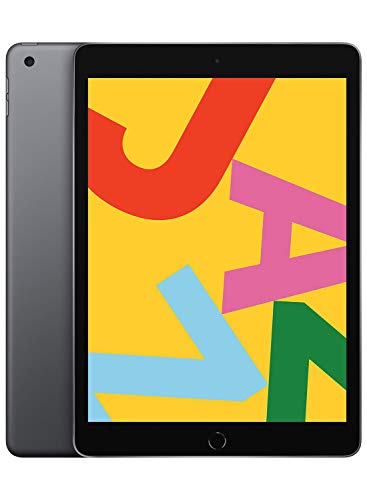
Apple iPad 10.2-inch Wi-Fi 32GB Space Gray

Apple iPad mini Wi-Fi + Cellular 64GB

Apple iPad 10.2-inch 8th Gen Cellular

Pinikox Retail Kiosk iPad Stand Black

T70 Tablet 11-inch Android 16 8GB 256GB

11-inch Android 16 Tablet with Accessories

Apple iPad 11-inch A16 128GB Cellular Blue

Gemini AI Android 16 11-inch 256GB Tablet

Kids Tablet 10-inch Android 16 Pink Bundle
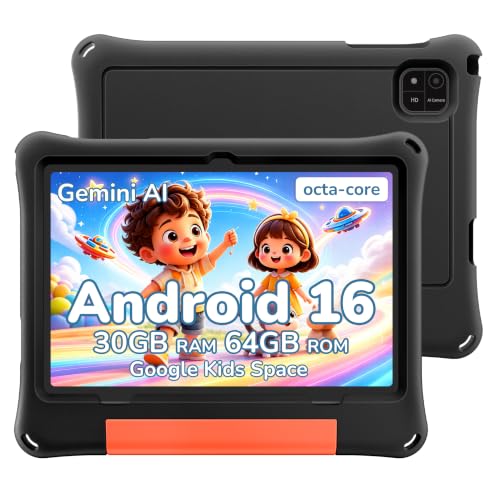
2026 Android 16 Kids Tablet 10-inch Black
Inside Each Recommended Option
The 10.2-inch Retina display (a high-resolution panel that keeps text crisp at normal viewing distance) gives this iPad a comfortable canvas for email, spreadsheets, and point-of-sale apps without feeling oversized on a reception desk. Compared with the iPad mini covered later, this screen is a better match for side-by-side document review and invoice editing, where every column deserves its own room.
An A10 Fusion chip handles the everyday office suite with ease, while Touch ID (a fingerprint reader built into the home button) keeps logins quick for shared-staff environments. Stereo speakers and a front-facing camera round out the video-call experience, which matters once weekly check-ins become routine. For most small business owners, the honest read is that this is a steady workhorse rather than a flashy upgrade.
Strengths Worth Knowing
- The Retina display makes long reading sessions easier on your eyes than older, lower-density panels.
- Touch ID speeds up sign-ins during busy retail hours when staff swap shifts.
- Stereo speakers lift video-call clarity for one-on-one client conversations.
- Wide accessory support means a Smart Keyboard or Apple Pencil slots in without adapters.
- Up to 10 hours of battery covers a full shift away from the charger.
Things To Consider
- The 32GB storage fills quickly with offline documents and presentations.
- The A10 chip will feel modest for heavy multitasking across five or more apps.
Who It Suits Best
Small business owners running a counter, kiosk, or reception desk who want a proven tablet with mature software support and don’t mind the older chip.
Where Another Pick Suits Better
The Apple iPad 11-inch A16 (Pick 7) is a smarter fit for creative professionals who need the newest silicon and a USB-C port.
The iPad mini’s 7.9-inch Retina display with True Tone (a sensor that adjusts the screen’s color temperature to match the room lighting) slips into a coat pocket or small messenger bag, which makes it the natural companion for site visits and client walkthroughs. Its cellular radio means you stay connected in parking lots, warehouses, and conference venues where guest Wi-Fi is unreliable.
The A12 Bionic chip is a notable step up from the A10 in Pick 1, so apps open faster and split-view multitasking stays responsive. That extra headroom shows up when you’re switching between a CRM, mapping tool, and note-taking app on the same screen. For mobile-first teams, you may find the smaller canvas a welcome trade for true portability.
Reasons It Performs
- Cellular connectivity removes the hunt for guest Wi-Fi on job sites.
- True Tone display reduces eye strain during long field days.
- A12 Bionic chip handles CRM, mapping, and notes without lag.
- Compact frame fits one-handed use during walkthroughs.
Trade Offs
- The 7.9-inch screen feels tight for spreadsheet-heavy reporting.
- The Lightning connector (Apple’s older charging port) means you’ll need a separate cable from newer USB-C accessories.
Made For
Traveling field teams, sales reps, and inspectors who need a connected tablet that disappears into a bag and wakes up reliably anywhere.
Not Your Match When
The 2020 Apple iPad 10.2-inch 8th Generation (Pick 3) is the better call for desk-bound roles that benefit from the larger display and full keyboard support.
The 8th-generation iPad borrows the work-friendly 10.2-inch canvas from Pick 1 and pairs it with the A12 Bionic chip and a Neural Engine (a dedicated processor that accelerates on-device machine learning tasks like text prediction and image recognition). That combination handles everything from invoice processing to video calls without breaking a sweat, even when a few tabs pile up.
Cellular connectivity rounds out the package for hybrid workers who split time between home, office, and client sites. Touch ID handles secure logins, and Smart Keyboard support turns the tablet into a lean laptop replacement for short writing sessions. If your workweek moves between desks, the practical payoff here is real flexibility.
Useful Highlights
- A12 Bionic chip with Neural Engine speeds up document scanning and image tasks.
- 10.2-inch Retina display offers comfortable reading for long reports.
- Cellular radio keeps you connected at job sites without hunting for hotspots.
- Touch ID secures logins and Apple Pay transactions at the counter.
- Smart Keyboard support enables typing without pairing third-party hardware.
Honest Caveats
- 32GB of storage is the tightest spot in the lineup, especially for offline catalogs.
- The 1.2MP front camera is serviceable but soft for frequent video conferencing.
Right Fit For
Hybrid office workers who bounce between Wi-Fi and cellular environments and want a familiar iPad experience with newer internals than Pick 1.
Look Elsewhere When
The Apple iPad 11-inch A16 (Pick 7) is the smarter upgrade for roles that lean on video calls and need sharper front-facing optics.
This metal kiosk stand turns any compatible 10.2-inch iPad into a countertop point-of-sale or self-service terminal. A 360-degree swivel base lets the cashier and customer both view the same device, which speeds up transactions and reduces screen-sharing awkwardness.
The anti-theft lock and rigid metal frame keep the tablet anchored in busy retail floors, while the 45-degree viewing angle sits comfortably at standing height. Pair it with the 8th-generation iPad from Pick 3 for a tidy checkout bundle. Depending on your counter depth, you may need to check clearance before mounting.
A Strong Showing
- 360-degree swivel encourages customer-facing use at the register.
- Anti-theft lock secures the tablet in open retail environments.
- Metal construction handles daily bumps better than plastic alternatives.
- Compatibility with 7th, 8th, and 9th generation 10.2-inch iPads protects upgrade flexibility.
Points To Keep In Mind
- Counter drilling may be required for a permanent anti-theft install.
- Confirm cable routing paths before mounting, since the rigid frame limits repositioning.
Best Suited To
Retail counter setups, hospitality check-in desks, and showroom floors that need a fixed tablet mount with theft deterrence.
Skip It When
The 2020 Apple iPad 10.2-inch 8th Generation (Pick 3) alone is the better choice for mobile workflows that don’t need a permanent counter mount.
The T70 delivers an 11-inch canvas, 8GB of physical RAM, and 256GB of storage, which is generous headroom for spreadsheets, product catalogs, and offline presentations. Running Android 16, it supports split-screen multitasking that holds steady even with a dozen browser tabs open.
A 4-year warranty adds an ownership comfort layer that most consumer tablets skip, and the 180Hz touch sampling rate (how many times per second the screen reads your finger input) makes stylus annotations feel immediate. Compared to the older iPads earlier in this lineup, the T70 leans into raw capacity rather than ecosystem polish. The honest read is that power users will appreciate the breathing room.
What Helps Most
- 256GB of storage handles large offline catalogs and project files without cloud roundtrips.
- 8GB of physical RAM keeps multitasking responsive during heavy workdays.
- 180Hz touch sampling rate improves stylus accuracy for note-taking and markup.
- 4-year warranty provides long-term ownership reassurance.
Softer Spots
- Android app optimization for professional tools can be inconsistent compared to iPadOS.
- The larger 11-inch frame is less comfortable for one-handed carry than the iPad mini.
Who Should Grab It
Power business users who store large files locally, run multiple apps in parallel, and value storage headroom over brand polish.
A Better Fit Elsewhere
The Apple iPad 11-inch A16 (Pick 7) is a smarter choice for roles that depend on iPad-optimized creative and productivity apps.
This 11-inch Android 16 tablet ships with a Bluetooth keyboard, stylus pen, mouse, and protective case, which removes the accessory shopping list for new buyers. The shockproof case adds confidence during travel between meetings, and the wireless keyboard boosts typing speed for document edits.
An octa-core processor (a chip with eight processing cores working in parallel) handles split-screen productivity without the sluggishness that plagues budget tablets. The screen real estate comfortably accommodates two apps side by side, which is handy for reference-heavy work like quoting and invoicing. For setup-light offices, the bundled approach is a practical time-saver.
Advantages To Know
- Included keyboard and case skip the accessory research phase entirely.
- Stylus pen supports markup and signature capture out of the box.
- Octa-core chip stays responsive under split-screen workflows.
- Shockproof case tolerates daily commute bumps.
A Few Limitations
- Bundled accessories are functional but lack the premium feel of first-party gear.
- The case adds noticeable thickness compared to a bare tablet.
Perfect Match For
Mobile office setups, small teams, and first-time tablet owners who want everything in one box without piecing together accessories later.
Reach For A Different Pick When
The T70 Tablet (Pick 5) is the better fit for users who prioritize storage and RAM over bundled accessories.
The current-generation 11-inch iPad brings the A16 chip to the table, which is a serious leap over the A10 in Pick 1 and the A12 in Picks 2 and 3. That extra performance translates into smoother video calls, faster app launches, and confident multitasking with creative tools.
The Liquid Retina display (Apple’s higher-tier LCD panel with improved color accuracy and ProMotion-style smoothness) offers vivid color for design reviews and presentations, while Wi-Fi 6 plus 5G cellular covers fast networks at home and on the road. The USB-C connector simplifies docking setups with monitors and external drives. For businesses that want the newest internals without jumping to a Pro model, this iPad is the practical sweet spot.
Where It Helps
- A16 chip handles creative apps and large documents with room to spare.
- Wi-Fi 6 plus 5G cellular keeps you on the fastest available network.
- Liquid Retina display improves color accuracy for client-facing presentations.
- USB-C connector simplifies docking and external storage workflows.
- 12MP front camera sharpens video-call quality for remote meetings.
Some Limits To Know
- 128GB is comfortable but not generous for heavy offline media libraries.
- Premium positioning comes with a higher sticker than older iPads in this list.
Built With In Mind
Creative business professionals, marketing leads, and consultants who run presentations, video calls, and design reviews on a single device.
Swap It Out When
The Apple iPad mini (Pick 2) is a better match for traveling reps who prioritize one-handed portability over screen real estate.
The Gemini AI tablet layers Google’s Gemini assistant on top of Android 16, so drafting emails, summarizing documents, and brainstorming copy can happen on-device. An 11-inch screen, 8-core processor, and 256GB of internal storage make it a credible alternative to the T70 in Pick 5, with the bonus of integrated AI tooling.
An 8000mAh battery supports long shifts away from power outlets, while GPS and FM radio cover niche operational needs like fleet tracking or on-site logistics. Memory expansion up to 2TB via TF card (a small flash-memory card, similar to a microSD) provides room for archival data. Compared to the iPads earlier, this pick leans into customization and AI rather than curated app polish.
A Favorable Mix
- Gemini AI accelerates drafting, translation, and summarization tasks.
- 8000mAh battery supports extended field shifts without midday charging.
- Expandable storage up to 2TB handles archival catalogs and project archives.
- GPS support suits logistics and field-data collection workflows.
Where It Is Less Suited
- AI features depend on cloud connectivity for full functionality.
- The interface adds a learning curve for teams standardized on Apple workflows.
Whose Shelf It Belongs On
Data-heavy operators, logistics coordinators, and field managers who want AI-assisted workflows and long battery life in one package.
Consider Something Else When
The Apple iPad 11-inch A16 (Pick 7) is a smoother fit for creative teams standardized on iPadOS apps and Apple Pencil workflows.
This 10-inch Android 16 tablet comes with a keyboard, mouse, EVA protective case (a foam-rubber shell that absorbs shock from drops), and stylus in a pink bundle that suits family-shared workspaces and home-based businesses. Google Kids Space and Family Link parental controls let you approve apps, set screen-time limits, and filter content from a parent’s phone.
The combined 30GB of RAM (physical plus memory expansion) keeps educational apps responsive, while expandable storage up to 1TB handles downloaded videos and e-books. Dual cameras support video calls with grandparents or tutors. For family-run shops or home offices that double as learning spaces, the parental controls add a welcome safety layer.
Positive Takeaways
- Google Kids Space curates age-appropriate apps and books.
- Family Link parental controls manage screen time and content remotely.
- EVA protective case cushions drops during homework or play sessions.
- Expandable storage up to 1TB holds downloaded learning media.
Potential Drawbacks
- Kid-focused branding limits its fit in traditional corporate environments.
- Smaller 10-inch screen is less comfortable for long spreadsheet sessions.
The Right Fit
Family-friendly workspaces, home-based businesses, and shared family devices where children’s learning and parental controls are part of the requirement.
Where A Sibling Pick Shines
The 2026 Android 16 Kids Tablet with Black EVA Case (Pick 10) is a better fit for shared spaces that need a less colorful, more neutral aesthetic.
This 10-inch Android 16 tablet ships in a black EVA protective case that takes the brunt of drops and scratches in busy shared environments. Google Kids Space and Family Link parental controls handle the same app curation and screen-time management as Pick 9, just in a more neutral color profile.
The octa-core processor and expandable memory keep educational apps snappy, and the rugged shell reduces repair worries in waiting rooms, classrooms, or family offices. For shops where the tablet doubles as a learning device during off-hours, the durable exterior is the headline feature.
Real-World Strengths
- EVA case absorbs impact from drops during active use.
- Parental controls via Family Link simplify oversight for working parents.
- Neutral black finish fits professional and family settings alike.
- Expandable storage accommodates downloaded lessons and videos.
Worth Bearing In Mind
- 10-inch screen limits spreadsheet comfort compared to the 11-inch picks.
- Kid-tablet branding may feel out of place in strictly corporate reception areas.
Who Will Love This
Shared-space environments, classrooms, and home offices that want a rugged tablet with built-in parental controls and a neutral aesthetic.
Another Choice May Suit
The 11-inch Android 16 Tablet with Accessories (Pick 6) is a better match for adult-only offices that want bundled productivity gear without child-oriented software.
What To Weigh Before Choosing Your Business Tablet
Start with the operating system you’ll actually use day to day, since switching ecosystems mid-contract is painful. iPadOS offers a deeply optimized app catalog for creative and productivity tools, while Android 16 delivers customization, expandable storage, and tighter integration with Google services. Teams already standardized on Microsoft 365 or Google Workspace will lean one direction or the other based on which ecosystem their files live in.
Screen size and portability form the next trade-off. The 7.9-inch iPad mini disappears into a bag but cramps spreadsheets, while the 11-inch picks give comfortable room for side-by-side apps at the cost of one-handed comfort. Cellular connectivity is worth the premium for anyone who works away from stable Wi-Fi, since hotspotting drains your phone and tethering is unreliable in older buildings.
Storage, RAM, and warranty matter more than spec sheets suggest. Tablets with 32GB fill up quickly once offline catalogs and presentations enter the mix, so 128GB or more is a wise floor for document-heavy roles. RAM above 6GB keeps split-screen multitasking fluid, and a multi-year warranty signals a manufacturer that expects the device to last.
Accessories and mounting can elevate a good tablet into a great business tool. A keyboard and stylus bundle removes shopping overhead, while a kiosk stand like the Pinikox turns any compatible iPad into a counter-ready terminal. Match the tablet to the accessories you’ll actually use, rather than chasing specs that gather dust.
Smart Shoppers Avoid These Tablet Traps
Common Shopping Slip Ups Chasing the newest chip without checking app support leaves you with hardware that runs yesterday’s software smoothly. Confirm the operating system version is compatible with the business apps you depend on before committing. Storage is the other quiet trap: 32GB feels roomy on day one and crowded by month six, so buy for your actual file volume, not the demo unit.
What The Higher Tier Buys Paying more for a current-generation iPad or high-storage Android tablet buys you longevity, not just speed. Faster chips extend the useful lifespan of the device as apps grow heavier, and larger storage prevents the daily clean-up chore of offloading files. The upgrade pays off most when the tablet handles creative work, video calls, or large documents daily, and less so for simple POS or kiosk roles where older hardware serves perfectly well.
Frequently Asked Questions
What size tablet works best for business travel? A 10-inch or 11-inch screen hits the sweet spot for reading documents on planes and trains without feeling bulky. The iPad mini at 7.9 inches is more portable but cramps spreadsheet work, so it suits sales reps more than analysts.
Is cellular worth the extra cost over Wi-Fi only? For roles that involve job sites, client visits, or unreliable office networks, cellular saves time and frustration daily. Purely desk-based users can skip the cellular premium and tether from a phone when needed.
How much storage does a business tablet really need? Plan for at least 128GB if you carry presentations, catalogs, or video files offline. Light users who work entirely in the cloud can manage with 64GB, but 32GB fills faster than most people expect.
Can Android tablets handle professional productivity apps? Modern Android tablets run Microsoft Office, Google Workspace, and most CRM apps without issue. Specialized creative apps tend to favor iPadOS, so weigh your core toolset before committing to an ecosystem.
How long should a business tablet realistically last? Three to five years is typical, with battery health and software updates setting the upper limit. A warranty of three years or longer, like the one on the T70, is a strong sign the manufacturer expects the device to hold up.
Wrap Up
The right tablet depends less on raw specs and more on the workflows you actually run each day. Field-heavy roles benefit from cellular connectivity and a compact frame, while desk-based teams want bigger screens and accessory bundles that speed up typing. Pick the ecosystem you’ll live with for years, match storage to your offline file volume, and confirm the apps you depend on run smoothly. The lineup above covers everything from kiosk mounting to family-friendly shared spaces, so trust your use case to guide the choice.


