

Hanging a projector used to mean a handyman, a drill, and a quiet prayer. The mounts in this list solve that with steel brackets, drop-ceiling plates, and adjustable arms that match most home projectors on the market today. Some work for screens, some work for projectors, and one or two handle both. You will see a clear difference between simple L-brackets and full articulating arms, which matters when your ceiling is high or your room is not perfectly square.
Whether you are finishing a basement theater, building a conference room, or just getting the projector off the coffee table, the right mount keeps the image steady and the hardware safe.
The Essentials At A Glance
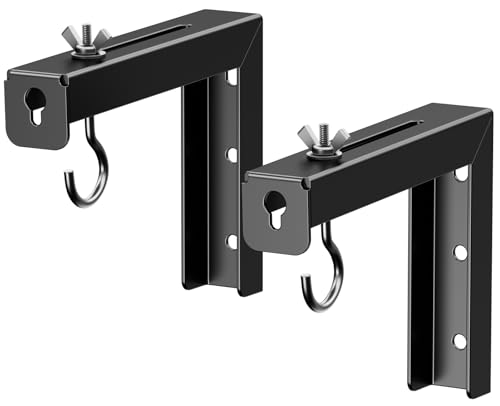
PUTORSEN Universal Projector Screen L-Brackets, 6-inch Black

Mount-It! Projector Screen L-Brackets, 12-inch, Black

Amer Mounts AMRDCP100KIT Drop Ceiling Projector Mount, White

XINLEI Universal Projector Screen L-Brackets, 6-inch, White

PureMounts Ceiling Mount for Projector, White

SCREEN PRO Universal Ceiling Bracket, 55″-79″, 33lb

SCREEN PRO Universal Ceiling Bracket, 42″-59″, 33lb

Amer Universal Projector Mount Kit with Adjustable Pole
The Strengths Of Each Pick
If your only goal is to hang a manual pull-down screen flat against the wall without paying for extras you do not need, this pair of steel L-brackets gets the job done with no fuss. The 6-inch arm leaves just enough room to clear most moldings, and the steel build feels sturdy enough to handle a mid-sized screen without flexing.
You will want to confirm your screen’s hanging hole spacing before drilling, since the bracket positions are fixed once mounted. For most standard residential screens this works out fine.
Standout Benefits
- Holds up to 66 lbs, which covers most manual screens on the market
- Adjustable extension from 1.5″ to 5″ lets you nudge the screen off the wall
- Steel construction handles daily use without sagging
- Two-piece L-shape keeps mounting hardware simple
- Pairs well with basic DIY installs in living rooms and bedrooms
Things To Consider
- No included hardware for masonry or concrete, so you may need to source anchors separately
- Fixed design means no tilt or swivel adjustment once installed
Best Suited To
A homeowner hanging a single manual screen in a living room or bedroom on a wood stud wall will find this a clean, no-nonsense match.
Look Elsewhere When
If your ceiling is dropped tile or you want a screen that tilts, the Mount-It! Projector Screen L-Brackets give you a larger 12-inch hook to work with.
The 12-inch arm on these Mount-It! brackets makes a real difference when the screen needs to clear a deep window frame, a wall-mounted speaker, or a thick ceiling trim. Compared to the shorter PUTORSEN pair reviewed earlier, this version gives you serious standoff distance, which is the whole point of an L-bracket in the first place.
Each hook handles up to 66 lbs, and the design works with most manual and electric screens you can buy today. The trade-off is the visual profile: that longer arm is more noticeable on the wall.
A Few Highlights
- 12-inch arm clears obstacles that shorter brackets cannot
- 66 lb capacity per hook handles wide-format screens
- Universal fit matches most hanging-style screens
- Black finish blends into dark walls and AV rooms
- Sold as a matched pair for symmetrical mounting
Trade Offs
- Longer arm shows more visible hardware in a casual living space
- No tilt mechanism, so screen angle is locked to the wall
Made For
Anyone mounting a large screen above a fireplace, doorway, or media console where shorter brackets would not clear the obstacle.
Consider Something Else When
If you would rather skip wall drilling entirely, the Amer Mounts AMRDCP100KIT drops straight into a 2×2 ceiling tile instead.
Suspended-grid ceilings found in offices, classrooms, and converted basements require a completely different mounting approach. The Amer Mounts AMRDCP100KIT replaces a standard 2×2 ceiling tile with a reinforced steel plate, so the projector hangs where a fluorescent light used to be, no drilling into structural ceiling required.
Multiple mounting holes on the plate give installers room to align the projector precisely without fighting tile-grid spacing. The plate also acts as a heat-dissipating surface, which is a quiet perk in a projector that runs warm during long meetings.
What Stands Out
- Replaces a single 2×2 ceiling tile, no structural drilling
- Steel plate handles the weight without bowing the grid
- Heat-dissipating surface keeps the mount cooler over long sessions
- Multiple mounting holes give installers alignment flexibility
- White finish matches most commercial ceiling tiles
Honest Caveats
- Specific to 2×2 grid systems, so it will not fit 2×4 ceilings
- Requires a separate projector mount arm, since this is just the ceiling plate
- Removing a tile section means a small gap if the projector footprint is smaller than 2×2
Who It Suits Best
An IT manager or facilities coordinator outfitting a conference room with a drop-ceiling grid will find this the cleanest path to a clean install.
Skip It When
Homeowners with a standard drywall ceiling should pick the SCREEN PRO Universal Ceiling Bracket, which bolts directly into joists.
The XINLEI pair covers the most common wall types in residential construction, which is the main reason it shows up in so many home theater installs. The included carabiner adds a layer of safety you do not always see on a basic L-bracket: even if a hook slips, the carabiner keeps the screen from hitting the floor.
The white finish and 6-inch adjustable extension sit between the PUTORSEN pair and the larger Mount-It! hooks reviewed earlier. For mixed-wall homes with brick or concrete sections, this bracket handles transitions without buying two sets of hardware.
Strong Points
- Carabiner-style hook prevents accidental screen drops
- Works on wood stud, concrete, brick, and drywall surfaces
- 66 lb load rating supports most home theater screens
- White finish matches light walls and ceilings
- 1.5″ to 5″ extension range for fine-tuned standoff
Worth Noting
- Carabiner adds a visible element some prefer to hide
- Hardware for masonry walls may need separate purchase depending on surface
Right Fit For
Anyone hanging a screen on a wall that mixes drywall and brick, like in a basement or a converted garage, will save time using one bracket set for both.
Not Your Match When
If you are mounting the projector itself rather than just a screen, look at the SCREEN PRO Universal Ceiling Bracket, which is sized for projector bodies.
The PureMounts PM-SPIDER-style bracket is the first entry on this list built for the projector body itself rather than a screen, and the tilting/swiveling joint is what sets it apart from rigid ceiling plates. Most home projectors need a few degrees of angle to land a square image on the wall, especially in rooms where the projector cannot sit directly in front of the screen.
The stepped adjustment keeps the joint quiet and stable, so there is no drift over time. For most living rooms where the projector mounts off-center from the screen, that tilt range is the difference between an image you tolerate and one you actually enjoy.
Points In Its Favor
- Tilt and swivel range handles angled ceilings and off-center mounts
- Hole spacing up to 320 mm fits a wide range of projectors
- Stepped adjustment locks in place without slipping
- White finish blends into most residential ceilings
- Reach range covers typical ceiling-to-projector distances
Minor Gripes
- Load rating is lower than heavy-duty options, so check your projector weight
- Installation requires precise hole alignment, since the joint depends on accurate placement
Who Should Grab It
Anyone mounting a mid-weight home projector on an angled ceiling or off-center from the screen will appreciate the adjustment range this mount offers.
A Better Fit Elsewhere
For larger projectors that push the weight limit, the Amer Universal Projector Mount Kit handles bigger loads with a heavier ball joint.
Vaulted ceilings, two-story living rooms, and remodeled barns all share one challenge: a standard-length drop puts the projector too close to the audience. The 55″ to 79″ extension range on this SCREEN PRO bracket pushes the projector down to a usable height without forcing you to lower the screen.
The white powder-coated finish is a small thing, but it matters in rooms where the ceiling is a focal point. You may find the adjustment steps require a second pair of hands during install, since holding a long pole steady while tightening bolts is awkward solo.
Well-Handled Touches
- Long extension range suits tall and vaulted ceilings
- Universal fit covers most mainstream home projectors
- White powder-coat blends into most ceiling finishes
- 33 lb capacity handles most consumer projectors
- Adjustable base arms match different mounting hole patterns
Practical Considerations
- Longer drop means more visible pole below the ceiling
- Two-person install is easier given the extended length
- Not ideal for ceilings under 9 feet where the reach becomes excessive
Feature Snapshot
Who Will Love This
Homeowners with vaulted ceilings or great rooms taller than 10 feet will find this drop length finally puts the projector at eye-friendly height.
Swap It Out When
For a standard 8-foot ceiling, the SCREEN PRO Universal Ceiling Bracket in 42″ to 59″ keeps the profile shorter and cleaner.
The shorter sibling in the SCREEN PRO line is purpose-built for normal-height residential ceilings, and the black finish looks right at home in media rooms with darker ceilings or exposed beams. Most living rooms and bedrooms sit between 8 and 9 feet, which is exactly where this 42″ to 59″ range lands the projector.
The same retractable aluminum column and full-motion adjustability appear here as in the longer version. The shorter drop just keeps the projector closer to the ceiling, which in most rooms actually improves the viewing angle.
Positive Points
- Drop range fits standard 8 to 9 foot ceilings without wasted pole
- Black finish blends into media rooms and darker ceilings
- Universal base arms match common projector hole patterns
- Full-motion adjustability for tilt, swivel, and roll
- 33 lb load rating covers mainstream home projectors
Points To Keep In Mind
- Not suited for vaulted ceilings where longer reach is required
- Cable management relies on routing alongside the pole rather than through it
Perfect Match For
A homeowner with a standard-height ceiling and a black or dark media room will appreciate how this bracket stays visually quiet overhead.
Reach For A Different Pick When
For taller ceilings, step up to the 55″-79″ SCREEN PRO Universal Ceiling Bracket in the same product family.
Large-format projectors from Epson and BenQ weigh more, measure more, and demand a mount that does not flinch. The Amer Universal Projector Mount Kit answers with a heavy-duty ball joint rated up to 25 kg and an adjustable pole that runs from 127 mm to nearly 578 mm.
The mounting point diameter covers projectors with hole spacing up to 380 mm, which is rare in this category. Built-in cable management inside the pole keeps the install looking tidy, and the included M3 through M6 fasteners cover the most common projector screw sizes right out of the box.
Practical Pluses
- 25 kg load capacity handles large format projectors with room to spare
- Ball joint offers tilt and full 360-degree swivel
- In-pole cable management hides wiring cleanly
- Included M3 to M6 fasteners cover common projector screws
- Mounting pattern up to 380 mm fits oversized projectors
- Adjustable pole covers 127 mm to 578 mm drop range
Factors To Consider
- Heavier overall assembly means a more involved ceiling install
- Aluminum and synthetic materials can mark up over years of vibration
- Specific large-format fit may be overkill for compact home projectors
Feature Card
Built With In Mind
Anyone installing a full-size home theater projector in a dedicated room will appreciate the headroom in load rating and adjustment range.
Where A Sibling Pick Shines
For lighter home projectors and shorter installs, the SCREEN PRO Universal Ceiling Bracket is simpler to mount and less visually heavy.
What Matters Most Before Choosing Ceiling Mount Projectors
Match The Mount To What You Are Hanging
Projector mounts and screen mounts are not interchangeable. Screen L-brackets like the PUTORSEN and Mount-It! pairs hang flat against a wall, while projector ceiling mounts suspend the projector body from above. Confirm whether you need a screen mount, a projector mount, or both before buying, since mixing the two is the most common install mistake.
Check The Ceiling Type First
Drywall over wood joists, concrete ceilings, and suspended-grid drop ceilings each demand a different hardware approach. Standard ceiling brackets bolt into structural framing, while drop-ceiling plates like the Amer Mounts AMRDCP100KIT replace a tile section entirely. Pick the mount designed for your actual ceiling, not the one that looks nicest in photos.
Weight And Reach Numbers Should Be Conservative
Manufacturers list maximum load ratings, but staying well under that number reduces strain on the ceiling and keeps the image from drifting over time. For projector mounts, also match the drop length to your ceiling height: too long and the pole dominates the room, too short and the projector sits awkwardly high.
Tilt And Swivel Beat Fixed Mounts In Real Rooms
Most living rooms do not allow a perfectly centered projector-to-screen alignment, which makes tilt and swivel adjustment essential. PureMounts and the SCREEN PRO brackets both offer this, while the basic L-brackets do not. If your room is not perfectly square, plan for adjustment range from the start.
Key Considerations Across These Picks
Mistakes Worth Dodging
The most common error is buying a screen mount when you needed a projector mount, or vice versa. Measure the device you are actually hanging and check whether the bracket is rated for that weight class before drilling anything. Second on the list is ignoring ceiling type: a drywall bracket on a drop-ceiling grid will not hold, and a drop-ceiling plate in a room with no grid looks out of place.
Where The Extra Money Goes
Higher-tier mounts earn their price through tilt and swivel joints, longer drop ranges, and heavier load ratings. The Amer Universal Projector Mount Kit costs more because it handles 25 kg projectors with a locking ball joint, while basic L-brackets stay cheap because they do one thing simply. For most casual home setups, mid-range mounts hit the sweet spot. For dedicated theaters or commercial installs, the upgrade to a heavier articulating mount pays off over years of use.
Frequently Asked Questions
How Do I Know If My Ceiling Can Hold A Projector Mount?
Standard wood joist ceilings handle most consumer mounts as long as you find and drill into the joist itself, not just the drywall between them. Drop-ceiling grids need a plate like the Amer Mounts AMRDCP100KIT that replaces a tile, since the grid alone will not bear the weight safely.
What Is The Ideal Drop Length For A Standard Ceiling?
For 8 to 9 foot ceilings, a drop between 6 and 18 inches keeps the projector at a comfortable height without dominating the room. Taller ceilings benefit from longer drops like the 55 to 79 inch SCREEN PRO bracket, since the projector needs more reach to reach a usable height.
Do I Need Tilt And Swivel On A Ceiling Mount?
In rooms where the projector mounts perfectly centered above the screen, fixed mounts work fine. In most living rooms, where the projector sits off to one side, tilt and swivel adjustment is the difference between a square image and one that needs digital correction.
Can One Mount Fit Multiple Projector Brands?
Universal mounts like the SCREEN PRO and Amer Universal kits include multiple arm positions and hardware sizes to fit most projectors on the market. Always check the mounting hole spacing and weight before assuming a fit, since some large-format projectors exceed universal patterns.
Are Screen Brackets And Projector Mounts The Same Thing?
No. Screen brackets like the PUTORSEN and XINLEI L-brackets hang a flat screen from a wall, while projector mounts suspend the projector body from the ceiling. Some rooms need both, but they are different products with different weight ratings and adjustment ranges.
Closing Thoughts
The right ceiling mount depends entirely on what you are hanging, what your ceiling looks like, and how much adjustment you actually need. Screen brackets cover the simplest installs, while articulating projector mounts handle the rooms that need real flexibility. Pick the mount that matches your ceiling and your device, and the rest of the install tends to fall into place.


