

A phone that runs hot during a long gaming session, a summer commute, or a backyard livestream is more than annoying; it drags down frame rates, kills your battery faster, and in worst cases forces the camera to shut off mid-recording. Whether you’re streaming a little-league game in July or trying to read a recipe in a stuffy apartment, the right fan turns a thermal bottleneck into background noise. This roundup covers nine options across two families: compact plug-in fans that sip power straight from your phone’s USB-C port, and outdoor mounting kits with built-in cooling for creators recording in the heat.
The Shortlist At A Glance

Black Shark FunCooler 5 Magnetic Cell Phone Cooler (Black)

TRIIFON Phone Fan USB C 4-Pack (Black)

ULBTER USB Type C Mini Mobile Phone Fan
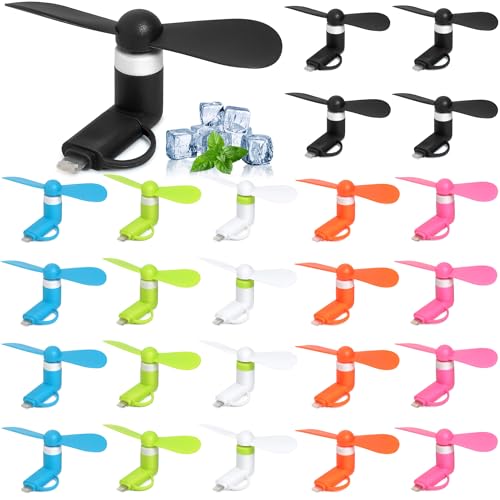
Aeergured 24-Pack Phone Fan Bulk

ULBTER Mini USB C Android Cell Phone Fan (4-Pack)

Baieasy USB C Phone Fan 6-Pack

MOHOSOKO Phone Fence Mount with Shade (Blue)

MOHOSOKO Aluminium Fence Mount for Mevo (1 Arm)

MOHOSOKO Magnetic Fence Mount for Mevo and GoPro
Inside Each Recommended Option
This one plays a different game than the rest of the roundup. While the other picks sip power from your phone, the Black Shark FunCooler 5 uses a Peltier element (a small thermoelectric chip that pumps heat from one side to the other when current flows through it) and runs wired, so it can deliver actual temperature drops rather than just moving air across a hot surface. You magnetically clip it to the back of a recent iPhone or pair it with an Android mount, then plug into a 20W-or-better power source.
For mobile gamers losing frames during long sessions, or creators shooting outdoors in summer heat, that matters. The RGB lighting is a fun touch but cosmetic; the real pitch is sustained thermal relief on a device that would otherwise throttle.
Where It Delivers
- Peltier-based cooling pulls heat away rather than just blowing across the surface.
- Magnetic attachment keeps the cooler centered over the phone’s main heat zone.
- Wired design means the cooler doesn’t drain your phone’s battery while it runs.
- RGB lighting adds visual feedback, useful in dim setups.
- Works with tablets and iPads for creators using larger screens.
Things To Consider
- You’ll need a separate 20W+ power brick and cable; neither ships in the box.
- Tethered use limits walking-around mobility compared to plug-in mini fans.
- Magnetic alignment only works cleanly on phones with MagSafe-style magnet rings or cases.
Feature Snapshot
Who It Suits Best
Mobile gamers, livestreamers, and outdoor shooters who already carry a power bank and want meaningful thermal drop rather than gentle airflow.
Where Another Pick Suits Better
Casual users who just want a quiet breeze during a subway ride will find the TRIIFON 4-Pack far less hassle.
Plug-and-go simplicity is the headline here. Each TRIIFON fan draws power directly from your phone’s USB-C port, no batteries, no app, no extra cable. That makes them genuinely pocketable: slide one in a jacket pocket, a backpack, or a gym bag, and you’ve got a personal breeze whenever the bus is hot or your face is flushed after a summer walk.
The four-pack format also suits small groups. Toss one to a friend on a hot day, keep spares in the car, or stash them around the house for different rooms.
Features That Help
- Plug-in design draws power from the phone, so there’s nothing to charge separately.
- Compact body fits easily into pockets and small pouches.
- Four-unit pack spreads value across multiple bags or users.
Worth Noting
- Compatibility is locked to iPhone 15/16 series and Type-C Android devices, so older iPhones won’t work.
- Running the fan does pull a small amount of battery from the phone during use.
- Airflow is gentle by nature, more of a personal breeze than a cooling blast.
Made For
Commuters, students, and travelers on iPhone 15/16 or modern Android who want a no-fuss personal fan they can carry everywhere.
Consider Something Else When
Anyone shooting long outdoor videos should reach for the MOHOSOKO Foldable Shade Mount, which pairs cooling with sun protection.
This ULBTER model sets itself apart with explicit iPhone 17 support, including the Air and Pro Max variants, so it’s a forward-looking pick for anyone who just upgraded. Like other plug-in fans on this list, it pulls power from your phone’s Type-C port and starts spinning the moment it’s connected.
It’s a tidy single-unit option for people who don’t need a multi-pack and want the latest compatibility sheet.
Why It Works Well
- Covers the newest iPhone lineup, including 17 series and 15 Plus.
- Plug-in simplicity means zero charging or pairing steps.
- Single-unit purchase suits shoppers who don’t want extras sitting around.
Honest Caveats
- Won’t work on iPhone 14 and earlier, or any phone using the older Lightning connector.
- One fan means no spare if this one gets lost or lent out.
- Color availability tends to be limited compared to multi-pack competitors.
Quick Facts
Best Suited To
Anyone on the newest iPhones who wants a single, current-generation plug-in fan without committing to a multi-pack.
A Better Fit Elsewhere
If you want extras to share or stash around, the Aeergured 24-Pack delivers more flexibility at lower per-unit cost.
The Aeergured bulk pack is built for shareable situations. Twenty-four individual fans in six colors, made from soft TPE, slip easily into party favor bags, classroom prizes, or office goody drawers. Each one is a 2-in-1 plug-in style that pairs with any Type-C device, so it works across iPads, tablets, and Android phones alike.
For a teacher prepping end-of-year gifts, a planner stocking wedding welcome bags, or a parent outfitting the whole minivan, this format makes more sense than buying four at a time.
A Strong Showing
- Bulk 24-pack drops the per-unit cost dramatically.
- Color variety lets you assign fans to different family members or events.
- Soft TPE construction feels gentle in hand and quiet in operation.
- Universal Type-C fit covers iPads, tablets, and Android in one SKU.
Minor Gripes
- Bulk format means storage space for 24 small parts to keep track of.
- Lightweight plastic body may not survive drops as well as metal-mount alternatives.
Whose Shelf It Belongs On
Event planners, teachers, and households with multiple Type-C devices who want a colorful, affordable way to keep everyone cool.
Skip It When
Solo users who want one solid fan should grab the ULBTER single option instead of wrestling with extras.
If your household runs on Samsung Galaxy or Pixel, this ULBTER 4-pack covers you more thoroughly than most. The compatibility list stretches across the Galaxy S20 through the latest S26 lineup, plus the Z Fold and Z Flip families, OnePlus flagships, and Google Pixel phones back several generations.
Compared with the Baieasy 6-pack coming up, the fan count is smaller, but the Android-specific focus means you’re less likely to hit a model gap.
Practical Advantages
- Wide Android compatibility, including Samsung Galaxy S26, Z Fold/Flip, OnePlus, and Pixel.
- Plug-in Type-C design needs no batteries or cables.
- Four-pack offers spares without the bulk of a 24-pack.
Points To Note
- Not compatible with iPhones, including the 15 and 16 series.
- No micro-USB support means older budget Androids won’t pair.
Perfect Match For
Android-first households with Samsung Galaxy, OnePlus, or Pixel phones who want guaranteed compatibility across the family.
Reach For A Different Pick When
Mixed-device families with iPhones in the mix will get broader coverage from the Baieasy 6-Pack.
The Baieasy 6-pack strikes a middle ground between the giant 24-pack and the smaller 4-packs. You get six colorful units in pink, blue, green, orange, black, and white, made from TPE, so each family member can claim their color. The compatibility list spans Samsung Galaxy from S9 onward, Note models, A-series, OnePlus, and Google Pixel, plus iPhone 15 and other USB-C phones.
It’s the right size for a household of four to six or for keeping spares in different rooms without going full bulk-buy.
Strong Points
- Six colors let you color-code fans across family members or rooms.
- Compatibility list covers both Android flagships and iPhone 15 family.
- TPE construction keeps noise low during video calls or bedside use.
Points To Keep In Mind
- Older iPhones (14 and earlier) and micro-USB phones remain unsupported.
- Six-pack assumes you actually need six; solo users may end up with extras.
Feature Rundown
Built With In Mind
Families of four to six with a mix of newer Android phones who want a color-coded, ready-to-share set.
Another Choice May Suit
Samsung-only households may find the ULBTER Android 4-Pack lists more Galaxy variants explicitly.
Switching gears entirely, the MOHOSOKO Fence Mount is a purpose-built rig for parents and creators recording little-league baseball from behind the backstop. The kit combines a foldable phone clamp with a 90° and 180° adjustable sunshade and a built-in USB cooling fan that runs off an external power bank.
The shade protects your screen from glare; the fan keeps the phone from overheating during a doubleheader. It’s a clever three-in-one solution.
Points In Its Favor
- Foldable shade cuts midday glare that ruins outdoor footage.
- Built-in fan prevents thermal shutdown during long recordings.
- Game Changer-style mount clamps onto chain-link fences quickly.
- Compatible with standard iPhones used as livestream cameras.
Practical Considerations
- Requires a separate power bank to run the fan, not included.
- Best suited to chain-link fences; won’t work on solid walls.
- Setup is more involved than a clip-on personal fan.
At A Glance
Who Should Grab It
Parents and creators recording baseball or softball games who need both glare control and active phone cooling.
Not Your Match When
Anyone needing a magnet-based mount for a steel backstop post should pick the MOHOSOKO Magnetic Fence Mount instead.
For creators using a Mevo Start or iPhone as a livestream camera, this all-aluminum MOHOSOKO mount trades plastic for metal. The articulating magic arm holds position firmly, dual 1/4-inch mount points let you add a second arm or accessory, and the clamp spins snug onto a variety of fence gauges.
It’s heavier in the bag but tougher on the field, and built for setups that see real weather.
The Upside
- Aluminum body resists weather and rough handling better than plastic mounts.
- Dual 1/4-inch mount points support extra accessories like lights or mics.
- Articulating arm locks into precise angles for centered framing.
- Compatible with Mevo Start and standard iPhone setups.
A Few Limitations
- Heavier than plastic mounts, more noticeable in a gear bag.
- No built-in cooling fan, so the phone still needs passive airflow or shade.
- Setup requires spinning the clamp nuts by hand for a snug fit.
Key Product Details
The Right Fit
Mevo-using creators who want a long-lasting, all-metal mount and don’t need a built-in fan.
Look Elsewhere When
Recreational streamers who want shade plus cooling in one package should choose the MOHOSOKO Foldable Shade Mount.
The fastest setup of the three MOHOSOKO mounts. Four high-strength rubber-coated magnets snap onto a steel backstop post, no clamps, no spinning nuts. The hinge design folds flat for transport and opens into a usable mount once you’re at the field.
Two 1/4-inch mount points let you attach a Mevo Start, GoPro, iPhone, or other action camera. The trade-off is straightforward: this only works where there’s steel to grab.
Noteworthy Benefits
- Magnetic attachment is the fastest setup option among fence mounts.
- Rubber-coated magnets protect metal surfaces from scratches.
- Folding hinge keeps the kit compact in a gear bag.
- Two 1/4-inch mount points fit Mevo, GoPro, and iPhone rigs.
Things To Weigh
- Only works on steel backstops, not wooden or chain-link-only fences.
- Magnetic grip may need verification on powder-coated or painted steel posts.
- No cooling fan, so the camera still needs passive airflow during long shoots.
Who Will Love This
Solo creators who set up alone and want to be streaming within a minute of arriving at the field.
Swap It Out When
You record at fields without steel posts or need a built-in fan; the Foldable Shade Mount handles both cases.
What Matters Most Before Choosing Cell Phone Fans
Start with the form factor. Plug-in mini fans draw power from your phone’s USB-C port and offer zero-setup relief for casual use; Peltier coolers like the FunCooler 5 deliver real thermal drops but require a separate power source. Outdoor mounts are a different category altogether, built for creators recording in direct sun.
Connector type is the next filter. Older iPhones with Lightning ports won’t pair with most Type-C fans. Check your specific model before committing, especially if you’re eyeing single-unit picks like the ULBTER iPhone fan.
For multi-pack shopping, color and quantity matter more than people expect. Twenty-four fans in six colors are useful at parties, classrooms, and weddings; four-packs are better for families who actually want to use them daily without managing spares.
For creator gear, weight and clamp type decide whether the kit lives in your bag or stays at home. Aluminum mounts survive weather better; magnetic mounts save time but only work on steel. Built-in fans help when shade alone isn’t enough.
Key Considerations Across These Picks
Where Shoppers Go Wrong
The most common slip-up is buying a Type-C fan for a Lightning-port iPhone. Compatibility lists look similar at a glance, but iPhone 14 and earlier need a different connector entirely. Double-check your model number before placing an order, especially on multi-pack listings where return shipping becomes a hassle.
The second trap is assuming airflow alone cools a hot phone. Plug-in mini fans move air across the surface, which helps a little, but they don’t pull heat out of the chipset. For gaming or long outdoor recording, you need either a Peltier cooler or a mount with active airflow plus shade.
When Paying More Pays Off
The step up to Peltier cooling or aluminum mount construction costs more, and the payoff shows up in specific scenarios. Mobile gamers who lose frame rate mid-session feel the difference immediately. Creators recording doubleheaders in summer heat avoid thermal shutdowns that ruin footage. For everyone else, a basic plug-in fan at a lower price handles the daily case just fine.
Frequently Asked Questions
Do cell phone fans actually cool the phone or just blow air? Plug-in mini fans mostly move air across the surface, which helps a little with perceived warmth. Peltier-based coolers like the FunCooler 5 pull heat away from the chipset and produce a measurable temperature drop.
Will a phone fan drain my battery? Plug-in USB-C fans draw a small amount of power from your phone during use. For a quick commute or short outing, the impact is minimal. For longer sessions, a Peltier cooler with its own power source is the better choice.
Are these fans safe to leave running for hours? Most plug-in fans are designed for extended use and run quietly, but no fan should run unattended for truly long sessions without a periodic check. Mounted creator kits with separate power banks can run through a full game with the right battery size.
Can I use these fans with a case on my phone? Magnetic fans need either a MagSafe-compatible case or a metal ring adapter. Plug-in Type-C fans usually work fine through cases as long as the port opening clears the connector.
What’s the difference between a phone fan and a phone cooler? A phone fan moves air, mostly for personal comfort and light surface cooling. A phone cooler uses thermoelectric technology to actually lower the chipset temperature. Coolers cost more and need external power; fans are simpler and draw from the phone itself.
Wrap Up
The right pick depends entirely on your situation. Mobile gamers and serious outdoor creators need real thermal relief from a Peltier cooler or a mount with active airflow plus shade. Casual users who just want a pocketable breeze on a hot commute are well-served by any of the plug-in Type-C options here. Match the format to your daily scenario and the rest falls into place.


