

Handing a child their first phone can feel like standing at the edge of a cliff. You want them reachable, not exposed to the entire internet, and you want controls that actually hold up against a curious 11-year-old. The picks below range from dedicated kid-safe phones to mainstream smartphones that pair well with carrier-side parental controls, so you can match the device to your child’s age, your budget, and how strict you want the limits to be.
An Overview Of The Picks
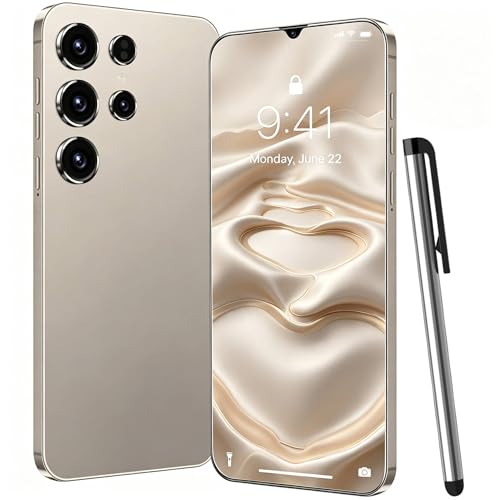
Unlocked Phone C25 Ultra 6.5″ FHD Smart Phone
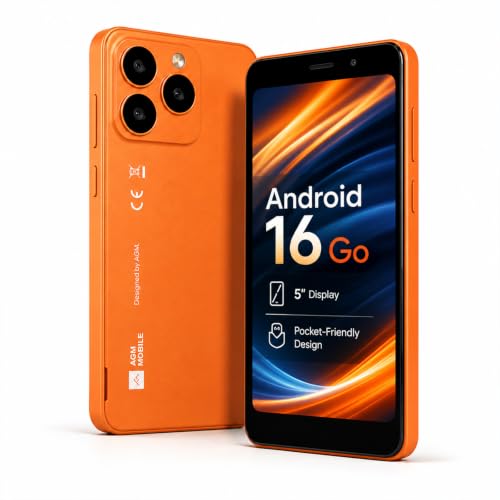
AGM N2 Mini Phone Android 16 Go, T-Mobile 4G LTE, Removable 3000mAh Battery

total wireless Motorola Moto g Stylus, 128GB, Blue – Prepaid Smartphone (Locked)

Gabb Phone 4 – Kids Phone, GPS Tracker, No Internet, Black

RENNY Loud Cell Phone Ringer Amplifier & LED Flasher, 117 dB, Bluetooth

Bark Phone for Kids & Teens – GPS Tracking & Parental Controls – A16
The Details Behind The Selections
Older teens usually outgrow locked-down kid phones fast, and that is exactly where an unlocked Android like the C25 Ultra earns its place. The 6.5-inch FHD screen gives enough room for schoolwork, video calls, and the apps a high schooler actually wants. Because it ships unlocked, you can move between Verizon, AT&T, and T-Mobile without buying a new device, which makes life easier if a family plan changes.
Parental controls here rely on the standard Android framework plus whatever your carrier offers. You will set up Google Family Link, screen-time caps, and app approvals through that route. Compare that to the Gabb Phone 4 below, which bakes restrictions into the operating system itself. This C25 Ultra is the looser, more grown-up option for a household ready to graduate past sealed-down hardware.
Standout Benefits
- Unlocked design works across major US carriers and MVNOs, so switching plans is painless.
- 6.5-inch FHD display leaves plenty of room for homework, reading, and video chats without feeling cramped.
- Android base supports Google Family Link, which gives you time limits, app approvals, and location sharing in one dashboard.
- Full app store access means it scales up with your teen rather than getting replaced in a year.
Worth Noting
- Parental controls rely on Google’s family-link setup rather than a custom locked-down OS.
- Carriers may need a band check before activation, so verify your local coverage before committing.
Who It Suits Best
Parents of teens who want real smartphone capability paired with carrier-level and Google Family Link oversight.
Consider Something Else When
The Bark Phone is a better match for households that want content monitoring built into the phone itself rather than configured through a separate app.
The AGM N2 takes the opposite approach from the C25 Ultra by keeping things small and tidy. It is built around T-Mobile 4G LTE, runs a lightweight Android 16 Go edition, and uses a removable 3000 mAh battery, which is a rare feature in 2026 and a quiet win for longevity. For a child who just needs calls, texts, and the occasional Maps lookup, this is the right size.
Setting limits here means leaning on T-Mobile’s family tools and Google’s family-link layer since the OS itself stays mostly stock. The dual-SIM slots also work on the same T-Mobile network, which helps if you want a personal line and a backup number on one device. If your family runs on Verizon or AT&T, the C25 Ultra above or the Moto g Stylus below will slot in more easily.
A Few Strong Suits
- Removable battery extends the usable life of the phone and makes a swap painless if capacity fades.
- Android 16 Go keeps the interface lean, which suits younger users and slower connections.
- Compact frame fits smaller hands and pockets, reducing the chance of drops on the playground.
- Dual SIM on the same network lets you separate work and personal numbers without two phones.
Honest Caveats
- T-Mobile is the only confirmed US carrier, so Verizon and AT&T households should confirm compatibility first.
- The 3000 mAh battery is modest, and heavy streaming days will still need a top-up.
Right Fit For
Families already on T-Mobile who want a starter phone with basic controls and a battery they can replace themselves.
Look Elsewhere When
You need Verizon or AT&T support, in which case the Unlocked Phone C25 Ultra is a stronger cross-carrier fit.
The Moto g Stylus stands out in this lineup because of that built-in stylus, which is something most budget phones skip. Kids who like to doodle, jot down math problems, or sketch out story ideas will quietly use it every day. The 128 GB of built-in storage also means you are not constantly hunting for space to clear.
Because this device is sold locked to Total Wireless, your control story runs through Total’s prepaid plans and the parental tools they provide. You add Google’s family link on top for app approvals and screen-time rules. Locked status is the trade-off here, and it makes sense if you want a single predictable bill rather than carrier juggling.
Advantages To Know
- Integrated stylus opens up note-taking and drawing without buying a separate accessory.
- 128 GB internal storage holds years of school photos, apps, and downloaded videos.
- Prepaid Total Wireless billing keeps monthly costs predictable and easier for kids to learn.
Trade-Offs To Consider
- Locked to Total Wireless, so switching carriers later is not as simple as with an unlocked phone.
- Stylus tips can wear down with heavy use and may need replacing over time.
Quick Facts
Best Suited To
Creative kids and note-takers who want stylus input on a prepaid plan that parents can lock down.
Reach For A Different Pick When
You prefer an unlocked device that follows your teen across carriers, which is where the C25 Ultra pulls ahead.
The Gabb Phone 4 is the clearest answer for parents who want the safety features built into the operating system rather than bolted on later. It runs on Gabb OS, which intentionally ships without a web browser, social media, or an open app store. Calling, texting parent-approved contacts, and GPS tracking are the whole feature list, and that restraint is the point.
You get Safe Zones that ping you when your child arrives at school or home, which is a quiet relief on busy mornings. Compared with the C25 Ultra, there is no constant battle over which app just got installed. The honest read is that this phone is built for ages 8 through 12, and kids on the cusp of their teen years will probably start asking for something more open.
The Case For It
- No internet, no social media, and no open app store removes entire categories of parental worry at once.
- GPS tracking and Safe Zones give you location updates without needing a third-party app.
- Calls and texts limited to parent-approved contacts keep strangers firmly out of the contact list.
- Focused OS means longer battery life since there is no constant background syncing.
Points To Keep In Mind
- Teens who want Spotify, group chats with GIFs, or school apps will quickly feel boxed in.
- You’ll need to plan a hand-off moment when your child is ready for a full smartphone.
Feature Snapshot
Whose Shelf It Belongs On
Parents of elementary and middle-school kids who want a first phone that does the basics without exposing them to the open web.
A Better Fit Elsewhere
Older teens who want a real smartphone experience are better served by the Bark Phone, which adds content monitoring to a fuller Android.
The RENNY is not a phone at all, but it earns a spot on this list because parental controls only matter if the calls actually get answered. It pairs over Bluetooth and tops out at 117 dB (decibels, a unit of loudness) with a bright LED flash, which makes it useful for hearing-limited parents or simply loud households where phones go missing under couch cushions.
Five ringtone options and two operating modes let you tune it for daytime versus overnight use. Pair it with any of the phones above and you have a home base station. If your child’s phone lives on silent in a backpack, RENNY gives you a second chance to hear it ring from another room.
What Makes Sense
- 117 dB output and a flashing LED make missed calls rare even in noisy homes.
- Bluetooth pairing works with most modern cell phones without extra apps.
- Multiple ringtone choices let you assign distinct sounds for known contacts.
Smaller Limitations
- It does not replace a phone, so you’ll still need a handset from elsewhere on this list.
- Bluetooth range may fall short in very large homes with thick walls.
Feature Rundown
Made For
Parents with hearing differences, deep workspaces, or chronically buried phones who still want every call heard.
Swap It Out When
You only need a phone rather than an amplifier, in which case any of the dedicated handsets above is the right starting point.
The Bark Phone sits at the grown-up end of this roundup, and it is the strongest option for parents whose kids need a real smartphone with a watchful layer over it. Bark’s software scans texts, emails, and a wide spread of social platforms for warning signs, then sends alerts only when something warrants a conversation. It is monitoring, not spying, and the difference matters in trust.
Setup is part of the package because the phone ships with Bark’s app layer preconfigured. Compare that to the C25 Ultra, where you wire up Google Family Link yourself. The trade-off is the monthly subscription on top of the device, which you should factor in before committing.
Real-World Strengths
- Content monitoring covers texts, emails, and a broad list of social apps in one dashboard.
- GPS tracking and screen-time rules arrive preconfigured, which shortens setup night considerably.
- Full smartphone experience means your teen does not feel like they got a toy phone while friends got real ones.
- Alerts arrive only when something needs attention, reducing daily notification fatigue for parents.
Possible Compromises
- Monthly subscription cost sits on top of the device price, so the long-term spend adds up.
- Monitoring depends on Bark’s database, so unusual slang or new platforms can slip past initially.
Core Details
Who Will Love This
Parents of teens who want a real smartphone with serious content monitoring rather than a sealed-down alternative.
Not Your Match When
Your child is still in elementary school, in which case the Gabb Phone 4 covers the basics without the subscription layer.
Choosing A Phone That Actually Fits Your Family
What Matters Most Before Choosing Cell Phones For Parental Controls
The first decision is age, because the right phone for a 9-year-old looks nothing like the right phone for a 15-year-old. Younger kids benefit from a sealed-down OS like Gabb’s, where the internet simply is not there to argue about. Older teens usually need a real Android so they can run school apps, group chats, and music streaming, with limits layered on top through Google Family Link or a Bark-style service.
Carrier support is the next filter that catches most parents off guard. Unlocked phones like the C25 Ultra follow you across Verizon, AT&T, and T-Mobile, while locked prepaid options such as the Total Wireless Moto g Stylus only work on their own network. Check your family plan before anything else, or you risk a phone that simply will not activate on day one.
Where Form Factor And Features Change The Conversation
Battery and screen size shape daily habits more than people expect. A 6.5-inch screen like the C25 Ultra makes reading and video calls easier, while a compact body like the AGM N2 disappears into a backpack. Removable batteries are rare in 2026, and they quietly save you a repair bill two or three years down the road.
Add-on gear can also matter. A Bluetooth ringer amplifier such as the RENNY makes sure calls do not get lost in the shuffle, especially in households where phones tend to live under couch cushions. It is not a phone, but it solves a problem every parent eventually runs into.
How Controls Differ Across These Picks
Sealed-down operating systems like Gabb OS handle restrictions at the platform level, which means a child cannot simply install a workaround. App-based controls such as Google Family Link and Bark live a level higher and depend on the child cooperating with the limits, which works well for teens who understand the conversation. Picking between the two is really about your child’s maturity and your household’s communication style.
Key Considerations Across These Picks
Where Shoppers Go Wrong
The most common slip-up is buying a phone before checking carrier compatibility. An unlocked device still has to support the right cellular bands (the specific radio frequencies your carrier uses) on your chosen network, and prepaid lock-ins only work on their own service. A five-minute check with your carrier saves a return trip.
Another trap is assuming parental controls are automatic. Even the most locked-down Gabb Phone needs you to set up Safe Zones and approved contacts before it does its job. Plan a setup evening, not a same-day hand-off, so your child is not stuck waiting while you fumble through settings.
Why Top Tier Costs More
The premium tier in this category buys deeper content monitoring, larger screens, and unlocked carrier flexibility. The Bark Phone’s subscription model, for example, pays for a constantly updated library of monitored platforms, which is work that never stops. Phones like the C25 Ultra cost a little more up front because they ship unlocked and ready to move between carriers, which is a feature, not filler.
Whether the upgrade is worth it depends on how long you want the phone to last and how much you value monitoring depth over airtight restriction. A family that needs flexibility will lean toward unlocked hardware, while a family that needs monitoring depth will lean toward a Bark-style service.
Frequently Asked Questions
What Is The Best First Phone for a Child?
The Gabb Phone 4 is the cleanest starting point for kids ages 8 to 12 because the operating system removes browsers, social apps, and an open app store at the platform level. Parents get calling, texting, and GPS tracking without negotiating over every new download.
Do Parental Controls Work Without a Subscription?
Basic screen-time rules and contact approvals work through Google Family Link at no extra cost on most Android phones. Deeper content monitoring across social platforms usually requires a paid service like Bark, since that scanning work runs on a maintained database.
Are Unlocked Phones Harder To Set Up With Parental Controls?
Unlocked phones run a stock Android experience, which means you install Google Family Link yourself rather than getting a preconfigured app. It takes a bit more setup time, but you get full access to Google’s family tools and carrier flexibility in return.
Can a Kid Bypass Parental Controls on These Phones?
On Gabb OS, the restrictions are baked into the system, so bypassing them is much harder. On a stock Android phone running Family Link or Bark, a determined teen with a second device or a friend’s Wi-Fi can sometimes route around limits, which is why open conversations matter alongside any tool.
How Long Should a Kid Phone Last?
Expect roughly two to three years from a budget phone, longer if you pick a removable-battery design like the AGM N2 or invest in a higher-tier device. Storage fills up faster than people expect, so 128 GB like the Moto g Stylus offers is a comfortable cushion for school files and apps.
Closing Thoughts
The right phone depends less on specs and more on your child’s age, your carrier, and how strict you want the limits to feel. Younger kids do well on sealed-down hardware like the Gabb Phone 4, while teens usually need a real smartphone with monitoring on top, which is where the Bark Phone earns its keep. Match the device to your family, set up the controls on day one, and you have given your child a tool that grows with them rather than against them.


