

A dead phone mid-commute or a tablet that refuses to wake up before a flight is the kind of small annoyance that can throw off an entire day. Charging bricks solve that problem, but only if you match the right brick to the right device. This roundup walks through ten solid options spanning compact 20W single-port picks to multi-port 100W desktop replacements, so you can find the one that actually fits how you charge.
The Shortlist At A Glance

Anker PowerPort III 20W USB-C Wall Charger

Anker Nano Pro 20W USB-C Charger Block
Apple 20W USB-C Power Adapter
Apple 12W USB Power Adapter

Apple 35W Dual USB-C Compact Adapter

Anker Nano 30W GaN USB-C Charger

Auorld 100W 5-Port USB-C Charger Block (2-Pack)

Anker 45W USB-C Charger Block (2-Pack)

Auorld 100W 5-Port Charger Block with MacBook Support (2-Pack)

Auorld 100W 5-Port Charger Block, Yellow (2-Pack)
The Picks, Examined More Closely
This Anker brick is the kind of charger that disappears into your routine without making a fuss. It uses a single USB-C port and outputs 20W, which is the sweet spot for an iPhone 16 or a modern Galaxy or Pixel that supports fast charging. The foldable plug keeps it pocketable, so it slips into a laptop sleeve or carry-on without snagging on anything.
For commuters and travelers who only need to power one phone at a time, it removes the mental load of choosing between bricks. A cable is not included, so factor in your existing USB-C cable or pick one up. Compared to the larger multi-port options later in this list, this pick trades ports for portability.
Useful Strengths
- 20W USB-C output handles modern fast-charge phones
- Foldable prongs make it travel-friendly
- Compact shell fits crowded outlets and power strips
- Single-port focus keeps cable management simple
Points To Keep In Mind
- No included cable, so plan to buy one separately
- Only one port, so multi-device users will need a second brick or hub
Quick Facts
Made For
Solo phone owners who want a pocketable fast charger for daily commutes or carry-on bags.
Look Elsewhere When
The Auorld 100W 5-Port Charger Block suits you better when the household runs four or five devices off one wall outlet.
The Nano Pro leans hard into the “small brick” category, and it pulls it off without giving up the 20W target that modern phones expect. PIQ 3.0 (Anker’s power-delivery tech) negotiates the right voltage with your device, so you are not locked into one fixed speed. An active temperature sensor inside keeps the surface from getting uncomfortably warm during long top-ups.
This is the brick to toss in a jacket pocket before a weekend trip. It works across iPhone 13 through 17, current Galaxy phones, and most Pixels. Like the PowerPort III, it is a single-port design, so anyone running a phone and a watch at the same time will need a second brick.
A Few Highlights
- Tiny footprint thanks to GaN-style miniaturization
- 20W output matches most flagship phone fast-charge needs
- Wide device compatibility across iPhone, Galaxy, and Pixel lines
- ActiveShield temperature monitoring keeps heat in check
Small Caveats
- Cable sold separately
- Single port means no tablet-plus-phone charging from one outlet
Best Suited To
Travelers and minimal-bag users who want the smallest possible 20W brick that still negotiates proper fast-charge speeds.
Swap It Out When
The Anker 45W USB-C Charger Block is the smarter buy if you need headroom for a tablet or a small laptop on the same charger.
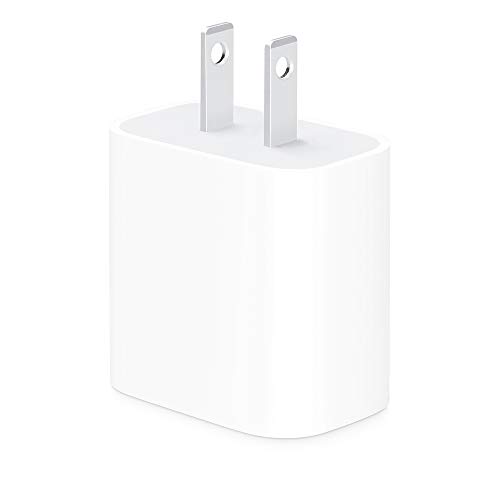
Apple’s own 20W brick is the safe default for anyone deeply invested in the Apple ecosystem. It pairs well with iPad Pro 11-inch and 12.9-inch (3rd gen and later) and unlocks the fast-charge feature on iPhone 8 and newer models. The 2-pack format means you can keep one at a desk and one in a travel pouch without re-buying.
There is nothing flashy here, and that is the point. You are paying for predictable behavior, not for ports or extra wattage. If you mostly live in the Apple ecosystem and want a brick that “just works” with your devices, it is a sensible fit. It is noticeably less versatile than the multi-port picks further down.
Useful Highlights
- Official Apple firmware means broad iPhone and iPad compatibility
- 20W output matches the iPhone fast-charge ceiling
- Two-pack format adds convenience for home and travel
- Compact square shell fits well behind furniture
Honest Caveats
- Single USB-C port with no extra flexibility
- Charging cable is not included in the box
Quick Facts
Right Fit For
iPhone and iPad owners who value first-party Apple compatibility over additional ports or wattage.
Skip It When
The Apple 35W Dual USB-C Compact Adapter suits you better when you regularly charge an iPhone and an iPad at the same desk.
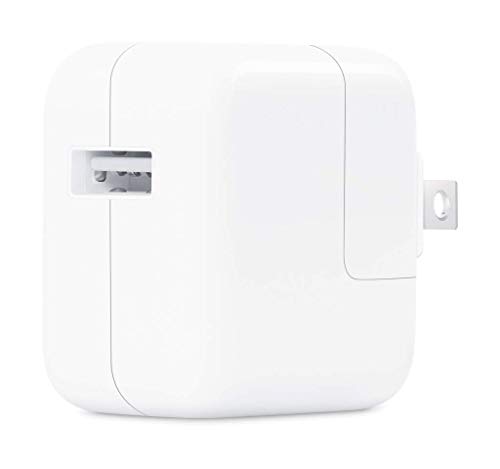
The 12W brick is an older piece of Apple’s accessory catalog, and it is aimed squarely at people still living with Lightning-based devices. It uses a USB-A output rather than USB-C, which matters if you have legacy cables lying around. It charges an iPhone, an older iPad, an Apple Watch, or an iPod with a Lightning connector.
This is not the brick you buy to chase fast-charge speeds. At 12W, it is roughly half the throughput of the Apple 20W. For anyone with a current iPhone 15 or later, this brick is a step backward, and a USB-C 20W pick will serve you far better.
Key Advantages
- Native support for Lightning-based iPhones and iPads
- Compact and stable shape
- Reliable first-party build quality
Less Ideal Details
- USB-A port feels dated against current USB-C ecosystems
- 12W output is slower than modern fast-charge bricks
- Cable sold separately
Who Should Grab It
Owners of older iPhones, iPads, and Apple Watches who need a replacement brick and already own Lightning cables.
Consider Something Else When
The Anker PowerPort III 20W is a smarter upgrade for anyone running iPhone 15 or newer on a USB-C cable.
This is the brick to consider when one port stops being enough. Two USB-C ports give you room to charge an iPhone and an iPad, or a phone and an Apple Watch, from a single outlet. At 35W total, it can also keep a MacBook Air topped up while a phone grabs its share on the second port.
The folding prongs keep the shell pocketable, and Apple leans on it specifically for MacBook Air charging. The trade-off is wattage splitting. Plug in two power-hungry devices and each port dips lower. For mixed phone-plus-light-laptop use, the math works fine.
Practical Advantages
- Two USB-C ports cover phone-plus-tablet workflows
- 35W ceiling supports MacBook Air charging
- Folding prongs make it travel-friendly
- Apple ecosystem tuning for iPhone, iPad, and MacBook Air
Trade-Offs
- Total wattage is shared, so two laptops slow each other down
- Cable sold separately
Quick Facts
Who It Suits Best
Apple users who want to charge two devices at once, especially a phone and a MacBook Air, from one outlet.
Reach For A Different Pick When
The Auorld 100W 5-Port Charger Block fits better when you run a laptop, two phones, and accessories off the same wall socket.
The Nano 30W steps up the wattage without giving up the small footprint that defines the Nano line. GaN (gallium nitride) components let Anker shrink the internals, so this brick lands somewhere between a phone charger and a small laptop charger in capability. 30W is enough to fast-charge an iPhone, top up an iPad, and even keep a smaller laptop from draining.
For travelers who want one brick to cover phone, tablet, and ultrabook duties, it lands in a sweet spot. Compared to the 20W Anker bricks earlier in this list, the extra 10W is meaningful when a tablet or a Steam Deck-style handheld is in the mix.
Notable Gains
- 30W output covers phones, tablets, and lighter laptops
- GaN internals keep the shell small
- Foldable plug for travel pouches
- Single USB-C port keeps the design simple
Things To Consider
- Cable sold separately
- Single port means no simultaneous device charging
Perfect Match For
Travelers carrying a phone and a small laptop or tablet who want one brick to handle both without filling a bag.
A Better Fit Elsewhere
The Anker 45W USB-C Charger Block suits heavy users better when Super Fast 2.0 charging on a Samsung flagship matters more than portability.
This is the brick to reach for when a household runs more devices than wall outlets. With four USB-C ports and one USB-A port per charger, plus a 2-pack in the box, you can place one in the living room and one in a home office without splitting a hair. Each USB-C port can push up to 65W, and the brick supports PD3.0, QC3.0, and PPS protocols.
The catch is shared power. With five ports drawing at once, the per-port output drops. PPS (programmable power supply) helps because it negotiates a more efficient voltage curve with compatible phones, especially recent Galaxy flagships. For a couple or a small family, this clears the cable mess.
The Practical Payoff
- Five ports per brick reduce the need for multiple wall warts
- 2-pack covers multiple outlets or rooms
- 100W total ceiling supports laptop charging on a single port
- Multi-protocol support covers iPhone, Galaxy, and Pixel fast-charge standards
Worth Noting
- Per-port output drops when all five ports are in use
- Larger shell than single-port bricks, harder to hide behind furniture
- Cables not included
Quick Facts
Built With In Mind
Families, roommates, or anyone running four-plus devices off a single wall outlet at the same time.
Where Another Pick Suits Better
The Anker Nano 30W GaN USB-C Charger is the better carry-on when you travel light and only need to charge one device at a time.
Anker’s 45W brick targets Super Fast Charging 2.0, which is the spec that unlocks the top charging speed on the latest Galaxy flagships. At 45W, you can drive a Galaxy S24 Ultra from low to roughly half in around twenty minutes. The 2-pack format covers a home-and-office setup without buying twice.
MultiProtect safety features handle high-voltage and short-circuit events behind the scenes, which is the kind of detail that earns trust over years of daily use. Compared to the 20W Anker bricks earlier in this list, the 45W model gives Samsung owners noticeably faster top-ups.
Why It Works Well
- 45W output unlocks Galaxy Super Fast Charging 2.0
- 2-pack adds convenience for two locations
- MultiProtect safety suite covers voltage and short-circuit events
- Single USB-C port keeps the build slim
Soft Spots
- Cable sold separately
- Single port limits simultaneous charging
Quick Facts
Whose Shelf It Belongs On
Samsung Galaxy owners who want the fastest supported charging on their current flagship without paying laptop-charger prices.
Not Your Match When
The Auorld 100W 5-Port Charger Block is the better buy when you need to charge a laptop, two phones, and accessories at the same time.
This Auorld bundle pushes the same multi-port formula as pick 7 but with an explicit MacBook Pro tuning note. Each USB-C port can deliver up to 65W, and the total ceiling is 100W. With PPS, PD3.0, and QC3.0 on the protocol list, the brick negotiates with both phones and modern laptops without manual setup.
The 2-pack layout works well for a household that runs a laptop, two phones, and a few accessories. The honest read is that single-port laptop users will not benefit from the extra ports, so this is really for mixed-use desks and family rooms where one outlet needs to do real work.
What Works In Its Favor
- MacBook Pro 14-inch class charging on a single USB-C port
- 2-pack spreads charging coverage across two rooms
- Multi-protocol support covers iPhone, Pixel, and Galaxy
- Five ports handle phones, tablets, and accessories at once
Possible Compromises
- Heavier and larger than single-port bricks
- Cables not included
Who Will Love This
Hybrid workers and small families who want one outlet to power a laptop, two phones, and accessories at the same time.
Wrong Turns To Avoid
The Anker Nano 30W GaN USB-C Charger is the right call when you travel light and only need to charge one device on the road.
Functionally, this yellow Auorld bundle mirrors pick 9: four USB-C ports, one USB-A, 100W total ceiling, and a 2-pack. The yellow shell earns its place in a busy household where everyone is hunting for the charger, or in a dorm room where unlabeled black bricks tend to wander off. Bright housings also help you remember to unplug before leaving.
Charging speeds match the rest of the Auorld line, with PPS support helping recent Galaxy and Pixel phones negotiate efficient voltage curves. If the color matters to you, it is a small thing. If you do not care, pick 9 is functionally identical and easier to blend into a tidy shelf.
Where It Excels
- Bright yellow finish stands out in shared rooms
- Five ports per brick cover phones, tablets, and laptops
- 2-pack covers two rooms or a home-plus-office pair
- PPS, PD3.0, and QC3.0 protocol support
Practical Considerations
- Bolder color may clash with minimalist decor
- Cables not included
- Larger footprint than single-port bricks
Right Fit For
Shared spaces like dorm rooms, family kitchens, or Airbnbs where a bright color helps track the charger.
Reach For A Different Pick When
The Auorld 100W 5-Port Charger Block with MacBook Support suits you better when neutral coloring matches the room.
What To Weigh Before Choosing A Charging Brick
Wattage is the headline number, but the right brick depends on what you plug in. A 20W USB-C brick handles a modern iPhone or Pixel at full fast-charge speed, which is plenty for overnight top-ups and quick boosts at a coffee shop. Heavier devices like tablets and lighter laptops want 30W to 45W to avoid slow charges.
Port count changes how the brick fits your life. Solo travelers usually prefer one port to keep the build small. Households and home offices benefit from multi-port bricks because one outlet can cover phones, tablets, and accessories without a power strip stacked with wall warts.
Cable situation matters. Most bricks in this roundup ship without a cable, so plan a USB-C cable that supports the wattage you plan to use. A 60W-rated cable is fine for 45W bricks; older cables may throttle charging speeds.
Wattage Range And Real Use
20W is enough for any current iPhone and most Android phones. 30W opens the door to iPad Pro, Galaxy Tab, and lighter ultrabooks. 45W and up unlocks Samsung Super Fast Charging 2.0 and small-to-mid laptop charging. Going higher than 65W on one port is only useful if you charge a laptop regularly.
Port Setup Versus Footprint
Single-port bricks are smaller and best for carry-on bags. Multi-port bricks are heavier and wider, but they replace several wall warts. If you travel light, single-port is the honest answer. If you charge everything at a desk, multi-port reduces clutter.
Protocol Support
PD (Power Delivery) is the USB-C standard for fast charging. QC (Quick Charge) is the older Android standard. PPS is a newer refinement that adjusts voltage in finer steps, which helps recent Galaxy and Pixel phones charge more efficiently. A brick that lists PD3.0, QC3.0, and PPS covers most current phones.
Common Slip-Ups And Upgrade Payoffs
Pitfalls Shoppers Hit
A common trap is buying a high-wattage brick that pairs with a low-wattage cable, which silently limits charging speed. Another is picking a multi-port brick without checking per-port output, since some bricks throttle heavily when every port is in use. Buyers sometimes over-index on wattage and ignore ports, then realize they still need a second brick for a tablet.
Where The Extra Money Goes
Higher-tier bricks typically add multi-port support, more refined safety monitoring, or GaN-based miniaturization. The safety systems handle voltage spikes and overheating behind the scenes. Paying more makes sense when you charge laptops, run multiple devices, or want a brick that lasts through years of daily travel.


