

Cables multiply quietly. You start with an iPhone brick, add an iPad charger for travel, then an Apple Watch puck shows up, and suddenly three outlets behind the nightstand are spoken for. A solid charging hub pulls that mess back into one footprint, which matters for anyone sharing a small desk, kitchen counter, or family charging shelf where outlets run out before devices do.
The Shortlist At A Glance
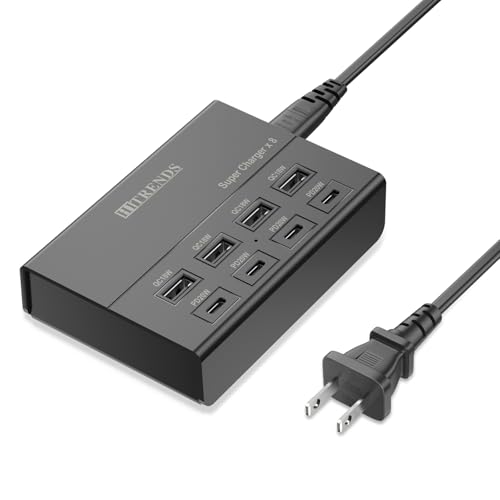
HITRENDS 60W PD 8-Port Charging Station

TESSAN 65W 9-in-1 USB Charging Station

Moezuti 20-Port 600W Charging Station

Pravish 180W GaN 6-Port Charging Station

Dirose Echo Spot Stand Charging Station

GEEKERA Qi2.2 25W 3-in-1 Charger Station

BREEKET GaN 100W 6-Port USB Charging Hub
A Breakdown Of The Leading Choices
The HITRENDS hub is built for the family that runs both older gear and the latest iPhones side by side. With four USB-C PD20W ports and four USB-A QC18W ports on a single desktop block, you can top up an iPhone 17 alongside an older Lightning-era iPad, a Galaxy, and a pair of earbuds without juggling separate bricks.
The 5-foot integrated cable gives you some reach behind a dresser or along a kitchen counter, which is a quiet perk. Owners commonly report that the smart power allocation keeps fast charging consistent even when every port is busy, so no device gets pushed to a trickle.
What Works In Its Favor
- Eight mixed ports cover old and new cables without adapters.
- PD20W on USB-C handles modern iPhone and iPad fast charging.
- Single power brick frees up wall outlets behind furniture.
- Smart distribution keeps speeds steady across eight ports.
- Long 5-foot cord reaches awkwardly placed outlets.
Trade Offs Worth Noting
- The plastic shell runs warm under sustained eight-port load.
- No USB-C cables included, so you supply your own.
Key Specs
Best Suited To
Households blending new USB-C iPhones with older USB-A accessories and tablets on a shared family charging shelf.
Look Elsewhere When
You need laptop-class 45W or 65W per port for a MacBook, in which case the Pravish 180W GaN hub covers that use case.
The TESSAN station leans into portability with a vertical tower design that takes up roughly the footprint of a phone. Nine ports handle iPhones, iPads, and even a MacBook Air at modest wattage, which makes it a sensible pick for hotel desks and cruise-ship cabins where outlet count is limited.
The 65W total output means heavier laptops charge slower than on a dedicated brick, though phones and tablets still pull their rated fast-charge speeds. Owners commonly toss this in a carry-on because the palm-size shell fits into a backpack sleeve without sacrificing port count.
What It Does Well
- Nine ports in a palm-sized vertical body save desk space.
- 65W covers a MacBook plus several iPhones at once.
- Carry-on friendly for travel and hotel nights.
Honest Caveats
- 65W shared across nine ports throttles under heavy load.
- Vertical orientation tips easily on soft luggage.
- No included wall adapter means you bring your own.
Made For
Frequent flyers and remote workers who need one compact hub for hotel desks, AirBnBs, and shared coworking spaces.
Swap It Out When
You stay home and need laptop-class sustained power, where the Pravish 180W GaN hub makes more sense.
The Moezuti tower is the kind of station you see on a classroom charging cart. Two PD65W USB-C ports sit alongside 10 PD30W USB-C and 8 QC20W USB-A ports, and the package even ships with 10 cables so you can plug in a full row of student iPads without buying extras.
600W of shared output is overkill for a single user, though it shines the moment several people need power. Compare that to the HITRENDS above: that hub handles a family of five, while the Moezuti handles a room of twenty.
Everyday Perks
- 20 ports handle a full classroom, lab, or event setup.
- 10 cables ship in the box for immediate use.
- PD65W on two USB-C ports tops up a MacBook fast.
- Mixed port types support both new and older devices.
Practical Considerations
- The tower is large and heavy, so it stays put on a shelf.
- 600W draw means a dedicated outlet is recommended.
- Overkill for a single user or couple.
Who Will Love This
Schools, training offices, Airbnb hosts, and large families running simultaneous iPad or Chromebook fleets.
Skip It When
You live solo or with one other person, where the BREEKET GaN hub keeps things simpler on a smaller shelf.
The Pravish station is the only one in this lineup with three truly independent 45W USB-C outputs, which is the kind of spec you notice once you start charging a MacBook Air and an iPad Pro at the same desk. GaN technology keeps the shell smaller and more heat-tolerant than older silicon chargers, so the unit stays quiet on a hard-working desk.
Three USB-A ports round out the lineup for AirPods, an Apple Watch puck, or older accessories. You may find six ports limiting in a household with five phones, but for a focused workstation the per-port power is genuinely useful.
What Makes Sense
- Three independent 45W USB-C ports handle laptops and tablets.
- GaN design runs cooler under sustained load.
- 180W total output matches pro desk workflows.
- Compact desktop footprint fits alongside a monitor.
Trade Offs To Consider
- Six ports total may run short for large families.
- Higher per-port power comes at a higher cost tier.
Feature Snapshot
Whose Shelf It Belongs On
Prosumers and remote professionals charging a MacBook Air or Pro alongside an iPad and iPhone every day.
A Better Fit Elsewhere
Households charging many older USB-A accessories should look at the HITRENDS 8-Port station for broader compatibility.
The Dirose stand solves a very specific problem: an Echo Spot sits on the dock, and a USB-C plus USB-A port on the base lets you drop in a charging cable for your phone and earbuds. The adjustable angle keeps the Spot’s screen visible while the side ports stay within reach.
Two ports is a slim offering compared to the multi-port hubs above, so this fits a nightstand or kitchen counter rather than a family charging shelf. Owners commonly pair it with a short 1-foot cable for the phone slot.
Practical Pluses
- Integrated Echo Spot stand with viewing angle adjustment.
- Two extra ports handle a phone and earbuds.
- Compact footprint suits a nightstand or counter.
Small Caveats
- Only two ports, so it is not a family hub.
- Power adapter not in the package.
- Niche use case beyond Echo Spot owners.
Perfect Match For
Anyone with an Echo Spot who wants a tidy bedside combo dock for the speaker and a phone.
Consider Something Else When
You want broad multi-device charging without the speaker dock, in which case the GEEKERA Qi2.2 station fits a similar nightstand role more flexibly.
The GEEKERA wireless station takes a different route from the wired hubs above. Qi2.2 magnetic alignment (the newer wireless standard with stronger magnets and faster speeds than Qi1) snaps an iPhone into place at 25W, which is meaningfully quicker than older 7.5W pads still common on nightstands.
The 3-in-1 layout covers an iPhone, an Apple Watch, and AirPods in a single small slab. For a couple sharing a nightstand, this is a tidier solution than a 6-port hub, and the magnetic alignment means no fumbling for a cable port in the dark.
Notable Upsides
- Qi2.2 magnetic alignment at 25W charges noticeably faster.
- 3-in-1 layout handles iPhone, watch, and earbuds.
- Cable-free design suits a minimalist nightstand.
Honest Caveats
- Wireless only, so it cannot fast-charge a laptop.
- Qi2.2 magnets require a MagSafe-compatible iPhone.
- Limited to three devices at once.
Right Fit For
Anyone with a recent MagSafe-compatible iPhone who wants a sleek, cable-light nightstand dock.
Not Your Match When
You need to charge older iPhones or multiple laptops over cables, where the Pravish 180W hub covers more ground.
The BREEKET hub is the most apartment-friendly pick on the list. Three USB-C PD ports at 20W each, three USB-A ports at 18W each, and a 100W GaN ceiling fit inside a brick that tucks behind a monitor stand or shares a corner of a tiny desk.
Unlike the Pravish above, the three USB-C ports share their 100W budget, so running all three at once drops per-port output. For most one-or-two-person setups that rarely matters, and the size advantage is real.
Useful Touches
- Compact GaN brick fits tight desks and shelves.
- 100W max output covers phones, tablets, and light laptops.
- Mixed USB-C and USB-A ports handle a varied device mix.
Worth Bearing In Mind
- Shared 100W budget throttles under full six-port load.
- No cables included in the package.
- Plastic shell runs warm under sustained load.
Quick Facts
Built With In Mind
Solo professionals, students, and couples in small apartments where every square inch of desk space counts.
Reach For A Different Pick When
You need classroom-level density or 20 simultaneous ports, in which case the Moezuti 20-Port tower handles that scale.
Choosing The Right Hub For Your Apple Setup
How Many Devices And What Kind?
Start with a quick count of what actually needs charging each night: phones, tablets, earbuds, a watch, maybe a MacBook. Two-port stations like the Dirose Echo Spot stand cover a speaker plus a phone, while 6-port hubs handle a couple’s full kit. Households with student iPads or Chromebooks should look at 20-port options like the Moezuti before anything else.
Wattage Per Port Versus Total Wattage
A station advertising 100W total can still throttle to slow speeds across six ports at once. Pravish’s three independent 45W USB-C outputs avoid that drop, which matters if a MacBook sits in the mix. For phone-and-tablet-only households, shared wattage is usually fine.
Wired Versus Wireless
Wired hubs still win on speed, flexibility, and price. Wireless stations like the GEEKERA Qi2.2 3-in-1 trade raw speed for a clean nightstand and MagEasy snap-on convenience. Think about where the hub lives: desk = wired, bedside = wireless feels cleaner.
Future-Proofing With GaN And Qi2
GaN (gallium nitride) chargers run cooler than older silicon models and pack more wattage into smaller shells. Qi2.2 wireless adds proper magnetic alignment and faster speeds to wireless charging. Either feature extends the useful life of a hub as your device mix evolves.
Smart Shopping Notes For Charging Hubs
Where Shoppers Go Wrong
The most common slip is buying a hub with too few USB-C ports, then realizing two of those ports are permanently occupied by a MacBook and an iPad Pro. Count your USB-C devices first, then check the USB-A count for older cables. Another trap is chasing advertised peak wattage without checking per-port output, which leads to disappointment when five devices share 60W.
What Separates Premium From Basic
Higher-tier hubs like the Pravish 180W station spend the extra money on independent high-wattage ports, GaN cooling, and better internal components. That translates to faster laptop charging, less heat under sustained load, and longer useful life. For a couple charging a MacBook and an iPhone, the upgrade pays off. For a single iPhone user, the BREEKET or HITRENDS covers the need at a friendlier cost.
Frequently Asked Questions
How Many Ports Do Most Apple Households Actually Need?
A couple with iPhones, an iPad, AirPods, and an Apple Watch typically fills six to eight ports without trouble. Solo users can often manage with three to four ports, while families with student iPads should look at 10 or more.
Can A Charging Station Power A MacBook?
Yes, as long as the station has a USB-C port rated at 45W or higher for a MacBook Air, or 65W or higher for a MacBook Pro. The Pravish 180W hub and TESSAN 65W station both qualify, with the Pravish offering more headroom across multiple ports.
Is Wireless Charging Slower Than Wired?
Generally yes, though Qi2.2 stations like the GEEKERA close the gap with 25W output and magnetic alignment. Wired hubs still win on raw speed and flexibility, especially for laptops and fast top-ups before heading out.
Do These Stations Work With Android Phones Too?
Most USB-C and USB-A hubs charge Android devices that accept standard PD or QC profiles. The exception is the Echo Spot stand, which is designed primarily for the speaker plus a phone, and wireless stations like the GEEKERA require MagSafe-compatible iPhones for magnetic alignment.
How Hot Is Too Hot For A Charging Hub?
Mild warmth under load is normal, especially with GaN and shared-wattage designs. Owners commonly report that sustained heat above what is comfortable to touch signals an undersized hub for the workload, in which case a higher-wattage or independent-port station is the right next step.
Closing Thoughts
Pick the hub that matches the room it lives in. A bedside calls for wireless ease, a family shelf calls for port count, and a pro desk calls for per-port wattage. Any of the seven above handles the daily Apple-device mix well, so the choice comes down to scale and where the cables actually go.


