

A great YouTube channel lives and dies by audio. Viewers will forgive shaky handheld footage and a rough thumbnail, but they bounce fast when voices sound hollow, roomy, or distant. The good news: you don’t need a pro studio rig to sound clean. The category has matured, and there are genuinely capable USB condensers, XLR workhorses, and clip-on wireless lavaliers that deliver broadcast-friendly tone without breaking the budget.
This roundup covers ten picks spanning desktop USB mics, traditional XLR condensers that need an audio interface, and pocket-friendly wireless lavs for vlogging on the move. Each one is mapped to a clear use scenario so you can match your room, your content style, and your comfort with cables.
The Picks In Brief
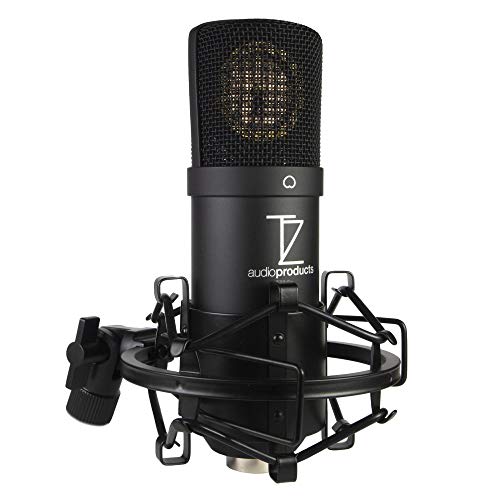
TZ Stellar X2 Large Diaphragm Condenser Mic
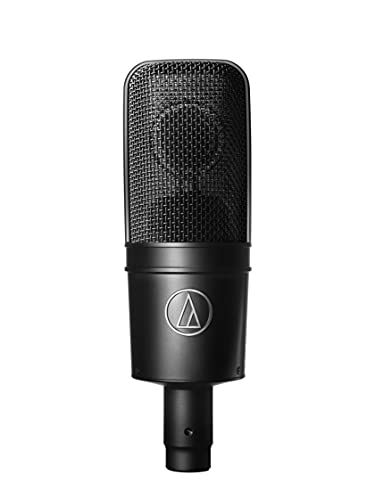
Audio-Technica AT4040 Cardioid Condenser

Blue Yeti USB Microphone Bundle (Blackout)

HyperX QuadCast S RGB USB Mic

Audio-Technica AT2020USB+ Mic

HyperX QuadCast USB Mic (Red LED)

Wireless Mini Lavalier Microphone

RØDE NT-USB Studio-Quality Mic

A41 Wireless Lavalier Mic (2TX)

MAONO Wave T5 Wireless Lavalier
The Details Behind The Selections
The Stellar X2 is the kind of XLR condenser (a studio microphone that uses an XLR cable to send an analog signal to an interface, which then converts it to digital for the computer) that surprises people who assume smooth, podcast-ready tone has to cost serious money. Its large-diaphragm capsule and cardioid pickup (it captures sound mostly from the front while rejecting noise from the sides and back) are tuned for a warm, balanced character rather than the brittle, sibilant top end that plagues many affordable condensers. YouTubers recording narrated videos in a treated closet or spare bedroom tend to find this mic sits comfortably on top of a music bed without constant EQ tweaking.
Because it runs on XLR, you’ll need an audio interface (a small external box that connects the mic to your computer and provides clean power) and a source of phantom power (48V electrical power the interface sends through the XLR cable to run the mic’s internal circuitry). That extra gear adds to the cost, but it also gives you cleaner gain and room to grow into better preamps. Compared to the Blue Yeti later in this list, the Stellar X2 is the choice when you care more about long-form vocal character than grab-and-go convenience.
Strengths Worth Knowing
- Smooth, mix-ready vocal tone that flatters spoken word
- Cardioid pattern that helps reject room noise behind the mic
- Standard XLR connection plays nicely with most audio interfaces
- Large-diaphragm design captures detail without harshness
Points To Note
- Requires an audio interface and phantom power, adding to total cost
- No onboard mute or headphone monitoring on the mic body
Made For
Narrators and educators who already own, or are willing to invest in, an audio interface for cleaner, more flexible recording.
Consider Something Else When
The Blue Yeti USB Microphone Bundle is the smarter match for beginners who want a single USB cable and zero extra gear to get recording.
The AT4040 is Audio-Technica’s long-running studio condenser, and it has earned its reputation by being unusually forgiving on a wide range of voices. Side-address in form factor (you speak into the side of the body rather than the top), it’s built around a tensioned large diaphragm that aims for smooth, natural sound rather than hyped highs. For creators who record long voiceovers, interview segments, or musical performances, that even-handed character is a real asset.
Like the Stellar X2 above, it asks for phantom power and an interface, but the payoff is a low self-noise floor and high SPL (Sound Pressure Level) handling, meaning it can cope with louder sources like guitar cabinets without distorting. Compared to the AT2020USB+ further down, the AT4040 trades USB convenience for a more polished, professional sound and far more headroom.
Benefits That Matter
- Smooth and neutral character suited to voice and instrument work
- Wide dynamic range handles loud and quiet sources gracefully
- Low self-noise (the quiet hiss the mic itself adds to the recording) keeps spoken word clean
- Proven cardioid pattern that rejects off-axis room noise
Trade Offs
- Needs phantom power and a quality interface to sound its best
- Higher upfront investment than USB-only options
Built With In Mind
Vocal-heavy YouTube creators, voice actors, and home recording musicians who want a step-up condenser and already have an interface on hand.
Not Your Match When
The TZ Stellar X2 is a more wallet-friendly XLR alternative if you want a similar character at a lower entry cost.
The Yeti is the mic many creators cut their teeth on, and the Blackout bundle adds a pop filter (a mesh screen that softens the “p” and “b” pops your mouth makes when talking) and a 4-port USB 3.0 hub to the standard package. It plugs straight into a laptop with a single USB cable, so there’s no interface, no phantom power, and almost no learning curve. The metal desk stand and integrated headphone port make it feel like a self-contained mini studio the moment you unbox it.
Its real trick is multiple polar patterns, meaning you can switch how the mic picks up sound: cardioid for one person talking, omnidirectional for group chats, and bidirectional for two-person interviews across a desk. Compared to the HyperX QuadCast further down, the Yeti trades flashy RGB lighting for that flexibility and a more podcast-flavored tone.
Notable Gains
- Plug-and-play USB connection with zero extra gear
- Built-in headphone jack for zero-latency monitoring
- Bundle includes a pop filter and USB hub
- Multiple polar patterns cover solo and interview recording
Honest Caveats
- Large, desk-hogging footprint compared to compact condensers
- Highly sensitive capsule picks up room echo in untreated spaces
- USB-only design leaves no upgrade path to XLR gear
Right Fit For
First-time creators who want one box that ships with the basics and gets them on camera and on mic the same day.
Look Elsewhere When
The HyperX QuadCast S is the better call for streamers who want RGB flair and a smaller desk footprint.
The QuadCast S is the streaming showpiece of this roundup, with fully customizable RGB lighting that adds personality to a Twitch overlay without distracting the eye. Underneath the glow sits a USB condenser with four polar patterns, a built-in anti-vibration shock mount, and a tap-to-mute sensor on top that toggles the mic with a soft tap. The LED ring around the grille doubles as a status indicator, glowing on when the mic is live and off when muted.
For creators broadcasting from a gaming PC, console setup, or Mac, the QuadCast S works across all of those without drivers. Compared to the Blue Yeti above, the HyperX is more compact, more gaming-flavored, and more fun to look at on camera, though the Yeti’s voice is warmer for pure podcasting.
Noteworthy Benefits
- Dynamic RGB lighting creates eye-catching on-camera presence
- Tap-to-mute sensor with LED feedback prevents broadcast mishaps
- Four polar patterns support solo, interview, and group setups
- Built-in shock mount quiets desk bumps and keyboard thumps
Small Caveats
- RGB customization requires HyperX Ngenuity software
- Heavier desk footprint than a simple clip-on lav
Best Suited To
Game streamers and content creators who want a mic that performs well and looks intentional on camera.
Reach For A Different Pick When
The HyperX QuadCast (non-S) is a smart alternative if you want the same core feature set without the full RGB light show.
The AT2020USB+ takes the well-regarded AT2020 studio condenser and translates it into a USB-friendly package with a built-in headphone jack and volume control on the mic body. It delivers a clean, articulate sound that suits spoken word, sung vocals, and acoustic instruments with equal confidence. The onboard headphone output lets you monitor your recording in real time without adapter cables or extra software.
For creators who want studio-style articulation without taking the XLR plunge, this is one of the more refined USB picks in the category. Compared to the RØDE NT-USB further down, the AT2020USB+ leans slightly more neutral, while the NT-USB has a warmer midrange. Either way, the everyday writing or podcast workflow is friendly right out of the box.
Useful Highlights
- Studio-quality articulation straight from a USB cable
- Onboard headphone jack with mix control for live monitoring
- Cardioid pattern that focuses on your voice and rejects side noise
- Sturdy metal build that handles daily desktop use
Things To Consider
- Fixed cardioid pattern means no omnidirectional option for groups
- Stock desk stand is light; many creators upgrade to a boom arm
Right Fit For
Home studio creators and podcasters who want polished, articulate audio from a single USB cable without buying an interface.
A Better Fit Elsewhere
The RØDE NT-USB is the alternate pick if you want a slightly warmer character and the included pop filter out of the box.
The original QuadCast trades the RGB lighting of its S sibling for a steady red glow, and the rest of the feature set stays intact. You still get four polar patterns, the tap-to-mute top sensor, the built-in shock mount, and the same USB plug-and-play simplicity across PC, Mac, PS4, and PS5. For many creators, the static red LED is enough to look intentional on camera without the busy distraction of animated lighting.
The sound profile leans toward the warmer, more broadcast-friendly side, which works nicely for streaming commentary. Compared to the AT2020USB+ above, the QuadCast offers more pickup-pattern flexibility, while the AT2020USB+ has a slightly cleaner studio-style sound.
The Upside
- Tap-to-mute top sensor is fast and reliable during live sessions
- Four polar patterns support solo, interview, and roundtable formats
- Anti-vibration shock mount is built in, not an add-on
- Cross-platform compatibility across PC, Mac, and consoles
Practical Considerations
- Heavier body needs a solid mic arm or stand
- Fixed red LED cannot be dimmed or recolored
Who Should Grab It
Long-session streamers and daily creators who want a robust USB condenser with pro-leaning flexibility and minimal fuss.
Swap It Out When
The HyperX QuadCast S is the alternate pick if you want full RGB customization on top of the same core feature set.
This wireless lavalier (a small clip-on mic that you attach to your shirt or collar, leaving your hands free) is built for the phone-first creator who shoots vlogs and interviews on the move. You clip the transmitter to your shirt, plug the other end into your phone or laptop, and the two pair automatically with no app or Bluetooth menu to wrestle with. The compact size means it disappears on camera, which is exactly what mobile-first YouTubers and TikTok creators want.
The included noise reduction targets the kind of wind and background chatter that ruins outdoor takes. Compared to the A41 wireless lav later in this list, this model is the simpler single-mic option, while the A41 ships with two transmitters for two-person interviews.
The Helpful Details
- Plug-and-play pairing with no app or Bluetooth setup
- Works with phones, tablets, and laptops across iOS and Android
- Compact clip-on design stays out of the camera frame
- Built-in noise reduction helps clean up outdoor takes
Some Limits To Know
- Single-transmitter kit limits you to one on-camera voice
- Wireless range and battery life depend on environment and usage
Perfect Match For
Solo mobile vloggers and TikTok creators who want clean, hands-free audio without hauling a desktop mic kit around.
Another Choice May Suit
The MAONO Wave T5 is a strong alternative if you want a lighter body and broadcast-flavored tone in a similar clip-on form factor.
The NT-USB is RØDE’s take on the all-in-one USB condenser, and it leans into a warm, broadcast-ready character that flatters both spoken word and sung vocals. A side-address design, integrated pop filter, and zero-latency headphone jack make it feel like a mini studio rig right out of the box. It’s also compatible with the iPad using apps like GarageBand, which broadens the use cases beyond the laptop.
For creators who want one mic to handle voiceovers, musical performances, and podcast interviews, the NT-USB is one of the most versatile USB condensers in this price range. Compared to the AT2020USB+ above, the NT-USB has a slightly warmer midrange, while the AT2020USB+ feels a touch more neutral and clinical.
The Value In It
- Warm, broadcast-style tone suited to vocals and voice
- Built-in pop filter reduces plosives without add-on accessories
- Zero-latency headphone monitoring on the mic body
- Works with laptops and iPads for flexible setups
Things To Weigh
- Heavier than typical USB condensers and needs a sturdy mount
- Fixed cardioid pattern limits multi-person pickup options
Whose Shelf It Belongs On
Multi-format creators who record music, voiceovers, and podcasts from the same desk and want one mic to handle all of it.
Skip It When
The Audio-Technica AT2020USB+ is the better fit if you prefer a more neutral, articulate character over warmth.
The A41 ships with two transmitters in a charging case, which makes it purpose-built for two-person interviews, co-hosted podcasts, and creator duos who don’t want to share a single mic. The dual-interface receiver covers both Lightning and USB-C connections, so it works with newer iPhones, Android handsets, tablets, and PCs without juggling adapters.
ENC (Environmental Noise Cancellation) processing helps clean up the kind of background hum that ruins street interviews and outdoor takes. Compared to the Rackwaylo wireless lav earlier in the list, the A41’s biggest draw is that second transmitter, which turns it from a solo vlogging tool into a proper two-host kit.
Key Advantages
- Two transmitters included for two-host interviews
- Dual Lightning and USB-C receiver covers modern devices
- ENC chip helps reduce background noise in busy locations
- Charging case keeps both transmitters topped up on the move
Where It Is Less Suited
- Single receiver means both mics must stay near the host device
- Real-world noise reduction varies with environment
Who Will Love This
Dual-creator podcasters and interview hosts who want a phone-friendly wireless lav setup that handles two voices at once.
Where A Sibling Pick Shines
The Wireless Mini Lavalier Microphone is a simpler, single-voice alternative if you don’t need a second transmitter.
The Wave T5 is the featherweight of the roundup, tipping the scales at roughly nine grams, which makes it easy to forget you’re even wearing a lav. That tiny body packs intelligent noise cancellation aimed at outdoor and street-level recording, plus a transmitter tuned for broadcast-style clarity. Filmmakers, vloggers, and reporters working on location tend to appreciate how little space the kit takes in a bag.
For creators who shoot most of their content outdoors with a phone or compact camera, the Wave T5 is a strong everyday carry. Compared to the A41 wireless lav above, this one trades the second transmitter for a smaller, lighter body better suited to solo creators on the move.
Positive Takeaways
- Lightweight body around 9 grams stays comfortable during long shoots
- Intelligent noise cancellation targets outdoor and street noise
- Tuned for broadcast-style vocal clarity in compact form
- Pocketable kit that travels well in a camera bag
Room For Improvement
- Single-transmitter kit limits you to one on-camera voice
- Wind performance varies in heavy outdoor conditions
Right Fit For
Filmmakers and vloggers who shoot most of their content outdoors and want a barely-there lav that still sounds intentional.
Not Your Match When
The A41 Wireless Lavalier Mic is the stronger pick if you regularly record two-host interviews on the same shoot.
What To Weigh Before Buying Cheap Youtube Microphones
Match The Mic To Your Recording Setup
The first decision is the simplest: where will you actually record? A USB condenser like the Blue Yeti or HyperX QuadCast S is the right call for a desk-based setup with a laptop nearby. An XLR condenser like the TZ Stellar X2 or Audio-Technica AT4040 belongs in a workflow that already includes an audio interface. A wireless lavalier like the MAONO Wave T5 or A41 makes sense if you’re shooting handheld or on the move.
Decide What Sound Character You Actually Want
Condensers (microphones that use a thin electrically charged diaphragm to pick up fine detail, making them sensitive and clear but also more prone to picking up room noise) tend to capture lots of detail, which can be a blessing for vocals and a curse in untreated rooms. Warmer mics like the RØDE NT-USB sit nicely on top of music beds, while more neutral options like the AT2020USB+ flatter spoken word and acoustic instruments. Picking a character that matches your content saves editing time later.
Look For The Right Practical Extras
Things like built-in pop filters, shock mounts, and tap-to-mute sensors are not just nice-to-haves; they shape how often you’ll actually hit record. A mic that ships with these touches in the box is easier to live with day to day, especially if you’re filming solo.
Plan For Headphone Monitoring
A zero-latency headphone jack (an onboard socket where you can plug headphones directly into the mic body to monitor your voice with no delay, so you hear exactly what the mic picks up in real time) on the mic body is a quiet superpower for solo creators. It removes the guesswork from levels and lets you catch plosives and rustling before they ruin a take. USB condensers from Audio-Technica, RØDE, Blue, and HyperX all include this.
Slip Ups And Spend Trade-Offs In This Category
Pitfalls Shoppers Hit
Buying on looks alone is the most common mistake in this category. RGB lighting and flashy finishes do not improve the audio your audience actually hears. Many creators also skip acoustic treatment, then blame the mic for room echo that no condenser can fully hide. Finally, pairing an XLR mic with a noisy or underpowered interface can undo the very clarity you bought the mic for, so match the rest of the chain to the mic’s quality.
Where The Extra Money Goes
Stepping up in this category tends to buy lower self-noise, smoother off-axis rejection (how well the mic ignores sounds coming from the sides and rear), and more flexible pickup patterns. Higher-tier condensers also tend to use better capsule materials and tighter manufacturing tolerances, which shows up as a flatter frequency response (a balanced, even sound across the low, mid, and high ranges, with no single area exaggerated) and more consistent results from unit to unit. For a creator publishing weekly or building toward monetization, that consistency tends to be worth the upgrade.
Frequently Asked Questions
Do cheap YouTube microphones really make a difference over a built-in laptop mic?
Yes, the jump from a built-in laptop mic to even a basic USB condenser is dramatic, with cleaner voice, less room noise, and far better detail. Most viewers will notice the difference within a few seconds of playback.
What’s the difference between USB and XLR microphones?
USB mics connect directly to a computer and need no extra gear. XLR mics use a balanced cable (a cable with three internal wires that cancels out electrical interference over long runs) to send an analog signal to an audio interface, which then converts it to digital for your computer. XLR setups cost more upfront but offer cleaner signal and room to grow.
Are wireless lavalier microphones good for YouTube videos?
They are excellent for vlogs, interviews, and outdoor content where a desktop mic is impractical. The key is keeping the transmitter close to your mouth and the receiver near the recording device.
Do I need a pop filter for a condenser microphone?
A pop filter helps soften the hard “p” and “b” sounds that condenser mics tend to exaggerate. Some mics ship with one built in, like the RØDE NT-USB, while others benefit from an add-on.
Can one microphone work for both voice and music?
Yes, side-address USB condensers like the RØDE NT-USB and the AT2020USB+ are designed to handle both spoken word and sung or acoustic instruments. Matching the mic’s character to your dominant content type usually gives the best results.
Bottom Line
The right cheap YouTube microphone comes down to where you record, how many people share the frame, and how much gear you want to manage. Desktop USB condensers cover most creators, XLR models reward the patience to grow into an interface, and wireless lavaliers unlock mobile workflows that desktop mics can’t match. Pick the format that fits your real shooting life, not just the spec sheet, and your channel will sound better from the very next upload.


