

Colour laserjet printers keep gaining ground in home offices, freelance setups, and growing small businesses because they handle heavy workloads with predictable quality. Color output stays sharp without the ink-soaked mess of a typical inkjet, and pages roll out fast when deadlines stack up.
You’re juggling client decks, shipping labels, school forms, and the occasional photo print, and your current machine groans under the weight. The seven options below cover solo creators, satellite teams, and small offices that need colour, monochrome, or both. Each one is matched to a different kind of workload so you’re not paying for features you’ll never touch.
Your Options, Compared

Xerox C245 Wireless Color All-in-One Printer
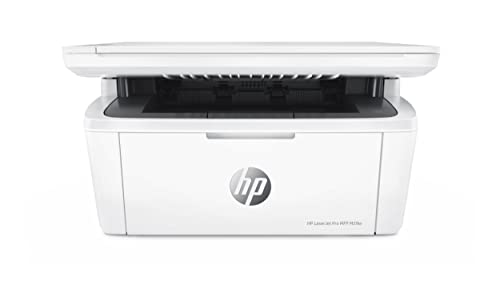
HP Laserjet Pro MFP M29w Monochrome All-in-One

Xerox C240 Wireless Color Laser Printer
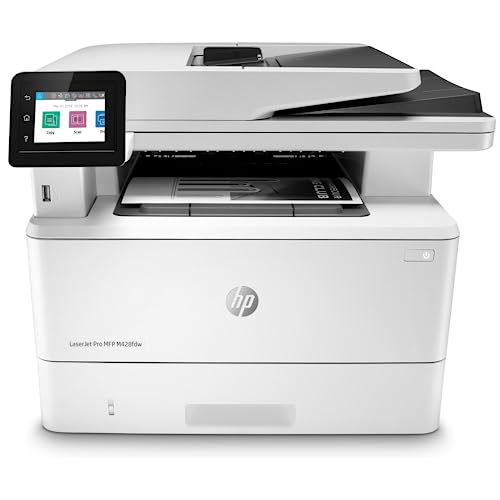
HP LaserJet Pro MFP M428fdw Monochrome All-in-One

HP LaserJet Pro M118dw Wireless Monochrome Laser Printer

HP LaserJet Pro MFP 3101sdw Monochrome All-in-One

HP Color LaserJet Pro MFP M479fdw Wireless Laser Printer
The Picks, Examined More Closely
The Xerox C245 Wireless Color All-in-One Printer pulls double duty in a single body, with print, scan, and copy wrapped into one compact footprint. It targets home professionals and satellite teams who need reliable color output without dedicating an entire corner to office equipment.
Compared to the monochrome HP Laserjet Pro M29w below, the C245 trades compact simplicity for true color output and automatic double-sided printing. Wi-Fi with Apple AirPrint and Mopria support makes phone and laptop printing painless.
Everyday Perks
- Three functions in one machine saves desk space
- Automatic duplex printing cuts paper use in half
- Mobile printing through AirPrint and Mopria
- Color laser output handles charts and reports cleanly
Honest Caveats
- Larger footprint than single-function printers
- Toner replacements cost more than inkjet cartridges
Feature Snapshot
Who It Suits Best
Home professionals and small teams needing color, scan, and copy in a single machine.
Swap It Out When
Color isn’t essential and desk space is tight, where the HP Laserjet Pro M29w fits better.
The HP Laserjet Pro MFP M29w is built for tight spaces where every inch of desk counts. It serves one to three users printing under 1,000 pages monthly, which fits freelancers, remote workers, and small household offices.
Where the Xerox C245 above delivers color, the M29w skips color entirely for a smaller body and lower toner cost. Wireless connectivity and mobile printing keep it modern despite the modest size.
A Strong Showing
- One of the smallest all-in-one lasers on the market
- Wireless printing from phones and laptops
- Ale integration adds voice control convenience
Points To Note
- Monochrome only, no color output
- Lower duty cycle limits heavy monthly use
- Paper tray holds fewer sheets than larger units
Right Fit For
Solo remote workers and small households printing mostly text documents in tight spaces.
A Better Fit Elsewhere
Color reports and presentations matter, where the Xerox C245 earns its place.
The Xerox C240 Wireless Color Laser Printer is a print-only machine aimed at users who don’t need scan or copy. It’s sized for modern freelancers and home offices that print often but rarely scan.
Strip out the scanner bed and the C240 becomes more affordable than its sibling C245 above, while keeping the same color engine. For someone who already has a dedicated scanner or uses a phone app, that trade-off pays off.
Real Benefits
- Affordable entry into color laser printing
- Compact body fits smaller workstations
- Wireless with AirPrint and Mopria support
- Dual-band Wi-Fi for stable connections
Trade-Offs
- No scan or copy functions built in
- Toner cost is the main ongoing expense
Quick Facts
Best Suited To
Freelancers and solo creators who print often but rarely scan or copy.
Consider Something Else When
Scanning and copying are routine tasks, where the Xerox C245 saves buying a separate scanner.
The HP LaserJet Pro MFP M428fdw targets growing businesses that need print, scan, copy, and fax in one machine. Built-in Ethernet alongside wireless makes it friendly to office networks with multiple users.
Compared to the HP M118dw below, the M428fdw adds scan, copy, fax, and a customizable control panel for workflow shortcuts. HP Wolf Pro Security sits at the firmware level to help protect sensitive documents.
Useful Highlights
- Ethernet and Wi-Fi for flexible office networking
- Automatic two-sided printing saves resources
- Security features embedded in firmware
- Customizable control panel automates repetitive tasks
- Print, scan, copy, and fax in one body
Things To Consider
- Monochrome only, no color output
- Larger footprint needs dedicated shelf space
Feature Card
Made For
Small offices and growing teams handling sensitive paperwork and steady monthly volumes.
Reach For A Different Pick When
Color output is part of the workload, where the HP Color LaserJet Pro MFP M479fdw makes more sense.
The HP LaserJet Pro M118dw is built for one to three users who print up to 2,000 pages monthly without color needs. It focuses on speed and duplex efficiency rather than multi-function versatility.
Where the M428fdw above adds fax and security features, the M118dw keeps things lean and fast. A 250-sheet input tray means fewer reloads during long print runs.
What Pays Off
- Up to 30 pages per minute output
- Automatic two-sided printing included
- 250-sheet input tray reduces reloads
- Mobile printing through the HP Smart app
Minor Gripes
- No scan, copy, or fax functions
- Monochrome output limits report formatting
Spec Overview
Whose Shelf It Belongs On
Text-heavy offices and home workers running 1,000–2,000 monochrome pages monthly.
Where Another Pick Suits Better
Scanning and copying are daily tasks, where the HP LaserJet Pro MFP M428fdw is the upgrade path.
The HP LaserJet Pro MFP 3101sdw targets small teams sharing one printer across multiple users. Wireless setup and remote management through a single dashboard make multi-user life easier.
It’s a newer design that takes the strengths of the M428fdw above and streamlines setup for shared spaces. High-speed monochrome printing keeps up with steady team demand.
Strengths Worth Knowing
- Single-dashboard management for multiple locations
- Automatic duplex keeps paper use efficient
- Wireless setup supports mobile and laptop printing
- All-in-one design saves buying separate machines
Trade-Offs
- Monochrome output only
- Setup may need IT help on larger networks
The Right Fit
Small teams sharing one printer in a satellite office or branch location.
Skip It When
Color output drives your daily work, where the HP Color LaserJet Pro MFP M479fdw pulls ahead.
The HP Color LaserJet Pro MFP M479fdw is the top-tier color option on the list, aimed at businesses where color quality and document security matter equally. Print, scan, copy, and fax combine in one feature-rich body.
It sits above the Xerox C245 and C240 reviewed earlier, adding workflow automation and stronger security. Wireless and Ethernet connectivity fit a variety of office configurations.
Where It Delivers
- Full color laser output with sharp text and graphics
- Automated workflows save time on repeat tasks
- Strong security features protect sensitive documents
- Print, scan, copy, and fax in one machine
- Wireless and Ethernet for flexible setup
Softer Spots
- Higher toner cost than entry-level color lasers
- Larger footprint than compact home units
Core Details
Perfect Match For
Color-driven businesses and offices needing print, scan, copy, and fax in one secure machine.
Look Elsewhere When
Budget is tight and color isn’t essential, where the Xerox C240 covers the basics.
What To Weigh Before Picking a Colour Laserjet Printer
Choosing between colour laserjet printers comes down to matching the machine to your real workload. Think about how many pages you print monthly, whether colour appears on most documents, and how much desk space you can spare.
Colour output is the headline feature, but monochrome laser printers often deliver faster text printing at a lower toner cost. A colour model makes sense if your work involves charts, presentations, flyers, or client-facing materials. If your pages are mostly text, a monochrome unit saves real money over time.
Connectivity matters more than people expect. Wireless printing with Apple AirPrint and Mopria lets your phone, tablet, and laptop send jobs without installing drivers. Built-in Ethernet is worth having if the printer sits on a shared office network with several users.
Duty cycle tells you how much monthly volume a printer is built to handle. A small-office printer rated for 1,000 pages monthly isn’t ideal for a team pushing 5,000. Match the cycle to your workload, and you’ll avoid early wear.
Key Considerations Across These Picks
Common Slip Ups To Sidestep
The most common mistake is buying colour when you only print text. Monochrome lasers are faster, cheaper to run, and typically smaller. On the flip side, picking a compact monochrome unit when colour drives your business leads to outsourcing print jobs and inflated costs over time.
Another trap is ignoring total ownership cost. A cheap printer can carry expensive toner cartridges, while a higher-priced model uses high-yield cartridges that drop the per-page cost. Look at consumables, not just the initial sticker, before committing.
Where The Extra Money Goes
Higher-tier models like the HP Color LaserJet Pro MFP M479fdw add workflow automation, stronger security, and faster print engines. For a single user printing 200 pages monthly, those extras stay idle. For a team of five pushing thousands of pages with sensitive client data, the upgrade pays for itself through saved hours and fewer security headaches.
Frequently Asked Questions
What is a duty cycle?
A duty cycle is the maximum number of pages a printer is designed to handle in a month without extra wear. It’s a useful guide for sizing a printer to your workload.
Do colour laser printers dry out like inkjets?
No, colour laser printers use toner, which is a dry powder that doesn’t dry out. You can leave them idle for weeks without clogged printheads.
Are colour laser printers good for photos?
They’re decent for documents with graphics and charts, but photo enthusiasts still get better results from a dedicated photo printer. Laser toner lays down colour differently than inkjet droplets.
How long does toner last?
Most toner cartridges are rated for 1,000 to 6,000 pages depending on the model and whether it’s a standard or high-yield cartridge. High-yield cartridges cost more upfront but drop the per-page cost.
Can I print from my phone?
Most colour laser printers on this list support mobile printing through Apple AirPrint, Mopria, or vendor apps. Wireless setup is straightforward on current models.
Final Verdict
The right colour laserjet printer depends on what your workday actually looks like. Solo creators and freelancers tend to thrive with the Xerox C240 or C245, while small teams benefit from the M428fdw or M479fdw. Match the machine to your volume, your colour needs, and your available space, and the printer fades into the background where it belongs. Pick the one that fits today, and it’ll quietly do its job for years to come.


