

Your monitor’s built-in speakers tell only half the story. Films lose their punch, gaming sessions sound thin, and long video calls leave you leaning in to catch every word. A dedicated computer sound bar solves that in a single, low-profile unit that tucks beneath your display without turning your desk into a cable jungle.
The trick is matching the bar to your setup: a casual browser needs something simple and USB-powered, while music lovers and gamers want real stereo separation, deeper bass, and multiple inputs. We looked at ten options across budgets, sizes, and feature sets, weighing connectivity, driver configuration, and how each one fits on a real-world desk. Here’s the shortlist worth your attention.
The Essentials At A Glance

BESTISAN Computer Speakers with Bluetooth Mode

Nylavee Hi-Res Desktop Speakers with LDAC
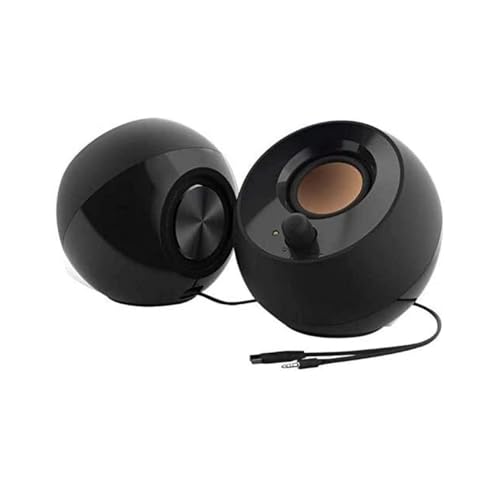
Creative Pebble 2.0 USB Desktop Stereo Speakers
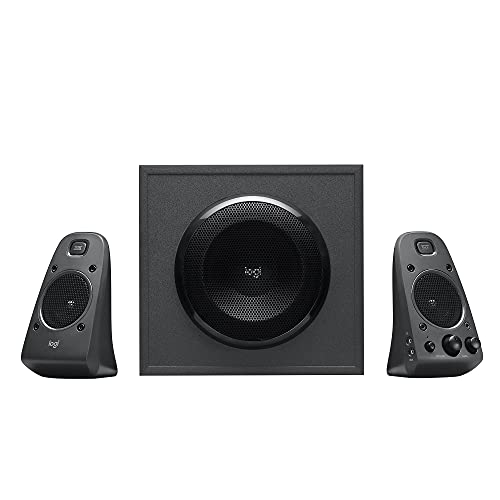
Logitech Z625 THX Certified 2.1 Speaker System

Bluedee Rechargeable Computer Sound Bar

Nylavee PC Speakers with 6 Lighting Modes
AOC Detachable Computer Speakers

Nylavee 4-Driver PC Sound Bar with Mic
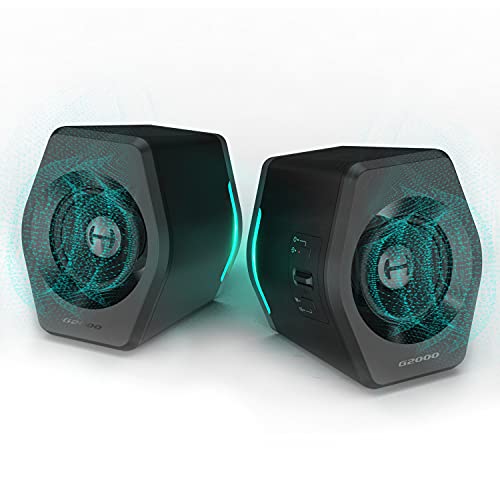
Edifier G2000 32W PC Gaming Speakers

LENRUE Under Monitor Sound Bar
The Strengths Of Each Pick
These BESTISAN speakers pull double duty as a wired desktop pair and a wireless Bluetooth setup, which makes them a natural fit for desks where phones, tablets, and a PC all take turns pumping out audio. The white housing looks clean against lighter setups, and the powered monitor design means no extra amp on your desk.
Unlike the single-cable Creative Pebble that opens this list later, this pair gives you RCA and optical-style flexibility for older gear. Owners commonly pair them with both laptops and gaming consoles in the same room.
Notable Upsides
- Bluetooth mode lets you stream from a phone without unplugging your PC.
- Multiple wired inputs cover legacy consoles and older audio sources.
- Powered design removes the need for a separate amplifier on a tidy desk.
- The white finish blends well with bright, modern workspace aesthetics.
Things To Consider
- The wired and wireless paths share the same speaker, so swapping sources mid-session can interrupt playback.
- Bluetooth compression can flatten fine detail compared to a wired Hi-Res bar like the Nylavee LDAC model further down.
Who It Suits Best
Folks juggling a PC, phone, and an older console on one desk, who want one speaker set that handles all three without cable juggling.
Look Elsewhere When
You care more about high-resolution music detail than wireless convenience, in which case the Nylavee Hi-Res Desktop Speakers with LDAC are a stronger match.
LDAC is a Bluetooth codec that streams roughly three times more audio data than standard Bluetooth, and these Nylavee speakers lean in hard on that detail. Pair them with a compatible Android phone and you get noticeably richer wireless playback than the BESTISAN above.
The wired path is just as serious: a silk dome tweeter and a glass fiber mid-bass driver in each cabinet handle vocals and bass with real separation. Bass and treble knobs sit on the front, so you can shape the sound without diving into software.
What Pays Off
- LDAC support unlocks high-resolution wireless audio on supported Android devices.
- USB Audio input at 96kHz/24bit gives a true wired Hi-Res path for PC listeners.
- Dedicated bass and treble knobs make at-desk tuning quick.
- Front-panel headphone jack lets you switch to private listening without reaching behind your PC.
Worth Noting
- The Hi-Res LDAC experience is limited to compatible Android phones, so iPhone owners won’t see the full benefit.
- These bookshelf cabinets take up more desk depth than a slim under-monitor bar like the LENRUE further down.
Feature Snapshot
Made For
Listeners who stream Hi-Res music from a supported Android device or play lossless files from a PC and want a near-audiophile desktop rig.
Consider Something Else When
You mostly watch streaming video and want a tidier under-monitor footprint, where the LENRUE Under Monitor Sound Bar fits better.
Creative’s Pebble 2.0 takes the most boring part of owning speakers, the cables, and quietly removes it. A single USB cable handles both power and audio, so you plug one thing into your laptop and you’re done. The orb-shaped cabinets look more like a desk toy than a serious audio upgrade.
The drivers sit at a 45° upward angle, aimed at your ears when the speakers rest flat on a desk. That’s a small detail that makes a real difference during long listening sessions, since ear-level delivery keeps vocals clear without pushing volume.
Key Advantages
- Single USB cable cuts desk clutter for laptop users and minimalists.
- Elevated 45° driver angle projects sound toward the listener at seated height.
- Rear-facing passive radiators add real low-end weight from a tiny cabinet.
- Compact spheres fit beside thin-bezel monitors without crowding the screen.
Trade Offs
- USB-only power means no optical or RCA inputs for older consoles or TVs.
- Power output sits well below the Logitech Z625 covered later, which matters in open-plan offices.
Best Suited To
Anyone working from a small laptop-centric desk who wants noticeably better audio than built-in speakers with zero setup effort.
A Better Fit Elsewhere
You host multiplayer sessions and need room-filling volume, where the Logitech Z625 2.1 system is a better match.
The Logitech Z625 is the heaviest hitter in this roundup, and it earns that distinction the honest way: a 2.1 layout (two satellites plus a dedicated subwoofer) and a peak power rating aimed at filling a full room, not just a desk. THX certification means the system passed a set of distortion and frequency-response tests, which is rare at this category.
Compared to the compact Creative Pebble above, this setup trades desk neatness for genuine cinema-grade rumble. Optical, 3.5mm, and RCA inputs all run at once, so three devices stay connected without swapping cables.
What It Does Well
- Dedicated subwoofer delivers deep low-end that small 2.0 bars can’t reproduce.
- Three inputs run simultaneously, keeping a PC, console, and TV all hooked up.
- THX certification confirms a tested baseline for distortion and tonal balance.
- Wired control pod keeps volume and input switching within easy reach.
Points To Note
- The subwoofer needs floor placement and adds bulk that minimal setups can’t absorb.
- Peak power ratings tend to overstate real-world listening levels, so set expectations accordingly for apartments.
Key Specs
Who Will Love This
Movie watchers and bass-loving gamers who want full-room presence and don’t mind a subwoofer on the floor.
Skip It When
You sit in a small apartment and can’t accommodate a separate subwoofer, in which case the Edifier G2000 keeps a smaller footprint.
The Bluedee sound bar stands out for a single reason: it runs on a built-in battery. That changes where you can place it, since you’re not chained to a wall outlet or a USB port on your PC. Move it from desk to kitchen to bedside without re-plugging.
Bluetooth 5.3 brings the wireless side up to a current standard, which uses less power and holds a steadier connection than older Bluetooth versions. A 3.5mm AUX input covers wired sources when battery life matters.
A Strong Showing
- Rechargeable battery frees the bar from outlet placement and reduces desk cabling.
- Bluetooth 5.3 uses less power and resists dropouts compared to older versions.
- Dual full-range drivers paired with tweeters aim for balanced playback rather than bass-heavy tuning.
- A 3.5mm AUX fallback covers wired sources when conserving battery.
Honest Caveats
- Battery-powered output typically runs lower than mains-powered bars like the Logitech Z625.
- Charging between long sessions becomes routine if your desk stays active for eight hours or more.
Right Fit For
People who switch workspaces or want a sound bar they can carry to the couch, kitchen, or patio without tethering to an outlet.
Swap It Out When
You sit at a fixed desk for full workdays and want louder, always-on output, where the Edifier G2000 with mains power makes more sense.
If your battlestation is more about mood than minimalism, this Nylavee pair brings six RGB lighting modes to the desk. The colored glow stays subtle enough to read alongside other gear without taking over the room, and the lighting can be turned off for after-hours work sessions.
Two bass-boost ports push low frequencies from a small cabinet, which matters when games and trailers hit hard. USB power and a 3.5mm AUX input keep the wired setup simple, similar to the Creative Pebble above but with extra visual flair.
Where It Excels
- Six lighting modes add visual character to gaming setups without requiring extra software.
- Two dedicated bass-boost ports reinforce low-end response from a compact cabinet.
- USB power plus 3.5mm AUX keeps wired installation to two cables.
Minor Gripes
- RGB lighting adds visual noise in professional or shared environments where subtlety matters.
- Without a subwoofer, deep bass falls short of the Logitech Z625 covered earlier.
Feature Card
Whose Shelf It Belongs On
Gamers who want their speaker pair to match the look of their RGB keyboard, mouse, and headset without adding extra hub software.
Not Your Match When
You want a low-profile bar that disappears under the monitor, where the LENRUE Under Monitor Sound Bar fits more discreetly.
The hook here is modularity: the two halves slide together into a single sound bar or apart into separate stereo satellites. You set the layout based on whether you want a clean under-monitor look or wider stereo separation for couch play.
A 2.0 channel core with a 10W total output sits in the middle of the pack, enough for typical desk distances. Both USB and Bluetooth modes are available, so you can switch between wired PC audio and wireless phone streaming without re-plugging.
Practical Pluses
- Detachable design lets you switch between a sound bar and a stereo pair as your setup changes.
- Bluetooth plus USB gives you wireless and wired paths in one unit.
- A 10W output handles typical desk-distance listening without strain.
Some Limits To Know
- Separating the two halves adds cable management that the joined configuration avoids.
- Output levels won’t reach the room-filling peaks of the Logitech Z625 system.
Built With In Mind
Folks who rearrange their setup often or split time between a tight desk and a wider entertainment surface and want one product that adapts.
Another Choice May Suit
You want a fixed under-monitor bar with no moving parts, in which case the LENRUE Under Monitor Sound Bar is a simpler, more permanent answer.
Four speaker units and two independent bass diaphragms fill the bar’s body, which is wider than typical under-monitor designs. That extra real estate shows up in stereo separation, with vocals and instruments sitting in distinct left-right positions rather than collapsing into a single point.
The built-in microphone and front-panel headphone jack turn the bar into a small communication hub. Remote workers can take video calls through the bar without reaching for a headset, then plug in headphones when privacy matters.
The Good Stuff
- Four drivers plus two bass diaphragms widen stereo imaging beyond typical 2.0 bars.
- Built-in microphone supports hands-free calls straight through the sound bar.
- USB-A and USB-C power options cover both modern and older laptops.
- Front headphone jack simplifies private listening without rear-panel reach.
Room For Improvement
- The wider bar footprint may not fit beneath compact or curved monitors.
- Built-in mics in sound bars tend to pick up more room noise than dedicated headsets, which matters in open offices.
Perfect Match For
Remote workers and students who want a single bar that handles music, calls, and headphone passthrough without adding desk clutter.
Reach For A Different Pick When
You mainly play competitive games where voice clarity is critical, where the Edifier G2000 paired with a dedicated gaming headset serves better.
The Edifier G2000 stands as the most powerful pick in this roundup, with 32W of total peak power driven through 2.75-inch full-range units and rear bass ports. EQ modes for game, music, and movie let you tune the output for the content at hand rather than living with one signature.
Bluetooth, USB, and 3.5mm AUX inputs cover modern and legacy gear alike. RGB lighting rounds out the gaming angle, similar to the Nylavee 6-mode pair earlier, but with Edifier’s more refined tuning heritage.
Real-World Strengths
- 32W peak output handles loud listening sessions without obvious strain.
- Three EQ presets re-tune the bar for gaming, music, and movie content.
- A subwoofer output jack lets you add an external sub later if bass demands grow.
- Bluetooth, USB, and 3.5mm AUX inputs cover phones, PCs, and older consoles.
A Few Limitations
- Peak power ratings tend to read higher than sustained output, so volume expectations should stay realistic.
- RGB lighting adds visual noise that some professional environments prefer to avoid.
At A Glance
Who Should Grab It
Gamers, streamers, and movie watchers who want louder, EQ-tuned playback with room to grow into an external sub later.
Where Another Pick Suits Better
You mostly stream podcasts and value vocal clarity over volume, where the smaller Creative Pebble 2.0 handles the basics without excess power.
The LENRUE bar takes the simplest possible path: USB for power, 3.5mm AUX for audio, no Bluetooth pairing, no battery to manage. You plug two cables and the bar plays whatever your computer sends it.
The slim profile slips beneath most flat monitors without crowding the screen or the desk surface. It fills the role of “noticeably better than built-in speakers” without any of the extras that complicate a first-time setup.
Advantages To Know
- USB power plus 3.5mm AUX covers the simplest plug-and-play wired path.
- Slim under-monitor footprint fits beneath most displays without crowding the desk.
- No Bluetooth or battery management means zero daily fiddling.
Where It Is Less Suited
- No wireless option rules out quick phone streaming that the BESTISAN handles earlier.
- Output and bass extension sit well below the Edifier G2000 covered above.
Right Fit For
First-time sound bar shoppers who want a clean, minimal upgrade from built-in monitor speakers with zero learning curve.
Consider Something Else When
You want wireless streaming from your phone alongside PC audio, where the BESTISAN Computer Speakers with Bluetooth Mode cover both paths.
Matching A Sound Bar To Your Desk Setup
Driver Configuration And Stereo Imaging
Two-driver 2.0 systems, the most common layout in this category, handle everyday desktop duties well, but four-driver bars like the Nylavee 4-Driver model widen stereo separation noticeably. If you watch films or play games where directional audio matters, that extra imaging pays off. For podcasts and video calls, two drivers are typically plenty.
Wired Versus Battery And Bluetooth
USB-powered wired bars deliver consistent output without charging routines, which suits fixed desks. Battery-powered options like the Bluedee bar trade sustained loudness for placement flexibility. Bluetooth support is worth having if your phone streams half your music, but Bluetooth compression lowers fidelity versus wired Hi-Res paths.
Footprint And Monitor Clearance
Under-monitor bars need to clear your display’s stand, which varies by model. Measure the gap between your screen base and the desk surface before committing, since some bars sit taller than they appear in product photos. Detachable designs like the AOC let you split the pair when clearance is tight.
Inputs And Future-Proofing
Optical input matters if you plan to share the bar between a PC and a TV or console. USB-C power future-proofs laptop compatibility, while headphone jacks on the front panel save you from reaching behind your PC during late-night sessions. Three simultaneous inputs, as the Logitech Z625 supports, keep every device plugged in at once.
Key Considerations Across These Picks
Pitfalls Shoppers Hit
Buying a bar louder than your desk can handle is the most common mistake. Peak power ratings look impressive on paper but rarely reflect sustained output, so a 32W bar in a small apartment can feel overwhelming at half volume. Measure your desk distance and room size before chasing watts. Another trap is ignoring cable layout. A bar with optical, USB, and Bluetooth sounds flexible until you realize your monitor blocks the ports you’ll actually use.
Where The Extra Money Goes
Higher-tier models earn their price through better drivers, real subwoofer support, and EQ modes that tune the sound for specific content types. The jump from a basic 2.0 bar to a 2.1 system like the Logitech Z625 is the most noticeable upgrade for movie watchers and bass lovers, since a dedicated sub reproduces frequencies that small cabinets cannot. For casual listeners, the upgrade may sit lower on the priority list.
Frequently Asked Questions
What size sound bar fits under most monitors?
Most computer sound bars are designed to slip beneath 24-inch to 32-inch displays. Measure the clearance between your monitor base and the desk surface, then check the bar’s height before buying.
Do computer sound bars need a subwoofer?
A dedicated subwoofer helps if you watch action films or play bass-heavy games. For podcasts, calls, and casual music, a 2.0 bar with rear bass ports, like several options in this list, is usually enough.
Can a sound bar replace gaming headset audio?
A sound bar handles game audio and music well, but a gaming headset still wins for voice chat clarity and private audio. Some bars, like the Nylavee 4-Driver model, include a built-in microphone for casual calls.
Is Bluetooth audio quality good enough for music?
Standard Bluetooth compresses audio, which lowers fine detail. LDAC and similar Hi-Res codecs, supported on some bars, recover much of that detail on compatible devices. For the most accurate playback, a wired USB or AUX path still wins.
How long do computer sound bars typically last?
Most computer sound bars use solid-state electronics without moving parts, so lifespan depends mainly on driver wear and power supply health. Keeping the bar at moderate volume and out of direct sunlight tends to extend its usable life.
Bottom Line
The right computer sound bar depends less on raw specs and more on how you actually use your desk. A casual browser or remote worker will be happy with a slim, simple bar like the LENRUE or Creative Pebble. Music lovers and home theater fans get more from a 2.1 system or a Hi-Res wired setup. Take stock of your space, your sources, and how loud you like it, and the right pick on this list will follow.


