

A contact smart card reader turns your laptop into a doorway for CAC, PIV, and other chip-based identity cards. Service members, federal employees, contractors, and remote workers who log into secure portals daily know the frustration of a flaky reader that drops mid-session. The right reader plugs in, recognizes your card instantly, and stays out of your way.
Below, you’ll find ten contact smart card readers worth a serious look, from rugged desk-anchored units to pocket-sized tokens that travel with you. Every pick has been chosen for genuine fit across use cases: permanent desk setups, mobile workflows, and multi-OS households.
How The Shortlist Stacks Up
Identiv uTrust 2700 R USB-C

Identiv SCR3310V2 USB Smart Card Reader

Identiv SCR3310v2.0 USB-C Reader

Identiv SCR3500A USB SmartFold

IOGEAR GSR202 CAC Reader (TAA)

ACS ACR38U-N1 PocketMate Reader

Recbot CAC Reader Military

ZOWEETEK CAC Reader USB

HID OMNIKEY 3121 Smart Card Reader
ACS ACR39U-N1 PocketMate II
Inside Each Recommended Option
The Identiv uTrust 2700 R is the kind of reader you bolt to a desk and forget about, in the best way. Its USB-C cable suits newer workstations without an adapter, and the housing includes pre-drilled mounting holes so you can secure it to most surfaces, a real plus if your reader tends to wander off in shared spaces.
It’s aimed at CAC and PIV workflows, which means government, defense, and enterprise logins are squarely in its wheelhouse. Compliance with ISO/IEC 7816 (the international standard for contact chip cards), USB CCID (the protocol your computer uses to talk to the reader), PC/SC (the software interface layer), and Microsoft WHQL (Windows hardware certification) signals broad interoperability. For most permanent desk setups, this is a reader you set up once and rely on.
What Pays Off
- USB-C cable eliminates adapter hassle on newer laptops.
- Pre-drilled mounting holes suit permanent desk installations.
- CAC and PIV approval covers the bulk of government and defense logins.
- Standards compliance (ISO/IEC 7816, USB CCID, PC/SC) reduces driver surprises.
Things To Consider
- Mounting hardware is not included, so you’ll source screws separately.
- Larger footprint than pocket readers, less ideal for travel kits.
Key Specs
Who It Suits Best
Federal employees, defense contractors, and enterprise IT staff who need a permanent, mountable CAC or PIV reader at a fixed workstation.
Where Another Pick Suits Better
Frequent travelers and remote workers may prefer the Identiv SCR3500A USB SmartFold for its folding body that slips into a laptop bag.
Long before USB-C became standard, the Identiv SCR3310V2 was already earning its keep on desks across federal agencies. It uses a USB Type-A connection and supports a smart card read/write speed of up to 600 kbps, which is more than fast enough for the typical CAC login sequence. Read/write speed is how quickly the reader exchanges data with the chip on your card.
OS support runs across Windows, macOS, Linux, and Android, so mixed-environment offices can standardize on a single model. Compliance with PC/SC, USB CCID, ISO/IEC 7816, and Microsoft WHQL has helped it remain a familiar sight in workplaces where it rarely gets replaced until it’s misplaced.
The Good Stuff
- Broad OS support across Windows, macOS, Linux, and Android.
- Up to 600 kbps read/write speed covers daily login and signing routines.
- Established reputation in government and enterprise environments.
- Standards-compliant for trouble-free middleware integration.
Worth Noting
- USB Type-A connection means an adapter on modern USB-C-only systems.
- Plastic shell feels lighter than the Identiv uTrust 2700 R.
Whose Shelf It Belongs On
IT departments and long-term federal offices that want a proven, broadly compatible reader without chasing the newest connector standard.
Look Elsewhere When
Anyone on a newer USB-C-only MacBook will find the Identiv SCR3310v2.0 USB-C Reader a cleaner fit without dongles.
The SCR3310v2.0 is essentially the modernized sibling of the SCR3310V2 reviewed earlier, swapping the legacy USB-A plug for a USB-C connector. If your laptop or dock is USB-C-only, this is the version that saves you from carrying an adapter just to log in.
It targets the same CAC and PIV workflows, so government, defense, and enterprise users will recognize the behavior. The housing is compact and lightweight, which is helpful when it lives in a laptop sleeve between sessions.
Real Benefits
- Native USB-C connector cuts the adapter from your bag.
- Familiar SCR3310 lineage means predictable middleware support.
- Compact shell suits both desks and travel pouches.
Honest Caveats
- Limited tactile weight means it can slide on slick surfaces.
- No mounting holes, so it’s not the pick for permanent anchoring.
Feature Snapshot
Made For
Remote workers and field staff using newer USB-C laptops who need a no-fuss CAC or PIV reader without dongles.
Swap It Out When
Users who need a permanently bolted-down reader will appreciate the Identiv uTrust 2700 R USB-C more for its mounting holes.
Few smart card readers earn the word “clever” as honestly as the SCR3500A. Its folding body tucks the USB-A plug away when not in use, protecting the connector from lint and snags inside a crowded laptop bag. That hinge also makes it shorter than a stick of lip balm when folded.
It fits standard CAC and PIV workflows, so you don’t trade durability for compatibility. Compared to the rigid Identiv SCR3310V2 covered above, the SmartFold is built for movement rather than desk permanence.
What It Does Well
- Folding body protects the USB connector during travel.
- Compact footprint when collapsed suits crowded laptop bags.
- Standard CAC and PIV compatibility keeps workflows familiar.
Points To Note
- USB Type-A connector means an adapter on USB-C-only systems.
- Hinge is the mechanical wear item to watch over years of daily folding.
Right Fit For
Mobile professionals, reservists, and field technicians who pack their reader daily and want a connector that stays clean.
Not Your Match When
Workers tied to newer laptops will prefer the Identiv SCR3310v2.0 USB-C Reader to skip the adapter step entirely.
IOGEAR’s GSR202 reads like a multi-tool for secure logins, with TAA compliance opening doors in sectors that have strict procurement rules. TAA, the Trade Agreements Act, restricts procurement to products from designated countries, which matters for federal purchase orders. It targets DOD, government, healthcare, banking, and entertainment networks through one compact USB unit.
Compatibility spans macOS, Windows, and Linux, which keeps cross-platform shops from maintaining two SKUs in inventory. For most office environments where compliance language shows up in the procurement paperwork, this is the reader that clears the desk.
Positive Takeaways
- TAA compliance suits regulated procurement environments.
- Multi-OS support covers Mac, Windows, and Linux from a single SKU.
- Broad sector coverage from defense to healthcare and banking.
Small Caveats
- USB Type-A connection may require an adapter for newer laptops.
- Lacks a mounting option for permanent installation.
Feature Rundown
Who Will Love This
Compliance officers and IT teams in regulated industries that need TAA-compliant hardware for procurement approval.
Another Choice May Suit
Anyone prioritizing a USB-C-native connection will find the Identiv SCR3310v2.0 USB-C Reader easier on a modern laptop.
The ACS ACR38U-N1 PocketMate has more personality than most readers in this category. It looks like a USB token until you swivel the body and a full-sized smart card slot appears, almost like flipping open a switchblade. For digital signature workflows, that motion becomes a small satisfying ritual.
It supports e-banking, e-payment, and e-Government applications through broad smart card compliance. Compared to the desk-bound Identiv uTrust 2700 R, this PocketMate is built for the pocket and the cafe table rather than the anchored workstation.
Standout Benefits
- Swivel design reveals a full card slot from a tiny token form factor.
- Strong fit for digital signature and e-Government workflows.
- Pocket-friendly size makes it easy to keep on a keychain or lanyard.
Points To Keep In Mind
- Swivel mechanism is the main wear point over long-term daily use.
- No cable means the body takes any tug when something snags the card.
Best Suited To
Mobile notaries, consultants, and e-Government users who sign documents in the field and want a reader that lives in a pocket.
Skip It When
Heavy daily wear at a fixed desk points to the HID OMNIKEY 3121, whose weighted base handles rougher handling.
The Recbot CAC Reader aims at the moment you first plug it in. It’s marketed as driver-free across Windows 10/11 and recent macOS, so the plug-and-play promise is real for most home and small-office users.
It supports an unusually long list of CAC-protected portals, including AKO, OWA, DKO, JKO, NKO, BOL, GKO, Marinenet, AF Portal, Pure Edge Viewer, ApproveIt, and DCO. Compliance with ISO 7816, EMV4.0 Level 1 (the chip-card payment standard), and PBOC2.0 Level 1 (China’s chip-card standard) keeps the door open across government and payment workflows.
Well-Handled Touches
- No-driver setup on modern Windows and macOS.
- Broad portal compatibility across DOD and government login systems.
- Multiple standards compliance for cross-purpose use.
A Few Limitations
- Less established brand pedigree than the legacy Identiv line.
- Documentation and long-term support are thinner than bigger-name competitors.
Perfect Match For
First-time CAC users and reservists who want the simplest possible setup without driver rabbit holes.
Reach For A Different Pick When
Users in regulated IT shops that require established brands will lean toward the Identiv SCR3310V2 for its longer track record.
ZOWEETEK’s reader earns its place through posture. The vertical standing design with a precisely sized slot keeps the card visible and aligned, which reduces fumbling at login time. Inside, a Realtek chipset does the talking.
It carries PIV, EMS, ISO-7816, and EMV2 2000 Level 1 compliance, plus CE, FCC, VCCI, and Microsoft WHQL certifications for regulatory coverage. The same wide DOD portal support shows up here as on the Recbot reviewed earlier.
Features That Help
- Vertical standing design makes insertion orientation obvious.
- Realtek chipset offers steady recognition across sessions.
- Broad certification list covers regulatory paperwork needs.
Room For Improvement
- Standing body takes more desk depth than flat readers.
- Vertical orientation can catch on items in a packed laptop bag.
Built With In Mind
Standing-desk users and shared workspaces where the reader stays put on the desk and needs to look intentional.
Consider Something Else When
Travelers and mobile workers will find the Identiv SCR3500A USB SmartFold easier to pack and protect.
HID’s OMNIKEY 3121 leans into its name with a weighted standing base that keeps it planted during heavy daily use. In call-center-style environments where dozens of cards pass through each week, that stability adds up.
Compliance with ISO 7816 and EMVCo Terminal Level 1, combined with TAA and GSA FIPS 201 certification, makes it a comfortable fit for high-security federal installations. Compared to the IOGEAR GSR202 reviewed earlier, this one is built for permanence rather than portability.
Reasons It Performs
- Weighted base resists sliding during frequent card insertions.
- TAA and GSA FIPS 201 certification covers federal procurement.
- Broad CAC portal support for DOD and government workflows.
Trade-Offs To Consider
- Larger footprint claims more desk real estate than pocket picks.
- Premium positioning may not suit cost-driven deployments.
Who Should Grab It
IT procurement teams and high-traffic workstations that need a rugged, certified reader for shared federal use.
Where A Sibling Pick Shines
Solo mobile users will find the ACS ACR39U-N1 PocketMate II a much easier carry for daily commuting.
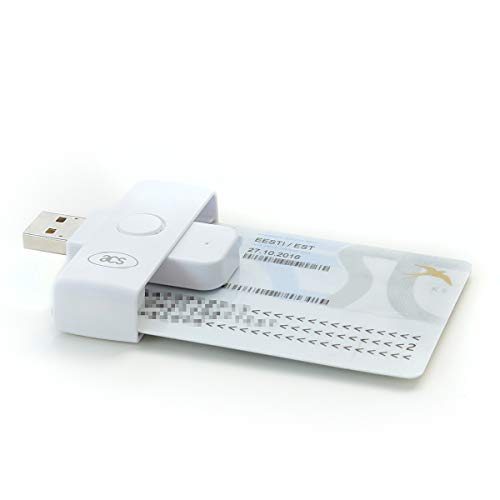
The PocketMate II refines the original original ACS token design covered earlier into a slimmer body that’s easier to lose in a jacket pocket, in a good way. It reads most contact chip smart cards, with no NFC support, so this is strictly for contact cards, not contactless.
It supports the same wide DOD and government portal catalog, including AKO, OWA, DKO, JKO, and AF Portal. For most digital signature and CAC login routines on the move, this is the smallest possible tool that still gets the job done.
Notable Upsides
- Ultra-compact body slips into pockets and small carry pouches.
- Reads nearly every common contact-chip government ID card.
- Strong fit for digital signature and enterprise email workflows.
Some Limits To Know
- No NFC means contactless cards won’t work.
- Small body can be misplaced more easily than desk-bound readers.
Quick Facts
Who It Suits Best
Mobile CAC signers and remote federal employees who want the smallest reader that still handles the standard government portal catalog.
A Better Fit Elsewhere
Users running shared workstations where the reader stays plugged in will prefer the HID OMNIKEY 3121 for its stability.
Choosing a Contact Smart Card Reader That Actually Fits
Start with the connector. A USB-A reader needs an adapter on newer laptops that ship with only USB-C ports, and a USB-C reader needs a hub on legacy systems. Picking the connector that matches your most-used machine removes one daily friction point.
Next, weigh portability against permanence. Pocket readers like the ACS PocketMate II are wonderful travel companions but get yanked around by any cable tug. Desk-bound readers with weighted bases or mounting holes, such as the Identiv uTrust 2700 R or the HID OMNIKEY 3121, last longer under constant insertions. If your reader lives at the same desk for years, prioritize stability. If it rides in a laptop sleeve, prioritize folding or token designs.
OS and standards support matter more than specs suggest. A reader that lists Windows, macOS, and Linux on the box removes the headache of cross-platform households. Look for the protocols PC/SC and USB CCID on the spec sheet, since most middleware layers expect them. For federal purchase orders, TAA compliance and FIPS certifications can be procurement requirements.
Connector Match
USB-C readers suit modern MacBooks, recent ThinkPads, and most current docks. USB-A readers still cover older workstations and KVMs cleanly. Adapters work in a pinch, but every adapter is another point of failure when you’re trying to log in at 6:55 a.m.
Form Factor And Use Case
Pocket tokens are great for occasional use and travel but take abuse from cables. Vertical standing readers reduce fumbling at the desk. Bolted-down readers shine in call-center-style environments where dozens of cards pass through weekly.
OS, Standards, And Compliance
Multi-OS support (Windows, macOS, Linux) lets a single SKU serve mixed teams. Standards like ISO/IEC 7816, PC/SC, and USB CCID signal reliable middleware behavior. TAA compliance and FIPS 201 unlock regulated federal procurement paths.
Practical Pointers Across This Shortlist
Mistakes Worth Dodging
A common slip is choosing a contactless reader when you actually need contact-only support, since CAC and PIV cards rely on the contact chip. Verify the card type before you check out, especially if your reader must support legacy government IDs.
Another trap is ignoring the connector. Buying a USB-A reader for a USB-C-only laptop without an adapter turns into a frustrating first day. Match the port or budget for a hub.
Where The Extra Money Goes
Spending more often buys certification paperwork, weighted housings, and longer mechanical lifespans. A reader with TAA compliance and GSA FIPS 201 certification, like the HID OMNIKEY 3121, clears regulated procurement that cheaper alternatives can’t. Premium readers also tend to survive rougher daily handling, which matters in shared workspaces.
Frequently Asked Questions
What is a contact smart card reader?
It’s a small USB device that reads the chip embedded in cards like CAC, PIV, and national IDs. You insert the card physically, and the reader exchanges data with the chip through metal contacts on the card’s face.
Do contact smart card readers work with Mac and Windows?
Most modern readers support both, along with Linux, as long as they list PC/SC and USB CCID compliance. Always check the OS list on the product page before purchasing, especially for older macOS or Linux distributions.
Can I use these readers for DOD CAC logins?
Yes, several readers on this list explicitly support DOD portals like AKO, OWA, DKO, and JKO. CAC stands for Common Access Card, the standard identification credential for active duty, reserve, and civilian DOD personnel.
Are USB-C smart card readers better than USB-A?
Not better, just newer. USB-C removes the need for an adapter on modern laptops, while USB-A still plugs directly into older workstations and KVMs. The choice depends on the ports you actually use.
Do I need TAA compliance for a personal reader?
For personal home use, TAA isn’t required. For federal agency purchases or contractor environments under specific procurement rules, TAA compliance is often mandatory. Confirm your procurement requirements before specifying a model.
The Takeaway
Match the reader to where it will live: a desk, a bag, or both. The Identiv uTrust 2700 R anchors permanent workstations, the HID OMNIKEY 3121 handles shared federal environments, and the ACS PocketMate II slips into a pocket for mobile logins. Whichever you choose, confirm the connector and OS support before you order, and you’ll save yourself a return trip.


