

Carrying a backpack full of paperbacks gets old fast. A dedicated reader cuts the weight, lets you highlight passages without ruining the spine, and lets you keep lecture notes, research PDFs, and leisure reading in one place. The picks below cover a range of student situations: Bible study on campus, color textbooks and comics, large-screen note-taking with a stylus, pocket-sized reading between classes, and Android-powered tablets for app flexibility.
A Closer Look At The Lineup

Azpen Audiobook Speaker Electronic Bible 8″ eReader

Kobo Libra Colour eReader 7″ Kaleido 3
Kobo Elipsa 2E 10.3″ eReader with Stylus 2

Kobo Libra Colour eReader 7″ Black

Ocean 64GB 7″ E-Ink Paper Tablet

XTEINK X3 3.7″ Pocket E-Ink Reader
Bigme B7 Color ePaper Tablet 7″ 4G
A Closer Look At Each Pick
The Azpen leans into a very specific student audience rather than chasing a textbook reader format. Its 8-inch touchscreen pairs with a built-in audio Bible speaker and a bundled pair of headphones, so it works during silent study at the library and during walks across the quad.
Preloaded translations remove the hassle of sourcing scripture files, and the simulated leather case with a notes pocket encourages annotation. For seminarians, campus ministry leaders, or any student whose coursework revolves around scripture study, the package solves several needs in one box.
What Makes Sense
- Preloaded audio Bible content saves you from hunting down files before the semester starts
- Built-in speaker plus bundled headphones covers both private and group study situations
- Hard-shell gift-style packaging protects the device from backpack scuffs and pressure
- 8-inch screen size splits the difference between 6-inch portability and 10-inch textbook space
- Notes pocket on the case lets you pair digital reading with analog paper annotations
Worth Noting
- Outside of faith-based coursework, this device offers fewer general study tools than other picks here
- The leather-style case is decorative rather than rugged, so owners commonly handle it with care around water
- Limited ecosystem compared with mainstream readers, meaning fewer app add-ons for non-religious subjects
Who It Suits Best
Theology students, devotional study leaders, and anyone whose primary reading load centers on scripture rather than research papers will find the package especially practical.
Consider Something Else When
Engineering or lab-based students who need stylus-driven note-taking and a larger canvas should look at the Kobo Elipsa 2E for its 10.3-inch screen.
Color ePaper (an electronic paper display that uses charged pigment particles to render color) finally feels mature in this generation, and the Libra Colour is the most balanced way to get it. The 7-inch Kaleido 3 panel keeps glare out of sunny reading spots, while audiobook support keeps your study hands free during long reading lists.
Humidity around labs, dorm kitchens, or rainy walks between buildings is less of a worry, thanks to waterproofing. The asymmetric grip and physical page-turn buttons help when you settle into a long chapter at a cramped lecture-hall desk.
Where It Excels
- Full-color display makes textbook diagrams, comics, and annotated notes genuinely useful rather than washed out
- Waterproof body handles coffee spills and rain without panic
- Audiobook playback supports long commute study sessions when your eyes need a break
- Asymmetric grip keeps the device comfortable for one-handed reading in tight spaces
Points To Note
- Color mode drops the effective pixel density compared with monochrome, so text at small sizes looks softer
- Kobo’s library ecosystem is strong but slightly narrower than Amazon’s for certain textbooks, depending on your school’s required materials
Made For
Art history, graphic design, and liberal arts students who work with color imagery or annotated PDFs will appreciate the upgrade over a standard black-and-white panel.
Skip It When
Students whose courses are heavy on dense black-text research papers should consider the Kobo Elipsa 2E for its sharper text rendering and larger canvas.
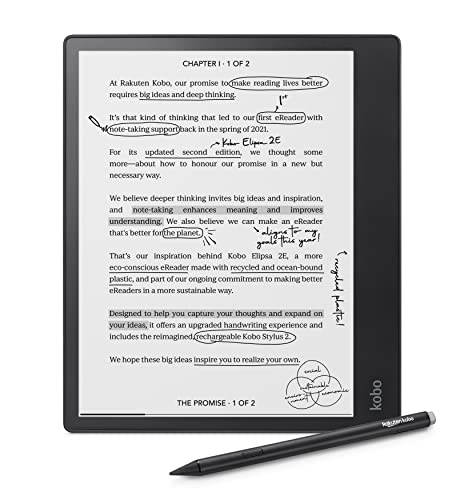
The Elipsa 2E trades pocketability for desk utility. Its 10.3-inch Carta E Ink panel (a high-contrast, paper-like electronic ink display) is large enough to render full journal pages, and the included Kobo Stylus 2 turns the device into a dedicated notebook for marking up readings and sketching diagrams.
ComfortLight PRO warms the front light (a built-in illumination layer that sits above the screen) as the evening stretches on, easing eye fatigue during thesis sessions. With 32GB of storage, most students will never hit a limit during their program.
Positive Points
- 10.3-inch screen fits textbook pages and academic PDFs without constant zooming
- Bundled stylus eliminates a separate purchase and supports handwritten margin notes
- Adjustable warm front light cuts blue light during late-night study
- 32GB local storage holds thousands of papers, even without cloud access
- Wi-Fi transfers simplify syncing notes between devices
Points To Keep In Mind
- The size and weight make it more of a desk companion than a one-handed commuter reader
- Stylus tips wear with heavy use, so replacements are worth budgeting for across a multi-year program
Built With In Mind
Graduate students, law students, and researchers who annotate dense PDFs and need a paper-like canvas will get the most value from the larger surface.
Where A Sibling Pick Shines
Students who want color markup on a smaller device should consider the Kobo Libra Colour, which trades screen area for color depth.
The black variant of the Libra Colour shares its core hardware with the white version but comes in a more understated finish. For students who carry their reader into lecture halls and group study rooms, the darker shell hides smudges better and feels less conspicuous.
Waterproofing matters more than people expect: a tipped-over water bottle in a backpack is one of the most commonly reported accidents. Holding a paper-like 7-inch panel that survives that mishap reduces the cost of a busy semester.
Key Advantages
- Dark colorway hides fingerprints and case scuffs during daily carrying
- Color E Ink brings textbook illustrations and color-coded notes to life
- Physical page-turn buttons reduce screen taps in cold study rooms or while wearing gloves
- Waterproofing handles accidental spills near your desk or bag
Worth Bearing In Mind
- Color saturation is more muted than a phone or tablet, so it is not ideal for high-fidelity image editing
- Buttons add a small amount of bulk compared with buttonless slabs
The Right Fit
Students who move between dorm, classroom, and cafe with their reader in a tote will appreciate the ruggedness and the discreet black finish.
Swap It Out When
Students who mostly read at a desk and prioritize a larger canvas over portability may be happier with the Kobo Elipsa 2E.
Where most readers offer 16GB or 32GB, the Ocean doubles down with 64GB of storage and 4GB of RAM (working memory that keeps apps responsive). The 7-inch E Ink panel supports handwriting with a compatible stylus, making it useful for chemistry formulas, math problem sets, and language flashcards.
That generous local capacity matters when you are loading semester archives without depending on cloud access. You may find the larger library especially valuable when traveling or working in labs where Wi-Fi is restricted.
Everyday Advantages
- 64GB internal storage handles heavy course archives without constant offloading
- 4GB RAM supports smoother app navigation and faster page turns
- Handwriting support lets you sketch diagrams and solve problems directly on screen
- Glare-free E Ink display reduces eye strain across long reading sessions
Some Limits To Know
- The stylus is not bundled, so budget for one if you plan to use handwriting features regularly
- Stock stylus support varies, and third-party pens may need calibration
- Brand recognition is lower than competitors, so accessories can be harder to source
Best Suited To
STEM students, language learners, and anyone juggling large reference libraries will benefit most from the storage and handwriting combo.
Not Your Match When
Students who prioritize a more polished software experience and tighter ecosystem integration should consider the Kobo Elipsa 2E instead.
The XTEINK X3 is small in a way that actually changes how you read. At roughly 3.7 inches and around 58 grams, it slips into a jacket pocket or a small crossbody bag and disappears until you need it.
It is not built for textbook PDFs or color diagrams. Instead, it suits students who want a distraction-free way to grind through assigned novels, language drills, or short-form reading between classes.
Real-World Strengths
- Pocketable size keeps it on you when a textbook would stay home
- Paper-feel E Ink display is easy on the eyes during short sessions
- Lightweight build reduces fatigue during held-reading sessions
- Muted Mist Gray finish looks unobtrusive in lecture halls
Small Caveats
- Small screen size makes it unsuitable for dense PDFs, charts, or academic articles
- Limited touchscreen space means chunky fingers may fumble through menus
- Less mainstream brand, so finding cases and screen protectors takes extra effort
Who Should Grab It
Minimalist readers, language students running flashcards, and commuters who want a phone-replacement for novels will find it genuinely useful.
Reach For A Different Pick When
Students who need to read assigned PDFs and research articles should step up to the Kobo Libra Colour for its 7-inch color panel.
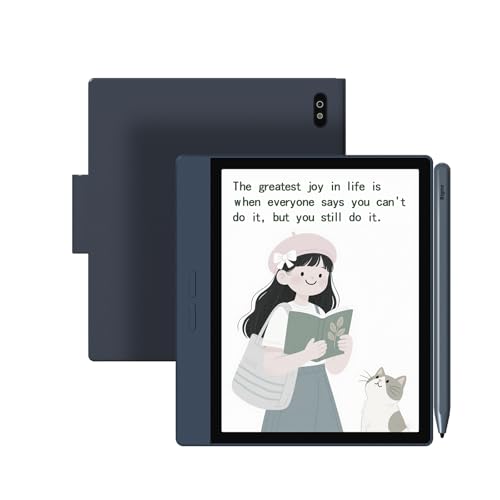
The Bigme B7 is less a reader and more an ePaper tablet (a multi-purpose device that runs apps on an electronic paper screen) that happens to read books very well. With 8GB of RAM and 128GB of storage, it runs Android 14 and installs most productivity apps you would expect on a phone, just on a low-strain paper-like screen.
Built-in 4G support adds voice calling, which is genuinely useful if your phone dies mid-lab and you need to reach a study group. The 3000 mAh battery (the cell that powers the device between charges) is comfortable for a full day of mixed reading and light browsing.
Bright Spots
- 4G connectivity supports calls and data when Wi-Fi is unavailable on campus
- 128GB storage plus microSD expansion handles years of reading material
- Android 14 access broadens the app library for productivity tools
- Color ePaper display combines study reading with app use in one device
Practical Considerations
- App support on ePaper is hit-or-miss: some Android apps assume fast refresh rates that this screen cannot match
- Heavier than single-purpose eReaders, which can matter during long carry days
- 4G plan adds a recurring cost to factor into your student budget
Perfect Match For
Power users who want one device for reading, note-taking, light browsing, and emergency calling on campus will appreciate the flexibility.
A Better Fit Elsewhere
Students who want pure reading focus without app distractions should look at the Kobo Libra Colour for a more streamlined experience.
Matching a Reader to Your Study Habits
Screen size is the single biggest decision, and it usually follows your study location. Lecture-hall annotators lean toward 10-inch panels like the Kobo Elipsa 2E, while commuters benefit from 7-inch devices that fit a coat pocket. Pocket-only readers like the XTEINK X3 work for novel reading but stumble on assigned PDFs.
Consider ecosystem next. Kobo and Amazon each run their own bookstore, but Kobo handles EPUB files natively, which matters when your professor distributes open-format readings. Devices running Android, like the Bigme B7, let you install third-party reader apps but introduce distractions and battery drain.
Storage scales with how much you keep locally. A literature major rereading a personal archive wants 32GB or more, while a student streaming library loans can manage with less. Battery life on E Ink panels routinely lasts weeks for pure reading and drops fast with Wi-Fi or stylus use, so factor in your stylus habits.
Waterproofing is underrated. Spills happen, and an IP-rated device (one rated against dust and water intrusion under specific conditions) saves a costly replacement semester. If your campus involves rain, cafeteria tables, or shared kitchens, treat waterproofing as a feature, not a luxury.
Picking Through the Noise
Common Buying Mistakes
Skipping ecosystem research is the most common trap. Many students pick a reader, then discover their required textbooks cost more on the wrong store, or their notes format does not sync across devices. Cross-check your school’s syllabus lists and your existing cloud setup before committing.
Another common error is overprioritizing specs. A 10-core processor on an eReader rarely matters for static text, but screen quality, battery life, and stylus ergonomics do. Color depth also drops in color mode compared with black-and-white, which surprises students expecting smartphone-grade vibrancy.
Where the Extra Money Goes
Higher-tier models usually pay for better front light, larger storage, and tighter build quality. The Kobo Elipsa 2E, for instance, includes a stylus and a 10-inch panel that a 7-inch reader cannot match for research. Spending up makes sense when you annotate daily or read many PDFs.
Budget models still deliver solid reading, but you trade color, waterproofing, or storage. Students who only need distraction-free novel reading get more value from a basic reader than from a feature-rich tablet they never fully use.
Frequently Asked Questions
Do I need a color eReader for college?
Color helps with diagrams, charts, and annotated PDFs but is optional for plain-text reading. Humanities students often benefit more from color than STEM students who mostly read equations and prose.
Can I read Kindle books on a Kobo?
Not directly, but converting or sideloading personal documents through EPUB or PDF formats usually works for non-DRM files (documents without digital copy protection). Check your library’s lending format compatibility before committing.
How important is waterproofing?
Waterproofing is a strong safety net for backpack spills, kitchen tables, and rainy commutes. It is not essential if you keep your reader at a dry desk, but it adds peace of mind for active students.
Is a stylus worth it for non-art majors?
Yes, especially for math, science, and language students who work through problems by hand. Writing on the screen also helps with retention compared with passive highlighting.
Can these readers replace a tablet?
Dedicated readers run for weeks on a charge and reduce eye strain, but they cannot match a tablet for video, web browsing, or color apps. Students who split tasks between focused reading and media consumption benefit from owning both.
Closing Remarks
The right reader depends less on raw specs and more on where and how you study. Pick the screen size that matches your dominant study location, then prioritize waterproofing or stylus features based on your daily habits. Whatever you choose, dedicating a device to text cuts distractions and trims the weight of your school bag.


