

Editing a photo on a phone gets you only so far. Color grading, skin retouching, and tethered shooting all ask more of your screen, your input device, and your workflow than a casual scroll ever will. The right tablet or pen display turns slow, mouse-heavy edits into something fluid, and the wrong one wastes hours in a single session. This list rounds up gear for studio pros, mobile editors, and hobbyists refining a hobby.
A Quick View Of The Lineup
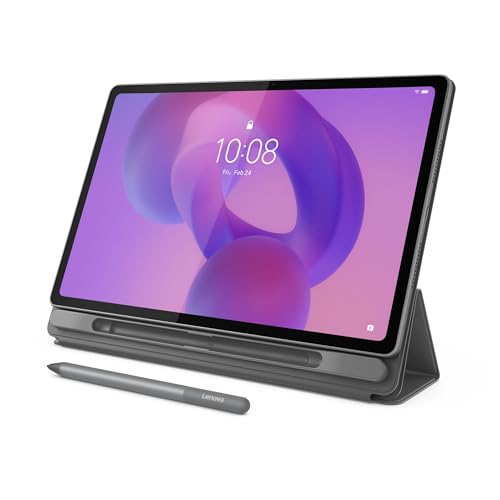
Lenovo Idea Tab Plus 12.1″ 2.5K Touchscreen Tablet with Tab Pen
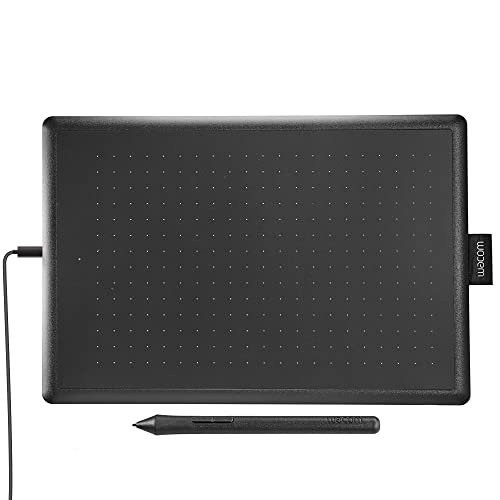
One by Wacom Medium Drawing Tablet 10.9″ x 7.4″

XPPen Artist 22 2nd Drawing Tablet with Screen 21.5″

Lenovo Idea Tab 11″ 2.5K Touchscreen Tablet with Tab Pen
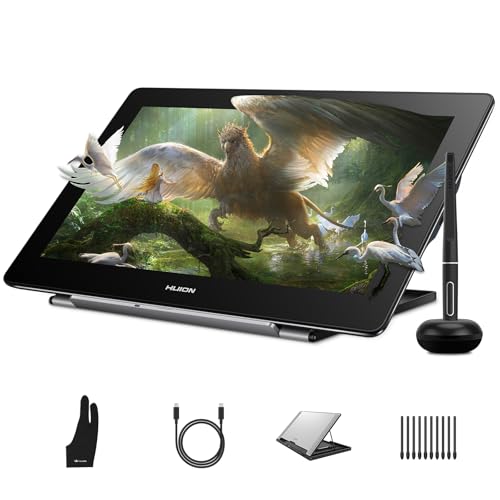
HUION Kamvas Pro 16 4K UHD Pen Display 15.6″
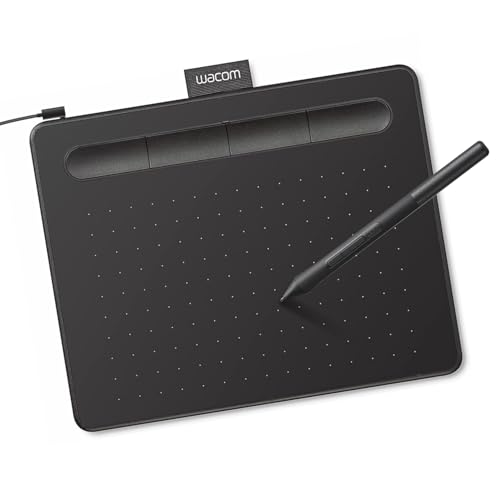
Wacom Intuos Small Wired Drawing Tablet with Pen

TourBox NEO Editing Controller Wired Kit

Lenovo Tab One 8.7″ HD Tablet with Folio Case
What Each Pick Brings To The Table
Photographers who split time between studio edits and location shoots need a tablet that travels light and still feels like a real canvas. The Lenovo Idea Tab Plus delivers a 12.1-inch 2.5K IPS (in-plane switching, a panel technology that holds accurate color at wider viewing angles) touchscreen with a 90Hz refresh rate, meaning the screen redraws 90 times per second for smoother brushwork and scrolling. The included Tab Pen makes quick mask adjustments or spot-healing passes feel direct rather than mouse-mediated.
Compared with the One by Wacom that follows, this Lenovo runs a full Android tablet experience, so you can move between Lightroom, Snapseed, and tethered file transfer without juggling drivers. The high-brightness mode helps when reviewing images outdoors at a cafe patio or near a window.
Advantages To Know
- 2.5K resolution on a 12.1-inch panel means you spot noise and color casts before export.
- Tab Pen ships in the box, so there is no accessory scramble on day one.
- Folio case bundled, useful for propped-up hands-free viewing during client reviews.
- 90Hz refresh rate keeps pen strokes visually responsive during retouching.
- Lightweight chassis slips into a camera backpack without crowding lenses.
Points To Keep In Mind
- Android app ecosystems vary, so desktop-class tethering tools may need workarounds.
- Screen coating picks up fingerprints quickly; a microfiber cloth is worth keeping in your bag.
Key Attributes
Who Will Love This
Traveling photographers who want pen input, a sharp panel, and a tablet that fits in a camera bag without weighing it down.
A Better Fit Elsewhere
Colorists working on critical print matching should reach for the HUION Kamvas Pro 16 4K UHD Pen Display instead, since its higher resolution and dedicated pen display workflow are built for that exact job.
If you are stepping into pen-based editing for the first time, Wacom’s pen reputation is hard to ignore. The One by Wacom is a medium graphics tablet measuring roughly 10.9 by 7.4 inches with a slim 0.3-inch profile, so it slips behind a keyboard without dominating desk space. It connects to Chromebooks, Macs, and Windows machines, which is helpful if your editing setup shifts between a studio iMac and a travel laptop.
Unlike the Lenovo Idea Tab Plus above, this is a screen-less tablet. You draw on the pad and look at your monitor, which keeps the cost low but takes a week or two to build muscle memory. Once your hand-eye coordination clicks, dodging, masking, and clone-stamping speed up noticeably.
Bright Spots
- Wacom pen tracking has a long-standing reputation for accuracy, which matters when dodging highlights.
- Broad OS compatibility covers Mac, Windows, and Chromebook editing setups.
- Compact medium size suits desks that already hold a calibrated monitor.
- Lightweight build, so it travels between home and office setups.
Trade Offs
- No screen means a learning curve for first-time pen users.
- Smaller active area than the XPPen Artist 22 2nd, so sweeping brush strokes need hand repositioning.
- Pen batteries eventually need replacing; spares are worth ordering early.
Right Fit For
First-time pen tablet shoppers who already own a calibrated monitor and want Wacom reliability without a steep learning curve on their editing software.
Look Elsewhere When
If you want to draw directly on the image rather than look up at a separate monitor, the XPPen Artist 22 2nd Drawing Tablet with Screen is a more natural match.
Studio editors handling large retouching jobs benefit from drawing right on the image. The XPPen Artist 22 2nd is a 21.5-inch pen display (a monitor you draw on with a stylus) covering 122% sRGB (the standard RGB color gamut, a color space commonly used for web and print reference) with 8192 levels of pressure sensitivity, so light and heavy brush strokes translate naturally during skin work and layer masking. Tilt function is built in, useful for shading passes that lean to one side.
Compared with the One by Wacom earlier, this model puts the canvas under the pen tip, which removes the disconnect between hand and cursor. The included battery-free stylus sidesteps charging interruptions during long editing days.
Benefits That Matter
- 21.5-inch canvas lets a full-frame photo sit comfortably without constant zooming.
- 122% sRGB coverage is generous for web and print workflows.
- Battery-free stylus cuts a small recurring hassle from your routine.
- Compatible with Windows, Mac, and Linux editing rigs.
- Tilt support adds nuance to dodge-and-burn passes.
A Few Limitations
- 21.5 inches demands real desk space, which is a constraint in smaller home studios.
- Some users report the stand feels less sturdy than expected, so anchoring it to a sturdy desk helps.
- A USB-C to USB-C cable is sold separately, which adds an extra purchase before first use.
Feature Snapshot
Best Suited To
Studio retouchers with dedicated desk space who want direct-on-screen editing and broad color coverage.
Swap It Out When
If 4K resolution matters more than screen size, the HUION Kamvas Pro 16 4K UHD Pen Display offers higher pixel density on a smaller footprint.
Photographers on the move often cull and lightly edit before reaching a laptop, and a compact 11-inch tablet is easier to hold one-handed than a full notebook. The Lenovo Idea Tab brings a 2.5K IPS touchscreen at 90Hz, paired with 256GB of storage, so a day of raw files plus edited JPEGs fits without juggling cloud transfers. The Tab Pen and Folio Case ship in the box, removing two accessory decisions.
Compared with the larger 12.1-inch Lenovo Idea Tab Plus earlier, this model trades a bit of screen real estate for portability. For location shoots where you cull in a rental car or a hotel room, that trade often pays.
A Favorable Mix
- 256GB internal storage holds a solid cull session’s worth of files.
- 2.5K resolution at 90Hz keeps image review smooth and detailed.
- Pen and case included, useful right out of the box.
- Quad speakers tuned with Dolby Atmos add clarity when reviewing video stills.
Honest Caveats
- Android-only workflow means tethered capture tools behave differently than on a Mac or PC.
- 11 inches is comfortable for single-image review, less so for multi-image grid views.
Whose Shelf It Belongs On
On-location photographers who cull, lightly retouch, and share previews from the road before a full desktop session.
Reach For A Different Pick When
If you spend most of your editing time tethered at a desk, the XPPen Artist 22 2nd Drawing Tablet with Screen gives you a more comfortable full-frame workspace.
Pixel-peepers working on detail retouching and print prep value resolution as much as screen size. The HUION Kamvas Pro 16 packs a 15.6-inch 4K UHD (3840 by 2160) fully laminated panel, meaning the glass and the LCD sit close together with minimal air gap, which reduces parallax (the visual offset between the pen tip and the drawn line) and makes pen placement feel precise. The 120% sRGB gamut and 16.7 million display colors add headroom for subtle grading work.
Where the XPPen Artist 22 2nd leans on raw canvas real estate, this HUION leans on pixel density. Skin retouchers who zoom into pores and fabric texture tend to appreciate that trade.
Positive Takeaways
- 4K UHD resolution reveals fine detail during high-zoom retouching.
- Full-lamination cuts parallax, so the pen tip tracks the cursor more faithfully.
- 120% sRGB coverage supports print-aware grading.
- Battery-free stylus reduces interruptions during marathon edits.
- 15.6-inch size balances canvas area with a manageable footprint.
- Cross-platform support covers Windows, Mac, Linux, and Android editing hosts.
Possible Compromises
- 4K at 15.6 inches pushes your computer’s graphics card harder than lower-res panels.
- A fully featured pen display costs more than a screen-less tablet like the Wacom Intuos Small.
Quick Facts
Made For
Retouchers and colorists who grade for print and need both pixel density and a wide color gamut in a single pen display.
Where A Sibling Pick Shines
For sheer canvas area on a desk, the XPPen Artist 22 2nd Drawing Tablet with Screen still wins on workspace size.
Small desks and laptop bags reward compact gear, and the Wacom Intuos Small fits that brief without dropping the Wacom pen experience. This is a wired graphics tablet paired with a pressure-sensitive pen and some bundled software, designed for newcomers to pen tablets who want a familiar brand. Setup is plug-and-play on most modern operating systems.
Compared with the larger One by Wacom earlier, the Intuos Small shrinks the active area, which keeps the tablet out of the way when your keyboard and trackpad already dominate the desk. For short editing sessions on the couch or a hotel desk, that footprint is a feature.
What Makes Sense
- Small footprint tucks beside a laptop without crowding the workspace.
- Wacom pen tracking carries its long-standing reputation even at this entry tier.
- Bundled software gives newcomers a starting point for editing apps.
- Wired connection avoids charging the tablet during travel.
Softer Spots
- Small active area means more hand travel across the pad during long edits.
- No screen, so beginners face the same hand-eye adjustment as with any pen tablet.
Perfect Match For
Travelers and home editors working on tight desks who want pen input without giving up precious surface area.
Not Your Match When
If you want your edits to appear directly under the pen tip, the HUION Kamvas Pro 16 4K UHD Pen Display sits closer to that brief.
Not every editing accessory is a tablet. This is a tactile editing controller, a small wired box of dials and buttons that sits beside your keyboard or tablet. The TourBox NEO is built for macOS and Windows and acts as a multi-control surface for sliders, brushes, and shortcuts in popular editing programs. It pairs well with any pen tablet on this list by giving your non-dominant hand something physical to do while the dominant hand keeps the pen moving.
Unlike the Wacom Intuos Small before, this does not replace a pen. It complements one. Wired-only design means zero dropouts and zero charging, which suits studio setups that never leave the desk.
Notable Gains
- Dials and buttons cut down on keyboard shortcut hunting during retouching.
- Wired connection delivers stable, lag-free input.
- Compact footprint tucks beside a keyboard without crowding your pen tablet.
- Useful across photo retouching and color enhancement workflows.
Practical Considerations
- Not compatible with Linux or mobile devices like iPad or Android, limiting flexibility for some setups.
- Software mapping has a learning curve, so expect a week of muscle-memory work.
Who Should Grab It
Photographers who already use a pen tablet and want faster, tactile control over sliders, brushes, and layer navigation in Lightroom or Photoshop.
Consider Something Else When
If you work primarily on a mobile device, the Lenovo Idea Tab Plus 12.1″ tablet is a more portable all-in-one starting point.
Sometimes a tablet just needs to be small enough to hold one-handed while you scrub through shots on a return flight. The Lenovo Tab One is an 8.7-inch HD tablet with a rounded chassis that fits a coat pocket, paired with a MediaTek Helio G85 chip, 4GB of memory, and 64GB of storage. The Folio Case is in the box, so propping it on a tray table works without buying extras.
Compared with the Lenovo Idea Tab Plus earlier, this model drops the pen input and the high-resolution panel in exchange for genuinely pocketable size. For quick culling and social-share edits, that simplification is a feature.
The Upside
- Under a pound, easy to carry alongside a camera body.
- Folio Case included, which doubles as a viewing stand.
- 8.7-inch HD display fits comfortably in one hand for review on the go.
- Long battery life supports full-day trips without a wall outlet.
Where It Is Less Suited
- HD resolution is modest compared to the 2.5K panels in the larger Lenovo Idea Tabs.
- No pen input, so detailed retouching falls to finger-based edits or another device.
Built With In Mind
Casual mobile reviewers who want a lightweight tablet for quick image review, sharing, and light edits on the move.
Skip It When
For serious retouching work, the Lenovo Idea Tab Plus 12.1″ gives you pen input and a much sharper panel in a still-portable form.
What Matters Most Before Choosing Editing Tablets For Photographers
Screen Real Estate And Resolution
Larger screens give you a more comfortable canvas for high-resolution files, while higher pixel density lets you scrutinize detail at native zoom. Most pen displays fall between 15 and 22 inches, and resolution ranges from full HD to 4K UHD. Match the panel to the kinds of files you edit: 24-megapixel wedding shots look different on a 1080p canvas than on 4K.
Pen Feel And Pressure Response
Pressure sensitivity (measured in levels) and tilt support shape how natural retouching brushes feel. Higher pressure levels allow finer transitions between light and heavy strokes, which matters when dodging and burning skin. Tilt function helps when shading or working at angles that mimic pencil behavior.
Workflow Fit And Portability
A studio-bound editor benefits from a large pen display plus a controller like the TourBox NEO. A travel-heavy photographer gains more from a compact tablet with a bundled pen, such as the Lenovo Idea Tab Plus or the Lenovo Idea Tab 11-inch. Decide whether desk space or bag space is your real constraint before falling for spec sheets.
Color Accuracy And Gamut
Color-critical work, especially print prep, leans heavily on sRGB coverage percentages and panel calibration options. Displays advertising 100% sRGB or higher generally deliver more honest edits, though proper monitor calibration remains essential regardless of the panel you choose.
Key Considerations Across These Picks
Common Shopping Slip Ups
First-timers sometimes grab the cheapest pen tablet they see and discover too late that the active surface is too small for their editing style. Others buy a 22-inch pen display without measuring their desk, then discover it overwhelms their workspace. Measure first, then buy. It saves a return.
Where The Extra Money Goes
Higher-tier models buy you sharper panels, wider color gamuts, more reliable pen tracking, and bundled accessories that entry-level options leave out. The upgrade makes sense if you spend serious hours retouching or grading for print. Casual social-share editing rarely needs the extra spend.
Frequently Asked Questions
Do photographers really need a pen tablet for editing?
A pen tablet speeds up dodging, masking, and clone work compared to a mouse. It is not strictly required, but most retouchers who try one rarely go back to a mouse for detailed passes.
Should I pick a pen display or a screen-less tablet?
A pen display lets you draw directly on the image, which shortens the learning curve. A screen-less tablet costs less and saves desk space, but takes longer to feel natural.
How important is color gamut for photo editing?
Color gamut, the range of colors a display can show, matters most for print prep and color-critical work. For web-focused editing, a respectable sRGB panel is usually sufficient.
Can a small tablet really replace a laptop for editing?
Compact tablets handle culling, light retouching, and social sharing comfortably. Heavy catalog work, tethered shooting, and complex layered edits still favor a desktop or laptop.
Does pressure sensitivity actually change editing results?
Yes. Higher pressure levels let you vary brush intensity with light hand pressure, which feels closer to painting on a print and produces more nuanced retouching than click-only input.
Closing Thoughts
The right editing tablet depends on where you edit and how much detail you chase. Travel-heavy shooters tend to land on compact tablets with bundled pens, while studio retouchers usually pick a 4K pen display or pair a controller with a familiar tablet. Pick the workflow that matches your real week, and the spec sheet will follow.


