

Shopping for a learning device means balancing screen time, screen content, and the actual age of the child holding it. Some families want a closed-system toy that traces letters and plays animal sounds, while others need a full Android slate that streams lessons, e-books, and video calls. The four picks below cover that whole range, from a toddler-friendly tracing board to an 11-inch tablet with facial login and fast charging. Each one fits a different stage of early learning, so match the toy to the kid, not the other way around.
How The Shortlist Stacks Up

LeapFrog Mr Pencil’s Scribble Write and Read (Green)

VTech Squishy Lights Learning Tablet

COLORROOM 2026 Android 16 Tablet 11-Inch (Blue)
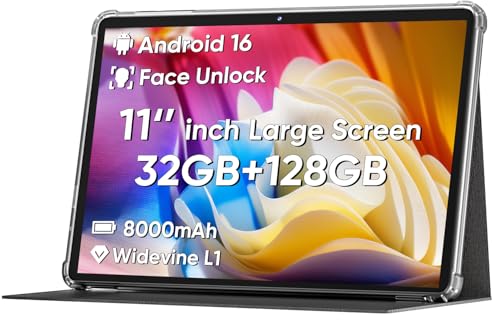
COLORROOM 2026 Android 16 Tablet 11-Inch (Black)
The Picks, Examined More Closely
For kids just learning the alphabet, LeapFrog’s Mr. Pencil leans into tracing instead of tapping. A built-in stylus guides small fingers along dotted paths to form uppercase letters, lowercase letters, and numerals, then rewards the trace with short animations on the screen. Unlike the VTech pick coming up, there’s no squishy rubber here, so the focus stays on pen control rather than tactile exploration.
The body is a sturdy green slab that fits comfortably on a lap or a car seat tray, and the included stylus tucks into the side so it tends to stay with the device between sessions. LeapFrog is a long-running name in early electronics, and this model sits squarely in their starter tier, which is what most families with a four or five-year-old want.
The Practical Payoff
- Tracing format builds actual pencil control, which transfers directly to handwriting practice at a desk.
- Number mode counts objects aloud, so a child sees the link between the numeral and the quantity.
- Self-contained design means no app downloads, no Wi-Fi setup, and no parental account juggling.
- Compact body fits in a backpack pocket, so it travels to restaurants and road trips without bulk.
- Lower complexity is a real upside for families who don’t want a full tablet on a toddler’s lap.
Worth Bearing In Mind
- Once a kid masters the alphabet, the content has a ceiling, and there isn’t much stretch left in the toy.
- The stylus lives in a side slot that younger children sometimes forget to return it to, which can mean lost parts.
- Screen animations are short, and owners commonly report that sustained attention still depends on a parent’s involvement.
Who It Suits Best
A preschooler who is just learning letter shapes and benefits most from guided pen practice rather than open-ended screen time.
Where Another Pick Suits Better
Toddlers under two get more out of the VTech Squishy Lights Learning Tablet, since its soft keys and animal prompts fit that earlier stage.
VTech’s Squishy Lights tablet skips the stylus entirely and goes straight for soft, squeezable keys. That single design choice tells you who it’s for: little hands that want to press, poke, and feel something give. Compared with the LeapFrog tracing board above, this is a younger, more sensory-led experience with animal prompts, color cues, and four piano-style keys for early music play.
The unit is lightweight enough to toss in a diaper bag, and the squishy keys double as a hand-strengthening exercise that pediatric occupational therapists often recommend. Parents planning a long flight or a doctor’s waiting room will appreciate the take-along form factor, especially when a full tablet would feel like overkill.
Benefits That Matter
- Soft silicone keys invite pressing without sharp corners or rigid plastic, which suits younger toddlers.
- Light-up prompts pair with animal names, color words, and shape names, building vocabulary without requiring reading.
- Built-in piano mode introduces rhythm and cause-and-effect, with sounds that respond to each keypress.
- Portable size fits a diaper bag pocket, making it a useful distraction on errands.
Some Limits To Know
- Designed for the youngest age band, so the content has a built-in ceiling before a child turns three.
- No screen for letter tracing, so once a kid starts writing practice, you would still want the LeapFrog above.
- Battery-powered operation means you’ll swap cells on long trips, and owners often recommend carrying spares.
Feature Snapshot
Right Fit For
Toddlers in the one-to-three range who benefit most from sensory play and first-word vocabulary building.
Consider Something Else When
Older children ready for actual lessons and e-books get more mileage out of the COLORROOM 2026 Android 16 Tablet, since it offers a real screen for reading and streaming.
Stepping up from the closed-system toys above, the COLORROOM 2026 Android 16 tablet is a full 11-inch slate aimed at school-age children and teens. An octa-core processor drives the Android 16 operating system, and storage combines 4GB of working memory with 128GB of onboard space, which is enough room for textbooks, e-books, and downloaded lessons. The 11-inch panel is the kind of size that splits the difference between a phone and a laptop, and it works well at a desk or on a kitchen table.
Facial recognition replaces typed logins, which speeds up the moment when a child wants to hop straight into a study app. The blue finish is the visible difference from the black sibling covered next, but the internals are identical, so this is largely a style decision. Owners commonly set up a separate user profile for each child, taking advantage of the larger storage for app variety.
Where It Helps
- 11-inch screen gives textbook pages and video lessons enough room to breathe without constant zooming.
- Face unlock skips password typing, which keeps kids focused on opening the app instead of fighting the login screen.
- 18W fast charging cuts downtime between study sessions, so a short plug-in is enough to finish a homework block.
- Android app support opens up learning apps, e-readers, and classroom tools beyond what a closed toy can offer.
Trade-Offs To Consider
- Open app ecosystem means parental controls and time limits are the parent’s responsibility to configure.
- 11-inch size is great at a desk but heavier than the toy tablets above, so younger children may find it tiring to hold.
- Like most Android tablets, the pre-installed apps and update cycle depend on the manufacturer, which can vary by region.
Best Suited To
Middle-school and high-school students who need a portable screen for e-books, video classes, and homework apps.
Look Elsewhere When
Preschoolers get plenty more from the LeapFrog Mr. Pencil tracing board, since its guided format suits that earlier developmental stage.
The black version of the COLORROOM 2026 slate mirrors its blue sibling under the hood, with the same 11-inch Android 16 system, octa-core processor, and 18W fast charging. The finish is the only visible change, and for shared-household use, that single swap matters. A black chassis tends to hide fingerprints and scuffs better than lighter colors, which is helpful when more than one person is handling it.
Where the blue version leans toward a single child’s desk setup, this black model fits a common-area spot like a family-room charging dock. Face unlock keeps things simple for whoever picks it up first, and the larger storage makes it easy to keep a few user profiles side by side. It is the same device as Pick 3 in nearly every spec, so the decision comes down to color and where it lives in your home.
What Pays Off
- Black finish conceals everyday smudges from multiple hands, keeping the device looking cleaner over time.
- 11-inch canvas supports split-screen lessons, with reading material on one side and notes on the other.
- Face recognition adds a layer of convenient login for households where several users share access.
- Fast charging means a quick top-up during dinner can carry the device through an evening homework session.
Factors To Consider
- Specs match Pick 3 exactly, so you won’t gain performance by choosing this finish over the blue one.
- Open system still asks parents to set time limits and content filters before handing it to younger children.
- The 11-inch size remains heavier than the VTech squishy toy, so very young siblings shouldn’t carry it around unsupervised.
Quick Facts
Whose Shelf It Belongs On
Households with multiple children who share one tablet benefit most, since the finish handles frequent handling gracefully.
Swap It Out When
A toddler learning first words would do better with the VTech Squishy Lights Learning Tablet, since the soft keys and animal prompts match that earlier stage.
What Matters Most Before Choosing Educational Tablets
Start with the child’s age, because a tracing board and a full Android slate serve very different developmental stages. Children under three generally learn more from tactile toys like the VTech squishy tablet, while kids in preschool get real value from stylus-led letter practice like the LeapFrog model. Once a child is reading independently, an 11-inch Android slate opens the door to actual e-books, video lessons, and classroom apps.
Screen time philosophy matters too. Closed-system toys limit what a child sees, which removes a layer of parental worry but also caps long-term usefulness. Open tablets stretch further, but only when paired with active parental controls, screen-time schedules, and a clear charging routine. Storage size is worth checking early, since 128GB of onboard space leaves room for downloaded textbooks and lessons, while smaller-capacity devices fill up fast.
Finally, think about where the tablet will actually live. A desk-bound study tablet can be 11 inches without issue, but a backseat travel toy needs to be lighter and simpler. Matching the device to the room where it will spend most of its time keeps the whole family happier.
Key Considerations Across These Picks
Pitfalls Shoppers Hit
One common slip is buying a full Android slate for a child under three, then wondering why it sits ignored. Touch-screen apps rarely hold the attention of a toddler the way a tactile toy does, and the LeapFrog and VTech picks above are designed for exactly that gap. Another frequent mistake is skipping the parental-control setup on a brand-new tablet, which leaves a child with unrestricted app access from day one.
Where The Extra Money Goes
Higher-tier tablets in this category tend to add faster processors, more storage, and biometric login like face unlock. Those features matter most when the tablet doubles as a homework tool, since multitasking and quick logins keep study momentum going. For a younger child, that upgrade money is often better spent on a second learning toy, since they will outgrow any single device quickly.
Frequently Asked Questions
What age is best for an educational tablet?
Most learning toys are designed for specific age bands, and matching the device to the child’s stage matters more than any spec sheet. Tracing boards suit preschoolers, tactile toys suit toddlers, and full tablets suit school-age children.
Are open Android tablets safe for kids?
Open tablets are safe when parents configure user profiles, content restrictions, and time limits before handing them over. Closed-system toys skip that step but cap how long the device stays useful.
How much storage does a learning tablet need?
For a school-age child downloading e-books and lessons, 128GB of onboard storage gives plenty of room. Younger children using closed-system toys don’t need much storage at all.
Do educational tablets need Wi-Fi?
Closed-system toys work offline, while Android tablets benefit from Wi-Fi for downloading apps and streaming lessons. Cellular connectivity isn’t usually required for at-home learning.
Can a learning tablet replace a laptop?
For younger children, yes, since reading and light app use are the main tasks. Older students doing heavy typing or video editing will still benefit from a full laptop.
The Takeaway
Pick the format first, then worry about specs. A toddler needs tactile play, a preschooler benefits from guided tracing, and a school-age child gets the most from a full Android slate with room for e-books and lessons. Whichever stage your household sits at, one of the four picks above should fit without overspending on features the child won’t use this year.


