

Picking a first tablet shouldn’t feel like a quiz. The goal is simple: a screen that handles streaming, video calls, reading, and the occasional homework session without turning into a pocket-money regret. This roundup focuses on tablets that boot quickly, stay calm under multitasking, and don’t demand a second mortgage. Every pick here runs modern Android, ships with enough storage for the basics, and skips the flagship gimmicks that inflate the sticker. Whether you’re shopping for a student, a grandparent, or yourself, the six options below cover the realistic scenarios most households actually face.
The Leading Options At A Glance

FIRYMID Android 16 Tablet 10 Inch with Keyboard

FIRYMID Android 16 Tablet 11 Inch with Keyboard

FIRYMID 13 Inch Android 16 Tablet 40GB+128GB

Samsung Galaxy Tab A 10.1 32 GB WiFi Black
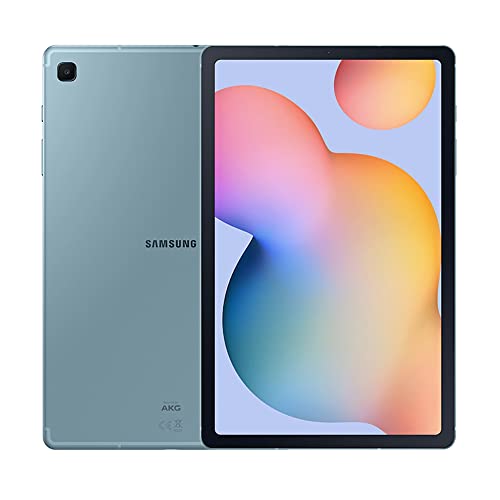
Samsung Galaxy Tab S6 Lite 10.4 64GB Angora Blue

COLORROOM 2026 Android 16 Tablet 11 Inch Blue
Inside Each Recommended Option
The first tablet in your house rarely needs to be a powerhouse, and this 10-inch Android 16 bundle fits that brief neatly. An octa-core processor (the kind of chip that splits workloads across eight small cores for smoother multitasking) keeps streaming, browser tabs, and casual games moving without obvious stutter. You get a keyboard in the box, which turns the tablet into a passable email and homework machine the moment you unbox it.
For shoppers dipping their toes in, this FIRYMID model is a confident starting line. The 10-inch display hits a sweet spot for travel, couch use, and a kid’s lap without feeling oversized. Compared to the 11-inch sibling that follows, it’s the easier grab for backpacks and smaller hands.
Where It Delivers
- Octa-core CPU handles streaming, browsing, and light multitasking without drama.
- Includes a keyboard, so it doubles as a typing station for emails and classwork.
- Runs Android 16, giving you current apps and security patches out of the box.
- Expandable storage keeps photos, shows, and reading material from filling the device.
- The 10-inch form factor works well in one hand on the couch or a train seat.
Things To Consider
- Owners commonly report the included case accessories feel lighter than premium alternatives.
- Charging speeds sit in the standard range, so overnight top-ups are the practical move.
Who It Suits Best
This pick makes the most sense for first-time tablet shoppers who want a ready-to-use bundle, including students and casual streamers who value typing flexibility on day one.
Where Another Pick Suits Better
If your household plans to share the tablet for streaming and light gaming on a bigger canvas, the FIRYMID 13 Inch Android 16 Tablet gives everyone more screen to work with.
An extra inch of screen sounds trivial until you try reading a recipe on the couch, and that gap becomes obvious fast. This 11-inch FIRYMID keeps the same Android 16 software and octa-core foundation as the smaller sibling but stretches the canvas for split-screen apps and longer reading sessions. It still ships with a keyboard, so the typing story carries over cleanly.
Beginner shoppers who plan to keep this tablet for three or four years will appreciate that the extra storage headroom leaves room to grow into apps, games, and downloaded shows. The trade-off is a slightly larger footprint, which some travelers may notice compared to the 10-inch option above.
Notable Upsides
- 11-inch screen gives split-screen apps and video calls enough breathing room.
- Octa-core T615 chip keeps the system responsive across everyday tasks.
- Expandable storage up to 1TB covers long-term media hoarding.
Worth Noting
- The larger size trades one-handed comfort for a roomier view.
- Battery drain climbs faster when brightness and streaming both push the panel hard.
Best Suited To
Streaming-first households, students juggling notes and video calls, and anyone upgrading from a phone screen who wants more room to read and type.
Look Elsewhere When
Travelers packing light should consider the smaller FIRYMID Android 16 Tablet 10 Inch with Keyboard, which trims the dimensions without sacrificing the keyboard bundle.
Thirteen inches puts a tablet firmly in couch-table territory, and this FIRYMID leans into that role without apology. The 2.2GHz octa-core chip gives the panel a stronger brain, while 40GB of combined memory (a blend of physical RAM plus expanded virtual memory) keeps the system snappy when several household members stack up background apps. Android 16 brings the modern privacy controls and split-screen flow that families actually use.
Where the smaller FIRYMID models focus on portability, this one targets the kitchen counter, the coffee table, and the homework desk. For first-time shoppers who treat a tablet as a shared household screen rather than a personal phone replacement, the size jump pays off in comfort.
Practical Pluses
- 13-inch panel makes shared viewing comfortable from across the room.
- 2.2GHz octa-core CPU keeps multitasking responsive when several apps are open.
- 128GB onboard storage with up to 2TB expansion covers long family use.
Trade Offs
- The larger footprint limits one-handed reading and weighs more on a lap.
- Charging takes longer than smaller tablets because the higher-capacity battery fills at standard rates.
Right Fit For
Families who want one shared tablet for streaming, recipes, and schoolwork, and households where the device mostly stays on a stand or counter rather than in a bag.
Skip It When
Solo commuters looking for a personal travel tablet should look at the COLORROOM 2026 Android 16 Tablet 11 Inch, which keeps a friendly size without the 13-inch bulk.
The Galaxy Tab A 10.1 is the calm corner of this roundup. It’s an older Samsung design, and that older status is exactly why it earns its place: the brand’s polish, a familiar Android layout, and a 10.1-inch panel that’s well-suited to reading, casual video, and the occasional video call. The minimalist bezel keeps the focus on the screen, which is what most entry-level shoppers actually want.
You’re trading flagship speed for trust and simplicity. For households that just need a dependable screen on the kitchen counter, this Samsung handles the basics without fanfare. Compared to the FIRYMID models above, it sits a generation behind on software, which is the honest trade-off.
A Few Strong Suits
- 10.1-inch display with thin bezels keeps video and reading front and center.
- Samsung’s build quality offers reassurance for first-time shoppers.
- Expandable storage covers media libraries without forcing a cloud subscription.
- A long-standing Android layout means family members adapt quickly.
Honest Caveats
- An older generation lands behind the Android 16 picks in software currency.
- The 32GB base storage fills quickly with offline shows and downloaded games.
- Heavy multitasking stretches the processor more than newer chips handle.
Built With In Mind
Light daily readers, casual streamers, and shoppers who want a recognizable brand name without paying for the latest software cycle.
Reach For A Different Pick When
Anyone planning to keep the tablet through several software updates should step up to the FIRYMID Android 16 Tablet 10 Inch with Keyboard for longer software support.
The Tab S6 Lite is the entry point that still feels grown-up. The included S Pen (Samsung’s pressure-sensitive stylus that magnetically clips to the tablet’s edge) turns the tablet into a notebook the moment you pull it out, and the slim metal body gives it the reassuring weight of a premium device without the premium sticker. The 10.4-inch LCD sits comfortably between reading size and sketchbook size, which is exactly the sweet spot for note-takers.
Where the cheaper picks focus on streaming, this one quietly handles classroom markups, journal entries, and casual sketching. The AKG-tuned dual speakers (audio tuned by the AKG acoustics brand, a name long associated with studio headphones) make a real difference for music practice or movie nights without headphones.
Everyday Wins
- S Pen ships in the box, so note-taking and sketching cost nothing extra.
- Slim metal body carries comfortably between home and classroom.
- AKG dual speakers give music, calls, and shows clearer audio than typical entry-level speakers.
- 64GB base storage handles a healthy mix of apps, books, and offline video.
A Few Limitations
- The LCD panel misses the deeper contrast of OLED screens found on costlier tablets.
- Heavy gaming pushes the processor harder than flagship Samsung tablets would handle.
- S Pen magnets can loosen over time if the tablet rides in a packed bag.
Who Should Grab It
Students, journal-keepers, and casual artists who want pen input without paying flagship tablet prices, plus commuters who appreciate the metal build on the train.
Swap It Out When
Pure streaming households who don’t need a stylus will save money stepping down to the Samsung Galaxy Tab A 10.1 32 GB WiFi Black.
The COLORROOM rounds out the list with the kind of small conveniences that quietly matter in daily use. The 11-inch Android 16 tablet supports face unlock, so you go from bag to screen without typing a PIN every time. The 18W fast charge (a charging standard that pushes higher wattage than typical 10W tablet chargers, cutting refill time noticeably) gets the battery back to a useful level during a coffee break, which commuters and students will notice more than any benchmark score.
The Unisoc octa-core chip keeps the system calm through video calls, streaming, and note apps. Compared to the FIRYMID 11-inch option, this COLORROOM leans into the on-the-go lifestyle with faster top-ups and biometric login.
Features That Help
- Face unlock removes a step between you and your apps.
- 18W fast charging shortens the gap between a low battery and a usable tablet.
- Anti-blue light mode eases long reading sessions at night.
- Android 16 software keeps the interface current with newer tablets.
- Light blue finish stands out from the standard black slab crowd.
Points To Note
- Brand recognition sits behind Samsung, so accessories and cases are less common.
- Camera quality targets video calls rather than photography, which is the honest expectation at this tier.
Whose Shelf It Belongs On
Busy commuters and students who want quick biometric login and fast top-ups between classes, plus casual readers who appreciate the anti-blue light mode.
A Better Fit Elsewhere
Sketchers and note-takers will get more from the Samsung Galaxy Tab S6 Lite 10.4 64GB Angora Blue, whose S Pen turns the same daily routine into a creative one.
What Matters Most Before Choosing Entry Level Tablets
Screen Size and Daily Use
A 10-inch panel works well for one-handed reading and travel, while 11-inch screens split the difference between portability and comfort. For shared household viewing, 13-inch tablets earn their space on the coffee table without forcing you to crowd around a smaller screen. Think about where the tablet will live most often, and the size choice becomes easier.
Software Currency and Update Path
Android 16 tablets ship with current apps and security patches, which matters more than raw clock speed for first-time shoppers. An older generation like the Galaxy Tab A 10.1 saves money up front, but you’ll feel the software gap within a year as more apps expect newer APIs (the underlying rules apps use to talk to the operating system). Choose Android 16 if you plan to keep the tablet through three or four school years.
Storage and Expandability
Even light users hit 32GB faster than expected once offline shows, photo caches, and game installs stack up. Tablets with expandable storage (microSD slots, common on this tier) buy you breathing room without forcing a cloud subscription. Pick 128GB or more if you plan to keep large media libraries on-device.
Accessories and Bundled Value
Keyboards, styluses, and cases change how a tablet fits into your day. The FIRYMID bundles ship with typing accessories for students, while the Tab S6 Lite’s S Pen turns the device into a notebook. Shop the bundle as a system rather than a screen, and the right choice tends to surface quickly.
Common Shopping Slip Ups and Upgrade Trade-Offs
Pitfalls Shoppers Hit
The most common mistake is buying on screen size alone. A 13-inch tablet that strains a budget often runs the same processor as a smaller sibling, which means the bigger screen reveals lag faster, not slower. Another trap is skipping storage math: 32GB sounds generous until you add a few streaming apps, a couple of games, and offline video for a flight. Build quality is the third blind spot. Plastic bodies flex and creak under casual handling, while metal frames like the Tab S6 Lite’s age noticeably better through daily backpack use.
What The Higher Tier Buys
Stepping up to a premium tier usually buys three concrete things: faster charging, sharper displays, and longer software support windows. The COLORROOM’s 18W charging shows how much a fast top-up changes the daily rhythm of a tablet. Premium panels add deeper contrast and smoother motion, which matters for streaming but rarely matters for note-taking. Software support is the quiet winner: newer Android versions stay compatible with apps longer, which protects your purchase through more school years or work cycles. Pay up when those three line up with how you actually use the device.
Frequently Asked Questions
How much storage do entry-level tablets really need?
For most households, 64GB covers a year of casual apps, photos, and a handful of offline shows. If you plan to download full seasons of shows or keep large game libraries on-device, step up to 128GB or rely on a microSD card to stretch the room.
Is Android 16 a big upgrade over older Android versions?
Yes for security and app compatibility, less so for visual change. Newer Android versions keep apps working smoothly for longer, which matters on a budget tablet where you keep the device for several years.
Are bundled keyboards actually worth using?
For students typing essays or anyone answering long emails, a bundled keyboard removes the friction of on-screen typing and effectively turns the tablet into a small laptop. For pure streaming households, the keyboard collects dust and adds weight.
Can entry-level tablets handle video calls well?
Yes, as long as your WiFi is stable and you stick to the front camera’s native resolution. Tablets like the Tab S6 Lite and COLORROOM models handle Zoom, Teams, and Google Meet without strain, though low light exposes their budget camera limits.
How long should an entry-level tablet last?
With reasonable care, three to four years is realistic. Battery health starts to fade around the four-year mark, and software support for newer apps tapers at the same time, which is why Android 16 picks age more gracefully than older generations.
Final Verdict
A first tablet earns its place by disappearing into the routine, and any of the six picks above can do that. Match the size to where it will live, the storage to what you actually keep on-device, and the software to how long you plan to hold onto it. The right choice is the one that handles your real day without asking for attention.