

You’ve probably hit the wall every modern device user eventually stumbles into: a laptop begging for space, a phone full of photos you can’t bring yourself to delete, a project file that simply must move from one machine to another right now. A good flash drive still solves all of that without dragging you into subscriptions, logins, or a tangle of cables. The eight picks below cover everyday transfers, dual-connector convenience, and multi-pack value, so you can match storage to the way you actually work.
The Essentials At A Glance

GIGASTONE 128GB Dual USB Flash Drive 2-Pack

GIGASTONE 256GB Dual USB Flash Drive
GIGASTONE 64GB Dual USB Flash Drive 2-Pack

GIGASTONE 128GB USB 3.2 Flash Drive 5-Pack

GIGASTONE 64GB USB 3.2 Flash Drive 2-Pack
GIGASTONE 128GB Dual USB Flash Drive
GIGASTONE 64GB Dual USB Flash Drive
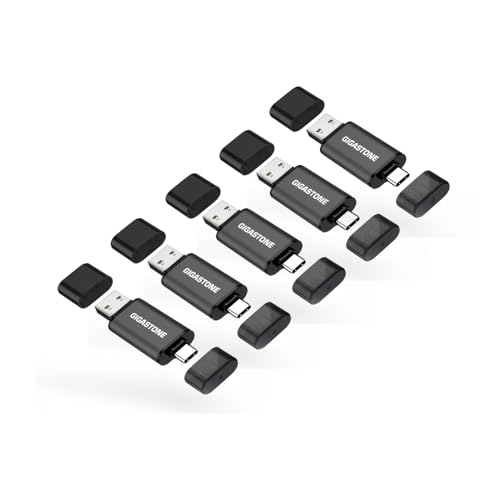
GIGASTONE 64GB Dual USB Flash Drive 5-Pack
More On The Choices That Made The List
Two 128GB drives in a single pack gives you breathing room to keep one at the office and one at home, or hand one to a family member without emptying your own pocket. The 2-in-1 USB-C plus USB-A design (USB-C is the small reversible connector used by most modern phones and laptops) means a single drive walks comfortably between an older desktop and a newer phone or tablet.
Transferring a season of photos or a stack of documents off a phone that insists on being full happens in minutes rather than coffee breaks, since this is a USB 3.2 Gen 1 drive (a mainstream USB standard that supports up to 5 Gbps theoretical throughput). The head cap design also keeps the unused connector covered during travel, which tends to pay off over months of pocket carry.
Real Benefits
- Dual USB-C and USB-A connectors cover both new and older machines in one stick
- 256GB total across the two-pack leaves room for sizeable media libraries
- Up to 100MB/s read speed keeps most file moves under a few minutes
- Plug-and-play setup means no apps to install for typical phone, PC, or car use
- Head cap protects the unused connector from pocket lint and pocket damage
Things To Consider
- Not every phone supports USB-C OTG (On-The-Go, the feature that lets a phone read external storage) out of the box, so check your model
- The cap is small enough to misplace on a busy desk
Key Product Details
Made For
Frequent phone-to-computer movers and households that want a spare drive within arm’s reach.
Consider Something Else When
The GIGASTONE 256GB Dual USB Flash Drive is a better match for anyone whose single-drive needs have grown past 128GB.
Stepping up from 128GB to 256GB on a single stick changes the rhythm of how you use portable storage. A full backup of a working project folder, an offline music library, or a season of 4K clips can sit on one drive without juggling folders across multiple sticks.
The 2-in-1 USB-C plus USB-A connector setup is the same recipe as the 128GB pick above, so the convenience is identical. Where this one stands apart is the headroom: 256GB gives content creators, photographers, and anyone dealing with large working files the room to stop constantly shuffling data.
The Upside
- 256GB handles sizeable media projects on a single stick
- USB-C and USB-A cover modern and legacy devices without adapters
- Up to 100MB/s read speed shortens the wait on big transfers
- Plug-and-play means zero software setup across phones, PCs, and TVs
Worth Noting
- Owners commonly report slower write speeds when the drive fills past roughly 80 percent, a quirk common to most flash media
- No activity light on the body, so you have to trust the file system during large transfers
- Losing a single 256GB stick is a bigger loss than losing a smaller drive
Right Fit For
Creators, photographers, and home-office pros who carry sizable working files between devices.
Where Another Pick Suits Better
The GIGASTONE 128GB Dual USB Flash Drive 2-Pack suits shoppers who’d rather have two smaller sticks than one big one.
Sixty-four gigabytes per drive is the sweet spot for documents, class notes, slide decks, and a healthy stack of photos. Two of them in a pack lets you separate work and personal files without buying twice, and the dual USB-C plus USB-A design sidesteps the dongle hunt for most modern workflows.
For students, casual home users, and anyone tired of email attachment limits, this is a low-fuss pickup. You may find 64GB tight if you regularly work with 4K video, but for everyday documents and media collections, it rarely feels cramped.
A Few Strong Suits
- Two 64GB drives cover typical document and photo needs
- Dual USB-C and USB-A connectors skip the adapter dance
- Up to 100MB/s read speed is quick for everyday file moves
Room For Improvement
- 64GB can feel tight for large video libraries or system backups
- USB-C OTG support varies by phone, so confirm compatibility before relying on it
Feature Snapshot
Best Suited To
Students, casual home users, and gift-givers who want a reliable everyday drive without overspending.
Not Your Match When
The GIGASTONE 128GB Dual USB Flash Drive 2-Pack is the better pick for shoppers who want fewer compromises on per-drive space.
Five matching drives in one box changes the math for a busy household or a small business. Hand a stick to each family member, label them with masking tape, and you’ve got an organized system without buying them one at a time.
The carbon fiber-look shell is purely cosmetic, but the retractable connector is the real practical win. There’s no cap to lose, and the connector tucks inside the body when the drive rides in a bag or drawer.
Noteworthy Benefits
- Five matching drives bring order to shared household or office use
- Retractable connector removes the risk of losing a tiny cap
- Up to 100MB/s read speed for fast file pulls across the pack
- USB 3.2 Gen 1 interface handles everyday transfers without bottlenecking
Points To Note
- USB-A only, so a USB-C phone will need an adapter or a different pick
- Five drives out of one box can be tricky to keep track of without labels
At A Glance
Who Will Love This
Families, shared workspaces, and small offices that need a matched set of dependable drives for multiple people.
Look Elsewhere When
The GIGASTONE 64GB Dual USB Flash Drive 5-Pack is a smarter fit when USB-C phone support matters more than per-drive capacity.
This 64GB pair trades the dual-connector flexibility of the picks above for a straight USB-A setup, and the lower read ceiling shows up mainly when you push large video files. For documents, slide decks, and modest photo collections, 80MB/s is more than enough.
The retractable body and carbon fiber-look shell mirror the 128GB five-pack above, so if you like the form factor but don’t need 128GB per drive, this pair keeps the same dependable build. It fits naturally into office desks and home setups where USB-A ports are still the norm.
What Stands Out
- Retractable connector means no separate cap to keep track of
- Two-pack value covers typical work-and-home separation
- USB 3.2 Gen 1 interface handles everyday transfers without slowdown
Trade Offs
- USB-A only, so newer USB-C-only devices need an adapter
- 80MB/s ceiling is slower than the 100MB/s picks in this list
- 64GB per drive is light for large video libraries
Built With In Mind
Office workers, students, and home users who mostly move documents and small media files between computers.
A Better Fit Elsewhere
The GIGASTONE 128GB Dual USB Flash Drive 2-Pack is the stronger choice when USB-C support and higher capacity both matter.
Travelers, hybrid workers, and anyone bouncing between a personal phone and a work laptop tend to want one drive that does both jobs. The single 128GB stick here covers that ground without the bulk of a multi-pack, and the dual USB-C plus USB-A setup means you can hand a file to almost any port you run into.
Pocket carry is where the head cap design pays off. In a hotel room or airport lounge, you can plug into a TV for a movie, into a laptop for work, and into a phone for a backup, all from the same small stick.
The Value In It
- Dual USB-C and USB-A connectors suit hotel, airport, and café outlets
- 128GB is enough for travel documents, a working project, and entertainment
- Up to 100MB/s read speed keeps file pulls short between devices
- Plug-and-play across phones, PCs, Macs, TVs, and car audio
Honest Caveats
- Head cap is small and easy to leave behind in a hotel room
- Single drive, so a failure means a single point of loss for everything on it
Feature Rundown
Whose Shelf It Belongs On
Frequent travelers and commuters who need one stick to bridge phone, laptop, and TV without adapters.
Reach For A Different Pick When
The GIGASTONE 256GB Dual USB Flash Drive is the smarter grab for anyone whose travel workflow includes large video files.
For first-time flash drive owners, simplicity matters more than specs. A 64GB dual-connector stick gives you a comfortable introduction: enough space for thousands of photos, a year of tax documents, or a working music library, and the USB-C plus USB-A pair means you don’t have to learn what adapters do first.
Plug-and-play is the headline here. Plug it into a phone, a laptop, or a TV and it just shows up, no apps, no formatting rituals, no manual to read. The honest read is that 64GB is the floor for comfortable use in 2026, but it remains plenty for most people who aren’t editing video.
Everyday Wins
- Dual USB-C and USB-A connectors mean one drive works across all household devices
- Plug-and-play removes the learning curve for first-time users
- Up to 100MB/s read speed handles everyday transfers with no waiting around
Some Limits To Know
- 64GB fills up faster than expected if you shoot video on a recent phone
- Phone compatibility depends on USB-C OTG support, which varies by model
- Head cap is small enough to misplace on a busy desk
Who Should Grab It
First-time flash drive owners, parents buying for a teen, and anyone who wants a no-fuss stick for basic file moves.
Skip It When
The GIGASTONE 128GB Dual USB Flash Drive suits shoppers who already know they’ll outgrow 64GB inside a year.
Small studios, classrooms, and project teams run into the same friction: everyone needs a stick, nobody wants to share one. Five 64GB dual-connector drives in a single box sidestep that whole conversation and keep each person’s files separate.
The USB-C plus USB-A pair on every drive is the real value play here. It removes the daily “do you have a USB-C stick or a regular one” negotiation that eats into a working session. For most teams, 64GB per person is plenty for active projects without the cost of larger sticks.
A Few Highlights
- Five drives cover a full team or class without buying individually
- Dual USB-C and USB-A on every stick simplifies device matching
- Up to 100MB/s read speed keeps shared file moves quick
- Head cap design protects the unused connector during shared handling
Potential Drawbacks
- Five loose caps across a busy workspace can disappear fast
- 64GB per drive limits use for video-heavy production teams
Perfect Match For
Small studios, classrooms, and project teams that need a matching set of USB-C and USB-A drives for shared use.
Swap It Out When
The GIGASTONE 128GB USB 3.2 Flash Drive 5-Pack is the better match for a household that wants more per-drive space and only needs USB-A.
Factors To Consider When Choosing Flash Drives
Capacity And Real-World Storage
Capacity is the easiest spec to over-buy or under-buy. A 64GB drive holds around 15,000 typical smartphone photos or roughly 10 hours of compressed video, which fits casual users fine. A 128GB stick doubles that room and is the comfortable middle for most households. The 256GB tier makes sense when you’re carrying working project files, large music libraries, or video projects, but anything beyond that usually belongs on an external SSD (Solid State Drive, a faster and larger storage device that connects over USB) rather than a thumb drive.
Connector Type And Device Mix
Modern devices are split between USB-A (the classic rectangular USB port found on most PCs, TVs, and car stereos) and USB-C (the small reversible connector on most modern phones, tablets, and newer laptops). Dual-connector drives cost a little more but eliminate the adapter hunt entirely. Pure USB-A drives still make sense in office environments where every desktop and laptop has the older port, and they tend to be the most affordable option per gigabyte.
Speed And What It Means In Practice
Read speed (how fast a drive opens or copies files off itself) is what you’ll feel most often. Up to 100MB/s is comfortable for everyday transfers and most media playback. Write speed (how fast your computer can drop files onto the drive) is slower on most flash media and matters more when you’re moving large video files. Look for USB 3.2 Gen 1 as a baseline, since older USB 2.0 drives feel sluggish on anything beyond documents.
Build, Cap, And Daily Handling
A removable cap is the most common point of failure on a flash drive: it pops off in a pocket and disappears. Retractable designs tuck the connector inside the body, which is a real durability win over months of use. A lanyard loop or a sturdy shell matters more for keys-and-pocket carry than for drives that live in a desk drawer. Carbon fiber-look shells are mostly cosmetic, but the retractable mechanism inside them is the practical detail to focus on.
Key Considerations Across These Picks
Common Buying Slip Ups
The most common flash drive mistake is buying on capacity alone and ending up with a slow USB 2.0 stick that bottlenecks every transfer. A second trap is grabbing a USB-A-only drive for a USB-C-only phone, which forces a frustrating adapter chain. A third is skipping the connector check on a phone: not every USB-C port supports USB-C OTG (On-The-Go), the feature that lets a phone read external storage at all. Before you commit, confirm your phone’s file manager can see external drives, or pick a dual-connector model so you have a backup plan.
What Separates Premium From Basic
The step up from a basic stick to a premium one shows up in three places: faster sustained write speeds for large video files, higher-grade NAND flash memory (the underlying storage chip, where better chips last longer under heavy rewriting), and a build that survives daily pocket carry. For casual document and photo use, a budget dual-connector drive does everything most people need. The premium tier pays off for creators, photographers, and anyone who writes hundreds of gigabytes a month, where slower drives bog down and cheaper chips wear out faster.
Frequently Asked Questions
How much storage do I actually need on a flash drive in 2026?
For documents, class projects, and a personal photo collection, 64GB remains comfortable for most people. A 128GB drive is the practical middle for mixed work and personal use, and 256GB is worth the step up only when you’re moving large media files or backing up full project folders.
What’s the difference between USB 3.2 Gen 1 and USB 2.0 on a flash drive?
USB 3.2 Gen 1 supports theoretical speeds up to 5 Gbps (gigabits per second, a measure of data throughput) and is roughly ten times faster than USB 2.0 in real-world use. For anything beyond small documents, USB 3.2 Gen 1 is the sensible baseline today, while USB 2.0 sticks feel slow even on routine photo transfers.
Do I need a USB-C flash drive or is USB-A still fine?
A USB-A drive still works for laptops, desktops, TVs, and most car audio systems, so it’s a safe pick for office and home setups. A USB-C connection is essential for modern phones and tablets, and dual-connector drives cover both worlds without needing an adapter.
Can I use a flash drive with my phone?
Most modern Android phones support USB-C OTG, which lets them read external flash drives through a file manager. iPhones require a Lightning or USB-C adapter, and iPad support depends on the model. Confirming your phone’s OTG support before relying on a flash drive for backups saves a frustrating return trip.
How long does a flash drive typically last?
A flash drive used for everyday document and photo storage can last many years with normal handling, since the workload is light. Heavy write cycles, like constant video recording, wear the NAND flash memory faster. Keeping a backup of anything important on a second drive or cloud service is wise, because all flash media eventually fails.
Bottom Line
The right flash drive is the one that matches the ports on your desk and the size of the files you actually move. A dual-connector 128GB stick covers most households comfortably, a 256GB model is the upgrade for heavy media work, and a multi-pack brings order to shared spaces. Match the connector to your most-used device, pick capacity with a small buffer for growth, and you’ll stop thinking about storage on the daily.


