

A vacation ends, a phone storage warning pops up, and suddenly you’re scrambling to move a thousand RAW shots off your device. That panic moment is exactly why the right flash drive matters more than people expect. Photographers juggling phone shoots, parents archiving family albums, and travelers who refuse to trust cloud-only backups all need reliable, portable storage that just works. This list rounds up eight solid options across budgets and connector types, from ultra-portable sticks to rugged metal bars, so you can match capacity, speed, and connector style to the way you actually shoot.
The Picks In Brief

SanDisk Cruzer Ultra 16GB USB 3.0 Flash Drive (Pack of 5)

ADATA C906 64GB USB 2.0 Flash Drive (Blue)

MOSDART 128GB USB C and A 3.2 Dual Flash Drive (Pink)

MOSDART 64GB USB C and A 3.2 Dual Flash Drive (Pink)

MOSDART 128GB USB C and A 3.2 Dual Flash Drive (Navy)

MOSDART 128GB USB C and A 3.2 Dual Flash Drive (Purple)
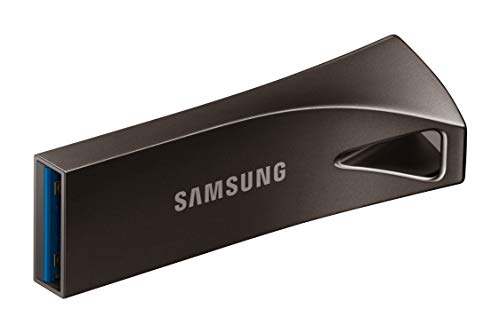
SAMSUNG BAR Plus 3.1 USB Flash Drive 128GB (Titan Grey)

ThePhotoStick Omni 128GB Photo Backup Drive
The Picks, Examined More Closely
Sorting photos by project or client often means wanting more than one drive in play, and that’s exactly where the SanDisk Cruzer Ultra 16GB 5-pack earns its spot. Each stick runs on USB 3.0 with read speeds topping out around 100 MB/s, so a card of JPEGs moves over quickly on a modern laptop. The slim, retractable body slips into a jeans coin pocket or a camera-bag side pouch without adding bulk.
For someone shooting weddings on a tight budget, a hobbyist who archives one event per stick, or a teacher who hands a labeled drive to each class, the math works out cleanly. Five drives also doubles as a basic backup strategy: keep one at home, one in a drawer at the office, and rotate. Compared with the single higher-capacity options later in this list, you trade total gigabytes for the flexibility of physical separation.
What Earns Its Place
- Five drives let you separate shoots by project, client, or family member without juggling folders.
- USB 3.0 read speed up to 100 MB/s keeps full-card dumps from feeling painful on a recent laptop.
- Retractable connector design avoids the lost-cap problem that plagues so many cheap sticks.
- Each drive is small and light enough to toss in a laptop sleeve, a glove box, or a coat pocket.
Worth Noting
- 16 GB per drive feels tight for RAW shooters; a single wedding can blow past that quickly.
- Plastic body is light, but not designed to shrug off drops the way metal options are.
Who It Suits Best
Event photographers, teachers, and casual shooters who prefer separate physical drives per project rather than one large stick to manage.
Skip It When
The SAMSUNG BAR Plus 128GB is a better fit for travelers who want one rugged, high-capacity drive instead of juggling several smaller ones.
There’s something quietly reassuring about a flash drive that looks like a flash drive, and the ADATA C906 is exactly that: a slim stick with a cap-protected USB-A tip and a familiar blue shell. 64 GB of room is enough to stash a couple thousand phone JPEGs or a year of scanned family photos without much fuss. The Classic Series design language has been around long enough that it just feels normal in a hand.
Where it faltates slightly is the USB 2.0 interface, which limits how fast you can move a large batch of files. Pulling a few hundred photos off a card is fine; dumping a full DSLR session in one go is where you’ll feel the wait. For a grandparent who just wants a place to save scanned albums, or a student collecting research snapshots, that tradeoff is acceptable.
Reasons It Performs
- 64 GB holds thousands of phone-resolution photos without forcing a daily tidy-up.
- Cap-coupling design protects the connector from pocket lint and accidental snaps.
- Universally compatible with older laptops, desktops, printers, and TVs that still ship with USB-A ports.
Trade Offs
- USB 2.0 transfer speed means large bulk moves feel sluggish on newer computers.
- Plastic shell is light, but owners commonly report scuffs after months of pocket carry.
Right Fit For
Casual users archiving phone photos, scanned documents, or small image libraries on older computers where USB 2.0 ports are the norm.
Where Another Pick Suits Better
The MOSDART 128GB USB C and A 3.2 Dual Flash Drive makes more sense for anyone moving photos between a modern smartphone and a laptop, since it covers the connector gap the C906 can’t.
Phone shooters hit a wall the moment they want to offload a chunk of images without paying for a cloud subscription. The MOSDART 128GB USB C and A 3.2 dual flash drive answers that problem with two connectors on one stick: USB-C for modern Android phones, tablets, and slim laptops, and USB-A for older machines. The pink finish makes it easy to spot in a crowded bag, and the built-in keychain loop means it’s harder to lose between shoots.
USB 3.2 read speeds around 150 MB/s mean a few thousand JPEGs clear off a phone in well under a minute on compatible ports. Compared with the ADATA C906 earlier in this list, you trade the universal compatibility of USB-A for the speed and dual-connector convenience that fits a phone-first workflow. The 128 GB capacity is generous enough for several trips’ worth of images before you need to rotate.
Strengths Worth Knowing
- USB-C tip plugs straight into most Android phones and recent iPads without a dongle.
- USB-A side keeps older laptops, TVs, and printers in play without buying adapters.
- 128 GB holds roughly 30,000 to 40,000 phone JPEGs, depending on resolution.
- Keychain hole keeps the drive physically attached to a bag or lanyard, reducing loss risk.
Points To Keep In Mind
- Some phone cases are thick enough to block a flush USB-C connection, so a case check helps.
- Pink finish shows scuffs faster than darker options like the Navy sibling in this list.
Made For
Phone-first photographers and travelers who want one drive that bridges a USB-C handset and a USB-A laptop without carrying adapters.
Look Elsewhere When
The SAMSUNG BAR Plus 128GB is the stronger match for shooters who never need a phone connector and want a more rugged metal body for field use.
Not every shoot demands a 128 GB stick, and that’s where this 64 GB MOSDART dual-connector sibling earns attention. It carries the same USB-C and USB-A 3.2 hardware as its larger brother, just with half the storage. For weekend trips, classroom projects, or a single wedding’s worth of phone shots, 64 GB covers the trip without weighing you down with capacity you won’t use.
The keychain-friendly shell and bright pink finish make it a friendly travel companion, and 150 MB/s read speeds are quick enough that offloading at a hotel lobby laptop is realistic. The honest read is that this drive makes the most sense for someone who already plans to offload weekly, rather than as a long-term archive vault.
Well-Handled Touches
- Dual USB-C and USB-A tips cover both a phone and a laptop from a single stick.
- Compact size fits on a keyring without turning your keys into a brick.
- Pink color is easy to spot in a black camera bag or a dark purse.
Minor Gripes
- 64 GB fills up fast on a heavy shooting day, so it rewards regular offloading.
- Smaller capacity version of the same line, so it shares any quirks of the broader MOSDART build.
Who Should Grab It
Casual phone shooters, students, and weekend travelers who want a pocketable dual-connector drive without paying for extra capacity they won’t fill.
A Better Fit Elsewhere
The MOSDART 128GB USB C and A 3.2 Dual Flash Drive in Navy is a smarter pick for anyone who regularly shoots RAW photos or 4K video clips and wants headroom in the same form factor.
Color matters more than people expect when you’re juggling several drives, and the Navy version of the MOSDART 128GB dual flash drive keeps a low profile in a bag full of dark tech gear. The dual USB-C and USB-A tips and 150 MB/s read speed match the Pink version earlier in the list, so the choice here is really about finish and how it sits in your kit.
For a working photographer who keeps one drive attached to a carabiner on a belt loop, the deeper color hides scuffs and looks more professional on client handoffs. The same practical ownership note applies as the other MOSDART sticks: a quick case check on thicker phone cases prevents the USB-C tip from sitting loose.
A Favorable Mix
- Navy finish reads as more professional than brighter colors on a client shoot.
- 128 GB capacity covers several events or a long vacation without rebalancing files.
- USB-C and USB-A 3.2 hardware means one drive covers phones, tablets, and laptops.
Honest Caveats
- Plastic shell is lighter than the metal SAMSUNG BAR Plus, so it needs a case or a pocket to stay safe.
- Darker finish can vanish in a cluttered drawer if the keychain loop is left empty.
Best Suited To
Working photographers and frequent travelers who want a discreet, high-capacity dual-connector drive that won’t look out of place on a client handoff.
Swap It Out When
The MOSDART 128GB USB C and A 3.2 Dual Flash Drive in Purple works better for creatives who color-code drives by project and want visual sorting at a glance.
Color-coding is one of those small habits that prevents a real headache later, and the Purple variant of the MOSDART 128GB dual flash drive slots neatly into a system where each project gets its own hue. The internal hardware is identical to the Pink and Navy versions in this list: dual USB-C and USB-A tips, 150 MB/s read speed on a USB 3.2 bus, and a 128 GB ceiling for storing thousands of JPEGs or several RAW sessions.
The trade-off, as with any plastic-bodied drive, is that it lives best on a lanyard or inside a padded pocket rather than rattling around at the bottom of a backpack. For studio managers or family archivists who already use a color system for memory cards, this stick slides into the routine with zero friction.
The Practical Payoff
- Purple shell fits cleanly into a color-coded memory card or drive system.
- Dual USB-C and USB-A tips cover modern phones and older laptops from one stick.
- 128 GB gives several full projects of breathing room before you need to archive.
Smaller Limitations
- Plastic body feels light, so dropping it on a hard floor without a case is a real concern.
- Write speeds lag behind the read rating, which shows up during large RAW file dumps.
Who Will Love This
Studio managers, wedding photographers, and family archivists who already color-code their memory cards and want their backup drives to match.
Reach For A Different Pick When
The SAMSUNG BAR Plus 128GB is the better call for field shooters who want a metal body that can take a real beating without a protective case.
The SAMSUNG BAR Plus looks and feels different from the plastic sticks earlier in this list, and that’s the point. The rugged metal casing is built to take a beating in a backpack or a coat pocket, and the integrated keyring loop keeps the drive physically tethered to something you won’t lose. With USB 3.1 hardware and read speeds up to 400 MB/s on compatible ports, moving a full card of high-resolution JPEGs or a chunk of 4K video feels quick rather than tedious.
For a landscape photographer, a frequent flyer, or anyone who treats a flash drive like a tool rather than a disposable accessory, the BAR Plus justifies its place at the top of the rugged category. 128 GB is enough for most working shoots, and the Titan Grey finish looks discreet in professional settings. The catch, depending on your setup, is the USB-A only design: if your main computer is USB-C only, you’ll need a hub or adapter.
Everyday Perks
- Metal casing shrugs off drops and pocket scuffs that would mark plastic sticks.
- 400 MB/s read speed on USB 3.1 ports makes large transfers noticeably faster than older drives.
- Integrated keyring loop reduces the chance of losing the drive in transit.
- 128 GB holds roughly 30,000 to 40,000 JPEGs at typical phone resolutions.
Points To Note
- USB-A only design means USB-C phone users need a hub or adapter for direct transfers.
- Metal body gets cold in winter and warm during long transfers, which is purely cosmetic but worth noting.
The Right Fit
Field photographers, business travelers, and anyone who treats their flash drive as a daily-carry tool that needs to survive a real bag.
Where A Sibling Pick Shines
The MOSDART 128GB USB C and A 3.2 Dual Flash Drive in Pink is a smarter pick for shooters who offload straight from a USB-C phone and don’t want to carry a hub.
Not everyone wants to learn file management just to keep their photos safe, and ThePhotoStick Omni is built for that exact person. The pitch is simple: plug the device in, run the included app, and let it find and copy your photos and videos automatically across PC, Mac, iPhone, and Android. For a parent backing up a decade of phone photos, or a small business owner who never wants to touch a folder structure, the simplicity is the feature.
The 128 GB capacity is generous, and the multi-device compatibility means the same stick can pull images from a desktop, a phone, and a tablet over time. The trade-off is that you give up the granular control a working photographer needs: there’s no real way to filter by project or client, just a broad sweep. For its target user, that hands-off approach is exactly the point.
The Upside
- Automatic backup software removes the manual sorting step most people skip.
- Works across PC, Mac, iPhone, and Android, so a household can share one device.
- 128 GB holds over 50,000 images and videos, depending on resolution and length.
A Few Limitations
- Lacks project-level organization, so photographers who need folder control will outgrow it.
- App-based workflow means non-tech users may need help with the first setup on a new device.
Perfect Match For
Non-technical family members, small office users, and anyone who wants a set-and-forget photo backup without learning file management.
Not Your Match When
The SAMSUNG BAR Plus 128GB suits working photographers better, since it offers manual folder control, faster transfer speeds, and a more durable build for daily use.
What To Weigh Before Picking A Flash Drive For Photos
Capacity First, Speed Second
Capacity drives the decision before speed for most home archivists. A single phone year of JPEGs often lands between 20 GB and 60 GB, so a 64 GB drive covers one calendar year comfortably, while 128 GB gives you two to three years of breathing room. RAW shooters and 4K video users fill drives faster, and a 128 GB or larger stick stops feeling oversized. For context, 128 GB holds roughly 30,000 to 40,000 phone JPEGs, but only a few thousand RAWs from a full-frame body.
Connector Type And Daily Reality
USB-A still rules older laptops, desktops, TVs, and printers, so a single USB-A drive covers the widest range of household ports. USB-C matters the moment you want to offload straight from a modern Android phone, a recent iPad, or a thin laptop without carrying a hub. Dual-connector sticks cost a little more but remove the dongle pile, which is the real reason to pay the small premium.
Build Quality And Where It Lives
A drive that sits in a desk drawer does not need the same armor as one that lives on a keychain or rides in a camera bag. Metal casings cost more but handle drops and scuffs without complaint, while plastic sticks are fine in protected pockets. Owners commonly report that plastic shells pick up pocket lint around the connector and can crack if sat on, so a cap or retractable design helps.
Key Considerations Across These Picks
Pitfalls Shoppers Hit
The most common mistake is buying on gigabytes alone and ending up with a drive too slow for the workflow. A 256 GB USB 2.0 stick looks like a bargain until you wait twenty minutes to copy a session, at which point the cloud subscription you were avoiding starts looking reasonable. Another trap is assuming any flash drive works with any phone: USB-C phone compatibility requires a USB-C tip or a working OTG adapter, and iPhones with Lightning ports need a different solution entirely.
When Paying More Pays Off
The premium tier in this category buys three real things: faster transfer speeds, more durable materials, and dual connectors. A metal-bodied USB 3.1 drive like the SAMSUNG BAR Plus handles a working photographer’s daily abuse in a way a plastic USB 2.0 stick never will. For someone who offloads once a year, the premium is wasted; for someone who offloads weekly from a USB-C phone in the field, it pays for itself in saved time and lost fewer files.
Frequently Asked Questions
How much storage do I need for phone photos?
A 64 GB drive covers a typical phone year of JPEGs comfortably, while 128 GB gives two to three years of headroom. RAW shooters and 4K video users should look at 128 GB or larger to avoid weekly purges.
Are USB 3.0 flash drives worth it for photos?
Yes, the speed difference shows up most during big transfers. USB 3.0 and newer drives move a few thousand JPEGs in seconds, while USB 2.0 drives stretch the same job into minutes. For occasional small backups, USB 2.0 is fine, but for any regular workflow, the faster bus saves real time.
Can a flash drive back up photos from both iPhone and Android?
Dual-connector drives with USB-C and USB-A, or dedicated multi-platform devices like ThePhotoStick Omni, cover both ecosystems. iPhones with a Lightning port need an adapter or a dedicated Lightning-compatible device, so check your specific model before buying.
How long do flash drives last for photo storage?
Most quality flash drives last several years of normal use, though long-term archival storage is not their strongest suit. Storing a drive in a cool, dry place and avoiding physical stress extends its life, and keeping a second backup copy is wise for irreplaceable photos.
Is a flash drive safer than cloud storage for photos?
Both have trade-offs. Flash drives keep photos offline and out of subscription cycles, but they can be lost, stolen, or physically damaged. Cloud storage survives device loss but depends on a subscription and an internet connection. Many people use both, treating the flash drive as a local copy and the cloud as a second layer of redundancy.
Bottom Line
Your camera roll, your trip, and your family archive all deserve a place that does not depend on a monthly bill. Match the connector to your most common device, pick a capacity that gives you at least a year of room, and choose a build that fits where the drive will actually live. Any of the eight options above covers that job well, and the right one is the one that matches your daily habit rather than a spec sheet.


