

Recording live TV, saving series for later, or archiving sports broadcasts all depend on one quiet piece of hardware: the USB stick sitting in the back of your television. Most smart TVs and DVR units accept flash drives for one-touch recording and timeshift playback, but not every drive handles long sessions, large files, or repeated writes without complaint. Capacity, sustained write speed, and a physical size that doesn’t crowd nearby HDMI ports all matter more than a casual shopper might expect.
This shortlist focuses on drives that pair naturally with TV recording workflows, from compact metal sticks with keychain holes to dual-port SSD-style options that move large files quickly between devices. Each pick below covers a real use case, whether you’re building a permanent media library or just need a spare drive for occasional captures.
How The Shortlist Stacks Up

GARMESE 32GB USB 3.0 Flash Drive 5-Pack

GARMESE 64GB USB 3.0 Metal Flash Drive

GARMESE 256GB USB C SSD Flash Drive

GARMESE 256GB USB C Flash Drive Dual Port

GARMESE 128GB USB C SSD Flash Drive

GARMESE Mini USB 3.0 Flash Drive 32GB 3-Pack
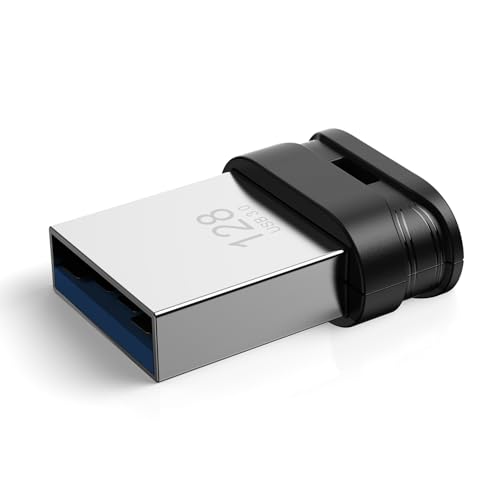
GARMESE 128GB USB 3.0 Mini Flash Drive

GARMESE 64GB USB 3.0 Mini Flash Drive
The Strengths Of Each Pick
A household with more than one television usually ends up needing more than one flash drive, and the GARMESE 32GB USB 3.0 Flash Drive 5-Pack answers that exact problem. Each stick comes in a metal shell with a small keychain hole, so you can label one for the living room TV, one for the bedroom, and another for travel without mixing up the contents.
At 32GB per unit, you get enough room for several recorded episodes or a few movies depending on your television’s encoding bitrate. For most households recording standard or high-definition broadcasts, this capacity fills the gap without forcing you to juggle files between devices.
Useful Highlights
- Five matching drives let you assign dedicated storage to each TV in the home.
- USB 3.0 interface keeps file movement to and from a computer quick when archiving recordings.
- Metal housing with a keychain loop reduces the chance of leaving a drive behind in a hotel or guest room.
- Per-drive 32GB capacity holds a healthy batch of standard-definition TV recordings.
Points To Keep In Mind
- 32GB fills up quickly if your TV records at a high bitrate or captures long sports broadcasts.
- Owners with multiple televisions sometimes find five drives is more than needed at first.
Built With In Mind
Families juggling two or three televisions who want a labeled stick for each screen without paying for separate single-drive purchases.
Look Elsewhere When
You record full seasons in HD and would rather consolidate onto a single large stick, which is where the GARMESE 128GB USB 3.0 Mini Flash Drive fits more naturally.
The GARMESE 64GB USB 3.0 Metal Flash Drive lands in the comfortable middle of the storage conversation. Capacity is generous enough to swallow weeks of casual recording without forcing you to delete favorites, and the metal shell holds up well to repeated plugging and unplugging behind a console.
Compared with the 32GB five-pack, this single 64GB drive trades quantity for a tidy one-stick setup. For most living rooms where one television handles all the recording, that simplification is usually the better call.
Where It Delivers
- 64GB comfortably holds a month or more of casual TV recordings for a single household.
- USB 3.0 read and write performance keeps transfers to a computer brisk when archiving a season.
- Metal body with keychain hole feels sturdy enough for daily insertion cycles.
Honest Caveats
- 64GB still requires offloading if you record 4K broadcasts regularly.
- Standard USB-A only, so newer laptops and tablets with USB-C ports need an adapter.
Right Fit For
Anyone running one main television in a typical household and recording a steady but moderate schedule of shows and movies.
Consider Something Else When
You frequently move recordings onto a modern laptop and would benefit from the GARMESE 128GB USB C SSD Flash Drive’s dual-port convenience.
The GARMESE 256GB USB C SSD Flash Drive steps into a different class than the metal sticks earlier in this list. SSD-grade storage and a USB 3.2 interface mean recorded TV footage moves to your computer in a fraction of the time, which matters when a 256GB library is sitting on the drive.
For viewers capturing 4K broadcasts or maintaining a multi-season archive, the speed and capacity come together nicely. Plug-and-play operation across Windows, macOS, Linux, and Android keeps setup minimal, so you spend time watching instead of formatting.
Advantages To Know
- 256GB supports extensive TV recording libraries without constant archiving.
- USB 3.2 read and write speeds slash transfer times for large recording collections.
- 2-in-1 dual-port design handles USB-C televisions, laptops, and modern phones directly.
- Plug-and-play across major operating systems simplifies setup behind a television.
Worth Noting
- SSD-grade pricing sits above the metal-stick options for shoppers on tight budgets.
- USB-C only, so older televisions without a USB-C port require an adapter or a different pick.
Made For
Viewers recording 4K broadcasts or maintaining large personal libraries who want fast, modern dual-port convenience.
Skip It When
You record standard-definition shows occasionally and would prefer the simpler value profile of the GARMESE 64GB USB 3.0 Metal Flash Drive.
Mixed-device households often run into a wall: one television wants a USB-A stick, a laptop wants USB-C, and a phone accepts either. The GARMESE 256GB USB C Flash Drive Dual Port solves that puzzle with both connector types on a single body, no adapter required.
With 256GB on hand, the drive doubles as a portable archive for TV recordings you want to move between devices. Compared to the SSD sibling earlier in this list, the USB 3.1 Gen 1 interface is slower, but the trade shows up mainly during big transfers, not everyday TV recording.
A Favorable Mix
- Dual-port body switches between USB-C and USB-A without an adapter.
- 256GB handles a healthy TV recording backlog and general file storage at the same time.
- Compact OTG design works with smartphones and tablets, not just televisions.
Small Caveats
- Up to 150MB/s read speed trails the SSD-class picks above for large archive transfers.
- Some televisions detect only one connector at a time, so the dual design is mostly useful on computers and phones.
Whose Shelf It Belongs On
Households that shuttle recordings between a USB-C laptop, a smart TV, and a phone, all without an adapter drawer.
Where Another Pick Suits Better
Users focused purely on fast TV recording and computer archiving benefit more from the GARMESE 256GB USB C SSD Flash Drive’s higher transfer ceiling.
The GARMESE 128GB USB C SSD Flash Drive hits a comfortable middle ground for TV recording enthusiasts who don’t quite need 256GB. SSD-class speed under USB 3.2 keeps the experience smooth, and the 2-in-1 dual-port body covers modern laptops and smartphones alongside a television.
This is the kind of stick you plug into a USB-C television for weekly recording and then pop into a laptop when you want to free space. Compared with the 256GB SSD sibling, you trade some storage capacity for a more approachable price point.
The Practical Payoff
- 128GB holds multiple recorded seasons or a long stretch of weekly broadcasts.
- USB 3.2 Gen 1 read and write performance trims the time spent moving large files.
- Dual USB-C and USB-A connectors cover modern televisions, laptops, and phones without adapters.
- Plug-and-play across Windows, macOS, Linux, and Android keeps formatting hassles out of the way.
Things To Consider
- 128GB fills up faster than 256GB options for users with multi-season archives.
- Premium SSD pricing may not suit casual recorders who only need a single movie’s worth of space.
Who Should Grab It
Regular TV recorders who want SSD-class speed and dual-port convenience without stepping up to 256GB capacity.
Swap It Out When
You rarely need more than a handful of movies and would prefer the simpler metal profile of the GARMESE 64GB USB 3.0 Metal Flash Drive.
Wall-mounted televisions often leave very little room behind the panel. The GARMESE Mini USB 3.0 Flash Drive 32GB 3-Pack keeps a low profile, sitting almost flush with the USB port so the television can sit close to the wall without stressing the connector.
You get three matching drives, which works well for households that want one dedicated stick per television or per family member. Compared with the metal 32GB five-pack earlier in this list, the trade is quantity versus an even more compact shell.
What Works In Its Favor
- Ultra-small body suits wall-mounted TVs where clearance behind the panel is tight.
- Lanyard hole adds a simple way to tether the drive and avoid losing it behind furniture.
- Three-pack format separates work, personal, and TV recording duties cleanly.
Room For Improvement
- 32GB per drive limits how many hours of recording you can keep before offloading.
- Mini bodies are easier to misplace than the chunkier metal sticks, especially in busy households.
Best Suited To
Apartment dwellers with wall-mounted televisions and tight entertainment centers who want dedicated sticks per room.
Reach For A Different Pick When
You record long games or extended series and need more room per drive, which the GARMESE 128GB USB 3.0 Mini Flash Drive covers in the same compact body.
When 32GB feels too tight but a chunky full-size stick feels like overkill, the GARMESE 128GB USB 3.0 Mini Flash Drive lands in a useful middle spot. The mini body keeps the back of the television tidy while 128GB swallows multiple seasons of recorded shows.
The waterproof rating is a quiet bonus for installations near kitchens, kids’ play areas, or anywhere an accidental spill is possible. USB 3.0 read speeds support quick transfers when you finally pull the recordings off for archiving.
Reasons It Performs
- 128GB in a mini body suits long TV recording sessions without hogging space behind the panel.
- Waterproof construction offers peace of mind in kitchens or family rooms.
- Lanyard hole lets you tether the drive and reduce the chance of losing it behind furniture.
- Plug-and-play setup with smart TVs means no extra software or formatting steps.
Things To Weigh
- USB-A only, so newer USB-C televisions and laptops require an adapter for direct use.
- Mini bodies can feel small in larger hands, which makes them easier to drop.
Who It Suits Best
Viewers archiving full seasons on a wall-mounted television who want capacity and a low-profile body in one stick.
A Better Fit Elsewhere
You mostly record onto a USB-C smart TV and would benefit from the GARMESE 128GB USB C SSD Flash Drive’s modern dual-port design.
The GARMESE 64GB USB 3.0 Mini Flash Drive wraps a useful amount of storage in the smallest possible body. Plug it into a tight entertainment center and it almost disappears, which makes it a comfortable choice for permanent installation behind a wall-mounted panel.
For viewers who record a few shows a week rather than entire seasons, 64GB strikes a practical balance, enough room to be useful, small enough to stay out of the way. Compare that to the 128GB mini sibling above, and you trade capacity for a more compact ownership profile.
What Pays Off
- 64GB holds a few weeks of casual recording without forcing constant cleanup.
- Mini form factor keeps the back of wall-mounted televisions uncluttered.
- Waterproof construction is reassuring in living rooms where snacks and drinks live nearby.
Some Limits To Know
- USB-A only, so USB-C smart TVs need an adapter or a different pick from this list.
- 64GB fills up quickly if you record long sports broadcasts at high bitrates.
Perfect Match For
Casual recorders with wall-mounted televisions who want a tidy stick that stays out of the way after setup.
Where A Sibling Pick Shines
You record consistently across multiple TVs and want a matching set, which the GARMESE Mini USB 3.0 Flash Drive 32GB 3-Pack delivers more naturally.
What To Match Your Television And Habits Before Buying
Television recording looks simple, but a few attributes decide whether a flash drive feels invisible or turns into a daily annoyance. Capacity sets how much you can keep before offloading, sustained write speed affects whether long recordings drop frames, and physical size matters once the television sits flush against a wall.
Match the drive to your television first. Older sets with USB-A ports pair cleanly with the metal and mini sticks earlier in this list, while newer USB-C smart TVs benefit from the dual-port and SSD-class picks. Encoding bitrate also drives your real-world capacity needs: standard-definition broadcasts fit far more hours onto the same drive than full 4K captures.
Consider how you will move recordings off the stick. Households that archive to a computer weekly benefit from faster USB 3.2 or SSD-grade transfer speeds, while households that simply watch and delete can stay with a USB 3.0 stick at comfortable capacity. Storage habits, not raw gigabytes, usually decide the right pick.
Reading The Specs Without Getting Lost
Two numbers tell you most of what matters: capacity and interface generation. Capacity is straightforward, but interface generation affects real-world feel. USB 3.0 in this list moves files at a steady everyday pace, USB 3.1 Gen 1 trims archive times, and USB 3.2 with SSD-grade storage shaves minutes off big transfers. For TV recording itself, any of these works, so the difference shows up mostly when you offload the library.
Physical format matters more than people expect. A stick that protrudes two inches behind a wall-mounted television can press on the wall, bend the connector, or block an HDMI cable sitting next to it. Mini and low-profile bodies solve that pain, especially in tight entertainment centers.
Key Considerations Across These Picks
Mistakes Worth Dodging
Plenty of shoppers grab the cheapest 1TB stick they see and assume bigger is automatically better. For TV recording, sustained write speed and format compatibility matter far more than headline capacity. A drive that drops frames during a live sports recording is worse than a smaller stick that captures the entire game cleanly. Match the drive to your television’s recording format and bitrate before chasing raw storage numbers.
Another common slip is overlooking physical clearance behind a wall-mounted panel. A full-size stick may technically work, but a protruding body can damage connectors or block nearby ports over time. Measure the gap between the back of your television and the wall before choosing a metal versus mini body.
Where The Extra Money Goes
Paying more usually buys SSD-grade storage, USB 3.2 transfer speeds, or a dual-port USB-C and USB-A design. Each of those adds real convenience: faster archiving, smoother transfers to modern laptops, and fewer adapters lying around the living room.
For most households recording standard-definition or HD broadcasts, a USB 3.0 metal or mini stick is plenty, and the savings feel meaningful. The SSD-class and dual-port picks earn their place when you record 4K, maintain multi-season archives, or shuttle files between a USB-C laptop and a television every week. Spend up when your habits match those scenarios, and stay with the simpler drives when they don’t.
Frequently Asked Questions
What Size Flash Drive Do I Need For Tv Recording?
Most smart TVs work comfortably with 32GB to 128GB for standard-definition recording, and 256GB suits households that keep several seasons archived before offloading. The exact capacity you need depends on your television’s encoding bitrate and how often you transfer files to a computer.
Are SSD Flash Drives Better Than Regular Ones For Tv Recording?
SSD-class drives offer faster transfer speeds when you archive recordings to a computer, but for the recording itself, both regular and SSD sticks perform similarly. The SSD tier matters most when you move large libraries regularly or capture 4K broadcasts.
Do All Smart Tvs Accept Any Flash Drive?
Most modern smart TVs accept standard USB flash drives formatted as FAT32, exFAT, or NTFS, but a few models limit capacity or require specific formatting. Check your television’s recording specifications before buying a high-capacity drive to avoid surprises.
Can I Use The Same Flash Drive On Multiple Tvs?
You can move a flash drive between televisions, but recorded files may use each set’s proprietary format, so files often won’t play on a different brand of TV. Many people solve this by assigning a dedicated drive to each television rather than swapping one drive around.
How Long Do Flash Drives Last For Tv Recording?
Flash drives used for TV recording typically last several years of regular use, though heavy write cycles can wear them out sooner. Safely ejecting the drive after each recording session and avoiding constant rewrites helps extend its working life.
Wrap Up
The right flash drive for TV recording depends on your television’s ports, your recording habits, and how much footage you like to keep on hand before offloading. Wall-mounted setups benefit from the mini bodies, multi-TV households gain flexibility from the value packs, and heavy recorders appreciate the SSD-class transfer speeds. Pick the format that matches how you actually watch, and the rest of the experience tends to fall into place.


