

Running emulator apps on your phone turns a quick session on the bus into a proper retro-gaming session. The catch is touch controls: swiping a virtual D-pad never feels as sharp as real inputs, which is why a dedicated gamepad makes a huge difference. This roundup focuses on controllers that pair well with Android devices, plug in cleanly over USB-C, and handle the demanding input patterns of emulated consoles without a fuss.
A Side-By-Side Look

abxylute S9 Full-Size Gaming Phone Controller (Black)

abxylute S8 Lite Type-C Mobile Gaming Controller
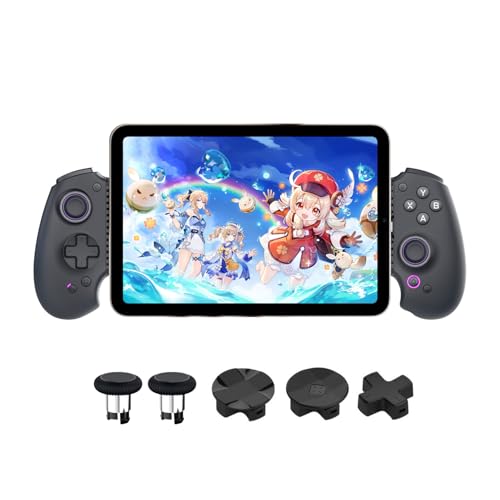
abxylute S9 Full-Size Bluetooth Type-C Mobile Gaming Controller

BACKBONE Pro Gaming Controller
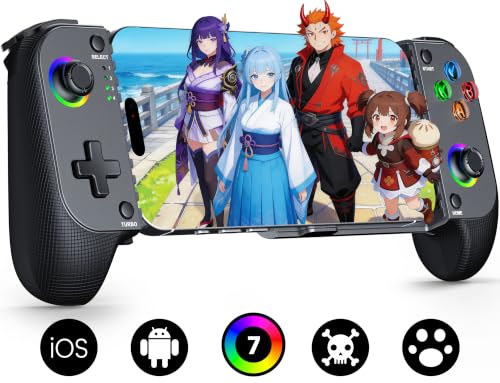
Mocagen MC1 Phone Controller for iPhone & Android (Black)

Mocagen MC1 Phone Controller for iPhone & Android with Turbo

BACKBONE One Mobile Gaming Controller

Razer Kishi Ultra Gaming Controller for Mobile, Phone, Tablet (USB-C)

GameSir G8 Galileo Type-C Mobile Gaming Controller
Meet The Standout Selections
If your emulation rotation leans toward SNES, PS1, or Nintendo 64 titles, the abxylute S9 brings a real full-size gamepad feel rather than a clipped mobile grip. It connects over Bluetooth or USB-C and covers iPhone 15 through 17, iPad Mini 6 and 7, plus Android tablets and phones from Samsung and Google Pixel lineups. Hall-effect joysticks use magnetic sensing to register input, which keeps stick drift from creeping in over months of play.
Free button mapping is a meaningful touch for emulators, since each console’s button layout can be reassigned to whatever feels natural on the pad. You also get programmable rear buttons for shortcuts like save states or fast-forward. Compared with the more compact S8 Lite covered later, this one favors longer sessions where hand fatigue is the main concern.
A Strong Showing
- Full-size grip layout feels closer to a home console pad than most mobile controllers.
- Hall-effect joysticks resist drift, which matters when you replay the same N64 platformer a hundred times.
- Bluetooth and USB-C dual connection for flexibility across emulator frontends.
- Free button mapping lets you reassign face buttons to match each emulated system’s layout.
- Broad device support across recent iPhones, iPad Mini generations, and major Android flagships.
Things To Consider
- The bulkier shell makes it less pocket-friendly than a telescopic design.
- iPhone 17 Pro is not on the supported device list, so check compatibility before committing.
Made For
Emulator enthusiasts who play for an hour or more at a stretch and want console-style ergonomics on a phone.
A Better Fit Elsewhere
Travelers juggling tight bags should look at the abxylute S8 Lite, which trims the footprint considerably.
The S8 Lite answers a different problem than the S9 above: it shrinks down for travel while keeping the inputs that emulators actually need. Plug-and-play over USB-C means you skip Bluetooth pairing screens and dive straight into a ROM. It fits phones and tablets up to 216mm long, which covers most modern Android flagships and the recent iPhone 17 alongside iPad Mini 6 and 7.
Hall joysticks and hall triggers (analog triggers that read pressure via magnetic sensing rather than a physical switch) keep the inputs consistent across the controller’s lifespan. Customizable buttons and key mapping let you tune the layout for specific emulators, like swapping face buttons for a fighting game or a Game Boy Advance session. Charging passthrough is a thoughtful touch for long flights where your phone battery would otherwise drain.
What It Does Well
- Plug-and-play USB-C means no Bluetooth menus when you want to launch a quick session.
- Compact travel-friendly body that still accommodates tablets up to 216mm.
- Hall triggers and joysticks for longer-term reliability over rubber-membrane alternatives.
- Pass-through charging keeps your phone topped up during demanding PSP or Dreamcast emulation.
Worth Noting
- The smaller grip is less comfortable than the S9 during sessions over an hour.
- No Bluetooth means you’re always tethered, which can feel restrictive on a couch setup.
Best Suited To
Commuters and travelers who want a low-fuss wired gamepad for shorter emulator bursts.
Reach For A Different Pick When
Couch players craving wireless freedom should consider the abxylute S9 Bluetooth edition instead.
This S9 variant is the Swiss Army knife of the abxylute line. Bluetooth pairs with Nintendo Switch, recent iPhones, iPad, and Android devices, while a USB-C wired mode covers low-latency play when you’re chasing frame-perfect inputs in a fighting game. That dual-mode setup lets one controller travel from phone emulation to docked Switch sessions without juggling two pads.
Hall-effect joysticks and triggers bring the same drift-resistant construction seen on the other S9 model reviewed earlier. Customizable buttons, free key mapping, and a companion app make it easier to save per-game profiles. You can set one profile for a precision platformer and another for a 16-button fighting game without rebuilding the layout each time.
What Makes Sense
- Dual Bluetooth and USB-C modes cover wireless couch play and low-latency wired tournament-style sessions.
- Works with Switch, iPhone, iPad, and Android, reducing the number of pads in your drawer.
- Hall-effect analog hardware holds up under sustained emulator use.
- Companion app support helps you store button profiles per emulator or game.
Trade Offs
- Heavier than a pure mobile pad, since it borrows the console-grade shell from the other S9.
- Setting up Bluetooth mode for the first time takes a few extra steps versus the S8 Lite’s plug-and-play approach.
Whose Shelf It Belongs On
Gamers who split time between Switch, phone emulation, and cloud streaming and want one pad to rule them all.
Not Your Match When
Minimalists who only need a tiny travel gamepad should pick the abxylute S8 Lite instead.
BACKBONE has built a reputation around mobile gaming polish, and the Pro edition leans further into that lane. It uses ALPS analog sticks, a brand known for precision components in arcade sticks and high-end controllers, paired with a precision D-pad, tactile face buttons, and remappable rear buttons. Three operating modes cover docked play powered by your phone, wireless BLE (Bluetooth Low Energy, a power-efficient wireless protocol), and wired USB-C for the lowest possible input lag.
The 40-hour wireless battery life makes it a sensible choice for emulator marathons. Wired mode is where most emulator purists will live, since PSP and N64 titles can punish any input delay. BACKBONE’s app ecosystem is a strong complement for organizing your library, though the controller works fine without it for raw emulation.
Useful Touches
- ALPS sticks and precision D-pad feel notably more refined than mid-tier mobile pads.
- 40-hour wireless battery handles days of casual play between charges.
- Three modes including docked, BLE wireless, and low-latency wired.
- Remappable rear buttons are useful for save-state hotkeys in emulators.
Room For Improvement
- Pricier than most mobile controllers in this roundup, reflecting the upgraded internals.
- Wired mode requires freeing up your USB-C port, which rules out simultaneous charging on most phones.
Who Should Grab It
Shoppers who want the most console-authentic feel available on a phone-compatible pad.
Where A Sibling Pick Shines
Budget-focused shoppers get more for their money with the Mocagen MC1 covered below.
The Mocagen MC1 leans into durability as its main selling point. Its hall-effect joystick is rated for five million cycles, roughly two-and-a-half times longer than typical carbon-film sticks, and the electromagnetic induction technology means no drift from worn resistive contacts. That’s the kind of longevity that matters when you replay the same RPG across multiple devices over the years.
The handle carries a laser-engraved texture that improves grip without feeling sticky, and the joystick and button layout aim for natural thumb reach. It’s also case-friendly, so most standard phone cases fit without forcing you to remove them every time you play. Pairing happens over Bluetooth, and the controller is listed for current iPhone models as well as Android phones.
Where It Helps
- Five-million-cycle joystick rating means the sticks should outlast cheaper alternatives.
- Hall-effect sensing eliminates the drift that plagues older analog sticks.
- Ergonomic grip with anti-slip texture keeps the pad planted during intense sessions.
- Case-friendly clamp avoids the daily hassle of removing your phone case.
Honest Caveats
- No turbo function on this variant, unlike the sibling Mocagen MC1 reviewed next.
Built With In Mind
Heavy daily emulator users who want a stick that holds calibration through years of grinding.
Consider Something Else When
Retro fans who replay shoot-’em-ups and want rapid-fire should grab the Mocagen MC1 with Turbo instead.
This MC1 sibling adds a feature classic gamers immediately appreciate: turbo buttons. Turbo fires a programmed input repeatedly while you hold the button, which removes the strain of mashing fire in shoot-’em-ups or the rapid A-button tapping in older platformers. The rest of the package mirrors the MC1 above, including the same hall-effect joystick with its long-life rating.
Pairing mimics an Xbox-style flow on most phones, so anyone who has set up a console pad before will feel at home. The case-friendly clamp and ergonomic shape carry over from the standard MC1, which keeps it comfortable for commutes. Compared with the BACKBONE Pro reviewed earlier, this is a more focused retro pick rather than a streaming-and-cloud hybrid.
Benefits That Matter
- Turbo function saves thumbs during lengthy arcade and platformer sessions.
- Hall-effect joystick keeps the analog stick drift-free over time.
- Low-latency Bluetooth connection reduces input lag during fast-paced titles.
- Case-friendly design avoids daily case removal for most phone models.
Points To Note
- Turbo is the main differentiator from the standard MC1, so if you rarely need rapid-fire, the cheaper variant may serve you better.
- Bluetooth-only, so battery charging becomes a routine you’ll need to track.
Right Fit For
Retro enthusiasts replaying arcade ports and classic platformers who want comfortable rapid-fire input.
Look Elsewhere When
Cloud-streaming enthusiasts should consider the BACKBONE One for its integrated app hub.
The original BACKBONE One popularized the snap-in mobile controller form factor, and it remains a strong pick for anyone mixing emulation with cloud streaming. The companion app organizes your installed games, controller-supported apps, and streaming services into one launcher. That’s a real time-saver when your library spans ROMs, Apple Arcade titles, and remote-play sessions from a console or PC.
The pad itself uses a Lightning or USB-C connector that slides into your phone, turning it into something that feels closer to a handheld than a separate accessory. Compared with the BACKBONE Pro covered earlier, this model lacks the BLE wireless mode, so it’s strictly wired play. That tradeoff keeps the price friendlier and the input latency near zero.
The Case For It
- Snap-in form factor turns a phone into a unified handheld without extra setup.
- Backbone app organizes emulators, cloud games, and streaming services in one place.
- Wired connection keeps input latency minimal for precision-heavy emulation.
- Compact enough to slip into a jacket pocket when not in use.
Possible Compromises
- No wireless mode, unlike the BACKBONE Pro.
- The pass-through design blocks your phone’s port during play, ruling out simultaneous charging on most devices.
Who Will Love This
Shoppers juggling cloud streaming and local emulation who want one tidy launcher for everything.
Swap It Out When
Players who prefer full-size console grips should consider the abxylute S9 Bluetooth edition instead.
The Kishi Ultra stands out for one unusual trait: it accepts tablets up to 8 inches, which is rare among mobile controllers. That makes it the natural choice for anyone running emulators on an iPad Mini or a small Android tablet, where a typical phone-only controller wouldn’t physically fit. Razer’s full console form factor feels closer to an Xbox or PlayStation pad than a clipped mobile accessory.
PC remote play support means you can stream games from a desktop to your phone or tablet and use the Kishi Ultra as the input device, which is a sensible add-on for anyone with a gaming PC. The telescopic body stretches to accommodate different device sizes, though it requires a bit more handling than a fixed-shape pad. Hall-effect-style hardware in Razer’s lineup keeps analog inputs consistent over time.
Standout Benefits
- Supports tablets up to 8 inches alongside standard phones, broadening its emulation reach.
- Full console-grade form factor feels familiar to anyone who has used an Xbox or PlayStation pad.
- PC remote play support streams desktop games to mobile without buying a second controller.
Potential Drawbacks
- The telescopic mechanism adds weight compared with the smaller Kishi V2.
- Takes up more room in a bag than a dedicated phone-only controller.
Who Should Grab It
Tablet owners who want a true console-sized controller for iPad Mini and 8-inch Android tablets.
A Better Fit Elsewhere
Pure phone-only users get a more pocketable experience from the GameSir G8 Galileo below.
The GameSir G8 Galileo targets wired purists who want zero input lag and no battery anxiety. Plug-and-play over USB-C means it works the moment you clip your phone in, with no firmware dance on most modern Android devices or the iPhone 15 series. A 3.5mm audio jack pass-through is a meaningful add-on for gamers using wired headphones.
Hall-effect joysticks and triggers deliver precise 360-degree input without the dead zones that plague older analog pads. GameSir’s companion app is Android-only, which is worth knowing if you plan to use the G8 with an iPhone for firmware tweaks. Compared with the BACKBONE One covered earlier, this one leans further toward traditional stick-and-trigger ergonomics rather than a unified launcher experience.
Everyday Advantages
- Plug-and-play USB-C means zero pairing menus or battery charging between sessions.
- 3.5mm audio jack keeps wired headphones usable without an extra dongle.
- Hall-effect sticks and triggers resist drift and reduce dead zones in analog inputs.
- Compatible with most Android phones plus the iPhone 15 series over USB-C.
Worth Bearing In Mind
- Thicker cases may need removal before the clamp closes properly, depending on the phone.
- GameSir’s companion app is Android-only, limiting customization options on iPhone.
Perfect Match For
Wired-gameplay purists running demanding emulators who want the lowest possible input latency.
Swap It Out When
Anyone wanting a built-in game library launcher should consider the BACKBONE One instead.
What To Weigh Before Picking An Android Emulator Controller
The first decision is wired versus wireless. Wired controllers like the GameSir G8 Galileo or the abxylute S8 Lite remove charging and pairing steps, which matters during quick sessions. Wireless pads add convenience but introduce occasional latency that shows up in fast-paced titles.
The second decision is stick technology. Hall-effect sticks use magnetic sensors that resist drift, while older carbon-film sticks tend to develop stick drift after a year or two of heavy use. Controllers rated for multi-million cycle lifespans, like the Mocagen MC1 line, generally outlast budget alternatives.
Device compatibility matters more than it sounds. Many controllers list supported phones explicitly, and a controller that fits a Pixel 9 may not clamp around a thick Samsung Galaxy S case. Check the supported device list against your specific phone model, including any case you use day-to-day.
Emulator-specific needs shape the rest of the choice. Fighting games benefit from a precise D-pad, while 3D console emulators lean on accurate analog sticks. Programmable rear buttons become save-state shortcuts, and turbo functions help with arcade ports that demand rapid input.
Smart Choices Across The Lineup
Wrong Turns To Avoid
The most common slip-up is buying a controller without checking your phone’s dimensions against the clamp range. A pad that lists support for “most Android phones” may not fit a model with a particularly thick case or an unusually wide camera bump.
Another trap is ignoring the analog stick technology. Budget controllers still ship with carbon-film sticks that drift within months of regular use, while hall-effect alternatives like the Mocagen MC1 line cost a little more but save you from replacing the controller after a year of daily emulator play.
What The Higher Tier Buys
Spending more typically buys hall-effect sticks, premium D-pads from brands like ALPS, and longer-rated lifespans. The BACKBONE Pro covered earlier is a good example, with components that mirror home console pads.
The upgrade is worth it for anyone playing multiple times a week, since cheaper sticks usually drift first. Casual players who pick up a controller a few times a month may not notice the difference and can save by going with a budget-friendly option like the Mocagen MC1 instead.
Frequently Asked Questions
Do these controllers work with any emulator app?
Most modern emulators on Android support standard USB or Bluetooth HID (Human Interface Device, the universal protocol for game controllers, mice, and keyboards) controllers, which all the pads in this roundup use. You may need to map inputs once per emulator.
Is wired or wireless better for emulator play?
Wired eliminates input lag and battery concerns, which suits competitive fighting games and 3D console emulators. Wireless offers freedom of movement and cleaner cable management during couch play.
Will a phone case interfere with snap-in controllers?
It depends on the case thickness. Most controllers list a maximum case-friendly depth, and thicker rugged cases often require removal before clamping.
How long do hall-effect sticks really last?
Manufacturers rate them for millions of cycles, often five million or more, which translates to years of regular play before any drift appears.
Do these pads support cloud streaming services?
Most support services like Xbox cloud gaming and GeForce Now over Bluetooth or USB-C. Some, like the BACKBONE One, add a dedicated app launcher for streaming.
Closing Thoughts
The right controller turns phone emulation from a curiosity into a daily habit, and the pads in this roundup cover everything from budget-friendly hall-effect sticks to premium console-grade hardware. Match the form factor to your play style and device, and you’ll spend more time playing and less time fighting virtual inputs.


