

You’ve probably noticed how the line between a tablet and a laptop keeps blurring, especially once you snap on a keyboard. Today’s Android tablets ship with bigger canvases, sharper displays, and AI features that actually help you draft, plan, and translate without skipping a beat. The trick is finding a setup that fits how you actually use a tablet: on the couch, at a lecture, on a plane, or at a desk.
This list rounds up ten solid Android tablet and keyboard combos worth your attention in 2026, whether you’re a student splitting research tabs, a casual note-taker, or someone who’d rather leave the laptop at home. Each pick gets a realistic breakdown of strengths, honest caveats, and who it’s actually built for.
The Shortlist At A Glance

YLEEBG 12-Inch Tablet With Keyboard (Black)
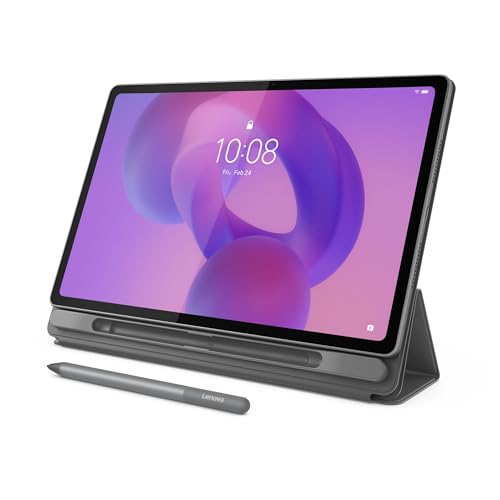
Lenovo Idea Tab Plus 12.1″ 2.5K Tablet

T70 Tablet 11-Inch Android 16 256GB

Lenovo Idea Tab 11-Inch College Tablet

Samsung Galaxy Tab S6 Lite 10.4″ 128GB

Lenovo Tab One 8.7″ Lightweight Tablet

Samsung Galaxy Tab S7 11-Inch 128GB

Raemond 11-Inch Android 16 Tablet 24GB

Raemond 12-Inch Android 16 Tablet 36GB

Raemond 10-Inch Android 15 Tablet Keyboard
Why These Options Stand Out
The YLEEBG 12-inch lands squarely in “do most things well” territory, which is why it earns the Editor’s slot. A 12-inch panel gives you room to keep two documents side by side without feeling cramped, and the included black case bundles a keyboard so the tablet is productive the moment it arrives.
Running Android 16 with Gemini AI built in, it leans on Google’s assistant for drafting, translating, and quick research. For someone moving between email, streaming, and a few creative tools, the screen size makes the experience feel less like a phone and more like a proper light workstation.
Real Benefits
- 12-inch display offers meaningful split-screen workspace for documents, browsers, and chat windows side by side.
- Android 16 with Gemini AI integration simplifies drafting, summarizing, and language work without third-party apps.
- Bundled keyboard case means the tablet works as a productivity tool straight out of the box.
- Larger canvas suits streaming and video calls more comfortably than compact 8-inch alternatives on this list.
Things To Consider
- A 12-inch tablet with case weighs more than slimmer options, so lap use for long stretches can feel heavy.
- Less established brand track record compared with Lenovo or Samsung, which may matter for long-term service expectations.
- Keyboard cases commonly add bulk that affects tablet-only handheld comfort when you want to read on the couch.
Whose Shelf It Belongs On
You want a single device for mixed productivity and entertainment, and you’d rather not buy a keyboard separately.
Consider Something Else When
The Lenovo Idea Tab Plus suits you better if a more established brand and included stylus for sketching matter most.
Step up from the YLEEBG and you arrive at Lenovo’s Idea Tab Plus, where the screen becomes the centerpiece. A 12.1-inch 2.5K IPS panel running at 90Hz makes text crisp and scrolling noticeably smoother than the 60Hz norm, which matters when you’re reading PDFs or scrolling long documents.
The MediaTek Dimensity 6400 chip with 8GB of memory handles most tablet workflows without flinching, and 128GB of storage gives you room to grow. The included Tab Pen and Folio case round out a package aimed at people who sketch, annotate, and type in roughly equal measure.
Notable Gains
- 2.5K resolution on a 12.1-inch IPS panel makes small text readable and creative work detail-friendly.
- 90Hz refresh rate produces smoother scrolling and pen strokes than the 60Hz panels on most budget tabs.
- Tab Pen plus Folio case included, so you can sketch, mark up, or type without hunting for accessories.
- Wide color coverage (96% DCI-P3 is a cinema-grade color space) helps photos and video look closer to the creator’s intent.
Room For Improvement
- Pen-focused kits can drift toward artistic buyers, so casual readers may pay for features they rarely touch.
- Folio cases typically add setup steps, and pairing the pen often requires a one-time Bluetooth handshake.
Feature Snapshot
Who Will Love This
You annotate documents, sketch ideas, and want a pen-ready tablet without buying accessories separately.
A Better Fit Elsewhere
The Samsung Galaxy Tab S6 Lite fits better if you mostly read and want a slimmer metal chassis with the S Pen.
The T70 shifts the conversation away from display bragging rights and toward long-term value. An 11-inch form factor lands in the comfortable middle ground, while 256GB of built-in storage gives you breathing room for apps, offline video, and large project files without immediately reaching for a memory card.
The four-year warranty is the quiet standout here, signaling that the manufacturer expects this device to last. If you tend to keep a tablet for many seasons rather than upgrading every cycle, that promise can matter more than a slightly faster chip.
Practical Advantages
- 256GB of internal storage lets you carry substantial media libraries and project files without expansion.
- Four-year warranty covers longer ownership cycles, reducing the sting of an out-of-warranty failure.
- Android 16 keeps the software current, including Gemini AI features that older Android versions miss.
Honest Caveats
- Warranty length only matters if registration and claim processes are smooth, so check the fine print before counting on it.
- 11-inch screens feel smaller than the 12-inch picks above when running two apps side by side.
- Brand recognition is lower than Lenovo or Samsung, which can affect resale and accessory availability.
Quick Facts
Right Fit For
You want a tablet you’ll keep for years and would value a longer manufacturer warranty over flashy extras.
Look Elsewhere When
The Lenovo Idea Tab Plus serves you better if a sharper 2.5K display and stylus matter for creative work.
Smaller sibling to the Idea Tab Plus, this 11-inch Lenovo trims the spec sheet to focus on the things students actually use. The 2.5K IPS display at 90Hz still looks sharp, and Dolby Atmos-tuned quad speakers handle lectures, YouTube, and study playlists with surprising fullness.
The MediaTek Dimensity 6300 keeps things efficient, and 256GB of storage means textbooks, recordings, and class notes don’t crowd each other. With a Tab Pen and Folio case in the box, it’s a turnkey study setup rather than a kit you have to build yourself.
Strengths Worth Knowing
- Quad speakers tuned for Atmos give lectures and videos richer sound than typical stereo tablets at this tier.
- 11-inch form factor is easier to carry across campus than a 12-inch panel in a backpack full of textbooks.
- 256GB built-in storage handles a full academic year of notes, slides, and recordings without expansion.
- Circle to Search with Google (a tool that lets you tap or circle anything on screen to look it up) helps students jump from a diagram to research without juggling windows.
Worth Noting
- The Tab Pen is useful for notes, but heavy drawing sessions may benefit from a more specialized stylus.
- 11-inch screen means less split-screen space than the Lenovo Idea Tab Plus above.
Perfect Match For
You’re a college student who wants one device for note-taking, lectures, light research, and streaming between classes.
Swap It Out When
The YLEEBG 12-Inch Tablet works better if you split most of your day between work documents and entertainment on one screen.
Samsung’s Galaxy Tab S6 Lite has earned its longevity by sticking to a simple promise: a slim metal tablet that feels good in the hand, with a stylus that doesn’t need charging. The 10.4-inch display hits a sweet spot for reading and casual sketching without becoming a two-hand device.
The S Pen attaches magnetically to the side and is always ready, which removes the small friction that makes other pens collect dust. For anyone who reads a lot, takes handwritten notes, or marks up documents, this remains one of the most approachable Android tablets you can buy.
Reasons It Performs
- Slim metal design makes the tablet feel sturdier and more premium than plastic-bodied competitors at this size.
- S Pen attaches magnetically and never needs charging, so it’s always ready when inspiration strikes.
- Dual speakers handle video calls and casual media well enough that you won’t reach for headphones every time.
- Long-lasting battery means full workdays of reading and note-taking without reaching for a charger.
Trade Offs
- Smaller 10.4-inch screen feels tight during heavy split-screen multitasking compared with 12-inch options.
- Samsung Care+ (Samsung’s extended protection plan with same-day screen repair at authorized locations) may be worth adding for accidental drops, since metal builds can dent.
Spec Overview
Best Suited To
You read often, take handwritten notes, and want a slim tablet that disappears into a bag without fuss.
Where Another Pick Suits Better
The Lenovo Idea Tab Plus fits better if a 12-inch panel and 2.5K resolution matter for sketching and creative apps.
The Lenovo Tab One shrinks the formula without giving up on the basics. At 8.7 inches and under a pound, it slips into a coat pocket or small sling and stays out of the way on a tray table, train seat, or café table.
An HD display with 480 nits of brightness (a measure of how much light the screen emits, where higher numbers mean better outdoor visibility) handles streaming in moderately bright rooms, and the MediaTek Helio G85 chip keeps basic apps responsive. Streaming续航 is the headline feature, with Lenovo citing up to 12.5 hours of YouTube playback, which is genuinely useful on long trips.
Everyday Perks
- Sub-pound weight makes it easy to hold one-handed during commutes or while standing in line.
- Compact 8.7-inch footprint fits small bags and even large coat pockets, unlike 11-inch and 12-inch picks.
- Up to 12.5 hours of streaming covers most long-haul flights and cross-country drives.
- 480 nits of brightness keeps the screen readable in sunlit rooms better than typical indoor-only panels.
Less Ideal Details
- 4GB of memory is workable for basics but can feel tight with many browser tabs or split-screen sessions.
- Smaller screen makes typing on a folio keyboard cramped for adults with larger hands.
Feature Snapshot
Who Should Grab It
You travel often, commute by train or plane, and want a tablet that disappears into a small bag.
Reach For A Different Pick When
The Samsung Galaxy Tab S7 fits better if you want a larger 11-inch screen and stronger performance for multitasking.
The Galaxy Tab S7 leans into “tablet as productivity machine” with a spec sheet aimed at users who push their devices. An 11-inch display with 128GB of storage pairs with the included S Pen, and Samsung’s DeX mode (a desktop-style interface that turns the tablet into a laptop-like experience when connected to a keyboard or monitor) gives it a more PC-like feel when paired with a keyboard.
Fast charging over USB-C shortens downtime between work sessions, and Bluetooth support covers wireless keyboards and headphones without adapters. For someone who already lives inside Samsung’s ecosystem, this is a familiar and capable hub.
Good Reasons To Consider
- DeX mode (Samsung’s desktop interface that mimics a laptop layout when a keyboard is connected) makes the tablet feel closer to a laptop when docked with a keyboard.
- S Pen included for sketching, marking up documents, and signing PDFs out of the box.
- USB-C fast charging cuts downtime so a quick top-up gets you back to work without long waits.
- Bluetooth connectivity covers wireless keyboards, mice, and headphones without dongles.
Small Caveats
- Keyboard is typically sold separately, so the total cost climbs once you add that accessory.
- An older flagship tablet means newer models offer brighter panels and faster chips, depending on your priorities.
Right Fit For
You want pro-tier performance with DeX mode and use a tablet as a primary work device.
Skip It When
The Lenovo Idea Tab Plus works better if you want a newer tablet with a bundled keyboard and pen in the box.
Raemond’s 11-inch Android 16 tablet delivers on paper what many casual users actually want: a current operating system, an octa-core processor, and generous memory for everyday multitasking. Gemini AI handles the same on-device drafting and translation features found on pricier picks.
The T7250 chip is a budget-to-midrange part, but paired with 24GB of combined memory, it handles streaming, social apps, light games, and document editing without obvious slowdowns. For someone replacing an aging tablet, this is a sensible step up without spending flagship money.
What Works In Its Favor
- Android 16 with Gemini AI keeps the software current with the same features found on more expensive tabs.
- Octa-core T7250 chip balances battery life and everyday responsiveness for casual workloads.
- Generous memory allocation helps apps stay in memory longer when you switch between them.
Points To Keep In Mind
- Display brightness and color accuracy typically lag behind premium panels like the Lenovo Idea Tab Plus.
- Brand support and warranty experience can vary, so checking return policies before purchase is wise.
Made For
You want a current Android tablet with AI features and don’t need a flagship-tier display for color-critical work.
Another Choice May Suit
The Lenovo Idea Tab fits better if you want a more established brand and an included pen for notes.
Take everything from the Raemond 11-inch and stretch it onto a 12-inch 2K display running at 90Hz, and you get a tablet built for genuine split-screen work. The 2000×1200 IPS panel keeps colors and viewing angles consistent when you share content with someone next to you.
With 36GB of combined memory and the T7250 octa-core processor, it pushes toward heavier multitasking than the smaller sibling. The bundled keyboard turns it into a workable laptop alternative for travel days when you don’t want to lug a full PC.
The Good Stuff
- 12-inch 2K display at 90Hz feels noticeably more responsive than 60Hz panels when scrolling or switching apps.
- Bundled keyboard turns the tablet into a workable laptop alternative without extra purchases.
- IPS panel holds consistent color at wider viewing angles, useful when sharing the screen with someone nearby.
- Generous memory allocation helps keep many apps live in the background for fast switching.
Factors To Consider
- A 12-inch tablet with keyboard adds noticeable bag weight, so daily commuters may feel the bulk.
- Brightness and outdoor visibility can fall short of premium Samsung panels in direct sunlight.
Who It Suits Best
You split apps side by side often and want a tablet that doubles as a light laptop on the road.
Where A Sibling Pick Shines
The Samsung Galaxy Tab S7 suits you better if established brand support and DeX mode matter more than raw memory.
Closing out the list is Raemond’s 10-inch Android 15 tablet, the smallest and most expandable option. A 2.0GHz octa-core processor keeps things moving, and 24GB of memory paired with 128GB of built-in storage gives you room to grow into a 1TB expanded configuration through a memory card.
Android 15 is one step behind the Android 16 picks above, but still current enough for most apps and security updates. For anyone who hoards offline videos, audiobooks, or work files, expandable storage is a quietly valuable feature.
Notable Upsides
- Expandable storage up to 1TB lets media hoarders carry large offline libraries without paying for cloud plans.
- Bundled keyboard turns a budget tablet into a workable productivity setup out of the box.
- 10-inch form factor is easy to hold during reading sessions or video calls in casual spaces.
- Octa-core processor handles everyday apps and light multitasking without obvious lag.
Points To Note
- Android 15 is one version behind newer Android 16 picks, which may matter for long-term software support.
- A 10-inch keyboard can feel cramped for users with larger hands during long typing sessions.
Feature Snapshot
Built With In Mind
You watch a lot of downloaded video or carry large media libraries and want expandable storage at a friendly cost.
Not Your Match When
The Lenovo Tab One works better if a brighter display and longer battery life for streaming matter more than storage.
What Matters When Picking Your Next Android Tablet And Keyboard
Match the screen size to your real routine
A 12-inch tablet shines when you split apps or sketch with a pen, but it weighs more in a backpack. An 8- or 10-inch tablet disappears into a bag and feels lighter in hand, though cramped split-screen work follows. Pick the size that matches where you’ll actually use it most: desk, couch, commute, or classroom.
Decide whether the keyboard comes in the box
Some tablets include a folio keyboard or pen, while others sell those accessories separately. If your budget already feels stretched, bundled accessories save you from a follow-up purchase. On the other hand, separate purchases let you choose a keyboard with a trackpad or a specific pen you prefer.
Look at the OS and AI features honestly
Android 16 with Gemini AI brings newer on-device drafting and translation tools than Android 15. For light note-taking and streaming, the difference is small. For heavy document work or AI-assisted research, the newer OS tends to feel smoother and stays relevant longer.
Storage shapes how the tablet ages
Tablets with 128GB of storage work fine for casual users, but if you keep large offline libraries of video or audio, 256GB or expandable storage keeps you from juggling files. Remember that some apps grow over time, so picking a roomier option now can extend the useful life of the device.
Key Considerations Across These Picks
Common Shopping Slip Ups
Plenty of shoppers get pulled in by raw RAM numbers or screen size without checking whether the keyboard they need ships in the box. Others pick an older Android version and miss out on current AI features. Confirm the OS generation, the bundled accessories, and the return policy before committing.
Why Top Tier Costs More
Higher-tier tablets typically add a sharper 2.5K display, a smoother 90Hz refresh rate, and a more capable pen. Those upgrades matter most for creative work, heavy split-screen multitasking, or frequent stylus use. For casual streaming and reading, a midrange tablet often delivers the same day-to-day experience at a friendlier cost.
Frequently Asked Questions
Do Android tablets with keyboards replace laptops?
For email, documents, web research, and streaming, yes. For heavy video editing, gaming, or specialized desktop software, a laptop still wins. The closer your work fits into browser-based or Android apps, the closer a tablet with a keyboard gets to a full laptop replacement.
How long does the battery last on these tablets?
Most modern Android tablets last a full workday of mixed use, and compact options like the Lenovo Tab One stretch further for streaming. Heavy tasks like gaming or video calls drain the battery faster, so your mileage depends on what you actually do with the screen on.
Is 90Hz really worth it over 60Hz?
You notice 90Hz most when scrolling long documents, switching between apps, or drawing with a pen. The difference is subtle for static reading but becomes obvious once you’ve used it for a week and go back.
Do these tablets support external storage?
Some include microSD card slots for expansion, like the Raemond 10-inch option. Others rely on cloud storage or fixed internal storage, so it’s worth checking the spec sheet if you keep large media libraries.
Can you use any Bluetooth keyboard with these tablets?
Most Bluetooth keyboards pair easily with current Android tablets, and many folio cases connect directly through pogo pins or USB-C without pairing. For trackpad support and tighter integration, checking the manufacturer’s recommended accessories usually gives the smoothest experience.
Bottom Line
The right Android tablet and keyboard setup comes down to honestly matching size, accessories, and budget to how you spend your day. Students and commuters often find the Lenovo Idea Tab line and the compact Tab One hit the sweet spot. Creators and power users lean toward the Lenovo Idea Tab Plus or the Samsung Galaxy Tab S7 for sharper screens and stronger performance. For mixed work and entertainment at a friendly cost, the YLEEBG and Raemond picks offer plenty of room to grow. Pick the one that fits your routine, and the rest tends to follow.


