

You don’t need a laptop to get real work done, but you do need the right slate. A productivity tablet has to handle split-screen multitasking, long typing sessions, pen input for markup, and battery life that survives a cross-country flight. The picks below cover rugged field use, note-taking on the couch, and everything in between, so you can match the hardware to your actual day.
The Main Contenders

HOTWAV R11 Pro Rugged Tablet with Pen 2026, Android 16 8.7″ Mini Tablet NFC

Samsung Galaxy Tab S6 Lite 10.4″ 64GB WiFi Tablet (Oxford Gray)
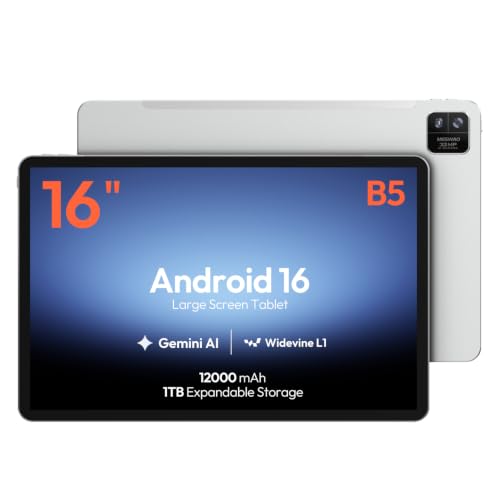
MESWAO 16-Inch Android 16 Tablet, Helio G99, 12GB RAM, 128GB Storage

HOTWAV R9 Ultra 5G Rugged Tablet with Pen, 11″ Android 15 Waterproof Tablet

HOTWAV R9 Ultra 5G Rugged Tablet with Pen, 24GB+512GB+2TB 11″ 2K 20080mAh

Samsung Galaxy Tab S7 11-inch Android Tablet 128GB Wi-Fi, S Pen (Mystic Black)

HOTWAV R8 Rugged Tablet Android 14, 10.1″ Incell HD+ 4G Waterproof Tablet
AOC 10 Inch Tablet Android 16, 120Hz IPS, 8-Core, 4GB RAM 128GB Storage
Why These Options Stand Out
The HOTWAV R11 Pro is the smallest device on this list, and that is its whole pitch. At 8.7 inches, it slips into a cargo pocket or a tool-bag pouch, yet it still ships with a ruggedized chassis and a stylus for marking up site photos or signing PDFs in the field. You can drop it on concrete without holding your breath.
Running Android 16, it covers the modern app compatibility you want, including NFC (near-field communication, the tech behind contactless card taps) for quick pairing with work accessories. Compared to the Samsung Galaxy Tab S6 Lite coming up next, the R11 Pro trades screen real estate for survivability. You may find the 8.7-inch panel tight during long spreadsheet sessions, but it earns its keep when you are outdoors.
Where It Helps
- Compact 8.7-inch form factor fits one-handed use at job sites
- Included stylus works for markup, signatures, and quick sketches
- NFC support speeds up pairing with scanners, badges, and accessories
- Android 16 keeps the software current with modern apps and security patches
Points To Keep In Mind
- Smaller display makes side-by-side multitasking feel cramped
- Cellular compatibility is limited; verify your carrier supports the listed bands
Built With In Mind
Field service technicians, inspectors, and anyone working outside who wants a pocketable, drop-resistant tablet that doubles as a digital clipboard.
Reach For A Different Pick When
You mainly take handwritten notes in class or in meetings; the Samsung Galaxy Tab S6 Lite offers a larger canvas with the same bundled stylus experience.
The Galaxy Tab S6 Lite is the classic Samsung note-taking tablet, refined over multiple generations. The 10.4-inch display gives you real room to write, draw, or split between a PDF and a research browser. The S Pen comes in the box, and because it uses Samsung’s EMR (electromagnetic resonance) tech, it never needs charging.
You give up some raw horsepower compared to the upcoming Galaxy Tab S7, but you also pay a friendlier entry price. The Oxford Gray finish and slim metal build make this a tablet you feel comfortable pulling out in a meeting. For most students and casual note-takers, the trade-off lands in the right place.
Standout Benefits
- 10.4-inch display makes split-screen apps and PDF reading comfortable
- Bundled S Pen with EMR technology never requires charging or pairing
- Slim, light metal chassis carries easily between classes or meetings
- 64GB internal storage handles typical note and ebook libraries
Honest Caveats
- WiFi-only configuration lacks on-the-go cellular connectivity
- Processor is mid-range, so heavy multitasking may show some lag
- International model may vary slightly from U.S. warranty terms
Right Fit For
Students, journal-keepers, and light creators who prioritize pen input and long battery life over flagship processing power.
Not Your Match When
You need laptop-class performance for video editing or large file exports; the Samsung Galaxy Tab S7 offers that step up.
The MESWAO is enormous. A 16-inch IPS panel (IPS means in-plane switching, a screen technology with wide viewing angles and accurate color) is closer to a laptop screen than a typical tablet, and that is exactly the point. Sheet music, guitar tabs, chord charts, and side-by-side PDFs all have room to breathe here.
Under the hood, the Helio G99 chip with 12GB of RAM keeps multiple reference apps open without falling over. You trade portability for that real estate; this is a tablet that lives on a stand or desk more than a lap. Coming from the smaller S6 Lite, the screen jump is dramatic.
What Earns Its Place
- 16-inch IPS display fits full digital sheet music and rehearsal charts without scrolling
- Helio G99 processor handles multitasking across reference apps smoothly
- 12GB RAM supports split-screen workflows with low stutter
- Android 16 brings modern app support and security improvements
Trade-Offs To Consider
- 16-inch size makes handheld use uncomfortable for long stretches
- WiFi-only means no mobile data for practice on the road
- Larger chassis is heavier to commute with compared to 10-inch tablets
Best Suited To
Musicians, music teachers, and visual reference users who work from a fixed spot and need the largest possible canvas for notation.
Consider Something Else When
You commute daily and want something that fits in a backpack sleeve; the HOTWAV R8 or AOC 10-inch tablet travel far better.
Where the smaller R11 Pro is for tight pockets, the R9 Ultra 5G is for actual jobs. The 11-inch screen gives reading-room for schematics, while the ruggedized chassis and waterproof rating let you keep working through rain, dust, or a knock off a ladder.
Built-in 5G means you can leave the WiFi behind and stay connected on remote sites. Android 15 keeps the software current without the latest Android 16 polish, but for productivity apps that is rarely a real limitation. If you have been considering the MESWAO but need durability, this is the pivot.
Everyday Wins
- 11-inch screen balances readability with portability for field documentation
- Waterproof and ruggedized build handles outdoor and shop conditions
- 5G connectivity removes dependence on WiFi at job sites
- Included stylus supports markup on plans and inspection forms
Worth Bearing In Mind
- Cellular compatibility is carrier-restricted, so verify your network first
- Rugged chassis adds noticeable bulk compared to consumer tablets
- Android 15 instead of the latest Android 16 release
Made For
Tradespeople, surveyors, and field inspectors who need a tablet that survives the work environment and stays online away from WiFi.
A Better Fit Elsewhere
Your work mostly happens at a desk or in meetings; the Samsung Galaxy Tab S6 Lite feels lighter and more polished for indoor use.
The flagship of the HOTWAV rugged line, this R9 Ultra 5G variant pushes the spec sheet hard. The 2K display sharpens on-screen plans, 24GB of RAM keeps apps humming, and storage scales to 2TB. None of that matters as much as the 20,080 mAh battery, which can run for two or three workdays between charges.
You pay for that endurance in weight, and there is no pretending otherwise. The honest read is that this is the right tool for people who genuinely cannot reach an outlet. For everyone else, the standard R9 above covers the same core job at less cost.
Notable Upsides
- 2K display renders plans, photos, and documents at sharp resolution
- 20,080 mAh battery supports multi-day shifts without recharging
- Massive storage ceiling handles large project files and offline maps
- 24GB RAM reduces app reloads during intensive multitasking
Less-Strong Areas
- Heavier than standard tablets due to the oversized battery
- Higher capacity storage configurations raise the overall cost noticeably
- Carrier restrictions apply, just like the other HOTWAV 5G models
Who Should Grab It
Remote crews, expedition photographers, and field engineers who need off-grid endurance and large local storage more than sleek design.
Swap It Out When
You mostly work near power outlets and want a lighter carry; the HOTWAV R9 Ultra 5G (standard variant) keeps the ruggedness without the battery weight.
The Galaxy Tab S7 is what you reach for when you want a productivity tablet that feels like a laptop. With 128GB of storage, a bundled S Pen, fast charging through USB-C (the small reversible charging port used on most modern phones and tablets), and Bluetooth for accessories, it covers the hybrid work checklist without compromise.
The 11-inch display sits right in the sweet spot between the smaller S6 Lite and the oversized MESWAO. Samsung’s DeX mode (a desktop-style interface that turns the tablet into a laptop-like workspace when paired with a keyboard) is the quiet win, letting you dock into a more familiar layout for spreadsheets and email. Compared to the rugged picks earlier, the trade-off is obvious: this one prefers a desk.
The Case For It
- 128GB internal storage holds large project files without microSD dependence
- USB-C fast charging reduces downtime between sessions
- Bluetooth support pairs easily with keyboards, mice, and earbuds
- Samsung DeX unlocks a desktop-like workspace for serious multitasking
Soft Spots
- WiFi-only model leaves you hunting for hotspots on the road
- Glass-back design demands a case for regular commuter use
- Older generation compared to the latest Samsung flagships
The Right Fit
Hybrid professionals who split time between a coffee-shop laptop and a couch tablet and want one device to do both jobs.
Where A Sibling Pick Shines
You often work on a construction site or in a shop; the HOTWAV R9 Ultra 5G survives the conditions this one would not.
The HOTWAV R8 is the gentlest entry point into rugged productivity. A 10.1-inch Incell HD+ display (Incell is a screen construction that puts the touch sensor inside the LCD layer, keeping the panel thin and responsive) hits a usable note-taking size without going overboard. Android 14 and 4G connectivity cover the productivity basics.
This is the pick for crews that need to issue tablets to a small team without breaking the equipment budget. It lacks the brute spec sheet of the R9 Ultra, but the waterproof build and modest price earn it a real place on this list. You may find the older Android version limiting in a year or two, but for now it runs the apps that matter.
Well-Handled Touches
- 10.1-inch display is comfortable for daily email, forms, and reading
- 4G connectivity supports mobile workflows away from WiFi
- Waterproof chassis handles spills, splashes, and dusty environments
- Friendly price point for outfitting multiple team members
Things To Weigh Up
- Android 14 is a step behind the Android 15/16 picks on this list
- Carrier compatibility is restricted, so check before issuing to staff
- Lower-end processor may struggle with heavy multitasking apps
Whose Shelf It Belongs On
Small business owners and team leads who want durable, connected tablets for staff without overspending on flagship specs.
Skip It When
You do serious creative work or gaming on the side; the Samsung Galaxy Tab S7 delivers far smoother app performance.
The AOC closes the list with a refined everyday option. A 10-inch IPS panel running at 120Hz (meaning the screen refreshes 120 times per second for visibly smoother scrolling) is rare at this size, and it makes scrolling documents and split-screen apps feel premium. Android 16 and an 8-core processor keep day-to-day productivity snappy.
Widevine L1 support (a digital-rights certification that lets the tablet stream high-definition video from services like Netflix and Disney+) makes this a hybrid work-and-relaxation device. The metal body gives it a more grown-up feel than the rugged picks earlier. Compared to the HOTWAV R8, you give up water resistance for a cleaner, smoother screen.
Reasons It Performs
- 120Hz IPS display delivers smooth scrolling and responsive pen feel
- Android 16 keeps the software on the current release
- 8-core processor handles split-screen multitasking with ease
- Widevine L1 enables HD streaming during downtime
Possible Compromises
- 4GB RAM is modest for power users running many apps at once
- Glass-and-metal body lacks the rugged durability of the HOTWAV line
- No bundled stylus, unlike several other picks on this list
Who Will Love This
Students, remote workers, and home-office professionals who want a smooth everyday tablet for documents, video calls, and streaming.
Look Elsewhere When
You need a stylus in the box for handwriting and markup; the Samsung Galaxy Tab S6 Lite includes one for a similar indoor workflow.
What Matters Most Before Choosing Android Tablets For Productivity
Screen Size and Weight Trade-Offs
Productivity tablets split into three camps. Pocket-friendly 8 to 9-inch devices like the HOTWAV R11 Pro disappear in a bag but strain during long reading sessions. The mainstream 10 to 11-inch range, covering the Samsung Galaxy Tab S6 Lite, Tab S7, AOC, and HOTWAV R8, hits the most universal balance. Massive 15 to 16-inch screens like the MESWAO excel at reference work but rarely leave the desk.
Software Currency and App Support
Android 16 leads this list on the HOTWAV R11 Pro, MESWAO, and AOC, while Android 15 shows up on the R9 Ultra and Android 14 on the R8. Newer Android versions tend to receive security patches longer, so a 2026 purchase benefits from the latest base where possible. For most productivity apps the differences feel small day to day.
Pen, Keyboard, and Accessory Support
S Pen support on the Samsung models, the included stylus on the HOTWAV line, and Bluetooth keyboard pairing across the board shape how laptop-like each tablet feels. Samsung’s DeX mode on the Tab S7 turns the Android interface into a familiar desktop layout, a meaningful advantage if you live in spreadsheets and email threads.
Cellular, WiFi, and Carrier Reality
WiFi-only models like the Galaxy Tab S6 Lite and MESWAO keep the cost down but tether you to hotspots. 4G and 5G models unlock true mobile work, though HOTWAV’s rugged line specifically excludes several major U.S. carriers, so compatibility is worth checking before you commit.
Key Considerations Across These Picks
Pitfalls Shoppers Hit
The most common mistake is buying a tablet that is too small for the work you plan to do. Six months of squinting at an 8.7-inch screen outweighs the convenience of a compact body. Another trap is assuming rugged equals heavy duty without checking the specific IP rating (the international standard that rates dust and water resistance, where higher numbers mean better protection); some rugged tablets handle splashes but not submersion.
What Separates Premium From Basic
The jump to premium tiers in this category buys you sharper displays, faster processors, more RAM, and bundled accessories like the S Pen. You also pay for software currency, with Android 16 reserved for the newest models. The honest read is that the upgrade pays off most for users who multitask heavily, push large files, or rely on desktop modes like DeX; casual note-takers often find the value tier covers their day.
Frequently Asked Questions
Do I really need 5G on a productivity tablet?
Only if you regularly work away from WiFi. For coffee-shop and home-office use, WiFi-only models like the Samsung Galaxy Tab S6 Lite keep the cost down without limiting real productivity.
Which Android tablet is best for taking handwritten notes?
Samsung’s S Pen experience on the Galaxy Tab S6 Lite and Tab S7 is widely considered the smoothest for handwriting, with no charging required and good palm rejection (the screen’s ability to ignore your resting hand while you write).
Are rugged tablets worth the extra weight?
For field work, construction, or outdoor use, yes. For indoor productivity, the bulk usually outweighs the durability benefit, and a slimmer tablet with a case often feels better in daily carry.
How important is RAM for productivity work?
For basic email, documents, and browsing, 4GB is workable. For split-screen multitasking with reference apps and large files, 8GB or more (like the MESWAO’s 12GB) reduces reloads and keeps the workflow fluid.
Can these tablets replace a laptop entirely?
For many users, especially with a Bluetooth keyboard and a Samsung DeX-compatible device, yes. Heavy video editors or software developers may still need a full laptop for specialized workloads.
Wrap Up
The right productivity tablet depends on where you actually work, not just what’s on the spec sheet. Match the form factor to your commute, the pen support to your note-taking style, and the cellular capability to your travel patterns. Any of the eight picks above will handle the basics; the differences show up in how well they fade into your routine.


