

Stylus support has quietly become one of the most useful features in modern Android tablets, turning a media screen into a sketchbook, a meeting notebook, and a study companion at the same time. Whether you want a clean digital note system for class, a precise drawing surface for design work, or a screen that holds up to scribbling from a curious kid, the right pairing matters. The picks below cover full productivity bundles, dedicated paper-feel displays, kid-ready builds, and compact everyday tablets, so you can match your workflow instead of fighting against it.
The Shortlist At A Glance

T70 Tablet 11 inch Android 16 8GB 256GB 4-Year Warranty

11 inch Android 16 Tablet with Stylus Pen Keyboard Black Case

TCL NXTPAPER 11 Plus Android Tablet 11.5″ 2.2K 120Hz

TCL NXTPAPER 14 Android Tablet 14.3″ 2.4K Paper-Like Display

TCL Note A1 NXTPAPER Paper Tablet 11.5″ 2.2K 120Hz

Gemini AI Android 16 Tablet 11″ 32GB+256GB+2TB Expand

Samsung Galaxy Tab S7 11-inch Android Tablet 128GB Wi-Fi S Pen

Kids Android 16 Tablet 10″ with Keyboard Mouse EVA Case Pen (Pink)
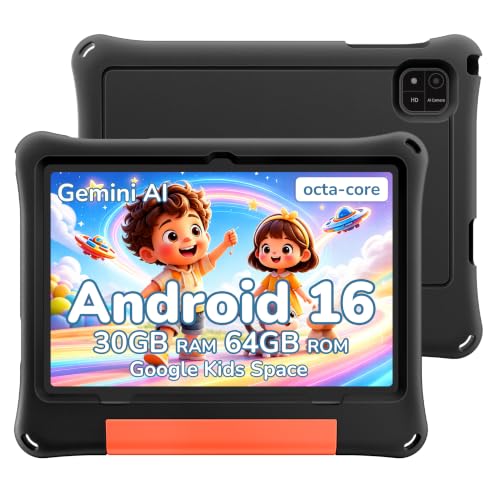
2026 Android 16 Kids Tablet 10 inch with Black EVA Protective Case
AOC 10 Inch Android 16 Tablet 120Hz IPS Metal Body
Taking A Closer Look At The Options
The VekfulPC T70 leans into long-haul ownership rather than flashy extras, pairing Android 16 with an 11-inch panel and a generous four-year warranty that keeps you covered well past the typical break-in period. For shoppers who hate replacing devices every couple of years, that kind of support window is the real reason to pay attention.
Compared to the more accessorised JUNINKE bundle below, the T70 keeps things simpler, which suits users who want a stable daily driver rather than a bundled workstation. The 8GB physical memory with 24GB virtual expansion (a software technique that borrows storage to behave like extra RAM) helps multitasking across split-screen work, while the 256GB internal storage leaves room for offline documents and sketch files.
A Strong Showing
- Four-year warranty that outlasts typical tablet coverage windows
- 256GB storage reduces the need to juggle microSD cards for documents
- Android 16 ships with current security and AI features
- 11-inch size works for both handwritten notes and split-screen apps
Worth Noting
- Stylus is not bundled, so plan for a separate purchase if you plan to draw
- Virtual RAM expansion is helpful but never quite matches true physical RAM under heavy gaming loads
Key Specs
Who Will Love This
Long-term owners who hate replacing hardware every cycle and want stylus-friendly general computing.
Look Elsewhere When
Shoppers wanting a stylus in the box should reach for the JUNINKE 11 inch Android 16 Tablet with Mouse Stylus Pen Keyboard Black Case instead.
JUNINKE’s 11-inch bundle arrives ready to work, with a stylus, a Bluetooth keyboard, and a protective black case included from day one. For commuters and students who want a single box purchase rather than a long accessory checklist, that all-in approach removes most of the friction that usually follows an Android tablet.
The protective case adds meaningful drop insurance compared to the slimmer T70 above, which matters when you’re tossing the tablet into a backpack between lectures or meetings. Android 16 powers the experience, while the bundled stylus lets you start jotting without hunting for compatible pens online.
A Few Strong Suits
- Stylus and keyboard included, no accessory hunting required
- Protective case bundled for daily commuter use
- Octa-core (eight processing cores working in parallel) setup handles multitasking well for the price
- Bluetooth keyboard pairs cleanly for typing-heavy tasks
Honest Caveats
- Bundled accessories can feel entry-grade compared to dedicated tablet keyboards
- Adding the case increases overall weight in handheld reading mode
Right Fit For
Students and remote workers who want a turnkey package rather than piecing together accessories themselves.
Consider Something Else When
Artists craving the matte NXTPAPER finish should pivot to the TCL NXTPAPER 11 Plus Android Tablet 11.5″ 2.2K 120Hz for a more paper-like drawing surface.
The TCL NXTPAPER 11 Plus earns its place through TCL’s paper-like display technology, which softens glare and reduces eye fatigue during marathon study or sketching sessions. The 11.5-inch 2.2K panel at 120Hz refresh (meaning the screen redraws 120 times per second for smoother motion) keeps text crisp while the T-PEN stylus with 4096 pressure levels (steps that determine how the tablet reads your stroke strength) feels closer to a real pen than budget alternatives.
Where the JUNINKE bundle above focuses on accessories, this TCL focuses on the canvas itself. The matte finish genuinely changes how long you can comfortably write without squinting under overhead lights.
Noteworthy Benefits
- NXTPAPER matte surface reduces glare in bright rooms
- 4096-level T-PEN handles subtle shading and pressure changes well
- 120Hz refresh keeps pen strokes lag-free for note-taking
- 256GB storage suits a sizable offline document library
Trade-Offs
- Matte finish slightly mutes video color compared to glossy screens
- T-PEN is sold separately from the tablet itself in many bundles
Best Suited To
Note-takers who write for hours and want their eyes to feel fresh at the end of the day.
Skip It When
Anyone wanting maximum drawing real estate should consider the TCL NXTPAPER 14 Android Tablet 14.3″ 2.4K Paper-Like Display instead.
The TCL NXTPAPER 14 pushes the canvas to 14.3 inches with a 2.4K paper-like display, giving illustrators, designers, and musicians a generous workspace that smaller tablets simply can’t match. Side-by-side with the 11 Plus above, the difference shows up immediately when sketching detailed portraits or reading dense sheet music.
Powering that big screen is 256GB of storage and the same 4096-level T-PEN ecosystem, so existing TCL pen accessories often carry over if you’re upgrading. The NXTPAPER 3.0 surface continues TCL’s glare-reduction story, though the larger real estate means you’ll want a desk or lap stand for long sessions.
What Earns Its Place
- 14.3-inch screen gives artists room to draw without constant zoom-and-pan
- 2.4K resolution keeps linework crisp at typical viewing distances
- NXTPAPER 3.0 maintains eye comfort during long creative sessions
- T-PEN compatibility preserves accessory continuity for TCL owners
Things To Consider
- Larger size makes handheld note-taking a two-hand affair
- Higher price bracket than the 11 Plus for the screen bump alone
Made For
Illustrators, sheet-music readers, and designers who treat their tablet as a primary creative surface.
A Better Fit Elsewhere
Pure handwriting-first shoppers who want a lighter daily carry should consider the TCL Note A1 NXTPAPER Paper Tablet 11.5″ 2.2K 120Hz instead.
The TCL Note A1 narrows the focus to handwriting, with NXTPAPER PURE technology and 3A Crystal Shield Glass layered over an 11.5-inch 2.2K panel. TÜV-certified eye protection (a third-party standard confirming low blue-light and flicker levels) signals TCL’s intent to make this a daily reading and writing companion rather than a general media device.
Unlike the larger NXTPAPER 14 above, the Note A1 feels manageable in one hand during commute reading. Owners commonly note that the matte texture makes long journaling sessions easier on the eyes, though you should update the tablet and stylus right out of the box for the latest pen features.
The Practical Payoff
- NXTPAPER PURE surface genuinely feels paper-like under the pen tip
- TÜV-certified eye protection helps during multi-hour reading sessions
- Crystal Shield Glass resists fingerprints better than glossy alternatives
- 11.5-inch size balances writing space with one-hand portability
Points To Note
- First-time setup requires both tablet and stylus firmware updates for best performance
- Less suited for media-first users who prioritize punchy color
Who Should Grab It
Journalers, students, and bookworms who primarily write and read on their tablet.
Another Choice May Suit
Creators wanting maximum drawing space should pivot to the TCL NXTPAPER 14 Android Tablet 14.3″ 2.4K Paper-Like Display.
JUNINKE’s Gemini AI tablet goes hard on memory, advertising a 32GB+256GB+2TB expandable footprint that aims at users who never want to think about clearing storage again. The 8000mAh battery supports extended unplugged use, and an octa-core processor keeps daily navigation smooth.
For shoppers moving from older devices with cramped storage, this specification ceiling reads almost like insurance. Compared to the simpler T70 earlier in the list, you’re paying primarily for breathing room and a bundled protective case.
What Pays Off
- Up to 2TB expandable storage swallows large creative libraries
- 8000mAh battery supports multi-day light use without charging
- Android 16 with Gemini AI offers modern assistant features
- GPS and FM radio add utility for off-Wi-Fi scenarios
Some Limits To Know
- Bundled stylus quality is entry-level compared to dedicated TCL T-PEN
- Virtual RAM expansion helps but won’t replace true physical RAM under sustained gaming
The Right Fit
Power users who keep years of notes, photos, and downloads on-device and rarely want to swap storage.
Where A Sibling Pick Shines
Shoppers prioritizing a dedicated paper-like writing surface should consider the TCL NXTPAPER 11 Plus Android Tablet 11.5″ 2.2K 120Hz.
The Samsung Galaxy Tab S7 represents the established mainstream option, pairing a familiar brand ecosystem with the included S Pen and 128GB of internal storage. For shoppers who value broad accessory support and a name they’ve trusted for years, that familiarity is itself a feature.
The Tab S7’s age shows in some areas, where newer TCL NXTPAPER models deliver fresher display tech and larger storage tiers. Still, the Bluetooth S Pen pairs quickly, and the Mystic Black finish suits both office and home setups.
Real-World Strengths
- S Pen included, with broad app compatibility across the Samsung ecosystem
- 128GB covers most everyday work without extra storage
- USB-C port with fast charging keeps downtime short
- Established brand support eases accessory shopping
Small Caveats
- Newer competitors ship with more current OS versions and brighter panels
- Glossy screen surface can show glare in sunlit rooms
Whose Shelf It Belongs On
Mainstream productivity shoppers who want a recognized brand and a stylus in the box.
Reach For A Different Pick When
Anyone wanting a paper-like writing surface should pivot to the TCL NXTPAPER 11 Plus Android Tablet 11.5″ 2.2K 120Hz.
This JUNINKE kids tablet arrives ready for family use with a pink EVA (ethylene-vinyl acetate, a soft, shock-absorbing foam-rubber) protective case, stylus pen, keyboard, and mouse included in the box. Google Kids Space and Family Link parental controls (software that lets parents set screen time, approve apps, and monitor activity) give caregivers a real handle on what children can access.
Compared to the adult-focused JUNINKE bundle earlier, this version is smaller, lighter, and wrapped in a kid-safe shell. The 10-inch size suits small hands better than the 11-inch productivity picks above.
What Works In Its Favor
- Stylus, keyboard, and mouse included for full package appeal
- EVA foam case absorbs everyday drops and bumps
- Parental controls through Google Family Link keep content age-appropriate
- 1TB TF card expansion grows with media libraries
A Few Limitations
- Stylus quality is tuned for simple drawing, not serious sketching
- Storage tier is modest until the TF card is added
Perfect Match For
Families wanting a ready-to-gift tablet that handles both play and learning with safeguards built in.
Swap It Out When
Older kids or teens who need a more grown-up ecosystem should look at the JUNINKE 11 inch Android 16 Tablet with Mouse Stylus Pen Keyboard Black Case instead.
The 2026 JUNINKE kids tablet keeps the focus on rugged daily use, with a black EVA protective shell that handles the kind of drops kids actually deliver. Google Kids Space and Family Link controls handle the content side, while Android 16 keeps the software experience current.
Versus the pink bundle above, this black version trades gender-coded styling for a more neutral, sibling-shareable look. Both tablets share the same 10-inch footprint and parental control structure, so the choice comes down to color preference and which accessories feel right.
What Makes Sense
- Black EVA shell hides scuffs and dirt better than lighter cases
- Family Link provides straightforward parental oversight
- 10-inch size suits both solo and shared use
- Android 16 keeps the software current for app compatibility
Things To Weigh
- Bundled stylus is best for tracing and basic sketches rather than detailed artwork
- Limited internal storage benefits from a TF card add-on for video libraries
Built With In Mind
Multi-child households that want one tablet to pass between siblings without scuff-showing cases.
Where Another Pick Suits Better
Shoppers wanting a stylus with finer pressure response should consider the TCL NXTPAPER 11 Plus Android Tablet 11.5″ 2.2K 120Hz.
The AOC 10-inch tablet rounds out the list with a compact metal-body design, 120Hz IPS panel (IPS is a screen technology that keeps colors and contrast consistent from wider viewing angles), and Widevine L1 support for HD streaming from major platforms. Face ID adds quick unlock, and the 6000mAh battery suits day trips without a charger.
It’s the smallest and lightest pick here, which makes sense for commuters and travelers who don’t want a backpack-hogging device. Compared to the larger TCL NXTPAPER models above, you trade paper-feel canvas for a more pocketable shell.
Standout Benefits
- Compact 10-inch form factor slips into smaller bags
- Metal body feels more rigid than plastic alternatives
- Widevine L1 enables HD streaming from supported services
- Face ID unlocks quickly without typing a passcode
Points To Keep In Mind
- Smaller canvas means more scrolling during long document review
- 4GB base RAM is modest for heavy multitasking
Made For
Travelers and commuters who want stylus-ready note-taking in a portable metal shell.
Skip It When
Heavy multitaskers should consider the Gemini AI Android 16 Tablet 11″ 32GB+256GB+2TB Expand for more memory headroom.
How To Pick The Right Stylus Tablet Without Overpaying
Stylus tablets live or die by two things: how the pen feels in your hand and how the screen behaves under the tip. Pressure levels (the number of distinct stroke strengths a pen can register, often 4096 on modern devices) determine whether you can shade a sketch subtly or just scratch out blunt lines, while the display finish decides whether you see glare or your own reflection during a long meeting. A glossy panel looks vivid for video, but matte paper-like surfaces such as NXTPAPER tend to win for extended handwriting sessions.
Screen size shapes the use case more than most shoppers expect. A 10-inch tablet fits a handbag and a child’s grip, while 11-inch models balance sketching and reading. The 14.3-inch TCL NXTPAPER sits in a different category altogether, offering a desktop-class canvas for illustrators and musicians who view sheet music or detailed artwork.
Bundles versus bare tablets change the real-world cost. The JUNINKE packages arrive with cases, keyboards, and mice, which sounds appealing until you realize the stylus in those boxes is usually a basic passive pen. Dedicated NXTPAPER and Galaxy Tab S7 setups often pair with higher-quality active styluses (battery-powered pens that communicate pressure and tilt to the screen for more precise input), but you’ll usually pay extra for them.
Storage and memory deserve a practical lens rather than a numbers game. Most note-takers live fine with 128GB, but creative users who hoard reference images or long video files benefit from 256GB or expandable storage. Virtual RAM (where the tablet borrows storage space to act as temporary memory) helps multitasking but never fully replaces physical RAM when running demanding apps.
Key Considerations Across These Picks
Pitfalls Shoppers Hit
A common mistake is buying for the stylus spec sheet and ignoring the screen finish. A 4096-level pen on a glossy display still reflects overhead lights during lectures. Another frequent slip is underestimating storage growth, since offline video and high-resolution sketches balloon quickly over a year of use.
Where The Extra Money Goes
Higher-tier tablets tend to invest in panel technology and active pen systems rather than raw RAM. The TCL NXTPAPER models above, for example, prioritize eye comfort and stylus precision, which matters more for daily note-takers than an extra gigabyte of memory. That focus is usually where the upgrade cost is justified.
Frequently Asked Questions
Do all Android tablets support any stylus?
Most modern Android tablets support capacitive styluses (basic pens that mimic a finger touch), but pressure sensitivity and palm rejection (the ability to rest your hand on the screen without registering stray marks) only work on tablets designed for active pens like the TCL T-PEN or Samsung S Pen.
Is a paper-like display worth the upgrade?
For users who write or sketch more than an hour a day, the glare reduction genuinely helps. For pure media consumption, glossy screens often look more vibrant for movies and games.
How important is pressure level count?
Pressure levels affect how naturally the pen responds to light and heavy strokes. Most modern active pens offer 4096 levels, which is enough for sketching, shading, and handwriting without obvious stepping.
Can kids use adult stylus tablets safely?
Technically yes, but kids benefit from rugged cases and parental controls. The JUNINKE kids tablets in this list bundle EVA shells and Google Family Link for that exact reason.
Does the tablet need a specific stylus brand?
Usually yes. Each tablet’s active pen protocol (the wireless language a stylus uses to talk to its specific tablet) is brand-specific, so a TCL T-PEN won’t pair with a Samsung Tab S7, and vice versa. Confirm compatibility before buying a pen separately.
The Takeaway
The right stylus tablet comes down to how you actually use the pen. Daily note-takers benefit most from paper-like displays and lightweight bodies, while artists and musicians want larger canvases with active stylus support. Pick the use case first, then let the hardware follow.


