

Hanging a TV sounds simple until the bracket arrives and you start measuring stud spacing, squinting at VESA numbers, and wondering whether that articulating arm actually clears the doorway behind it. The right mount makes a wall look clean, kills glare from the kitchen window, and lets the screen pull toward the couch without sagging. The wrong one flexes, droops, or just won’t fit your screen. This list covers ten solid angle tv mounts for 2026, ranging from lightweight brackets for small screens to long-arm models built for 90-inch panels and tight corners.
The Essentials At A Glance

Mounting Dream TV Wall Mount Swivel and Tilt 26-55 Inch

Mounting Dream Full Motion TV Wall Mount 42-90 Inch

Kanto PX600 Dual Stud Full Motion TV Wall Mount

Perlegear TV Wall Mount Full Motion 42-97 Inch

Perlegear Full Motion Sliding TV Wall Mount 42-95 Inch

Mounting Dream Full Motion TV Wall Mount 32-70 Inch
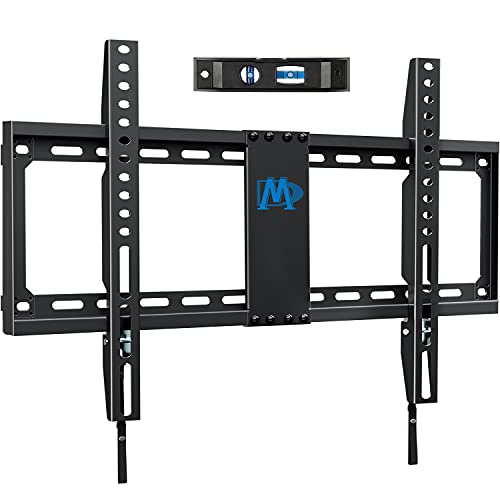
Mounting Dream Fixed TV Mount 42-84 Inch UL Listed

MOUNTUP Long Arm TV Wall Mount 42-90 Inch

Mounting Dream Tilting TV Wall Mount 37-90 Inch

Perlegear Ultra Slim TV Wall Mount 42-90 Inch
A Closer Look At Each Pick
Bedroom sets and small dens are where this Mounting Dream bracket earns its keep. It targets TVs from 26 inches up to 55 inches, with a 60-pound weight ceiling and a max VESA pattern of 400x400mm (the four-hole mounting pattern on the back of your screen). For renters and apartment dwellers who can’t drill into concrete, the support for standard wood stud placement removes a layer of guesswork.
Where it leans useful is in tight layouts. The swivel arm lets a screen swing toward a kitchen counter or away from a window, and the post-install leveling adjustment (a few degrees of fine-tuning once the mount is on the wall) helps line things up without pulling the bracket back off. Pair it with a TV that doesn’t weigh much more than the panel itself, and the install stays straightforward.
What Stands Out
- Light 60-pound capacity keeps the arm easy to manage during install
- Swivel and tilt let a screen follow you across a small room
- Centered design suits common stud layouts in newer apartments
- Compact VESA range covers most TVs under 55 inches
Points To Note
- Not suited for heavier 65-inch-plus panels that exceed the 60-pound rating
- The arm reach is modest, so wider corner placements may fall short
Built With In Mind
Anyone mounting a bedroom or office TV between 26 and 55 inches on standard 16-inch wood studs gets a tidy fit without overpaying for extra reach.
Look Elsewhere When
Shoppers mounting a heavy 75-inch panel toward a corner will get more headroom from the MOUNTUP Long Arm TV Wall Mount 42-90 Inch.
Step up in screen size and you step up in bracket requirements. This Mounting Dream unit covers 42 to 90 inches, holds up to 100 pounds, and uses a full-motion articulating arm that pulls the screen outward and swings it left or right. It shares a family resemblance with the smaller bracket above, but the longer reach and higher weight ceiling make it a better match for a living room centerpiece.
The arm extends roughly 16.6 inches and retracts to a slim 2.5 inches against the wall, so the screen sits close when you want it flush and pulls out when glare shows up. Post-install leveling (plus or minus four degrees) gives a small forgiveness window if your stud spacing wasn’t perfectly aligned.
Standout Benefits
- 100-pound capacity comfortably carries mid-sized flat panels
- Tilt range of 5 degrees up and 15 degrees down cuts glare from overhead lights
- Retracts close to the wall for a cleaner look when not extended
- Swivel action suits open-plan rooms with multiple seating zones
Worth Noting
- The arm length is shorter than corner-mount specialty brackets
- Heavier screens mean a two-person lift during mounting
Whose Shelf It Belongs On
Living rooms with a 55 to 75-inch TV on standard 16-inch studs benefit most, especially setups where the seating spans more than one wall.
Where Another Pick Suits Better
Buyers needing a deeper reach across a fireplace mantel will want the longer-arm MOUNTUP MU0059 instead.
The Kanto PX600 is the one you notice when a media wall looks magazine-ready. A dual-stud wall plate (a wider mounting plate that anchors into two studs instead of one) gives it extra rigidity, and the solid steel construction with a powder-coated finish feels like it was built for a designer showroom. It’s made for 37 to 75-inch TVs and supports up to 125 pounds.
What makes this mount different is the way it disappears. Fully retracted, the screen sits just two inches off the wall. Fully extended, it pushes out to 21.8 inches, which is enough reach to swing around a piece of furniture or angle toward a kitchen island. The integrated cable management keeps HDMI and power cords tucked through the arm instead of dangling behind the panel.
The Case For It
- Minimal 2-inch clearance keeps the wall clean when retracted
- 21.8-inch extension reaches over tall furniture
- 80-degree swivel per side offers wide viewing flexibility
- Dual-stud plate reduces flex on heavier screens
Some Limits To Know
- The price point sits higher than basic swivel brackets
- Stud spacing requirement of 16 inches may not fit older homes with nonstandard framing
Feature Snapshot
Right Fit For
Design-conscious shoppers building a dedicated media wall with a 55 to 75-inch screen will appreciate the low-profile retract and clean cable routing.
Skip It When
Anyone working with non-standard 24-inch stud spacing will get a smoother install from the Perlegear Full Motion Sliding TV Wall Mount 42-95 Inch.
Go big or go home is the pitch here. Perlegear’s articulating bracket runs from 42 inches all the way to 97 inches, with a 132-pound weight capacity that handles the heaviest consumer panels on the market. VESA compatibility stretches from 200x100mm to 600x400mm, which covers practically every modern flat panel.
Mounting options include 12 or 16-inch wood studs, plus solid concrete or brick. The arm pulls out and swivels to handle wide viewing angles, which is handy in family rooms where everyone fights for the best seat. Compared to the Kanto PX600, this Perlegear trades a touch of refined finish for sheer size range.
What It Does Well
- 97-inch ceiling covers the largest mainstream TVs without flinching
- 132-pound capacity adds a margin above most panel weights
- Multi-surface install supports wood studs, concrete, and brick
- Broad VESA range means fewer compatibility surprises
Trade-Offs To Consider
- The arm assembly is heavy, so a helper is essentially required during mounting
- Retracted clearance isn’t as tight as low-profile specialty mounts
Who Should Grab It
Households upgrading to a 75-inch-plus main screen in a family room with mixed seating will value the size headroom and broad mounting compatibility.
Consider Something Else When
Anyone prioritizing a flush-to-wall look over reach should consider the Perlegear Ultra Slim TV Wall Mount 42-90 Inch instead.
First-time installers usually worry about one thing: studs that don’t land where the bracket wants them. The Perlegear PGTVM41B solves that problem with a sliding wall plate that adjusts along the bracket body, accommodating 12, 16, or 24-inch stud spacing. Combined with tool-free tilt, it removes a lot of the friction that turns a Saturday project into a weekend regret.
It supports 42 to 95-inch TVs at up to 150 pounds, with VESA compatibility from 200x100mm to 600x400mm. The integrated cable management runs through the arm, which keeps cords from snagging when you swivel the screen. Compared to the heavier Perlegear reviewed earlier, this one trades the absolute largest screen for installation flexibility.
Where It Helps
- Sliding wall plate adapts to three stud-spacing configurations
- Tool-free tilt removes one step from the install process
- 150-pound capacity handles most flat panels with margin
- Cable management keeps cords hidden during swivel motion
Possible Compromises
- Sliding hardware adds slight visual bulk behind the panel
- Drywall-only mounting is not supported; concrete or stud anchoring required
Perfect Match For
DIY newcomers and homeowners with awkward stud layouts get a bracket that forgives imperfect framing and a tool-free tilt that simplifies the leveling step.
A Better Fit Elsewhere
Shoppers wanting the absolute thinnest retracted profile should look at the Perlegear Ultra Slim TV Wall Mount 42-90 Inch for tighter clearance.
This is the bracket you reach for when your TV is somewhere in the 55-inch range and your wall is standard 16-inch framing. The 32 to 70-inch window covers most living room upgrades, and the 99-pound capacity leaves headroom for heavier mid-tier panels. Tilt runs 5 degrees up and 15 degrees down, which is plenty for knocking out glare from overhead lighting.
The arm extends outward and retracts back close to the wall, so you get the articulating benefit without committing to a permanently protruding screen. For most shoppers, this bracket covers the common scenarios without any real shortcoming.
A Strong Showing
- 15-degree downward tilt handles ceiling light glare well
- Universal VESA fit up to 400x400mm for mainstream TVs
- Standard 16-inch stud compatibility suits most homes
- Full-motion design works for both centered and offset seating
Trade-Offs To Consider
- The 99-pound rating leaves less margin than the 130+ pound competitors
- Stud spacing is fixed at 16 inches, limiting off-center installs
Best Suited To
Shoppers upgrading a 50 to 65-inch TV in a typical living room with standard framing will find this a reliable middle-of-the-road fit.
Not Your Match When
Anyone with 24-inch stud spacing will get an easier install from the Perlegear PGTVM41B instead.
Not every wall needs a swivel. The Mounting Dream fixed bracket is built for the set-and-forget crowd who know exactly where the TV is going and never plan to angle it. UL listing (an independent safety certification from Underwriters Laboratories) signals the bracket has been tested to a recognized safety standard, which matters when you’re trusting a wall anchor with an 80-inch panel.
It supports 42 to 84-inch flat or curved screens up to 132 pounds, with a wide VESA range from 200x100mm up to 600x400mm. The bracket sits flush against the wall with no moving parts to loosen over time. For shoppers who just want a clean, motionless install, this is the most boring, reliable option on the list, and that’s a compliment.
What Makes Sense
- UL safety listing adds peace of mind for heavy panels
- 132-pound capacity handles premium 75-inch-plus screens
- Flush-to-wall profile looks tidy in dedicated media rooms
- No moving parts means nothing to sag or loosen over time
Practical Considerations
- Zero swivel or tilt means seating must face the wall directly
- Misaligned stud centering shows up immediately with no adjustment lever
Feature Snapshot
Who It Suits Best
Homeowners dedicating one wall to a stationary home theater screen will value the safety listing and the clean, no-movement profile.
Reach For A Different Pick When
Anyone wanting to angle the screen toward a kitchen or office needs the articulating reach of the Mounting Dream Full Motion TV Wall Mount 42-90 Inch.
The MOUNTUP MU0059 is the answer to two stubborn wall layouts: above a fireplace and inside a corner. The arm extends a generous 40 inches outward, which lets a screen clear mantels, shelves, or the inside angle of a corner wall. It retracts to roughly 3 inches when you want it tucked back.
Capacity lands at 150 pounds for 42 to 90-inch TVs, with VESA patterns from 150x100mm up to 800x400mm. Stud spacing covers 16, 18, and 24 inches. For shoppers whose ideal spot isn’t on a flat open wall, the long reach makes this a problem-solver rather than just another bracket.
Practical Advantages
- 40-inch extension handles deep mantels and corner walls
- 150-pound rating covers heavier 80-inch-plus screens
- Wide VESA range fits unusual mounting patterns up to 800x400mm
- Multi-stud spacing fits older and newer framing
Small Caveats
- Longer arm flexes slightly more than shorter brackets under heavy loads
- Fully extended, the screen sits well off the wall, which may feel exposed
Who Will Love This
Above-fireplace installers and corner-mount shoppers who need real reach will appreciate the deep extension and the broad VESA range.
Where A Sibling Pick Shines
Buyers mounting on a flat living room wall without reach challenges will find the Mounting Dream Full Motion TV Wall Mount 42-90 Inch a tidier daily fit.
Sometimes the only adjustment you need is up and down. The Mounting Dream tilting mount drops the swivel arm entirely and keeps just the vertical tilt, which means a thinner profile against the wall and fewer points of mechanical flex. It covers 37 to 90-inch TVs at up to 132 pounds.
The mount accepts wood stud spacing up to 24 inches, which is unusually generous and helpful in older homes. The low-profile design pulls the screen close to the wall for a flush look that swivel brackets can’t match. Anyone mounting above eye level will appreciate the downward tilt for cutting glare from overhead lights or skylights.
Reasons It Performs
- Up to 24-inch stud spacing fits nonstandard older framing
- Low-profile design keeps the screen close to the wall
- 132-pound capacity handles larger panels without issue
- Vertical tilt solves high-mounted glare problems
Soft Spots
- No horizontal swivel limits off-angle seating flexibility
- Max VESA of 600x400mm excludes some specialty mounting patterns
Right Fit For
Higher-mounted screens in bedrooms, kitchens, or above a low console benefit from the downward tilt and the low-profile silhouette.
Another Choice May Suit
Anyone who wants both vertical tilt and horizontal swivel will get more from the Perlegear Full Motion Sliding TV Wall Mount 42-95 Inch.
For shoppers who want the TV to look painted onto the wall, the Perlegear Ultra Slim sits at just 1.1 inches off the surface when retracted. That’s the tightest clearance on the list and a noticeable upgrade from the 2-inch minimums elsewhere. Despite the slim profile, it still pulls out and swivels for viewing flexibility.
It handles 42 to 90-inch TVs up to 132 pounds, with VESA patterns from 200×200 to 600x400mm. Stud spacing covers 16 or 24 inches, plus concrete or brick. The dual articulating arms extend smoothly, and the low-fuss design suits modern interiors where every millimeter of wall depth matters.
Where It Delivers
- 1.1-inch retracted profile is the tightest in this roundup
- Dual articulating arms extend for angled viewing
- 132-pound capacity handles most flat panels comfortably
- 16 and 24-inch stud compatibility covers common framing
Honest Caveats
- The slim body offers less internal cable space than chunkier brackets
- Drywall-only mounting is not supported, so a stud or masonry anchor is required
Feature Snapshot
Made For
Minimalist media walls where a flush-mounted screen is the goal will benefit most from the ultra-tight 1.1-inch clearance.
Swap It Out When
Shoppers needing a deeper reach toward a corner or fireplace will find more extension in the MOUNTUP Long Arm TV Wall Mount 42-90 Inch.
What Matters Most Before Choosing Angle Tv Mounts
Reading VESA And Weight Numbers
VESA is the four-hole pattern on the back of your TV measured in millimeters, both horizontally and vertically. A 75-inch modern flat panel usually lands somewhere between 300x300mm and 600x400mm. Picking a mount whose VESA range covers your pattern is the single most important compatibility step. Weight comes next: every mount lists a maximum, and staying well below that ceiling extends the life of the bracket hardware.
Stud Spacing And Wall Material
Most US homes frame interior walls with studs 16 inches apart on center, but older homes often run 24 inches, and some remodels end up at 12 inches. Wood studs, concrete, and brick each take different anchors, so confirm what your wall actually is before drilling. Mounting into drywall alone is not safe for any TV over a few pounds.
Motion Type: Fixed, Tilt, Or Full Motion
Fixed mounts sit flush and never move. Tilting mounts angle up and down to fight glare on high-mounted screens. Full motion mounts add swivel and extension, which lets the screen swing toward different seating areas. The honest read is that most households only need tilt, but open-plan rooms with multiple seating zones benefit from full motion reach.
Reach And Extension
Extension matters more than people expect. A mount that pulls 15 inches out handles most living rooms, but above a fireplace or in a tight corner, you want 30 to 40 inches of reach. Check the retracted clearance too; if you want a flush look, look for a low-profile rating under two inches.
Where Shoppers Go Wrong
Buying The Wrong VESA Range
The most common mistake is assuming a mount “fits most TVs” without checking the four-hole pattern on the back. Measure the distance between holes horizontally and vertically in millimeters, then compare to the bracket’s listed VESA range. Skipping this step means a return trip or a wall full of unused holes.
Ignoring Stud Spacing
A mount rated for 16-inch studs will not anchor safely into 24-inch framing. Measure center-to-center between studs before buying, or pick a model with adjustable or sliding wall plates that handle multiple spacings.
Where The Extra Money Goes
Why Premium Mounts Cost More
Higher-tier angle tv mounts typically use thicker gauge steel (the actual thickness of the metal in the arm and plate), tighter machining on the articulating joints, and dual-stud wall plates that distribute load across two anchors instead of one. The Kanto PX600 and the Perlegear Ultra Slim both show up in this category. The payoff is smoother motion over years of use and less visible sag on heavier panels.
When The Upgrade Pays Off
Pay more when the screen is over 65 inches, when the wall is above a fireplace, or when the TV sits in a main living area where wobble and sag would be obvious. For bedroom sets and smaller screens, a budget-friendly articulating mount handles the job just fine.
Frequently Asked Questions
What Does VESA Mean For Angle Tv Mounts?
VESA is the standard pattern of mounting holes on the back of a TV, written as horizontal-by-vertical measurements in millimeters. Matching your TV’s VESA pattern to the mount’s supported range is the key compatibility check before buying any angle tv mount.
Can I Mount A TV Into Drywall Alone?
Drywall alone cannot safely hold a TV over a few pounds. You need to anchor into wood studs, solid concrete, or brick with the appropriate fasteners. Most quality angle tv mounts list which wall types they support, and drywall-only mounting is generally excluded.
How Far Should A Full Motion Mount Extend?
For a standard living room, 15 to 20 inches of extension handles most seating angles. Above a fireplace or in a corner, look for mounts extending 30 to 40 inches so the screen clears furniture and mantels.
Do Tilting Mounts Work Above A Fireplace?
Yes. Tilting mounts angle the screen downward, which counters the upward viewing angle of high-mounted screens and reduces glare from ceiling lights. They also sit closer to the wall than full motion brackets, which looks cleaner above a mantel.
What Weight Capacity Should I Pick For My TV?
Choose a mount rated at least 20 percent above your TV’s actual weight. That margin accounts for leverage on the arm and gives the hardware room to age without sagging. Most modern flat panels sit well under 100 pounds, so 132-pound mounts are usually more than enough.
The Takeaway
The right angle tv mount depends on three things: the size and weight of your screen, the layout of your wall, and how much you want the TV to move once it’s hanging. Small screens in tight rooms get a simple swivel bracket, mid-size living room TVs benefit from a full motion arm, and large panels in challenging spots need a long-reach mount with a high weight ceiling. Pick the bracket that matches your wall, your screen, and your seating, and the install should go smoothly.


