

Long days in front of a bright monitor add up. Glare from a window across the room, the flicker of overhead lights, and the side-eye from a coworker on the train can all turn a workday into an endurance test. A good anti-glare screen softens reflections, filters harsh light wavelengths, and on many models doubles as a privacy shield so wandering eyes don’t read your screen sideways. The nine picks below cover common 24-inch, 27-inch, 32-inch, and laptop setups, with magnetic mounts and frameless-friendly fits worth a look.
The Main Contenders

JEAPKA Magnetic 24 Inch Privacy Screen Filter

JEAPKA 2 Pack 27 Inch Privacy Screen Filter

JEAPKA 2 Pack 32 Inch Curved Monitor Privacy Screen
Dabernur Privacy Screen Protector for MacBook Air 13

AEGIVIXE Magnetic 24 Inch Privacy Screen Filter

AEGIVIXE Magnetic 24 Inch Anti Glare Filter

AEGIVIXE Magnetic 27 Inch Privacy Screen
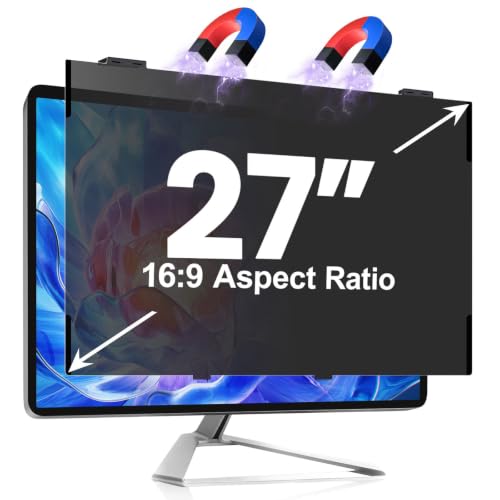
JEAPKA Magnetic 27 Inch Frameless Privacy Screen
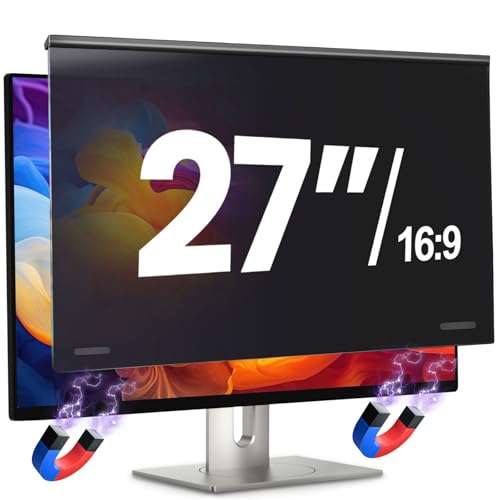
JEAPKA Magnetic 27 Inch Privacy Shield Panel
The Details Behind The Selections
A 24-inch monitor sits at the sweet spot for most home desks, and the JEAPKA Magnetic 24 Inch Privacy Screen Filter slots right onto that widescreen without fuss. The magnetic hanging design lines up along the top bezel in seconds, with a small bottom magnet anchoring the panel so it stays flush during typing marathons or video calls. You don’t need tape, adhesive strips, or any tools, which makes it forgiving if you swap monitors down the road.
For commuters who finish the day in a bright apartment or shared workspace, the blue-light filter softens the harsh cast that overhead fluorescents tend to cast on white documents. If you only own one display and want a clean, no-muss install, this 24-inch filter tends to suit you.
Good Reasons To Consider
- Magnetic mounting leaves zero residue and lets you remove the filter in seconds for screen sharing.
- Anti-scratch coating helps the panel survive daily wipe-downs with a microfiber cloth.
- Designed for common 23.6, 23.8, and 24-inch 16:9 monitors, which covers most home setups.
- Side-on privacy blackout helps keep spreadsheets out of coworker sight lines.
Things To Consider
- Strong ambient backlighting can still bleed through the filter when viewed straight-on.
- You may find image clarity drops slightly compared to an unfiltered matte screen.
Who It Suits Best
Remote workers and students on a single 24-inch monitor who want tool-free installation and clean removal for screen sharing.
Skip It When
Owners of curved displays should reach for the JEAPKA 2 Pack 32 Inch Curved Monitor Privacy Screen instead.
Two screens, one filter pack, no math required. The JEAPKA 2 Pack 27 Inch Privacy Screen Filter ships a matched pair for a dual-monitor setup, which matters when one mismatched panel would bug you daily. The magnetic hanging design snaps into place without tape, so you won’t fight adhesive bubbles on either monitor. If you’ve been holding off because buying two filters felt wasteful, a twin pack fixes that mental hurdle.
Compared to the JEAPKA Magnetic 24 Inch Privacy Screen Filter reviewed earlier, this one simply scales up to the 27-inch widescreen footprint and doubles the count. For trading desks, video editors, and anyone running a side-by-side productivity layout, having matching filters feels intentional rather than improvised.
Where It Excels
- Matched pair keeps two-monitor setups visually balanced and uniformly tinted.
- Adhesive-free mounting protects both screens from residue during long-term ownership.
- Anti-blue-light layer reduces eye strain across back-to-back work blocks.
Trade Offs
- You may find the privacy tint dims colors noticeably for color-critical photo work.
- Not built for curved 27-inch panels, so verify your screen profile before measuring.
Made For
Productivity enthusiasts running two matching 27-inch widescreens in a home office or studio apartment.
A Better Fit Elsewhere
Single-monitor users get more value from the JEAPKA Magnetic 24 Inch Privacy Screen Filter instead.
Big curved displays demand a filter that follows the curve, and the JEAPKA 2 Pack 32 Inch Curved Monitor Privacy Screen is built for exactly that geometry. Its 32-inch viewing area pairs well with the immersive monitors popular in editing suites and trading desks. The anti-glare layer cuts window reflections that flat filters often let through, and the anti-scratch surface holds up under repeated microfiber passes.
If you came from a flat 24-inch screen and stepped up, the difference is noticeable: reflections stretch across a wider arc, so the filter does more work per square inch. You get two panels here, so curved dual-display setups finally have a matching option without buying mismatched singles.
Everyday Wins
- Curved geometry matches modern immersive monitors without distorting the image.
- Twin-pack shipping suits buyers outfitting a two-screen workstation in one go.
- Anti-blue-light filter softens long editing sessions under studio lighting.
- Anti-scratch surface tends to handle routine cleaning without visible swirl marks.
Points To Note
- Measure your bezel area first, since flat 32-inch monitors will not seat correctly.
- You may notice a slight softening of fine text for spreadsheet-heavy workflows.
Best Suited To
Video editors, traders, and immersive-monitor enthusiasts running curved 32-inch displays in a fixed setup.
Look Elsewhere When
Flat-panel owners should consider the JEAPKA Magnetic 27 Inch Frameless Privacy Screen instead.
Working from a coffee shop or airport lounge changes the privacy equation entirely, and the Dabernur Privacy Screen Protector for MacBook Air 13 answers that with a magnetic snap-on design tailored for laptops. A subtle micro-adhesive strip along the bottom keeps the panel flush when closing the lid, so you don’t pop it off every time you stash the machine in a sleeve. The included storage sleeve also makes it easier to swap between filtered and unfiltered views without losing the panel under a couch cushion.
Note that the listing covers both MacBook Air 13 (2018–2021, M1) and MacBook Pro 13 (2016–2022, M1, M2), so double-check your specific model before ordering. For anyone whose work travel looks more like a backpack than a corner office, this is the closest thing to a grab-and-go privacy setup in the roundup.
Reasons It Performs
- Magnetic attachment means no residue if you need to remove the panel before a presentation.
- Micro-adhesive strip keeps the filter stable through repeated lid openings.
- Anti-glare layer softens overhead café and airport lighting alike.
- Storage sleeve adds a layer of scratch protection between uses.
Honest Caveats
- Frequent removal is discouraged by the brand, which limits flexibility.
- You may find the panel shifts slightly on older hinges that have loosened.
Perfect Match For
MacBook Air 13 owners (2018–2021, M1) who split their week between home and a coffee shop counter.
Consider Something Else When
Desktop-only users get more screen coverage from the AEGIVIXE Magnetic 24 Inch Anti Glare Filter.
Open offices punish side-viewing screens, and the AEGIVIXE Magnetic 24 Inch Privacy Screen Filter was clearly designed with that crowd in mind. The hanging magnetic system layers privacy, anti-blue-light filtering, and anti-glare coating into one panel that mounts without adhesives. You get a strong blackout effect from oblique angles, which matters when coworkers drift past your desk during sprint reviews.
Compared to the JEAPKA Magnetic 24 Inch Privacy Screen Filter reviewed earlier, this one doubles down on the dual privacy defense while sharing the same 24-inch 16:9 footprint. For shared spaces where the chair next to yours is rarely empty, the side-view shielding tends to matter more than the absolute clarity of the front view.
The Good Stuff
- Hanging magnetic design removes cleanly for screen sharing without leaving residue.
- Dual privacy defense narrows the viewing cone for anyone off to the side.
- Blue-light shielding helps during long days under overhead fluorescents.
Worth Noting
- Measure your bezel area first, since thick-edge monitors and curved screens will not fit.
- You may find the tint slightly heavier than competitors when watching video content.
Quick Facts
Right Fit For
Office workers in shared or open-plan layouts who need side-view privacy without committing to a permanent install.
Swap It Out When
Curved-monitor owners should pivot to the JEAPKA 2 Pack 32 Inch Curved Monitor Privacy Screen.
For a single, no-drama daily filter, the AEGIVIXE Magnetic 24 Inch Anti Glare Filter threads the needle. Its embedded magnets click onto a flat 24-inch 16:9 monitor in seconds, sidestepping the alignment dance that adhesive filters sometimes demand. The anti-glare coating handles window reflections without making text look fuzzy, which is the everyday win most shoppers actually want.
This pick sits between the JEAPKA 24-inch filter and the AEGIVIXE privacy-focused panel above. You give up some of the side-view blackout in exchange for a cleaner front-on image, which suits home users who don’t worry much about shoulder-surfing.
Useful Highlights
- Magnetic attachment makes the panel easy to lift for cleaning the screen underneath.
- Anti-glare finish keeps window reflections diffuse instead of mirror-sharp.
- Blue-light filtering softens evening work blocks for late-shift households.
Practical Considerations
- Privacy blackout is lighter than dedicated privacy filters on the list.
- Not suited for thick-edge or curved monitors, so verify dimensions before ordering.
Whose Shelf It Belongs On
Home users on a flat 24-inch monitor who want glare relief more than hardcore side-view privacy.
Reach For A Different Pick When
Office workers in tight cubicles should consider the AEGIVIXE Magnetic 24 Inch Privacy Screen Filter for stronger side-view shielding.
The 27-inch flat panel is the new office default, and the AEGIVIXE Magnetic 27 Inch Privacy Screen slots into that footprint without demanding adhesive strips. The hanging magnetic system keeps the filter flush against the bezel, which prevents the floating-edge look that makes cheaper filters feel temporary. Side-view blackout is the headline feature, while the anti-blue-light coating handles the secondary glare problem under ceiling fixtures.
Where the JEAPKA 2 Pack 27 Inch Privacy Screen Filter ships a matched pair, this one arrives solo, so it’s the cleaner choice for single-display setups. You may find the privacy tint a touch heavier than the anti-glare-only filters above, which is the trade-off you accept for stronger shoulder-surfing protection.
What It Does Well
- Magnetic hanging design installs without tools and removes cleanly for screen sharing.
- Side-view blackout helps in shared workspaces and coworking lounges.
- Anti-blue-light layer softens fatigue during extended document editing.
Points To Keep In Mind
- You may find image brightness drops noticeably compared to bare-panel viewing.
- Not compatible with curved or thick-edge monitors, so verify your screen profile.
Who Should Grab It
Single-monitor users on a flat 27-inch panel who want stronger privacy than entry-level anti-glare filters offer.
Where Another Pick Suits Better
Two-monitor workstations save money per panel with the JEAPKA 2 Pack 27 Inch Privacy Screen Filter.
Modern monitors shed their bezels faster than filters can keep up, and the JEAPKA Magnetic 27 Inch Frameless Privacy Screen was engineered for that exact shift. It targets the visible area of 23 9/16 by 13 1/4 inches, ignoring the bezel entirely, so the panel looks like part of the screen rather than an afterthought. The adhesive-free mounting keeps the minimalist look intact, which matters when you spent extra on a bezel-free display in the first place.
Unlike the AEGIVIXE Magnetic 27 Inch Privacy Screen above, this one tolerates minor measurement variances without creating a gap at the edge. For shoppers who care about how their desk looks as much as how it performs, that visual continuity carries weight.
Benefits That Matter
- Bezel-aware sizing creates a gap-free fit on frameless displays.
- Adhesive-free install preserves factory screen coatings over the long term.
- Anti-glare layer handles window reflections without washing out colors.
- Anti-blue-light filter softens evening work blocks for late-shift households.
Where It May Fall Short
- Minor measurement variances mean buyers should double-check the listed dimensions before measuring.
- Privacy tint may feel heavier than casual home users prefer during movie nights.
Feature Snapshot
Built With In Mind
Owners of bezel-free 27-inch monitors who want their filter to look like part of the screen, not a sticker on top.
Not Your Match When
Thicker-bezel displays pair more cleanly with the AEGIVIXE Magnetic 27 Inch Privacy Screen instead.
The JEAPKA Magnetic 27 Inch Privacy Shield Panel wraps up the roundup as a flexible option that doesn’t lock you into a specific use case. Its magnetic hanging design mounts in about a second, with a bottom magnet anchoring the panel so it stays put during the day’s typing and tab-switching. The 16:9 widescreen footprint works across a wide range of 27-inch monitors, so it’s forgiving if your current setup is mismatched across brands.
Where the JEAPKA Magnetic 27 Inch Frameless Privacy Screen above targets the modern bezel-free crowd, this one takes a more generalist path. For shoppers who want a single panel that handles most productivity needs without specialization, this tends to be the safe everyday call.
A Favorable Mix
- Magnetic hanging system makes removal and reinstallation a one-hand job.
- Anti-glare coating softens overhead light reflections across long workdays.
- Anti-blue-light filter helps during evening hours when ambient light drops.
- Side-view privacy adds a layer of protection during open-desk work blocks.
Potential Compromises
- Generalist fit may leave small gaps on some frameless panels compared to bezel-specific filters.
- You may find the privacy tint dims bright UI elements more than anti-glare-only alternatives.
Who Will Love This
General productivity shoppers who want a flexible 27-inch filter that works across monitor brands without specialized sizing.
A Better Fit Elsewhere
Bezel-free display owners get a tighter visual match from the JEAPKA Magnetic 27 Inch Frameless Privacy Screen.
Picking The Right Filter For Your Setup
Anti-glare screens are deceptively simple, but a few details decide whether yours feels like a daily upgrade or an awkward accessory.
Measure Before You Order
The single biggest mistake is trusting diagonal size alone. A 24-inch label can hide several different bezel widths depending on the brand, and filters are sized to the viewable area, not the marketing number. Pull a tape measure across just the screen, ignoring the plastic frame, and compare against the manufacturer’s stated dimensions before you click order.
Match The Mount To Your Habits
Magnetic hanging designs suit people who swap between filtered and unfiltered views for presentations or color work. Adhesive-backed filters feel more permanent and resist sliding, but they leave residue if you change your mind in six months. For laptops especially, magnetic systems tend to win because lids open and close dozens of times a day.
Privacy Versus Pure Anti-Glare
Anti-glare coatings scatter reflections for a softer, matte look that helps in bright rooms. Privacy filters go further by narrowing the viewing cone, which dims the screen for anyone sitting beside you. If you work alone at home, anti-glare alone often feels cleaner, while shared spaces benefit from the dual-action panels that handle both problems in one sheet.
Frame Style And Curvature
Frameless displays need filters sized to the visible area rather than the outer chassis, or you’ll see gaps at the edges. Curved monitors require curved filters; a flat panel stretched over a curve will bow at the corners and distort the image. The JEAPKA 2 Pack 32 Inch Curved Monitor Privacy Screen handles one case cleanly, while the JEAPKA Magnetic 27 Inch Frameless Privacy Screen handles the other.
What Shoppers Often Miss
Where Shoppers Go Wrong
Eyeballing the screen size instead of measuring the bezel area is the most common error, and it leads to returns more than any other issue. Skipping the aspect ratio check is a close second: a 21:9 ultrawide filter won’t seat correctly on a 16:9 panel, and the difference isn’t obvious from the listing photo. Rushing past cleaning habits can also bite you, since microfiber cloths and gentle pressure keep anti-glare coatings clear far longer than paper towels.
Where The Extra Money Goes
Higher-tier models in this category tend to invest in tighter privacy louvers, more consistent anti-glare layering, and cleaner magnetic alignment that holds up over months of removal cycles. The premium shows up most when you spend hours in front of the screen daily, where color consistency and reduced eye fatigue start to register as real comfort rather than marketing copy. For occasional use, mid-range filters handle glare and privacy well enough that the upgrade is rarely essential.
Frequently Asked Questions
Do anti-glare screens reduce eye strain?
They soften harsh reflections and filter some blue light, which many users find helpful during long sessions. They aren’t a substitute for breaks, proper lighting, or screen brightness tuning.
Can I install one without adhesive?
Yes. The magnetic hanging designs in this roundup attach to the monitor’s bezel using embedded magnets. No tape, no residue, and removal takes seconds.
Will a privacy filter dim my screen noticeably?
Most do reduce brightness somewhat, so many shoppers raise their monitor’s brightness setting to compensate. Front-on viewing stays sharp, while side angles go dark.
Are these filters safe for laptop lids?
Magnetic designs with a small bottom adhesive strip generally close cleanly. Avoid thick adhesive strips, which can leave a slight bulge when the lid shuts.
How do I clean an anti-glare screen?
Use a soft microfiber cloth with minimal pressure, and avoid paper towels or household cleaners. Light dusting tends to work better than wet wipes, which can streak the matte coating.
Closing Remarks
The right anti-glare screen depends less on price tags and more on your monitor’s bezel, your room’s lighting, and how often you’d want to remove the panel. Magnetic hanging designs lead the pack for flexibility, while curved or frameless-specific models reward shoppers who measure twice. Pick the filter that fits your setup rather than chasing the most feature-dense listing, and your eyes will thank you by the end of the week.


