

Drawing on a tablet has reshaped how illustrators, designers, and hobbyists work, yet choosing the right one feels overwhelming when every model promises pro-grade features. This lineup focuses on pen displays (tablets with a built-in screen you draw directly on) and a slimmer pen tablet alternative, sized for studio desks, dorm rooms, and travel bags alike. If you’ve been sketching on paper or bouncing between a mouse and a basic tablet, the jump to a proper pen display changes your whole drawing rhythm. Everything below balances screen quality, pen feel, and ergonomics without burying you in spec sheets.
A Closer Look At The Lineup
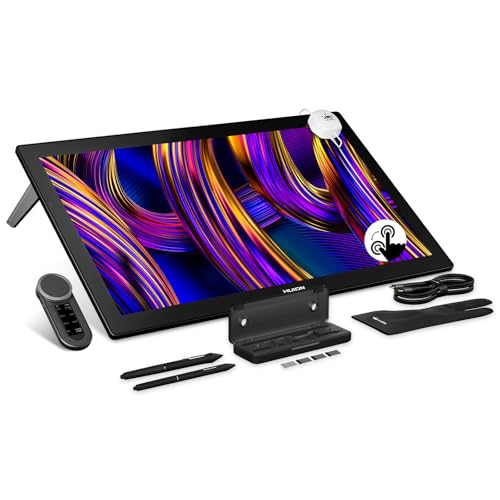
HUION KAMVAS Pro 27 (144Hz) 4K UHD Drawing Tablet

HUION Kamvas 13 (Gen 3) Drawing Tablet with Screen

HUION Kamvas Pro 16 Drawing Tablet with Screen

HUION KAMVAS 16 (Gen 3) 2.5K QHD Drawing Tablet
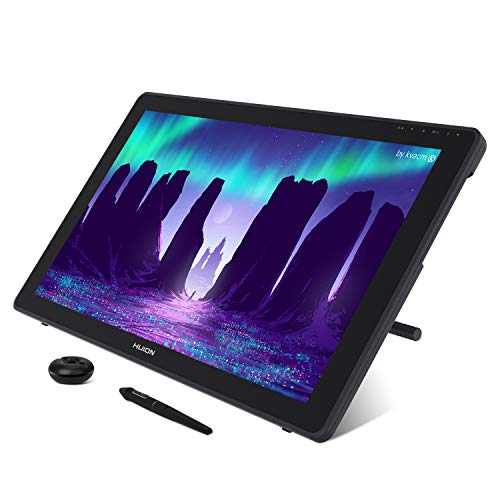
HUION KAMVAS 22 120% sRGB Drawing Tablet 21.5″

HUION KAMVAS Pro 19 4K UHD Drawing Tablet

HUION KAMVAS Pro 24 (Gen 3) UHD Drawing Tablet

XPPen Artist 24 Pro 2.5K QHD Drawing Tablet 23.8″

HUION KAMVAS Pro 27 4K UHD Drawing Tablet
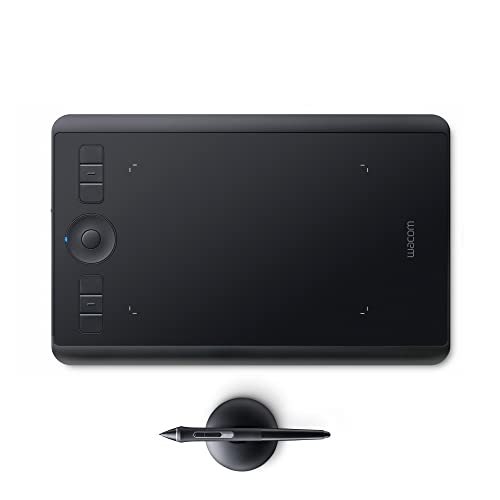
Wacom Intuos Pro Small Drawing Tablet
A Deeper Look At The Lineup
The biggest screen in the lineup, a 27-inch 4K UHD panel with a 144Hz refresh rate (meaning the image redraws 144 times per second for noticeably smoother cursor motion), puts this flagship in a category most pen displays never reach. For animators working in 24fps timelines or anyone scrubbing through heavy Photoshop files, that fluidity shows up the moment you pan across a canvas. PenTech 4.0, HUION’s current pen platform with 16384 pressure levels, feels precise enough for fine linework on character art.
You trade desk space for screen real estate, so measure your studio first. The 27-inch footprint plus stand eats a deep surface, and lifting it between rooms is a two-person job. Compared to the smaller Kamvas 13 (Gen 3), you’re trading portability for a workspace that genuinely replaces a primary monitor.
Practical Advantages
- 4K UHD resolution on a 27-inch canvas means fewer zooms for intricate detail work
- 144Hz refresh rate keeps strokes visually connected to your hand, which helps during fast gestural sketching
- PenTech 4.0 supports heavy pressure sensitivity for varied linework
- Large workspace lets you keep tool palettes open without crowding the artwork
Things To Weigh
- Requires a deep desk and a sturdy stand, so apartment studios may struggle to fit it
- Cleaning the etched glass surface takes microfiber care to avoid streaks
Key Specs
Built With In Mind
Studio illustrators and animators running a permanent desk setup who want a single screen to handle both work and drawing.
Consider Something Else When
The HUION Kamvas 13 (Gen 3) suits you better if you commute with your kit or sketch in cafés where a 27-inch display simply won’t fit.
This is the most portable pen display in the lineup, a 13.3-inch screen that fits in a backpack alongside a laptop. The Canvas Glass 2.0 surface cuts glare well enough that you can work near a window without fighting reflections. A pair of physical dials on the side give you tactile control over brush size and zoom, which feels faster than keyboard shortcuts once you build the muscle memory.
You’ll need to tether it to a computer, since it’s not a standalone tablet. For students sketching between classes or designers bouncing between a home desk and a coworking space, that tradeoff makes sense.
Real Benefits
- 13.3-inch form factor slides into most laptop sleeves for travel
- Canvas Glass 2.0 keeps reflections manageable in bright rooms
- Dual dials offer direct, hands-on adjustment of common brush settings
- Lighter desk footprint than the 16-inch and up models in this lineup
Worth Noting
- Must stay connected to a computer to function, no standalone mode
- Smaller canvas can feel tight for full-screen reference work
- Dial positioning may take a few sessions to feel natural for left-handed users
Who It Suits Best
Art students, traveling illustrators, and hobbyists who already own a capable laptop and want a pen display that travels light.
Look Elsewhere When
The HUION KAMVAS Pro 24 (Gen 3) makes more sense for full-time studio work where portability doesn’t matter and a larger canvas helps productivity.
A 15.6-inch canvas hits the sweet spot for many hobbyists, big enough for serious illustration, small enough to live on a corner desk. The fully laminated display (meaning the glass and LCD are bonded with no air gap) keeps the pen tip visually close to the cursor, which reduces the parallax effect that frustrates new pen display users. The anti-glare etched surface gives a slight tooth that mimics paper texture under the nib.
A touch bar along the side lets you program shortcuts, useful for switching tools without hunting through menus. This sits comfortably between the more compact Kamvas 13 and the larger Pro 19.
Reasons It Performs
- 120% sRGB coverage (a color space standard for digital displays) delivers punchy, accurate colors for most illustration work
- Fully laminated screen reduces the gap between pen tip and drawn line
- Programmable touch bar streamlines tool switching mid-sketch
- 15.6-inch size fits standard laptop bags for occasional transport
Honest Caveats
- Lower pixel density than the Gen 3 16-inch sibling, so fine detail retouching shows slightly softer edges
- Pen nibs wear down faster on the textured surface and need replacement over time
Made For
Intermediate illustrators and design students who want a daily-driver pen display without overspending on pro-tier resolution.
Skip It When
The HUION KAMVAS 16 (Gen 3) is the better pick when you do a lot of pixel-level retouching and need the sharper 2.5K QHD panel.
This third-generation 15.8-inch tablet focuses on pixel density, hitting 186 PPI (pixels per inch) for noticeably crisper detail than standard 1080p panels. At 2560×1440 resolution, brush textures and UI text stop looking soft, which matters for anyone doing precise digital painting or photo retouching. PenTech 4.0 keeps the pressure curve competitive with the larger Pro models.
Color coverage is solid at 99% sRGB and Rec.709 plus 90% Adobe RGB (a wider color space used by professional printers and photographers), enough for most client work short of high-end print production. The 15.8-inch footprint stays portable without sacrificing too much workspace.
A Few Strong Suits
- 2.5K QHD resolution sharpens fine brushwork and small UI elements
- Wide color coverage (99% sRGB, 90% Adobe RGB) handles most color-critical work
- PenTech 4.0 matches the responsiveness of larger flagship models
- 186 PPI rivals the clarity of premium 24-inch displays in a smaller package
Points To Keep In Mind
- Smaller active area than 19-inch and up models means more scrolling for large compositions
- The textured glass surface requires regular microfiber wiping to keep fingerprint smudges in check
Feature Snapshot
Best Suited To
Detail-oriented digital painters and retouchers who want sharper visuals than 1080p offers but don’t need a desk-sized display.
Reach For A Different Pick When
The HUION KAMVAS Pro 19 gives you more room for sprawling compositions and adds 4K resolution when pixel count matters more than portability.
The 21.5-inch KAMVAS 22 sits in a useful middle ground between compact 15-inch displays and the full 27-inch flagships. You get a generous drawing surface that comfortably holds tool palettes alongside your artwork, while the overall footprint still fits on most standing desks. The 120% sRGB color range produces vivid output for web illustration and concept art.
Resolution tops out at 1920×1080, so pixel density is lower than newer Gen 3 models. For broad-strokes illustration and graphic design where you aren’t pixel-peeping, this trade is easy to accept.
Real-World Strengths
- 21.5-inch canvas leaves room for toolbars, reference images, and the main artwork
- 120% sRGB coverage produces punchy color suitable for web and client-facing work
- 178-degree viewing angle keeps colors consistent when sharing your screen with collaborators
- More affordable path into the larger-display category
Points To Note
- 1080p resolution on a 21.5-inch panel means softer detail than 2.5K or 4K alternatives
- Stand adjustments are limited compared to higher-end Pro series arms
Whose Shelf It Belongs On
Concept artists, graphic designers, and hobby illustrators who want a large drawing area without stepping up to full 4K pricing.
A Better Fit Elsewhere
The HUION KAMVAS Pro 24 (Gen 3) is the smarter choice for studio pros who need 4K clarity and the modern PenTech 4.0 platform.
An 18.4-inch 4K panel fits in workspaces where the 27-inch flagships feel oversized. The 3840×2160 resolution paired with full lamination makes brush edges noticeably tighter than on 1080p or even 2.5K QHD alternatives at this size. Canvas Glass 2.0 reduces glare and adds a paper-like tooth that many illustrators prefer over slick glass.
PenTech 4.0 keeps the pressure response consistent with the bigger Pro models. This hits a sweet spot for studio illustrators who want 4K without committing to a desk-eating footprint.
Where It Delivers
- 4K UHD resolution in a mid-size form factor balances screen real estate and pixel density
- Etched Canvas Glass 2.0 surface mimics paper texture under the pen nib
- Full lamination reduces parallax (the visual gap between nib and ink line) for accurate strokes
- PenTech 4.0 supports 16384 pressure levels for nuanced linework
Trade Offs
- Mid-size screen still requires a dedicated workspace, not as portable as 13-inch options
- 4K demands a reasonably modern computer with capable graphics hardware
- Higher cost than 1080p displays in the same size class
Feature Card
Who Should Grab It
Professional illustrators and concept artists with a permanent desk who want flagship clarity without the 27-inch footprint.
Where A Sibling Pick Shines
The HUION KAMVAS Pro 27 (144Hz) makes more sense for animation work where the higher refresh rate matters more than a slightly smaller canvas.
A 23.8-inch 4K UHD panel with narrow bezels gives this Gen 3 Pro a near edge-to-edge workspace that feels like drawing on a clean sheet of paper. PenTech 4.0 drives 16384 pressure levels with what HUION describes as an improved grip and solid tip, both of which translate to longer sketching sessions without hand fatigue. The 24-inch size lands close to a standard monitor, so it doubles as your primary display.
For full-time illustrators who live at their desk, the size and resolution remove the constant zooming that smaller tablets force. You’ll want a strong computer behind it.
Everyday Wins
- 4K UHD resolution keeps fine detail work looking crisp at this size
- Narrow bezels maximize the drawing area within a similar desk footprint
- PenTech 4.0 supports nuanced pressure and tilt response
- Doubles effectively as a primary monitor for design and illustration workflows
A Few Limitations
- Heavy footprint demands a sturdy desk and arm or stand mount
- Color calibration out of the box may need tuning for print workflows
- Premium pricing puts it out of reach for casual hobbyists
The Right Fit
Full-time illustrators, comic artists, and studio designers who want a flagship-tier display that pulls double duty as a workstation monitor.
Another Choice May Suit
The HUION KAMVAS Pro 19 is a smarter fit when desk depth is limited and a slightly smaller 4K canvas is enough.
The Artist 24 Pro stands out in this lineup for one reason: 20 physical shortcut keys lining the front edge. For animators, video editors, and Photoshop-heavy workflows, that tactile row beats hunting through menus mid-stroke. The 23.8-inch 2.5K QHD panel renders 16.7 million colors with a wide 178-degree viewing angle that keeps tones accurate from different seating positions.
The included stylus offers 8192 pressure levels and tilt response, fewer than the 16384 of newer HUION PenTech 4.0 pens but plenty for most illustration tasks. Wireless connectivity and cross-platform support (Windows, Mac, Chrome, Linux) make it a versatile studio anchor.
Why It Works Well
- 20 shortcut keys provide fast access to common tools without menu diving
- 2.5K QHD resolution delivers sharp detail on a 23.8-inch panel
- Battery-free stylus eliminates charging breaks mid-session
- Wide OS compatibility covers most studio setups out of the box
Room For Improvement
- 8192 pressure levels fall short of newer 16384-level pens for ultra-fine line variation
- Stand and cable management aren’t as polished as HUION’s Pro line
Quick Facts
Perfect Match For
Power users who rely on physical shortcut keys and work across multiple operating systems in a busy studio environment.
Swap It Out When
The HUION KAMVAS Pro 24 (Gen 3) earns its place if maximum pressure sensitivity and 4K resolution matter more than a dedicated key row.
Among 27-inch pen displays, this model leans into color accuracy with 98% Adobe RGB coverage, which matters for illustrators preparing work for print or premium client deliverables. The 4K UHD resolution on a large canvas lets you lay out full comic pages, detailed concept pieces, or multi-panel compositions without constant panning. PenTech 4.0 keeps the writing experience consistent with the rest of the Pro family.
You’ll want a spacious desk and a computer with a discrete graphics card to push 4K comfortably. The display also lacks the 144Hz refresh rate of its sibling KAMVAS Pro 27 (144Hz), so animation smoothness takes a small step back.
Useful Touches
- 98% Adobe RGB coverage supports print and color-critical client work
- 4K UHD on 27 inches provides generous room for full-page layouts
- PenTech 4.0 delivers 16384 pressure levels for detailed linework
- Wide canvas reduces zoom-and-pan fatigue during long sessions
Some Limits To Know
- Higher Adobe RGB coverage requires a calibrated workflow to use fully
- 27-inch footprint needs significant desk depth and a sturdy mount
Who Will Love This
Illustrators, fine artists, and print designers who prioritize color accuracy and want ample room for large compositions.
Consider Something Else When
The HUION KAMVAS Pro 27 (144Hz) is the better match for animators and motion artists who prioritize refresh rate over Adobe RGB coverage.
The only pen tablet (no built-in screen, you draw while looking at your monitor) on this list, the Wacom Intuos Pro Small flips the script. You draw on the textured surface while watching your monitor, a workflow some illustrators swear by for the hand-eye separation it builds. At under one pound and roughly 10.6 by 6.7 inches, it disappears into a laptop bag.
The included Pro Pen 2 has long been the industry benchmark for pressure response. The Touch Ring adds a tactile dial for zooming or scrolling, useful when working at full canvas zoom. Wireless connectivity keeps the desk clean.
Strengths Worth Knowing
- Lightweight build makes it easy to carry between locations
- Pro Pen 2 remains a reference standard for pressure and tilt accuracy
- Touch Ring offers hands-on zoom and scroll without keyboard shortcuts
- Wireless mode keeps cables off the desk for cleaner studio setups
Worth Bearing In Mind
- No built-in screen means a learning curve for users transitioning from paper or pen displays
- Active drawing area is small, so large compositions require frequent zoom-out gestures
- Pen nibs wear faster than on hard-glass pen displays
Best Suited To
Traveling illustrators and concept artists who already work on a laptop and value portability over a built-in display.
Not Your Match When
The HUION Kamvas 13 (Gen 3) is the smarter grab if you want a screen to draw on and travel with a compact pen display instead.
What To Look For In A Pen Display
Screen size drives most of the buying decision. A 13-inch display travels well but compresses tool palettes; a 24- or 27-inch display replaces a monitor but demands desk depth. Resolution matters most for retouchers and pixel-level detail work, where 2.5K QHD or 4K UHD beats 1080p by a clear margin.
Color coverage (sRGB, Adobe RGB) matters less for casual sketching than for print production or client-facing color work. Pen pressure levels (8192 versus 16384) make a subtle difference at the high end; most hobbyists won’t notice the gap. Active drawing area, parallax from lamination, and tilt support all affect how natural the pen feels, so try to test in person when possible.
Connection type matters too. Most pen displays require an HDMI or USB-C tether to a computer, and 4K panels benefit from a modern graphics card. If your computer is a few years old, check compatibility before committing.
Key Considerations Across These Picks
Where Shoppers Go Wrong
The most common slip is chasing the biggest screen without measuring the desk first. A 27-inch pen display needs a deep surface and a sturdy stand, and cramming it onto a small desk creates ergonomic strain. Another frequent miss is overlooking cable requirements: 4K panels often need both HDMI and USB connections plus a capable graphics card. Buyers also underestimate the learning curve of a pen tablet without a screen, so first-timers often do better starting with a pen display like the Kamvas 13.
When Paying More Pays Off
The jump from a budget 1080p panel to a 4K model brings tighter pixel density, better lamination, and more accurate color reproduction. For professional illustrators whose income depends on client-ready output, that upgrade pays back through faster workflow and fewer revisions. Hobbyists and students, on the other hand, often get everything they need from a mid-tier 2.5K QHD display without the premium price.
Frequently Asked Questions
Do I need a computer to use a pen display?
Most pen displays, including every model in this lineup except the Wacom Intuos Pro, require a connection to a computer to function. They’re input/output devices that rely on your computer’s processing power. Plan to keep your laptop or desktop nearby whenever you draw.
What’s the difference between a pen display and a pen tablet?
A pen display has a built-in screen you draw directly on, so your pen tip and the cursor line up visually. A pen tablet like the Wacom Intuos Pro is a screenless surface, you draw on the tablet while looking at your monitor. Pen displays feel more intuitive for beginners; pen tablets are typically lighter and more portable.
Is 4K resolution worth the extra cost?
For retouchers, comic artists, and anyone doing pixel-level detail, 4K makes brush edges and UI elements noticeably sharper. For broad-strokes illustration or graphic design at moderate zoom levels, a 2.5K QHD display is often enough. The honest read is that 4K matters most when your eyes are close to the screen.
How important is color gamut?
Color gamut (the range of colors a display can reproduce) matters most for print production and high-end client work. Hobbyists sketching for fun rarely notice the difference between 99% sRGB and 120% sRGB. Professional illustrators preparing work for print should prioritize Adobe RGB percentages.
Can I use these with a Mac?
Yes, most modern pen displays support both Windows and Mac, including every model in this lineup. Check the manufacturer’s driver page for your specific macOS version, since older tablets sometimes lag behind new OS releases.
Bottom Line
The right pen display depends on your desk size, your typical canvas size, and how much color accuracy matters for your work. The HUION KAMVAS Pro 27 (144Hz) leads for animation studios, the Kamvas 13 (Gen 3) wins for travel, and the Wacom Intuos Pro stays the lightweight pick for laptop-only setups. Whatever you choose, measure your workspace, check cable requirements, and start with the smallest screen that genuinely fits your style. The best tablet is the one you’ll actually use every day.


