

Shopping for a new tablet can feel like sorting through a wall of near-identical black rectangles. Screen size, chipset, RAM, storage, AI tricks, kid-proof shells: every maker leans on a different selling point, and the differences between a budget slate and a flagship feel smaller every cycle. That makes the shortlist below worth your time. Each of these ten options earns its spot by solving a specific problem, whether that’s a long study session at a kitchen table, sketching on the couch, or handing a toddler a durable device for road-trip cartoons.
How The Shortlist Stacks Up
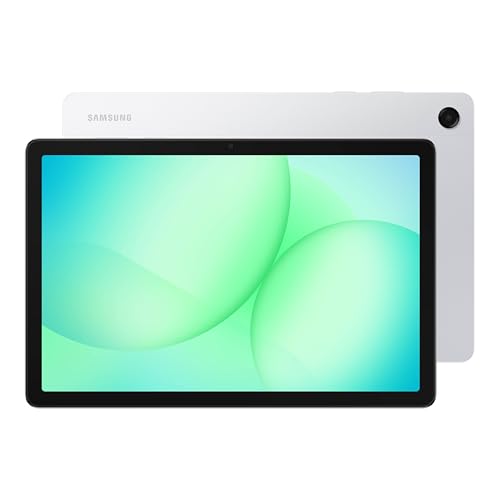
Samsung Galaxy Tab A11+ 256GB Silver

Samsung Galaxy Tab S10+ Plus 256GB

Samsung Galaxy Tab A11+ 5G 128GB

XIAOMI Pad 7 Pro 256GB Gray
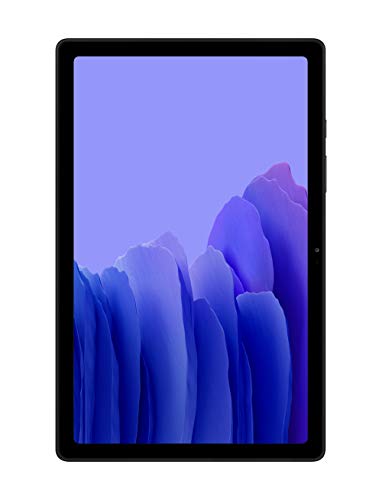
Samsung Galaxy Tab A7 32GB Gray
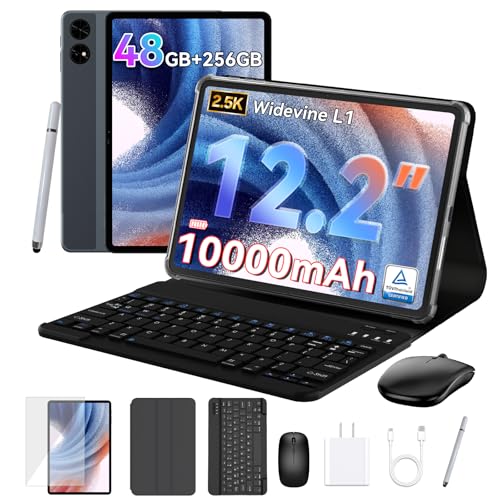
TABWEE 12.2-Inch Android 16 Tablet

YESTEL 10.1-Inch Tablet Bundle Gold

Samsung Galaxy Tab S11 512GB Silver

jumper 15.4-Inch 2-in-1 Tablet
ZIOVO 10-Inch Kids Tablet Pink
Inside Each Recommended Option
The Galaxy Tab A11+ is the kind of tablet a household actually agrees on. Eight gigabytes of RAM keeps app switching smooth when two people share the device, and 256GB of built-in storage handles a few seasons of kids’ shows plus a stack of PDFs without forcing you to micromanage space.
It lands in the middle of Samsung’s A-series lineup, which means you get a large display for streaming and homework without the cost of the flagship S-line. Compared to the Tab A7 further down this list, you gain noticeably more RAM and storage for similar day-to-day tasks.
Positive Points
- 8GB RAM keeps multitasking smooth, so a parent can jump from email to a streaming app without reloads.
- 256GB storage holds a serious offline library of shows, music, and reading material for long trips.
- Large display size makes it a comfortable shared device for movie nights or recipe lookups in the kitchen.
- Samsung’s broader accessory ecosystem means cases and screen protectors are easy to find at most retailers.
Things To Consider
- This is a Wi-Fi only configuration, so you’ll need a hotspot when traveling away from home networks.
- Charging tops out at a basic rate, so heavier users will want to plug in overnight rather than mid-day.
Made For
Families who want one dependable tablet for shared streaming, schoolwork, and casual browsing.
Where Another Pick Suits Better
Road warriors needing cellular data should look at the Samsung Galaxy Tab A11+ 5G instead.
The Tab S10+ is Samsung’s full-strength answer for people who treat a tablet like a creative tool. The 12.4-inch canvas gives sketching apps and split-screen documents real breathing room, and built-in Galaxy AI features aim to handle the tedious parts of note-taking and search.
Where the A11+ above is built for shared family use, this one leans into solo work: artists, students capturing lectures, and professionals trimming a video on the train. The Moonstone Gray finish also makes it feel less toy-like than the A-series palettes.
Everyday Perks
- The 12.4-inch panel makes side-by-side documents and reference images genuinely usable.
- Sketch-to-Image tools let rough drawings become polished visuals without leaving the device.
- Circle to Search with Google means you can look up an object in a photo without alt-tabbing.
- Note Assist summarizes and organizes long recordings, saving real time after meetings or classes.
Points To Keep In Mind
- This is the Wi-Fi configuration, so you won’t have always-on cellular when away from Wi-Fi.
- The flagship tier costs noticeably more than the A-series picks above.
Feature Snapshot
Right Fit For
Students, sketchbook artists, and mobile professionals who want a premium-feeling tablet with creative AI tools baked in.
Consider Something Else When
Shoppers on a tighter budget will get more value from the TABWEE 12.2-Inch Android 16 Tablet further down the list.
The 5G variant of the Tab A11+ swaps Wi-Fi dependence for a Verizon-locked cellular radio, which changes how and where you can actually use it. Route work through job sites, monitor dashboards from a delivery van, or stream lectures from a coffee shop that throttles public Wi-Fi.
Compared to the Wi-Fi-only A11+ at the top of the list, this one accepts a SIM for true mobility. You trade some onboard storage (128GB here versus 256GB), which most travelers handle with cloud sync.
Positive Takeaways
- 5G connectivity means you stay online in places Wi-Fi can’t reach, like construction sites or transit.
- The 11-inch display hits a sweet spot for reading documents one-handed on a commute.
- Samsung’s upgraded chipset keeps navigation and productivity apps responsive away from home.
- Verizon-locked plans can fold neatly into existing business lines.
Honest Caveats
- Network lock to Verizon limits your carrier choice, so check coverage before committing.
- 128GB is tighter than the Wi-Fi sibling; heavy offline collectors may need a memory card.
Best Suited To
Mobile workers and frequent travelers on Verizon who need real internet without hunting for hotspots.
Skip It When
Households that mostly stay near a router should save with the Wi-Fi Tab A11+ at the top of this list.
The Pad 7 Pro is the rare mid-tier tablet that punches above its weight on display quality. An 11.2-inch 3.2K panel running at up to 144Hz means animations stay smooth and text stays sharp, whether you’re reading a long article or scrubbing through a 4K video timeline.
Unlike the Samsung Tab S10+ above, the Xiaomi uses a slightly different aspect ratio that some people find better for reading. The trade-off: this global version supports Wi-Fi only, with no SIM slot for cellular on the road.
A Favorable Mix
- The 3.2K resolution at 144Hz makes scrolling and stylus input feel premium in a mid-priced device.
- Four-speaker setup pulls double duty for movies and casual music without reaching for headphones.
- 8GB of RAM paired with 256GB storage handles large creative apps smoothly.
- Bluetooth 5.4 keeps wireless earbuds and keyboards reliably connected.
Worth Noting
- No SIM card slot means you’ll lean on Wi-Fi or a phone hotspot when traveling.
- Camera performance is decent but not flagship-tier, so serious photographers should look elsewhere.
Who It Suits Best
Media enthusiasts who care deeply about screen quality and want a smoother display than the typical budget slate.
Look Elsewhere When
Users needing a built-in keyboard for typing-heavy work should consider the TABWEE 12.2-Inch Android 16 Tablet instead.
The Tab A7 is the lowest-friction pick on this list. A 10.4-inch screen, slim build, and Dolby Atmos speakers make it a natural couch companion for streaming and reading, and the modest 32GB of storage keeps the price accessible for anyone who mainly lives in the cloud.
Compared to the A11+ at the top, this is a clear step down in RAM and storage, so expect some patience when switching between apps. For a secondary device or a kid’s first tablet, that’s usually a fair trade.
Everyday Advantages
- Lightweight design makes it comfortable to hold for long reading sessions in bed or on the sofa.
- Dolby Atmos speakers deliver fuller sound than most tablets at this price tier.
- Expandable storage via microSD offsets the modest built-in capacity.
- Trusted Samsung software support keeps the tablet useful for years.
Small Caveats
- 32GB fills up fast with offline video, so lean on streaming or add a memory card early.
- Heavier multitasking will feel slow next to the A11+ picks above.
Perfect Match For
Light users who want a no-frills slate for streaming, email, and casual browsing without overspending.
Another Choice May Suit
Anyone wanting more horsepower for apps should stretch to the Samsung Galaxy Tab A11+ at the top of this list.
The TABWEE 12.2-inch tablet positions itself as a laptop alternative, and the included keyboard is the headline feature. A 2.5K QHD display with Widevine L1 support means streaming services deliver full-resolution playback, which a lot of budget tablets quietly downgrade.
Where the Samsung Tab S10+ above leans on flagship build and AI features, the TABWEE counters with more flexible storage expansion and a much smaller price tag. For students writing papers or remote workers handling email, that mix often wins.
Bright Spots
- Detachable keyboard turns the tablet into a workable laptop replacement for travel days.
- Widevine L1 support keeps Netflix, Disney+, and Prime Video at full resolution.
- Up to 2TB of expandable storage via TF card handles large media libraries.
- 10000mAh battery targets full workdays of mixed use away from an outlet.
Trade Offs
- The brand carries less long-term resale weight than Samsung or Apple tablets.
- Octa-core performance is solid for daily tasks but lags flagship chipsets under heavy creative loads.
Quick Facts
Who Should Grab It
Students, writers, and remote workers who want laptop-style typing on a tablet budget.
Reach For A Different Pick When
Buyers who prioritize brand-name polish and AI extras should consider the Samsung Galaxy Tab S11.
The YESTEL bundle is built for the “everything in one box” shopper. You get the tablet, a keyboard, and a mouse in a single purchase, which removes the usual second-order decisions about accessories. The gold finish also stands out from the sea of gray tablets on the market.
Compared to the TABWEE above, you trade screen size and resolution for a more compact 10.1-inch form factor that’s easier to throw in a small bag. Android 13 keeps the software experience familiar for anyone coming from a phone.
Why It Works Well
- Bundle pricing typically beats buying a tablet and keyboard separately.
- 10GB RAM plus expandable storage handles everyday multitasking without hiccups.
- 5G Wi-Fi support pulls faster speeds from modern home routers.
- Dual cameras (front and rear) cover video calls and casual snapshots in one device.
A Few Limitations
- Android 13 trails newer Android versions, so some future app features may arrive late.
- Gold finish looks distinctive but limits case options from major accessory makers.
Whose Shelf It Belongs On
First-time tablet owners and casual users who want a complete starter kit in a single order.
A Better Fit Elsewhere
Buyers wanting more power and a newer OS should look at the TABWEE 12.2-Inch Android 16 Tablet instead.
The Tab S11 is the most capable Android tablet Samsung currently ships for everyday use, and the IP68 rating is the quiet hero feature. Dust and water resistance mean a spilled drink or a sandy beach day doesn’t automatically mean a replacement, which is rare in this category.
Where the Tab S10+ above uses a larger 12.4-inch screen, the S11 keeps things slightly more compact with an 11-inch Dynamic AMOLED 2X panel and a generous 512GB of storage. Galaxy AI features handle summarization and on-device search.
The Practical Payoff
- IP68 water and dust resistance protects against real-world accidents most tablets can’t survive.
- 11-inch Dynamic AMOLED 2X display delivers rich color and deep contrast for streaming and design work.
- 512GB of storage holds entire project libraries and offline media collections without compromise.
- Galaxy AI features assist with summarizing documents and circling objects for quick search.
Factors To Consider
- Flagship pricing puts it well above the A-series and most mid-tier picks on this list.
- 11-inch screen feels smaller than the Tab S10+ for split-screen productivity.
Feature Card
Built With In Mind
Power users who travel often, work near liquids, or want a flagship Android tablet built to last.
Swap It Out When
Anyone needing a bigger canvas for split-screen work should consider the Samsung Galaxy Tab S10+ instead.
The jumper 15.4-inch 2-in-1 is the biggest screen on this list, and the design makes that size work for a desk. The magnetic keyboard and built-in adjustable stand turn it into a small all-in-one workstation, which is handy for kitchen-counter recipe viewing or workshop YouTube sessions.
Where the TABWEE 12.2-inch above aims at on-the-go typing, the jumper leans into staying put. The Helio G99 chipset handles daily browsing and document work without breaking a sweat, though it isn’t built for heavy gaming.
A Few Highlights
- 15.4-inch 1080p IPS display makes spreadsheets, recipes, and split windows easy on the eyes.
- Magnetic keyboard and protective case arrive in the box, so there’s no extra shopping.
- Adjustable stand supports comfortable viewing angles from standing or seated positions.
- 100% sRGB color coverage helps photos and design work look closer to print-accurate.
Possible Compromises
- The large size makes it less travel-friendly than 10- or 11-inch tablets on this list.
- Helio G99 is fine for daily tasks but trails behind flagship chips in demanding apps.
The Right Fit
Home users who want a tablet that doubles as a kitchen-counter or workshop display.
Where A Sibling Pick Shines
Frequent commuters will find the Samsung Galaxy Tab A11+ 5G easier to carry on the road.
The ZIOVO kids tablet is designed around the realities of small hands and short attention spans. A shockproof case comes in the box, parental controls keep browsing on a leash, and a pink shell stands up to the drops, throws, and sticky fingerprints that come with the territory.
Compared to the Tab A7 above, you gain a much higher storage ceiling (up to 1TB via TF card) and Wi-Fi 6 support for faster home networks. The trade-off is a brand name that’s less familiar than Samsung or Apple.
What Makes Sense
- Shockproof case arrives in the box, so an accidental drop from the couch doesn’t end the tablet.
- Parental controls help manage screen time and content without third-party apps.
- Face unlock keeps the tablet easy for kids to access and harder for siblings to snoop.
- Octa-core processor keeps educational apps and cartoons running smoothly.
Practical Considerations
- Wi-Fi 6 only, with no cellular option, so road trips need a phone hotspot.
- The pink finish is a strong aesthetic choice; families wanting neutral tones may look elsewhere.
Core Details
Who Will Love This
Parents of toddlers and young children who want a sturdy first tablet with parental controls built in.
Not Your Match When
Adults who want a primary tablet for work should look at the TABWEE 12.2-Inch Android 16 Tablet instead.
What Matters Most Before Choosing Android 14 Tablets
Pick The Operating System Version And Update Support Carefully
Android 14 (and the newer Android 15 and 16 builds shipping on some 2025 and 2026 slates) shapes how long your tablet stays current with app updates and security patches. Look for manufacturers that commit to multiple years of software support, especially Samsung’s A and S series lines. A tablet that launched on Android 13 in late 2024 may already trail behind on app compatibility by mid-2026.
Match The Display Size To Where You Actually Use It
A 10-inch tablet is comfortable on a couch and fits a small backpack. A 12-inch tablet gives you room for split-screen productivity but feels oversized in one hand. The 15.4-inch jumper further up the list makes sense on a desk but becomes a chore on a commute. Be honest about your primary use case: a tablet that lives on the kitchen counter has very different needs than one that lives in a carry-on.
RAM And Storage Drive Real Performance
Eight gigabytes of RAM is the practical floor for smooth multitasking in 2026. Anything below that starts to feel sluggish when you keep a browser, streaming app, and a chat window open at once. Storage matters more than people expect: cloud sync helps, but downloaded videos, offline maps, and large creative files fill up a 32GB tablet quickly. MicroSD or TF card support can extend life cheaply, though some apps install only to internal storage.
Cellular Versus Wi-Fi Depends On Your Routine
Wi-Fi only is fine for homebodies. Cellular models like the Tab A11+ 5G on this list make sense for field workers, frequent travelers, or anyone who relies on a tablet instead of a laptop away from home. Weigh the extra cost against the convenience of skipping hotspot battery drain on your phone.
Think About Accessories And Bundles Up Front
A tablet without a keyboard becomes a consumption device. A tablet with a keyboard becomes a productivity tool. Bundles like the TABWEE and YESTEL picks above save money if you know you’ll want typing capability. Stylus support varies wildly, so check the model number against Samsung’s S Pen compatibility or third-party active pen lists before assuming drawing apps will work.
Key Considerations Across These Picks
Where Shoppers Go Wrong
The most common trap is chasing screen size or RAM on the spec sheet without considering where the tablet will actually live. A 15-inch screen sounds impressive until you try to read on it for an hour with one hand. Another frequent misstep is ignoring storage expansion: many budget tablets lock you into 32GB or 64GB of internal space, and cloud sync only works when you have a reliable connection.
When Paying More Pays Off
Higher tiers like the Samsung Galaxy Tab S11 earn their price through IP68 durability, AMOLED panels, and longer software support windows. For most casual users, that premium doesn’t pencil out. For professionals who use a tablet daily, water resistance and brighter screens add up to real durability and fewer frustrations over years of ownership. The honest read is that mid-tier picks hit the best value sweet spot for families, while flagship tablets reward heavy daily users.
Frequently Asked Questions
Do Android 14 Tablets Still Receive Updates In 2026?
Most major manufacturers promise several years of security and OS updates, so an Android 14 tablet bought in late 2024 or 2025 should continue receiving patches into 2026 and beyond. Samsung’s A and S series typically lead the pack here.
Can These Tablets Replace A Laptop For School Or Work?
A 2-in-1 model with a keyboard, like the TABWEE 12.2-inch tablet on this list, can handle email, documents, and browser-based work comfortably. Heavy video editing or specialized software still benefits from a traditional laptop.
Which Tablet Is Best For Kids?
The ZIOVO 10-inch kids tablet includes a shockproof case and parental controls out of the box, which is the practical answer for most families. Older kids doing schoolwork may prefer the larger screen on the TABWEE or Tab S10+.
How Much Storage Do Most People Actually Need?
128GB covers casual users who stream most of their content. Anyone downloading videos for travel, working with large files, or storing a serious app library should target 256GB or more, ideally with a memory card slot for flexibility.
Is Cellular Worth The Extra Cost?
Cellular models like the Galaxy Tab A11+ 5G make sense for commuters, field workers, or anyone who frequently works away from Wi-Fi. Home-only users can safely skip it and save money.
Closing Thoughts
The right tablet is the one that fits the way you actually use it: a kitchen counter, a backpack, a couch, or a job site. Lean toward the size and storage that match your real routine, and don’t overspend on flagship features you won’t touch. With any of the ten picks above, you’ll land on something that earns its place in your daily life.


