

A good Android tablet in this price band isn’t about chasing specs on paper; it’s about how the device feels during a long reading session, a video call with family, or a Saturday streaming binge. Plenty of modern Android tablets now ship with newer software, and many shoppers want a familiar, clean Android experience without paying flagship prices. The picks below span compact 10-inch models, large 12-inch screens, S Pen bundles, and keyboard-equipped productivity setups, so you can match the hardware to the way you actually use a tablet at home, on the couch, or in a backpack.
A Fast Comparison Of The Options
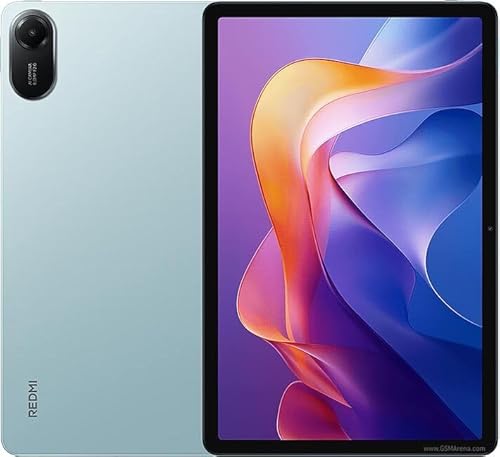
XIAOMI Redmi Pad 2 11″ 2.5K (Mint Green, 256GB + 8GB)

YLEEBG 12″ Tablet with Keyboard Android 16

Samsung Galaxy Tab S6 Lite 10.4″ (Oxford Gray)

XIAOMI Poco Pad M1 12.1″ 2.5K (Blue, 256GB + 8GB)

T70 Tablet 11″ Android 16 (8GB + 256GB)
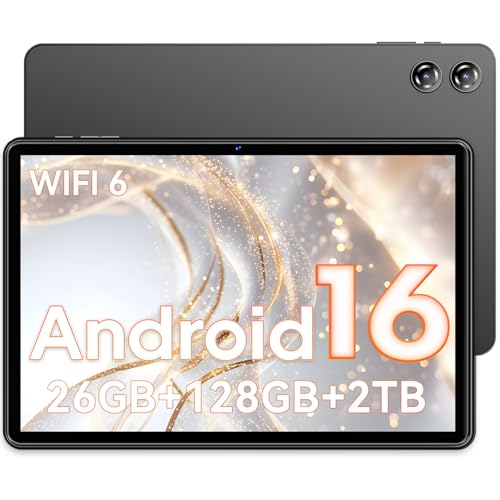
COTGOD 10″ Android 16 Tablet (26GB + 128GB)

Samsung Galaxy Tab S7 11″ (Mystic Black)
AOC 10″ Android 16 Tablet (4GB + 128GB)

COTGOD 10.1″ Android 16 Tablet (24GB + 128GB)
11″ Android 16 Tablet with Gemini AI
A Deeper Look At The Lineup
The Redmi Pad 2 leans into a clean 11-inch form factor that feels right at home on a kitchen counter or a coffee table. You get a 2.5K display with a 90Hz refresh rate, which is a step up from the older 60Hz panels you still see in this class, and the metal unibody gives it a sturdier hand feel than plastic alternatives. For everyday browsing, light gaming, and YouTube evenings, the experience is genuinely pleasant.
Where this slate pulls ahead of the older Galaxy Tab S6 Lite below is the larger 9,000mAh battery and the sharper 2560×1600 resolution. In a typical mixed-use day, owners report reaching bedtime with battery to spare, which matters on travel days or long school pickups. Compared with the COTGOD 10-inch model further down, the Redmi also offers a noticeably brighter panel for outdoor reading on a patio.
What Stands Out
- 2.5K display with a 90Hz refresh rate for smoother scrolling through social feeds and long articles
- Quad-speaker setup tuned with Dolby Atmos, a real upgrade for movie nights without headphones
- 9,000mAh battery that comfortably covers a long travel day between charges
- 256GB of internal storage gives plenty of room for offline Netflix downloads before flights
Points To Note
- Wi-Fi-only connectivity means no SIM slot for on-the-go data away from hotspots
- 8MP rear camera is fine for document scans but not memorable for vacation photos
- Bluetooth 5.3 is solid, though the lack of Wi-Fi 6 may feel dated next to the Poco Pad M1 below
Who It Suits Best
Home users and students who want a sharp, long-lasting screen for reading, streaming, and casual gaming, and who don’t need cellular data.
Consider Something Else When
You want a much larger 12.1-inch canvas for split-screen work, in which case the XIAOMI Poco Pad M1 covers that brief better.
Most of the picks here focus on a tablet-first experience, but the YLEEBG 12-inch ships with a black case and a keyboard, which quietly turns it into a pseudo-laptop. You get Android 16 with the Gemini AI assistant integrated for things like summarizing articles, drafting quick emails, and translating passages while you work. For anyone typing a lot on the go, having the keyboard ready in the box saves both money and the hassle of hunting down a compatible accessory later.
It sits in an interesting middle ground between the compact Redmi Pad 2 above and the larger Poco Pad M1 below. You trade the slimmer tablet-only design of those for a more desk-friendly experience. For college students writing essays, parents handling household paperwork, or remote workers who need a portable secondary screen, the productivity angle is the whole point.
A Few Strong Suits
- Android 16 with deeper Gemini AI integration for drafting, summarizing, and translating
- Keyboard included in the box, so you avoid extra accessory costs and pairing headaches
- 12-inch display gives breathing room for split-screen documents and video calls
- Useful as a portable secondary screen for laptop-based work
Trade Offs
- The bundled keyboard adds weight, making it less couch-friendly than a bare tablet
- Long-term app optimization for Android 16 on third-party hardware can vary
Key Product Details
Made For
Writers, students, and remote workers who want a typing-ready Android tablet without buying accessories separately.
Skip It When
You mostly want a handheld tablet for reading and streaming, in which case the slimmer Redmi Pad 2 is a lighter pick.
The Tab S6 Lite is one of those quietly dependable tablets that holds up years after launch, especially if you care about handwriting and sketching. The S Pen comes in the box, which is rare in this category, and it doesn’t need charging. That alone makes it a natural pick for note-takers, journaling fans, and anyone marking up PDFs for school or work.
The trade-off is that the 64GB storage here is tighter than the 128GB Samsung Galaxy Tab S7 below or the 256GB Redmi Pad 2 above. In practice, owners commonly pair it with a microSD card to keep photos, lecture recordings, and offline playlists around. The 10.4-inch display is also a touch smaller than the YLEEBG model, which matters less for notes and more for movie nights.
Everyday Perks
- S Pen included in the box, no charging or pairing required for sketching or note-taking
- Lightweight 10.4-inch form factor that slips into a backpack sleeve without bulk
- Recognized Samsung build quality and software support for productivity apps
- microSD expansion helps offset the more modest 64GB of built-in storage
Worth Noting
- 64GB fills up quickly with offline video, so a memory card is almost essential
- International model status means warranty and LTE options depend on your region
- Display refresh is 60Hz, less smooth than the 90Hz Redmi Pad 2 or 120Hz AOC tablet
Right Fit For
Students and note-takers who want a proven S Pen experience and a manageable 10.4-inch size for daily carry.
Look Elsewhere When
You need 128GB or more built-in for large game libraries, in which case the Samsung Galaxy Tab S7 serves you better.
If the Redmi Pad 2’s 11-inch screen feels a touch small, the Poco Pad M1 stretches things out to 12.1 inches with the same 2.5K resolution. That extra inch matters more than the number suggests when two apps are running side by side, or when you’re watching a movie and want subtitles to sit comfortably under the picture. The 120Hz refresh rate is the real highlight for anyone who has been staring at older 60Hz panels.
It also packs a 12,000mAh battery, which is among the largest cells in this roundup and noticeably bigger than the 9,000mAh unit in the Redmi Pad 2. For long-haul flights or weekend trips away from outlets, that extra capacity tends to matter. Compared to the more productivity-oriented YLEEBG above, this one is built for big-screen consumption rather than keyboard-heavy work.
Reasons It Performs
- 12.1-inch 2.5K display with a 120Hz refresh rate for smooth scrolling and gaming
- 12,000mAh battery that handles multiple movie-length sessions between charges
- Wi-Fi 6 support for faster downloads on modern home networks
- 256GB of internal storage plus microSD expansion up to 2TB
Points To Keep In Mind
- The larger 12.1-inch chassis is heavier to hold one-handed during long reading sessions
- Wi-Fi-only design means you’ll rely on hotspots or home networks for data
Feature Snapshot
Best Suited To
Movie lovers, students using split-screen notes, and anyone who wants a big, smooth display without stepping up to a laptop.
Another Choice May Suit
Portability matters more than screen real estate to you, in which case the Redmi Pad 2 is friendlier to one-handed use.
The T70 leans hard into longevity, and the four-year warranty on the listing is a quieter but meaningful feature. For families planning to hand a tablet down to a younger sibling, or for anyone who keeps a device in heavy daily rotation, that coverage is worth pausing on. The 11-inch size keeps it close to the Redmi Pad 2 footprint, which is a sweet spot for mixed use.
It runs Android 16 with a stated 180Hz touch sampling rate, which in practice means taps and stylus strokes feel responsive even on visually busy screens. The 8GB of RAM sits comfortably in the middle of the pack, between the AOC’s 4GB and the COTGOD 11-inch’s 32GB further down. You get a balance that handles multitasking without overpromising on raw power.
Bright Spots
- Four-year warranty for households that want long-term peace of mind
- Android 16 with Gemini AI features baked into the system
- 180Hz touch sampling rate for snappy typing and stylus use
- 256GB storage is generous for a tablet in this segment
Room For Improvement
- The T70 brand is less established than Xiaomi or Samsung, so resale value is harder to predict
- 8GB RAM is solid, but it sits below the 32GB offered by the COTGOD 11-inch pick
Who Will Love This
Busy households and frequent travelers who want a warranty-backed Android 16 tablet that can take daily use.
Where A Sibling Pick Shines
Brand recognition matters to you and you want a sharper 2.5K display, in which case the Redmi Pad 2 is a more familiar choice.
The COTGOD 10-inch sits firmly in budget territory, and the spec sheet punches above its weight: Android 16, an octa-core processor, 26GB of combined RAM, and 128GB of storage with microSD expansion. For a first tablet, a kid’s device, or a backup slate you keep in the kitchen, it’s a sensible option that doesn’t feel disposable.
The 1280×800 resolution is the most obvious compromise next to the 2.5K panels on the Redmi and Poco above. In a typical living room, the difference is most visible with text-heavy apps like e-readers, where lower pixel density shows. For video and casual use, owners commonly find the display perfectly fine, especially for the price.
Practical Pluses
- Android 16 with GMS certification for full Google Play access
- 26GB combined RAM keeps multiple apps open without aggressive reloads
- 2TB microSD expansion support for massive offline media libraries
- 7,000mAh battery is modest but adequate for a day of casual use
Soft Spots
- 1280×800 resolution is noticeably softer than the 2.5K XIAOMI picks above
- 2MP front camera is fine for video calls but not for content creation
- Plastic build tends to show scuffs faster than metal unibody designs
Quick Facts
Perfect Match For
First-time tablet owners, kids, and anyone looking for a low-risk second device for casual browsing and streaming.
Not Your Match When
Display sharpness is a priority for reading and movies, in which case the Redmi Pad 2 or Poco Pad M1 are clearer screens.
The Tab S7 sits above the S6 Lite in Samsung’s lineup, and the step up shows in three places: a larger 128GB of internal storage, an 11-inch display that gives the S Pen more room to work, and a faster-charging USB-C port for shorter top-ups between meetings. If you already lean toward Samsung’s ecosystem, this is the model that feels like a true daily driver rather than a starter tablet.
The S Pen still ships in the box, which keeps the Tab S7 competitive with the Tab S6 Lite above in the note-taking category while doubling your storage. In a household where one tablet is shared between a student’s homework and a parent’s work calls, the larger storage is a real stress reliever. It’s also a meaningful upgrade over the budget COTGOD 10-inch below if you can stretch the budget.
Positive Takeaways
- 128GB built-in storage, double the S6 Lite, plus microSD expansion
- 11-inch display gives the S Pen more drawing and writing real estate
- Fast-charging USB-C port for shorter top-up windows during busy days
- S Pen included in the box, with no batteries or charging needed
Honest Caveats
- Higher tier than the S6 Lite, so the value gap depends on your storage and pen needs
- Wi-Fi-only configuration listed, so no built-in cellular option here
- Older generation hardware may see shorter software support windows going forward
Built With In Mind
Power users and Samsung loyalists who want a premium S Pen experience with enough storage for large media libraries.
Swap It Out When
You want a more modern warranty and a 90Hz screen, in which case the T70 11-inch offers newer software promises.
AOC is better known for monitors, and the brand leans into that heritage with a 120Hz IPS display on this 10-inch slate. For streaming apps, the 120Hz refresh rate pairs nicely with Widevine L1, the certification that unlocks HD content from Netflix, Disney+, and similar services. If your main use case is watching shows on the couch, this combination punches above the 4GB RAM number on paper.
The metal body and Face ID login are small touches that make daily use feel a bit more refined than the typical plastic budget tablet. You may find the 4GB RAM tight if you like to keep a dozen browser tabs and a chat app open at the same time. Compared with the COTGOD 10-inch just above, the AOC is a tighter spec sheet but a more pleasant screen for video.
Useful Highlights
- 120Hz IPS display for noticeably smoother scrolling than 60Hz panels
- Widevine L1 support means HD streaming from major services works out of the box
- Metal body lends a more premium hand feel than plastic alternatives
- Face ID login removes the friction of typing a PIN each time you pick it up
Less Ideal Details
- 4GB RAM is light for heavy multitaskers, especially next to the 8GB+ picks above
- 6,000mAh battery is on the smaller side for all-day streaming sessions
Feature Card
The Right Fit
Binge-watchers and casual users who want a smoother 120Hz screen and HD streaming without paying flagship prices.
A Better Fit Elsewhere
Multitasking is your main use case, in which case the COTGOD 10.1-inch below offers more RAM headroom.
Travel-friendly tablets need three things: solid wireless, decent battery, and enough storage for offline maps and downloads. The COTGOD 10.1-inch covers the first two with Wi-Fi 6 and Bluetooth 5.4, plus GPS for navigation. You also get 2TB of microSD expansion, which is enough to hold an entire season of shows for a long flight.
It’s a near-twin to the COTGOD 10-inch above in form factor, with a slightly different RAM and storage balance and a more travel-leaning feature set. The 24GB of combined RAM is generous for juggling maps, translation apps, and a streaming service in a hotel room. The 1280×800 resolution is the same compromise as its sibling, soft compared to the 2.5K XIAOMI panels but fine for casual viewing.
A Favorable Mix
- Wi-Fi 6 and Bluetooth 5.4 keep wireless speeds competitive with newer phones
- Built-in GPS supports offline navigation without tethering to a phone
- 2TB microSD support for large offline media libraries during travel
- 24GB combined RAM handles multiple travel apps without aggressive reloading
A Few Limitations
- 1280×800 resolution is softer than 2.5K alternatives for text-heavy reading
- Plastic build shows wear faster than metal unibody tablets like the Redmi Pad 2
Whose Shelf It Belongs On
Frequent travelers, commuters, and anyone who wants a Wi-Fi 6 tablet with GPS for navigation on the go.
Reach For A Different Pick When
Display sharpness is the priority, in which case the Redmi Pad 2 or Poco Pad M1 are stronger screens.
The final pick leans into the most spec-heavy sheet in this roundup: 32GB of combined RAM, 128GB of storage, 2TB microSD expansion, an 8,000mAh battery, and Gemini AI baked into Android 16. On paper, it’s the most future-proofed option here, especially for heavy multitaskers who keep dozens of browser tabs and chat threads alive at once.
It also carries Widevine L1, so HD streaming works on the major platforms, plus Wi-Fi 6 and Face ID for quick, modern sign-ins. The 1920×1200 IPS display sits comfortably between the soft 1280×800 COTGOD screens and the sharper 2.5K XIAOMI panels. If you can stomach a slightly heavier tablet for the RAM headroom, this one is built to absorb years of app updates without feeling sluggish.
The Good Stuff
- 32GB combined RAM handles heavy multitasking and future Android updates gracefully
- Gemini AI integration adds on-tablet help for drafting, translating, and summarizing
- Widevine L1 plus Wi-Fi 6 and Face ID round out a modern feature set
- 2TB microSD expansion offers enormous room for offline media
Where It May Fall Short
- 1920×1200 resolution is sharp but not as crisp as 2.5K XIAOMI picks at the same size
- Heavier RAM profile can come with a slightly chunkier chassis than slimmer tablets
Technical Highlights
Who Should Grab It
Heavy multitaskers and AI-curious users who want generous RAM, Gemini AI features, and modern connectivity in one package.
Consider Something Else When
You want a sharper 2.5K panel for movies and reading, in which case the Redmi Pad 2 or Poco Pad M1 prioritize display quality.
Factors To Weigh Before Choosing Your Next Android 8 Tablet
Display Quality And Refresh Rate
The single biggest day-to-day difference between picks is the screen. A 2.5K panel like the one on the Redmi Pad 2 or Poco Pad M1 shows noticeably more detail in text and video than a 1280×800 budget screen, which matters most for reading, comics, and high-resolution streams. A 90Hz or 120Hz refresh rate, found on the Redmi, Poco, and AOC models, makes scrolling feel smoother and is a visible quality-of-life upgrade over older 60Hz panels.
If your use skews toward streaming and casual browsing, a 10-inch 1280p screen is honestly fine and saves money. For longer reading sessions or split-screen work, the larger and sharper 12.1-inch 2.5K panel is the more comfortable long-term pick.
Storage, RAM, And Expandability
Android tablets benefit from generous storage, especially if you plan to download shows for travel. The 128GB and 256GB options in this roundup are comfortable starting points, and most picks also accept microSD cards, with some supporting up to 2TB. RAM varies widely here, from 4GB on the AOC to 32GB on the feature-rich 11-inch COTGOD model at the end.
More RAM helps with multitasking and future-proofing, but you pay a small premium for it. If you mostly stream and browse, 8GB is a sensible middle ground. Power users who keep many apps and tabs open will appreciate the breathing room of 16GB or more.
Battery Life And Charging
Battery capacity is the headline number, but real-world endurance depends on screen brightness, refresh rate, and how aggressively apps run in the background. The Poco Pad M1’s 12,000mAh cell is the largest here and is well-suited to long travel days. The Samsung Tab S7 adds fast-charging via USB-C, which shortens top-up windows between meetings.
A small caveat: tablets with higher refresh rates and brighter panels tend to drain faster. For a tablet that lives mostly on a nightstand or kitchen counter, battery size matters less than the included charger wattage and how quickly the device refills.
Accessories And Ecosystem Fit
S Pen support, bundled keyboards, and case compatibility all shape how the tablet feels in daily use. The two Samsung models include the S Pen in the box, which is a meaningful saving for note-takers and sketchers. The YLEEBG 12-inch includes a keyboard and case for a laptop-style setup.
If you already own Samsung accessories, the Tab S6 Lite or Tab S7 slot in cleanly. For anyone building a new setup from scratch, the keyboard-equipped YLEEBG removes the accessory guesswork. Match the tablet to the accessories you actually need, not the ones that look flashy in marketing photos.
Key Considerations Across These Picks
Common Shopping Slip Ups
The most common mistake is choosing a tablet purely on RAM numbers, then finding the screen too soft for comfortable reading. Display resolution and refresh rate affect daily use far more than the spec sheet suggests, especially for text-heavy tasks. A second trap is overlooking Wi-Fi generation. Older Wi-Fi 5 models still work, but on a modern home network you’ll notice slower downloads than Wi-Fi 6 picks like the Poco Pad M1 or COTGOD 10.1-inch. Finally, don’t assume every tablet handles HD streaming out of the box. Without Widevine L1, services like Netflix fall back to standard definition, which is a real letdown on a sharp screen.
Why Top Tier Costs More
Higher-tier models in this roundup, like the Samsung Galaxy Tab S7 or the feature-rich 11-inch COTGOD, cost more for three practical reasons: better displays, more RAM and storage, and tighter build quality like metal unibodies. The extra money also tends to buy you longer software support windows, which matters if you plan to keep the tablet for three or four years. For a household that streams, browses, and occasionally works on the go, the step up usually pays for itself in smoother everyday use and a longer usable life.
Frequently Asked Questions
Do Android 8 Tablets Still Get Updates?
Most modern Android tablets in this price range ship with Android 15 or Android 16, which is several versions beyond Android 8. The “Android 8” phrasing in your search usually refers to tablet form factors that run current Android builds, so you can expect security patches and app compatibility for the foreseeable life of the device.
Is 4GB Of RAM Enough For A Tablet?
For light browsing, email, and streaming, 4GB is workable, as seen on the AOC 10-inch pick. Heavier multitaskers who keep many apps and tabs open will feel the limits quickly, which is why most picks here offer 8GB or more.
Can I Use These Tablets For Work?
Yes, especially the YLEEBG 12-inch with its bundled keyboard, or the larger Poco Pad M1 for split-screen documents. For full desktop-replacement work, pairing a tablet with a Bluetooth keyboard and a cloud office suite covers most tasks.
Are Stylus Pens Included With Any Of These Picks?
The two Samsung models, the Tab S6 Lite and Tab S7, both include the S Pen in the box. None of the other picks list a bundled stylus, so you’d need to buy one separately if handwriting matters to you.
What Is Widevine L1 And Why Does It Matter?
Widevine is a digital rights management system used by major streaming services. L1 is the highest security level and allows HD or higher playback. Tablets without L1, even with great screens, can be limited to standard definition on Netflix and similar platforms.
Wrap Up
The right pick depends less on raw numbers and more on how a tablet fits into your routine. The Redmi Pad 2 and Poco Pad M1 stand out for display quality, the Samsung models win on the included S Pen, and the YLEEBG 12-inch is the productivity angle in a single box. Match the screen, storage, and accessories to the way you actually use a tablet, and you’ll get years of solid service from any of these.


