

Tablets have quietly become the most flexible gadget in the house, slotting in anywhere a phone screen feels cramped and a laptop feels like overkill. The challenge is that “Android tablet” now covers everything from compact kids’ devices to productivity-focused slabs that pair with pens and keyboards. You probably want something that fits how you actually use a screen: streaming in bed, sketching on the couch, taking notes in class, or handing a tough little device to a child without flinching at the first drop. This lineup leans into those real scenarios, pairing each pick with a clear reader profile so you can match hardware to habits rather than guess from spec sheets alone.
A Snapshot Of The Selections

Lenovo Idea Tab Plus 12.1″ Tablet (128GB)

Samsung Galaxy Tab S7 Wi-Fi 256GB

Lenovo Idea Tab 11″ College Tablet (256GB)

11″ Android 16 Tablet With Mouse and Keyboard
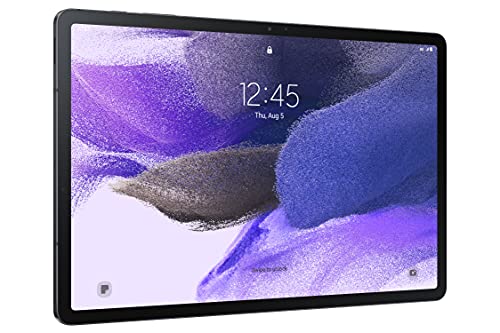
Samsung Galaxy Tab S7 FE 12.4″ (64GB, Mystic Black)
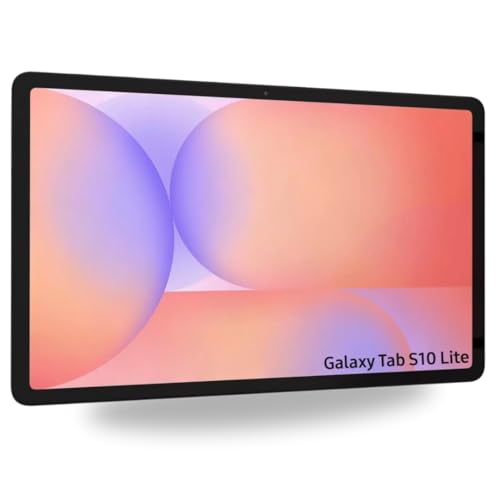
Samsung Galaxy Tab S10 Lite with S-Pen (128GB)

Lenovo Tab One 8.7″ Tablet (64GB)

Gemini AI Android 16 Tablet 11″ (256GB)

Kids Android 16 Tablet 10″ (Pink) with Case
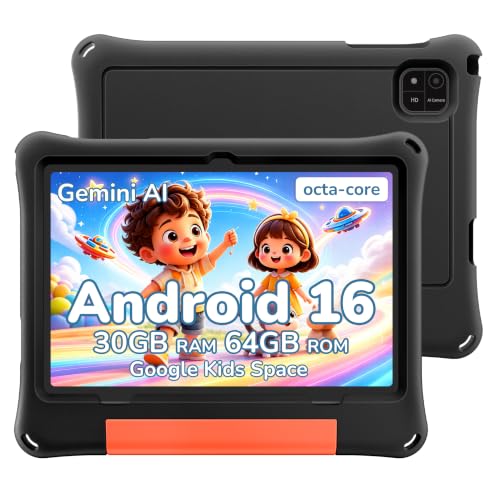
2026 Android 16 Kids Tablet 10″ with EVA Case
A Deeper Look At The Lineup
The Lenovo Idea Tab Plus lands at the top of this list because it blends a roomy 12.1-inch 2.5K display with a 90Hz refresh rate (meaning the screen redraws 90 times per second for smoother scrolling) in a chassis that stays light enough for one-handed reading on the couch. The MediaTek Dimensity 6400 chip and 8GB of memory give it enough headroom for split-screen research and casual sketching without the lag you sometimes get on budget slates.
What tips it over the edge for many shoppers is the included Tab Pen and Folio case. You can pull the tablet out of the box and start marking up PDFs, journaling in a note app, or doodling without buying extras. If your week splits between streaming, light work, and creative tinkering, this one covers a lot of ground without feeling oversized.
Where It Excels
- The 2.5K resolution on a 12.1-inch panel makes text crisp and video look sharp from typical couch distances.
- 90Hz refresh keeps scrolling, page turns, and pen strokes noticeably smoother than a standard 60Hz screen.
- Including the Tab Pen and Folio case removes two most common add-on purchases for new tablet owners.
- The Dimensity 6400 handles multitasking well enough for split-screen apps, light editing, and casual games.
- Compared with the smaller Lenovo Idea Tab further down this list, the Plus earns its keep for users who want genuine workspace real estate.
Worth Noting
- At 12.1 inches, it pushes the upper limit of comfortable handheld use for long reading sessions.
- The 128GB storage may feel tight if you plan to load large offline video libraries, though expandable storage helps.
Key Specs
Built With In Mind
Creators, students, and hybrid workers who want pen input and a generous screen without committing to a full laptop replacement.
Consider Something Else When
Choose the Lenovo Tab One if you mostly read and stream on a commute and a smaller 8.7-inch panel suits your bag better.
The Samsung Galaxy Tab S7 in Mystic Navy is the grown-up choice in this roundup. It targets people who treat a tablet like a thin laptop, swapping between a document editor, a browser with too many tabs, and a video call. The 256GB storage leaves breathing room for large files, and the redesigned S Pen that ships in the box feels close to a real writing instrument for sketching or marking up slides.
Samsung leans on its desktop-style DeX interface (a mode that reskins Android into a windowed, laptop-like layout when you connect a keyboard) to bridge the gap between phone and PC, and the Tab S7 runs it comfortably. For shoppers coming from a phone-first workflow who want tablet scale without giving up performance, this is the one that nudges into “replacement” territory rather than “companion”.
Strong Points
- The included S Pen offers low-latency drawing and handwriting, useful for artists and note-takers alike.
- 256GB of internal storage handles sizeable photo and document libraries without constant cleanup.
- Samsung’s DeX mode delivers a more laptop-like layout when paired with a keyboard.
- Build quality feels premium, with a magnetic strip for the pen and a solid aluminum frame.
Trade Offs
- This is an older flagship, so long-term software support may taper sooner than newer Samsung entries like the Galaxy Tab S10 Lite.
- Keyboard and cover accessories are typically sold separately, raising the total ownership cost.
- Heavy multitaskers may notice the Wi-Fi-only variant lacks the cellular option some road warriors want.
Who Will Love This
Power users and professionals who want a productivity-focused tablet with stylus support and a polished build.
Look Elsewhere When
Pick the Lenovo Idea Tab 11″ if you mostly need a study companion with generous storage and don’t need DeX-grade multitasking.
Smaller than the Idea Tab Plus at #1 but roomier than a phone, the Lenovo Idea Tab 11-inch model is built for the realities of student life. The 2.5K IPS display and 90Hz refresh carry over from its larger sibling, and the quad Dolby Atmos-tuned speakers (Dolby Atmos is a spatial audio format that places sound around the listener rather than just left and right) make lecture recordings and study videos easier to follow without headphones.
The jump to 256GB of internal storage is the quiet hero of this configuration. Lecture slides, e-textbooks, and downloaded videos add up fast, and you won’t be pruning files every week. With the Tab Pen in the box for handwritten notes, it earns its spot as a practical all-day study tool that won’t weigh down a backpack.
Noteworthy Benefits
- 256GB storage covers a full academic year of slides and e-books for most students.
- Quad speakers tuned for Dolby Atmos improve clarity in lecture playback and language listening exercises.
- The 11-inch 2.5K panel hits a sweet spot for reading PDFs and split-screen note-taking side by side.
- MediaTek Dimensity 6300 keeps everyday multitasking fluid without draining the battery.
Points To Keep In Mind
- Owners commonly report that pre-installed student apps benefit from manual cleanup to free RAM (short-term memory the tablet uses to keep apps running) over time.
- The 11-inch screen is portable but not as immersive for split-screen work as the 12.1-inch Idea Tab Plus above.
Feature Snapshot
Right Fit For
High school and college students who want a portable study hub with stylus support and speakers that hold up for group review sessions.
A Better Fit Elsewhere
Choose the Samsung Galaxy Tab S10 Lite if you prefer a more modern Android version and a slightly larger 10.9-inch panel for media-heavy evenings.
This 11-inch Android 16 tablet from JUNINKE targets first-time tablet owners who want everything in one box. The included Bluetooth keyboard, stylus pen, mouse, and protective black case cover the typical starter kit without forcing you to research and buy each piece separately. For students setting up a dorm desk or parents buying a first family tablet, that matters more than any single spec on the sheet.
The 11-inch screen lands in the comfortable middle, big enough for productivity apps and small enough to slip into a tote. You pair the keyboard for typing-heavy tasks and skip it for casual reading on the couch, which keeps the experience flexible.
What Earns Its Place
- The keyboard, stylus, mouse, and case bundle removes the most common add-on shopping trips.
- Android 16 brings current app compatibility and a familiar interface for anyone new to tablets.
- The 11-inch form factor works for both desk-based typing and handheld streaming.
- Including a shockproof case reduces the risk of early-life dings on a first family tablet.
Honest Caveats
- Generic-brand tablets can ship with some pre-installed apps worth uninstalling to free RAM and storage.
- Keyboard typing feel is typically fine for emails but won’t satisfy writers logging long daily sessions.
- Long-term software support is usually shorter than what Samsung or Lenovo offer on flagship lines.
Best Suited To
First-time tablet owners and families who want a complete starter bundle without comparing accessories across brands.
Reach For A Different Pick When
Choose the Lenovo Idea Tab Plus if you care more about a high-resolution display and Lenovo’s brand-name polish than bundled accessories.
If your tablet time leans heavily toward movies, streaming, and casual reading, the Galaxy Tab S7 FE’s 12.4-inch display is a treat. That extra screen real estate over a 10- or 11-inch model makes a real difference when you’re watching a show across the room or sharing a recipe in the kitchen. The S Pen is included for jotting or sketching between episodes.
Compared with the smaller Galaxy Tab S10 Lite further down this list, the S7 FE trades some newer-Android polish for size and value. It is a strong fit if you care more about the viewing experience than future software updates and prefer a Samsung-built device you can rely on.
The Good Stuff
- The 12.4-inch panel gives movies, comics, and split apps noticeable breathing room.
- S Pen is bundled, so you can take notes or draw without buying extras.
- Samsung’s build quality and One UI (Samsung’s custom Android skin) make for a refined everyday experience.
- Long battery life is commonly cited by owners for full-day streaming sessions.
Points To Note
- The 64GB storage fills up quickly with offline video, though microSD expansion helps.
- Released in 2021, so future Android version updates are more limited than the newer Tab S10 Lite.
- Cellular-enabled variants may be priced differently depending on carrier listings, so Wi-Fi-only shoppers should confirm the version before purchasing.
Quick Facts
Made For
Movie watchers, casual readers, and families who want a big Samsung display for shared viewing around the house.
Skip It When
Pick the Lenovo Tab One instead if you want something more compact for commute reading and one-handed use.
The Galaxy Tab S10 Lite sits in that comfortable middle ground for shoppers who want a modern Samsung experience without flagship pricing. The 10.9-inch 90Hz LCD is a step up from older budget Samsungs, and Android 15 with Wi-Fi 6 (the latest Wi-Fi standard, offering faster and more stable connections on supported routers) keeps the tablet future-friendly for streaming and cloud work. The included S Pen and an all-day battery round out a thoughtful everyday package.
It also bundles a 256GB SD card in the box, which removes one of the usual tablet-buying chores. For students, casual creatives, and home offices that bounce between notes, email, and streaming, this is a sensible middle-of-the-road option.
Benefits That Matter
- Android 15 keeps the tablet on a recent OS, which usually means longer software support ahead.
- Wi-Fi 6 support future-proofs your home network connection as routers get upgraded.
- Included S Pen and 256GB SD card lower the total cost of ownership.
- All-day battery life suits back-to-back classes or long travel days.
A Few Limitations
- At 10.9 inches, it sits between the compact Tab One and the larger S7 FE, which may feel middle-of-the-road to shoppers wanting a clear lean.
- Listed as an international model, so warranty coverage and accessory support may vary by region.
- LCD rather than OLED means contrast is good rather than exceptional for HDR (high dynamic range) video.
Perfect Match For
Everyday users who want a current Samsung tablet with stylus support and don’t need the largest screen on the market.
Where Another Pick Suits Better
Choose the Galaxy Tab S7 FE if a larger 12.4-inch screen matters more to you than running the latest Android version.
The Lenovo Tab One is the smallest, lightest entry in this lineup, and that is exactly the point. At 8.7 inches and under a pound, it slips into a jacket pocket or small bag, making it the kind of tablet you actually carry rather than leave on a shelf. The included Folio case keeps it safe in transit.
With up to 12.5 hours of YouTube streaming on the spec sheet and an HD display that handles bright environments reasonably well, this is the commuter, traveler, and casual reader pick. The MediaTek Helio G85 chipset (a budget-friendly processor tuned for everyday apps and light gaming) handles streaming, email, and reading apps smoothly, though heavy multitasking will push its limits.
Positive Takeaways
- The 8.7-inch form factor fits one-handed use on buses, trains, and couches.
- Long claimed battery life keeps you streaming through a cross-country flight or commute.
- Included Folio case protects the screen from scratches and adds a handy stand orientation.
- At under a pound, you barely notice it in a bag, unlike the larger Idea Tab Plus at #1.
Room For Improvement
- The 8.7-inch HD display is sharp enough for casual viewing but not as crisp as the 2.5K panels higher up.
- Only 4GB of RAM means aggressive app-switching can lead to slow reloads.
- The Helio G85 handles everyday apps well, but heavy games and editing tools will feel sluggish.
Feature Card
Whose Shelf It Belongs On
Commuters, travelers, and casual readers who want something smaller and lighter than the rest of this list.
Swap It Out When
Choose the Lenovo Idea Tab 11″ if you need more screen space and RAM for studying or office-style multitasking.
The Gemini AI-branded Android 16 tablet from JUNINKE leans hard into productivity features and a generous specification sheet. You get an octa-core processor (a CPU with eight processing cores for handling multiple tasks simultaneously), 32GB of effective RAM through expansion, and up to 2TB of expandable storage. The 8000mAh battery is larger than what most tablets in this price tier ship, which matters if you spend long stretches away from a charger.
It also includes GPS and FM radio, features often dropped from modern tablets, which is handy for travel or emergency use. For shoppers who like the idea of an AI-assisted Android with extras, this is a feature-dense choice worth considering.
A Strong Showing
- 8000mAh battery delivers long runtime, especially useful on flights and camping trips.
- Expandable storage up to 2TB removes the ceiling on offline video and photo libraries.
- GPS and FM radio cover use cases many modern tablets skip.
- Android 16 keeps the tablet on a current operating system version.
Where It Is Less Suited
- Software polish, camera quality, and long-term update reliability are commonly less consistent than on name-brand flagships like the Lenovo Idea Tab Plus.
- Heavy gamers and creators may find sustained performance lags behind premium tablets.
Right Fit For
Productivity experimenters and travelers who want long battery life, expandable storage, and modern Android in one package.
Another Choice May Suit
Choose the Samsung Galaxy Tab S10 Lite if you prefer Samsung’s ecosystem polish and One UI refinements over a feature-dense alternative.
For parents shopping on behalf of a young learner, the JUNINKE Kids Tablet in pink is built around two priorities: safety and durability. Google Kids Space curates age-appropriate apps, books, and videos, while Google Family Link (Google’s parental control app for managing screen time, app access, and content filters) gives you screen-time limits, app approvals, and content filters from your own phone. The included EVA protective case (EVA is a soft, rubber-like foam that absorbs impact) and bumper edges handle drops that would end most adult tablets.
The 10-inch form factor lands in a sweet spot: big enough for educational videos and reading, small enough for small hands to hold. The included keyboard, mouse, and stylus pen add flexibility for older kids who want to type assignments or try drawing.
Standout Benefits
- Google Kids Space provides a curated, age-appropriate content environment.
- Family Link parental controls let you approve apps, set time limits, and monitor usage remotely.
- The EVA case and bundled accessories reduce the chance of early-life damage.
- 10-inch display suits both solo use and shared viewing with a parent.
Some Limits To Know
- Some parents may find default app selections noisy and worth pruning.
- Internal storage at 64GB fills up quickly with downloaded videos, though expandable TF card storage (a small removable memory card format common in tablets) helps significantly.
Perfect Match For
Families with younger children who want a safer, drop-resistant tablet with parental controls ready out of the box.
Consider Something Else When
Pick the JUNINKE 2026 Kids Tablet with the black EVA case if you prefer a more neutral color and a rugged travel-focused build.
The black EVA-cased JUNINKE 2026 Kids Tablet leans into the most common reality of children’s tech: things get dropped. The chunky bumper case absorbs impact far better than a thin adult sleeve, and the neutral black finish feels more practical for shared family use than the brighter pink alternative at #9.
It runs Android 16 with the same Google Kids Space and Family Link ecosystem, so you get the parental tools without learning a new system. The 10-inch screen and expandable storage make it a solid choice for road trips, hotel nights, and rainy weekends at home.
What Pays Off
- The EVA protective case is notably more rugged than a standard tablet sleeve.
- Neutral black color suits shared family use and looks less “toy-like” to older kids.
- Google Kids Space and Family Link provide ready-to-go parental controls.
- 10-inch screen works for solo and shared viewing.
Trade-Offs To Consider
- The protective case adds bulk that some older kids may find less comfortable to hold for long sessions.
- Long-term software support is generally shorter than on flagship name-brand tablets.
At A Glance
Built With In Mind
Families with clumsy kids, frequent travelers, and shared-household tablets that need to handle real-world rough use.
Where Another Pick Suits Better
Choose the pink Kids Tablet if you prefer a brighter, more toy-like aesthetic for younger children at home.
Picking The Right Android Computer Tablet For Your Routine
Screen size should drive most of your decision, because it shapes every other experience. Tablets under 9 inches disappear into bags and suit one-handed reading, while 11- to 12-inch models handle split-screen work and shared viewing with more grace. If you commute, prioritize weight and battery life first. For home use, the larger 2.5K panels on the Lenovo Idea Tab Plus and Samsung Galaxy Tab S7 FE deliver noticeably sharper text and video.
Stylus support matters more than many shoppers expect. The Lenovo Idea Tab line includes a Tab Pen in the box, while Samsung’s Tab S7, S7 FE, and Tab S10 Lite all ship with an S Pen. If you plan to mark up PDFs, sketch, or handwrite notes, bundling the pen saves both money and shopping time. Keyboard support is worth checking if you intend to type for more than a few minutes at a stretch. Most Android tablets pair with Bluetooth keyboards, but the typing experience varies.
Storage is the most underestimated spec. A 64GB tablet fills up quickly with offline videos, app caches, and downloaded music. Models with 128GB or 256GB, or those that take large microSD cards like the Galaxy Tab S10 Lite’s 256GB SD bundle, give you breathing room without constant file cleanup. For kids’ tablets, expandable storage is especially useful as downloaded learning videos accumulate.
Smart Considerations Across These Picks
Where Shoppers Go Wrong
The most common slip is matching storage to the sticker instead of to your habits. Buyers who stream exclusively online can survive on 64GB, but anyone planning offline video for travel should aim for 128GB or more, or buy a tablet with reliable expandable storage. The second most common mistake is skipping the stylus bundle. Buying a tablet first and a pen later usually costs more and risks compatibility issues.
What Separates Premium From Basic
Higher-tier tablets like the Lenovo Idea Tab Plus and Samsung Galaxy Tab S7 FE earn their price through sharper 2.5K displays, faster refresh rates, and more refined build materials. The leap matters most for users who stare at the screen for hours, sketch in detail, or multitask with split windows. For casual streaming and email, the budget and kids-focused picks still deliver a satisfying experience.
Frequently Asked Questions
Which Android Computer Tablet Is Best For Students?
The Lenovo Idea Tab 11-inch model stands out for students thanks to its 256GB storage, Dolby Atmos-tuned speakers, and included Tab Pen. It balances price, portability, and academic-friendly features without overcommitting to a flagship budget.
Are Android Computer Tablets Good For Note-Taking?
Yes, especially models that include a stylus in the box. The Lenovo Idea Tab Plus, Idea Tab 11-inch, and Samsung Galaxy Tab S7, S7 FE, and S10 Lite all bundle a pen, making them practical for handwritten notes and PDF markup from day one.
How Much Storage Do I Need?
For light streaming and casual apps, 64GB with a microSD card is usually enough. If you store a lot of photos, download videos for travel, or work with large files regularly, 128GB or 256GB of internal storage is a safer choice.
Can Kids Use A Regular Android Computer Tablet?
Yes, but a kids-specific tablet like the JUNINKE Kids Tablet or the 2026 Kids Tablet adds a rugged case, Google Kids Space, and Family Link parental controls. Those features make the tablet safer and more durable for younger children.
Do Android Computer Tablets Work With Keyboards?
Most modern Android tablets support Bluetooth keyboards, and several models in this list, including the JUNINKE 11-inch bundle, include a keyboard in the box. Samsung’s Tab S7 series supports the DeX desktop-like interface for a more laptop-style workflow when paired with a keyboard.
Bottom Line
The right Android computer tablet comes down to how you actually use a screen. Match the size to your bag and your lap, the storage to your habits, and the stylus bundle to your note-taking style. Once those basics feel right, the rest of the specs tend to take care of themselves, and the tablet you pick will quietly fit into your day rather than demand attention.


