

You want a tablet that fits how you actually use it, not a spec sheet that sounds impressive until you turn it on. Android tablets run the gamut from budget slates for casual streaming to big-screen workhorses with pens and keyboards. The right pick depends on where you’ll use it, what apps matter most, and how long you need it to last on a charge.
This roundup walks through ten solid Android devices across price tiers, screen sizes, and use cases. Students, casual streamers, mobile workers, and families will all find something that lines up with their day. Each entry below focuses on real ownership scenarios, so you can match a tablet to your routine without second-guessing it later.
A Fast Comparison Of The Options

Xiaomi Redmi Pad 2 11″ 2.5K Tablet 256GB + 8GB
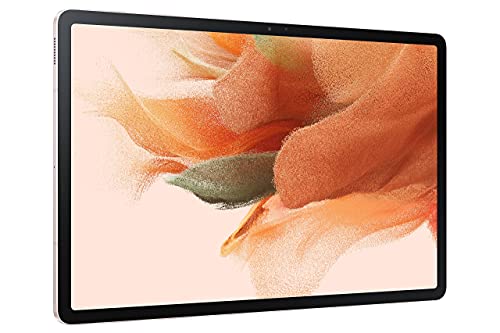
Samsung Galaxy Tab S7 FE 12.4″ 64GB WiFi (Mystic Pink)

Samsung Galaxy Tab S7 Wi-Fi 256GB (Mystic Navy)

Lenovo Idea Tab Plus 12.1″ 2.5K Tablet with Tab Pen

Lenovo Idea Tab 11″ 2.5K College Tablet with Tab Pen
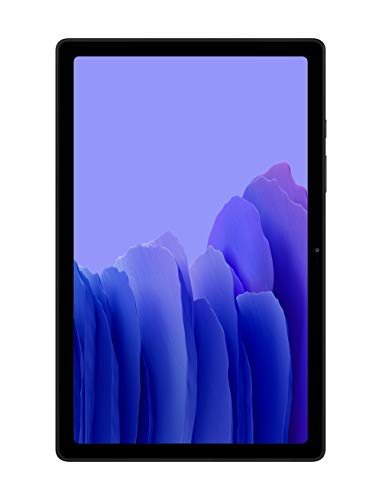
Samsung Galaxy Tab A7 10.4 Wi-Fi 32GB (Gray)

Lenovo Tab One 8.7″ HD Tablet with Folio Case

Samsung Galaxy Tab S10 FE 128GB WiFi (Silver)

Samsung Galaxy Tab A11+ 128GB Expandable (Gray)

GOODTEL 10″ Android Tablet with Case and Keyboard
Meet The Standout Selections
The Xiaomi Redmi Pad 2 is a quietly capable tablet that doesn’t try to be anything other than a solid all-rounder. Its 11-inch 2.5K display hits a sweet spot between portability and screen real estate, sharp enough for streaming shows, reading PDFs, or scrolling through photos without feeling cramped.
For anyone settling into a tablet for the first time, the generous 256GB of storage and 8GB of RAM keep apps and media happy without much fuss. The graphite gray finish feels grown-up, and the metal unibody (a single-piece metal frame) gives it a reassuring weight in hand. Owners commonly find the battery lasting through a full day of mixed use, which lines up well with long commutes or travel days.
The Helpful Details
- The 11-inch 2.5K panel renders text and video with real clarity, which matters during long reading sessions or video calls.
- Quad speakers (four speaker drivers placed around the frame) produce room-filling audio, useful when you don’t want to bother with headphones.
- The 9000mAh battery capacity is on the generous side, giving you a full day of mixed streaming, browsing, and note-taking.
- 256GB of built-in storage removes the early worry of running out of space for apps and offline media.
Things To Consider
- This is a WiFi-only model, so you won’t have cellular data on the road without tethering from a phone.
- Camera quality is functional rather than impressive, fine for video calls but not for serious photography.
Made For
Casual streamers, students, and home users who want a clear, long-lasting screen without paying premium prices.
Look Elsewhere When
You need a bundled pen for sketching or note-taking; the Samsung Galaxy Tab S7 FE includes an S Pen out of the box.
The Galaxy Tab S7 FE leans into the idea that bigger is better when you want room to create. Its 12.4-inch display gives sketches, PDFs, and split-screen apps plenty of breathing room, and the included S Pen means you can start drawing or annotating without buying extra accessories.
For visual learners and creative types, the roomy canvas makes a real difference. Handwriting feels closer to paper than on smaller slates, and the pen attaches magnetically when you’re done. The mystic pink finish is a small touch, but it sets this tablet apart from the usual black-and-gray crowd. Battery life holds up through long study or sketching sessions, depending on screen brightness.
Advantages To Know
- The 12.4-inch display turns split-screen multitasking and PDF markup into comfortable everyday tasks.
- The bundled S Pen writes with low latency (minimal delay between pen movement and ink appearing), so notes flow more naturally.
- Multi-device connectivity (the ability to link and share tasks with your phone and other Samsung gear) helps you hop between devices without losing your place.
Worth Noting
- 64GB of built-in storage fills up quickly if you save large creative files; you may need a memory card or cloud plan.
- The size makes it heavier than typical 10-inch tablets, so it’s less comfortable for one-handed reading.
- Charging speed is moderate; heavy users may find themselves reaching for the cable before bedtime.
Best Suited To
Artists, design students, and note-takers who want a large canvas and a pen included from day one.
A Better Fit Elsewhere
You mainly want a compact, lighter slate for casual reading; the Lenovo Tab One is far easier to hold one-handed.
The Galaxy Tab S7 positions itself as a tablet that wants to replace your laptop on lighter workdays. With a 256GB capacity and Samsung’s productivity ecosystem, it bridges casual entertainment and serious document work in one device.
Compared to the Redmi Pad 2 above, this one targets a different shopper entirely. The included S Pen and optional expanded keyboard support make it a flexible 2-in-1 (a device that works as both a tablet and a laptop when you dock or pair accessories) for people who travel light. The mystic navy finish looks professional, and the slim body fits in a backpack sleeve without drama.
The Case For It
- 256GB of storage handles hefty app libraries, downloaded media, and offline work files without breaking a sweat.
- The S Pen has minimal lag, which matters for handwritten notes and quick sketches.
- Battery life is built for full workdays, so you can leave the charger at the office.
- It pairs smoothly with Samsung phones for syncing notes, photos, and messages across devices.
Trade Offs
- The keyboard is sold separately, which adds cost if you want full laptop-style typing.
- The screen, while sharp, sits between the larger S7 FE and smaller Lenovo slates in size, so it’s not the most travel-friendly option.
Feature Snapshot
Whose Shelf It Belongs On
Mobile professionals and frequent travelers who split time between creative work and serious productivity tasks.
Skip It When
You mostly watch shows and browse at home; the Xiaomi Redmi Pad 2 covers that ground at a friendlier cost.
The Idea Tab Plus is Lenovo’s answer for anyone tired of squinting at a phone-sized screen on the road. Its 12.1-inch 2.5K IPS panel (IPS stands for in-plane switching, a screen technology that delivers wide viewing angles and accurate colors) hits a comfortable middle ground between compact portability and full laptop territory, while the 90Hz refresh rate keeps scrolling smooth.
For commuters and frequent flyers, the high brightness mode helps cut glare in sunny spots, and the included Tab Pen means you can jot down ideas without hunting for a stylus. The folio case that ships in the box adds a layer of protection for bags and crowded cafes. Compared to the Galaxy Tab S7 FE, this tablet is lighter and easier to carry one-handed around an airport.
A Strong Showing
- The 90Hz refresh rate makes scrolling and stylus input feel fluid rather than choppy.
- The included Tab Pen and folio case save you from buying basic accessories separately.
- High brightness mode helps the screen stay readable outdoors or near windows.
Honest Caveats
- The 128GB storage may feel tight if you store large files locally without cloud backups.
- The MediaTek Dimensity 6400 (a mid-range mobile processor) handles everyday tasks well but isn’t built for heavy gaming.
Perfect Match For
Travelers and commuters who want a bright, slim tablet that doubles as a sketchpad on the move.
Not Your Match When
You need a true laptop replacement for heavy multitasking; the Samsung Galaxy Tab S7 FE offers a larger 12.4-inch canvas for that workflow.
Built with classroom life in mind, the Lenovo Idea Tab pairs an 11-inch 2.5K display with quad Dolby Atmos-tuned speakers (Dolby Atmos is a surround-sound technology that places audio in three-dimensional space for a more immersive feel). Lecture recordings and study videos sound fuller than you’d expect from a tablet this size.
Students juggling PDFs, notes, and research tabs benefit from the 90Hz refresh rate and the 256GB of built-in storage. The included Tab Pen and folio case round out a kit that’s ready for backpacks. Versus the larger Idea Tab Plus reviewed above, this model is easier to hold during long lectures and lighter on the shoulders.
What It Does Well
- Quad Dolby Atmos speakers make lecture playback and group study sessions clearer without external speakers.
- 256GB of storage gives students room for textbooks, recordings, and class projects.
- Circle to Search with Google (a tool that lets you draw a circle around anything onscreen to instantly look it up) helps you look up unfamiliar terms mid-reading without breaking flow.
- The folio case and Tab Pen arrive in the package, so you’re set up from the start.
Points To Note
- The MediaTek Dimensity 6300 (a mid-range mobile processor) handles everyday coursework fine but may slow down under heavy multitasking.
- The 11-inch screen is comfortable but smaller than the Idea Tab Plus for split-screen note-taking.
Who Will Love This
College students and lifelong learners who want a focused study device with audio quality that supports long listening sessions.
Consider Something Else When
You prioritize the biggest possible canvas for design work; the Samsung Galaxy Tab S7 FE gives you more room to draw.
The Galaxy Tab A7 has been a quiet workhorse in Samsung’s lineup, offering a slim 10.4-inch frame for everyday streaming, browsing, and video calls. It’s the kind of tablet that fits naturally into a kitchen counter or a living room shelf without dominating the space.
For families sharing one device or anyone needing a second screen around the house, the A7 keeps things simple. Dolby Atmos surround sound lifts movie nights, and the landscape-oriented front camera makes video calls feel more natural. You may find the 32GB of storage a little tight for large offline libraries, but cloud storage or a memory card solves that easily.
Everyday Wins
- The slim, lightweight body is easy to pass around the family or carry from room to room.
- Dolby Atmos-tuned speakers deliver fuller sound than typical budget tablets.
- The 10.4-inch display hits a comfortable size for both reading and watching.
A Few Limitations
- 32GB of storage fills up quickly with downloaded apps and media, depending on your habits.
- Performance is tuned for everyday tasks rather than gaming or heavy multitasking.
Quick Facts
Right Fit For
Families and casual users who want a straightforward tablet for streaming, browsing, and video calls.
Another Choice May Suit
You want longer software support and a newer design; the Samsung Galaxy Tab A11+ offers updated internals and expandable storage.
The Lenovo Tab One is purpose-built for portability. At under a pound and sized like a small paperback, it slips into bags that wouldn’t fit a full-size tablet, making it a friendly companion for short trips and daily commutes.
For readers, casual streamers, and anyone who wants a screen bigger than a phone without the bulk of a 10-inch slate, the 8.7-inch HD display hits a sweet spot. The included folio case adds protection without adding weight, and battery life is rated for extended video streaming sessions. Compared to the larger Idea Tab above, this one trades screen space for true one-handed comfort.
Standout Benefits
- Under a pound, so it disappears into a tote or jacket pocket without weighing you down.
- The 8.7-inch HD screen reads well for books, comics, and casual video.
- Long battery life supports hours of streaming on a single charge, assuming standard brightness.
- The folio case is included, saving you a separate purchase.
Minor Gripes
- The HD resolution (basic high-definition sharpness) is fine for most content but less crisp than 2.5K panels on larger tablets.
- 4GB of RAM limits heavy multitasking, so background apps may need refreshing.
Built With In Mind
Commuters, travelers, and readers who want a featherweight tablet that’s easy to hold one-handed.
Reach For A Different Pick When
You want a larger screen for movies or split-screen work; the Xiaomi Redmi Pad 2 offers a more spacious 11-inch display.
The Galaxy Tab S10 FE arrives as a feature-forward option for shoppers who want modern conveniences without stepping up to flagship pricing. Its 90Hz refresh rate keeps scrolling smooth, and the big, bright display makes streaming and casual gaming feel responsive.
For households that rely on a tablet for everything from homework to movie nights, the dual speakers and large screen earn their keep. Circle to Search (the ability to draw a circle around any onscreen item to instantly look it up) adds a small but genuinely useful tool for curious minds. Compared to the older Tab A7 earlier in this list, the S10 FE offers a meaningful step up in fluidity and display quality.
Real Benefits
- The 90Hz refresh rate makes everyday scrolling noticeably smoother than older 60Hz panels.
- Circle to Search speeds up research sessions, especially for students and curious learners.
- Dual speakers deliver fuller audio for movies and games without reaching for headphones.
Where It May Fall Short
- 128GB of internal storage is solid but may feel limited if you avoid cloud services.
- The FE designation (a slightly trimmed version of Samsung’s flagship S-series) means a few premium features are absent compared to higher-tier siblings.
Key Product Details
Who Should Grab It
Shoppers who want modern Samsung polish and smooth performance without paying flagship prices.
Where A Sibling Pick Shines
You need a bundled stylus for sketching; the Samsung Galaxy Tab S7 FE ships with an S Pen in the box.
The Galaxy Tab A11+ is a practical pick for households that need one tablet to handle many jobs. Its upgraded chipset (the main processor that runs apps and the operating system) keeps everyday tasks responsive, and the long-lasting battery means fewer interruptions during homework, streaming, or video calls.
For families sharing storage across kids’ apps, shows, and games, expandable storage offers welcome flexibility. You can add a memory card as libraries grow without offloading everything to the cloud. Compared to the older Tab A7 reviewed earlier, this newer model brings updated internals for a noticeably snappier feel.
Practical Advantages
- Expandable storage (the ability to add a memory card for extra space) gives families room to grow their media and app collections.
- The upgraded chipset handles daily tasks, streaming, and light gaming without obvious slowdown.
- Long-lasting battery life supports back-to-back use between charges, depending on screen brightness.
Soft Spots
- The display is solid for everyday use but doesn’t compete with the higher refresh rates of premium siblings.
- Charging speed is moderate; heavy daily users may want overnight charging habits.
The Right Fit
Families and shared households that need one flexible tablet for kids, parents, and guests alike.
Swap It Out When
You prioritize screen smoothness for gaming or scrolling; the Samsung Galaxy Tab S10 FE offers a 90Hz panel.
The GOODTEL 10-inch tablet comes ready for both entertainment and light office work thanks to its bundled keyboard, mouse, and case. The 1280×800 HD IPS display (a basic high-definition IPS panel that handles wide viewing angles) covers everyday streaming, reading, and document editing without fuss.
For shoppers who want a tablet that pulls double duty as a mini laptop, the included accessories remove the usual extra-cost barrier. The 6000mAh battery lasts through long study or work sessions, assuming typical screen brightness. Versus the Samsung Galaxy Tab A7 above, this one targets users who type more than they stream.
Useful Touches
- The keyboard and mouse bundle saves you from buying accessories separately, useful for students and remote workers.
- The included case adds drop protection from day one.
- WiFi 6 support (the latest WiFi standard for faster, more stable wireless connections) and Bluetooth 5.0 keep wireless connections modern and stable.
- Widevine L1 certification (a security standard that allows HD streaming from services like Netflix) unlocks HD playback on major streaming apps.
Factors To Consider
- The 1280×800 resolution is entry-level, so fine text and detailed images won’t look as sharp as on 2.5K panels.
- Performance targets everyday tasks rather than demanding apps or heavy multitasking.
- Brand recognition is lower than the bigger names, so firmware updates and long-term support may be more limited.
Essential Details
Perfect Match For
Students and casual home office users who want an all-in-one tablet and typing setup without buying extras.
Look Elsewhere When
You want sharper visuals for creative work; the Lenovo Idea Tab Plus delivers a 2.5K display for detailed viewing.
What To Weigh Before Picking Your Next Android Tablet
Screen size and panel quality deserve a hard look before anything else. An 8.7-inch slate travels well but feels cramped for split-screen work, while a 12-inch tablet replaces a laptop more comfortably but won’t fit in every bag. IPS panels (in-plane switching screens known for color accuracy and wide viewing angles) and 2.5K resolutions make text crisper and colors more accurate, which matters during long reading or streaming sessions.
Refresh rate affects how the screen feels day to day. A 90Hz panel (a display that refreshes 90 times per second, compared to the standard 60Hz) makes scrolling and stylus input noticeably smoother, though it isn’t essential for casual streaming. If you’re buying for note-taking, a bundled pen saves money and gets you started without shopping for accessories.
Battery life and storage round out the practical side. A 6000mAh or larger battery (milliamp-hours, a unit measuring how much energy a battery can store; higher numbers generally mean longer runtime) handles full workdays without drama. Built-in storage of 128GB or more gives breathing room, but expandable storage via memory card offers flexibility for families or media hoarders.
Smart Picks And Common Pitfalls
Mistakes Worth Dodging
Buying a tablet that’s too big for how you’ll actually carry it ranks as the most common slip. A 12-inch slate sounds appealing until it sits on a shelf because it’s too heavy for daily commuting. Match the size to your routine, not to spec sheet wish lists.
Skipping the accessory plan is another quiet trap. A tablet without a case, pen, or keyboard may look like a bargain, then quietly costs more once you add the essentials. Bundles like the GOODTEL keyboard kit or Lenovo’s pen-included models solve this before checkout.
Where The Extra Money Goes
Stepping up to a premium tier typically buys you a sharper, brighter display, smoother refresh rates, and better build materials. These matter most for users who stare at the screen for hours or sketch and take handwritten notes daily.
For casual streamers and family use, mid-range tablets often deliver everything that matters without the premium price. The jump to flagship makes sense when you’ll genuinely use the extra polish; otherwise, the savings are real.
Frequently Asked Questions
What size Android tablet is best for everyday use?
A 10 to 11-inch screen balances portability and usability for most people. Anything smaller suits reading and travel, while 12-inch-plus models work better as laptop replacements.
Do Android tablets support pens and keyboards?
Many do, but accessories aren’t always included. Samsung’s Tab S7 FE and Lenovo’s Idea Tab models bundle pens, while the GOODTEL ships with a keyboard and mouse. Check the package details before assuming.
How much storage do I really need on an Android tablet?
For light streaming and browsing, 64GB is workable. For students, families, or anyone downloading media, 128GB or expandable storage avoids the frustration of running out of space mid-year.
Can Android tablets replace a laptop?
They can for light productivity, email, and note-taking, especially with a keyboard and pen. Heavy multitasking or specialized software still favors a traditional laptop, depending on your workflow.
How long do Android tablets typically last?
With reasonable care, most Android tablets serve well for three to five years. Battery health, software updates, and how heavily you use the device all affect long-term performance.
The Takeaway
The right Android tablet comes down to matching screen size, performance, and accessories to your daily routine. Students and casual users will find plenty of value in mid-range picks like the Lenovo Idea Tab or Galaxy Tab A11+. Creative types and mobile professionals get more room to work with the Galaxy Tab S7 FE or Idea Tab Plus. Trust your real-world use case over spec sheet hype, and you’ll land on a tablet that earns its keep.


