

Shopping for an e-reader has changed. Today’s models run Android, so they slip past the old ecosystem walls and let you load the apps you actually want. The seven picks below cover everything from clip-on page turners to full-blown color ePaper tablets, with honest notes on who each one suits.
How The Shortlist Stacks Up
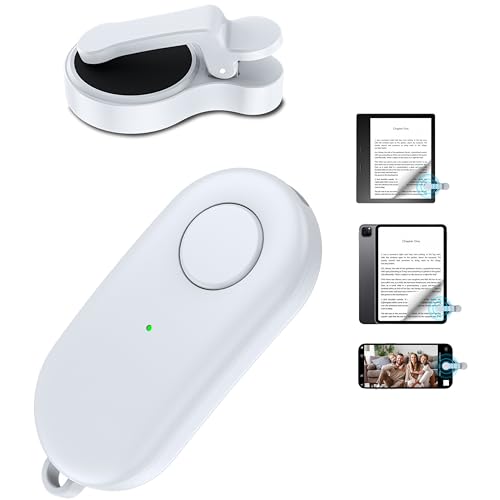
HIGHGO Remote Control Page Turner for Kindle & Kobo eReaders

Pandigital Novel 7-Inch Android Tablet with eBookstore & Stand (White)

Kobo Libra Colour eReader, 7” Color E Ink, Waterproof (Black)

Kobo Libra Colour eReader with Kaleido™ 3 Display, Dark Mode & Audiobooks (White)
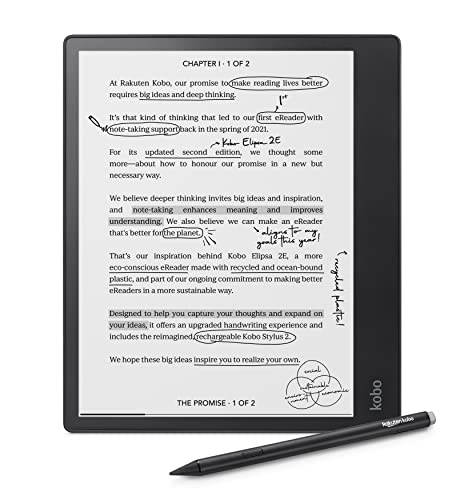
Kobo Elipsa 2E eReader with 10.3” Touchscreen, Kobo Stylus 2 & 32GB Storage

Musnap Ocean 64GB+4GB 7” E-Ink Paper Tablet for Reading and Writing
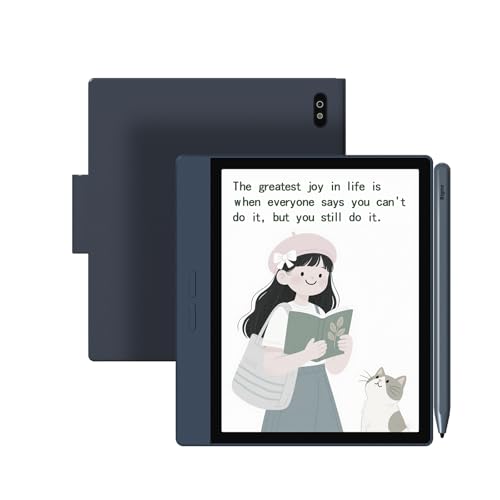
Bigme B7 Color ePaper Tablet 7-Inch 8+128GB eReader with 4G Calling (Blue)
More On The Choices That Made The List
This little clip-on clicker is the kind of accessory you forget you’re using until you try reading without one. It uses RF wireless (radio frequency) signaling to flip pages on compatible e-readers, so your hands stay wrapped around a coffee mug or tucked under a blanket. Pairing once means it just works the next time you open a book.
The HIGHGO clicker pairs with most Kindle and Kobo models, plus iPads, iPhones, and Android tablets. That makes it useful for anyone bouncing between devices during the day. The shutter button also doubles as a remote for selfies, which sounds gimmicky until you’re trying to take a stable group shot at arm’s length.
Real Benefits
- Turns pages without touching the screen, which is gentler on the display over time.
- Full charge takes about 1.5 hours, and the manufacturer rates standby at roughly five months for light daily reading.
- Compatible with Kindle, Kobo, iPad, iPhone, and Android tablets, so you can standardize one gadget across devices.
- Doubles as a camera shutter remote for solo and group photos.
Things To Consider
- Older Kindle generations aren’t supported, so verify compatibility before pairing.
- It only flips pages forward and triggers the shutter; you’ll still tap the screen for menus and highlights.
- The small clip can loosen over months of use, which owners commonly report as a minor annoyance.
Who It Suits Best
Daily readers who want hands-free page turns while cooking, holding a baby, or lying on one arm in bed.
Skip It When
You primarily want to annotate or mark up passages, because the Kobo Elipsa 2E with its stylus gives you far more control.
Long before color ePaper went mainstream, the Pandigital Novel tried to do something simple: put a color touchscreen, Android, and a built-in bookstore into one $150-ish tablet. The 7-inch screen has a resolution of 800 x 600, which sounds modest today but still reads clearly for casual novels.
The included stand lets you prop the tablet on a desk for hands-free reading or video. The trade-off shows up in the specs: an 800 MHz processor, 256 MB of RAM, and 1 GB of built-in storage make this a slow device by modern standards. You probably won’t enjoy multitasking, but for reading a downloaded book with the lights on, it’s fine.
Good Reasons To Consider
- Comes bundled with a stand, which saves you from buying one separately.
- Color LCD (liquid crystal display) screen makes comics, magazines, and illustrated books look more like the printed page.
- Pre-loaded with Barnes & Noble’s bookstore for one-stop purchasing.
- Android 2.0 means you can install compatible apps from that era, including reading utilities.
Worth Noting
- Running modern apps on this hardware will frustrate you; expect long load times and stutters.
- An LCD backlight can fatigue eyes during long sessions, unlike modern ePaper.
- 1 GB of internal storage fills quickly, so you’ll likely need an SD card for larger libraries.
Right Fit For
Light readers who want a color screen on a tight budget and don’t mind slower performance.
Look Elsewhere When
You want a glare-free, long-battery reading experience, because the Kobo Libra Colour in Black is built for exactly that.
The Kobo Libra Colour in Black is the quiet achiever of the e-reader world. Its 7-inch color E Ink Carta screen (a paper-like display technology that uses electronic ink) brings book covers, comics, and graphic novels to life without the glare of a tablet. Reading on a sunny patio feels like reading on paper, which is exactly the point.
Waterproofing means a dropped bath or splash from a pool won’t end your reading session. The asymmetric design with page-turn buttons feels natural in either hand, and Kobo’s store integration supports library borrowing through OverDrive in many regions. Unlike the HIGHGO clicker above, this is a full reader, not an accessory.
What Pays Off
- Waterproof construction handles accidental dunks, ideal for baths and pools.
- Color E Ink makes cover art and illustrated books noticeably richer than grayscale.
- Physical page-turn buttons reduce screen smudging during long sessions.
- Supports library lending apps and a wide range of file formats.
Points To Consider
- Color E Ink refreshes slower than grayscale, so fast-scrolling PDFs can ghost (show faint afterimages of previous text).
- It’s not an Android tablet, so you can’t install general apps beyond Kobo’s ecosystem.
Best Suited To
Comics and graphic-novel readers who want color without the eye strain of a tablet screen.
Consider Something Else When
You need full Android app freedom for note-taking, because the Musnap Ocean runs Android with handwriting support out of the box.
Key Specs
Think of the White Libra Colour as the same hardware recipe as the Black model above, but tuned for audiobook lovers. The Kaleido 3 display (Kobo’s latest color-filter E Ink panel) keeps colors soft and paper-like, while Dark Mode flips the palette for late-night reading without burning your retinas.
Audiobook support via Bluetooth lets you pair wireless earbuds and switch seamlessly between reading and listening. You can start a chapter on the train, then pick up the narration on a walk. Compared with the original Kindle-only clicker, this is a more complete standalone reading experience.
The Helpful Details
- Audiobook playback over Bluetooth means one device handles text and audio.
- Dark Mode reduces screen brightness for evening sessions.
- Kaleido 3 color rendering looks closer to printed pages than older color screens.
- Stylus 2 compatibility lets you mark up notebooks if you buy the pen separately.
Honest Caveats
- The stylus is sold separately, so handwritten notes aren’t truly out-of-the-box.
- Audiobook storage eats into available space for ebooks.
Perfect Match For
Readers who alternate between paper-style reading and audiobooks during commutes and workouts.
Reach For A Different Pick When
You prioritize 4G connectivity on the road, because the Bigme B7 brings built-in cellular on a similar 7-inch form factor.
Feature Snapshot
The Elipsa 2E is the big thinker of the bunch. A 10.3-inch Carta E Ink touchscreen gives you roughly the page area of a paperback, which makes PDFs, journal articles, and sheet music far less frustrating than squinting at a 7-inch screen. ComfortLight PRO adjusts both brightness and color temperature (the warmth of the screen’s tone) to reduce blue light at night.
The included Kobo Stylus 2 turns the device into a true digital notebook. You can scribble in margins, sketch diagrams, or handwrite meeting notes, then convert handwriting to typed text. With 32 GB of storage, you’ll hold thousands of books and notebooks without leaning on the cloud.
Useful Touches
- 10.3-inch screen handles academic PDFs and comics without constant zooming.
- Stylus included in the box, so you can start annotating immediately.
- 32 GB of storage swallows a massive personal library.
- ComfortLight PRO warms the screen for late-night reading sessions.
- Housing made with recycled and ocean-bound plastic, useful if you care about sustainability claims.
Trade-Offs
- It’s a large, two-handed device, so it’s awkward on a packed subway.
- The price tier is higher than the 7-inch Libra models.
Built With In Mind
Students, researchers, and professionals who read and annotate dense documents daily.
Swap It Out When
You want a smaller Android device with true app freedom, because the Musnap Ocean keeps a 7-inch footprint and runs Android natively.
Technical Reference
Where the Kobo readers lock you into one ecosystem, the Musnap Ocean swings the door open. It runs Android, so you can load reading apps, note-taking tools, or even cloud-storage clients from outside stores. The 7-inch E Ink display keeps the experience paper-like, with adjustable brightness and color temperature.
The “paper tablet” framing leans into handwriting: pair a compatible stylus (sold separately, since the listing notes Musnap’s stylus isn’t included) and you can scribble notes directly on the screen. Octa-core processing at 2.2 GHz and 4 GB of RAM make app-switching smoother than older e-ink tablets, and 64 GB of storage means you won’t be pruning files any time soon.
Notable Gains
- Native Android means real app flexibility beyond a single bookstore.
- 4 GB of RAM keeps apps responsive during multitasking.
- 64 GB of storage handles large PDF libraries and audiobooks.
- Adjustable color temperature reduces eye fatigue in dim rooms.
Practical Considerations
- The Musnap stylus isn’t included, so handwriting adds to the cost.
- Android on E Ink can feel slower than on a glass tablet, especially during scrolling.
Whose Shelf It Belongs On
Tinkerers and students who want an open Android reader with handwriting and don’t mind buying the pen separately.
A Better Fit Elsewhere
You need a built-in stylus and a larger canvas for marking up PDFs, where the Kobo Elipsa 2E ships with the pen ready to go.
Product Snapshot
The Bigme B7 is the most phone-like eReader on this list. A 7-inch color ePaper panel (a low-power display that mimics ink on paper) gives you grayscale-and-color reading, while built-in 4G means you can browse, call, and download books without hunting for Wi-Fi. That’s a real win on long train rides and layovers.
Android 14 under the hood opens the door to mainstream apps, so the B7 works as a tablet that happens to sip battery like an e-reader. With 8 GB of RAM and 128 GB of storage, you won’t run out of space for large comic collections or audiobook libraries. The 3000 mAh battery is modest by phone standards but generous for an ePaper device.
Reasons It Performs
- 4G connectivity keeps you online where Wi-Fi is patchy.
- 128 GB of storage dwarfs most competing e-readers.
- Color ePaper makes magazine layouts and comics more legible.
- Android 14 supports a wide app catalog beyond reading utilities.
Possible Compromises
- Color ePaper at this size still refreshes slower than a phone screen.
- Voice call quality through ePaper speakers won’t match a regular phone.
- Battery life is shorter than non-cellular e-readers when 4G is active.
Who Should Grab It
Frequent travelers and commuters who want one device that reads, calls, and connects off-Wi-Fi.
Where A Sibling Pick Shines
You mostly read at home and value waterproof durability, where the Kobo Libra Colour in White handles splashes without the cellular premium.
Feature Overview
What To Weigh Before Choosing An Android Ereader
Picking an Android eReader comes down to how the device fits your habits, not just its specs sheet. The right answer for a daily commuter differs wildly from the right answer for a graduate student buried in PDFs.
Screen Type And Size
E Ink and ePaper displays mimic printed paper, so they work beautifully outdoors and reduce eye fatigue during marathon sessions. Color panels like Kaleido 3 bring comics and magazines to life, but they refresh slower than grayscale, so scrolling PDFs can feel laggy.
A 7-inch screen strikes a balance between portability and readability. A 10.3-inch panel suits document-heavy workflows, academic reading, or sketch-style note-taking, though it won’t slip into a coat pocket.
Ecosystem Versus App Freedom
Locked-down readers like the Kobo Libra Colour run smoothly inside their own stores and library apps, which keeps the experience simple. Open Android readers like the Musnap Ocean or Bigme B7 let you install third-party apps, but you’ll manage updates and compatibility yourself.
For most shoppers, ecosystem matters more than raw flexibility. Choose open Android only if you already use reading apps from outside major stores.
Battery, Storage, And Extras
E Ink readers sip power and last days or weeks per charge, while color ePaper drains faster when 4G or heavy apps are active. Storage scales with library size: 32 GB handles thousands of books, while 128 GB on the Bigme B7 supports large audio and comic collections.
Accessories like waterproofing, stylus support, or physical page-turn buttons add real-world value. Waterproofing matters for bath and pool use; a stylus matters if you annotate regularly; buttons help one-handed reading on long commutes.
Key Considerations Across These Picks
Where Shoppers Go Wrong
The most common trap is buying on price alone. A cheap LCD tablet looks like a bargain until you read on it for two hours and your eyes ache. The honest read is that a slower ePaper device is often the better long-term value for daily readers.
Another misstep is ignoring the ecosystem. A Kindle-friendly clicker does nothing on a Kobo, and a Kobo store voucher doesn’t unlock books in a third-party app. Match the hardware to the storefront you actually use.
Where The Extra Money Goes
Spending up typically buys three things: better screens, more storage, and smarter input. Kaleido 3 color, larger panels, and bundled styluses all come at a premium, and they pay off when you read for hours each day or annotate professionally.
The upgrade is worth it for note-takers, color-comics fans, and travelers who want 4G. Casual readers who mostly consume novels can comfortably stay with the more modest picks and still enjoy a paper-like experience.
Frequently Asked Questions
What Does “Android Ereader” Actually Mean?
An Android eReader runs Google’s Android operating system, so it can install apps beyond a single bookstore. Some, like Kobos, use a customized skin over Android; others, like the Bigme B7, run a near-stock version with app-store access.
Is Color E Ink Worth The Upgrade?
For graphic novels, comics, and magazine layouts, color makes a real difference. For pure text novels, grayscale E Ink still offers sharper contrast and longer battery life at a lower cost.
Do These Ereaders Support Library Lending?
Kobo devices support OverDrive-style library lending in many regions through the built-in store. Open Android devices depend on the apps you install, so library access varies by app compatibility.
How Long Does The Battery Last On Color E Ink?
Expect days of regular reading rather than the weeks a grayscale reader delivers. Color panels draw more power, and 4G or stylus use shortens endurance further on devices like the Bigme B7.
Can I Use A Stylus On Any Of These?
Only models that explicitly support stylus input will recognize handwriting reliably. The Kobo Elipsa 2E includes a stylus in the box, while the Musnap Ocean accepts a compatible pen sold separately.
Closing Remarks
The right Android eReader depends on where and how you read most. Bath readers, comic fans, note-takers, and travelers each have a clear match on the shortlist above. Compare the screen size, ecosystem, and extras against your daily routine, and the choice becomes much simpler. Whichever pick you settle on, expect a calmer, more paper-like reading experience than any glowing glass tablet can offer.


