

A tablet that fits comfortably in one hand stops feeling useful the moment you try to read a full PDF, sketch a real layout, or split two apps side by side. Large-screen Android tablets fill that gap, and the 2026 lineup spans everything from budget 11-inch slates to 16-inch creative canvases. This guide walks through ten options that handle streaming, note-taking, gaming, and family use, so you can pick the screen size and feature mix that matches how you actually live with the device.
The Lineup, Simplified
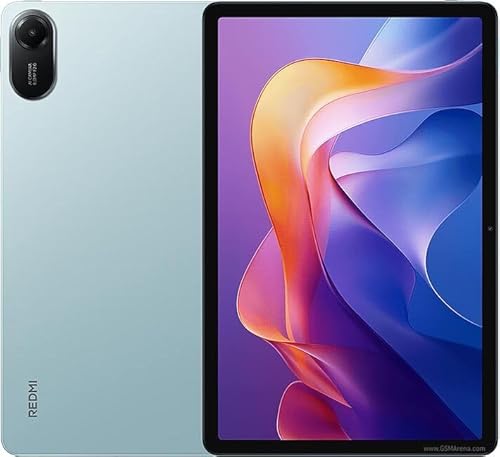
XIAOMI Redmi Pad 2 11″ Tablet (Mint Green, 256GB)

XIAOMI Poco Pad M1 12.1″ Tablet (Blue, 256GB)

VekfulPC T70 Tablet 11″ Android 16, 8GB+256GB

SVITOO Kids Tablet 10″ Android 16, 32GB

SAMSUNG Galaxy Tab S6 Lite 10.4″ 128GB (Gray)

Samsung Galaxy Tab S9 FE 10.9″ 128GB (Gray)
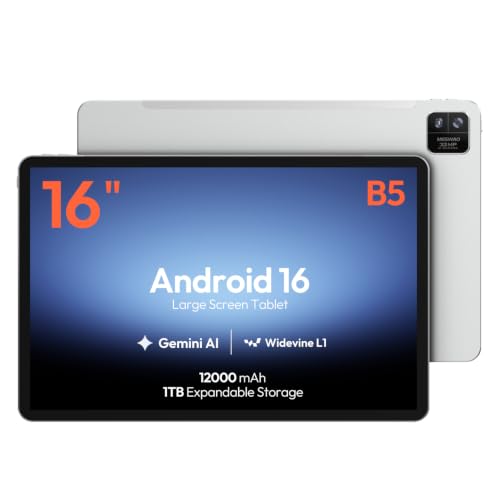
MESWAO 16-Inch Android 16 Tablet (Helio G99)

SAMSUNG Galaxy Tab S7 FE 12.4″ 256GB (Mystic Green)
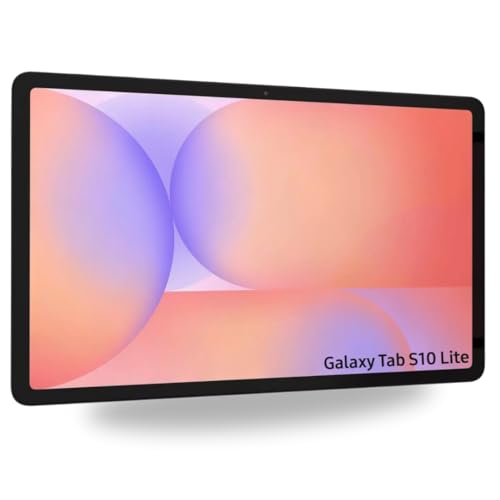
SAMSUNG Galaxy Tab S10 Lite 10.9″ Wi-Fi (Gray)

Samsung Galaxy Tab S8 11″ 128GB (Graphite)
What Each Pick Brings To The Table
The Redmi Pad 2 lands in that comfortable middle zone where the screen is big enough to read a recipe across the kitchen counter but light enough to hold one-handed for a long reading session. Its 11-inch 2.5K panel runs at 2560 by 1600 resolution, so text in books and PDFs looks crisp rather than soft. With 256GB of built-in storage and 8GB of RAM, there’s room for a sizeable offline movie collection plus several large apps running in the background.
You get quad speakers with Dolby Atmos tuning, which is more than the usual stereo pair found on budget slates, and an 8MP rear camera for quick document snaps. Wi-Fi only connectivity keeps the price reasonable for people who don’t need cellular data. In our view, it suits anyone upgrading from a smaller tablet who wants a sharper picture and longer battery life without moving into flagship pricing.
A Strong Showing
- 2.5K resolution makes reading and streaming noticeably sharper than standard 1080p panels
- 9000mAh battery covers long commute days and cross-country flights between charges
- Quad speakers with Dolby Atmos support create a fuller sound for movies without headphones
- Metal unibody construction feels sturdier than the plastic frames common at this tier
Things To Consider
- Wi-Fi only means no cellular data for trains or rural commutes without hotspot tethering
- 90Hz refresh rate is smooth but not as fluid as the 120Hz panels on pricier competitors
Made For
Students, casual streamers, and families looking for a sharp, dependable 11-inch tablet that handles homework, Netflix, and reading without weighing down the backpack.
Consider Something Else When
Mobile professionals who need DeX-style desktop productivity should look at the Samsung Galaxy Tab S8, which adds the S Pen and faster Wi-Fi 6E for serious work tasks.
The Poco Pad M1 steps up to a 12.1-inch display, which puts it in that sweet spot where split-screen multitasking actually works without squinting. The 2.5K panel refreshes at 120Hz, so scrolling through social feeds and racing games feels noticeably smoother than the 90Hz Redmi Pad 2 earlier in this list. Bluetooth 5.3 keeps wireless earbuds stable, and Wi-Fi 6 support means faster downloads on modern routers.
Battery capacity jumps to 12000mAh, which is one of the larger cells in this roundup and a real advantage on long flights or camping weekends without easy charging. Owners commonly report the quad speaker setup loud enough to fill a small room for movie nights. If your priority is entertainment and you want the bigger canvas over the smaller Redmi, this is the more theatrical sibling.
The Upside
- 120Hz refresh rate delivers fluid scrolling that makes 60Hz screens feel dated
- 12000mAh battery stretches through multi-day trips on a single charge
- 12.1-inch display gives split-screen apps enough room to breathe
- Wi-Fi 6 support future-proofs your home network connection
Worth Noting
- Larger size makes it harder to hold one-handed during long reading sessions
- No cellular option means you’ll rely on Wi-Fi or hotspot tethering outside the home
Key Product Details
Right Fit For
Frequent travelers and binge-watchers who want the largest display and longest battery life in the XIAOMI family without stepping into premium pricing.
A Better Fit Elsewhere
Buyers who want a stylus in the box should consider the SAMSUNG Galaxy Tab S6 Lite, which trades screen size for the productivity boost of an included S Pen.
The T70 ships with Android 16 out of the box, which gives it a longer software runway than older Android 14 tablets still common in this tier. That matters if you want your device to keep receiving security patches and feature drops through the next few years. The 11-inch form factor mirrors the Redmi Pad 2, but VekfulPC pairs it with 8GB of RAM and 256GB of storage for the same multitasking headroom.
The included 4-year warranty is unusually long for a tablet at this level and signals the manufacturer’s confidence in long-term durability. Octa-core processing handles split-screen apps and casual gaming without feeling sluggish. For shoppers who prioritize current software and warranty coverage over brand prestige, this is the practical choice.
Practical Advantages
- Android 16 OS delivers the newest interface features and longer update support
- 4-year warranty outlasts the typical 12-month coverage on competing slates
- 8GB RAM keeps multiple browser tabs and apps active without reloads
Trade Offs
- Less established brand means resale value and accessory support trail behind Samsung
- No flagship-tier display brightness for outdoor use in direct sunlight
Best Suited To
Everyday users who want the newest Android version, generous warranty protection, and don’t need premium brand cachet.
Skip It When
Buyers who value deep ecosystem support and frequent OS updates from a major brand should look at the Samsung Galaxy Tab S9 FE instead.
The SVITOO Kids Tablet wraps a 10-inch Android 16 device in a protective case and pairs it with parental controls designed for younger children. The smaller 10-inch size fits comfortably in small hands, and the bundled case helps absorb the inevitable drops that come with everyday kid use. It’s a different target audience than the productivity-focused picks earlier in this list.
The 32GB of internal storage is modest, so most photos and videos will need to move to a microSD card, but that trade-off keeps the price accessible for gift-giving occasions. Android 16 brings modern security and parental dashboard features. The included gift-ready box also means less wrapping paper hassle for birthdays and holidays.
Notable Gains
- Bundled protective case reduces damage risk during toddler and elementary-age use
- Parental control suite lets caregivers manage screen time and app access
- Gift-ready packaging simplifies birthdays and holiday presents
Points To Note
- 32GB storage fills quickly with kid videos and apps without a microSD expansion
- Smaller 10-inch screen limits its usefulness as the family grows into teen years
Perfect Match For
Parents shopping for a first tablet for children ages 3 to 10 who want built-in parental controls and a kid-tough case without separate accessory shopping.
Look Elsewhere When
Older kids and teens ready for more serious schoolwork should consider the SAMSUNG Galaxy Tab S6 Lite, which includes the S Pen for note-taking and sketching.
The Galaxy Tab S6 Lite has been a workhorse in Samsung’s lineup for years, and it remains a smart entry point for shoppers who want the S Pen without paying flagship prices. The 10.4-inch display hits a comfortable middle size that’s portable for commutes yet large enough for comfortable reading. The included S Pen attaches magnetically to the side and doesn’t require charging, which simplifies the daily carry.
Build quality stands out at this tier: the slim metal chassis feels closer to a premium device than a budget plastic tablet. Dual speakers handle casual video calls and YouTube sessions without distortion. For students, journaling enthusiasts, and anyone who wants a stylus experience without the Tab S9 FE price tag, this older model still earns its place.
Useful Touches
- S Pen included at no extra cost for handwritten notes and sketches
- Slim metal design feels more refined than typical budget tablet builds
- 10.4-inch screen splits nicely between portability and readability
Room For Improvement
- Older hardware means slower performance during heavy multitasking
- Limited high-brightness mode makes outdoor reading harder in direct sun
Who It Suits Best
Budget-conscious note-takers, students, and casual creators who want the S Pen experience and Samsung’s software polish without premium pricing.
Not Your Match When
Users wanting the latest processor and brighter display should step up to the Samsung Galaxy Tab S9 FE, which adds those gains along with newer connectivity features.
The Tab S9 FE sits in Samsung’s Fan Edition tier, which aims to deliver most of the flagship experience at a friendlier cost. Its 10.9-inch display is a touch larger than the older Tab S6 Lite and pairs nicely with the included S Pen for sketching and markup. Build quality matches Samsung’s premium line, with a slim chassis and lightweight construction that survives backpack life.
The processor handles everyday multitasking smoothly, and battery life stretches through long work sessions. Expandable storage via microSD adds room for media libraries without paying for the higher-capacity model. In most homes, it covers the same ground as the flagship Tab S9 while leaving room in the budget for a keyboard case or protective sleeve.
Good Reasons To Consider
- Lightweight durable design survives daily commutes and outdoor use
- Long battery life keeps you productive through full workdays
- Included S Pen turns the tablet into a notebook and sketchpad
Soft Spots
- Fan Edition processor trails the flagship Tab S9 in raw benchmark performance
- 128GB base storage fills up without adding a microSD card
Feature Rundown
Who Will Love This
Commuters, outdoor enthusiasts, and creative note-takers who want premium Samsung build quality with the S Pen but don’t need the absolute flagship processor.
Reach For A Different Pick When
Power users running demanding creative apps should consider the Samsung Galaxy Tab S8, which adds faster Wi-Fi 6E and the more powerful flagship chipset.
The MESWAO 16-inch tablet is the largest screen in this roundup, and that extra real estate changes how you use it. Sheet music, chord charts, large PDFs, and split-screen productivity all benefit from the roomy 16:10 aspect ratio. The Helio G99 octa-core chip (a MediaTek processor designed for efficient mid-range performance) and 12GB of RAM keep apps responsive even with multiple windows open.
Android 16 brings modern interface refinements, and 128GB of storage holds a sizeable music library or design assets. This isn’t a grab-and-go device. The size makes it a stay-at-your-desk or table-top companion. Musicians, designers, and digital artists get the most from the canvas, while casual users may find it excessive for bedtime reading.
Advantages To Know
- 16-inch display creates a laptop-like workspace for sheet music and design files
- 12GB RAM handles multitasking across music, notes, and reference apps
- Android 16 OS brings up-to-date features and security patches
Practical Considerations
- Large size makes it impractical for one-handed reading or couch use
- Heavier chassis means backpack weight adds up on commutes
Whose Shelf It Belongs On
Musicians, designers, and productivity-focused users who want the biggest canvas possible and don’t need portability as a primary concern.
Swap It Out When
Anyone needing daily portability should consider the Samsung Galaxy Tab S7 FE, which delivers a still-roomy 12.4-inch screen in a more travel-friendly form factor.
The Tab S7 FE combines a generous 12.4-inch display with 256GB of built-in storage, giving you one of the most spacious configurations in this list. The screen is large enough to view two apps side by side with comfortable text size, while the included S Pen turns the slate into a sketchbook or PDF editor. Multi-device connectivity makes it easier to share files with a Galaxy phone or laptop.
The long-lasting battery handles full workdays and streaming sessions without panic-charging. Compared to the earlier Redmi Pad 2, this tablet trades portability for screen size and ecosystem polish. It fits students, remote workers, and households that already own other Samsung devices.
Well-Handled Touches
- 256GB internal storage holds large video and project libraries without expansion
- 12.4-inch screen supports comfortable split-screen productivity
- S Pen included for handwritten notes and creative sketching
Small Caveats
- Older generation chipset trails the newer Tab S9 FE in some workloads
- Charging speed is slower than current flagship tablets
Built With In Mind
Students and remote workers who split time between note-taking, video calls, and streaming, and who appreciate having lots of storage built in.
Another Choice May Suit
Buyers wanting the newest processor and longer software support should look at the SAMSUNG Galaxy Tab S10 Lite, which brings a smoother 90Hz refresh rate and newer internals.
The Tab S10 Lite is the newest member of Samsung’s Lite series, and it brings a smoother 90Hz LCD to the 10.9-inch form factor. That’s a noticeable bump from the 60Hz panels on older Lite models, making scrolling through documents and feeds feel more natural. The included S Pen and a bundled 256GB SD card give you everything needed to start creating right out of the box.
Android 15 keeps the software current, and Wi-Fi 6 supports fast downloads on modern routers. The international model designation means buyers should check warranty coverage in their region. Compared to the XIAOMI Poco Pad M1 earlier in this list, the S10 Lite trades raw screen size for Samsung’s deeper ecosystem and stylus support.
What It Does Well
- 90Hz refresh rate makes everyday scrolling noticeably smoother
- S Pen and bundled 256GB SD card add value from day one
- Wi-Fi 6 keeps wireless performance current
A Few Limitations
- 6GB RAM can feel tight when running multiple heavy apps
- International model status may affect warranty service availability
Feature Snapshot
The Right Fit
Casual creators and students who want a smooth display, included stylus, and expandable storage without committing to flagship pricing.
Where A Sibling Pick Shines
Power users needing more RAM and storage built-in should consider the SAMSUNG Galaxy Tab S7 FE, which offers 256GB internally and 12.4 inches of screen space.
The Galaxy Tab S8 was Samsung’s flagship tablet at release and still holds up as a productivity powerhouse. The 11-inch LCD hits the sweet spot between portability and workspace size, while Wi-Fi 6E support delivers the fastest wireless speeds available on consumer routers today. That extra bandwidth helps with cloud file sync, video calls, and large downloads in busy offices or cafés.
Samsung’s DeX mode (a desktop-style interface that mirrors a PC experience when connected to a monitor or keyboard) transforms the tablet into a laptop-like workstation with the right accessories. The S Pen handles markup and signatures, and the ultra-wide camera improves video call framing. For mobile professionals and serious students, this is the most capable option on the list.
Everyday Wins
- Wi-Fi 6E future-proofs your wireless connection for years ahead
- DeX mode delivers a PC-style experience when paired with a keyboard
- S Pen and ultra-wide camera round out a productivity-focused package
Factors To Consider
- Older generation means it lacks the absolute newest chipset found in the S9 series
- Premium pricing reflects flagship positioning from its original launch
Who Should Grab It
Mobile professionals, frequent travelers, and power users who want desktop-style productivity and the fastest wireless speeds in a portable tablet form factor.
Not Your Match When
Casual users happy with slower Wi-Fi and basic streaming should consider the SAMSUNG Galaxy Tab S6 Lite, which delivers the S Pen experience at a much friendlier cost.
Finding The Right Large Tablet For Your Routine
Screen size, stylus support, and ecosystem depth tend to matter more than raw processor benchmarks once you cross the 10-inch mark. Pick a tablet that matches the space where you’ll use it most.
Screen Size And Daily Carrying Habits
Anything from 10.4 to 12.4 inches works well for couch reading, coffee table browsing, and casual note-taking. Tablets above 12 inches, like the MESWAO 16-inch, feel more like portable monitors than reading devices. Frequent commuters benefit from staying closer to 11 inches, since larger screens fill a backpack fast and strain the wrist during long one-handed holds. If you mostly use the tablet at a desk or kitchen counter, leaning bigger gives you more room for split-screen apps without giving up much portability.
Stylus Support And Productivity Goals
If handwriting, sketching, or PDF markup matter to your workflow, prioritize tablets with a stylus included or supported. The S Pen experience across Samsung’s Tab S6 Lite, S9 FE, S10 Lite, S7 FE, and S8 remains the most refined at this category level. For non-stylus users, a solid keyboard case and split-screen multitasking on larger displays deliver most of the productivity benefit at lower cost.
Storage, Connectivity, And Long-Term Value
Internal storage above 128GB matters if you keep large offline movie libraries, design assets, or years of project files. MicroSD expandability (a small memory card slot that adds storage cheaply) helps when buying smaller base configurations. Wi-Fi 6 or 6E support future-proofs your home network connection. Software update length affects how long the tablet stays secure and compatible with new apps, which is where newer models like the VekfulPC T70 and Tab S10 Lite gain ground over older flagships like the Tab S8.
Smart Choices Across The Lineup
A few patterns show up across most large-screen tablet purchases, and they’re worth weighing before you commit.
Common Shopping Slip Ups
The biggest mistake is buying on raw screen size alone without thinking about how you’ll carry the device. A 16-inch tablet sounds appealing until it doesn’t fit in your bag or tire your arm during reading sessions. Another trap is ignoring software support length: a cheaper tablet running an older Android version may stop receiving security patches sooner, which matters for any device connected to your home network. Skimping on storage to save money often backfires when you hit the ceiling during a long flight with no way to offload files.
What The Higher Tier Buys
Premium Samsung tablets earn their price with brighter outdoor displays, included S Pens, longer software support windows, and refined metal chassis that survive years of daily commutes. The jump from budget to mid-range usually delivers a noticeable display upgrade, while flagship-tier pricing buys you faster Wi-Fi, desktop-style DeX mode, and better accessory ecosystems. For casual streaming and reading, mid-range is plenty. For daily productivity and stylus-heavy work, the higher tier earns its keep through durability and software longevity.
Frequently Asked Questions
What size counts as a “large” Android tablet?
Large Android tablets generally start around 10 inches and go up to 16 inches. The 10.4 to 12.4-inch range covers most productivity and entertainment needs, while 14-inch and 16-inch models lean toward creative work and fixed workspace use.
Do I need cellular connectivity in a large tablet?
Most shoppers do fine with Wi-Fi only, since tablets typically live near routers or use phone hotspots on the go. Cellular models cost more and add a monthly data plan, so they only pay off for field workers who regularly use tablets away from Wi-Fi.
Is the S Pen worth it if I don’t draw?
Even non-artists find stylus support useful for handwritten notes, PDF markup, and signing documents. If your work involves any paperwork, a tablet with an included stylus pays for itself quickly in convenience.
How long should an Android tablet last?
A well-cared-for Android tablet typically serves three to five years before performance feels slow. Software update support varies, with newer Samsung and VekfulPC models promising longer patch windows than older budget devices.
Can a large tablet replace a laptop?
For many users, yes, especially with a keyboard case and Samsung’s DeX mode on the Tab S8 or Tab S9 FE. Heavy creative software users still benefit from a traditional laptop, but light productivity, email, and streaming all move comfortably to a large tablet.
Bottom Line
Large Android tablets earn their space when the screen fits the way you actually use a device. Match the size to your bag and your grip, decide whether stylus and ecosystem features matter for your routine, and weigh software support against upfront cost. The right pick is the one that fits daily life without forcing you to adapt your habits around it.


