

Picking a phone for an older adult usually comes down to a few honest questions. Is the text big enough to read without squinting? Are the menus simple enough that calling the grandkids doesn’t turn into a 20-minute ordeal? Does the battery last through a long afternoon out? You don’t need every bell and whistle, just a phone that’s comfortable to hold, easy to see, and friendly enough that the learning curve stays short.
This roundup focuses on unlocked Android phones that pair well with senior-friendly use, plus one medical alert device for shoppers who want extra safety. Every pick here is sold through the same retailer, so you can compare features side by side without chasing links across the web.
A Closer Look At The Lineup
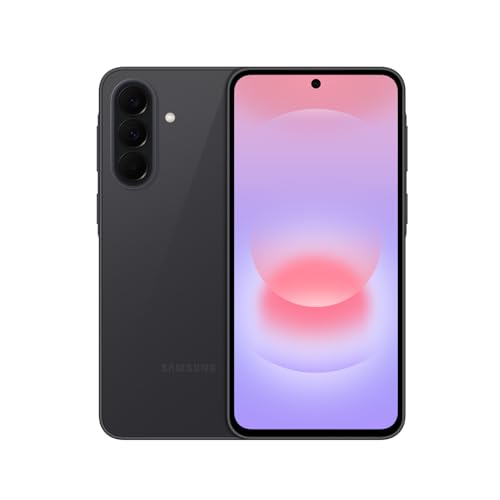
Samsung Galaxy A37 5G Unlocked Smartphone 128GB (Charcoal)

Samsung Galaxy A05 64GB Dual-SIM Unlocked Smartphone (Black)

Google Pixel 11 Unlocked Smartphone 256GB (Obsidian)

Google Pixel 11 Unlocked Smartphone 512GB (Hibiscus)

Google Pixel 11 Unlocked Smartphone 512GB (Frost)
LIVELY Mobile2 Medical Alert Device (Waterproof)

Google Pixel 11 Pro Unlocked Smartphone 512GB (Obsidian)
Meet The Standout Selections
The Galaxy A37 5G is the kind of phone that gets out of the way and lets you focus on what matters, whether that’s a video call with family or reading an article without leaning in. It carries a 6.7-inch Super AMOLED display, which means deeper blacks and brighter text than older LCD panels, a real upgrade for anyone with weaker eyesight. The slim body and IP68 dust and water resistance mean it should survive the occasional coffee spill or rainy walk to the mailbox.
Compared with the Galaxy A05 below, the A37 5G offers noticeably better build quality, faster networking on modern 5G bands, and a 5000mAh battery that comfortably lasts a full day of browsing, calls, and navigation. The trade-off shows up in the upfront cost, but for the senior who plans to keep the phone for several years, the extra headroom is worth it.
What Stands Out
- The Super AMOLED screen renders text and photos with high contrast, so reading in dim rooms or bright sun is easier on the eyes.
- IP68 sealing protects against accidental dunks and dusty pockets, which matters when arthritis or tremors make drops more common.
- The 5000mAh battery typically stretches across a full day of mixed use, so fewer charging breaks in the middle of errands.
- Super Fast Charging 2.0 shortens the time tethered to a wall outlet, which helps anyone who forgets to plug in overnight.
- Unlocked design means the phone works with most major carriers without being locked to one network.
Things To Consider
- The slim body feels light but also slick; a textured case is a smart add-on for shaky grips.
- The triple camera system is capable, though owners who rarely use the third lens may not notice the benefit day to day.
- The AMOLED panel looks gorgeous but can show slight color shifts at extreme viewing angles, something to note if the phone sits flat on a table.
Key Specs
Who It Suits Best
An active adult who streams video, chats over Wi-Fi calling, and wants a durable phone that lasts a few years without upgrading.
Consider Something Else When
Shoppers on a tighter budget should look at the Samsung Galaxy A05, which keeps a large screen but trims features to keep the price gentler.
The Galaxy A05 is the no-frills sibling of the A37 5G above, and that simplicity is exactly why some shoppers will prefer it. It still stretches a 6.7-inch HD+ screen across the front, which keeps icons and messages large enough for older eyes to read comfortably. The dual-SIM slot is a quiet bonus for anyone who travels between countries or wants a work line separate from a personal one.
The honest read is that this is a phone for someone who mostly calls, texts, and browses lightly. Heavier gaming or long video calls may push the processor harder than it likes. Storage is modest at 64GB, so you’ll want to lean on cloud backups if family photos start piling up.
The Value In It
- The 6.7-inch HD+ display gives text and contacts plenty of breathing room, even without bumping font size to maximum.
- The 50MP main camera handles everyday snapshots well, so capturing grandkids’ school events feels effortless.
- Dual-SIM support is useful for splitting work and personal lines or for international travelers.
Worth Noting
- 64GB of storage fills up fast with photos and apps; a microSD card is practically a must.
- The HD+ panel is large but not as sharp as the AMOLED screens in higher-tier phones, which you may notice on small text.
- This is a Latin America version listing, so confirm band compatibility with your local carrier before purchase.
Built With In Mind
A first-time smartphone owner or someone who only needs calls, texts, video calls, and the occasional photo.
Look Elsewhere When
Anyone who streams a lot of video or shoots many photos should consider the Google Pixel 11, which delivers sharper display tech and far more storage.
The Pixel 11 brings Google’s Gemini assistant front and center, and that’s a quiet superpower for older adults. Voice commands like “call my daughter” or “set a reminder for my pills” take a lot of typing out of the equation. The matte back and slim camera bar give the phone a clean look, while the 256GB of internal storage means plenty of room for photos, downloads, and apps without juggling cloud subscriptions.
Where this phone differs from the Samsung Galaxy A37 5G is in software approach. Pixels tend to receive direct updates from Google and lean on AI features for things like live captions, transcription, and photo editing. For someone living alone who values hands-free help, that combination lands well. You’ll want to spend an afternoon setting up accessibility settings, though, because the out-of-the-box defaults lean toward power users.
What Makes Sense
- Gemini assistant can handle voice calls, reminders, and on-device questions, reducing the need to navigate menus.
- 256GB of storage handles years of family photos without forcing cloud subscriptions.
- Live captions and transcription help users with hearing loss follow along with calls and videos.
Points To Note
- The AI features require some initial setup to feel natural; expect an afternoon of personalization.
- Some accessibility options live deep in the settings menu, so a family member may need to help the first time.
- Battery life is good but not class-leading for users who stream all day.
Feature Snapshot
Made For
An older adult who wants a friendly voice assistant, larger fonts, and easy transcription for calls and voicemails.
A Better Fit Elsewhere
If safety is the top priority over screen quality, the LIVELY Mobile2 medical alert device offers one-button emergency calling that no smartphone can match.
The Hibiscus edition of the Pixel 11 doubles the storage to 512GB, which removes a quiet worry for grandparents who shoot photos constantly. Same Gemini assistant, same clean Android interface, just more breathing room for video clips and offline playlists. The soft pink finish is a nice touch for anyone who finds black phones dull or hard to spot on a cluttered counter.
Realistically, most seniors will never fill 512GB, but the extra headroom also helps the phone stay fast as the operating system ages. Compared with the 256GB Pixel 11 above, this version is for households that don’t want to think about storage at all. The trade-off is a slightly higher upfront cost, though it’s modest given the long-term peace of mind.
What It Does Well
- 512GB of storage means years of unsorted photos and video clips without needing to delete anything.
- The hibiscus color helps the phone stand out on a cluttered coffee table, reducing the chance of losing it.
- Same Gemini voice assistant as the 256GB Pixel 11, so accessibility benefits carry over directly.
Honest Caveats
- The color is appealing but may show wear on corners over time, depending on how the phone is carried.
- Most users won’t tap into 512GB, so this is essentially future-proofing rather than a daily-use requirement.
- Same AI setup learning curve as the rest of the Pixel 11 lineup.
Right Fit For
A photo-loving grandparent or anyone who wants storage they will never have to think about again.
Swap It Out When
Callers on a strict budget will do just fine with the Samsung Galaxy A05, which covers the basics at a noticeably lower cost.
The Frost colorway is the same Pixel 11 hardware reviewed in slightly cooler tones, which appeals to shoppers who prefer a muted, modern look. Functionally, you get the same 512GB of storage as the Hibiscus edition, the same Gemini assistant features, and the same matte back that resists fingerprints. The color choice is purely aesthetic, but for some households that’s the deciding factor between two identical spec sheets.
Compared with the Galaxy A37 5G earlier in this list, the Pixel 11 leans more on software polish than rugged hardware. You won’t get an IP68 rating or Super Fast Charging, but you will get years of direct Google updates and a voice assistant that genuinely understands natural requests.
The Practical Payoff
- The frost finish hides minor scuffs better than darker colors, so the phone looks newer for longer.
- Gemini AI handles calls, texts, and reminders by voice, a real win for anyone with limited dexterity.
- 512GB of internal storage removes the need for microSD management.
- Direct updates from Google keep the phone secure and current without carrier delays.
Practical Considerations
- The lighter finish can still pick up scratches at the corners if dropped without a case.
- No official water resistance rating is specified for this model, so it deserves more care around sinks and pools.
- Setup of AI accessibility features takes patience, especially for users unfamiliar with voice prompts.
Whose Shelf It Belongs On
An older adult who values a quiet color, helpful voice assistant, and a phone that stays current through software updates.
Not Your Match When
Buyers who prioritize ruggedness and waterproofing will be happier with the Samsung Galaxy A37 5G, which carries an IP68 rating.
The LIVELY Mobile2 isn’t a smartphone, and that’s the point. This is a single-purpose device built around one button, worn on a lanyard or clipped to a belt, that connects to emergency help with a press. For older adults living alone or with balance issues, that simplicity is exactly what makes it worth carrying.
The waterproof build means it survives the shower, which is statistically where many falls happen. Unlike the smartphones reviewed above, this device does need a service plan to actually reach a response team, so factor that ongoing cost into the decision.
Real-World Strengths
- The single-button design is intuitive enough that it works under stress, even for users new to technology.
- Waterproof construction allows it to stay on in the bath, shower, or pool, where falls often occur.
- Fall detection can automatically place a call when a hard impact is sensed, removing the need to press anything.
- The lanyard keeps the device close at hand without occupying a pocket.
Possible Compromises
- This is not a phone, so you’ll still need a separate device for calls, texts, and navigation.
- Service plans add a recurring monthly cost on top of the hardware purchase.
- Battery life is good for a wearable but still needs regular charging, just like a phone.
Feature Rundown
Best Suited To
An older adult who lives alone, has a history of falls, or simply wants a reliable way to reach help in an emergency.
Another Choice May Suit
Shoppers who want a primary communication device rather than a safety companion should stick with the Samsung Galaxy A37 5G, which doubles as a full smartphone.
The Pixel 11 Pro is the top of Google’s current line, and it shows in the details. Google’s marketing calls out durable materials and the strongest drop protection in the Pixel Pro family to date, with two display sizes to choose from. The 512GB of storage matches the standard Pixel 11’s maxed-out version, but the Pro adds a more refined camera system and longer-lasting battery for heavy users.
The catch is the cost. Compared with the Samsung Galaxy A37 5G, the Pro runs noticeably more expensive, and most of that premium goes into camera features and build materials rather than senior-specific accessibility. Worth the upgrade if you travel and want a phone that doubles as a quality camera, less so if calls and texts are the primary use.
Standout Benefits
- The Pro tier emphasizes durability, so it should handle accidental drops better than mid-range alternatives.
- Gemini AI features carry over from the standard Pixel 11, including live captions and voice assistance.
- Larger battery capacity comfortably handles streaming, navigation, and frequent photo-taking in a single day.
- 512GB storage means no compromises on app libraries or video clips.
- Two display size options let you pick a smaller 6.3-inch model for easier reach or a 6.8-inch version for larger text.
Trade-Offs To Consider
- Higher upfront cost than any other phone on this list, with features that mostly benefit heavy users.
- More settings to learn and configure out of the box, especially across Gemini and camera modes.
- The premium build feels great but may warrant a case to protect that investment long-term.
Perfect Match For
An active older adult who travels, photographs family events, and wants a flagship-grade phone that will last several years.
Reach For A Different Pick When
Callers who mainly want a straightforward, rugged phone should pick the Samsung Galaxy A37 5G instead, since it delivers the essentials at a friendlier cost.
What To Weigh Before Choosing Android Phones For Seniors
Display Size And Readability
Screen size matters more than raw resolution for most older users. A 6.5-inch or larger display gives text and icons enough room to breathe, and high-contrast panels like Super AMOLED make small fonts easier on tired eyes. Font scaling is built into Android, so a generous display lets you bump text up without losing usable space.
Battery Life And Charging
A 5000mAh battery, found in the Galaxy A37 5G here, is a sensible target for anyone who forgets to charge nightly. Fast charging standards like Super Fast Charging 2.0 reduce downtime, so a short top-up before errands is usually enough. Wireless charging is convenient but slower, which matters less for users who keep the phone on a pad overnight.
Accessibility And Software Help
Live captions, voice assistants, and hearing-aid compatibility all make a real difference day to day. Pixel devices lean heavily on Google’s Gemini AI, while Samsung’s One UI offers similarly deep accessibility menus. A short afternoon of personalization goes a long way toward comfort.
Durability And Water Resistance
IP68 sealing, as on the Galaxy A37 5G, protects against spills and brief submersion. Anyone prone to drops should pair the phone with a textured case and a screen protector. Wearable options like the LIVELY Mobile2 add a separate layer of safety without depending on the phone being in reach.
Storage And Long-Term Use
64GB fills up quickly with photos, while 256GB or 512GB removes the worry entirely. Cloud backups are a fine complement but require trust in a monthly subscription. For someone planning to keep the phone for three or four years, more local storage today avoids headaches later.
Key Considerations Across These Picks
Wrong Turns To Avoid
A common stumble is choosing a phone purely on paper without checking carrier compatibility. Unlocked phones work across most networks, but a Latin America version like the Galaxy A05 here may not support every US band. Another trap is overlooking accessibility settings; large font options and high-contrast modes are buried inside Android, and skipping them makes a good phone feel clumsy. Finally, relying on a smartphone alone for emergency safety can fall short if the phone is left on a counter during a fall, which is exactly where a wearable like the LIVELY Mobile2 adds real value.
Where The Extra Money Goes
Stepping up from a budget device like the Galaxy A05 to the Galaxy A37 5G buys a sharper AMOLED panel, an IP68 rating, and a much larger battery. Going further to a Pixel 11 Pro adds premium materials, a more advanced camera system, and longer software support, which matters most for users who travel or shoot a lot of video. The honest read is that mid-range phones cover roughly ninety percent of senior needs, and the premium tier mostly rewards those who push the phone harder than average.


