

Android tablets have grown up. The current crop handles real multitasking, streams in crisp detail, and shrugs off the kind of daily wear that used to send older slates to the recycling bin. Picking the right one comes down to how you plan to use it, since the gap between a kids’ learning device and a productivity workhorse is wider than ever. This list walks through ten solid options across budget tiers, with notes on who each one genuinely serves.
Your Options, Compared

Samsung Galaxy Tab S7 Wi-Fi 256GB

JUNINKE 11 inch Android 16 Tablet Bundle
Samsung Galaxy Tab S7 FE 12.4″ 64GB
Samsung Galaxy Tab S10 Lite with S-Pen
COTGOD 10 inch Android 16 Tablet

JUNINKE 11 inch Gemini AI Tablet

JUNINKE Kids 10 inch Android 16 Tablet
JUNINKE 2026 Kids Tablet 10 inch

COTGOD 10.1 inch Android 16 Tablet
COTGOD 11 inch Gemini AI Tablet
A Closer Look At Each Pick
The Samsung Galaxy Tab S7 holds up well even after several years on the market, mostly because Samsung built it with desktop-style multitasking in mind. The 256GB of internal storage gives plenty of room for large work files, downloaded shows, and a healthy game library without forcing a microSD card on day one. For anyone who has been hunting for a productivity-leaning Android slate that doesn’t feel dated, this Mystic Navy model still earns its keep on a desk or a kitchen counter.
That said, it sits in a slightly awkward spot next to the Galaxy Tab S10 Lite on this list, which ships with newer software. Power users who already own a recent flagship phone and want their tablet to feel just as current may want to keep scrolling.
What Works In Its Favor
- Generous 256GB storage for offline media, large PDFs, and project files.
- Refined aluminum body that holds up well in a backpack or briefcase.
- S Pen support turns the slate into a real note-taking tool in meetings.
- Desktop-style DeX mode helps when you want a laptop-like layout.
Trade-Offs To Consider
- Runs an older Android version out of the box, depending on updates already applied.
- Keyboard cover is typically sold separately, unlike the JUNINKE bundles below.
Feature Snapshot
Whose Shelf It Belongs On
Shoppers who want a proven Samsung tablet with stylus support and don’t mind an older software generation find real value here.
Reach For A Different Pick When
The Samsung Galaxy Tab S10 Lite is a stronger match if you specifically want the newest Android 15 experience and Wi-Fi 6.
The 11-inch screen here gives you a useful middle ground between a small media slate and a chunky laptop replacement. What sets this JUNINKE option apart is the bundle: a Bluetooth keyboard, a stylus, a mouse, and a protective case all ship together, so you can move from couch browsing to typing a term paper without buying extras.
It’s positioned for students and home offices where accessories are often the hidden cost. Compared to the Galaxy Tab S7 above, the trade-off shows up in build materials and camera quality, but the value math is genuinely appealing if accessories would otherwise be on your shopping list.
Why It Works Well
- Keyboard, mouse, stylus, and case are included out of the box.
- 11-inch display gives comfortable split-screen space for documents and video calls.
- Runs Android 16, which means up-to-date app compatibility.
Things To Weigh Up
- Accessory build quality is functional rather than premium.
- Long-term software support from smaller brands tends to be shorter than Samsung’s track record.
Built With In Mind
Students writing essays and parents setting up a shared household tablet get the most from this all-in-one bundle.
A Better Fit Elsewhere
The Samsung Galaxy Tab S7 FE is worth a look if you’d rather invest in a bigger display from a more established brand.
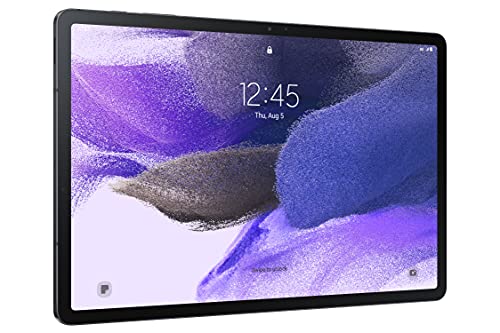
The Galaxy Tab S7 FE leans into screen real estate with its 12.4-inch display, which makes it feel more like a small laptop when propped on a stand. Watching a two-hour movie without squinting, sketching a digital painting with the bundled S Pen, or reviewing a long PDF all benefit from the extra inches. Samsung also designed it to play nicely with their phones and laptops through multi-device connectivity.
For shoppers who already like Samsung’s ecosystem, this one slots in naturally. It does, however, take up more bag space than the 10-inch picks lower on this list.
What Pays Off
- 12.4-inch display is excellent for streaming and split-screen multitasking.
- S Pen included, so you can sketch or annotate from day one.
- Samsung’s multi-device features pair smoothly with Galaxy phones.
Possible Compromises
- Storage tops out smaller than some alternatives, so a microSD card is a smart add-on.
- Larger footprint makes one-handed reading awkward on a crowded subway.
Quick Facts
Best Suited To
Creatives, students, and home viewers who want a generous screen and the comfort of the Samsung ecosystem.
Swap It Out When
The COTGOD 10.1 inch Android 16 Tablet is easier to carry around all day if portability matters more than screen size.
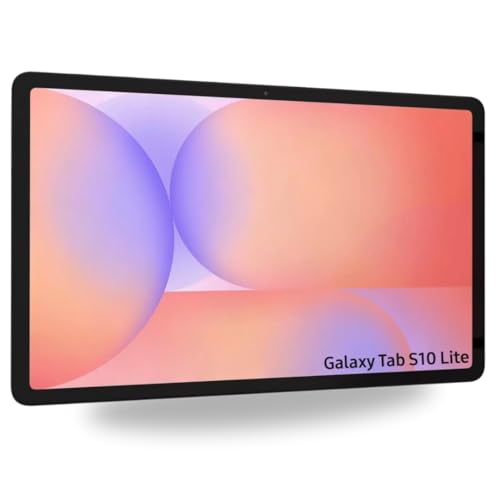
The Galaxy Tab S10 Lite feels like the thoughtful middle child of Samsung’s lineup: newer Android 15 software, a smooth 90Hz display, and bundled S-Pen support at a friendlier price than the flagship Tab S series. The 10.9-inch screen hits a sweet spot for reading, drawing, and binging shows without weighing down your bag. There’s also an included 256GB SD card bundle to ease storage concerns from day one.
Compared to the older Tab S7 FE above, this one trades a slightly smaller display for faster software and Wi-Fi 6. For most daily routines, the trade feels worth it.
Practical Advantages
- Android 15 out of the box keeps things current for longer.
- Smoother 90Hz refresh makes scrolling and drawing feel more responsive.
- Bundled S-Pen removes the accessory decision.
- 256GB microSD in the package adds breathing room for media.
A Few Limitations
- Wi-Fi only, so no native cellular option for hotspot-free days.
Feature Card
Made For
Commuters, students, and home-office workers who want modern software without flagship pricing.
Look Elsewhere When
The Galaxy Tab S7 FE suits shoppers who specifically want the larger 12.4-inch canvas for sketching and split-screen work.
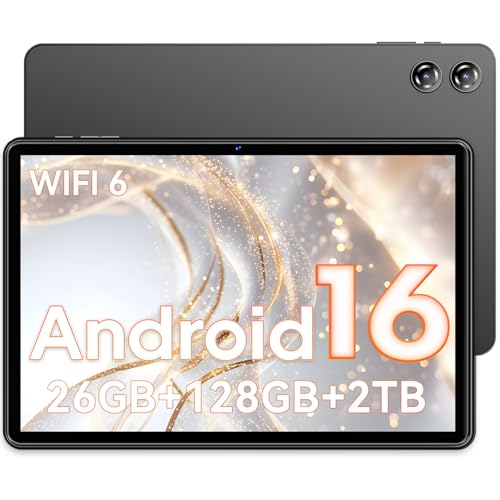
The COTGOD 10-inch tablet aims at the casual end of the market, where the goal is browsing, light streaming, and the occasional video call. The spec sheet promises more RAM than you usually see at this tier, plus a 7000mAh battery that handles a few days of casual use between charges. Android 16 keeps it feeling current even on a tighter budget.
Realistically, the 1280×800 screen resolution isn’t going to wow anyone, and the cameras are basic. For a second household tablet or something for a guest room, though, it’s a sensible call.
Strong Points
- 26GB of effective RAM keeps multitasking from bogging down.
- Large 7000mAh battery for longer stretches between charges.
- Android 16 with Google Play access for mainstream apps.
Worth Noting
- Screen resolution is modest, so text can look soft at arm’s length.
- Camera quality is basic, with owners commonly finding it best for video calls rather than photography.
Who It Suits Best
Casual home users who want a backup device for browsing, recipes, and streaming without overspending.
Consider Something Else When
The COTGOD 10.1 inch Android 16 Tablet below offers a stronger battery life story if you travel often.
If you’ve ever filled up a tablet with downloaded shows, photos, and offline maps, the storage pitch on this JUNINKE model is hard to ignore. The combination of 256GB internal plus 2TB expandable capacity opens the door to hoarding entire libraries of content. The 8000mAh battery and shockproof case are nice extras for travelers who tend to be hard on their gear.
It’s positioned squarely against the COTGOD 10-inch above. Where that one keeps things simple, this one offers more storage headroom and a slightly larger display.
Benefits That Matter
- Massive expandable storage up to 2TB via microSD.
- 8000mAh battery for longer unplugged sessions.
- Shockproof case included for daily commute wear.
Details To Watch
- Real-world app performance depends heavily on how the expandable storage is configured.
Core Details
Right Fit For
Travelers, commuters, and media collectors who treat their tablet like a portable hard drive.
Not Your Match When
The Galaxy Tab S10 Lite is a smarter choice if you want Samsung’s longer software support track record.
This pink JUNINKE kids tablet is built around the realities of being handed to a six-year-old. The bundle includes a keyboard, mouse, EVA foam case, and stylus, so kids can tap, type, or draw without much risk of damage. Underneath, it runs Android 16 with Google Kids Space and Family Link parental controls, which give grown-ups meaningful oversight over screen time and app access.
It’s the more accessory-loaded of the two kids tablets in this roundup. Compared to the JUNINKE 2026 model below, this one ships with more out-of-the-box extras but trades a tougher aesthetic for a pink finish.
Good Reasons To Consider
- Google Kids Space and Family Link parental controls built in.
- Keyboard, mouse, and stylus all included.
- EVA foam case softens drops and bumps during play.
Some Limits To Know
- Younger kids may lose or ignore the extra accessories quickly.
Who Should Grab It
Parents of younger school-age kids who want a full learning station rather than just a media screen.
Where Another Pick Suits Better
The JUNINKE 2026 Kids Tablet below is a better fit if you want a darker, more neutral case for an older child or shared household.
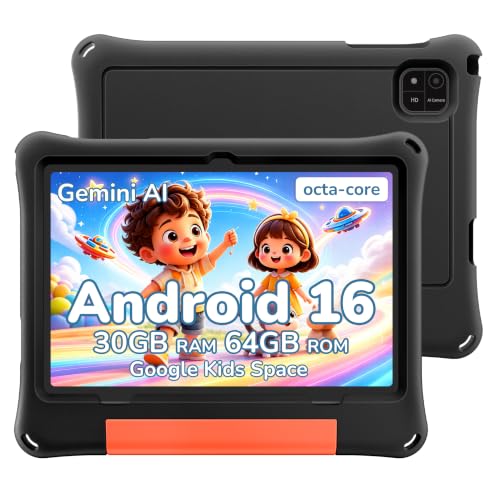
The 2026 JUNINKE kids tablet takes a more pared-back approach than its pink sibling. There’s a black EVA protective case that handles everyday bumps, plus the same Android 16 backbone with Google Kids Space and Family Link for parental management. For households where a tablet gets passed around among siblings, the understated case color is easier to share.
It’s a sensible middle ground between the bundle-heavy pink model above and a no-frills budget tablet. Tweens and shared living rooms are where this one earns its spot.
Noteworthy Benefits
- Durable EVA case in a neutral color that ages well visually.
- Android 16 keeps the software current.
- Google Kids Space content library supports learning and play.
Points To Keep In Mind
- No bundled keyboard or stylus, so older kids may want to add their own accessories.
Perfect Match For
Tweens and shared households who want a kid-friendly tablet with a tougher, more grown-up look.
Skip It When
The pink JUNINKE kids tablet above makes more sense if a younger child will be the primary user and accessories matter.
Long days away from an outlet call for a tablet that doesn’t flinch at heavy use. This COTGOD model pairs an advertised 8-hour battery rating with Wi-Fi 6 and Bluetooth 5.4, so connections stay stable on modern home networks and public hotspots alike. The 24GB of combined RAM and 128GB of internal storage are generous for the tier, and you can expand up to 2TB with a microSD card.
It sits one rung above the smaller COTGOD on this list. Where that one keeps things minimal, this adds faster networking and more memory headroom.
What Makes Sense
- Wi-Fi 6 handles crowded networks better than older standards.
- Long battery life suits travel days and back-to-back meetings.
- Bluetooth 5.4 pairs quickly with modern earbuds and keyboards.
Where It Is Less Suited
- Display resolution tops out at 1280×800, so text is not as crisp as higher-end panels.
Quick Technical Notes
Who Will Love This
Frequent travelers and commuters who rely on stable Wi-Fi and a battery that won’t quit mid-trip.
Wrong Turns To Avoid
The COTGOD 11-inch Gemini AI model above is a better fit if sharper display resolution matters more than battery life.
The COTGOD 11-inch Gemini AI Tablet rounds out the list with the sharpest screen in this price conversation: a 1920×1200 IPS panel that makes streaming and reading noticeably crisper than the 1280×800 alternatives. Widevine L1 support means popular streaming apps play back at their intended quality, and the 8000mAh battery is generous enough for movie marathons.
For shoppers who care more about display quality than bundled accessories, this is the budget-tier option to weigh. Compared to the Galaxy Tab S10 Lite above, it trades brand polish for raw resolution per dollar.
Real-World Strengths
- 1920×1200 IPS display is sharper than most competitors in this tier.
- Widevine L1 enables high-quality streaming from major services.
- Face ID adds a quick unlock option.
- 8000mAh battery handles long viewing sessions.
Points To Note
- Camera system is functional rather than impressive.
- Smaller brands tend to deliver fewer major OS updates over time.
The Right Fit
Movie fans and casual creatives who want a noticeably sharper display without stepping up to a premium flagship.
Where A Sibling Pick Shines
The Samsung Galaxy Tab S10 Lite is worth a look if you’d rather have a brand with a stronger long-term software support track record.
What To Weigh Before Choosing An Android Tablet
Screen size and software generation drive most of the real-world difference between these picks. A 10-inch tablet hits a sweet spot for reading, browsing, and casual sketching, while a 12-inch model like the Galaxy Tab S7 FE feels more like a small laptop replacement. Anything below 10 inches starts to feel cramped for split-screen multitasking or watching shows with a friend.
Storage deserves a second look too. Advertised internal storage shrinks fast once Android and pre-loaded apps take their share, which is why so many of the picks on this list advertise 2TB of expandable capacity via microSD. People who hoard downloaded shows or carry large work files should treat that expansion slot as essential rather than optional.
Software generation matters more than shoppers often realize. Newer Android versions receive security patches and app compatibility for longer, which extends the useful life of the device. The Galaxy Tab S10 Lite and several of the budget COTGOD and JUNINKE models here ship with Android 15 or 16, while the older Galaxy Tab S7 may feel dated sooner depending on use.
Accessories can quietly double the price of a tablet. Bundled keyboards, cases, and stylus support save real money, especially for students setting up a study station. Shoppers planning to draw, type, or travel with the device should check what’s in the box before adding extras.
Smart Buying Notes Across These Picks
Common Shopping Slip Ups
Chasing raw RAM numbers is one trap. Many budget tablets advertise inflated RAM by counting virtual expansion, which feels snappy on day one but can plateau with heavy use. A clearer spec to weigh is the size of the physical RAM, plus the expandability if you want headroom. Skipping the microSD card question is another common miss, since downloaded shows and offline maps eat storage faster than expected. Shoppers who travel or commute should pick a tablet with at least 128GB internal plus expansion.
When Paying More Pays Off
The premium tier earns its keep through software longevity, better displays, and stronger build materials. The Galaxy Tab S10 Lite, for instance, ships with newer Android 15, a smoother 90Hz panel, and Samsung’s longer update window, which together push its useful life further than a budget alternative. Higher resolutions like the 1920×1200 panel on the COTGOD 11-inch also matter if streaming is a primary use case. The honest read is that the upgrade pays off most for shoppers who plan to keep their tablet for three or more years.
Frequently Asked Questions
How much storage do Android tablets really need?
A 128GB tablet handles casual streaming and a moderate app library comfortably. People who download movies, store large photo libraries, or carry work files should look at 256GB or more, ideally with microSD expansion.
Is a stylus worth getting on an Android tablet?
A stylus turns a tablet into a real note-taking and sketching tool, especially on Samsung models with bundled S Pen support. Shoppers who mostly watch video or browse the web will rarely use one, so it makes more sense for students and creatives.
Do kids really need a dedicated kids tablet?
A kids tablet like the JUNINKE models on this list offers parental controls, rugged cases, and curated content libraries that mainstream tablets skip. For younger children, those built-in safeguards save a lot of setup time.
Can Android tablets replace a laptop?
Modern Android tablets handle email, documents, video calls, and light photo editing well, especially with a keyboard. Heavy video production or specialized software still calls for a traditional laptop.
What does Wi-Fi 6 actually change?
Wi-Fi 6 (also known as 802.11ax) handles crowded networks more efficiently and offers faster real-world speeds than older Wi-Fi 5. In a busy household or coffee shop, that translates to fewer buffering moments.
The Takeaway
The right Android tablet depends almost entirely on what you need it to do. The Galaxy Tab S10 Lite hits a smart modern middle ground for daily use, while the Galaxy Tab S7 FE rewards anyone who wants a larger canvas. Budget shoppers get real value from the COTGOD models, and the JUNINKE options cover niche use cases like road-warrior storage or kid-friendly bundles. Match the tablet to your real routine, and the rest tends to fall into place.


