

Your Android tablet can handle serious work, but the on-screen keyboard caps what you can actually do on it. A dedicated keyboard turns quick searches into long emails, casual note-taking into proper writing sessions, and couch browsing into a real workstation. The catch is that not every keyboard plays nicely with Android, and the wrong fit can fight you on key layout, pairing, or portability.
The picks below cover mechanical typefeel, slim travel-friendly designs, and Samsung-specific cases that double as keyboard stands. Each one solves a slightly different problem, so match the keyboard to how you actually use your tablet, not just what looks good in a product photo.
How The Shortlist Stacks Up
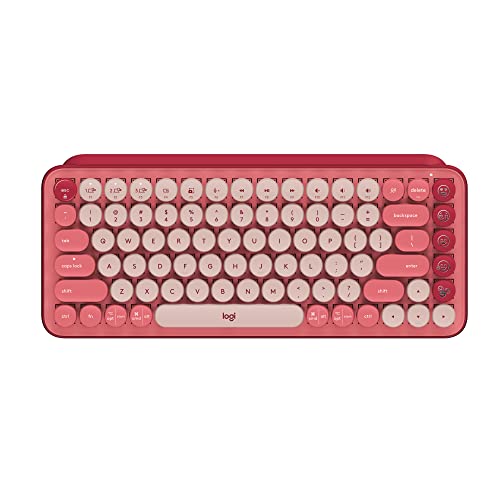
Logitech POP Keys Wireless Mechanical Keyboard (Rose)
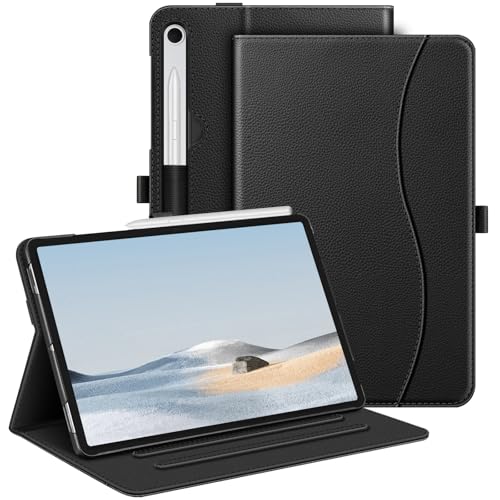
Fintie Multi-Angle Case for Samsung Galaxy Tab S10 Lite/S10 FE/S9 FE 10.9″
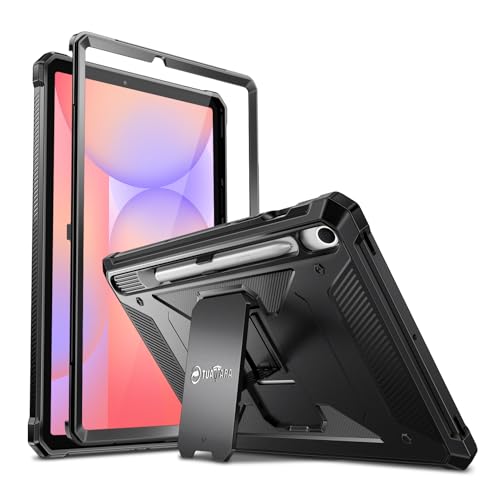
Fintie Shockproof Case for Samsung Galaxy Tab S10 Lite/S10 FE/S9 FE/S9
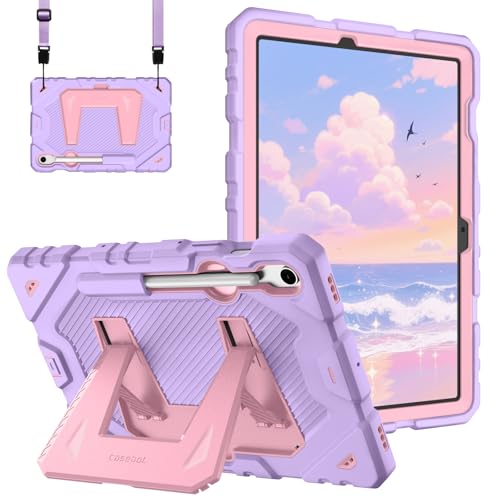
Fintie Kid-Friendly Case for Samsung Galaxy Tab S10 Lite/S10 FE/S9 FE/S9

Logitech K780 Multi-Device Wireless Keyboard with Built-in Cradle (Speckles)

Bluetooth Wireless Keyboard and Mouse Combo, Ultra-Slim Rechargeable (Pink)

Wireless Bluetooth Keyboard and Mouse Combo, Portable Mini Travel (Blue)

Logitech K380 Pebble Wireless Multi-Device Keyboard (Off White)

Bluetooth Wireless Keyboard and Mouse Combo, Ultra-Slim Rechargeable (Blue)
A Breakdown Of The Leading Choices
The POP Keys mechanical keyboard leans into personality in a category full of gray rectangles. The rounded typewriter-style keycaps give your fingers clear targets, and the clicky mechanical switches (the individual switch mechanisms under each key, designed to give a tactile bump and audible click when pressed) deliver a satisfying thock that you can feel without bottoming out hard. For a writer at a kitchen table, that feedback makes long sessions easier on the hands than the flat membrane keys (a thin rubber-dome layer that registers a press when fully compressed) you find on most travel boards.
Connection is wireless over Bluetooth or the included Logi Bolt USB receiver (a small dongle that plugs into your device for a stable, low-latency link). A row of swappable emoji keys along the right side keeps quick reactions close by, and the rose colorway brightens up a neutral workspace. You can pair up to three devices and switch with a button press, which helps when you bounce between an Android tablet, a laptop, and a phone throughout the day.
What Stands Out
- Mechanical switches give real tactile feedback, which most slim tablet keyboards skip.
- Triple-device Bluetooth pairing lets you type on a tablet, then jump to a phone in one tap.
- Swappable emoji keys add personality and quick social-media reactions without menu-diving.
- The compact layout saves desk space while still including a function row.
Things To Consider
- The clicky switches are louder than scissor-switch or membrane keys, so quiet offices may push back.
- No built-in cradle, so you’ll need a separate stand to hold your tablet at eye level.
Who It Suits Best
Writers and casual creators who want a keyboard that feels as expressive as it looks, and who type in spaces where a little keyboard noise is welcome.
Consider Something Else When
The Logitech K780 is the better call for shared offices, since its built-in cradle holds a tablet at a comfortable angle without a separate stand.
This Fintie case is a stand first, a case second, and that ordering shows in daily use. The cover folds into a triangular stand with multiple stop points, so you can tilt the screen back for typing, lean it upright for video, or flatten it for reading. Compared to a single-groove case, that flexibility matters when you switch between writing emails and watching a show on the same device.
Compatibility is the headline: the case is cut for the Samsung Galaxy Tab S10 Lite 5G 10.9-inch (model SM-X400 or X406B), the Tab S10 FE 5G 10.9-inch (SM-X520, X526B, or X528U), the Tab S9 FE 5G 10.9-inch (SM-X510, X516B, or X518U), and the Tab S9 11-inch (SM-X710, X716B, or X718U). Owners of the smaller Tab S9 should not order this case, and the same goes for any non-listed model. Port cutouts line up with the tablet’s speakers, USB-C port, and camera array, and the shell stays slim enough to slide into a backpack sleeve.
Features That Help
- Multiple stand angles reduce neck strain during long typing sessions.
- Direct model compatibility with four popular Samsung tablet lines removes guesswork.
- Folding cover protects the screen when tossed in a bag.
Worth Noting
- No built-in keyboard, so you still need a separate Bluetooth board to match it.
- The PU exterior (a polyurethane-coated synthetic leather) wipes clean but can scuff at the corners over time.
Quick Facts
Made For
Samsung Galaxy Tab owners in the S10 Lite, S10 FE, S9 FE, or S9 families who want a flexible stand without committing to a heavier keyboard case.
A Better Fit Elsewhere
The Fintie Kid-Friendly Case is the smarter pick if the tablet lives in a house with young children, thanks to its grippier, more forgiving build.
If your tablet ends up on job sites, in delivery trucks, or in the hands of anyone with butterfingers, this is the case you reach for. The shell uses a thicker, dual-layer construction with reinforced corners, which is the spot that takes the brunt of a face-down drop. The trade-off is bulk: this is not the case you slide into an evening clutch, but it earns its weight when the alternative is a cracked screen.
Like the Fintie Multi-Angle Case reviewed earlier, fit is locked to four Samsung tablet models: the Tab S10 Lite 5G 10.9-inch (SM-X400 or X406B), Tab S10 FE 5G 10.9-inch (SM-X520, X526B, or X528U), Tab S9 FE 5G 10.9-inch (SM-X510, X516B, or X518U), and Tab S9 11-inch (SM-X710, X716B, or X718U). The case does not include a built-in keyboard, so it pairs best with a separate Bluetooth board like the Logitech K380 or a SHARE SUNSHINE combo.
Points In Its Favor
- Reinforced corners absorb the impact from typical waist-height drops.
- Textured exterior adds grip when carrying the tablet one-handed.
- Same broad Samsung Tab compatibility as the Fintie Multi-Angle Case.
Trade Offs
- Noticeably thicker than the standard Multi-Angle Fintie case, which adds backpack weight.
- No stand or keyboard built in, so you need separate accessories for productivity.
Best Suited To
Field workers, contractors, and parents who want drop protection first and don’t mind carrying a slightly heavier tablet.
Look Elsewhere When
The Fintie Multi-Angle Case is the better pick for productivity on a coffee-shop table, since its adjustable stand angles make long typing sessions easier to manage.
This is the Fintie case to grab when a Samsung tablet is shared across a household or handed to a younger user. The foam-style body wraps the corners and edges, so a dropped tablet is more likely to bounce than crack. The textured grip helps smaller hands hold the device without the case slipping, and the lighter weight keeps the tablet from feeling like a brick during longer reading or learning sessions.
It fits the same four Samsung models as the other Fintie cases in this roundup: the Tab S10 Lite 5G 10.9-inch (SM-X400 or X406B), Tab S10 FE 5G 10.9-inch (SM-X520, X526B, or X528U), Tab S9 FE 5G 10.9-inch (SM-X510, X516B, or X518U), and Tab S9 11-inch (SM-X710, X716B, or X718U). The case skips a built-in keyboard, so plan on pairing it with a separate Bluetooth board if homework or writing is part of the tablet’s daily use.
Useful Highlights
- Foam-padded shell cushions the most common drops for younger users.
- Light build reduces hand fatigue during longer school sessions.
- Cutouts line up cleanly with the listed Samsung Tab models.
Points To Note
- Foam exteriors can show marks from sticky fingers and snack-time use; a quick wipe usually handles it.
- No integrated stand or keyboard, so a productivity setup needs extra accessories.
Perfect Match For
Parents outfitting a shared family tablet, and households where a younger user takes the device to the couch, the car, or the kitchen table.
Swap It Out When
The Fintie Shockproof Case is a more rugged alternative for older kids and teens who treat tablets less gently.
The K780 is the keyboard you put on a permanent desk and forget about. The integrated rubberized slot across the top holds a 10-inch tablet at a comfortable viewing angle, so you can replace a second monitor with a Galaxy Tab in a one-cable home office. The full-size layout includes a number pad, which is a quiet luxury when you spend time in spreadsheets or accounting apps.
Pairing covers Windows, macOS, ChromeOS, iOS, and Android, and the keyboard switches between three paired devices using the F-keys. The round, concave keycaps (slightly dished inward to cradle your fingertip) feel softer than the POP Keys reviewed earlier, and the keystroke is much quieter, which matters in shared workspaces. The speckles colorway adds some warmth without crossing into novelty territory.
A Strong Showing
- Built-in cradle removes the need for a separate tablet stand.
- Full-size layout with number pad suits long-form work.
- Three-device switching works smoothly across Android, iOS, and desktop platforms.
- Quieter typing than mechanical boards, friendlier to nearby coworkers.
Room For Improvement
- Larger footprint than compact boards, so it is not the best for tight desks or travel.
- Uses AAA batteries, which means periodic replacements rather than a rechargeable cycle.
Key Product Details
Who Will Love This
Hybrid workers who dock a tablet next to a laptop and want one quiet, full-size keyboard to drive both screens without a separate stand.
Another Choice May Suit
The Logitech K380 is the better fit for daily commuters and cafe regulars, since its smaller footprint slides into a backpack pocket.
SHARE SUNSHINE’s pink combo delivers a keyboard and a matching mouse in one box, which removes the headache of matching a third-party mouse to a third-party keyboard. The keyboard is low-profile and slim, and the included mouse is compact enough for small hands. Both pieces recharge over a standard cable, so you skip the constant battery swap that comes with cheaper wireless sets.
Compatibility is wide: the combo works with iPad, iPhone, Mac, MacBook, Samsung Galaxy Tab and Note lines, Surface Pro, Windows PCs, and any Bluetooth-enabled Android phone or tablet. That breadth is the real story here. You can move the same combo from a home-office desk to a hotel-room nightstand without re-pairing everything from scratch, which is helpful for anyone working across multiple devices in a single day.
Advantages To Know
- Two-piece set means one purchase covers typing and cursor control.
- Rechargeable batteries cut down on disposable battery waste.
- Broad platform support covers Android, iOS, macOS, and Windows without fuss.
Practical Considerations
- Pink finish shows smudges on the keys over time, so a quick weekly wipe keeps it fresh.
- The compact mouse may feel small for users with larger hands during long sessions.
Right Fit For
Home offices where the tablet is one of several devices, and you want a tidy matching pair without buying components separately.
Where A Sibling Pick Shines
The blue SHARE SUNSHINE combo (covered later) is the better fit if the pink colorway clashes with your workspace.
Where the pink SHARE SUNSHINE combo leans into home-office style, this blue set is built for a carry-on. The keyboard uses a typewriter-inspired round keycap shape, which gives it a smaller footprint than a flat scissor-switch board. The mouse is correspondingly small, and the whole kit slips into a laptop sleeve without taking over the bag.
Bluetooth pairing covers iPad, iPhone, Mac, MacBook Pro, Samsung Galaxy Tab and Note, Surface Pro, and Android phones, so the kit works as a hub-and-spoke setup. The keyboard ships as the only included accessory in the box, so check the listing closely if you need a matching mouse confirmed for your travel kit.
Where It Excels
- Compact typewriter-style layout fits in tight airplane tray tables.
- Quiet keystrokes suit shared lounges and quiet cafes.
- Broad device support covers iOS, macOS, Android, and Windows.
Less Ideal Details
- Smaller key spacing can feel cramped during long writing sprints.
- Round keycaps take a few sessions to adjust to, especially if you touch-type by feel.
Whose Shelf It Belongs On
Frequent flyers and remote workers who pack light and want a single kit that handles tablet, phone, and laptop duty on the road.
Skip It When
The Logitech K780 is the smarter call for a permanent desk setup, since its full layout and built-in cradle handle long workdays more comfortably.
The K380 is the keyboard most reviewers reach for when they need a quiet, compact board for a tablet. The round, low-profile keys have a soft scissor-switch feel, and the typing sound is mild enough for coffee shops and shared apartments. The off-white colorway fits cleanly on a light desk without shouting for attention.
Bluetooth pairing handles up to three devices at once, and the K380 auto-maps familiar shortcuts to the host operating system, so Cmd and Ctrl swap based on whether you’re typing on a Mac, a Windows laptop, or an Android tablet. That automatic OS detection is the small detail that makes the K380 feel less fussy than cheaper boards that require manual toggling between layouts.
Real-World Strengths
- Triple-device Bluetooth pairing with automatic OS layout switching.
- Quiet, low-profile keys work in shared spaces without disturbing neighbors.
- Compact footprint fits in a laptop bag side pocket or a small desk drawer.
Some Limits To Know
- Powered by AAA batteries, so plan on replacements rather than USB recharging.
- No backlight, which makes dim rooms and red-eye flights a typing challenge.
Feature Snapshot
Built With In Mind
Students, writers, and remote workers who type in cafes, libraries, or shared desks and want a small, quiet board that just works with Android.
Not Your Match When
The Logitech K780 is the better pick if you want a number pad, a built-in cradle, and a single home-base keyboard.
Take everything covered about the pink SHARE SUNSHINE combo and shift the colorway to a calmer blue, and you have this set. The function is identical: a slim rechargeable keyboard, a compact wireless mouse, and broad Bluetooth support that covers iPad, iPhone, Mac, MacBook, Samsung Galaxy Tab and Note, Surface Pro, Windows PCs, and any Android phone or tablet. For a quieter workspace, the blue finish hides minor smudges better than the pink version.
The rechargeable batteries in both pieces cut the cost and waste of disposable cells, and the low-profile design means the kit slips into a laptop bag without adding bulk. For shoppers who liked the idea of the pink combo but wanted a more neutral color, this is the straightforward swap.
Benefits That Matter
- Rechargeable keyboard and mouse keep ongoing costs low.
- Blue colorway is easy on the eyes in a bright room.
- Multi-platform support covers Android tablets, iPads, and laptops in one set.
Things To Weigh
- The compact mouse may feel small for users with larger hands during long workdays.
- No dedicated number pad, which limits appeal for spreadsheet-heavy work.
The Right Fit
Shoppers who want a rechargeable keyboard-and-mouse pair in a neutral color, and who already use a mix of Android and other Bluetooth devices at home.
Reach For A Different Pick When
The Logitech K380 is the better fit for pure typing on the go, since its lighter build and automatic OS switching are tuned for a single-board workflow.
What Matters Most Before Choosing Android Tablet Keyboards
Connection Type and Pairing Limits
Bluetooth is the default for most tablet keyboards, and it usually pairs in under a minute. Check the maximum number of paired devices the keyboard supports: budget boards often handle one or two, while multi-device boards like the K380 and K780 cover three. If you bounce between a phone, a tablet, and a laptop daily, three-device pairing saves a lot of menu-diving.
Key Feel and Travel Distance
Key travel (how far a key moves down when pressed) and switch type change the typing experience more than any spec sheet suggests. Mechanical keys give clear feedback and a satisfying click, but they are louder. Scissor-switch keys (an X-shaped plastic mechanism under each keycap that gives a short, even press) sit lower and feel softer, which suits long sessions. Membrane keys (a flat rubber sheet that registers a press) are quiet and cheap, but feedback is mushy. Match the feel to your workspace.
Layout and Android Compatibility
Confirm the keyboard explicitly supports Android before you buy. Some boards map shortcuts to Mac or Windows layouts and ignore Android-specific keys. A compact 60 percent layout saves space, but a number pad helps if you handle spreadsheets. For Samsung Galaxy Tab owners, a case with a stand is often the missing piece that turns a portable board into a real workstation.
Portability, Power, and Build
If you carry the keyboard every day, weight and battery type matter. Rechargeable lithium-ion boards save the cost and waste of disposable cells, but they need a charging cable on long trips. AAA-powered boards last longer on a single set of cells but require spares. A protective sleeve or a hard case extends the life of any keyboard you toss in a backpack regularly.
Key Considerations Across These Picks
Common Shopping Slip Ups
The most common mistake is buying a keyboard without checking Android-specific support. Some boards advertise iOS, Mac, and Windows compatibility and quietly skip Android, which means certain shortcut keys stop working. The second trap is picking a case without confirming the exact tablet model number. Samsung’s Tab S9, S9 FE, S10 FE, and S10 Lite all use different shells, and a near-match can leave your camera or charging port misaligned.
Where The Extra Money Goes
Stepping up to a premium board like the K780 or the POP Keys buys better switches, a sturdier frame, and multi-device pairing. Mechanical switches and a built-in cradle cost more, but they pay off in typing comfort and a cleaner desk. If your tablet is your primary computer, the upgrade usually earns its keep over a year of daily use. For occasional email and note-taking, a budget combo or a compact board covers the basics without the extra cost.


