

Running a small shop, café, or pop-up event means your checkout setup has to work as hard as you do. The right Android tablet POS hardware keeps lines moving, scans reliable, and screens readable under harsh lighting. This roundup pairs full-size Android POS monitors with handheld scanners and dedicated tablets, so you can build a counter station that fits your space and your workflow.
An Overview Of The Picks
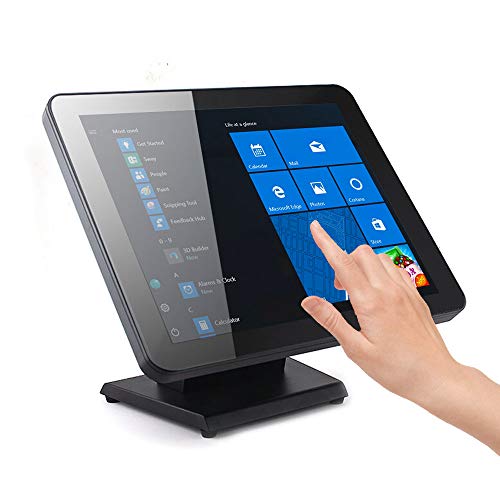
Angel POS 17-Inch Capacitive LED Backlit Multi-Touch Monitor (VGA)

NETUM Upgraded QR Industrial Bluetooth Barcode Scanner with Charging Dock

Inateck 1D Bluetooth Barcode Scanner BCST-70 (2600mAh)

Inateck 1D Wireless Bluetooth Handheld Barcode Scanner (2000mAh)

TABWEE T50 Android 16 Tablet (11 Inch)

NADAMOO Wireless Barcode Scanner 3-in-1 (Purple)
TECLAST Artpad Pro 12.7″ 4G Android 15 Tablet

Vanquisher Android Barcode Scanner H66 (Zebra SE4710)

ANGEL POS 17.3″ FHD Commercial Touchscreen POS Monitor
Inside Each Recommended Option
Counter space gets crowded fast when you stack a register, printer, and payment terminal side by side. The Angel POS 17-inch monitor solves that puzzle with a true flat seamless touchscreen (a panel with no raised bezels between the glass and the frame) that wipes clean in seconds and shrugs off dust in open-air kiosks.
For boutique owners and café managers running a single register, the capacitive touch surface responds to finger taps the same way a phone does. Compared to the Inateck BCST-70 scanner coming up later, this is the screen half of your station rather than the scanning half, so it pairs naturally with a handheld scanner if you want both.
What It Does Well
- Seamless flat edge design keeps crumbs and splashes from lodging in the bezel.
- Capacitive multi-touch means staff can tap, swipe, and zoom like on a phone.
- LED backlight stays readable under bright overhead retail lighting.
- VGA input keeps legacy POS hardware compatible during a phased upgrade.
Worth Noting
- VGA only may feel dated if your POS box relies on HDMI or DisplayPort.
- 17-inch footprint needs a deep counter, so tight pop-up setups may struggle.
- Owners commonly report that a mounting arm helps free desk real estate.
Made For
Single-counter cafés, boutique shops, and salons running legacy POS software through VGA.
Where Another Pick Suits Better
Shoppers needing full HD clarity and HDMI should look at the ANGEL POS Commercial Grade 17.3-inch monitor further down.
Industrial floors do not treat electronics gently, and a scanner that cracks after one fall ends up costing more than it saves. The NETUM RD-1200 is built around that reality with an IP67 rating (meaning it is fully sealed against dust and can survive temporary submersion in water) and a silicone-wrapped body rated to shrug off drops from roughly 12 feet.
For warehouse crews, outdoor market vendors, and event staff working in unpredictable weather, this scanner reads 1D and 2D codes including QR labels on shipping cartons. Compared to the previous Angel POS monitor, this piece tackles scanning rather than the display, so the two complement each other in a full counter build.
A Few Strong Suits
- IP67 sealing shrugs off dust storms and rain-soaked loading docks.
- Drop-tested to roughly 12 feet for accidental tumbles from ladders or shelving.
- Charging dock keeps the unit topped up between shifts without cable fuss.
- Bluetooth pairing means no cable snags across a busy stockroom aisle.
Points To Keep In Mind
- Heavier than a typical retail scanner, so wrist fatigue is worth considering during long shifts.
- Silicone shell may pick up grime that needs a wipe-down in food-handling areas.
- Dock takes up extra outlet space near your charging station.
Feature Snapshot
Right Fit For
Warehouse teams, outdoor event vendors, and anyone scanning in wet or dusty environments.
Skip It When
Counter-only shops that need something lighter should reach for the Inateck BCST-70 instead.
A spacious showroom or back-of-house stockroom punishes scanners with short wireless range, forcing staff to walk each item back to the counter. The Inateck BCST-70 stretches coverage up to 115 feet on its 2600mAh battery, which keeps clerks where the customers are.
Setup takes seconds out of the box, with broad keyboard language support and pairing across POS, iOS, Android, Windows, Mac OS, Linux, and even Raspberry Pi builds. The NETUM scanner above is the tougher industrial sibling; this Inateck is the friendlier retail-floor workhorse.
Standout Benefits
- 115-foot wireless range covers most shop floors without repeaters.
- 2600mAh battery holds up through back-to-back shifts on a single charge.
- Reads damaged or blurry 1D barcodes under both bright and dim lighting.
- Multi-language keyboard layout simplifies international inventory workflows.
- Three-second pairing keeps new staff moving without a long setup ritual.
Honest Caveats
- 1D-only, so it skips QR codes and 2D shipping labels.
- Battery is sealed inside, which means charging rather than swapping spares.
Who It Suits Best
Bookstores, apparel shops, and mid-size retail floors where UPC labels dominate the workflow.
Consider Something Else When
Operations that scan QR or 2D codes should look at the Vanquisher Android Barcode Scanner H66 further along.
Charging cables are the silent downtime tax of any scanner fleet. The Inateck 2000mAh wireless handheld reportedly runs about three months on a single charge, which fits pop-up shops and weekend events that only power up between sales.
The companion Inateck Office app simplifies Bluetooth management and battery monitoring, so even non-technical staff can swap devices between events. It costs you nothing to skip the screen, but you do get a no-fuss scanner for tight budgets.
A Favorable Mix
- Multi-month battery life avoids mid-event charging panics.
- Wireless handheld design keeps counters clear for payments and packaging.
- App-driven configuration means less button-mashing to reprogram.
Where It May Fall Short
- 1D-only, so it misses QR-based loyalty and 2D shipping workflows.
- Smaller battery than the BCST-70, which shortens active scanning windows on heavy days.
- Relies on the Inateck Office app for deeper customization, which may feel limiting without it.
Quick Facts
Best Suited To
Pop-up shops, weekend markets, and small stockrooms that rarely plug in for daily top-ups.
A Better Fit Elsewhere
Shops needing all-day heavy scanning should step up to the Inateck BCST-70 for its larger battery.
Not every shop wants a tethered POS monitor, especially mobile services that bill from a cart or a curbside window. The TABWEE T50 runs Android 16 on an octa-core chip with 24GB of RAM, which is generous headroom for juggling inventory, payments, and a loyalty app simultaneously.
Built-in storage sits at 128GB, plenty of room for offline catalogs and product photos in cafés without reliable Wi-Fi. Pair this tablet with the NADAMOO scanner from item six, and you have a counter station that travels.
Useful Strengths
- Generous RAM headroom keeps multiple POS apps running without reloads.
- 128GB of storage handles offline catalogs and product imagery.
- 11-inch display balances screen real estate with one-handed mobility.
- Android 16 brings the latest OS for current POS app compatibility.
Things To Consider
- Battery life varies with workload, so a charging dock may be needed between events.
- Glossy panel can fight reflections under bright overhead lights.
Whose Shelf It Belongs On
Mobile cafés, food trucks, and small retailers that want a modern Android tablet without a bulky register setup.
Reach For A Different Pick When
Operations needing a larger customer-facing display should consider the TECLAST Artpad Pro coming next.
Mixed-device shops often hit a wall when a scanner only talks to one connection type. The NADAMOO scanner flips between Bluetooth, 2.4G wireless through a USB adapter, and a wired cable, so it follows whatever hardware you swap in.
Compatibility stretches across Windows XP through 10, Mac OS, Windows Mobile, Android, and iOS, which keeps it useful across generations of POS hardware. For teams running a TABWEE tablet alongside an older laptop register, that flexibility is the whole point.
Notable Gains
- Three connection modes cover tablets, laptops, and legacy registers.
- Compact body slips into an apron pocket for curbside and pop-up use.
- Broad OS compatibility reduces setup friction when hardware rotates.
Practical Considerations
- Switching modes takes a manual toggle, so training new staff is worth planning for.
- CCD sensor (a contact-style imager that uses LED light) handles standard 1D codes best; heavy 2D use feels slower than dedicated imagers.
- Plastic shell may scuff with heavy daily drops onto hard floors.
Feature Rundown
Who Should Grab It
Mixed-device shops and cafés that rotate between tablets, laptops, and traditional registers.
Look Elsewhere When
High-volume industrial scanning is a better match for the Vanquisher Android Barcode Scanner H66.
When customers need to see what they are ordering, a small tablet screen falls short. The TECLAST Artpad Pro stretches a 12.7-inch 2K IPS display (a high-resolution panel that holds color at wide viewing angles) with 2176 by 1600 resolution, turning the tablet into a customer-facing order screen.
TDDI panel technology (touch and display driver integration, which layers the touch sensor directly into the LCD) brightens images and speeds up touch response, helpful for quick taps during a rush. With 256GB of storage and 20GB of total RAM, it doubles as a back-office workstation when needed.
What Helps Most
- 12.7-inch 2K panel doubles as a customer-facing order display.
- Wide viewing angles keep images readable from across the counter.
- 256GB of storage handles large product catalogs and loyalty databases.
- Android 15 keeps the OS current for modern POS apps.
Small Caveats
- Larger footprint than an 11-inch tablet, so a sturdy stand or mount is worth planning.
- Drawing stylus adds bulk you may not need for pure checkout work.
Perfect Match For
Restaurants and self-order kiosks that want customers to see and confirm orders in real time.
Swap It Out When
Mobile-only carts that travel light should stick with the TABWEE T50 instead.
When scanning speed defines your throughput, the engine inside the scanner matters more than the brand on the outside. The Vanquisher H66 builds around a Zebra SE4710 scan module (a professional-grade imaging engine used in enterprise logistics), paired with a Qualcomm octa-core processor and Android 13 that upgrades to Android 16.
Wi-Fi 6 plus 4G LTE keeps the device online across warehouses and yard logistics, and the 2.4-meter drop rating handles the worst-case ladder tumble. AER (Android Enterprise Recommended) certification signals compatibility with managed device fleets, a real plus for IT teams.
Where It Helps
- Zebra SE4710 engine reads damaged 1D and 2D codes quickly under warehouse lighting.
- 2.4-meter drop rating survives hard concrete tumbles.
- Removable 4420mAh battery supports hot-swaps across long shifts.
- AER certification eases deployment inside managed Android fleets.
Trade-Offs To Consider
- Enterprise-grade pricing stretches the budget for single-counter shops.
- Bulkier form factor than a slim retail scanner, so holsters help during all-day wear.
- More configuration work upfront to align with existing MDM (mobile device management) software.
Product Snapshot
Built With In Mind
Warehousing teams, logistics operators, and enterprise fleets that need rugged all-day scanning.
Where A Sibling Pick Shines
Smaller shops that just need a counter scanner should look at the NETUM RD-1200 from item two.
Bright retail floors wash out dim panels, so cashiers squint and tap the wrong button. The ANGEL POS 17.3-inch monitor delivers full HD 1920 by 1080 resolution with 10-point capacitive touch, the same sharpness you expect from a laptop screen but built for a working counter.
HDMI and VGA inputs (a digital and an analog video port, respectively) cover modern POS boxes and older cash registers alike, while the waterproof, dustproof seamless surface holds up to kitchen steam and gym wipe-downs. Compared to the 17-inch Angel earlier in this list, the bigger panel and higher resolution make menu screens and inventory grids easier to read at a glance.
The Value In It
- Full HD resolution keeps dense POS menus readable without zooming.
- 10-point capacitive touch supports multi-finger gestures common in modern checkout apps.
- HDMI plus VGA inputs for legacy and current POS boxes.
- Waterproof and dustproof surface handles kitchens, gyms, and outdoor kiosks.
Factors To Consider
- Larger 17.3-inch footprint demands a deep counter or a mounting arm.
- Commercial-grade build adds weight compared to home monitors, so a sturdy mount is wise.
Who Will Love This
Restaurants, gyms, and warehouses that run long hours and need a screen built for constant touch.
Not Your Match When
Mobile or pop-up setups that travel daily should consider the TABWEE T50 tablet instead.
Matching Android Tablet Pos To Your Workflow
The shape of your business decides which pieces earn their keep. A fixed counter station leans toward a sealed touchscreen monitor plus a desktop scanner, while a mobile café or food truck benefits more from a tablet paired with a wireless handheld. Define your scan volume first: shops processing mostly printed UPC labels can save money with a 1D scanner, while QR-driven loyalty programs and shipping workflows demand 2D imaging.
Connectivity matters more than most shoppers expect. Bluetooth feels modern but can drop in metal-heavy stockrooms, where a 2.4G USB adapter or wired scanner stays steadier. Confirm your POS software supports the device before committing, and check that the scanner works with your specific Android, iOS, or Windows terminal.
Display size is the next call. A 17-inch screen reads well across a wide counter but overwhelms a narrow espresso bar, where an 11-inch tablet feels just right. For customer-facing order screens, a 12-inch-plus tablet or monitor invites customer interaction and reduces order errors.
Durability rounds out the decision. Outdoor markets, warehouses, and busy kitchens punish electronics, so an IP-rated scanner or a sealed touchscreen panel pays off in fewer replacements. Match the build quality to your environment, and your Android tablet POS hardware will keep up with the daily grind.
Smart Choices Behind The Specs
Pitfalls Shoppers Hit
The biggest trap is buying a scanner that reads the wrong code format. Confirm whether your labels are 1D UPCs or 2D QR codes before deciding, since a 1D-only scanner is useless for QR loyalty programs. Another common slip is overlooking operating system compatibility, especially when pairing an older POS box with a new Bluetooth scanner.
Where The Extra Money Goes
Higher-tier scanners like the Vanquisher H66 cost more because of professional-grade imaging engines and rugged housings. That investment pays off in warehouses and outdoor venues where standard retail scanners fail quickly. Premium monitors add higher resolution and sealed surfaces, which matter in harsh lighting or steamy kitchens, but most small shops can start with a sealed flat panel and upgrade later if needed.
Frequently Asked Questions
What Is An Android Tablet Pos?
An Android tablet POS is a checkout setup built around an Android device, paired with peripherals like barcode scanners and receipt printers. It replaces traditional cash registers with mobile-friendly hardware.
Do I Need A Dedicated Scanner Or Can A Tablet Camera Work?
A tablet camera handles occasional scans but slows down at volume, so a dedicated scanner keeps lines moving. For busy retail floors and warehouses, a handheld scanner is worth the upgrade.
What Is The Difference Between 1D And 2D Barcode Scanners?
1D scanners read traditional barcodes like UPC labels, while 2D scanners also read QR codes and data matrix labels. Choose 2D if your workflow includes QR loyalty codes or modern shipping labels.
Are POS Touchscreens Different From Home Monitors?
POS touchscreens use sealed flat surfaces rated for dust and water, built for constant touch. Home monitors lack that sealing, so they wear out quickly in busy retail environments.
How Do I Know A Scanner Will Work With My POS Software?
Check the supported operating systems on the scanner listing and compare them with your POS software requirements. Most modern scanners support Windows, Android, iOS, and macOS, but always verify before purchasing.
Bottom Line
Your ideal Android tablet POS setup is the one that matches your counter size, your scan volume, and your tolerance for rugged gear. Match the monitor to the space, the scanner to the labels, and the tablet to your mobility needs, and the rest of the workflow tends to fall into place.


