

Wall-mounting a tablet sounds simple until you actually try to live with one. Maybe you want a recipe screen in the kitchen that doesn’t slide off the counter. Maybe the front desk needs a self-check-in kiosk. Maybe the kids’ tablet finally lives in one place, charging where you can always find it. The right mount quietly removes a daily annoyance, and the wrong one wobbles, blocks the charging cable, or holds a screen at chin height.
This roundup covers ten wall mounts designed for Android tablets, iPads, and similar devices. The picks range from heavy-duty locking enclosures built for retail to slim under-cabinet brackets that hold a tablet in a kitchen or home office. Each one is reviewed for real-world fit, so you can match the mount to your wall, your device, and your daily habits.
An Overview Of The Picks

AboveTEK Universal Tablet Wall Mount Anti-Theft Locking Enclosure

IFCASE Aluminum Universal Wall Phone & Tablet Mount Silver
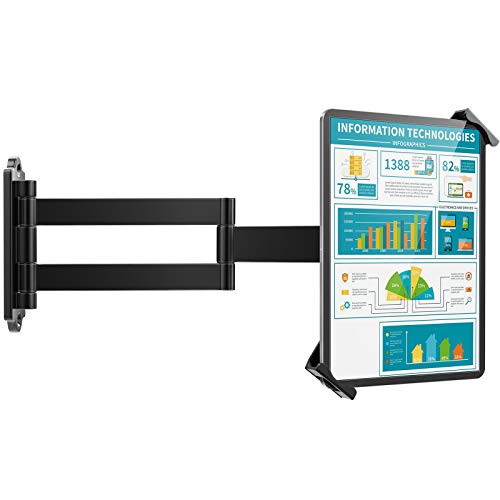
AboveTEK 360° Tablet Wall Mount Extension Arm Black

NOTMBESTM Universal Tablet Wall Mount for iPad Black
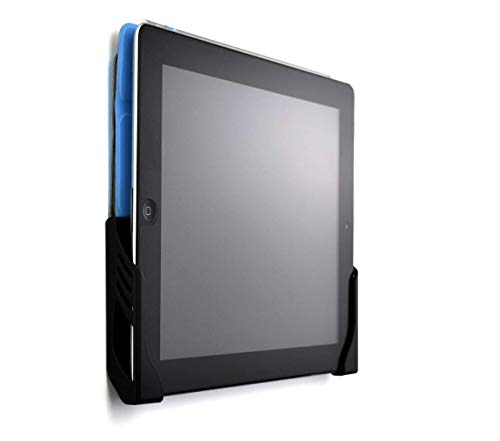
Dockem Koala Tablet Wall Mount Screw-in Black Brackets

Mount-It! Universal Tablet Wall Mount Steel Enclosure

AboveTEK 360° iPad Wall Holder Retail & Business Black

NEDIS 7-12 Inch Tablet Holder Wall Mount
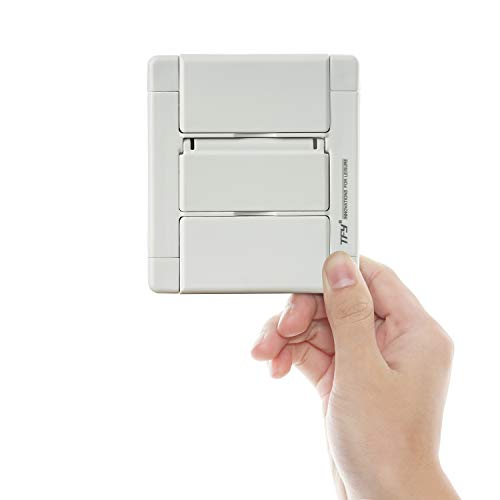
TFY Wall Mount Holder Tablets & Smartphones White
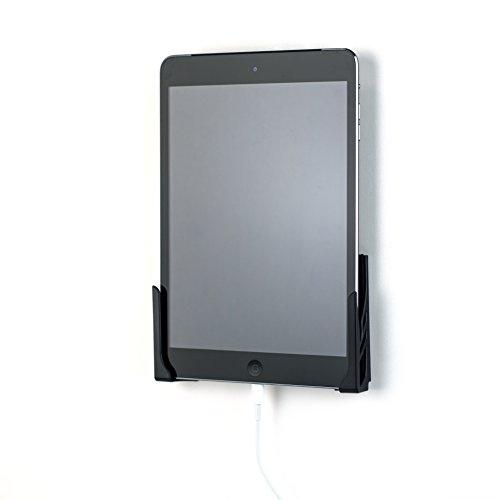
Dockem Koala Wall Mount 2.0 Damage-Free Black
Taking A Closer Look At The Options
Mounting a tablet in a lobby, retail counter, or shared workspace means worrying about theft, and that is exactly where the AboveTEK Universal Tablet Wall Mount Anti-Theft Locking Enclosure earns its keep. The body is heavy-duty aluminum rather than plastic, and the locking closure uses a tamper-proof screw system instead of a key, so you won’t end up hunting for a missing keyring the moment someone wants to swap devices.
It fits tablets from 9.7″ to 13″ and up to about 0.47 inches thick, which covers most modern iPad Pro, iPad Air, and Galaxy Tab models in standard cases. VESA compatibility (the standard mounting hole pattern used on monitors and arms) means you can pair it with articulating arms if portrait and landscape both matter. For shops and offices that need a steady, theft-resistant screen, this is the starting point.
Useful Strengths
- Locking aluminum enclosure deters casual theft in lobbies and shared spaces
- Wide 9.7″ to 13″ device range future-proofs against the next tablet refresh
- VESA mounting works with most third-party arms for easier repositioning
- Tamper-proof screw system means no keys to lose or duplicate
- Sturdy aluminum frame holds up to daily tapping in checkout-style setups
Points To Keep In Mind
- Overkill for a bedside or kitchen use case where locking isn’t needed
- Bulkier than simple cradle mounts, so it looks out of place in a casual living room
- Tamper-proof screw adds a step each time you want to remove the tablet
Key Specs
Who It Suits Best
Small business owners and facility managers who need a secure, always-on tablet at a counter, kiosk, or reception desk.
Look Elsewhere When
Home cooks and renters should reach for the IFCASE Aluminum Universal Wall Phone & Tablet Mount, which trades the locking enclosure for a lighter aluminum body and an everyday-friendly footprint.
The IFCASE Aluminum Universal Wall Phone & Tablet Mount does something the bulkier enclosures ignore: it gets out of the way. The aluminum cradle holds a phone or tablet against a wall in a tile shower, beside a kitchen counter, or near a workshop sink, and a small hook at the bottom manages the charging cable so it doesn’t drape across the tile.
Compatibility is generous, covering iPad, iPad Mini, iPad Air, iPad Pro, Galaxy Tab, and most Android tablets, plus iPhone 17, 16, 15, 14, 13, 12, and 11 series, Galaxy S25, S24, S23, and Pixel phones. For anyone who wants one tidy mount instead of separate bedside and kitchen stands, this is the one that earns a permanent spot on the wall.
Strong Points
- Aluminum body holds up to humidity in bathrooms and kitchens
- Cable hook keeps charging cords tucked and visible
- Accepts phones and tablets, so one mount covers two rooms
- Compact footprint suits narrow spaces between tile and cabinetry
Worth Noting
- No locking mechanism, so it’s not for unattended public spaces
- Less adjustable angle than the swiveling arm mounts covered later
Made For
Homeowners who want a single wall mount that handles both phone and tablet duty in kitchens, bathrooms, or workshops.
Consider Something Else When
Shop owners who need theft deterrence should step up to the AboveTEK Universal Tablet Wall Mount Anti-Theft Locking Enclosure, which adds the tamper-proof screw closure.
Most wall mounts fix a tablet at one angle, but the AboveTEK 360° Tablet Wall Mount Extension Arm reaches, tilts, and rotates to wherever you’re working. The articulating extension pulls a tablet out from the wall and toward you, which makes it far easier to tap a screen while cooking or reading. A security lock and key add a measure of theft protection that the lighter IFCASE cradle doesn’t offer.
It accepts 7″ to 11″ tablets including iPad, iPad Pro, iPad Mini, Surface, Galaxy Tab, Pixel Slate, and Fire. Under-cabinet and wall-mount options both work, so you can park it beside a stovetop or angle it across a standing desk. Compared to the IFCASE cradle, this is the pick when you actually want the screen to move with you.
Real-World Strengths
- Extension arm pulls the tablet toward you for closer reading
- Full 360° rotation switches between portrait and landscape instantly
- Lock and key deters grab-and-go theft in shared kitchens
- Works under cabinets or on flat walls, so placement is flexible
Trade Offs
- More moving parts mean more frequent joint tightening over time
- Heavier than a simple cradle, so wall anchors matter for safe install
Right Fit For
Home cooks and readers who want a tablet at eye level that can swing out of the way when not in use.
Skip It When
Anyone running a fixed retail counter should consider the Mount-It! Universal Tablet Wall Mount Steel Enclosure, which trades the swing arm for a sturdier fixed frame.
The NOTMBESTM Universal Tablet Wall Mount for iPad is a refreshingly simple slot-style cradle. Two L-shaped brackets form a slot roughly 16 mm wide, and EVA pads (a soft foam padding that protects the device finish) cushion whatever slides in. The slot stores devices horizontally or vertically, and a reserved charging port keeps a cable from bending awkwardly.
Compatibility stretches from Amazon Fire, Samsung, and Android tablets to iPhone 8 through 14, plus most Kindles and e-readers. It doesn’t swivel or lock, but for a bedroom wall or a homework station, the no-frills design tends to disappear once the tablet clicks in.
Useful Highlights
- EVA foam pads protect the device finish over long holds
- Reserved charging port keeps the cable routing tidy
- Two-piece slot design accepts tablets stored in either orientation
- Works for phones, tablets, and e-readers in the same slot range
Some Limits To Know
- Fixed slot angle doesn’t allow tilting for glare control
- No locking, so it isn’t suited to public or shared spaces
Best Suited To
Bedroom, dorm, and home-office users who want a tidy slot to drop a tablet in for charging overnight.
Swap It Out When
Anyone who wants a damage-free, no-drill install should choose the Dockem Koala Wall Mount 2.0, which offers 3M Command adhesive strips alongside a screw option.
The Dockem Koala Tablet Wall Mount Screw-in version sticks to the basics, and that’s why it works. Two black brackets mount to drywall with included screws and anchors, then hold any device up to about 11 mm thick. Built-in cord clips turn the bracket pair into a small charging dock, so the tablet charges while it sits on the wall.
Installation calls for a hammer and a Phillips screwdriver, and on studs or tougher walls you may need a drill or alternate screws. For a kitchen, bedroom, or home gym, this is a tidy way to dock a tablet without giving up an entire counter to a stand.
Practical Pluses
- Built-in cord clips create a charging dock on the wall
- Two-piece bracket design accepts different tablet widths easily
- Lightweight install uses common household tools
- Brackets hold the device firmly without obstructing the screen
Practical Considerations
- Drywall-only convenience assumes a stud isn’t always easy to hit
- No swivel or tilt, so glare control depends on placement
Who Will Love This
DIY-minded homeowners who want a no-fuss dock they can install with a basic tool kit.
Another Choice May Suit
Renters who can’t drill should pick the Dockem Koala Wall Mount 2.0, which adds a 3M adhesive option for damage-free install.
The Mount-It! Universal Tablet Wall Mount Steel Enclosure treats a wall-mounted tablet like a piece of professional AV equipment. The steel enclosure keeps a tablet accessible but secured in offices, retail counters, restaurants, hotels, and libraries, and the broad compatibility list covers iPad, Galaxy Tab, Surface Pro, and Lenovo Tab from 9.7″ to 13.1″.
Where the AboveTEK locking model focuses on a tamper-proof screw, this one leans into a fixed steel frame that signals permanence. It is built for environments where the tablet needs to stay put for weeks at a time and where a casual passerby isn’t supposed to walk off with it.
A Few Highlights
- Steel enclosure suits heavy-traffic commercial installs
- Wide 9.7″ to 13.1″ range covers most professional tablets
- Fixed-mount design feels stable even with daily tap-and-type use
- Neutral styling blends into reception and counter spaces
Where It May Fall Short
- Heavier steel frame needs careful wall-anchor selection
- Less flexibility than the AboveTEK swing arm for kitchen use
Perfect Match For
IT teams and operations staff setting up tablets in lobbies, libraries, hotel counters, or retail floors.
Reach For A Different Pick When
Home cooks who want a swinging arm should instead consider the AboveTEK 360° Tablet Wall Mount Extension Arm, which adds reach and rotation.
The AboveTEK 360° iPad Wall Holder for Retail & Business is the same AboveTEK swing-arm family as pick 3, tuned for commercial rooms. It handles classrooms, conference rooms, recording studios, food delivery counters, healthcare facilities, virtual offices, gyms, and under-cabinet kitchen installs. The lock and key keep the tablet put when staff move between rooms.
360° rotation covers portrait and landscape modes, and a flexible joint tilts the screen to cut glare from overhead lighting. It accepts 7″ to 11″ tablets, including iPad, iPad Pro, iPad Mini, and Galaxy Tab. For shared workspaces, the lock makes this a noticeably different pick from the IFCASE aluminum cradle.
Everyday Wins
- 360° rotation supports portrait menus and landscape video calls
- Lock and key adds theft deterrence for shared commercial rooms
- Flexible joint tilts to reduce overhead glare
- Fits classrooms, gyms, kitchens, and reception counters
Things To Weigh
- Slightly different mount design than pick 3 may suit some walls better
- More components than a fixed cradle, so install takes longer
Who Should Grab It
Facility managers, trainers, and small business owners running tablets in classrooms, gyms, or service counters.
Where Another Pick Suits Better
Renters in apartment buildings may prefer the Dockem Koala Wall Mount 2.0, which avoids drilling entirely when paired with the 3M adhesive option.
The NEDIS 7-12 Inch Tablet Holder handles a tablet in either orientation, which is more useful than it sounds. Mount it on a wall or inside a cabinet, then tilt, swivel, and turn the screen to wherever you’re sitting. The clamp-style grip accommodates 7″ to 12″ tablets, and the bracket can be mounted vertically to fit tight spaces.
The clamp feature is built for quick install, and all necessary mounting materials come in the box. For homes that move tablets between the kitchen, bedroom, and home office, the multi-position clamp earns its keep.
What It Does Well
- Clamp-style bracket supports width and length orientations
- Mounts on walls or inside cabinets for hidden installs
- Flexible tilt and swivel reduce glare from different angles
- Vertical mount option fits narrow wall sections
Details To Watch
- Clamp tension should be checked over time for heavier tablets
- Less heavy-duty than the Mount-It! steel enclosure for commercial use
Built With In Mind
Home users who want one wall mount that adapts to whichever room they bring the tablet into.
A Better Fit Elsewhere
Anyone needing a sturdier public-facing install should look at the Mount-It! Universal Tablet Wall Mount Steel Enclosure, which is built for heavier commercial traffic.
The TFY Wall Mount Holder for Tablets & Smartphones is the smallest-footprint option in this roundup, and that’s the point. The slim white cradle accepts iPhone Air, 17 Pro Max, 16, 15 Plus, 14 Pro, 13, 12 Pro, 11, Xs Max, Xs, XR, SE, Galaxy S24, Mate 70 Pro, and iPad Pro 10.5-inch, iPad Air, and Mini models, fitting devices between roughly 2.7″ and 7.4″ wide.
Install is straightforward, and the clamped device can be adjusted slightly to dial in the viewing angle. For narrow spaces beside a desk or inside a closet charging nook, this compact mount is hard to beat.
The Upside
- Compact white body suits minimalist bedrooms and offices
- Wide device fit covers phones and small tablets in one cradle
- Simple clamp install needs only basic mounting hardware
- Adjustable angle accommodates standing or seated viewing
Less Ideal Details
- Not designed for larger tablets above 7.4″ wide
- Plastic cradle feels lighter than the aluminum IFCASE option
The Right Fit
Apartment dwellers and minimalists who want a small, tidy wall mount for phones and compact tablets.
Not Your Match When
Anyone running a larger tablet should reach for the AboveTEK Universal Tablet Wall Mount Anti-Theft Locking Enclosure, which scales up to 13″ devices.
The Dockem Koala Wall Mount 2.0 makes a point of leaving the wall alone. Two setup options come in the box: 3M Command Adhesive strips rated to hold up to 5 lb each, or screws and anchors for a more permanent mount. That dual approach is the difference between a deposit-friendly install and a wall you need to patch when you move.
Two separate brackets adjust to fit any device up to 13 mm thick, and many users can leave protective cases on as long as the total thickness stays under that limit. Compatibility covers iPad 1 through Pro, Galaxy Tab and Note, Google Nexus, and Microsoft Surface. For renters, this is the most landlord-proof wall dock in the roundup.
Advantages To Know
- 3M Command option avoids drilling and wall repair
- Two-piece bracket design fits a wide range of device widths
- Often works with protective cases left on the device
- Comes with both adhesive and screw hardware for either install
Honest Caveats
- Adhesive strips are best on smooth, clean paint and may need re-taping over time
- No swivel, so positioning depends on where you mount it
Whose Shelf It Belongs On
Renters, dorm residents, and travelers who want a clean wall dock without risking their security deposit.
Wrong Turns To Avoid
For commercial or shared installs, the AboveTEK Universal Tablet Wall Mount Anti-Theft Locking Enclosure is a stronger choice, since it offers tamper-proof security beyond what adhesive strips can provide.
What To Weigh Before Picking A Wall Mount
Three attributes decide whether a wall mount disappears into your routine or becomes a daily annoyance. First, device fit, meaning the screen size range and the maximum thickness the mount accepts. A mount that fits a 10-inch tablet in a slim case may not accept the same tablet in a rugged case, so checking both dimensions prevents returns. Second, mounting surface, which covers drywall, tile, brick, and under-cabinet options. Adhesive strips work on smooth painted surfaces, but tile and brick need anchors or a stud-grade install. Third, the use profile, where a kitchen recipe screen, a retail kiosk, and a bedside dock all reward different priorities like tilt, security, or a clean cable path.
Reader profile matters just as much. A renter who moves yearly is served by damage-free adhesive. A small business with foot traffic needs a locking enclosure. A home cook who follows recipes hands-free benefits most from a swing arm. Picking the mount that matches your wall and your habits tends to be more useful than chasing the heaviest build.
A few practical details show up once the mount is on the wall. Cable routing varies widely, with cord clips and reserved ports making a real difference in tidy installs. Joints on swing arms loosen over time, so occasional tightening is part of ownership. Heavier steel frames demand better anchors, especially on drywall without a stud.
Real Tradeoffs Most Shoppers Miss
Common Buying Slip Ups
A frequent mistake is choosing a mount by screen size alone and ignoring case thickness, which leads to a tablet that almost fits. Another is mounting on drywall without confirming a stud or using proper anchors, which is how mounts end up on the floor with a chunk of wall attached. Finally, some shoppers skip cable routing until after install, then run a charging cable across a tile line where it collects dust.
Where The Extra Money Goes
Higher-tier mounts pay for materials like aluminum and steel instead of plastic, which improves longevity in humid kitchens and busy lobbies. They also tend to include locking hardware, smoother swivel joints, and wider VESA compatibility (the standard hole pattern used to attach monitors and arms). For shops, gyms, and shared offices, the upgrade tends to pay for itself in fewer replacements. For a single bedroom or home office, the lower-cost options usually do the job.


