

Digital sketching used to mean tethering yourself to a workstation, but modern Android tablets have changed that. Today’s options run full creative apps, pack responsive styluses, and feel light enough to toss in a backpack. The challenge is that “drawing tablet” now covers everything from stripped-down general-purpose slates with bundled pens to dedicated standalone canvases built specifically for art. Knowing the difference matters more than spec sheets suggest.
This list is for hobbyists opening their first sketch app, illustration students building a portfolio, and working artists who want a travel-friendly second screen. Every pick below earns its place for a different reason, and each one maps to a clear type of creator.
A Quick View Of The Lineup

Samsung Galaxy Tab S6 Lite 10.4″ 64GB WiFi Tablet (Oxford Gray)

Samsung Galaxy Tab S7 Wi-Fi 256GB (Mystic Navy)

RubensTab T14 Drawing Tablet 14.1″ FHD Standalone

Samsung Galaxy Tab S6 Lite 10.4″ 128GB WiFi Tablet

Samsung Galaxy Tab S6 10.5″ 128GB WiFi Tablet

Frunsi T8 Standalone Drawing Tablet 8″
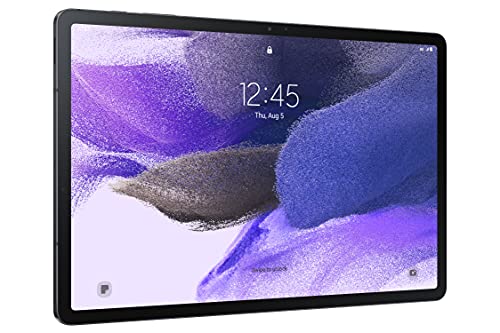
Samsung Galaxy Tab S7 FE 12.4″ 64GB WiFi Tablet

RubensTab T11 Pro Standalone Drawing Tablet
AOC 10 Inch Android 16 Tablet, 120Hz Display
A Breakdown Of The Leading Choices
The Tab S6 Lite earns its place here because it threads a needle most competitors miss: a pressure-sensitive S Pen in the box, a slim metal body, and a price that doesn’t scare off casual buyers. In daily sketching sessions around a kitchen table or coffee shop, the 10.4-inch display gives enough room for full-page illustrations without forcing you to lug a laptop. The One UI interface on Android keeps navigation familiar even for first-time tablet owners.
For someone testing whether digital art clicks for them, this is the lowest-friction way to find out. The included S Pen magnetically snaps to the side for storage and charges without cables, which removes one of the small annoyances that often breaks early habits. Compared to dedicated art tablets later in this list, the S6 Lite relies on general app compatibility, which suits hobbyists more than working pros.
Where It Helps
- Included S Pen means no extra accessory purchase to start sketching
- Light enough for one-handed reading and reference on the couch
- Slim metal build feels sturdier than the price suggests
- Runs mainstream apps like Samsung Notes and popular drawing suites smoothly
Points To Note
- The international model variant may have different warranty coverage depending on your region
- 64GB fills up fast with layered illustration files, so a memory card is worth planning for
- Screen brightness can feel modest outdoors in direct sunlight
Quick Facts
Made For
Beginners and casual sketchers who want a real stylus and a familiar Android experience without overspending.
Consider Something Else When
The Samsung Galaxy Tab S7 FE 12.4″ WiFi Tablet fits better if you sketch large compositions and want a noticeably bigger canvas.
The Tab S7 jumps up the ladder with a redesigned S Pen that drops input lag noticeably during long brush strokes. In timed sketching drills, the responsiveness matters more than resolution specs suggest, and the 256GB storage swallows hundreds of layered PSD files without breaking a sweat. The Mystic Navy finish looks understated next to flashier alternatives, which most working artists probably prefer.
Illustration students handling multiple subjects a semester will appreciate how this tablet behaves like a portable studio. It pairs nicely with a Bluetooth keyboard when the workload shifts from drawing to writing, and the battery holds up through a full day of classes. Compared to the S6 Lite covered earlier, this model trades a touch of portability for meaningful horsepower.
Bright Spots
- Low-latency S Pen feels closer to drawing on paper than older models
- 256GB internal storage holds large project archives without constant cloud juggling
- Fast mobile processor keeps multi-app workflows responsive
- Battery life stretches across full work or study days
Trade Offs
- Heavier than the S6 Lite, so extended one-handed use tires the wrist faster
- Keyboard accessory sold separately if you want a laptop-style setup
- Fingerprint smudges on the metal back require regular wiping
Whose Shelf It Belongs On
Illustration students and pros who want snappy pen response and enough storage to keep projects local.
Skip It When
The RubensTab T14 Drawing Tablet 14.1″ FHD Standalone suits you better if your priority is sketching without tethering to other devices at all.
The RubensTab T14 takes a different approach from the Samsung entries above: it ships as a dedicated drawing tablet that runs its own apps without needing a paired computer. The 14.1-inch Full HD IPS panel gives plenty of room for compositional thumbnails and final renders alike, and the wide viewing angles help when you flip the device to show work to a client. Frunsi built this for artists who want to grab the tablet and go.
On a long train ride or a park bench, the standalone design feels liberating, since nothing breaks the creative flow when you set it down. Pre-installed drawing apps and tutorials shorten the setup learning curve for newer artists. Compared to the RubensTab T11 Pro covered later, this model trades portability for screen real estate, which is the right call for studio-leaning workflows.
Useful Highlights
- Full HD IPS display renders color and detail accurately across wide angles
- Octa-core CPU handles layered files without long save waits
- Comes with drawing apps and tutorials for a gentler learning ramp
- Bonus accessories in the box extend value beyond the tablet itself
Small Caveats
- App ecosystem is more limited than mainstream Android stores
- Larger footprint makes it less comfortable on a lap than a 10-inch slate
- Battery life varies widely depending on which drawing app you push hardest
Right Fit For
Traveling artists and plein air sketchers who want a dedicated canvas that works without extra hardware.
Look Elsewhere When
The Samsung Galaxy Tab S7 FE 12.4″ WiFi Tablet makes more sense if you need mainstream app compatibility and a familiar Samsung stylus experience.
The 128GB version of the Tab S6 Lite answers the most common complaint about the 64GB model reviewed earlier: too little breathing room for a growing portfolio. In a semester of art school, students routinely accumulate gigabytes of reference, brush packs, and in-progress pieces, so doubling the storage headroom feels like a quiet upgrade that pays off daily. The slim metal body and dual speakers carry over unchanged.
Casual creators sketching a few evenings a week get a comfortable middle ground between the entry S6 Lite and the more powerful Tab S7. The S Pen still ships in the box, so there is no surprise accessory trip after unboxing. Against the RubensTab T14 above, this Samsung option trades standalone app curation for the wider Android ecosystem.
Noteworthy Benefits
- Doubled internal storage keeps more projects local without an SD card
- Crystal clear display handles color work and reading reference files comfortably
- Long-lasting battery supports extended sketching sessions away from outlets
- Dual speakers help when reviewing video tutorials or mood-board clips
Honest Caveats
- Still uses the older S Pen design with slightly more lag than the Tab S7
- WiFi only means no mobile data option for sketching on cellular networks
- Color accuracy is solid for hobbies, though pros may want wider gamut
Built With In Mind
Students and hobby creators who want a balanced Samsung tablet with extra storage and a familiar stylus.
Reach For A Different Pick When
The Samsung Galaxy Tab S6 10.5″ 128GB WiFi Tablet suits you more if you want the AMOLED upgrade and a richer media experience.
The original Tab S6 is where Samsung’s tablet design language first felt properly premium, and that legacy still shows up in the Super AMOLED edge-to-edge display. For visual artists judging color accuracy on the fly, the deeper contrast and richer blacks translate directly into how an illustration reads on screen. Quad speakers tuned by AKG make a difference when sketching while streaming reference playlists or tutorial videos.
The included S Pen attaches magnetically, charges on contact, and adds a remote shutter button that doubles as a presentation clicker during portfolio reviews. The 2-in-1 keyboard capability (sold separately) opens up laptop-style work without buying a second device. Compared to the S6 Lite versions earlier in this list, the S6 steps up meaningfully for creators who care about display quality.
What Stands Out
- Super AMOLED display delivers deeper blacks and richer color than LCD siblings
- Quad AKG-tuned speakers give fuller audio for tutorials and media
- Magnetic S Pen storage and charging keep the stylus ready without cables
- Fast mobile processor keeps multitasking responsive across creative apps
Where It Is Less Suited
- Keyboard accessory is sold separately and adds to total cost
- Rose Blush color option may show wear more visibly than darker finishes
- Older generation means shorter future software update runway than newer models
Best Suited To
Visual artists and designers who prioritize display quality and richer media playback while sketching.
A Better Fit Elsewhere
The AOC 10 Inch Android 16 Tablet, 120Hz Display fits better if smoother animation work and a high-refresh screen matter more than color depth.
The T8 is the smallest dedicated drawing tablet in this lineup, and that size is the entire point. For commuters sketching on a train, or hobby artists who want a pocketable second canvas, an 8-inch slate slides into bags that would reject a 12-inch model. Android 13 keeps the interface familiar, and the 1200×800 display handles thumbnail work and color studies without fuss.
Running independent of a computer, the T8 fits the same standalone philosophy as the larger RubensTab siblings reviewed elsewhere here. You trade screen area for portability, which is the honest trade-off to weigh. The compact form also makes it a sensible pick for younger creators building early habits.
Features That Help
- Compact 8-inch form slips into bags and even larger jacket pockets
- Standalone operation means no tether to a PC or phone
- Android 13 keeps the interface modern and app-compatible
- Lightweight body reduces fatigue during extended held sketching
Things To Consider
- Smaller canvas feels cramped for detailed character or landscape work
- Resolution tops out at 1200×800, which limits fine line detail on screen
- Drawing app selection is narrower than mainstream Android stores
Who Should Grab It
Sketchbook joggers and commuters who want a pocketable canvas for quick studies and warm-up doodles.
Swap It Out When
The RubensTab T11 Pro Standalone Drawing Tablet fits better if you want more canvas area without giving up standalone convenience.
The Tab S7 FE delivers the largest screen in Samsung’s FE (Fan Edition) line, which matters more for illustrators than spec sheets imply. At 12.4 inches, you can keep tool palettes open without sacrificing canvas area, and the redesigned S Pen feels closer to a real marker than older generations. Long battery life means a full day of cafe sketching without hunting for an outlet.
Multi-device connectivity lets you mirror or extend a Samsung phone or laptop, which is useful when color-matching reference photos. The included S Pen removes the usual accessory friction. Compared to the Tab S6 reviewed earlier, this model gives up a touch of display crispness for a meaningfully bigger workspace.
Good Reasons To Consider
- Large 12.4-inch display fits full layouts with toolbars visible
- S Pen included in the box and redesigned for better hand-feel
- Long-lasting battery handles all-day sketching off-grid
- Multi-device sync streamlines reference and asset workflows
A Few Limitations
- 64GB storage is light for large illustration archives
- Heavier than smaller tablets, so laps and one-hand use get tiring
- WiFi only variant limits sketching on cellular networks
Perfect Match For
Detail-heavy illustrators and concept artists who want Samsung polish with extra screen real estate.
Where A Sibling Pick Shines
The RubensTab T14 Drawing Tablet 14.1″ FHD Standalone fits better if you want the largest canvas and full standalone operation without Samsung’s app layer.
The T11 Pro sits in the middle of the RubensTab family, balancing portability and canvas size in a way most dedicated drawing tablets don’t. The 10.1-inch Full HD IPS screen gives sharp detail at a comfortable size for lap sketching, and the standalone setup means the device runs drawing apps directly without leaning on a phone or computer. Frunsi designed it for creators who want focus without distraction.
In practical terms, the T11 Pro behaves like a portable studio: open the lid, pick up the pen, and start working. The IPS panel covers wide angles, which helps when showing work to collaborators. Against the larger RubensTab T14 above, this model gives up some screen area for a friendlier carry size on shorter trips.
The Helpful Details
- Full HD IPS display renders color accurately for review sessions
- 10.1-inch size balances workspace and travel-friendliness
- Standalone operation removes the tether to other devices
- Wide viewing angles help when collaborating or sharing the screen
Room For Improvement
- App ecosystem is narrower than mainstream Android tablets
- Battery life depends heavily on which drawing app runs hardest
- Pen nibs may wear faster with daily heavy use, so replacements are worth stocking
Who Will Love This
Independent creators and hobbyists who want a feature-focused standalone canvas without overspending on a flagship Samsung.
Not Your Match When
The Samsung Galaxy Tab S7 FE 12.4″ WiFi Tablet suits you better if you need mainstream app support and a noticeably larger workspace.
The AOC 10-inch tablet stands out for one specific reason that animation doodlers and pen-response obsessives notice immediately: a 120Hz refresh rate. Most tablets in this price tier run at 60Hz, so strokes feel visibly smoother here, especially during fast sketching or frame-by-frame animation work. Android 16 brings the latest interface refinements, and the metal body gives it a more premium hand-feel than plastic alternatives.
Widevine L1 support means HD streaming from major platforms works out of the box, useful for tutorial watching between practice sessions. Expandable storage up to 1TB takes pressure off the internal 128GB. Compared to the Samsung entries earlier, this AOC trades brand-name polish for raw refresh-rate value.
What It Does Well
- 120Hz refresh rate delivers noticeably smoother pen response during fast strokes
- Metal body feels sturdier and cooler to the touch than plastic shells
- Android 16 keeps the software current with the latest interface refinements
- Widevine L1 unlocks HD streaming for tutorial platforms
Practical Considerations
- No bundled stylus, so pen shopping is a separate step
- Brand has less tablet-specific software polish than Samsung’s ecosystem
- Face ID convenience depends on lighting conditions during sign-in
Right Fit For
Animation doodlers and smooth-pen enthusiasts who prioritize high refresh rates and a metal build over brand-name extras.
Another Choice May Suit
The Samsung Galaxy Tab S7 Wi-Fi 256GB fits better if you want a bundled S Pen and Samsung’s mature stylus ecosystem out of the box.
What Actually Matters When Picking a Drawing Tablet
Choosing an Android tablet for drawing comes down to how the pen feels, how much space you get to draw, and whether you need a computer nearby. Latency, or the tiny delay between pen movement and line appearance, drives most of the experience, and it improves noticeably when the display refresh rate climbs and the pen uses refined digitizer technology. A 60Hz panel feels fine for slow sketches but starts to feel sluggish during fast gestures, which is why the 120Hz option in this list earns its place.
Screen size shapes your workflow as much as pen quality. Compact 8-inch tablets slip into bags and feel natural on a lap, while 12-inch and up models handle full compositions with toolbars still visible. If you mostly draw thumbnails and studies, smaller screens work; for finished illustrations and layout work, more canvas area saves time.
Stylus choice matters more than people expect. Bundled pens like Samsung’s S Pen remove accessory shopping and tend to integrate tightly with the tablet’s software. Third-party active pens add flexibility but require pairing, charging, and sometimes pressure-calibration tweaks. Match the pen to your most-used drawing app rather than chasing raw spec numbers.
Storage and ecosystem round out the practical side. Layered illustration files grow fast, so 128GB and up gives breathing room, especially if you keep brush packs locally. Mainstream Android tablets give you broader app compatibility, while standalone drawing tablets curate apps for a more focused experience.
Smart Picks Across These Options
Mistakes Worth Dodging
Shoppers often chase raw processor speed and overlook pen latency, which is the factor that shapes day-to-day drawing far more. Another common slip is underestimating storage, since layered PSD files and brush packs accumulate quickly. Skimping on screen size to save money also backfires when compositions feel cramped and toolbars eat into your canvas.
When Paying More Pays Off
Higher-tier models typically bring smoother pen response, better color accuracy, and larger canvases that hold up for finished work rather than just sketches. For pros and serious hobbyists, that upgrade often means less friction during long sessions and a more accurate preview of the final piece. Casual doodlers can comfortably stay at the entry level without losing the core experience.
Frequently Asked Questions
Do Android drawing tablets need a computer to work? Some tablets like the RubensTab and Frunsi T-series run drawing apps directly, so no computer is needed. Others like the Samsung Galaxy Tab S series work as full Android tablets and only need a computer if you want to mirror the screen or sync files through desktop software.
Is the S Pen pressure-sensitive? Samsung’s S Pen supports pressure and tilt sensitivity, which most major drawing apps recognize natively. Third-party active pens on other tablets vary in pressure levels, so check app compatibility before assuming full pressure support.
How much storage do I need for digital art? For casual sketching, 64GB can work with cloud backups. For illustration students or working artists with layered files and brush libraries, 128GB or more plus expandable storage gives comfortable breathing room.
Can I use these tablets for animation? Yes, especially models with higher refresh rates like the AOC 10-inch tablet. Apps like Flipaclip and similar tools run on Android and benefit from smoother displays, though complex projects still demand more storage and processing power.
Are screen protectors worth it for drawing tablets? Matte screen protectors add paper-like texture that many artists prefer for pen control, though they slightly reduce display sharpness. Tempered glass protectors protect against drops but feel slicker under the pen. Choose based on whether you prioritize feel or screen clarity.
Wrap Up
The right Android tablet for drawing depends on how and where you sketch most. For casual creators and students, the Samsung Galaxy Tab S6 Lite models balance price, portability, and a bundled stylus. Working illustrators and concept artists will appreciate the larger canvas and smoother pen response of the Tab S7 FE or Tab S6. Independent creators who want to leave the laptop behind should look closely at the RubensTab and Frunsi standalone options.
Take a moment to match the tablet to your most common sketching environment, whether that’s a kitchen table, a commute, or a studio corner, and the rest of the decision tends to fall into place.


