

Whether you’re a student drowning in lecture slides, a designer sketching concepts on the fly, or a professional who thinks better with a stylus in hand, the right tablet transforms how you capture ideas. Note taking on a slab of glass only feels natural when the hardware disappears, the latency stays low, and the screen gives your handwriting room to breathe.
The picks below lean heavily on Android, with a couple of iPad entries that crash the party because they honestly outperform everything else for stylus work. I’ve grouped them by who each one is built for, called out the trade-offs honestly, and skipped the marketing fluff so you can match a device to your actual workflow.
The Choices Worth Comparing
Apple iPad 9.7-inch (Wi-Fi, 32GB) Gold
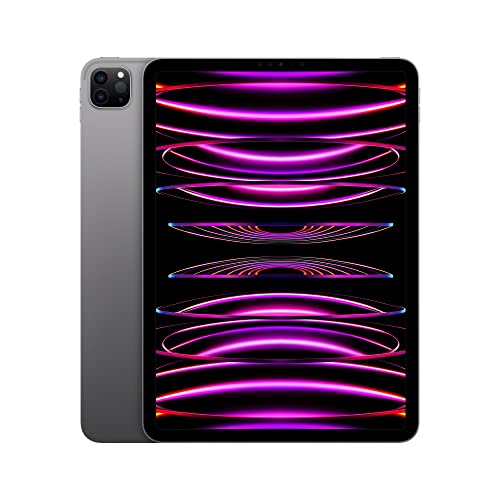
Apple iPad Pro 11-inch (4th Gen) M2 256GB Space Gray

Samsung Galaxy Tab S6 Lite 10.4″ 64GB WiFi Oxford Gray

11-inch Android 16 Tablet with Stylus Pen and Keyboard

JUNINKE Gemini AI Android 16 Tablet 11-inch 256GB

Samsung Galaxy Tab S7 11-inch 128GB Wi-Fi Mystic Black

JUNINKE Kids Android 16 Tablet 10-inch Pink with Keyboard
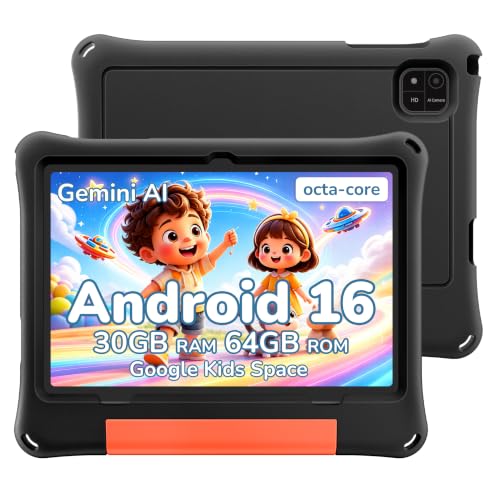
2026 Android 16 Kids Tablet 10-inch with Black EVA Case
AOC 10-inch Android 16 Tablet 120Hz Gray 128GB
The Strengths Of Each Pick
The standard iPad has earned its reputation as a no-fuss note companion over years of classroom use. Its 9.7-inch Retina display offers enough canvas for handwriting without forcing you into a laptop-sized footprint. Pair it with a first-party Apple Pencil and the whole setup tucks neatly into a backpack alongside textbooks.
For shoppers who want iPadOS polish without the iPad Pro price tag, this older generation still holds up for everyday note work. The A10 Fusion chip handles handwriting recognition and split-screen note apps comfortably. Touch ID keeps the device locked down quickly between classes, which matters when you’re juggling back-to-back lectures.
Real-World Strengths
- Mature app ecosystem with refined handwriting-to-text conversion
- Touch ID unlocks fast enough between sessions
- Two speaker setup for media during review sessions
- Lightning cable compatibility with existing Apple accessories
Worth Noting
- 32GB fills up fast once you store lecture recordings offline
- No newer Apple Pencil support, so stylus cost stacks
Built With In Mind
Students who already live inside Apple apps and want a budget-friendly note taker.
Reach For A Different Pick When
Android loyalists should skip this entirely and head straight for the Samsung Galaxy Tab S6 Lite instead.
The iPad Pro with M2 silicon is, in plain terms, overkill for scribbling lecture bullets and absolutely worth it for serious creative work. Its 11-inch Liquid Retina display (Apple’s term for a high-resolution LCD panel with wide color support) gives handwriting room to land without the ink looking jagged. Add the Apple Pencil hover feature and you can preview strokes before the nib touches glass.
Where this generation pulls ahead of the standard iPad reviewed above is raw horsepower. The 8-core CPU and 10-core GPU make layered Procreate sketches and PDF markup feel instant. Wi-Fi 6E (the latest wireless standard offering faster throughput on compatible routers) keeps large files moving when you sync between devices.
What Earns Its Place
- Apple Pencil latency that essentially disappears
- 256GB storage swallows large PSD and PDF libraries
- Face ID unlocks the moment you sit down to work
- All-day battery handles cross-country flights without a hunt for outlets
Trade Offs
- Costs noticeably more than mid-range alternatives
- Apple Pencil sold separately and runs pricey
- iPadOS still fences you inside Apple’s app garden
Feature Snapshot
Who Will Love This
Creative professionals who treat their tablet as a primary sketchbook and need zero compromise on latency.
Consider Something Else When
Budget-focused note takers will find the Samsung Galaxy Tab S6 Lite a more comfortable match.
For shoppers committed to Android who still want a real stylus experience, the Tab S6 Lite punches above its weight. The S Pen ships in the box, so there’s no surprise accessory bill waiting at checkout. You can write across the 10.4-inch display without a separate purchase, which keeps the total cost sensible for students.
The international variant carries the same core hardware as the US release and works with most Android apps note takers actually use. Samsung Notes in particular plays nicely with the included S Pen for handwritten annotations and PDF markup. The slim, light build makes it easier to hold one-handed during long reading sessions.
The Upside
- S Pen included at no extra cost
- 10.4-inch screen gives notes breathing room
- Lightweight enough to hold during long sessions
- Android flexibility for sideloaded note apps
Honest Caveats
- International model may need a quick region check
- Wi-Fi only, no cellular option for commutes
Quick Facts
Right Fit For
Android users and students who want a solid stylus experience without breaking the budget.
A Better Fit Elsewhere
Shoppers needing flagship performance should consider the Samsung Galaxy Tab S7 reviewed below.
This JUNINKE bundle arrives as a complete mobile workstation rather than just a tablet. The custom-fit Bluetooth keyboard, wireless mouse, and shockproof case all come in the box, which removes the typical accessory scavenger hunt. You can move from handwriting notes during a meeting to typing long-form reports without buying extras.
The 11-inch display size matches what you’d find on a small laptop, and the Android 16 software stack opens up split-screen multitasking. For field workers, remote contractors, and anyone who treats a tablet as a primary computer, the included accessories make this a more practical bundle than a bare tablet alone.
A Favorable Mix
- Keyboard and stylus included in the box
- Octa-core processor handles multitasking smoothly
- Protective case bundled for daily commute use
- Bluetooth mouse support for precise editing tasks
Points To Keep In Mind
- Bundle pricing may stretch beyond dedicated tablets
- Brand recognition is lighter than Samsung or Apple
Feature Card
Made For
Mobile professionals and remote workers who want typing and stylus capability in one package.
Look Elsewhere When
Pure note takers who don’t need a keyboard should consider the Samsung Galaxy Tab S6 Lite for a simpler setup.
If storage anxiety keeps you from buying a tablet, this JUNINKE model brings 256GB of onboard room plus expansion headroom up to 2TB. That means you can keep years of lecture recordings, sketch archives, and PDF textbooks without juggling cloud subscriptions. The 8000mAh battery is similarly generous, easily covering a full workday of mixed note taking and media playback.
The octa-core processor paired with 32GB of RAM keeps Android 16 responsive when you bounce between note apps, browsers, and video calls. For shoppers who treat a tablet as a long-term digital locker rather than a quick consumption device, the headroom here is genuinely useful.
The Helpful Details
- 256GB base storage swallows large file collections
- 8000mAh battery lasts a full workday comfortably
- 2TB expansion ceiling for future-proofing
- Android 16 brings the latest software polish
Softer Spots
- Heavier than competing 10-inch tablets
- Stylus typically sold separately for note use
Who Should Grab It
Power users with deep local media libraries and heavy file storage needs.
Skip It When
Students wanting a simpler stylus bundle should consider the JUNINKE 11-inch Android 16 Tablet with Keyboard reviewed above.
The Tab S7 sits in that sweet spot where flagship-tier hardware meets a more approachable price than the Ultra line. Its 128GB of storage handles a hefty PDF library, and the S Pen stays included in the box, unlike many competitors who treat the stylus as a separate upsell. The 11-inch screen gives both handwriting and split-screen work enough real estate to feel uncluttered.
For shoppers stepping up from the S6 Lite reviewed earlier, the jump in responsiveness is obvious the moment you open multiple apps. Fast charging through the USB-C port helps on days when the tablet pulls double duty. Samsung’s Dex mode (a desktop-style interface triggered when you connect a keyboard or monitor) also makes this a credible laptop alternative for travel days.
Where It Excels
- S Pen included without an extra purchase
- Fast charging tops the battery up between meetings
- USB-C port accepts standard cables you already own
- Dex mode enables laptop-style multitasking
A Few Limitations
- Wi-Fi only model, no built-in cellular option
- Premium-tier pricing reflects flagship hardware
Technical Sheet
Best Suited To
Power users who want flagship responsiveness and Android flexibility without crossing into the Ultra price tier.
Where A Sibling Pick Shines
Budget shoppers will find the Samsung Galaxy Tab S6 Lite covers the same note-taking basics for less.
Note taking isn’t just an adult activity, and this JUNINKE kids tablet acknowledges that with thoughtful parental tooling. Google Kids Space curates age-appropriate apps, books, and videos so younger students have a safe sandbox to explore. The EVA foam case (a rubberized, drop-absorbing shell commonly used in children’s electronics) cushions the inevitable bumps that come with classroom and couch use.
For parents who want a learning device rather than a toy, the keyboard and mouse inclusion enables typing practice alongside stylus work. The pink colorway adds a bit of personality without sacrificing the more grown-up hardware underneath.
Noteworthy Benefits
- Parental controls baked into Android 16
- Stylus pen bundled for handwriting practice
- Keyboard and mouse included for typing drills
- EVA case absorbs drops from backpack heights
Things To Weigh
- Younger children may outgrow the curated app pool
- Not designed for high-end creative software
Whose Shelf It Belongs On
Families with elementary-age students who want a safe, drop-resistant device for homework and creative play.
Not Your Match When
Adult note takers should look at the Samsung Galaxy Tab S6 Lite for a more grown-up experience.
Where the previous JUNINKE kids tablet leans pink and playful, this sibling model goes stealth with a black EVA case that takes the brunt of rougher handling. The thick foam shell wraps the corners and back, which matters for younger students who treat tablets more like toys than tools. Android 16 brings the same parental controls as the pink version, just wrapped in a more neutral exterior.
For gift-givers shopping for a child who already has a lot of colorful gadgets, the understated look feels less juvenile without sacrificing the safety features parents actually care about.
Practical Pluses
- Thick EVA shell absorbs hard drops
- Neutral black color suits older kids
- Parental controls via Family Link included
- Android 16 keeps the software current
Possible Compromises
- Bulkier case reduces pocket portability
- Storage specs lean lighter than adult tablets
Perfect Match For
Tweens and older kids who need rugged protection without a babyish color scheme.
Swap It Out When
Younger children who prefer a brighter design may enjoy the JUNINKE Kids Android 16 Tablet 10-inch Pink reviewed above instead.
AOC’s 10-inch tablet brings something most budget Android slates skip: a 120Hz refresh rate (meaning the screen redraws 120 times per second instead of the typical 60). Scrolling through long note documents and flicking between split-screen apps feels noticeably smoother than what you’d expect at this size. The IPS panel also delivers wide viewing angles for couch and desk sessions.
The metal body adds a touch of heft that feels reassuring in the hand. Widevine L1 support (a digital rights management level that unlocks HD streaming from services like Netflix and Disney+) means the tablet pulls double duty for note taking and entertainment on travel days.
A Few Highlights
- 120Hz refresh makes scrolling feel fluid
- Metal body lends a more premium feel
- Widevine L1 unlocks HD streaming apps
- 128GB storage covers most note collections
Less-Strong Areas
- 4GB RAM is modest for heavy multitasking
- 6000mAh battery is smaller than peers
Who It Suits Best
Shoppers who care more about a smooth, fluid display than raw multitasking horsepower.
Another Choice May Suit
Frequent travelers needing longer battery life should consider the JUNINKE Gemini AI Android 16 Tablet with its 8000mAh cell.
What To Weigh Before Choosing Android Tablets For Note Taking
Stylus Quality And Latency
A tablet can have the brightest screen in the world, but if the stylus drags behind your hand, note taking turns into a chore. Look for pens with low latency (the delay between moving the tip and the line appearing), pressure sensitivity (the ability to vary line weight by pressing harder), and palm rejection (software that ignores your resting wrist). Bundled pens like Samsung’s S Pen save money, while first-party options on iPads usually deliver the tightest feel.
Display Size And Aspect Ratio
Bigger screens give your handwriting more room, but they also bulk up the device. Ten to eleven inches tends to hit the sweet spot for note apps. Aspect ratio matters too: 16:10 feels more natural for split-screen layouts, while 4:3 mimics a notepad shape that some students prefer.
Software And App Support
Android gives you more app flexibility, while iPadOS offers more refined note apps like GoodNotes and Notability. Make sure your must-have app actually runs well on the platform you’re considering, since not every writing app feels equal across operating systems.
Storage And Battery Life
Local storage matters if you keep large PDF libraries or recorded lectures offline. A 6000mAh battery typically gets you through a workday of mixed use, but heavy sketchers and video callers should look for 8000mAh or larger to avoid mid-afternoon charging hunts.
Key Considerations Across These Picks
Common Shopping Slip Ups
The most frequent mistake is treating a tablet like a full laptop replacement without checking whether the keyboard accessory is included or sold separately. Bundles like the JUNINKE 11-inch productivity model save money precisely because they avoid that trap. Another common miss is ignoring regional model differences, especially with Samsung’s international variants, which sometimes ship with software quirks that take a settings tweak to resolve.
What The Higher Tier Buys
Paying more for an iPad Pro or Samsung Galaxy Tab S7 gets you faster processors, smoother displays, and tighter stylus integration. For casual note takers, the jump rarely justifies the cost, but for digital artists and serious multitaskers, the responsiveness gap becomes obvious within a week of daily use.
Frequently Asked Questions
Do Android Tablets Work Well With Styluses For Note Taking?
Modern Android tablets like the Samsung Galaxy Tab S6 Lite include responsive styluses that handle handwriting and PDF markup comfortably. Latency has improved dramatically in recent generations, so the gap with iPad is narrower than it used to be.
Should I Get A Tablet With A Keyboard For Note Taking?
A keyboard helps if you mix handwriting with longer typed documents, like lecture summaries or research notes. If you mainly scribble quick thoughts, a pure tablet without the keyboard accessory keeps the weight and cost down.
How Much Storage Do I Need For Note Taking Apps?
For text-based notes, 32GB to 64GB usually suffices. Heavy users with offline PDFs, recorded lectures, and sketch libraries should target 128GB or more to avoid constant cloud juggling.
Are Kids Tablets Suitable For School Note Taking?
Kids tablets like the JUNINKE pink and black EVA models work fine for elementary homework and basic note apps. Older students with heavier workloads will want something more grown-up, like the Samsung Galaxy Tab S7.
Can I Use Microsoft Or Google Apps On These Tablets?
Yes, both Microsoft 365 and Google Workspace apps run on Android tablets. Some advanced features in desktop Office are limited, but the core apps handle document editing and cloud syncing reliably.
Wrap Up
The right tablet comes down to how you actually take notes. Android loyalists get the best value from the Galaxy Tab S6 Lite, creative professionals lean toward the iPad Pro, and shoppers wanting a complete bundle gravitate toward the JUNINKE productivity model. Match the device to your handwriting style, your preferred app ecosystem, and how much weight you want to carry, and the rest falls into place.


