

Stylus support on Android has quietly become a genuine productivity tool rather than a gimmick. Plenty of modern Android tablets now pair responsive active pens with full keyboard and case bundles, which makes hand-written notes, sketching, and split-screen work feel natural on a slab you can throw in a backpack. You will find ten real options below, ranging from dedicated paper-feel displays to budget-friendly workhorses with bundled pens. Each pick includes a shortlist of what it actually does well, where it stumbles, and which other tablet in this lineup is a smarter match if your needs sit slightly outside its lane.
A Quick View Of The Lineup

VekfulPC T70 Tablet 11 inch Android 16

JUNINKE 11 inch Android 16 Tablet Bundle

TCL NXTPAPER 11 Plus Android Tablet

TCL NXTPAPER 14 Android Tablet

TCL Note A1 NXTPAPER Paper Tablet

JUNINKE Gemini AI Android 16 Tablet 11 inch

Samsung Galaxy Tab S7 11-inch

JUNINKE Kids Tablet 10 inch Pink Bundle
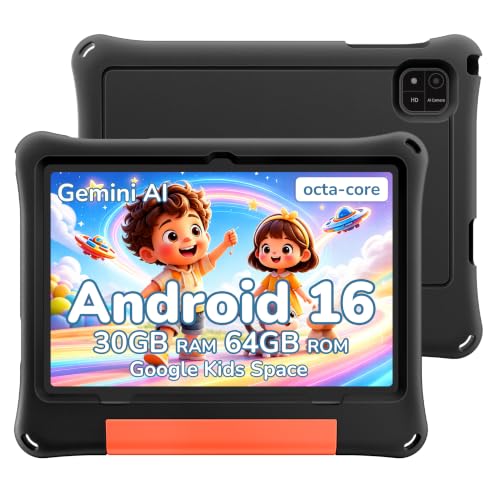
JUNINKE 2026 Android 16 Kids Tablet 10 inch
AOC 10 Inch Tablet Android 16
The Picks, Examined More Closely
The VekfulPC T70 lands as a flexible 11-inch Android 16 tablet with 8GB of physical memory and 256GB of built-in storage. It targets shoppers who want stylus and keyboard friendly hardware without committing to a premium brand, and the headline feature is a four-year warranty that takes the usual worry out of daily carry. Compared with the JUNINKE bundle further down, you give up the included keyboard but you gain longer peace of mind on the hardware itself.
This pick makes sense for office workers who split between streaming, email, and stylus note-taking during long meetings. Most users will appreciate the roomy 256GB for downloaded documents and offline playlists, though creative pros will likely want the TCL NXTPAPER options instead.
Noteworthy Benefits
- Four-year warranty covers hardware failures well beyond the typical first-year window.
- 256GB of internal storage leaves room for large PDFs, lecture videos, and offline maps.
- Android 16 with 8GB RAM handles split-screen multitasking between documents and a video call without stuttering.
- 11-inch display size sits in the sweet spot for stylus writing and shared-screen viewing.
Things To Consider
- No bundled stylus, so pen input requires a separate purchase.
- Brand recognition is lighter than Samsung or TCL, which can matter for resale.
Who It Suits Best
Office commuters and students who want long warranty coverage and stable everyday performance in a portable Android tablet with stylus support.
Skip It When
You want a stylus and keyboard right in the box, in which case the JUNINKE 11 inch Android 16 Tablet Bundle is the smarter match.
The JUNINKE 11 inch Android 16 Tablet arrives as a complete kit: tablet, stylus pen, wireless mouse, Bluetooth keyboard, and a fitted black case. That setup makes it the most turnkey option in this lineup for shoppers who want everything in one box. The hardware spec lines up similarly to the VekfulPC T70 reviewed just above, but the in-box accessories shift this firmly toward productivity-first buyers.
Students tackling online lectures or remote workers handling daily email will find the included keyboard genuinely useful. Stylus responsiveness is solid for handwritten notes and casual sketching, although serious digital artists should compare against the TCL NXTPAPER 11 Plus below.
Features That Help
- Bluetooth keyboard and stylus arrive in the box, removing extra shopping.
- Fitted black case adds drop protection for backpack commutes.
- Wireless mouse support speeds up spreadsheet work over touch-only editing.
- 11-inch Android 16 platform supports split-screen for research and writing.
Worth Noting
- Bundled stylus is basic capacitive, not an active 4096-level pen like TCL’s T-PEN.
- Keyboard adds bulk that may feel heavy for one-handed tablet reading.
Made For
Students and home-office shoppers who want a complete Android tablet with stylus, keyboard, and case out of the box without buying extras separately.
Consider Something Else When
You want a more advanced pressure-sensitive stylus for serious sketching, in which case the TCL NXTPAPER 11 Plus is the better pick.
The TCL NXTPAPER 11 Plus is the first pick in this list aimed squarely at stylus-first shoppers. It pairs an 11.5-inch 2.2K display running at 120Hz with a TCL T-PEN stylus that supports 4096 pressure levels. Pressure levels, in plain terms, are how many distinct weights the pen can detect, and more levels mean finer shading and more natural line variation. The 8GB RAM plus 256GB storage combo keeps things comfortable for art apps and large files.
Sketchers, design students, and note-takers who care about accurate line weight will get the most out of this model. Compared with the larger TCL NXTPAPER 14 reviewed next, this version is more portable but gives up screen real estate.
A Favorable Mix
- T-PEN with 4096 pressure levels captures shading and line weight naturally.
- 11.5-inch 2.2K 120Hz display makes pen strokes appear smooth and crisp.
- 8GB RAM plus 256GB storage handles large drawing files and reference libraries.
- NXTPAPER display tech reduces glare for long drawing and reading sessions.
Room For Improvement
- Stylus and keyboard are often sold separately depending on the listing configuration.
- 11.5-inch canvas can feel tight for full-page sheet music or comic layouts.
Best Suited To
Sketchers, illustrators, and design students who want pressure-sensitive stylus support on a glare-resistant 11.5-inch tablet.
Reach For A Different Pick When
You need a much larger canvas for sheet music, comic pages, or split-screen reference work, in which case the TCL NXTPAPER 14 is the stronger match.
The TCL NXTPAPER 14 takes the same NXTPAPER display philosophy from its smaller sibling and stretches it to a generous 14.3-inch 2.4K panel. The 4096-level T-PEN stylus keeps the same pressure-sensitive writing feel that artists respond to. The big shift is real estate: musicians reading full-page sheet music, illustrators laying out multi-panel compositions, or productivity users juggling two apps side by side will appreciate the breathing room.
Shoppers looking for a near-laptop canvas without giving up stylus precision will find a lot to like here. For pure portability, the TCL NXTPAPER 11 Plus reviewed earlier is the lighter option.
Everyday Perks
- 14.3-inch 2.4K display fits full sheet music, comic pages, and split-screen workflows comfortably.
- T-PEN with 4096 pressure levels keeps writing and sketching natural and detailed.
- Paper-like NXTPAPER display reduces glare for long reading and writing sessions.
- 8GB RAM plus 256GB storage handles sizable creative projects and reference libraries.
Honest Caveats
- Larger body is harder to hold one-handed during extended reading sessions.
- Higher price band than the 11.5-inch TCL NXTPAPER 11 Plus.
Who Will Love This
Digital artists, musicians, and split-screen multitaskers who want a large paper-like canvas with pressure-sensitive stylus input on Android.
A Better Fit Elsewhere
You prioritize one-handed portability above screen size, in which case the TCL NXTPAPER 11 Plus is the smarter fit.
The TCL Note A1 is the most book-like tablet in this lineup. It uses TCL’s NXTPAPER PURE panel technology with 3A Crystal Shield Glass and aims at users who read and write for long stretches at a time. The 11.5-inch 2.2K display runs at 120Hz and pairs with the T-PEN stylus for note-taking that feels closer to paper than glass, at least compared with conventional glossy Android screens.
Readers and dedicated note-takers who want eye comfort will appreciate this model. Gamers and video-streaming fans will probably find the TCL NXTPAPER 11 Plus more flexible, since the Note A1 prioritizes paper feel over media flash.
What Earns Its Place
- NXTPAPER PURE panel delivers reduced glare for comfortable long sessions.
- 3A Crystal Shield Glass helps minimize fingerprints and surface smudges.
- T-PEN stylus with 4096 pressure levels supports detailed handwritten notes.
- 11.5-inch 2.2K 120Hz display keeps text sharp and pen strokes smooth.
Points To Note
- Stylus and keyboard are typically sold separately depending on configuration.
- Specialized paper-feel tuning is less exciting for video-first shoppers.
The Right Fit
Dedicated readers, students, and journal-keepers who want a glare-resistant paper-like tablet for extended writing sessions.
Look Elsewhere When
You mostly stream video or play games, in which case the TCL NXTPAPER 11 Plus offers a more versatile display for mixed media.
The JUNINKE Gemini AI Android 16 Tablet is built around one standout promise: room. It ships with 256GB of built-in storage and officially supports expansion up to 2TB through a memory card, which makes it the highest-capacity pick in this lineup for media hoarders. The 8000mAh battery is generously sized for long trips, and Android 16 with an octa-core processor handles stylus note-taking and split-screen multitasking.
Travelers and media collectors who download entire seasons before flights will find the most value. For shoppers who mostly stream and don’t store much locally, the AOC 10 Inch Tablet reviewed later is a more compact alternative.
Real Benefits
- Expansion up to 2TB swallows huge movie libraries and offline documents.
- 8000mAh battery supports long workdays away from outlets.
- Octa-core processor keeps Android 16 responsive under split-screen loads.
- 11-inch screen size is comfortable for stylus notes and shared viewing.
Trade Offs
- Bundle configuration varies; check whether stylus, case, and accessories are included.
- Heavier than 10-inch options like the AOC tablet.
Who Should Grab It
Media-heavy commuters and field workers who need massive storage and a long-lasting battery in an 11-inch Android tablet with stylus support.
Swap It Out When
You want a smaller, lighter tablet for daily carry, in which case the AOC 10 Inch Tablet is the more travel-friendly choice.
The Samsung Galaxy Tab S7 is the most established name in this list, and its appeal centers on Samsung’s mature S Pen ecosystem. The S Pen uses electromagnetic resonance technology, which means it doesn’t need to be charged and it tracks accurately without a battery. Built-in 128GB storage, a USB-C port, and Bluetooth round out a familiar productivity setup that has been refined over multiple generations.
Long-time Samsung shoppers and shoppers who value a polished stylus experience will find this a comfortable choice. Note that availability is currently listed as unavailable on the retailer’s product page, so confirm stock before deciding. For shoppers wanting a newer budget option with more storage, the VekfulPC T70 reviewed earlier is worth a look.
Benefits That Matter
- S Pen uses electromagnetic resonance, so no charging or pairing hassle.
- 128GB of internal storage handles apps, photos, and downloaded documents.
- 11-inch display pairs comfortably with Samsung’s mature stylus software ecosystem.
- USB-C port supports fast charging and easy accessory compatibility.
Points To Keep In Mind
- Currently listed as unavailable on the retailer product page, which affects near-term purchase plans.
- Older release than the 2026 TCL models, so newer pressure levels may differ.
Perfect Match For
Long-time Samsung shoppers who value a refined S Pen experience on a familiar 11-inch Android tablet.
Consider Something Else When
You want immediate availability and a longer warranty window, in which case the VekfulPC T70 Tablet is the safer bet.
The JUNINKE Kids Tablet is a 10-inch Android 16 device built specifically for younger users. It arrives with a keyboard, mouse, EVA foam case, and stylus in a friendly pink color. Google Kids Space and Family Link parental controls help caregivers manage screen time, app access, and content filters without constant monitoring.
Parents looking for a single gift-ready bundle for a child learning to read, draw, or type will get the most out of this pick. For households wanting a tougher neutral-color shell instead, the JUNINKE 2026 Kids Tablet reviewed next is the closer match.
What Works In Its Favor
- Full bundle with keyboard, mouse, EVA case, and stylus right in the box.
- Google Kids Space provides age-appropriate apps, books, and videos.
- Family Link parental controls manage screen time and content filters.
- 30GB combined memory keeps learning apps and videos responsive.
Smaller Caveats
- 64GB of built-in storage fills quickly with downloaded videos; plan to use a memory card.
- Pink color may not suit every child’s taste or household aesthetic.
Built With In Mind
Parents buying a gift-ready tablet for younger children with stylus input and parental controls included from day one.
Reach For A Different Pick When
You want a tougher, gender-neutral protective shell, in which case the JUNINKE 2026 Kids Tablet 10 inch with Black EVA Case is the better fit.
The JUNINKE 2026 Kids Tablet takes the same Android 16 platform as the pink bundle above and dresses it in a tougher black EVA foam case. EVA foam, in simple terms, is a soft rubber-like material that absorbs shocks well, which makes this model a sensible choice for kids who tend to drop things. Google Kids Space and Family Link parental controls come built in for content and screen-time management.
Households that prioritize durability over color will find this version practical. The pink JUNINKE bundle reviewed earlier is the better pick if you want a full keyboard and mouse in the box as well.
Advantages To Know
- Black EVA protective case absorbs drops and rough daily use.
- Google Kids Space offers curated apps, books, and videos for young users.
- Family Link parental controls manage screen time and content filters.
- 10-inch form factor stays portable for small hands and travel bags.
Less Ideal Details
- Keyboard and mouse are not included in this specific bundle configuration.
- Accessory support varies, so confirm stylus compatibility before purchase.
Whose Shelf It Belongs On
Parents of active kids who need a drop-resistant Android tablet with parental controls over a full accessory bundle.
Another Choice May Suit
You want keyboard and mouse included out of the box, in which case the JUNINKE Kids Tablet Pink Bundle is the smarter match.
The AOC 10 Inch Tablet rounds out the list as the most portable option here. A 10-inch 120Hz IPS display sits inside a metal body, with Widevine L1 support for HD streaming from popular services. Widevine L1, in plain terms, is a digital rights certification that unlocks full-resolution playback on Netflix, Disney+, and similar platforms, which is something cheaper tablets often skip. Android 16 plus an octa-core processor keeps everything feeling responsive for stylus notes and casual sketching.
Commuters and travelers who want a compact, sturdy tablet will appreciate the form factor. For a larger canvas with pressure-sensitive stylus input, the TCL NXTPAPER 11 Plus reviewed earlier is the natural step up.
Practical Pluses
- 10-inch metal body keeps weight low and durability high for travel.
- 120Hz IPS display makes stylus strokes and scrolling feel smooth.
- Widevine L1 unlocks HD streaming on supported services.
- 4GB RAM plus 128GB storage with 1TB expansion handles offline media.
Smaller Limitations
- 4GB RAM is lighter than other picks, so heavy multitasking may push its limits.
- Pressure-sensitive stylus performance depends on the pen paired with it.
Best Suited To
Commuters and travelers who want a compact metal-body Android tablet with stylus support and HD streaming capability.
A Better Fit Elsewhere
You need a larger creative canvas with a high-end stylus, in which case the TCL NXTPAPER 11 Plus is the smarter pick.
What Actually Matters When Buying An Android Tablet With A Stylus
Stylus Technology And Pressure Levels
The single biggest differentiator between cheap bundled pens and serious creative tools is pressure sensitivity, measured in levels. Capacitive pens behave like a fingertip and ignore pressure entirely, while active pens with 1024 levels feel noticeably better, and 4096-level pens like TCL’s T-PEN respond to light shading the way a real pencil does. Samsung’s S Pen uses electromagnetic resonance, which avoids Bluetooth pairing and battery charging. For handwritten notes, 1024 levels usually suffice. For sketching and shading, 4096 levels feel like night and day compared with basic pens.
Display Type, Size, And Refresh Rate
Screen quality affects how natural the stylus feels under your hand. Matte or NXTPAPER-style panels reduce glare and add a paper-like texture that mimics writing on a notebook. Glossy screens show color better for video but can feel slippery with a pen. Refresh rate matters more than most shoppers expect: 120Hz panels render pen strokes more smoothly during fast sketching than 60Hz panels. Size is a portability-versus-canvas trade-off. A 10-inch tablet slips into a small bag, while 14-inch tablets like the TCL NXTPAPER 14 feel closer to a paper notebook.
Software, Accessories, And Long-Term Use
Android 16 support and split-screen multitasking have made tablets more capable for productivity, but not every model bundles the stylus, keyboard, and case. Bundles like the JUNINKE 11 inch tablet remove extra shopping. Long warranty windows, like the four-year coverage on the VekfulPC T70, matter if you plan to use the device daily for several years. Finally, parental controls and kids-specific builds deserve attention for family shoppers, while commuters will care more about weight, build material, and HD streaming support.
Pick Smart, Skip The Headaches
Common Shopping Slip Ups
Skipping the stylus check is the most common trap. Many listings advertise “Android tablet with stylus” but ship only a basic capacitive pen, which ignores pressure and feels nothing like writing. Confirm the pressure level and whether the pen is bundled before you commit. Another slip is buying on screen size alone. A 14-inch tablet is generous for art but painful to read one-handed on a commute. Match size to your real scenario, not the biggest number.
What The Higher Tier Buys
Spending more on premium picks like the TCL NXTPAPER 14 mostly buys you three things: a larger, sharper display, a more advanced pressure-sensitive stylus, and longer hardware support. For casual note-takers, mid-range TCL NXTPAPER options deliver most of the experience at a lower cost. For digital artists, musicians reading sheet music, or shoppers who want a multi-year daily driver, the premium tier earns its place by stretching creative and comfort headroom beyond what budget picks offer.
Frequently Asked Questions
Do All Android Tablets Support A Stylus?
No. Many Android tablets support only basic capacitive styluses, which behave like a finger and ignore pressure. True stylus support requires active pen technology such as electromagnetic resonance on Samsung devices or pressure-level pens like the TCL T-PEN. Always check the pressure level and pen type before assuming stylus functionality.
What Is A Good Pressure Level For Drawing?
For sketching and shading, 4096 pressure levels is widely considered the comfortable baseline for natural-feeling line variation. Lower counts work fine for handwriting and quick notes, but serious digital artists usually notice the difference. Mid-range active pens often sit around 1024 levels, which is acceptable for casual creative work.
Are Kids Tablets Worth It Or Can Adults Use Them?
Kids tablets are simply Android tablets with parental controls, sturdy cases, and curated content. Adults who want a basic tablet for reading or casual browsing can use them, but they typically offer less RAM and storage than adult-focused picks. For shared family use, kids tablets are a sensible middle ground.
Can I Use A Stylus On Any Android Tablet?
Universal capacitive styluses work on any touchscreen but ignore pressure and lack palm rejection, which is the ability to ignore your hand resting on the screen while writing. For pressure sensitivity and palm rejection, the tablet needs active pen support from the manufacturer. The TCL NXTPAPER models and the Samsung Galaxy Tab S7 both ship with active pen support.
How Important Is Refresh Rate For A Stylus Tablet?
A higher refresh rate, such as 120Hz, makes pen strokes appear smoother, especially during fast sketching or quick note-taking. A 60Hz display works fine for slow writing and reading, but artists tend to prefer 120Hz for the responsiveness. It is not essential, but it is a noticeable upgrade for creative users.
The Takeaway
The right pick depends on what you actually do with a stylus, whether that means shading illustrations on a 14-inch canvas, jotting meeting notes during a commute, or handing a kid a drop-resistant tablet for homework. TCL’s NXTPAPER lineup is the strongest creative match. JUNINKE bundles cover the practical, gift-ready end of the market. VekfulPC adds warranty peace of mind. AOC handles travel. Samsung still earns a nod for S Pen ecosystem fans. Trust the use case more than the spec sheet, and the right one tends to become obvious.


