

Upgrading a PC on a sensible budget means choosing a GPU that handles today’s games without overpaying for frames you’ll never use. The market is full of mid-range options promising strong 1080p performance, and the trick is matching chip power, memory, and cooling to the build you actually have. This guide sorts through nine cards that deliver reliable value for everyday gaming, content work, and small-form-factor setups.
The Lineup, Simplified
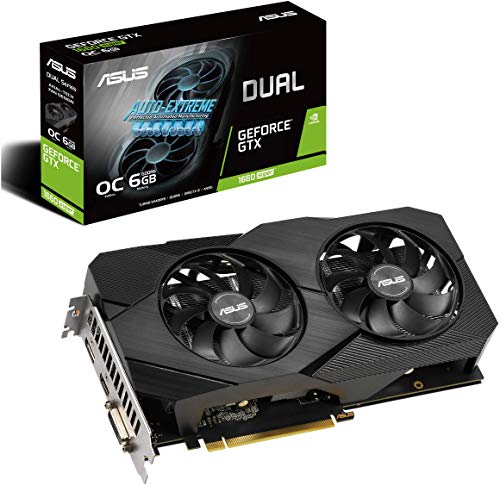
ASUS GeForce GTX 1660 Super Overclocked 6GB Dual-Fan Evo Edition

ZOTAC Gaming GeForce GTX 1660 6GB GDDR5 192-bit Super Compact

msi Gaming GeForce GTX 1660 128-Bit HDMI/DP 6GB GDDR5 OC

GIGABYTE GeForce RTX 2070 Super Windforce OC 8GB GDDR6

msi Gaming GeForce GTX 1650 Super 128-Bit HDMI/DP 4GB GDDR6 OC
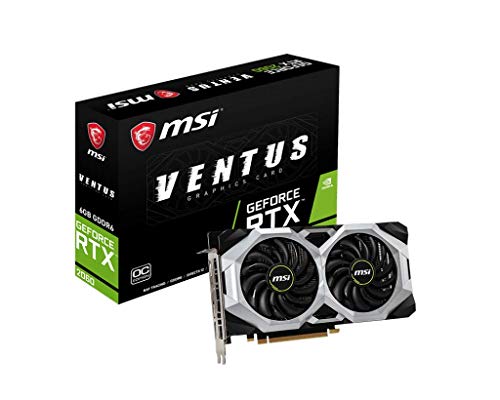
msi Gaming GeForce RTX 2060 6GB GDDR6 192-bit Ventus OC

MSI Gaming GeForce GTX 1650 128-Bit HDMI/DP 4GB GDDR6 OC
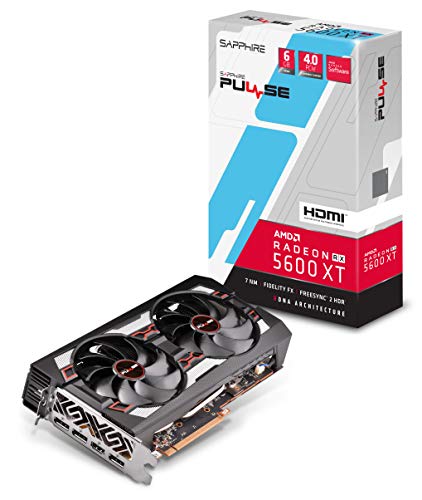
Sapphire Radeon Pulse RX 5600 XT 6GB GDDR6 HDMI/Triple DP OC

ASUS GeForce RTX 2070 Super Overclocked 8GB GDDR6 Dual-Fan Evo
The Details Behind The Selections
The Asus GTX 1660 Super Evo sits in a comfortable middle ground for 1080p gaming, pairing an overclocked Turing GPU (a generation of Nvidia architecture focused on efficient shading) with 6GB of GDDR6 memory, which is faster VRAM than the older GDDR5 standard. The dual-fan layout is tuned for sustained airflow, and the brushed shroud lines up well with most Asus motherboards if you’re building a coordinated setup.
For most people running modern titles on a single 1080p monitor, this card delivers the kind of frame rates that matter without bleeding cash on silicon they won’t use. It’s a sensible pick if you’re upgrading from a GTX 1050 or older card and want a noticeable jump without entering RTX pricing territory.
Positive Takeaways
- 6GB of GDDR6 memory gives smoother texture streaming in modern AAA games than the older GDDR5 cards below it.
- Overclocked core straight out of the box saves you from manual tuning if you prefer set-and-forget performance.
- Dual Axial-Tech fans with reinforced shrouds tend to run quieter than single-blower designs in similar builds.
- Wide output selection including DVI helps if you’re keeping an older secondary monitor in the loop.
- Backed by a 3-year warranty, which is reassuring for anyone uneasy about mid-range electronics.
Small Caveats
- No hardware ray tracing, so newer titles with that feature will fall back to standard shading.
- The dual-fan shroud is longer than compact designs, so shorter cases may need a clearance check.
- GDDR6 helps, but 6GB is the practical minimum at this tier, not a future-proof buffer.
Feature Snapshot
Made For
Esports players and casual AAA gamers running a single 1080p display who want noticeable headroom over older cards.
Swap It Out When
If you specifically need hardware ray tracing or aim for 1440p, the GIGABYTE GeForce RTX 2070 Super Windforce OC is a better tier for you.
ZOTAC’s GTX 1660 leans hard into the small-form-factor crowd, packing the same 1408 CUDA cores (parallel processing units that handle graphics math) as larger cards into a noticeably shorter board. The “Super Compact” label is genuine, not marketing fluff, and that opens up ITX cases and home theater PC builds where every centimeter matters.
Compared to the Asus Evo above, this card trades some GDDR6 bandwidth for raw size savings, so your choice depends on whether case clearance or memory speed matters more in your build. The cooling profile stays reasonable in the tight chassis builders tend to favor.
The Good Stuff
- Shortest footprint in this roundup, ideal for Mini-ITX builds and slim towers.
- 4K, HDR (high dynamic range for richer color and contrast), and VR-ready outputs cover a wide range of display setups.
- NVIDIA G-SYNC compatibility helps reduce screen tearing on supported monitors.
- Dual-fan layout keeps thermals reasonable even in restricted airflow cases.
Points To Note
- GDDR5 memory sits a step behind the GDDR6 used in the Asus Evo.
- Compact boards can run warmer in poorly ventilated cases, so case airflow matters.
Right Fit For
Small-form-factor builders and anyone housing a gaming PC in a desk-side slim tower or living-room console-style case.
Consider Something Else When
If your case has room and you want the memory bandwidth edge, the ASUS GeForce GTX 1660 Super Overclocked 6GB Dual-Fan Evo Edition is the smarter target.
MSI dresses up the GTX 1660 with their signature Gaming X treatment, layering a brushed metal backplate and tasteful RGB lighting over the same 6GB GDDR5 foundation. The Twin Frozr cooler is the headline feature, using paired fans and a thick heat pipe layout to keep temperatures tame during extended play sessions.
If you’re putting together a build that lives behind a tempered glass panel, the visual design justifies some of the asking price. For raw value, the Asus Evo still wins on memory type, but here you’re paying for cooling polish and a cleaner aesthetic.
Where It Delivers
- Brushed metal backplate improves rigidity and protects the PCB during installation.
- Twin Frozr thermal design typically holds lower sustained temps than budget coolers under load.
- Subtle RGB lighting adds personality without dominating the case interior.
- DirectX 12 and HDCP support cover modern gaming and protected media playback.
Honest Caveats
- Still GDDR5 memory, not GDDR6, so it lags the Asus Evo on bandwidth.
- RGB software adds a small configuration step for users who want effects synced across components.
Feature Snapshot
Best Suited To
Builders who care about a clean, coordinated look and lower sustained thermals as much as raw benchmarks.
Look Elsewhere When
If memory bandwidth matters more than aesthetics in your build, the ASUS GeForce GTX 1660 Super Overclocked 6GB Dual-Fan Evo Edition offers faster VRAM for similar money.
Stepping up to the RTX 2070 Super changes the conversation. Real-time ray tracing (a rendering technique that simulates realistic lighting and shadows), 8GB of GDDR6, and a 256-bit memory bus push this card into territory where 1440p high-refresh gaming feels natural. GIGABYTE’s Windforce 3X cooler uses three fans with alternating spin directions to reduce turbulence noise.
This is where the budget-conscious line blurs into enthusiast territory, and for many people, it’s the right place to land. You may find the frame rate jump from a 1660 Super justifies the extra spend if your monitor is 1440p or higher.
Where It Excels
- Hardware ray tracing cores enable realistic lighting in supported games.
- 8GB of GDDR6 across a 256-bit bus gives generous headroom for 1440p textures.
- 8+2 power phase design tends to support stable overclocking headroom.
- Alternate-spinning fans keep the cooler profile quieter than straight tri-fan layouts.
- Core clock of 1785 MHz out of the box removes the need for manual tuning for most users.
Things To Consider
- Demands more wattage from your PSU (power supply unit) than the GTX-tier cards above.
- Triple-fan cooler is longer; you may need to measure your case clearance before installing.
Feature Snapshot
Who It Suits Best
Gamers running a 1440p high-refresh monitor who want ray tracing in modern titles without going to flagship pricing.
A Better Fit Elsewhere
If your display is locked at 1080p and you don’t need ray tracing, the msi Gaming GeForce GTX 1660 128-Bit HDMI/DP 6GB GDDR5 OC delivers smoother value for your money.
The GTX 1650 Super stretches the dollar further than most cards in this lineup, delivering GDDR6 memory and a modest factory overclock at a price tier usually reserved for stripped-down GPUs. It’s the kind of card that makes sense as a starter upgrade for an older office PC that wants to run esports titles and lighter AAA games.
Compared to the full GTX 1660 cards above, the trade-off shows up in shader count and memory capacity, but for a single 1080p monitor at sensible settings, this MSI card punches well above its tier.
Reasons It Performs
- GDDR6 memory at this price tier is rare and meaningfully faster than older GDDR5 budget cards.
- Dual-fan cooling runs quiet and cool enough for compact mid-tower builds.
- Factory OC adds a small but real bump over reference clock speeds.
- DirectX 12 support keeps it relevant for current-generation game engines.
Worth Bearing In Mind
- 4GB VRAM limits texture quality in newer AAA games at high settings.
- 128-bit bus is narrower than the 192-bit options higher up this list.
Who Should Grab It
First-time builders or anyone upgrading an older system who mostly plays esports and lighter titles at 1080p.
Where Another Pick Suits Better
If you want the same GDDR6 benefit with more VRAM, the ASUS GeForce GTX 1660 Super Overclocked 6GB Dual-Fan Evo Edition is the natural step up.
MSI’s Ventus RTX 2060 lands in the middle of this roundup, bringing real-time ray tracing and Turing architecture to a more approachable price point than the 2070 Super cards above. The 192-bit memory interface paired with 6GB of GDDR6 hits a sweet spot for 1080p ultra settings and entry-level VR setups.
The Ventus cooler uses a pair of Torx 2.0 fans with copper heat pipes (metal tubes that draw heat away from the GPU core toward the fins), and the industrial design stays neutral enough to fit most build themes without shouting for attention.
What It Does Well
- Hardware ray tracing at a tier below the 2070 Super pricing.
- 6GB GDDR6 across a 192-bit bus delivers solid 1080p ultra performance.
- VR-ready for headsets like the Rift and Valve Index at sensible settings.
- Core clock of 1710 MHz gives a small factory OC over reference.
- Copper heat pipe baseplate pulls heat away from the GPU efficiently.
Things To Weigh
- Ray tracing performance at 1080p can dip below 60 fps (frames per second) in demanding titles without DLSS (Nvidia’s AI-driven image upscaling that boosts frame rates).
- Requires a more capable PSU than GTX-tier cards.
Feature Snapshot
Built With In Mind
VR enthusiasts and 1080p ultra-setting gamers who want ray tracing access without paying 2070 Super prices.
Reach For A Different Pick When
If you want more ray tracing headroom for 1440p, the GIGABYTE GeForce RTX 2070 Super Windforce OC steps up meaningfully.
The GTX 1650 D6 Gaming X is the entry point here, offering GDDR6 memory and the familiar MSI black-and-gunmetal aesthetic at the lowest tier of this roundup. It’s aimed at casual players who want smoother frame rates than integrated graphics can manage without breaking into enthusiast pricing.
You may find this card particularly fitting for older systems with weaker power supplies, since GTX 1650 cards typically sip power compared to the RTX options further up. For esports and indie titles at 1080p, it’s a sensible baseline.
A Favorable Mix
- Lowest power draw in this lineup, friendly to older or modest PSUs.
- GDDR6 memory is a real upgrade over older GDDR5 budget GPUs.
- Twin Frozr cooling design borrowed from higher-tier MSI cards.
- DirectX 12 and HDCP support cover modern gaming and streaming media.
A Few Limitations
- 4GB VRAM is limiting in newer AAA games at higher texture settings.
- No hardware ray tracing limits future-proofing as more titles adopt the feature.
- 128-bit memory bus is narrower than mid-range options above.
Whose Shelf It Belongs On
Casual gamers, students, and anyone building a budget home PC who plays esports and lighter titles at 1080p.
Skip It When
If you want more VRAM and the GDDR6 advantage at similar money, the msi Gaming GeForce GTX 1650 Super 128-Bit HDMI/DP 4GB GDDR6 OC is the smarter upgrade.
Sapphire’s Pulse RX 5600 XT is the only AMD card in this roundup, built on the RDNA architecture (AMD’s GPU design focused on efficiency and high clock speeds). It targets 1080p and entry-level 1440p gaming with 6GB of GDDR6, and the backplate plus triple DisplayPort outputs make it a natural fit for multi-monitor setups.
Compared to the Nvidia cards above, the RX 5600 XT trades ray tracing support for raw rasterization performance (traditional rendering that calculates each pixel without simulating light paths) at the price point. If you’re an AMD-favoring builder or want a PCIe 4.0-ready card on a modern AMD motherboard, this one earns its place in the conversation.
The Practical Payoff
- Strong 1080p performance that competes with pricier Nvidia options in rasterization.
- PCIe 4.0 support future-proofs the slot on modern AMD platforms.
- Triple DisplayPort plus HDMI covers up to four outputs for multi-monitor setups.
- Backplate adds rigidity and helps with passive heat dissipation.
Where It May Fall Short
- No hardware ray tracing equivalent to Nvidia’s RTX cores.
- UEFI requirement means legacy BIOS motherboards won’t boot this card.
- Driver maturity varies game-to-game compared to Nvidia’s longer-standing ecosystem.
Perfect Match For
AMD-favoring builders and anyone running multiple monitors who wants strong 1080p rasterization without Nvidia pricing.
Not Your Match When
If ray tracing matters in your gaming library, the msi Gaming GeForce RTX 2060 6GB GDDR6 192-bit Ventus OC delivers that feature at a similar tier.
ASUS closes out the roundup with their Dual RTX 2070 Super Evo, taking the same 2070 Super silicon as the GIGABYTE Windforce but wrapping it in a dual-fan shroud tuned for quieter operation. The 0dB dust-resistant fans stop spinning entirely during light loads, which can be a real quality-of-life win for a desk-side PC.
For builders prioritizing low noise and clean aesthetics over maximum cooling headroom, this card lands in a different comfort zone than the Windforce. You trade a third fan for a quieter idle and a slimmer cooler profile.
What Stands Out
- 0dB fan stop means silent operation during desktop use and light workloads.
- Dust-resistant fan design tends to extend cooler longevity in real-world setups.
- GPU Tweak II software makes monitoring and light overclocking straightforward.
- Boost clock of 1845 MHz in OC mode delivers real-world headroom over reference.
A Few Things To Consider
- Dual-fan design may run slightly warmer than the triple-fan Windforce under sustained load.
- Higher tier pricing than the GIGABYTE 2070 Super in some listings.
Feature Snapshot
Who Will Love This
Builders who want near-silent operation during desktop use and don’t mind a slightly warmer sustained load.
Another Choice May Suit
If maximum sustained cooling matters more than silent idle, the GIGABYTE GeForce RTX 2070 Super Windforce OC is the better fit.
Choosing A GPU That Earns Its Place In Your Build
Picking the right card starts with your monitor. A 1080p display at 60Hz has very different demands than a 1440p panel running at 144Hz, and matching GPU tier to display capability keeps you from overpaying for frames your screen can’t show.
Memory Type And Capacity
GDDR6 is meaningfully faster than GDDR5, which matters once you start running modern AAA games with high-resolution texture packs. 6GB is the practical minimum at mid-range; 4GB works for esports and lighter titles but tightens quickly in newer releases.
Cooling Layout And Case Fit
Dual-fan cards fit most mid-towers, while triple-fan designs need longer clearance. If you’re building in a compact case, the ZOTAC GTX 1660 Super Compact is built for that constraint, while larger coolers like the Windforce 3X demand full-size chassis.
Architecture And Features
Turing GPUs brought hardware ray tracing to the table, so any RTX card in this roundup supports that feature. AMD’s RDNA cards prioritize raw rasterization but skip ray tracing, so your preference for lighting realism versus frame rate shapes the choice between camps.
Power And Connectivity
RTX-tier cards need stronger PSUs than GTX options, and triple-DisplayPort outputs only matter if you’re running multiple monitors. Check your existing components before committing to a card that exceeds your system’s headroom.
Key Considerations Across These Picks
Pitfalls Shoppers Hit
A common misstep is buying more card than the power supply or case can handle. RTX 2070 Super cards pull noticeably more wattage than GTX-tier options, and triple-fan coolers won’t fit every chassis. Measure twice, and verify your PSU wattage before upgrading.
Another trap is chasing VRAM numbers without matching resolution. A 4GB card at 1080p runs esports smoothly, while the same card at 1440p with high textures struggles. Match memory capacity to the resolution you actually game at.
Where The Extra Money Goes
Higher-tier cards buy quieter cooling, more overclocking headroom, and entry into ray tracing. The jump from a GTX 1660 Super to an RTX 2070 Super isn’t just frame rates; it unlocks visual features that lower tiers can’t render at all. If your library leans heavily on those features, the upgrade pays off. If not, mid-range still holds strong value.
Frequently Asked Questions
How much VRAM do you really need for 1080p gaming?
For most modern AAA titles at high settings, 6GB is the practical floor. 4GB works for esports and lighter games but tightens quickly when texture packs scale up. If you keep your graphics card for several years, leaning toward 6GB or more extends usable life.
Is GDDR6 worth the upgrade over GDDR5?
Yes, especially for newer games. GDDR6 delivers meaningfully higher bandwidth, which translates to smoother texture streaming at 1080p and headroom at 1440p. The price gap has narrowed enough that GDDR5 cards mostly make sense only at the tightest budgets.
Do you need hardware ray tracing to enjoy modern games?
Not strictly, but more titles adopt it each year. Ray tracing adds realistic lighting and reflections that look noticeably better in supported games, though it costs frame rate. If your library leans on those titles, RTX cards deliver a tangible visual upgrade.
How important is cooling for a mid-range GPU?
Very important for sustained performance. A cooler that runs hot will throttle (automatically reduce clock speeds to prevent overheating) frame rates during long sessions, while a quality dual-fan design holds steady clocks. The cooler design often matters as much as the GPU itself.
Should you match GPU brand to motherboard brand?
No, compatibility is governed by PCIe slot and power connections, not brand pairing. Aesthetic coordination is a separate choice, and most builders mix brands without issues. The Asus Evo matches Asus motherboards visually, but it works in any modern PCIe-compatible system.
The Takeaway
The right graphics card depends on your display, your case, and your gaming library more than raw benchmark numbers. Match the GPU tier to the resolution you game at, check your PSU and case clearance, and prioritize memory type over flashy features you won’t use. Any of these nine cards can be the right call when it lines up with the build you actually have.


