

Your desk deserves better than tinny laptop audio, and a great pair of bass-forward speakers can turn a cramped workspace into a real listening spot without taking over the room. Whether you’re grinding through a deadline, gaming late, or just want Spotify to actually breathe, the right setup makes a difference. These ten options cover everything from minimalist studio mounts to quirky retro designs, so you can match your gear to your space and habits.
The Leading Options At A Glance

Kanto S4 Tilted Desktop Speaker Stands (Pair, Black)

FUNLOGY 14W Stereo PC Speakers (White)

Divoom MiniToo Retro PC-Style Computer Speaker

BESTISAN Computer Speakers with Bluetooth (White)

FUNLOGY Speaker Plus 14W Stereo with DSP (White)

FUNLOGY 14W Stereo PC Speakers (Black)

Creative Pebble 2.0 USB Desktop Speakers (Black)

FUNLOGY Portable Mini2 Bluetooth Speaker (White)

FUNLOGY Speaker Plus 14W Stereo with DSP (Black)
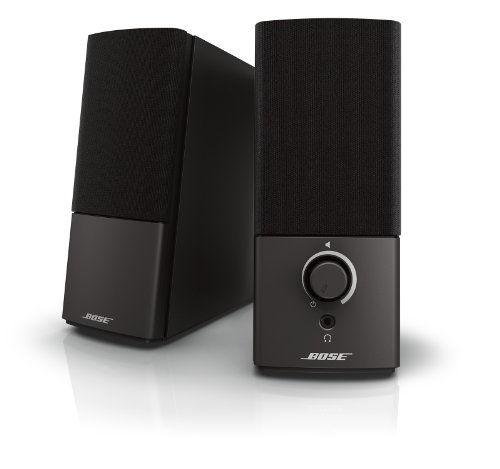
Bose Companion 2 Series III Multimedia Speakers
Inside Each Recommended Option
Most desktop speaker roundups start with speakers, but the Kanto S4 stands deserve the opening slot because they fix a problem the rest of this list ignores: where do your bookshelf speakers actually sit? These solid metal risers lift medium-sized monitors off the desk surface and angle them upward at 16 degrees, putting the tweeters closer to ear height for a much more direct sound.
Audio purists chasing real bass extension tend to use 3 to 4-inch bookshelf monitors, and those cabinets vibrate against wood desks if left flat. The S4’s included foam padding sits between speaker and stand, soaking up resonance before it travels into your keyboard tray. For anyone who already owns the Kanto YU4 or similar passive monitors, the integrated quarter-inch mounting thread locks the speaker down so accidental cable tugs won’t send them tumbling.
Strengths Worth Knowing
- The 16-degree upward tilt noticeably sharpens vocal clarity and treble detail during long work sessions.
- Solid metal construction paired with foam padding reduces the muddy resonance that flat desk placement usually causes.
- Quarter-inch threaded mounting accepts most compact monitors, including the Kanto YU4 and similar passive speakers up to 8 lbs.
- The low-profile black finish keeps your desk looking clean rather than cluttered with extra hardware.
- Owners commonly report the stands feel weighty enough that you can swap speakers without the whole assembly sliding around.
Things To Consider
- You supply your own speakers, so this is only useful if you already own bookshelf monitors in the supported size range.
- The 8 lb per-pair capacity rules out larger studio monitors or floor-standing speakers that need heavier support.
Built With In Mind
Listeners who already own compatible passive bookshelf monitors and want to elevate them off the desk for cleaner sound projection.
Look Elsewhere When
The Creative Pebble 2.0 suits anyone who wants powered, plug-and-play desktop speakers without buying separate stands and monitors.
The white FUNLOGY speaker pair flips the script on desktop audio by leaning into what small cabinets do well: aim the drivers straight at your ears and let the passive radiators do the heavy lifting on the low end. The 30-degree upward tilt is intentional, mimicking how near-field studio monitors position tweeters so dialogue and acoustic detail hit you directly.
For cramped desks where every inch counts, palm-sized stereo speakers with dual 48mm drivers produce surprisingly full sound without crowding your keyboard or monitor stand. USB power means one cable to your laptop, and a side-mounted volume dial keeps adjustments within reach during calls or gaming sessions. This is the option to consider when you want a tidy white aesthetic that matches modern minimalist workstations.
Features That Help
- The 30-degree driver angle places the soundstage right at ear height when seated, which sharpens podcast dialogue and acoustic music.
- Passive radiators help push bass response lower than typical 2-inch desktop drivers, so hip-hop and EDM tracks feel weightier.
- USB power eliminates the bulky wall adapter, keeping cable management simple on small or floating desks.
- A dedicated volume dial on the unit avoids hunting through software mixers when you need quick adjustments mid-call.
Worth Noting
- At 14W total output, these are designed for near-field listening rather than filling a large home office or open-plan space.
- No Bluetooth option, so streaming from a phone requires a wired AUX connection to the speakers.
Right Fit For
Remote workers and students with tight desk space who listen at moderate volumes and prefer a clean white aesthetic.
Consider Something Else When
The Creative Pebble 2.0 is a smarter pick if you want a similar tilt design at a more entry-level price point for a single-cable setup.
The Divoom MiniToo doesn’t pretend to be anything other than a curiosity, and that is exactly its charm. Shaped like a tiny 90s desktop tower, it ships with a 1.77-inch pixel display that cycles through retro clock faces, animations, and scrolling text you can customize from a phone app. It is half speaker, half desk toy, and the form factor rewards anyone whose aesthetic leans kitsch.
Under the novelty sits a real 5W near-field driver, tuned to handle the kind of close-range listening you do at a desk for music, study sessions, or background podcasts. Bass reproduction is warm rather than deep, which is honest for a unit this size. For creators, streamers, or anyone who wants their workspace to feel personal, the pixel screen adds visual interest that no plain black rectangle can match.
Standout Benefits
- The customizable pixel display adds personality, useful for showing animations, notifications, or your favorite retro clock face.
- Compact near-field tuning delivers clear vocals and warm bass that work well for podcasts and lo-fi study music.
- Bluetooth plus app integration makes it feel like a smart object rather than a passive speaker.
Trade Offs
- 5W of output is modest, so this unit fills a personal desk area rather than a shared office or living space.
- Bass response leans warm rather than deep, which may frustrate listeners chasing punchy low-end impact.
- App-driven features require a phone or tablet nearby to unlock the full customization suite.
Quick Facts
Who It Suits Best
Creators, students, and home-office workers who want a speaker that doubles as a conversation piece and enjoy tweaking visuals in an app.
Not Your Match When
The Creative Pebble 2.0 is a better fit for anyone who prioritizes pure stereo separation and simple USB plug-and-play without a learning curve.
The BESTISAN powered monitor speakers lean into flexibility with three input paths on a single unit: RCA for legacy gear, optical for clean digital audio from a TV or sound card, and Bluetooth for cable-free streaming from phones or tablets. That kind of input variety turns a desktop pair into the audio hub for an entire workstation, especially when you switch between PC gaming and casual music listening throughout the day.
The white housing fits modern minimal setups, and the powered monitor design means each speaker carries its own amplification, so no separate amp stack crowds your shelf. For shared desks where one person games while another streams music, the Bluetooth option removes the cable dance. Anyone balancing multiple audio sources will appreciate having one set of speakers that handles all of them.
What Makes Sense
- Three input options (RCA, optical, Bluetooth) let you connect a desktop tower, a phone, and a legacy audio source without swapping cables.
- Powered monitor design eliminates the need for a separate amplifier on a clean desk.
- Bluetooth streaming makes it easy to share the speakers with family or roommates without touching wires.
- The white finish blends with bright, modern interiors where black speakers feel too heavy.
Points To Keep In Mind
- Multiple input options mean a slightly larger footprint than minimalist single-cable speakers like the Creative Pebble 2.0.
- Bluetooth adds convenience but introduces a small amount of latency that competitive gamers may notice.
Made For
Desk owners who split time between PC gaming, console sessions, and casual phone streaming and want one speaker pair to handle every source.
Skip It When
The Creative Pebble 2.0 makes more sense for anyone with a single laptop and no legacy audio gear who values minimalism over input variety.
The FUNLOGY Speaker Plus earns its “Plus” badge by adding digital signal processing (DSP) tuning and dual amplifiers to the same compact footprint as the standard FUNLOGY model. DSP is the onboard digital audio shaping that lets small drivers punch above their weight: the system equalizes frequencies in real time, so mids stay clear and the passive radiator can focus on bass without distortion.
USB-C power appeals to anyone whose laptop has dropped older USB-A ports, and the AUX input still covers older devices. Combined with the familiar 30-degree driver tilt, this white version reads as a thoughtful upgrade for listeners who care about the difference between decent and detail-oriented sound, especially for dialogue-heavy games and acoustic tracks.
Where It Helps
- DSP tuning balances frequencies so dialogue, sound effects, and music stay distinct at lower listening volumes.
- Dual amplifiers deliver cleaner output than single-amp designs, helping bass feel controlled rather than boomy.
- USB-C power matches modern laptops and tablets, cutting down on cable clutter.
- The 30-degree driver tilt keeps the soundstage aimed at your ears during long sitting sessions.
- The passive radiator reinforces bass response without forcing the main drivers to overextend.
Less Ideal Details
- USB-C power means older laptops without USB-C ports will need an adapter to drive the speakers.
- At 14W total, output remains a near-field experience rather than room-filling sound.
Feature Snapshot
Best Suited To
Detail-oriented listeners with USB-C laptops who want noticeably cleaner sound than entry-level desktop speakers without giving up a small footprint.
Another Choice May Suit
The Bose Companion 2 Series III is a better match for office workers who want a long-trusted wired setup and don’t need USB-C specifically.
Same engineering, different wardrobe: this black version of the FUNLOGY speaker mirrors the white model’s dual 48mm drivers, passive radiator, and 30-degree upward tilt. The black housing suits darker gaming setups or workspaces where you want the speakers to disappear into the background rather than stand out as a design element.
For apartment dwellers with floating desks or compact gaming battlestations, USB power means no wall wart behind the furniture. The same near-field tuning that delivers clear mids and crisp highs also keeps the bass tight at lower volumes, which is ideal for late-night sessions when you do not want to wake neighbors. Volume dial accessibility is a small but meaningful daily upgrade over software-only controls.
Why It Works Well
- The black housing blends with most gaming setups and dark-themed workstations without drawing attention away from the monitor.
- Dual 48mm drivers with a passive radiator push bass lower than typical compact speakers without distortion.
- USB power keeps the cable count down to one for clean desks where extra adapters create clutter.
- The physical volume dial gives quick, tactile control during voice calls or games where sudden mute is needed.
Practical Considerations
- Lacks Bluetooth, so wireless phone streaming requires a separate adapter or wired AUX connection.
- 14W total output is tuned for close-range listening rather than projecting sound across a large room.
Who Will Love This
Gamers and remote workers with dark-themed setups who want unobtrusive speakers that disappear visually while delivering solid near-field audio.
A Better Fit Elsewhere
The BESTISAN Computer Speakers make more sense if Bluetooth streaming across multiple devices matters more than a minimalist footprint.
The Creative Pebble 2.0 has earned its place as a default recommendation for a simple reason: one USB cable handles both power and audio, no drivers, no wall adapter, no setup screens. For anyone who just wants better laptop sound without thinking about it, the Pebble delivers a clean upgrade in a tiny spherical housing that fits next to any monitor.
The 45-degree elevated drivers angle the sound toward your ears, and rear-facing passive radiators extend bass response beyond what such small cabinets should reasonably produce. It is the kind of speaker pair you forget is on the desk until you turn it off and notice how flat your laptop sounds by comparison. For students, casual users, or anyone who values low-fuss plug-and-play, the Pebble is hard to argue with.
A Few Highlights
- Single USB cable carries both power and audio, ideal for laptops with limited ports or traveling setups.
- 45-degree elevated drivers direct sound at seated ear level for clearer podcasts and calls.
- Rear-facing passive radiators reinforce bass response in a footprint that fits next to any monitor.
- The minimalist spherical design looks intentional on most desks without taking up much visual space.
Honest Caveats
- No Bluetooth, so all connections require a wired USB or 3.5mm path to your device.
- Volume at low levels can be limited depending on your computer’s USB power output.
Feature Card
Perfect Match For
Students, casual listeners, and anyone who values a single-cable setup over premium audio refinement on a tight budget.
Where A Sibling Pick Shines
The FUNLOGY Speaker Plus white model steps up with DSP tuning and dual amplification if you want more refined sound at slightly higher output.
The FUNLOGY Mini2 breaks from the desk entirely and earns a spot on this list because “desktop” setups are not always stationary. IPX7 waterproofing means it survives full submersion, which opens up use cases the other speakers here cannot touch: shower playlists, poolside decks, beach trips, or kitchen counters where spills happen. The integrated mic also turns it into a hands-free conference speaker when paired to your phone.
TWS stereo pairing (True Wireless Stereo) lets you link two Mini2 units for proper left-right separation if you want a wider soundstage in larger spaces. For solo use, the 5W driver paired with a passive radiator produces distortion-controlled bass at higher volumes. It is the most versatile pick on this list for anyone whose audio routine follows them from desk to kitchen to travel bag.
Everyday Advantages
- IPX7 waterproof rating makes the speaker safe for shower, pool, or beach use without a separate case.
- TWS pairing lets you link two units for true stereo separation when you want fuller sound in a room.
- Built-in microphone supports hands-free calls when paired to a phone.
- Portable size slips into a backpack or travel bag without adding noticeable weight.
- Passive radiator keeps bass response tight even when volume climbs toward maximum.
A Few Limitations
- 5W single-driver output is modest for filling a large living room or open-plan office.
- Battery life depends on volume levels, so extended outdoor sessions may require periodic charging.
The Right Fit
Travelers, renters, and home users who want one speaker that moves between desk, shower, kitchen, and outdoor settings without special handling.
Reach For A Different Pick When
The Creative Pebble 2.0 makes more sense for desk-bound setups where USB power and stereo separation matter more than waterproof portability.
The black FUNLOGY Speaker Plus trades the white model’s bright aesthetic for a darker finish that suits gaming battlestations and minimalist workspaces. Functionally it mirrors the white Plus variant: dual amplifiers feed a 14W stereo output with DSP tuning, and the 30-degree upward driver tilt aims the soundstage directly at the listener.
USB-C power delivery matters here. Laptops released in the last several years lean toward USB-C as the primary port, and a desktop speaker that draws clean power from the same source removes one more wall wart from the cable mess. The 3.5mm AUX input still supports older devices when needed, giving this unit a real flexibility edge over single-connection speakers.
Useful Strengths
- DSP tuning plus dual amplification delivers noticeably cleaner audio than single-amp entry-level speakers.
- USB-C power matches modern laptops and tablets, reducing cable clutter on minimalist desks.
- 3.5mm AUX input covers older devices, so you do not need to upgrade every audio source at once.
- The black finish blends with gaming setups and dark-themed workstations without drawing visual attention.
- Passive radiator adds depth to bass-heavy tracks without overwhelming mids and vocals.
Potential Drawbacks
- USB-C power delivery requires a compatible port on your device, so older laptops will need an adapter.
- 14W output suits near-field listening, not large-room coverage.
Whose Shelf It Belongs On
Owners of USB-C laptops who want refined near-field audio and prefer darker hardware that blends with gaming or minimalist setups.
Swap It Out When
The Bose Companion 2 Series III fits better for office workers with older laptops who want a long-trusted wired setup without USB-C requirements.
The Bose Companion 2 Series III sits at the end of this list because it represents the conservative, well-engineered choice that has earned its reputation over years of consistent service. Two simple inputs, 3.5mm AUX and a dedicated PC input, keep the setup uncomplicated for office workers who plug in and forget about configuration.
Bose’s tuning philosophy focuses on clarity at any volume, so podcasts, video calls, and music all stay intelligible even at low listening levels where small speakers usually sound thin. The auxiliary input also doubles the speakers as a playback source for a phone or tablet when you want to step away from the desk. For anyone who has owned Bose gear before and knows what to expect, this pair delivers on that legacy without unnecessary extras.
A Favorable Mix
- Bose-tuned drivers prioritize vocal clarity, useful for video calls and podcast-heavy workdays.
- Dual input paths (PC and AUX) let you keep the speakers connected to two devices simultaneously.
- Consistent volume reproduction at low levels, ideal for shared offices where loud playback isn’t an option.
- Established brand reliability backed by long-term engineering refinement.
Some Limits To Know
- No Bluetooth, so wireless streaming requires a wired connection to your phone or tablet.
- The design is conservative and looks dated next to modern white or retro-themed alternatives.
- Limited bass extension compared to systems with dedicated subwoofers or DSP-tuned compact speakers.
At A Glance
Who Should Grab It
Office workers, frequent video callers, and long-time Bose owners who want dependable wired audio without modern extras like Bluetooth or USB-C.
Where Another Pick Suits Better
The Creative Pebble 2.0 makes a smarter pick for minimalists on a tighter budget who prefer a single-USB-cable setup over dual-input wired convenience.
What Matters Most Before Choosing Bass Desktop Speakers
Driver Size And Cabinet Volume
Small desktop speakers live or die by the relationship between driver size and internal cabinet volume. A 2-inch driver in a sealed cabinet can produce clean mids but struggles to move enough air for deep bass, which is why passive radiators (a second passive diaphragm that resonates with the active driver) appear on most compact options in this list. Listeners who prioritize bass extension should look for passive radiators or dedicated subwoofer outputs, while podcast-focused users can prioritize midrange clarity instead.
Connection Type And Power Source
USB-powered speakers trade raw output for cable simplicity, a worthwhile trade if your desk has limited outlets. USB-C models future-proof the setup against older USB-A laptops, while traditional wall-powered units often deliver higher sustained volume but require an extra outlet. Bluetooth adds convenience for phone streaming but introduces latency that competitive gamers may notice.
Size, Tilt, And Desktop Geometry
The 30 or 45-degree driver tilt angles sound toward your ears at seated height, which is why so many modern desktop pairs include this design. Measure your monitor stand height and available shelf space before choosing, because larger cabinets can block webcam angles or push your keyboard too far back. Match cabinet size to your typical listening distance for the best balance of presence and clarity.
Common Pitfalls And Upgrade Logic
Mistakes Worth Dodging
Chasing wattage numbers often backfires on desktop speakers. A 30W rating on a poorly tuned cabinet can sound worse than a properly engineered 14W unit with DSP shaping. Skipping the connection check is another common slip: owners of newer laptops with only USB-C ports frequently buy USB-A speakers, then scramble for adapters. Finally, ignoring cabinet material means resonance and buzz can ruin otherwise clean audio at higher volumes, so solid plastic or wood enclosures tend to outlast hollow-feeling alternatives.
Where The Extra Money Goes
Higher-tier desktop speakers earn their premium through better digital signal processing, dual amplification, and superior driver materials like aluminum cones over basic paper ones. The upgrade makes the biggest audible difference for listeners who game, edit audio, or simply care about separating instruments in busy tracks. Casual listeners who only need clear voice reproduction for calls and background music will find mid-tier options deliver most of the experience without the cost jump.
Frequently Asked Questions
Do desktop speakers really produce meaningful bass?
Compact desktop speakers with passive radiators can produce surprisingly full low-end response for their size, though they will not match a dedicated subwoofer setup. For most music genres at moderate volumes, modern desktop pairs deliver bass that feels present and warm rather than overpowering.
Is USB power enough to drive desktop speakers?
USB power is sufficient for most compact desktop speakers under 20W output. Higher-wattage units typically require dedicated wall power to reach their full volume and bass extension without distortion.
Do I need a sound card for desktop speakers?
Modern computers handle digital-to-audio conversion internally well enough for most desktop speakers. A dedicated sound card or DAC only becomes worthwhile for high-impedance studio monitors or audiophile-grade setups that demand cleaner signal paths.
Can Bluetooth speakers work as desktop speakers?
Bluetooth desktop speakers work fine for casual listening, music streaming, and video playback. Competitive gamers and audio editors often prefer wired connections because Bluetooth introduces a small amount of latency that can affect timing-sensitive use.
How long do desktop speakers typically last?
Solid desktop speakers from established brands commonly last five to ten years with normal use. The weakest link is usually the power supply or internal amplifier rather than the drivers themselves, so quality build materials tend to translate into longer service life.
Closing Remarks
The right pair of bass desktop speakers depends on how you actually use your desk: commuters who stream music at low volumes need something different from gamers chasing deep impact during late-night sessions. Match the connection type to your laptop, the size to your available shelf space, and the tuning philosophy to the content you play most. Whatever profile fits, the picks above cover the realistic range of needs without forcing you into a single style of listening.


