

Your first recording session is waiting, and the audio interface sitting between your microphone and your computer decides how good it sounds. Pick the wrong one and you’ll fight latency, hiss, and driver headaches for months. Pick well and you’ll wonder why you waited so long to start.
This guide focuses on entry-level gear that beginners actually finish projects on, not gear that sits in a box because the setup got too frustrating. Every pick below fits a real first-timer scenario, from solo singer-songwriters to first-time podcasters and gamers who want clean broadcast audio.
The Lineup, Simplified

Focusrite Scarlett 18i20 3rd Gen USB Audio Interface
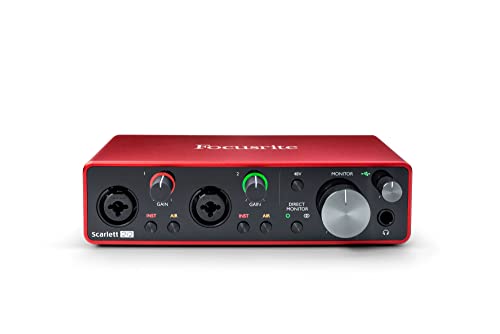
Focusrite Scarlett 2i2 3rd Gen USB Audio Interface
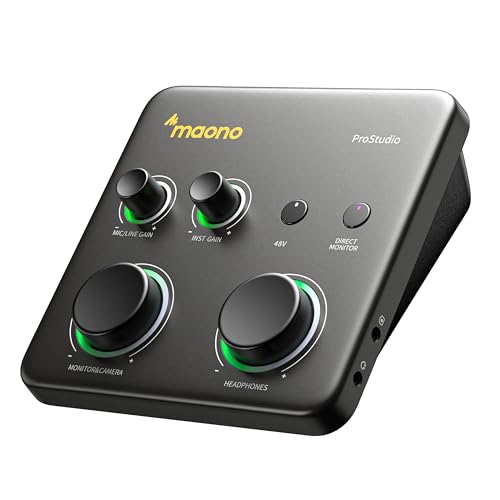
MAONO P1 USB Audio Interface with 70dB Gain

MAONO G1 Neo Gaming Audio Mixer Audio Interface

MAONO AME2 Audio Interface Mixer Podcast Studio

MAONO PS22 Lite USB Audio Interface for PC

Focusrite Scarlett Solo 3rd Gen USB-C Audio Interface

MAONO P2 USB Audio Interface

MAONO Podcast Equipment Bundle Audio Interface

MAONO MaonoCaster All-in-One Podcast Interface
Meet The Standout Selections
The 18i20 lives at the heavy end of the Scarlett lineup, which matters for first-timers who already know their ambitions are bigger than a bedroom demo. Eight microphone preamps, eight line inputs, and eight line outputs mean you can record a full band or run a hardware-heavy studio without immediately outgrowing the box. Preamps are the small built-in amplifiers that boost your microphone signal to a usable level, and the 18i20’s eight of them carry Focusrite’s signature Air mode for brighter acoustic capture.
Resolution tops out at 24-bit/192kHz, a spec that simply means each recording captures far more sonic detail than the 16-bit/44.1kHz CD standard, giving you real headroom for mixing later. In practice, the converters hold their own against interfaces that cost twice as much, and the driver latency stays low enough that you can track vocals without distracting delay. Compared to the 2i2 below, this is a quantum jump in scale, not a step.
Where It Delivers
- Eight preamps with Air mode brighten acoustic sources without external processing
- Eight line inputs and outputs support band tracking and complex routing
- 24-bit/192kHz converters capture detail that holds up under heavy mixing
- Talkback and speaker switching make this a credible control-room hub
Worth Noting
- Overkill if you only plan to record one vocalist at home
- Rack-sized chassis demands a dedicated desk space
- Owners commonly report a learning curve for the routing software
Key Specs
Made For
Beginners running ambitious multi-mic sessions who want an interface that will not box them in next year.
Consider Something Else When
Solos or duos should look at the Focusrite Scarlett 2i2 3rd Gen, which strips away the rack form factor and ships with friendlier basics.
The 2i2 is the interface most bedroom producers end up buying, and for good reason. Two upgraded preamps with switchable Air mode handle a vocal and guitar simultaneously, while the high-headroom instrument inputs let passive pickups shine without choking. Headroom is the amount of clean volume a signal can hit before distortion creeps in, and you feel it every time you strum hard without crackle.
You also get two low-noise balanced outputs, which are professional-style jacks that reject hum over long cable runs, useful if your monitors sit a few feet away. The bundled software covers everything a first album needs, and the metal chassis feels like it will outlast your laptop. Where the 18i20 above is a control-room piece, the 2i2 is a songwriting companion.
Bright Spots
- Two preamps with Air lift acoustic clarity on vocals and strings
- High-headroom instrument inputs preserve clean guitar tone
- Low-noise balanced outputs keep playback hiss-free
Trade Offs
- Only two inputs limit ensemble or drum recording
- No MIDI ports if you plan to add classic synth gear later
Right Fit For
Singer-songwriters and small-duo creators who want a proven, no-drama workhorse right out of the box.
Look Elsewhere When
Streamers hunting for sound pads and effects should pivot to the MAONO AME2, which bakes broadcast tricks into the hardware.
The P1 targets creators who record away from a desk, and the headline spec is the 70dB preamp gain. Gain is how much the interface amplifies your microphone, and 70dB is enough to drive notoriously power-hungry dynamics like the SM7B without an inline booster. That single feature saves beginners from one of the most common first-week frustrations: a mic that sounds thin and distant.
Dual USB-C ports and MFi-certified connectivity, the Apple licensing standard that guarantees compatibility with iPhones and iPads, let you run a laptop and a phone at the same time. The 24-bit/192kHz conversion and quoted -130dB EIN (Equivalent Input Noise, a measurement of how much hiss the preamp adds) keep quiet passages genuinely quiet. Routing software rounds out the package for streamers who need loopback, which is the ability to send computer audio back into your recording, for capturing game or browser sound.
The Upside
- 70dB gain handles demanding dynamic mics without a booster
- Dual USB ports with MFi certification support mobile and desktop together
- Loopback and routing software suit streamers and creators on the move
Honest Caveats
- One XLR input means solo creators only
- Software routing adds setup time compared with plug-and-play rivals
Who Will Love This
Mobile-first creators who bounce between phone, tablet, and laptop and want one box that follows them.
A Better Fit Elsewhere
If you record a single dynamic mic at a fixed desk, the Focusrite Scarlett Solo 3rd Gen covers the same need with a simpler learning curve.
The G1 Neo speaks directly to gamers who want broadcast-quality sound without bolting on a full studio setup. The XLR input with 48V phantom power (the electrical current that powers condenser microphones) accepts the kind of streaming mics beginners actually buy, and the compact chassis fits next to a keyboard without dominating the desk.
Where the Focusrite 2i2 above treats sound as a clean canvas, the G1 Neo leans into custom sound effects and RGB lighting, so a stream intro or hype button sits one button-press away. In our view, the appeal is the mix of personality and practicality for first-time streamers who care about audience experience as much as raw audio fidelity.
Real-World Strengths
- XLR input with 48V supports a wide range of streaming microphones
- Custom sound effects add broadcast polish without extra software
- Compact footprint suits crowded gaming setups
Possible Compromises
- Gaming aesthetic may feel out of place in a music-focused home studio
Quick Facts
Perfect Match For
First-time gamers and streamers who want character-driven broadcast tools and XLR flexibility in one box.
Skip It When
Music-focused beginners will get cleaner results with the Focusrite Scarlett Solo 3rd Gen, which prioritizes pure tone over on-board effects.
The AME2 sits in the middle of MAONO’s podcast line, and it pulls double duty as mixer and interface. Built-in preamps support 48V phantom power, the three-level mic gain tops out around 60dB, and the 32-bit chipset keeps noise low even when you push the level. Eleven custom sound pads give hosts jingles, stingers, and signature intros without leaving the desk.
Bluetooth input lets you pull in a phone caller or stream a remote guest, and the layout is genuinely approachable for first-time podcasters who do not want to learn a full DAW (Digital Audio Workstation, the software used to record and edit audio). Compared to the 2i2 above, this trades pure analog simplicity for broadcast-style hardware controls.
Useful Touches
- Eleven custom sound pads make live shows feel polished
- Bluetooth input simplifies remote call-ins
- 3-level mic gain accommodates different XLR mics
Small Caveats
- More controls mean more setup reading before first use
- Physical pads take desk space that two-input interfaces save
Whose Shelf It Belongs On
Hosts running multi-segment podcasts with jingles, callers, and guest drops who want hardware control over software menus.
Reach For A Different Pick When
Musicians recording acoustic instruments will find the MAONO PS22 Lite more focused on clean capture than broadcast flair.
The PS22 Lite is a quiet achiever: 24-bit/192kHz capture with a 106dB dynamic range (the span between the quietest and loudest sounds the interface can record cleanly) in a compact shell aimed at home-studio beginners. For a first guitar-vocal setup, that resolution is plenty of overhead, and the ASIO driver support (a low-latency audio standard popular on Windows) keeps live monitoring tight.
Loopback and routing software make it a sensible pick for streamers using OBS, the popular broadcasting program, since you can pipe application audio back into the mix without extra adapters. Compared to the Scarlett 2i2 above, the price lands lower, though the Focusrite still wins on driver polish and brand reputation. For most first-year creators, that trade is fair.
What Pays Off
- 24-bit/192kHz resolution at a beginner-friendly price tier
- Loopback support simplifies streaming and content workflows
- ASIO drivers keep monitored signals in sync with your performance
Areas To Watch
- Fewer bundled software tools than rival beginner kits
Feature Snapshot
Best Suited To
Home-studio beginners recording guitar and vocals who want flagship resolution without flagship pricing.
Swap It Out When
If you want brand-name driver polish and bundled software, the Focusrite Scarlett 2i2 3rd Gen is the safer step up.
The Scarlett Solo is the smallest interface in the third-gen lineup, built for one voice and one instrument at a time. One upgraded mic preamp with switchable Air mode handles vocals with surprising clarity, and the instrument input keeps electric guitars and basses sounding clean at higher gain settings.
USB-C connectivity means it lives well on modern laptops without adapters, and the bundled software covers your first recording, editing, and release cycle. If you have never owned an interface before, the Solo is the gentlest on-ramp into the Focusrite ecosystem. The trade-off shows up the moment you want to record a guest or layer a second mic, since there is simply nowhere to plug it in.
A Few Highlights
- One preamp with Air mode handles solo vocals cleanly
- USB-C simplifies modern laptop hookups
- Bundled software covers end-to-end recording basics
Minor Gripes
- Single mic input prevents two-person sessions
- No MIDI for vintage keyboard workflows
Who Should Grab It
First-time solo creators who record one voice and one guitar at a time and value the gentlest learning curve.
Where A Sibling Pick Shines
Duo acts and interviewers should step up to the Focusrite Scarlett 2i2 3rd Gen, which adds the second preamp without overwhelming complexity.
The P2 wraps a 24-bit/192kHz signal path in a zinc-alloy chassis that feels tougher than its size suggests. The 69dB preamp and 120dB dynamic range give vocalists enough headroom for expressive delivery, and MFi certification lets you plug straight into an iPhone or iPad without adapters hanging off the cable.
Auto-gain is the headline for nervous beginners, since the interface dials in a sensible level on its own, and loopback makes it easy to mix in app audio for tutorial-style content. Compared to the PS22 Lite below it on this list, the P2 leans harder into mobile-first creators who often record on a kitchen counter rather than at a studio desk.
A Favorable Mix
- Auto-gain removes the most common beginner setup mistake
- MFi-certified connection works with iPhone and iPad out of the box
- Zinc chassis survives the daily commute in a backpack
Things To Consider
- Auto-gain can clip hot vocalists during loud passages
Feature Card
Right Fit For
Phone-and-tablet podcasters who record away from a traditional desk and want auto-gain to remove setup guesswork.
Another Choice May Suit
Studio-bound creators chasing pure tone should consider the Focusrite Scarlett Solo 3rd Gen instead, which trades portability for Focusrite’s renowned converter character.
The Podcast Equipment Bundle pairs the MaonoCaster Lite console with a condenser microphone and the MH601 monitoring headphones, giving first-timers a working rig in a single purchase. The mixer side offers four user-recordable sound pads and eight built-in effects like applause and laughter, which is enough personality to keep early episodes feeling lively.
The MH601 headphones use a 50mm driver and active noise cancellation, useful in shared apartments or coffee-shop recordings where isolation matters. As a bundle, the value proposition is strong for someone who has not bought any accessories yet. If you already own gear you love, buying the parts separately usually wins.
Notable Gains
- Mixer, mic, and headphones ship together for one-stop setup
- User-recordable pads let you load custom jingles
- Headphones offer active noise cancellation for noisy spaces
Some Limits To Know
- Bundled condenser mic is solid for speech, less so for music
- Bundle offers less upgrade flexibility than buying separates
Made For
First-time streamers and podcasters who want a complete rig from one box without researching individual components.
Not Your Match When
Musicians should look at the MAONO PS22 Lite, which captures instruments more honestly than a broadcast-oriented bundle.
The MaonoCaster Caster edition leans into personality, packing six reverb modes, twelve-step auto-tune, and eleven sound pads into a compact tabletop unit. The 32-bit chipset and built-in preamps with 48V phantom power support proper XLR condensers, and each mic input is independently controllable for shows with multiple hosts.
Pro touches like sidechain (an effect that ducks one signal when another speaks, often used to keep music under voice) and music-only mode give beginners broadcast tricks they would otherwise pay a producer for. Compatibility stretches across PC, smartphone, tablet, and camera, so the same rig works in a bedroom studio or on a convention stage. It is the most personality-forward pick on this list, and the trade-off is a learning curve that rewards a few patient evenings.
Strengths Worth Knowing
- Reverb, autotune, and pads feel like a mini broadcast studio
- Sidechain and music-only modes add pro polish to live shows
- Wide device compatibility for streaming anywhere
Details To Watch
- Auto-tune and effects may not suit serious music recording
Spec Overview
Best Suited To
Talk shows, live streams, and creator content where personality and on-board effects matter as much as raw tone.
Consider Something Else When
Pure music recordists will prefer the Focusrite Scarlett 2i2 3rd Gen, which focuses on transparent sound over built-in effects.
What Matters Most Before Choosing Your First Audio Interface
A first interface should disappear into your workflow, not become a project of its own. Start by counting how many things you actually need to record at once: a solo vocalist or guitarist only needs one mic input, while a podcast with one guest needs two.
Preamp gain matters more than beginners expect. Condenser microphones (the kind that need external power and tend to be very sensitive) play nicely with most preamps, but power-hungry dynamics like the SM7B can sound thin on interfaces that only deliver 50dB of clean gain. Look for 60dB or higher if you already own or plan to buy a dynamic mic.
Resolution and bit depth matter, but only up to a point. 24-bit/192kHz is the practical ceiling for most beginners, and anything beyond it does not improve a bedroom recording. Latency, the delay between playing a note and hearing it back through your headphones, is the real time-killer, so confirm the interface plays nicely with your computer’s audio driver standard, whether that is ASIO on Windows or Core Audio on Mac.
Finally, check that the included software covers your first six months. Bundled DAWs and plug-ins save you from subscription fatigue, and that matters when the goal is to keep making things, not wrestle with license codes.
Practical Buying Notes For First-Timers
Common Shopping Slip Ups
A frequent misstep is buying the cheapest interface without checking input count. A single-input box feels generous until the day you want to record a guest or an instrument alongside your voice. Another trap is chasing spec-sheet numbers that do not matter at the beginner stage, like extreme sample rates that no home studio can hear a difference from.
When Paying More Pays Off
Higher-tier interfaces earn their keep through cleaner preamps, lower noise floors, and rock-solid driver support that simply works session after session. For most beginners, the upgrade is worth it the moment you start delivering finished work to other people, since listeners hear hiss and hum far sooner than they hear subtle resolution differences. That is when a quieter signal chain pays for itself.


