

A dependable flash drive quietly handles the unglamorous work of daily life: the photos from last weekend, the spreadsheets you swap between machines, the presentation you forgot on the home laptop. The right stick disappears into your pocket and just works. This roundup focuses on high-capacity options that hold up under real travel and daily transfer routines, including a niche pick for keeping laptops awake during long sessions.
Your Options, Compared

SanDisk Cruzer Ultra 16GB USB 3.0 Flash Drive 5-Pack
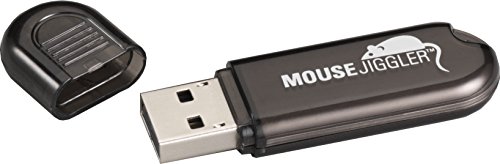
Cru DataPort Mouse Jiggler

Lexar D40E 64GB Dual USB Type-C Jump Drive

Lexar A30E USB 3.2 Flash Drive 64GB 3-Pack
Lexar A30E USB 3.2 Flash Drive 32GB 3-Pack

Lexar D40E 128GB Dual USB Type-C Jump Drive

Lexar D40E 256GB Dual USB Type-C Jump Drive

Lexar D40E 256GB Dual USB Type-C Jump Drive (Silver)

Lexar E32C 128GB Type-C Dual Drive Swivel
Lexar E32C 64GB Type-C Dual Drive Swivel
What Each Pick Brings To The Table
Buying flash drives one at a time gets old fast, especially when half of them end up loaned out and never returned. This SanDisk bundle ships five identical 16GB sticks in one box, so you can label one for work, one for media, one for backups, and still have a couple spares for the kids’ homework machines.
Each drive uses USB 3.0 (a third-generation connection that handles data much faster than the older USB 2.0 standard), with read speeds rated up to 100 MB/s, meaning roughly a full 16GB transfers in a couple of minutes on a modern port. The slim, retractable body slides easily onto a keyring. For most households that just need a few no-frills sticks scattered around the house, the math works out well.
What Makes Sense
- Five sticks in one pack means you can dedicate each to a purpose without reshuffling
- 100 MB/s read speed handles everyday document and photo transfers without long waits
- USB 3.0 backwards compatibility with USB 2.0 ports on older laptops and TVs
- Compact, retractable shell protects the connector from pocket lint and pocket damage
- Useful for schools, small offices, or families where multiple people need their own drive
Trade Offs To Consider
- 16GB per stick fills up quickly if you work with raw video or large photo libraries
- Write speeds are noticeably slower than reads, so dropping a few gigabytes onto the drive takes patience
- No hardware encryption, so sensitive files need separate protection
Core Details
Right Fit For
Families, classrooms, and small offices that want a few affordable, clearly labeled sticks for everyday document handoffs.
Where Another Pick Suits Better
The Lexar D40E 128GB is a better match for solo users who want one larger drive instead of juggling five smaller ones.
Strict sleep timers have a way of biting you at the worst moments, especially during long downloads or lengthy remote sessions. The CRU WiebeTech Mouse Jiggler is a small USB accessory that simulates tiny mouse movements so your computer stays awake without you touching it.
It plugs into any open USB-A port (the classic rectangular USB connector found on most laptops and desktops) and runs on its own, with no software required. Forensic investigators use these to keep evidence machines awake during acquisitions, but home folks find them just as handy for overnight backups or video renders that can’t be interrupted.
Where It Excels
- Plug-and-play simplicity with no driver install on Windows, macOS, or Linux
- Compact footprint stays flush against the laptop edge
- Prevents annoying password re-prompts during long unattended tasks
- Useful for IT work, presentations, and overnight file syncs
Worth Noting
- Not a storage device, so it adds nothing to your media library
- USB-A only, so newer USB-C-only laptops need an adapter
- Some corporate machines flag mouse jigglers in security audits, so check your workplace policy first
Who It Suits Best
IT professionals, researchers, and remote workers who run long unattended processes on a single laptop.
A Better Fit Elsewhere
Anyone wanting actual storage capacity should skip this and pick the Lexar E32C 128GB Type-C Dual Drive Swivel instead.
Modern phones shoot 4K video that fills a laptop drive in a single afternoon, and getting it off the phone usually means fumbling with cables or cloud uploads. The Lexar D40E solves that with two connectors built into one slim stick: a USB-C plug on one side and a USB-A plug on the other.
You can move files straight from an Android phone or tablet (the kind that support USB On-The-Go, a standard that lets phones read external storage) into the same drive and then plug it into an older laptop without a dongle. At 64GB, it’s a comfortable size for travel albums, podcast archives, and work documents. Read speeds top out around 100 MB/s, fast enough for daily transfers but not a speed demon for massive video libraries.
Everyday Advantages
- USB-C and USB-A in one drive removes the need for adapters between devices
- Slim champagne-silver finish slips into a wallet or coin pocket
- Plug-and-play with no app required on most modern phones
- Convenient for moving camera roll photos off a phone during a trip
Things To Consider
- Some Android phones require enabling OTG file transfers in settings before the drive appears
- 64GB is roomy for documents but tight for users shooting constant 4K phone video
- Plastic housing feels lighter than metal-cased alternatives if you prefer heft
Feature Snapshot
Made For
Travelers and hybrid workers who constantly swap files between a USB-C phone and an older USB-A laptop.
Skip It When
Anyone needing a true workhorse for video projects should reach for the Lexar D40E 256GB Dual USB Type-C Jump Drive instead.
When one drive never feels like enough, three matching sticks keep the chaos organized. The Lexar A30E pack hands you three identical 64GB USB-A drives, each one slim enough to live on a lanyard or sit forgotten in a drawer until needed.
USB 3.2 Gen 1 brings the same 100 MB/s read ceiling as the dual-connector D40E, though these are USB-A only, so they pair best with traditional laptops and desktops. The lightweight 7.4g body barely registers in a pocket. For most households that want a backup stick in each bag, one in the car, and one for the office, this trio removes the daily hunt for the one drive that wandered off.
A Few Highlights
- Three sticks let you split work, personal, and backup roles without overlap
- 64GB per stick handles multi-week project folders and music libraries
- Lightweight body won’t weigh down a keychain
- Plays nicely with older laptops that only have USB-A ports
A Few Limitations
- No USB-C connector, so newer phone-to-laptop workflows need an adapter
- Identical sticks can be hard to tell apart without labeling
- Write speeds slow down noticeably when filling the drive near capacity
Best Suited To
Multi-device households and small work teams who want a dedicated stick per person or per project.
Consider Something Else When
The Lexar D40E 64GB Dual USB Type-C Jump Drive is a smarter call for phone-first workflows with no USB-A port in sight.
Not every job needs a 256GB vault. For hauling term papers, slide decks, and a season of TV episodes between machines, 32GB is plenty. This three-pack ships three A30E sticks at the smaller capacity, giving you one for the office, one for the travel bag, and one for the kitchen counter.
The drive itself stays slim and light at around 7.4 grams, with the same USB 3.2 Gen 1 interface as the larger A30E sticks. You may find the smaller capacity limiting for video editors or photographers, but for most schoolwork and document handoffs, the trade-off feels right. Compatibility stretches across laptops, Macs, and traditional desktop towers.
Positive Points
- Three sticks for the price of a single mid-capacity competitor
- Ideal size for essays, slide decks, and small media files
- Compact body survives daily pocket carry without bulk
- USB 3.2 Gen 1 reads keep file access snappy on modern laptops
Honest Caveats
- 32GB fills quickly with high-res photos or short videos
- No USB-C connector means USB-C-only laptops need an adapter
- Plastic shell can scratch over years of keychain carry
Who Should Grab It
Students and casual home users who mostly move documents and lightweight media between machines.
Look Elsewhere When
Anyone regularly backing up a phone camera roll should consider the Lexar D40E 128GB Dual USB Type-C Jump Drive instead.
Stepping up from 64GB to 128GB doubles the room for project files without changing the pocket-friendly form factor. The Lexar D40E in 128GB keeps the same dual-connector design: USB-C for phones and modern laptops, USB-A for older machines and TVs.
For creators and students handling larger RAW photo sets or short 4K clips, the extra space matters. Read speeds hold steady around 100 MB/s, so opening files directly from the drive stays responsive. The slim champagne shell still disappears into a wallet sleeve, and there is no cap to misplace.
What It Does Well
- 128GB comfortably holds photo libraries and several hours of video
- Dual connectors bridge phone and laptop in one body
- 100 MB/s reads keep project files responsive when working off the drive
- Sturdy enough for daily travel in a laptop sleeve
Soft Spots
- Still slower than dedicated SSDs for sustained large-file writes
- No integrated keychain loop, so a small case or lanyard helps avoid loss
- Phone compatibility requires OTG support, which some budget Android phones lack
Feature Rundown
Right Fit For
Students and freelance creators who want one stick to handle phone transfers, laptop backups, and client handoffs.
Not Your Match When
The Lexar E32C 128GB Type-C Dual Drive Swivel is a better pick for users who want a protective swivel cap over the connectors.
A full 256GB turns a thumb drive into a credible archive. Photographers with multi-year image libraries, videographers carrying B-roll between shoots, and anyone backing up a phone on the road will appreciate the breathing room. The D40E at this capacity lands in a titanium-grey finish that looks at home next to premium laptops.
Like the smaller D40E siblings, you get USB-A and USB-C on one body, plus the same 100 MB/s read ceiling. Real-world transfer speed depends on what you’re moving and the host port, but for most daily archiving tasks the pace feels steady. The trade-off shows up in weight, just a touch more, though still well under an ounce.
Useful Touches
- 256GB swallows large photo libraries and several full-length video projects
- Titanium-grey finish has a more grown-up look than the silver model
- Dual connectors remove the need for adapters in mixed-device households
- Useful as a travel backup before cloud sync in spotty Wi-Fi areas
Where It Is Less Suited
- Larger capacity means slower recovery if the drive is ever lost
- Write speeds can’t match a portable SSD for sustained video capture
- Sticking out from a laptop, the body can catch on bags if not removed before packing
Perfect Match For
Photographers, videographers, and field professionals who need large-capacity portable storage in one slim stick.
Reach For A Different Pick When
The SanDisk Cruzer Ultra 16GB USB 3.0 Flash Drive 5-Pack makes more sense for users who want multiple smaller sticks instead of one large one.
Capacity and aesthetics often pull in opposite directions, but this silver 256GB D40E pulls off both. The champagne-silver finish pairs well with MacBooks and silver-tone laptops, making it feel like an intentional accessory rather than an afterthought.
Spec-wise, the drive matches its titanium sibling: dual USB-A and USB-C connectors, USB 3.2 Gen 1, and up to 100 MB/s reads. The main difference is purely cosmetic, so the choice between this and the titanium grey model comes down to your laptop’s finish. For style-conscious professionals, the silver version slides into a polished workflow without clashing.
The Helpful Details
- Silver finish pairs well with MacBook and premium ultrabook aesthetics
- 256GB handles full project archives in a single stick
- Dual connectors bridge phone and computer seamlessly
- Light enough to live attached to a slim laptop sleeve
Practical Considerations
- Same write speeds as the grey model, no performance upgrade
- Silver finish may show fingerprints more than darker shells
- Not weather-sealed, so a small pouch helps during rainy commutes
Built With In Mind
Design-focused professionals and creatives who want storage that matches the polished look of their hardware.
A Better Fit Elsewhere
Users prioritizing connector protection over color should pick the Lexar E32C 128GB Type-C Dual Drive Swivel instead.
Anyone who has fished a lint-covered cap out of a pocket knows the appeal of a cap-less design. The Lexar E32C solves that with a swivel shell that rotates to cover either connector when not in use, eliminating the lost-cap problem entirely.
Inside, you get 128GB, USB-A plus USB-C dual connectors, and USB 3.2 Gen 1 with up to 100 MB/s reads. Compared to the D40E siblings, this one feels a touch more rugged for daily pocket carry, and the swivel action gives you a tactile “click” confirming the connector is protected. For commuters and field workers who toss their gear into bags without thinking, the design pays off.
Advantages To Know
- Swivel cover protects both USB-A and USB-C connectors from pocket debris
- 128GB comfortably handles photo libraries and project folders
- Dual connectors work with phones, tablets, and laptops alike
- Sturdy hinge feels reliable for daily open-and-close use
Things That May Matter
- Swivel mechanism adds slight bulk compared to the cap-less D40E
- Hinge can wear over many years of constant swiveling
- Read speeds top out around 100 MB/s, slower than portable SSD alternatives
Whose Shelf It Belongs On
Daily commuters and field workers who want connector protection without a separate cap to lose.
Swap It Out When
Users wanting maximum storage on a single stick should consider the Lexar D40E 256GB Dual USB Type-C Jump Drive (Titanium Grey) instead.
The 64GB sibling to the E32C keeps the same swivel-protected design but trims capacity to a more casual size. For users who mainly swap documents, podcast files, and phone camera dumps between machines, 64GB is often plenty.
USB 3.2 Gen 1 brings the familiar 100 MB/s read ceiling, and dual USB-A plus USB-C connectors keep the workflow flexible across older laptops and modern phones. You may find the smaller capacity limiting for sustained video work, but for everyday phone-to-laptop transfers, the lighter price tag and pocket-friendly build make sense.
Benefits That Matter
- Swivel cover eliminates lost caps on daily commutes
- 64GB covers casual phone transfers and document handoffs
- Dual connectors work across phones, tablets, and laptops
- Compact size slides into a wallet or coin pocket
Potential Drawbacks
- 64GB fills up quickly with high-res video or large RAW photo batches
- Hinge mechanism adds a moving part that can wear with constant use
- Not weather-sealed, so a small pouch helps in wet weather
Who Will Love This
Casual commuters and students who mostly transfer documents, podcasts, and phone photos between devices.
Where A Sibling Pick Shines
The Lexar E32C 128GB Type-C Dual Drive Swivel is a smarter fit for users who want the same swivel design with more storage room.
Choosing Big Usb Memory Sticks That Actually Fit Your Day
Capacity First, Connector Second
The biggest mistake shoppers make is picking capacity first and connector last. A 256GB stick does you no good if your phone can’t read it. Check whether you actually need USB-C, USB-A, or both before comparing gigabytes. Most modern phones and tablets need USB-C, while older laptops and TVs still rely on USB-A. Dual-connector drives like the D40E and E32C lines cover both, but they cost a bit more than single-connector equivalents.
Speed Ratings In Real Life
Manufacturers often advertise maximum read speeds measured under ideal lab conditions. In practice, real-world transfer speed depends on the host port, the file type, and how full the drive is. USB 3.2 Gen 1 (a designation covering transfer rates up to 5 Gbps) is plenty for documents, music, and most photo work. Sustained 4K video writes benefit more from a portable SSD than a flash stick. For most daily transfers, the 100 MB/s class is more than enough.
Build Quality And Daily Wear
A flash drive lives a rough life: pockets, backpacks, keychains, coffee tables. Retractable and swivel designs protect the connector from the most common failure point, which is debris and physical damage to the plug. Plastic shells are lighter; plastic shells also scratch more easily. Consider where the drive will live day to day before choosing between slim and rugged.
Packs Versus Singles
Multi-pack bundles make sense for households, classrooms, and small offices where each person needs a labeled stick. Single high-capacity drives suit solo users who want one stick to do everything. There’s no wrong answer here, but matching the format to your actual workflow avoids the frustration of buying five drives when one would have done.
Key Considerations Across These Picks
Pitfalls Shoppers Hit
The most common slip-up is buying on advertised capacity alone without checking connector compatibility. A great price on a USB-A-only stick is wasted on a USB-C-only laptop. Another trap is assuming all “USB 3.0” drives perform the same: write speeds vary widely, and a slow write can turn a quick backup into a long wait.
What The Higher Tier Buys
Stepping up from budget to mid-tier often means dual connectors, faster USB 3.2 Gen 1 silicon, and better build quality. Premium tiers add metal housings, larger capacities, and longer durability cycles. For users moving large media libraries daily, the upgrade pays off in saved time. For casual document handoffs, a budget stick handles the job just fine.
Frequently Asked Questions
How Much Storage Do Most People Actually Need?
For document handoffs and casual media, 32GB to 64GB covers most needs. Photo-heavy users and creators typically want 128GB or higher. Video editors often outgrow flash drives entirely and move to portable SSDs.
Do USB-C And USB-A Drives Work The Same Way?
Functionally yes, though USB-C is the connector used on most modern phones, tablets, and newer laptops. USB-A remains common on older machines. Dual-connector drives bridge both worlds without an extra adapter.
Are Flash Drives Still Worth It In The Cloud Era?
For offline backups, quick file swaps, and situations without reliable Wi-Fi, absolutely. Cloud storage complements flash drives rather than replacing them, especially for sensitive files you want kept offline.
Why Do Read And Write Speeds Differ So Much?
Read speed is how fast the drive sends files to your computer; write speed is how fast the drive accepts files from your computer. Writes are typically slower because storing data takes more work than retrieving it. Both matter, but writes matter more when copying large folders onto the drive.
Can Flash Drives Handle Long-Term Archiving?
Flash drives are reliable for everyday use but not ideal as a sole long-term archive. For files you want to keep for years, use multiple backup methods, including cloud storage and an external hard drive.
Wrap Up
The right big USB memory stick depends less on raw specs and more on how your day actually flows. Students and casual users do well with the 32GB or 64GB Lexar A30E packs, while creators and frequent travelers get more mileage from dual-connector D40E or E32C models. Match the connector to your devices, pick capacity for your real workload, and the rest falls into place.


