

A tablet with a larger display changes how you work, watch, and create, and finding the right balance between screen size, weight, and battery life matters more than the spec sheet suggests. You want a panel that stays sharp in daylight, a processor that doesn’t choke on multitasking, and a build you can hold for hours. The ten picks below cover creative pros, college note-takers, families, and casual streamers, each with a screen size chosen for a specific kind of user. Let’s help you find the one that fits how you actually use a tablet.
A Side-By-Side Look
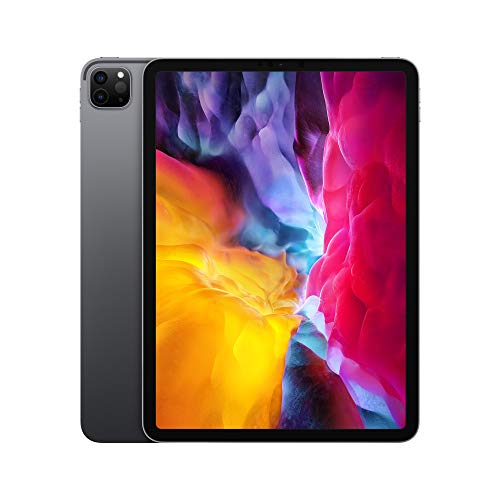
Apple iPad Pro 11-Inch (Wi-Fi, 128GB) Space Gray
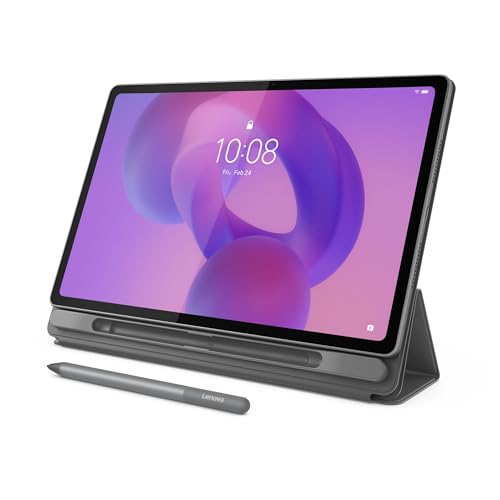
Lenovo Idea Tab Plus 12.1″ 2.5K Tablet

Lenovo Idea Tab 11″ 2.5K College Tablet

11-Inch Android 16 Tablet with Keyboard Bundle
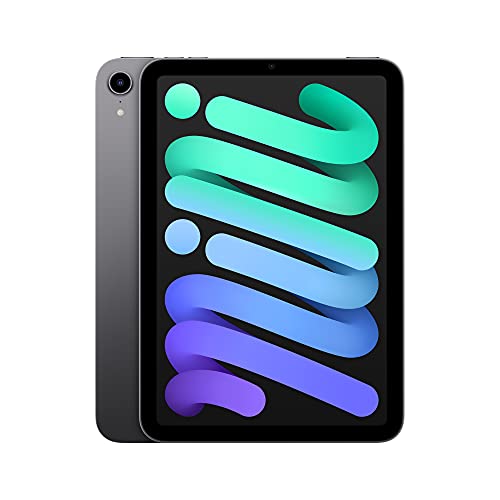
Apple iPad mini 8.3-Inch 64GB Space Gray

Lenovo Tab One 8.7″ HD Streaming Tablet

JUNINKE Gemini AI 11″ Android 16 Tablet

Samsung Galaxy Tab S7 11-Inch 128GB Mystic Black

JUNINKE 10-Inch Kids Tablet (Pink) with Keyboard
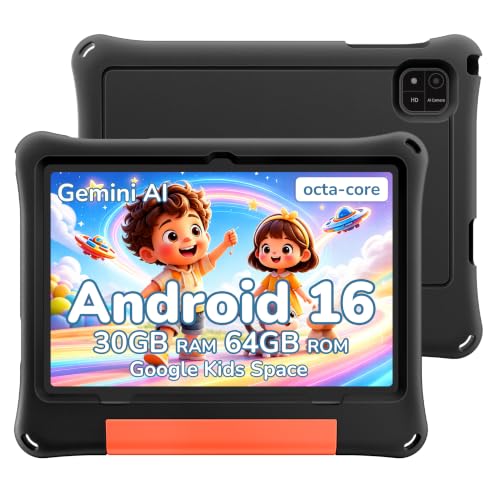
JUNINKE 2026 Android 16 Kids Tablet 10-Inch (Black)
A Closer Look At Each Pick
The 11-inch iPad Pro sits at the top of this list for a reason. Its Liquid Retina display (Apple’s term for a high-resolution LCD with wide color and accurate brightness) uses ProMotion, which means the refresh rate dynamically adjusts up to 120Hz for buttery scrolling and drawing. For illustrators, photo editors, and anyone who lives in split-view multitasking, that smoothness is the difference between feeling premium and feeling dated.
The A12Z Bionic chip, paired with a Neural Engine (a dedicated module that accelerates machine-learning tasks), still handles pro apps like Affinity Designer and LumaFusion without breaking a sweat. The LiDAR Scanner (a depth-sensing tool that maps room geometry in real time) adds genuine AR capability for interior designers or anyone prototyping room layouts. In our view, this is the pick if your work depends on a precise, color-accurate panel and you don’t mind paying for it.
Advantages To Know
- ProMotion 120Hz refresh makes pen input and scrolling feel instant.
- LiDAR Scanner adds real AR measurement and room-mapping value.
- Four-speaker audio and five studio-quality microphones make it a credible video-call and content-review tool.
- USB-C connector supports a wide range of hubs, monitors, and external storage.
Worth Noting
- The base 128GB storage fills up fast with pro-grade photo and video files.
- No headphone jack, so wireless audio or a USB-C dongle is required.
- You may find the Wi-Fi-only model limiting if your work moves between cafés and client sites without reliable networks.
Quick Facts
Whose Shelf It Belongs On
This fits creative professionals and serious students who need a precise, color-accurate display for design work, sketching, or detailed document review.
Where A Sibling Pick Shines
Casual streamers and commuters may get more value from the Lenovo Tab One, which costs less and offers longer battery life for video on the go.
If screen size is the priority, the Lenovo Idea Tab Plus delivers a generous 12.1-inch 2.5K IPS panel (an in-plane switching display known for wide viewing angles and accurate color) with a 90Hz refresh rate. That’s sharper than many competing Android tablets at this size, and the included Tab Pen makes sketching and note-taking feel natural. The folio case folds into a stand for hands-free video calls, which matters when you’re cooking along with a recipe video.
Powered by a MediaTek Dimensity 6400 with 8GB of RAM, it handles streaming, light gaming, and document work without dropping frames. Compared to the iPad Pro, the Idea Tab Plus trades raw processing power for a more affordable price and a larger canvas. For most backyards, family rooms, and commute bags, that’s a worthwhile trade.
Strong Points
- 12.1-inch 2.5K display offers sharp text and vivid color for reading or watching.
- 90Hz refresh keeps scrolling and animations feeling smooth.
- Included Tab Pen and folio case reduce the need for separate accessory purchases.
- 8GB RAM supports comfortable multitasking across browser tabs and apps.
Trade-Offs To Consider
- Larger screen means more weight in one-handed reading positions.
- MediaTek Dimensity 6400 is mid-range, so heavy 3D gaming will show its limits.
Right Fit For
Mobile entertainment lovers and remote workers who prioritize a large, vivid display for streaming, video calls, and document review over top-tier gaming performance.
Look Elsewhere When
Travelers who want a lighter one-hand option should consider the Apple iPad mini, which delivers strong performance in a much smaller package.
The 11-inch Lenovo Idea Tab lands in the sweet spot for college life. Its 2.5K IPS display with a 90Hz refresh rate is sharp enough for reading PDFs and crisp enough for late-night lecture streaming. Quad speakers tuned with Dolby Atmos (a surround-sound processing technology that creates a more immersive audio experience) give dorm-room movie nights a fuller sound without external speakers.
With 256GB of storage, this one outpaces the iPad Pro’s base configuration for hoarding lecture recordings, e-books, and design files. The MediaTek Dimensity 6300 chip handles note-taking apps and multitasking comfortably, though it’s not built for serious video editing. You may find the Tab Pen a touch less precise than premium alternatives, but for highlighting and quick sketches it gets the job done.
What Helps Most
- 256GB storage holds a full academic year of notes and video without offloading.
- Quad Dolby Atmos speakers improve lecture and movie audio clarity.
- Tab Pen and folio case come in the box, saving accessory costs.
Honest Caveats
- Dimensity 6300 struggles with high-end games or 4K video editing.
- The folio case adds bulk if you prefer a slim sleeve for backpack carry.
Feature Snapshot
Best Suited To
College students and lifelong learners who need a reliable note-taking and streaming tablet that doesn’t punish them for storing a full term’s worth of files.
Swap It Out When
Creative majors working in pro design software should reach for the iPad Pro, which has the horsepower for demanding creative apps.
This 11-inch bundle stands out for one simple reason: everything you need to turn the tablet into a laptop replacement ships in the box. You get a Bluetooth keyboard, a stylus pen, a mouse, and a protective case, which removes the usual accessory scavenger hunt. For remote workers, students, or anyone setting up a kitchen-office hybrid, that convenience is real value.
Running Android 16 with an octa-core processor, it handles email, document editing, and streaming smoothly. The shockproof case adds grip and drop protection, which matters when the tablet travels between rooms. Compared to the Lenovo Idea Tab, this option trades brand-name polish for a complete starter kit at a similar screen size.
Everyday Advantages
- Full accessory bundle eliminates the need to buy a keyboard or stylus separately.
- Bluetooth keyboard supports faster typing for emails and long documents.
- Protective case reduces the risk of damage during daily commutes.
Points To Note
- Octa-core performance is solid for productivity but not built for intensive creative apps.
- The included stylus lacks pressure sensitivity for serious illustration work.
Made For
Mobile productivity users who want a turnkey tablet-to-laptop experience without piecing together accessories from different brands.
Consider Something Else When
Sketchers and artists who prioritize pen precision should consider the Samsung Galaxy Tab S7, which ships with a pressure-sensitive S Pen.
The iPad mini earns its place as the travel-friendly outlier in this lineup. At 8.3 inches, it’s the smallest pick here, but that compact size is exactly why some people choose it. You can hold it one-handed on a morning train, slip it into a jacket pocket, and read for hours without wrist fatigue. The Liquid Retina display stays sharp and color-accurate despite the smaller footprint.
The A15 Bionic chip is more powerful than most of the Android tablets on this list, so apps load fast and multitasking feels fluid. Center Stage (a feature that automatically pans the front camera to keep you in frame during video calls) makes video calls feel more natural when you’re moving around. For most backpacks and bedside tables, the iPad mini hits a sweet spot the bigger tablets can’t.
Why It Works Well
- A15 Bionic chip delivers flagship-level app performance in a small body.
- One-handed 8.3-inch form factor fits bags and small spaces the larger tablets can’t.
- Center Stage keeps video calls framed even as you move around.
Some Limits To Know
- 64GB base storage fills quickly if you download games or shoot video.
- Smaller screen makes split-view multitasking feel cramped compared to the iPad Pro.
Who Will Love This
Commuters, frequent flyers, and dedicated readers who want tablet-level power in a form factor closer to a paperback book.
Not Your Match When
Home users who primarily watch movies on the couch may prefer the Lenovo Idea Tab Plus, which offers a much larger 12.1-inch canvas for video.
The Lenovo Tab One is the no-frills streaming companion in this list. Its 8.7-inch HD display delivers 480 nits of brightness (a measure of how much light the screen emits; higher values mean better outdoor visibility), which keeps things readable on a sunny patio or in a bright kitchen. The MediaTek Helio G85 chip handles streaming and casual browsing without drama, though it isn’t aimed at heavy multitasking.
Battery life is the standout feature. Lenovo rates up to 12.5 hours of YouTube streaming, which translates to a full day of background TV, recipe videos, and reading without reaching for a charger. At well under a pound, it’s barely noticeable in a tote bag. You may find the 64GB storage limiting if you hoard offline downloads, but a microSD slot (typical for this class) typically expands that.
Benefits That Matter
- Up to 12.5 hours of streaming battery covers a full day of casual use.
- 480 nits brightness keeps the screen visible outdoors and in sunny rooms.
- Lightweight palm-sized build slips into bags without bulk.
Small Caveats
- HD resolution looks softer than the 2.5K panels on the Lenovo Idea Tab models.
- 4GB RAM limits heavy multitasking to two or three apps at once.
Who Should Grab It
Casual streamers and apartment dwellers who want a light, long-lasting tablet for video, reading, and light browsing without overspending.
Reach For A Different Pick When
Students needing sharper text for long reading sessions should consider the Lenovo Idea Tab, which offers a higher-resolution 2.5K display.
This JUNINKE tablet leans into headroom. With claimed support for up to 2TB of expandable storage and an 8000mAh battery, it’s positioned for users who want fewer storage warnings and longer unplugged sessions. The 11-inch screen lands in the same territory as the iPad Pro and Samsung Tab S7, making it a reasonable mid-size canvas for work and play.
The octa-core processor paired with expandable RAM should handle Android 16 multitasking with moderate demands. Built-in GPS is a touch unusual for a tablet and adds genuine value for navigation in a car or RV. Compared to the Lenovo Idea Tab, this option trades a cleaner brand ecosystem for raw storage flexibility and battery capacity.
What Pays Off
- Up to 2TB expandable storage accommodates large media libraries.
- 8000mAh battery supports extended unplugged use for travel or long shifts.
- Built-in GPS adds navigation value beyond what most tablets offer.
Where It May Fall Short
- Display resolution and refresh rate aren’t specified, so expectations should stay modest.
- Brand recognition is lower, so long-term software support may be less predictable than Apple or Samsung.
Perfect Match For
Power users and frequent travelers who prioritize storage capacity and battery life over display fidelity or premium brand cachet.
Skip It When
Creatives who need a color-accurate, high-refresh panel for design work should opt for the iPad Pro, which delivers verified display quality.
The Galaxy Tab S7 remains a strong upgrade pick for anyone who sketches or annotates for a living. The included S Pen (Samsung’s active stylus with pressure sensitivity and tilt recognition) magnetically attaches to the back for charging, and the 11-inch display gives you real canvas to work on. USB-C fast charging tops the battery quickly between meetings or class blocks.
With 128GB of internal storage, you get enough room for apps and projects without constantly clearing space. The Snapdragon-class processor in this generation handles multitasking comfortably. For most commuters and coffee-shop workers, the S Pen alone justifies choosing this over a non-stylus Android option. One thing worth considering: LTE variants exist, but the Wi-Fi model here suits stationary work best.
Key Advantages
- S Pen supports pressure-sensitive drawing and handwriting recognition.
- USB-C fast charging minimizes downtime between sessions.
- 11-inch display sits between the iPad mini’s compactness and the Idea Tab Plus’s 12.1-inch span.
Potential Drawbacks
- Wi-Fi-only connectivity requires hotspot tethering when away from trusted networks.
- The S7 generation is older than newer Samsung releases, so check the latest firmware support timelines.
Built With In Mind
Note-takers, design students, and illustrators who want a pressure-sensitive stylus and a tablet built around pen input rather than as an afterthought.
A Better Fit Elsewhere
Apple-ecosystem households wanting tighter iCloud and AirDrop integration will be happier with the iPad Pro, which offers deeper cross-device syncing.
This 10-inch JUNINKE kids tablet is built around the realities of family life. The pink EVA case (a rubberized foam shell that absorbs drops) cushions the inevitable tumble off a couch or car seat, and the full accessory bundle, including a keyboard, mouse, and stylus, lets kids type, draw, and explore with familiar controls. Parental controls through Google Family Link let you set screen time limits and approve apps, which is the kind of practical ownership benefit that justifies a dedicated kids’ device.
Running Android 16 with an octa-core processor, it’s responsive enough for learning apps and casual games. The dual cameras handle video calls with relatives and the occasional creative project. Compared to handing over a flagship tablet, this one gives you a safer starting point without sacrificing modern software features.
A Favorable Mix
- EVA case protects against drops and rough handling in the daily chaos of family life.
- Google Family Link integration makes screen time and app approvals straightforward.
- Full accessory bundle supports keyboard, mouse, and stylus play without extra purchases.
Less Ideal Details
- The 10-inch screen is smaller than the productivity-focused tablets earlier in this list.
- Kids’ tablets tend to attract sticky fingerprints, so routine case wiping is expected.
Who Will Love This
Parents of younger children who want a durable, controlled tablet that introduces tech without exposing a flagship device to crayons and juice boxes.
Not Your Match When
Older kids who need a tablet for schoolwork should consider the Lenovo Idea Tab, which offers a sharper 2.5K display and more capable multitasking.
The black edition of JUNINKE’s 2026 kids tablet trades the pink colorway for a more neutral look that older kids and tween users tend to prefer. The included EVA protective case is the real hero here, because it absorbs impact when the tablet inevitably gets dropped from hands, beds, or backpacks. That durability is the practical ownership benefit parents care about most.
Android 16 with Google Kids Space gives children access to age-appropriate apps, books, and videos, while Family Link keeps parents in control. The octa-core processor handles learning apps and casual gaming without lagging. Compared to the pink sibling model, this one offers identical internals with a color choice that grows with the child.
What Earns Its Place
- EVA protective case shields the tablet from drops and rough handling.
- Google Kids Space provides curated, age-appropriate content out of the box.
- Black colorway suits older kids who have outgrown brighter designs.
Small Limitations
- 10-inch screen is compact compared to family-shared tablets.
- The case adds slight bulk for travel in slim laptop bags.
Best Suited To
Families with active children or tween users who need a durable, controlled tablet that can survive daily adventures without constant supervision.
Consider Something Else When
Adults who want a tablet for personal productivity and streaming will get more from the Lenovo Idea Tab Plus, which delivers a larger 12.1-inch display.
What To Weigh Before Choosing Your Next Tablet
Screen Size And How You Hold It
Screen size drives everything else: weight, battery life, and how the tablet fits into your routine. Tablets in the 8 to 9-inch range, like the iPad mini and Lenovo Tab One, disappear into bags and feel comfortable in one hand during reading sessions. Tablets from 11 to 12.1 inches, including the iPad Pro, Galaxy Tab S7, and Lenovo Idea Tab Plus, give you a more laptop-like canvas that excels at split-screen multitasking and media viewing. The honest read is that bigger screens cost more in weight and battery, so think about where you’ll actually use the device before chasing the largest panel.
Performance Versus Everyday Demands
Processors matter most when you push them. The A12Z in the iPad Pro and the A15 in the iPad mini handle pro apps and heavy multitasking with room to spare, while MediaTek Dimensity chips in the Lenovo Idea Tab models and the octa-core setups in JUNINKE tablets serve streaming, browsing, and document work comfortably. For most kitchens, dorm rooms, and commute bags, mid-range silicon is plenty. If you edit video, run 3D apps, or multitask across many browser tabs, the higher-tier chips pay off.
Accessories And Long-Term Ownership
Bundles can save real money. The 11-inch Android 16 bundle and both kids’ tablets ship with keyboards, cases, or styluses included, which removes the accessory scavenger hunt. Pressure-sensitive pens like the S Pen on the Galaxy Tab S7 or the Tab Pen on Lenovo’s Idea Tab models unlock sketch and annotation workflows that finger input can’t match. Storage also matters: 64GB fills fast with offline video, while 128GB or expandable options like the JUNINKE Gemini tablet give breathing room for years of use.
Smart Shifts Before You Buy
Where Shoppers Go Wrong
The most common misstep is chasing screen size without considering weight and battery drain. A 12.1-inch tablet feels luxurious on a desk but gets heavy in a backpack, and it sips power faster than a compact 8.7-inch model. Another trap is ignoring software ecosystems: an iPad plays nicely with iPhones and Macs, while Android tablets integrate more flexibly with Google services and sideloaded apps. Buying outside your ecosystem just to save a few dollars often costs more in frustration later.
When Paying More Pays Off
Higher-tier tablets earn their premium through display quality, processing power, and build refinement. The iPad Pro’s ProMotion panel and LiDAR Scanner open workflows a budget tablet can’t touch, and the Galaxy Tab S7’s pressure-sensitive S Pen makes sketching feel closer to pen-on-paper. If your work or hobby depends on color accuracy, low-latency pen input, or sustained heavy multitasking, the upgrade typically justifies itself. For casual streaming and browsing, a mid-range pick delivers most of the experience at a friendlier price.


