

Filament moisture is the silent saboteur of most 3D printing projects. Wet filament pops, strings, and clogs nozzles, turning what should be a fun weekend into a frustrating afternoon of failed prints. This list rounds up nine enclosed or filament-protecting 3D printer setups and accessories that tackle humidity, support multicolor work, and keep your workspace organized.
A Snapshot Of The Selections

Creality K2 Plus Combo with Space Pi X4 Filament Dryer Box
Creality K2 Combo with Space Pi Filament Dryer Plus

Creality 4 Spools Dryer Box with 4kg PETG Filament

3PCS 3D Printer LED Lamp Kit 001 for Bambu Lab

Creality Multi-Kilo Filament Dryer Box

Creality K2 Pro Combo (A) with CFS Bundle
Creality K2 Pro Combo (A) with Filament Dryer Box 4 Spools

Hard Storage Case for SCRIB3D/MYNT3D/PIKA3D 3D Printing Pen

Creality Ender-5 MAX Large Bundle with Space Pi X4
More On The Choices That Made The List
The Creality K2 Plus Combo pushes desktop 3D printing into pro territory with a 350mm cubic build envelope, which genuinely matters when you’re prototyping helmet interiors or batch-printing engineering brackets. Its active chamber heater warms the interior to roughly 60°C, opening the door to engineering materials like ASA and PPA that typically warp in cool rooms. FOC step-servo motors drive the XYZ axes (these are closed-loop motors that detect missed steps and correct themselves), so the printer moves at 600mm/s without losing registration.
The included Space Pi X4 filament dryer box in this bundle keeps up to four spools conditioned, addressing the moisture problem that ruins prints when humidity climbs. Compared to the smaller K2 Combo in spot two, this unit trades a quieter footprint for raw throughput and material flexibility.
What Helps Most
- 350×350×350mm build volume fits larger models or small production batches without splitting parts.
- Active chamber heating up to 60°C unlocks engineering-grade filaments that warp on open-frame printers.
- Hardened steel nozzle handles abrasive composites without wearing out quickly.
- Step-servo motors reach 600mm/s with 30,000mm/s² acceleration for fast job completion.
- Input shaping algorithm reduces vibration artifacts on tall, slender prints.
Trade Offs To Consider
- The large frame demands significant desk or shelf space, which may not suit compact studios.
- Advanced feature set carries a learning curve for hobbyists new to closed-loop motor systems.
- Heated chamber adds warm-up time before the first layer, extending short print runs.
Key Attributes
Made For
Engineering professionals, small-batch manufacturers, and serious hobbyists working with high-temperature composites like ASA, PPA, or carbon-fiber blends.
A Better Fit Elsewhere
For a quieter setup in a shared living space, the Creality K2 Combo with Space Pi Filament Dryer Plus offers similar core features in a smaller, less intrusive chassis.
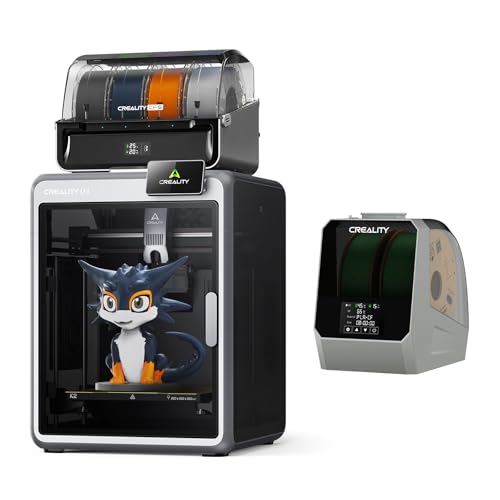
The Creality K2 Combo trims the K2 Plus down to a 260mm cubic build space, but it keeps the same multicolor DNA with support for up to four CFS units (Creality Filament System modules that feed multiple spools into the printer). That means up to 16 colors per print without manual swaps. The Silent Mode leans on step-servo motors and dynamically balanced fans, producing noise levels comparable to a laptop keyboard for late-night sessions.
The K2 arrives pre-assembled, so setup is closer to plugging in a kitchen appliance than calibrating a DIY kit. Owners commonly report that this “out of the box” experience removes a real barrier for newcomers who want multicolor without tinkering.
What Makes Sense
- Silent Mode keeps noise comparable to a laptop for shared living and sleeping spaces.
- Pre-assembled packaging lets you start printing within minutes of unboxing.
- Multicolor capability through CFS expansion handles complex artistic projects.
- AI camera monitors for spaghetti failures and idle prints in real time.
Room For Improvement
- 260mm build cube constrains larger prints that the K2 Plus handles easily.
- Expanding beyond four colors requires buying additional CFS units separately.
Who It Suits Best
Apartment dwellers, home office creators, and hobbyists who value whisper-quiet operation alongside plug-and-play convenience.
Skip It When
You need industrial-scale throughput, in which case the Creality Ender-5 MAX Large Bundle offers a print-farm workflow with WLAN multi-printer control.
The Creality 4 Spools Dryer Box is essentially a humidity-controlled vault for filament, holding four standard 1kg spools or two larger 2kg spools in dual independent 200W chambers. Each chamber runs on its own heating circuit (the dryer can warm different spools at different temperatures at the same time), so you can dry PLA at one setting while simultaneously prepping PETG at another. The 85°C maximum handles everything from PLA to more demanding nylons.
What sets this apart is universal compatibility with both 1.75mm and 2.85mm filament diameters, sidestepping the gauge restrictions that lock some dryers into a single ecosystem. The included 4kg of PETG means you can unbox and start a real project.
Where It Helps
- Dual independent 200W chambers dry different filament types simultaneously.
- Accommodates 1kg, 2kg, and oversized spools for versatile storage.
- Universal 1.75mm and 2.85mm compatibility spans most consumer filaments.
- 85°C max temperature handles moisture-sensitive engineering plastics.
Worth Noting
- The footprint grows significantly when four spools are loaded, requiring shelf planning.
- No active printer integration, so you’ll feed filament manually into your machine.
Feature Snapshot
Right Fit For
High-volume users managing multiple spools across different materials in humid climates where storage alone cannot keep filament dry.
Look Elsewhere When
You need single-spool portability, in which case the Creality Multi-Kilo Filament Dryer Box handles heavier 5kg spools in a more focused footprint.
The 3PCS LED Lamp Kit 001 targets Bambu Lab owners who want to convert their printers into functional light fixtures using existing MakerWorld lamp designs. It is a niche accessory, but a genuinely clever one: you print a lamp shade from a free model on MakerWorld, then drop this LED hardware into the cavity. The three-color configuration lets you switch ambiance without rewiring anything.
The kit drops into Bambu Lab A1, A1 Mini, P1S, P1P, and X1C models, and it also fits Anycubic ecosystems with compatible hotend mounts. You get three identical kits in the box, so you can build matching lamps for a hallway or desk cluster.
The Good Stuff
- Plug-and-play design drops into Bambu Lab models without soldering or wiring knowledge.
- Three kits per box let you build a matching set for home decor.
- Three-color LED switching adds mood flexibility without extra remotes.
Things To Consider
- Specific to Bambu Lab and select Anycubic models, limiting cross-brand usefulness.
- Requires you to source or design your own lamp shade models separately.
Best Suited To
Bambu Lab owners and MakerWorld hobbyists who already enjoy 3D-printing functional decor items.
Not Your Match When
You do not own a compatible printer, in which case the Creality Multi-Kilo Filament Dryer Box delivers more universal filament-storage value.
The Creality Multi-Kilo Filament Dryer Box stands out by accepting spools from 1kg up through 5kg, which is unusual since most dryers cap at 2kg. A 400W PTC (positive temperature coefficient) heater warms the chamber to 70°C, which is well within the safe range for hygroscopic materials like nylon and TPU. The adjustable temperature window from 40°C to 70°C gives you the precision to dry PLA gently without softening it.
The detachable chamber heater simplifies cleaning and replacement, which matters when dust from long print sessions collects on the heating element. It works across PLA, PETG, ABS, TPU, and nylon, covering most desktop printing needs.
Bright Spots
- Accepts 1kg through 5kg spools, accommodating bulk filament purchases.
- 400W PTC heater reaches drying temperature quickly without overshooting.
- Detachable heater simplifies cleaning and extends service life.
Points To Note
- Single-chamber design limits simultaneous drying of different material types.
- Large 5kg capacity means the dryer itself takes up meaningful bench space.
Perfect Match For
Users buying industrial-sized 5kg filament spools who want a single dryer that handles both standard and bulk formats.
Reach For A Different Pick When
You need to dry four 1kg spools at different temperatures at once, in which case the Creality 4 Spools Dryer Box offers dual independent chambers.
The Creality K2 Pro Combo (A) targets creators who want full visibility into their drying conditions. The included Space Pi Filament Dryer Box displays real-time humidity and temperature readings, so you know exactly when filament reaches equilibrium (the stable moisture level where it stops absorbing or losing water) rather than guessing from timer countdowns. Temperature adjusts from 45°C to 70°C, and the timer runs up to 48 hours for stubborn moisture loads.
On the printer side, the K2 Pro Combo (A) supports up to 16 colors through four CFS units. The filament dryer integrates with the printer’s Creality Print software workflow, so moisture data flows into the same interface you already use for slicing.
Standout Benefits
- Real-time humidity and temperature displays remove guesswork from drying cycles.
- 48-hour timer handles deeply saturated filament rolls without babysitting.
- Software integration with Creality Print keeps monitoring in one workflow.
- Multicolor support up to 16 colors through CFS expansion.
Practical Considerations
- Software integration ties the dryer most tightly to Creality’s ecosystem.
- Real-time displays add minor cost over simpler timer-based dryers.
Whose Shelf It Belongs On
Detail-oriented multicolor users who want measurable drying data rather than fixed timer settings.
Swap It Out When
You prioritize a sealed enclosure for long pauses, in which case the Creality K2 Pro Combo (A) with Filament Dryer Box 4 Spools maintains humidity 24/7.
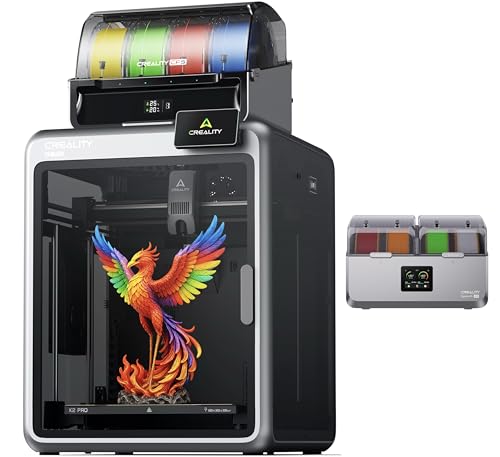
The Creality K2 Pro Combo (A) with Filament Dryer Box 4 Spools adds a silicone-sealed enclosure to the drying equation, which actively prevents moisture re-absorption even when the heater cycles off. That means overnight jobs and multi-day prints keep their filament in prime condition, since the silicone seal blocks humid air from seeping back in during pauses. An illuminated window lets you peek at spool status without cracking the seal.
The dual 200W chambers heat up to 85°C, and the dryer doubles as storage, so spools can stay loaded between sessions rather than shuttling in and out of a separate container.
Useful Strengths
- Silicone-sealed enclosure blocks moisture re-entry during long print pauses.
- Illuminated window lets you monitor spools without breaking the humidity seal.
- Dual-function design handles both drying and ongoing storage in one unit.
- Dual 200W chambers support high-temperature drying up to 85°C.
A Few Limitations
- Sealed enclosure adds weight and reduces portability around the shop.
- Higher capacity consumes more bench space than single-spool dryers.
Who Should Grab It
Printers running overnight or multi-day jobs who cannot afford moisture re-absorption during long pauses.
Where A Sibling Pick Shines
For a simpler timer-based approach without real-time displays, the Creality 4 Spools Dryer Box with 4kg PETG covers the basics at a lower complexity level.
The Hard Storage Case for SCRIB3D, MYNT3D, and PIKA3D 3D printing pens solves a different problem than the rest of this list: portability. The hard shell protects the pen, filament refills, USB cable, and doodlepad from drops and bag crushes. A mesh pocket inside keeps small accessories organized so refill strands do not tangle with the charging cable.
This case is purpose-built for the SCRIB3D, MYNT3D, and PIKA3D pen models, which means it fits those specific shapes precisely. For families with kids who doodle in the car or creators who take their pen to workshops, it removes the frustration of finding a tangled mess at the bottom of a backpack.
Strengths Worth Knowing
- Hard outer shell protects the pen and accessories from drops and pressure.
- Internal mesh pocket organizes filaments, cables, and refills separately.
- Compact form factor fits into backpacks and luggage for travel.
Honest Caveats
- Model-specific fit limits usefulness outside SCRIB3D, MYNT3D, and PIKA3D pens.
- Does not address filament drying, so humidity-sensitive refills still need separate storage.
Built With In Mind
Families and hobbyists who travel with their 3D printing pen and want everything organized in one protective case.
Consider Something Else When
You need actual filament drying rather than just physical protection, in which case any Creality dryer box on this list tackles moisture directly.
The Creality Ender-5 MAX targets print farms and small studios rather than hobbyists. Its 400×400×400mm build volume handles oversized props, furniture prototypes, or batch jobs that smaller printers split into pieces. The WLAN multi-printer control and grouped management turn a cluster of these machines into a coordinated production line, and a tri-color status indicator visible from across the shop floor keeps operators informed without walking to each unit.
The bundle pairs the printer with the Space Pi X4 Filament Dryer Box (four-spool capacity with dual independent 200W chambers), keeping production queues fed with dry filament. The reinforced die-cast aluminum frame and X-axis linear rail reduce vibration on tall prints, which matters at this scale where wobble compounds over height.
A Favorable Mix
- WLAN multi-printer control coordinates fleets of machines from one interface.
- 400mm cubic build volume fits large props and batch jobs without splitting.
- Tri-color status indicator enables at-a-glance monitoring across the shop floor.
- Die-cast aluminum frame minimizes vibration on tall or heavy models.
- X-axis linear rail improves accuracy across wider prints.
Factors To Consider
- Large footprint demands dedicated floor or heavy bench space in any studio.
- Print-farm features add complexity for hobbyists running a single unit.
Feature Card
The Right Fit
Small businesses and design studios running print farms that need coordinated control over multiple machines.
Where Another Pick Suits Better
For a quieter single-printer home setup, the Creality K2 Combo with Space Pi Filament Dryer Plus delivers multicolor without print-farm complexity.
Matching Your Workspace To The Right Setup
Selecting the right Box 3D printer setup comes down to honest matching between your materials, volume needs, and environment. The picks above split into three practical groups: full printer-and-dryer combos for those building a new workflow from scratch, standalone dryer boxes for users who already own a compatible machine, and niche accessories like the pen case and lamp kit. Understanding which group matches your situation saves both money and shelf space.
Build Volume And Material Match
Start by identifying what you actually print. Hobbyists making desk toys and replacement parts usually fit comfortably in a 220 to 260mm cubic build space, while prop makers and small-batch manufacturers benefit from 350 to 400mm envelopes. Material choice matters just as much: PLA prints fine on open-frame machines, but engineering filaments like ASA, ABS, and nylon require either an enclosed chamber or a heated build environment to prevent warping. You may find that a heated chamber sounds appealing until you realize your studio cannot accommodate the bulk.
Drying Capacity And Workflow
Filament moisture is the most common silent failure mode in desktop 3D printing. Symptoms include popping sounds during extrusion, stringing between travel moves, and weak layer adhesion that cracks under light stress. A dedicated dryer box solves the problem at the source. If you buy filament by the spool, a single-slot dryer suffices. Studios buying 4-spool cases or industrial 5kg rolls need higher-capacity solutions with dual heating chambers. Humid climates amplify every weakness, so consider sizing up if you live near a coast or run prints through summer.
Multicolor And Production Scale
Multicolor printing through CFS units opens creative possibilities for signage, cosplay props, and detailed models, but it requires buying each color spool separately and learning the slicer workflow. Print-farm features like WLAN multi-printer control make sense only when you already operate multiple machines; for a single-printer setup, that capability adds cost without return. Match features to your real workflow rather than aspirational ones.
Key Considerations Across These Picks
Where Shoppers Go Wrong
The most common mistake is buying a printer with impressive specs that exceeds your actual print size, leaving you with a massive machine that takes up more space than your projects justify. Another trap is overlooking filament storage: a premium printer paired with damp filament produces worse results than a budget printer paired with dry, well-conditioned material. Finally, skipping the enclosure or chamber heater to save cost tends to backfire the moment you try engineering filaments, so factor in those accessories if you plan to print beyond PLA.
When Paying More Pays Off
Higher-tier printers in this category justify their cost through enclosed build chambers, faster step-servo motors, and integrated filament management. For users printing in engineering materials or running multicolor production, those features pay for themselves through reduced failure rates and faster turnaround. For casual hobbyists sticking to PLA, a simpler configuration delivers nearly identical results at a friendlier price point. The honest read is that the upgrade makes sense the moment your project complexity outgrows your current setup.


