

Jotting notes by hand has its charm, but laptops feel clunky in a lecture hall, and phones are too cramped for real thinking. A tablet splits the difference, giving you a digital canvas for handwriting, sketching, and organizing without the bulk of a notebook stack. The trick is finding one that handles stylus input smoothly, runs the apps you need, and won’t punish your savings account.
This list rounds up ten tablets that hit that balance, including a few graphic drawing pads for anyone who wants a focused writing surface without the distractions of a full tablet OS. Some lean budget-friendly, others earn their place through sheer capability. You’ll find options for students, professionals, hobbyists, and casual note-takers alike.
A Quick View Of The Lineup

Xiaomi Redmi Pad 2 Only WiFi 11″ 2.5K Octa Core Tablet (Graphite Gray, 256GB + 8GB)
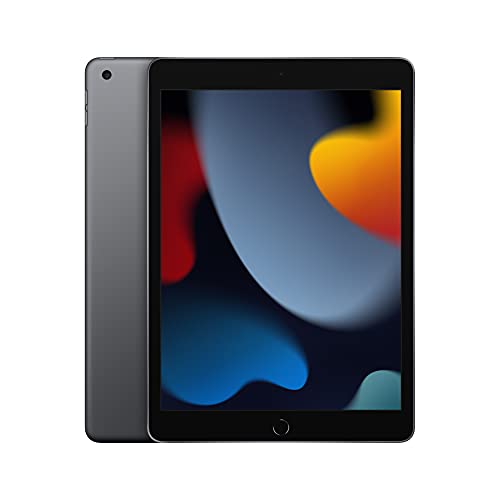
Apple iPad (9th Generation) with A13 Bionic chip, 10.2-inch Retina Display, 64GB, Wi-Fi

Apple iPad (Wi-Fi, 32GB) – Gold (Previous Model)

Apple iPad Air 11-inch (M2) Wi-Fi 6E Tablet, 128GB, Blue
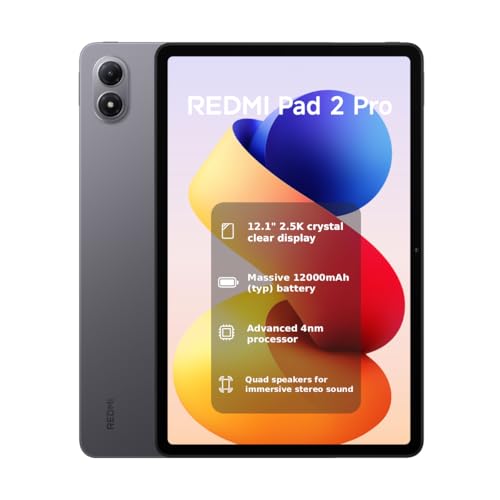
XIAOMI Redmi Pad 2 PRO Only WiFi 12.1″ 2.5K Tablet (Gray, 256GB + 8GB)

Lenovo Idea Tab Plus 12.1″ 2.5K Tablet with Tab Pen & Folio Case

Samsung Galaxy Tab S9 FE 10.9″ 128GB WiFi Android Tablet with S Pen, Gray

Wacom Intuos Small Wired Graphic Drawing Tablet with Pen + Software

HUION Inspiroy 2 Small Drawing Tablet with Scroll Wheel, Pink

Blackview 13 Inch Android 15 Tablet with Keyboard, Mouse, and Stylus
More Details On Our Top Picks
The Redmi Pad 2 lands in that sweet spot where the screen feels larger than the price suggests. Its 11-inch 2.5K panel renders handwriting previews and split-screen docs crisply, which matters when you’re annotating PDFs or sketching quick diagrams during a class. The octa-core processor keeps note apps responsive, even with a handful of browser tabs open alongside.
For commuters and dorm-room dwellers, the 9000mAh battery is the real headline. You’ll get through a full day of lectures without hunting for an outlet, and Bluetooth 5.3 (a wireless standard that improves connection stability and range over older versions) keeps your wireless earbuds happy during long study sessions. The metal unibody shell gives it a sturdier feel than most budget slates.
The Value In It
- 2.5K resolution on an 11-inch panel, sharp enough for handwritten detail work
- 9000mAh battery that genuinely lasts a full workday of note-taking
- Quad speakers for clear audio playback of recorded lectures
- 256GB of storage, enough for years of notebook files without cloud dependence
- 8GB RAM, comfortable for split-screen multitasking with research tabs
Honest Caveats
- WiFi-only variant means no SIM slot, so hotspot tethering is required on the road
- Stylus support typically requires a separate purchase rather than a bundled pen
- App ecosystem isn’t as deep as Apple’s for specialized handwriting tools
Who It Suits Best
This tablet fits students and casual note-takers who want a sharp screen and all-day stamina without crossing into premium pricing.
Look Elsewhere When
Heavily invested Apple Pencil users will feel more at home with the iPad (9th Generation), which offers tighter stylus integration out of the box.
The 9th-generation iPad has earned its reputation by sticking to what works. Its A13 Bionic chip handles GoodNotes and Notability without breaking a sweat, and the 10.2-inch Retina display (a high-resolution Apple panel with excellent pixel density) renders handwritten strokes with the kind of smoothness that makes long writing sessions painless. Compared to the Redmi Pad 2 above, you trade some screen size for a noticeably more polished stylus experience.
The Ultra Wide front camera with Center Stage (a feature that automatically pans and zooms to keep you framed during video calls) makes this a friendly companion for remote classes and study groups. Touch ID sits in the home button, which feels familiar if you’re coming from an older iPad. It’s the rare budget device where the accessory ecosystem (especially the first-generation Apple Pencil) feels like a natural extension rather than an afterthought.
Real Benefits
- A13 Bionic chip keeps note apps responsive even with multiple notebooks open
- Apple Pencil support unlocks pressure sensitivity and low-latency writing
- iPadOS offers strong multitasking, including Split View and Slide Over
- Compact 10.2-inch form factor fits easily into backpacks and lap desks
Things To Consider
- 64GB of base storage fills up quickly with offline video and large PDFs
- Apple Pencil (1st generation) charges via the Lightning port, a dated approach
Feature Snapshot
Made For
Existing Apple ecosystem users who want reliable stylus support and a mature note-taking app library.
A Better Fit Elsewhere
Anyone wanting a larger 12-inch canvas for split-screen layouts should consider the XIAOMI Redmi Pad 2 PRO instead.
This previous-generation iPad is the doorway into Apple’s tablet world for the most cost-conscious shoppers. The A10 Fusion chip is older, but for basic note-taking, reading, and browsing, it still holds up respectably. The 9.7-inch Retina display is smaller than the 9th generation above, which some users actually prefer for handheld reading and one-handed note capture.
Touch ID keeps unlocking fast, and the Lightning connector remains compatible with a wide range of existing accessories. You’ll feel the storage squeeze at 32GB, so this is best for users who keep most of their files in the cloud.
Everyday Perks
- Lowest entry point for an Apple Pencil-compatible device
- Compact 9.7-inch form is comfortable for handheld reading sessions
- Touch ID fingerprint sensor for quick and secure unlocking
Points To Note
- A10 Fusion chip is noticeably slower with demanding multitasking
- 32GB storage fills up fast, requiring cloud reliance or strict file management
Right Fit For
Casual note-takers and light readers who want Apple simplicity at the lowest possible cost.
Skip It When
Anyone running modern apps or large PDF libraries will find the XIAOMI Redmi Pad 2 a smoother experience with more storage headroom.
The iPad Air with M2 is overkill for casual note-taking, but it shines when your notes involve heavy multitasking or creative work. The M2 chip (the same silicon found in many MacBooks) chews through Procreate brushes, video edits, and large spreadsheets without a stutter. Apple Intelligence support opens up system-level writing assistance that lighter tablets can’t touch.
The 11-inch Liquid Retina display (an advanced Apple panel with wide color, True Tone, and low reflectivity) makes reading outdoors far easier than on glossy budget screens, and Wi-Fi 6E support (the newest Wi-Fi standard using the 6GHz band for faster, less congested connections) future-proofs your wireless setup. The Apple Pencil Pro compatibility is the real draw for serious sketchers and annotators.
Everyday Advantages
- M2 chip delivers desktop-class speed for demanding note and creative workflows
- Apple Intelligence features provide system-wide writing and organization tools
- Wi-Fi 6E ensures fast, stable connections on supported networks
- 11-inch Liquid Retina display with P3 wide color for accurate visual work
Practical Considerations
- Premium price point stretches the definition of “budget”
- Apple Pencil Pro sold separately, adding to the total cost
Best Suited To
Creative professionals and power users who treat note-taking as part of a larger productivity workflow.
Swap It Out When
Students watching their wallets will get similar stylus functionality from the Lenovo Idea Tab Plus at a friendlier price.
The Redmi Pad 2 PRO trades portability for screen real estate, and that swap pays off when you’re juggling lecture slides and notes side by side. The 12.1-inch 2.5K panel at 120Hz (meaning the screen refreshes 120 times per second for smoother scrolling and writing) makes stylus strokes glide more naturally than on standard 60Hz budget tablets. You feel the difference during fast handwriting.
The 12,000mAh battery is the standout spec for anyone who forgets their charger. Wi-Fi 6 keeps downloads snappy, and quad speakers handle video playback well for group study sessions. If the regular Redmi Pad 2 above feels too compact, this PRO model stretches both the canvas and the endurance.
Why It Works Well
- 12.1-inch 2.5K display at 120Hz delivers noticeably smoother writing
- 12,000mAh battery handles multi-day note sessions without recharging
- 256GB storage and 8GB RAM support heavy multitasking
- Quad speakers fill a small room for shared media playback
Less Ideal Details
- Larger footprint makes one-handed use impractical for extended periods
- WiFi-only version means no cellular fallback when traveling
Feature Snapshot
Who Will Love This
Travel-heavy professionals and students who want maximum screen space and minimal charging interruptions.
Another Choice May Suit
Users prioritizing a more polished stylus experience should consider the Samsung Galaxy Tab S9 FE with its included S Pen.
The Idea Tab Plus solves a common frustration by bundling the pen and folio case in the box. Many tablets at this price advertise stylus support but leave you hunting for a compatible pen separately. Lenovo ships both, so you can start writing the moment it arrives. The 12.1-inch 2.5K panel is large enough for comfortable two-page PDF reading.
At a MediaTek Dimensity 6400 octa-core chip (a mid-range mobile processor designed for efficient everyday performance), the tablet handles note apps and light multitasking without drama. The folio case doubles as a stand for desk work, though it adds a bit of bulk to the overall package.
A Favorable Mix
- Bundled Tab Pen removes the guesswork of finding a compatible stylus
- 12.1-inch 2.5K IPS display (an in-plane switching screen with wide viewing angles) at 90Hz balances smoothness and battery life
- Folio case included for hands-free desk use
- 128GB storage with microSD expansion support
Trade Offs
- Folio case adds thickness, reducing portability slightly
- App optimization for stylus input varies more than on iPadOS
Perfect Match For
Note-takers who want a complete kit, pen and case included, without buying accessories separately.
Reach For A Different Pick When
Users wanting a more compact form should look at the Samsung Galaxy Tab S9 FE’s 10.9-inch footprint.
The Galaxy Tab S9 FE earns its “frequent-use” badge through durability. The S Pen ships in the box and magnetically attaches to the back for charging and storage, a small detail that prevents the lost-pen panic common with first-party styluses. The 10.9-inch display sits between compact and sprawling, a middle ground that works for both handheld reading and desk work.
Expandable storage via microSD means you won’t hit the same wall as fixed-storage tablets. The 8MP camera is basic but adequate for scanning documents and capturing whiteboard notes during meetings.
Practical Advantages
- Included S Pen with magnetic attachment and charging
- IP68-rated durability (resistance to dust and water immersion up to a specified depth) for everyday splashes and dust
- Expandable storage via microSD slot
- Lightweight design that holds up to daily commuting
Some Limits To Know
- 10.9-inch screen is smaller than the 12-inch options in this list
- FE (Fan Edition) processor is a step below the flagship Tab S9
Feature Snapshot
Built With In Mind
Daily commuters and students who want a rugged, pen-included tablet that survives coffee spills and crowded backpacks.
Not Your Match When
Users wanting maximum screen real estate for split-screen layouts will prefer the 13-inch Blackview tablet covered later in this list.
Stepping away from full-screen tablets, the Wacom Intuos Small is a focused writing surface without the distractions of a screen. Your handwriting appears on your monitor as you draw, which feels odd at first but becomes natural quickly. The pen is light, accurate, and pressure-sensitive, the kind of input quality that has made Wacom a studio standard for decades.
This is a companion device rather than a standalone tablet. Pair it with a laptop or desktop and you get a clean handwriting layer over your existing apps. The included software bundle sweetens the value, especially for beginners exploring digital ink for the first time.
What Helps Most
- Wacom pen technology delivers studio-grade pressure sensitivity
- Compact footprint fits on crowded desks and small workspaces
- Bundled software helps beginners get started immediately
- Wired connection means zero battery anxiety during long sessions
Where It May Fall Short
- Requires a connected computer, so it’s not a standalone option
- Hand-eye coordination takes practice when writing without seeing the pen tip directly
Whose Shelf It Belongs On
Writers and note-takers who already work at a desk and want a distraction-free handwriting layer over their existing workflow.
Where A Sibling Pick Shines
Anyone wanting an all-in-one mobile experience will find the Xiaomi Redmi Pad 2 a more self-sufficient option.
The Inspiroy 2 Small offers Wacom-like pen performance at a lower entry cost, and the pink finish adds a splash of personality. The 6.3 x 3.9-inch active area is genuinely compact, sliding into laptop sleeves and small desk setups where larger pads won’t fit. The scroll wheel is a standout feature for scrolling through long documents without reaching for the keyboard.
Like the Wacom above, this is a companion device rather than a standalone tablet. It pairs with your computer via USB and works with most major note-taking and illustration apps. For someone who already has a laptop and wants handwriting input without a screen, it’s a compact and stylish entry point.
Benefits That Matter
- Compact 6.3 x 3.9-inch active area fits in tight desk spaces
- Scroll wheel speeds up navigation through long documents
- Pink color option stands out from typical black and gray peripherals
- Programmable buttons allow workflow customization
Factors To Consider
- Small active area may feel cramped for full-page handwriting
- Requires a connected computer to function
The Right Fit
Desk-bound note-takers with limited space who want pen input plus a scroll wheel for efficient document navigation.
Consider Something Else When
Mobile users needing a standalone device will be better served by the Samsung Galaxy Tab S9 FE.
The Blackview 13-inch tablet is the largest canvas on this list, and that extra space changes how you work. Splitting the screen between notes, a PDF, and a browser tab stops feeling cramped. The 2176×1600 resolution at 90Hz keeps text crisp during long reading sessions, and the included keyboard, mouse, and stylus mean you can switch between typing and handwriting without buying extras.
Android 15 brings the latest interface refinements, and Gemini AI integration offers on-device assistance that older budget tablets lack. The 36GB of combined memory (12GB physical plus expanded virtual allocation) helps with heavy multitasking. At this weight, though, you’ll want a stable surface or lap desk for extended sessions.
Useful Highlights
- 13-inch display provides the most writing space in this lineup
- Keyboard, mouse, and stylus included for a complete setup
- Gemini AI integration offers modern on-device assistance
- 90Hz refresh rate keeps scrolling and writing smooth
Things To Weigh
- Larger size makes it less comfortable for handheld use
- Heavier than 10-inch tablets, especially with the keyboard attached
Feature Snapshot
Who Should Grab It
Users who want a desk-replacement tablet with enough room for serious split-screen productivity.
Look Elsewhere When
Commuters prioritizing portability should consider the more travel-friendly Galaxy Tab S9 FE instead.
What To Weigh Before Choosing A Budget Note Taking Tablet
Picking the right note-taking tablet starts with how you plan to use it. Students cramming lecture notes need long battery life and a responsive stylus. Professionals sketching diagrams care more about screen size and app ecosystem. Casual users might prioritize portability and price above all else.
Stylus support deserves special attention. Not every tablet includes a pen, and not every advertised “stylus-compatible” device delivers the pressure sensitivity and palm rejection (the ability to rest your hand on the screen without registering false touches) that makes handwriting feel natural. Bundled pens, like those on the Samsung Galaxy Tab S9 FE and Lenovo Idea Tab Plus, save you the hassle of researching compatible accessories.
Screen refresh rate (measured in Hz, or how many times per second the display redraws) matters more than most shoppers expect. A 90Hz or 120Hz panel makes handwriting feel noticeably smoother than a standard 60Hz display. If you write for long stretches, that difference adds up. Storage is another quiet factor; 64GB fills fast when you add offline textbooks and recorded lectures, so expandable storage or higher base capacities are worth pursuing.
Finally, consider the ecosystem. iPadOS offers the deepest library of note-taking apps, but Android tablets give you more hardware variety and file flexibility. Drawing tablets like the Wacom and HUION options work alongside your existing setup rather than replacing it, which suits users who already love their current laptop or desktop workflow.
Key Considerations Across These Picks
Traps First Timers Fall Into
The most common mistake is buying a tablet without checking stylus compatibility, then discovering the pen costs nearly as much as the device itself. Models like the Lenovo Idea Tab Plus and Samsung Galaxy Tab S9 FE sidestep this by shipping with a pen in the box.
Another misstep is ignoring storage limits. A 32GB iPad sounds affordable until your offline lecture library eats half the space. Look for at least 128GB or expandable storage if you plan to keep media files locally.
Finally, some shoppers overlook weight and ergonomics. A 13-inch tablet sounds appealing until you carry it across campus all day. Match the device size to your primary use case rather than chasing the biggest screen available.
When Paying More Pays Off
Higher-tier tablets earn their price through better chips, smoother displays, and longer software support. The iPad Air with M2 handles complex multitasking that makes budget chips stumble, and its Apple Intelligence features add functionality that older devices can’t access.
Premium screens also make a tangible difference. The 120Hz panel on the Redmi Pad 2 PRO and the Liquid Retina display on the iPad Air reduce eye strain during long reading sessions. If you write or read for hours daily, those upgrades justify the extra cost over a basic 60Hz budget panel.
Frequently Asked Questions
What size tablet screen works best for handwritten notes? Screens between 10 and 12 inches tend to hit the sweet spot, large enough for comfortable writing without becoming unwieldy. Models like the iPad (9th Generation) at 10.2 inches or the Redmi Pad 2 PRO at 12.1 inches both work well depending on whether you prioritize portability or canvas space.
Do I need an active stylus, or will any pen work? You’ll want an active stylus (a pen with electronic components that communicate with the screen) for pressure sensitivity and palm rejection. Passive capacitive styluses (basic pens that mimic a finger) don’t offer the precision needed for natural handwriting, so they’re best limited to casual scrolling.
Is 64GB enough storage for a note-taking tablet? For pure notes and PDFs, 64GB is workable if you use cloud syncing. Add offline videos, music, or large textbook libraries, and you’ll quickly want 128GB or expandable storage like the microSD slot on the Samsung Galaxy Tab S9 FE.
Can budget tablets replace a laptop for school? For note-taking, reading, and research, yes. The Lenovo Idea Tab Plus even ships with a keyboard for light typing. Heavy software like video editing or programming still calls for a traditional laptop.
How important is refresh rate for handwriting feel? More important than most shoppers expect. A 90Hz or 120Hz display makes stylus strokes glide more naturally, which reduces fatigue during long writing sessions. Budget 60Hz panels work fine but feel noticeably less smooth.
Closing Remarks
Your ideal pick depends on where and how you take notes most. Students and casual writers will find the Xiaomi Redmi Pad 2 or Samsung Galaxy Tab S9 FE hit a strong balance of price and capability. Power users and creatives should consider the iPad Air M2 for its processing headroom, while anyone wanting a focused writing surface will appreciate the simplicity of the Wacom Intuos or HUION Inspiroy 2. Whatever your workflow, there’s a tablet here that fits the way you think.


