

A good in-ear monitor system shouldn’t require a major investment to feel professional. From small club gigs to bedroom recording sessions, today’s affordable rigs deliver clean wireless audio, low latency, and enough driver detail for serious practice. The trick is knowing where each model earns its place, and where it falls short.
This roundup covers seven options across wireless systems and wired IEMs, organized so you can match the right tool to your stage, your studio, or your rehearsal space.
The Shortlist At A Glance
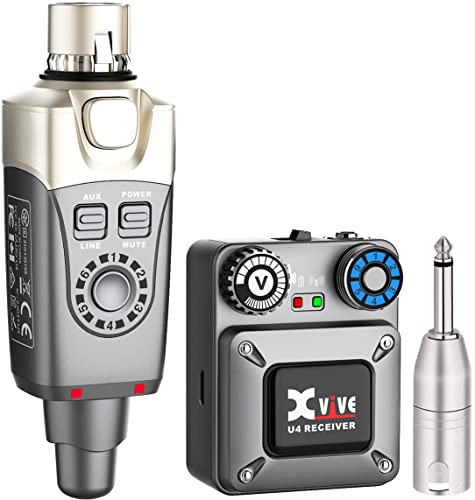
Xvive U4 Wireless in-Ear Monitor System Set

Xvive U45 Wireless in-Ear Monitor System (5.8GHz)

Xvive U45 Wireless in-Ear Monitor System

BASN Bmaster In-Ear Monitor Headphones (Cloud Pink)
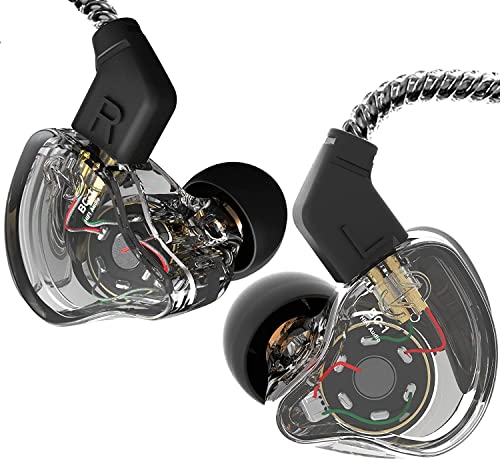
CCZ Melody Hybrid Dual Driver IEM (Transparent)

YINYOO CCZ Melody Wired IEM (Dark Black)
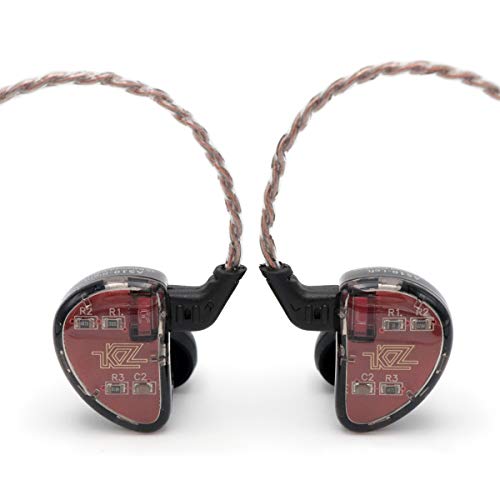
Linsoul KZ AS10 5BA HiFi Stereo IEM
A Closer Look At Each Pick
The Xvive U4 is the kind of gear that quietly makes your first wireless setup painless. It runs on the 2.4GHz wireless band, a frequency that works worldwide without licensing headaches, and pairs a transmitter with a bodypack receiver in a single box. For a singer stepping off wedges for the first time, that kind of turnkey simplicity matters more than spec sheet heroics.
Where the U4 shines is in the everyday gig. You’ll get around 90 feet of working range, which is plenty for small clubs, coffee shop stages, and house of worship setups. Latency (the small audio delay between input and your ear) sits under 5 milliseconds, tight enough that your vocal feels glued to your breath. Compared to the wired IEMs you’ll see later on this list, the U4 trades pure fidelity for freedom of movement, and for stage use that trade usually pays off.
Why It Works Well
- Six selectable channels help you dodge interference in busy venues with multiple wireless rigs running at once.
- Under 5ms latency keeps vocals tight, so your pitch and timing don’t drift from what you hear in your ears.
- Plug-and-play pairing gets you from case to performing in minutes, even if you’ve never run wireless before.
- Worldwide 2.4GHz operation means you can tour without worrying about regional frequency restrictions.
Things To Consider
- 90 feet of range covers small rooms but may feel short in larger halls or outdoor stages.
- 2.4GHz shares airspace with Wi-Fi routers, so crowded venues can occasionally introduce signal hiccups.
Quick Facts
Who It Suits Best
Solo singers, duos, and worship leaders moving from floor wedges to their first wireless IEM setup in venues under 1,000 seats.
Where Another Pick Suits Better
For larger stages where range and RF resilience matter more, the Xvive U45 Wireless in-Ear Monitor System (5.8GHz) offers more headroom.
Step up to the U45 and you’re getting true diversity wireless, which means two antennas work in parallel to keep your signal alive even when one path gets blocked. Onstage that translates to fewer dropouts when you turn your back to the transmitter or the crowd gets in the way.
The 5.8GHz band is the real headline for working bands. While the U4 above relies on the congested 2.4GHz airspace, the U45 moves to a frequency with more breathing room, so rehearsal rooms stacked with wireless gear don’t step on each other as easily. With around 100 feet of reliable range, it’s a sensible upgrade for full bands, multi-piece acts, and anyone tired of signal weirdness mid-song.
What It Does Well
- True diversity reception (two antennas picking the cleaner signal in real time) means fewer dropouts in challenging setups.
- 5.8GHz frequency avoids the Wi-Fi clutter that plagues 2.4GHz systems.
- Around 100 feet of stable range handles mid-sized venues comfortably.
Honest Caveats
- 5.8GHz struggles to pass through walls as easily as lower bands, so it works best in open rooms.
- Adds a step in cost over entry-level wireless, so casual hobbyists may not need the extra resilience.
Made For
Full bands, multi-performer setups, and rehearsal spaces where several wireless systems run side by side.
Look Elsewhere When
A solo performer on a tight budget will get more mileage from the Xvive U4 above, since the U45’s extras don’t pay off in single-user setups.
This second U45 variant focuses on the everyday working musician, and the auto channel scan is the headline feature. Press a button on the bodypack and the receiver surveys the local RF environment, then locks onto the cleanest channel. For a drummer who sets up and tears down at different venues every weekend, that one feature removes the fiddling that eats into soundcheck time.
Like its sibling above, it runs on 5.8GHz and keeps latency under 5ms, so the technical bones are familiar. What changes is the user-facing workflow. Where the first U45 leans on manual setup, this one automates the part most people forget to do properly. The honest read is that for the touring musician or the church audio volunteer, that automation adds real-world value even if the underlying hardware is closely related.
Key Advantages
- Auto channel scan removes manual frequency coordination, which is a relief for volunteers and guest engineers.
- Low-latency 5.8GHz transmission keeps audio locked to your performance.
Worth Noting
- Auto scan helps most when you actually run it before each gig; skipping it defeats the convenience.
- Same 5.8GHz wall-penetration limits as the U45 above, so open stages work best.
Feature Snapshot
Best Suited To
Touring musicians, church techs, and anyone setting up wireless IEMs at a new venue several times a month.
Consider Something Else When
Studio-only listeners focused on critical mixing should look at the wired Linsoul KZ AS10 instead.
The BASN Bmaster earns its place by solving the problem most IEMs ignore: comfort over a long set. At roughly 2.3 grams per earpiece, it’s the kind of monitor you forget you’re wearing, which matters during a three-hour wedding gig or a back-to-back rehearsal weekend.
Inside that featherlight shell sit triple drivers, two dynamic units for bass weight and one balanced armature (a tiny, fast-responding driver tuned for mids and highs) for vocal clarity. The result is a fuller sound than you’d expect from something this small. Where the wireless picks above are about getting audio from the desk to your ears, the Bmaster is about what those ears actually hear, and it leans toward singers who need clear vocals to pitch against.
Where It Delivers
- Ultra-light build reduces ear fatigue during long performances or studio sessions.
- Triple-driver layout gives bass depth without sacrificing vocal detail.
- Earhook design helps keep the fit stable during movement-heavy sets.
Points To Note
- Wired-only, so you’ll need a cable run from your beltpack or mixing desk.
- Triple drivers can run warm in tone, which may not suit every instrumentalist’s taste.
Who Will Love This
Singers, vocal coaches, and performers who clock long hours on stage and care more about comfort than absolute neutrality.
Skip It When
Drummers and guitarists who want a flatter reference sound for stage mix decisions should consider the CCZ Melody instead.
The CCZ Melody is a study in how much sound you can coax out of a budget IEM. With one balanced armature and one dynamic driver working in tandem, you get the speed of an armature for vocals plus the warmth of a dynamic driver for bass, without paying the price of a multi-armature flagship.
The tuning skews toward versatility rather than specialization. Mid frequencies sit forward enough that vocals cut through a busy mix, while bass has enough body to keep acoustic guitars and keys grounded. Compared to the BASN above, the Melody is slightly less plush on the low end and slightly more revealing in the mids, which is why drummers and engineers tend to gravitate toward it.
The Good Stuff
- Hybrid driver setup delivers detail and warmth in a single affordable package.
- Forward midrange makes vocals and lead instruments easy to monitor in a dense mix.
- Wired design means no batteries or charging routines to manage on gig day.
Trade Offs
- No microphone means no quick phone calls between sets without swapping IEMs.
- Stock cable is functional but commonly replaced for longer stage runs.
Perfect Match For
Acoustic performers, singer-songwriters, and small-stage musicians who want a balanced wired IEM without breaking the bank.
Reach For A Different Pick When
Singers needing longer-term comfort over a wired monitor might prefer the featherweight BASN Bmaster.
This YINYOO take on the Melody wraps the same hybrid driver formula in a more stage-friendly package. The 4N OFC cable (an oxygen-free copper cable designed for cleaner signal transfer) is thicker and more resilient than typical stock wires, which matters when you’re plugging in and unplugging several nights a week.
Ear fins are the quiet upgrade. Those small soft wings tuck into the outer ear and lock the IEMs in place during movement-heavy performances, think drummers hitting hard or dancers running cues. The transparent Melody above focuses more on a clean look; this one focuses on staying put when the stage gets physical.
What Pays Off
- Detachable cable design lets you swap in a fresh lead if one frays, rather than replacing the whole IEM.
- Ear fins keep the fit locked during active movement.
- 4N OFC cable reduces signal degradation over longer cable runs.
Room For Improvement
- Same hybrid voicing as the CCZ Melody, so if you didn’t like that signature, this won’t change your mind.
- Slightly heavier on the ear than fin-less designs for listeners who prefer minimal contact.
Built With In Mind
Drummers, dancers, and active performers who need an IEM that won’t budge once it’s seated.
A Better Fit Elsewhere
Listeners wanting the same sound in a lighter, fin-less form should look at the original CCZ Melody transparent version above.
The KZ AS10 is for the listener who treats in-ears like a microscope. With five balanced armature drivers per side, every frequency band gets its own dedicated driver, which translates to layers of detail that simpler IEMs simply blur together.
Unlike every wireless pick above, the AS10 is a pure analytical tool. There’s no low-end thump to flatter your mix, just honest retrieval of what’s already in the recording. For bedroom producers, mixing engineers, and instrumentalists who want to hear exactly what their tone sounds like, that honesty is the point. The trade-off is that the AS10 doesn’t flatter music the way warmer IEMs do, so it’s more workhorse than showpiece.
Features That Help
- Five-armature array reveals layers of detail in busy mixes and dense recordings.
- Strong value for the driver count compared to multi-armature flagships.
Minor Gripes
- Armature-heavy sound lacks the bass warmth some performers prefer for stage confidence.
- Stock cable and fit are widely replaced by owners for better long-term comfort.
Core Details
Whose Shelf It Belongs On
Producers, mixing engineers, and detail-oriented instrumentalists working in studio or controlled rehearsal environments.
Not Your Match When
Live vocalists wanting a warmer, friendlier stage sound will find the CCZ Melody a more flattering daily driver.
What To Weigh Before Choosing Your Setup
Wireless versus wired is the first fork in the road. Wireless systems, like the Xvive U4 and the two U45 variants, free you to roam the stage and ditch floor wedges, but they add battery management, RF coordination, and a few hundred extra dollars to the budget. Wired IEMs, like the BASN, CCZ, and KZ picks, deliver pure sound with zero latency but tether you to your beltpack or mixer. Backyard wedding soloists usually don’t need wireless. Touring bandleaders usually can’t live without it.
Frequency band shapes how your wireless behaves in the real world. The 2.4GHz band used by the U4 is globally legal and convenient, but it shares airspace with venue Wi-Fi routers. The 5.8GHz band in the U45 models steps away from that congestion, though it has slightly more trouble with walls and bodies in between. For most club and church venues, either works; for crowded conference halls and urban gig circuits, 5.8GHz tends to behave better.
Latency (the delay between your input signal and what reaches your ears) is the silent dealbreaker. Anything over about 10ms starts to feel like an echo chamber, and that breaks the illusion that you’re hearing yourself in real time. Every wireless pick on this list clocks in under 5ms, which is why they’re listed here. If a deal tempts you elsewhere and the latency spec is missing or worse, treat that as a red flag rather than a bargain.
Driver count matters mostly for wired IEMs. Each driver handles a slice of the audio spectrum, so more drivers usually mean more detail and cleaner separation. The CCZ Melody’s single armature plus dynamic driver covers the basics with warmth, while the KZ AS10’s five armatures chase every last detail. Neither is wrong, but they serve different priorities.
Comfort over a long set is the make-or-break factor most spec sheets ignore. A 2.3-gram earpiece like the BASN Bmaster disappears in your ear, which is wonderful during a four-hour shift. Heavier multi-armature designs can press in during long rehearsals. Fit is highly personal, but weight and ear-fin design are two things you can judge before you buy.
Practical Notes For Picking The Right Model
Traps First Timers Fall Into
The most common mistake is buying wireless when wired would do. Solo vocalists practicing in a home studio or playing one-off coffee shop sets rarely need wireless mobility, and the money saved on a wired IEM often buys better sound quality. Wireless pays for itself only when you’re moving across a stage, working with multiple performers, or running to a click track (a backing track played through your ears to keep time) without a cable snag risk.
Another slip is ignoring fit. In-ear monitors live or die by their seal, which is how well the earpiece blocks outside air to isolate sound. The same IEM can sound bass-light in one ear and full in another if the tips don’t match your canal shape. Most IEMs ship with multiple tip sizes for a reason; trying all of them takes two minutes and saves hours of frustration later.
When Paying More Pays Off
The jump from a single-driver IEM to a multi-armature setup isn’t about louder or bassier sound; it’s about what you can actually hear in a mix. Engineers and detail-driven instrumentalists will hear cymbal bleed, vocal sibilance, and string buzzes that cheaper IEMs flatten. For performers working with dense stage mixes or backing tracks, that resolution is the difference between reacting to your band and reacting to your band’s smeared impression.
Premium wireless adds true diversity reception (two antennas working in parallel to keep your signal stable), tighter latency, and rock-solid range. None of that matters at a coffee shop open mic, but it matters a great deal at a 500-seat venue with two other wireless systems running. The honest case for spending up is when your gigs have grown past the point where entry-level gear keeps up, not before.


