

Mounting a projector used to mean calling a handyman, drilling into ceiling joists, and hoping the bracket held. Today’s ceiling projector mounts range from simple L-shaped screen hangers to full-motion drop-ceiling kits, and most of them install with basic tools. The trick is matching the mount to your room, your projector weight, and how much aiming flexibility you actually need. The eight options below cover the most common scenarios, from a quick bedroom setup to a conference room drop-ceiling install, and each one earned its spot for a clear reason.
The Main Contenders
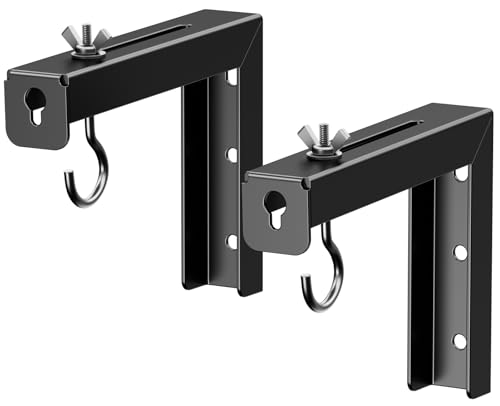
PUTORSEN Universal Projector Screen Ceiling Mount L-Brackets, 6-inch Black

Mount-It! Projector Screen Wall Mount L-Brackets, 12-inch

Amer Mounts AMRDCP100KIT Drop Ceiling Projector Mount, 2×2 ft

XINLEI Universal Projector Screen L-Brackets with Carabiner, 6 inch

PureMounts Ceiling Mount for Projector, White

SCREEN PRO Projector Mount, 55-79 inch Height, 33 lb

SCREEN PRO Projector Mount, 42-59 inch Height, 33 lb

AMER MOUNTS Universal Projector Mount Kit for Large Format
For most people outfitting a casual home theater on a tight budget, the PUTORSEN L-bracket set is the entry point that actually works. The pair of 6-inch steel L-hooks slides over standard screen mounting points and grips a range of manual pull-down and fixed-frame screens without custom drilling. The bracket itself is the part of the system that touches your wall, so the steel build feels reassuring rather than tinny.
You can shift the screen between 1.5 and 5 inches off the wall, which gives just enough leeway to line up with your projector’s throw distance. The 66-pound load rating covers anything in the typical home screen weight class, and in most living rooms that ceiling is never really tested. Compared with the longer Mount-It! brackets in the next pick, you trade reach for a cleaner, lower-profile look against the wall.
Good Reasons To Consider
- Steel L-shape construction holds up to 66 lbs without flexing in normal screen weights
- Adjustable 1.5″ to 5″ wall offset makes keystone alignment easier in tight rooms
- Low-profile black finish blends into dark accent walls and home theater setups
- Universal design fits most manual pull-down and fixed-frame screens on the market
Things To Consider
- 6-inch length may run short for extra-thick crown molding or deep window trim
- No included carabiner or safety tether, so the screen relies entirely on the L-grip
Right Fit For
Renters and first-time home theater builders running a lightweight pull-down screen in a small to mid-size room.
Look Elsewhere When
Mount-It!’s 12-inch L-brackets are the better call for tall ceilings or oversized screens that need more breathing room from the wall.
The Mount-It! L-brackets exist for the people who tried a 6-inch set, hit a molding issue, and gave up. Each 12-inch hook reaches past baseboards, picture rails, and chunky trim that would block a shorter bracket. The pair is rated at 66 pounds per bracket, which is genuinely useful because a 120-inch fixed-frame screen can easily land in that range once you include the aluminum frame.
You hang these on wood studs, concrete, or brick, and the long arm means the screen sits well clear of the wall for projectors with a short throw. In our view, that extra clearance also helps airflow around the screen material, which keeps dust from settling on the surface as quickly. The PUTORSEN set above is fine for a flat wall with no obstacles, but Mount-It! is the one for trickier geometry.
Practical Pluses
- 12-inch reach clears crown molding, baseboards, and uneven wall surfaces
- 66 lb per-bracket rating supports large 100-inch+ fixed-frame screens comfortably
- Universal hook design accepts most hanging screens without modification
- Pairs well with short-throw projectors that need extra space behind the screen
Trade Offs
- Long arm creates a visible gap between the screen and wall, which may bother minimalists
- Heavier steel adds a bit of installation effort compared with shorter L-hooks
Built With In Mind
Homeowners with large fixed-frame screens, deep trim work, or short-throw projector setups.
Swap It Out When
The PUTORSEN 6-inch set is a cleaner fit for flat walls and smaller pull-down screens where reach is not an issue.
Suspended drop ceilings behave nothing like drywall, and most home brackets are not built for them. The Amer Mounts AMRDCP100KIT replaces a standard 2×2 ceiling tile with a reinforced steel plate, so the projector hangs from the actual T-bar grid rather than the flimsy tile itself. Multiple mounting holes let you align the projector to the screen without shimming the whole frame.
Installers tend to choose this kit for classrooms, training rooms, and conference spaces where the ceiling grid is the cleanest-looking mounting point. The plate is light enough to handle from a ladder, and the white finish blends into most commercial tile patterns. For a residential room with a regular drywall ceiling, a pole-style mount like the SCREEN PRO picks below is the easier path.
Well-Handled Touches
- Replaces a 2’x2′ ceiling tile for a clean, grid-friendly install with no visible bracket
- Reinforced steel plate handles the weight without sagging the suspended grid
- Multiple mounting holes make fine alignment easier with various projector bases
Honest Caveats
- Only suits suspended T-bar ceilings and won’t work over standard drywall
- Requires lifting tiles in and out during install, which usually means two people
Whose Shelf It Belongs On
IT staff and AV installers setting up projectors in drop-ceiling offices, classrooms, or training rooms.
Reach For A Different Pick When
Standard residential drywall installers get a much easier setup from the SCREEN PRO 42-59 inch universal ceiling mount.
Where the PUTORSEN set uses a simple L-grip, the XINLEI version adds a carabiner that clips through the screen’s hanging loop. That small extra step keeps the screen from sliding off if the hook gets bumped, which matters in family rooms where a wayward basketball or a vacuum cleaner can find the wall at speed. The 66-pound capacity matches the PUTORSEN and Mount-It! brackets, so you are not trading strength for the added safety clip.
The 6-inch arm with a 1.5″ to 5″ wall offset works for stud, concrete, brick, and drywall installs. The white finish pairs nicely with light-painted ceilings and rooms where you want the bracket to disappear into the trim. You may find the carabiner a touch fiddly the first time you hang the screen, but after the initial setup it stays out of the way.
What Helps Most
- Carabiner clip adds a physical safety lock that resists accidental bumps and vibrations
- 66 lb load capacity supports a wide range of manual and fixed-frame screens
- Compatible with wood stud, concrete, brick, and drywall for flexible placement
Worth Noting
- White finish shows scuffs more easily than the black PUTORSEN and Mount-It! options
- 6-inch reach is short for walls with deep trim, similar to the PUTORSEN bracket
Best Suited To
Households with kids, pets, or high-traffic areas where the screen is at risk of getting knocked.
A Better Fit Elsewhere
The Mount-It! 12-inch L-brackets are the smarter choice for tall ceilings where a longer reach is more important than a clip.
The PureMounts PM-SPIDER-style mount is the most adjustment-friendly pick so far in this list. The tilting and swiveling head moves through a stepped range, with tilt typically around plus or minus 15 degrees, which is enough to square up a projector on a sloped or vaulted ceiling. The 380 to 580 mm ceiling drop covers a wide range of mounting heights, and the white finish disappears into most ceiling paint colors.
This is the bracket to reach for when your projector’s mounting hole pattern is awkward or your throw distance is finicky. The all-metal spider plate spreads the load across the projector’s base, which is reassuring on units with widely spaced feet. For a flat drywall ceiling with a standard 8-foot height, the SCREEN PRO universal mount below is a simpler install.
What Pays Off
- Stepped tilt and swivel head makes alignment easier on vaulted or angled ceilings
- 380-580 mm drop range covers most residential and small commercial ceiling heights
- Wide spider plate accepts projectors with hole patterns up to about 320 mm
Less-Strong Areas
- More parts and adjustment knobs mean a longer first-time install than simpler brackets
- Overkill for flat 8-foot ceilings where a basic pole mount would do the job
Who Should Grab It
Anyone dealing with vaulted ceilings, sloped surfaces, or projectors that need fine image alignment.
Where A Sibling Pick Shines
The SCREEN PRO 42-59 inch ceiling bracket is a faster install for standard flat ceilings and typical home theaters.
For two-story foyers, basements with high ceilings, or any room where the projector needs to drop well below the ceiling surface, the SCREEN PRO 55 to 79 inch mount handles the long reach. The telescoping pole drops the projector into the viewing sweet spot without forcing you to angle the image sharply downward, which preserves brightness and focus uniformity across the screen.
The base arms extend from roughly 3.7 to 19 inches, so the bracket accepts a wide range of projector mounting patterns. The white powder-coated finish helps the pole blend into painted ceilings, and the 33-pound load rating covers most home projectors without complaint. The 42 to 59 inch version below is the better match for standard 8-foot ceilings, where this longer drop would push the projector too low.
Everyday Wins
- 55-79 inch drop range is ideal for ceilings over 10 feet tall
- Adjustable base arms fit projector hole patterns from about 3.7 to 19 inches across
- White powder-coated finish blends into most ceiling colors
- 33 lb capacity covers mainstream home theater projectors comfortably
Room For Improvement
- Long drop sways slightly more than shorter pole mounts if bumped, though it usually self-corrects
- Too much reach for standard 8-foot ceilings, where the projector would sit at eye level
Made For
Home theater owners with vaulted, two-story, or basement ceilings who need the projector to drop well below the ceiling line.
Not Your Match When
Standard 8-foot ceilings pair better with the shorter SCREEN PRO 42-59 inch version of the same bracket.
The shorter sibling of the previous pick is the bracket most living rooms actually need. At a 42 to 59 inch drop range, the SCREEN PRO universal mount places the projector at the right height for an 8-foot ceiling without burying it against the drywall or hanging it at chin level. The same adjustable base arms accept projector hole patterns from about 3.7 to 19 inches, so most mainstream home projectors drop right in.
The 33-pound load rating covers the bulk of consumer projectors on the market, and the mounting hardware is straightforward enough for a single person to handle from a step ladder. The black powder-coated finish suits darker media rooms, while the white version of the same bracket suits lighter rooms. For a large-venue projector that weighs more than 33 pounds, the Amer Universal Kit below is the safer pick.
Why It Works Well
- 42-59 inch drop suits standard 8-foot ceilings without overhanging the projector
- Universal base arms accept a wide range of projector mounting hole patterns
- 33 lb capacity covers most consumer home theater projectors on the market
Minor Gripes
- Load rating caps out around 33 lb, so it does not suit heavy large-venue projectors
- Black finish shows dust on textured ceilings more than a white version would
Perfect Match For
Living room and basement theater owners with standard ceilings and mainstream projectors under 33 pounds.
Consider Something Else When
The AMER MOUNTS Universal Projector Mount Kit is the right call for large-format projectors that exceed the 33-pound limit.
The AMER MOUNTS Universal Kit is built for the heavy hitters. It carries up to 55 pounds, supports mounting points up to 380 mm across, and ships with a heavy-duty locking ball joint that allows roughly 25 degrees of tilt plus a full 360-degree swivel. That combination is the right tool for large Epson, BenQ, and similar professional projectors that simply do not fit on lighter consumer brackets.
The included adjustable pole drops the projector between roughly 5 and 22.7 inches from the ceiling, which gives flexibility for high rooms and angled installs. Built-in cable management routes power and HDMI through the pole rather than leaving them dangling, and the included M3, M4, M5, and M6 fasteners cover most projector bases out of the box. For a small home projector under 15 pounds, the SCREEN PRO mounts above are easier to live with.
Key Advantages
- 55 lb load capacity supports large-format projectors from Epson, BenQ, and similar brands
- Heavy-duty locking ball joint delivers plus or minus 25 degrees tilt and 360 degree swivel
- Mounting points up to 380 mm across accommodate large projector bases
- Built-in cable management keeps wiring hidden inside the pole for a clean install
Points To Keep In Mind
- Bulkier assembly makes this kit harder work for a single installer on a tall ladder
- Overkill for small home projectors that weigh well under the 55 lb limit
- Stated compatibility excludes a few specific older BenQ models, so check the projector base before buying
Feature Card
Who It Suits Best
AV professionals, venue operators, and home theater enthusiasts with large-format projectors weighing more than 30 pounds.
Skip It When
Standard home theaters with a 10-pound projector get a faster, simpler install from the SCREEN PRO 42-59 inch mount.
What to Match Before You Pick a Ceiling Projector Mount
A mount that looks right in a photo can be the wrong one for your room, so the smart move is to check three things first: ceiling type, projector weight, and the throw distance you need. Drywall ceilings, drop-ceiling grids, and vaulted surfaces each demand a different bracket style, and the weight of your projector (with the lens and any attached dongles) should sit comfortably below the mount’s load rating, not at the limit.
Ceiling Type and Mounting Surface
Drywall on wood studs is the easiest install, and most pole mounts assume a solid joist or beam behind the surface. Drop ceilings need a tile-replacement plate like the Amer AMRDCP100KIT, because the tile alone cannot hold a projector’s weight. Vaulted ceilings need a tilting and swiveling head like the PureMounts so the image lands square on the screen rather than skewed.
Weight, Throw, and Drop Length
Projector weight is the number that decides whether a bracket is overbuilt or right-sized. Throw distance (the space between the projector lens and the screen) is the number that decides how far the projector needs to hang from the ceiling. A 10-foot ceiling in a small media room can use a short 42 to 59 inch drop, while a 12-foot basement ceiling typically needs the longer 55 to 79 inch version to put the projector at seated eye level.
Universal Fit vs. Brand-Specific Kits
Universal mounts with adjustable arms or a wide spider plate accept most consumer projectors on the market, which is what most people actually need. Brand-specific kits (or large-format kits like the AMER MOUNTS kit) make sense only when your projector’s mounting pattern is unusually wide or unusually heavy. For a typical living room install, a universal bracket saves you from hunting down a part number for a specific projector.
Key Considerations Across These Picks
Where Shoppers Go Wrong
The most common mistake is choosing a drop length by ceiling height alone, without considering the projector’s lens offset. A ceiling that is 9 feet tall may still need a 55 inch drop if the projector has a steep downward throw angle. The other slip-up is ignoring the projector’s weight, where a heavy unit on a light-duty bracket is an accident waiting to happen.
What The Higher Tier Buys
Spending up usually gets you a heavier locking joint, wider mounting pattern, and built-in cable routing. Those features matter most in commercial and large-venue setups where the projector is heavy, the ceiling is high, and the install needs to look clean. For a basic bedroom or living room setup, a mid-range universal mount gets the same job done without the extras.
Frequently Asked Questions
How do I know if my ceiling can hold a projector mount?
Most drywall ceilings can hold a projector mount if you anchor into a wood joist or a proper ceiling beam. Drop ceilings need a tile-replacement plate designed for the grid. If you cannot find a joist where you want the projector, a mounting plate that spans two joists is the safer route.
What drop length do I need for an 8-foot ceiling?
A 42 to 59 inch drop usually works for standard 8-foot ceilings, since it places the projector at roughly seated eye level for most setups. Going much longer than that pushes the projector into the line of sight, and going much shorter forces steep keystone correction.
Are universal mounts safe for heavier projectors?
Universal mounts are safe as long as the projector’s weight sits well below the bracket’s load rating. A 50-pound projector on a 33-pound bracket is asking for trouble, so check both the projector weight and the bracket capacity before drilling.
Can I install a ceiling projector mount myself?
A basic drywall install on a wood joist is a one-person job with a stud finder, drill, and level. Drop-ceiling installs and high two-story ceilings usually call for a helper on the ladder and, in some cases, a professional installer.
Do I need a tilting head for a flat ceiling?
A tilting head is mostly useful for vaulted or sloped ceilings, where the projector needs to angle down toward the screen. On a flat ceiling, a fixed or swivel-only mount is usually enough, and one fewer adjustment knob means a faster setup.
Closing Remarks
A ceiling projector mount is one of those purchases that quietly does its job for years once it’s installed correctly, and the wrong bracket tends to cause problems for just as long. Match the mount to your ceiling type, your projector weight, and the drop length you actually need, and the rest of the install is mostly a Saturday afternoon with a drill and a level. The eight options above cover the most common room shapes and projector sizes, so one of them should be the right fit for your setup.


